
ASP.NET Core Building chat room using WebSocket
Creating “Login form”
We use here simple form where user can insert his or her preferred nick name for chat. To keep us focused on WebSocket stuff we don’t add any logic or checks in this point. Let’s add view called InsertUserName.cshtml under Home folder.
<form action="@Url.Action("Index")" method="post">
    <input type="text" placeholder="Insert user name" name="userName" />
    <input type="submit" value="Eńter" />
</form>
There will be another view for chat room and we will come back to it later when web sockets related code is done. Index() methods of home controller look like this.
[HttpGet]
public IActionResult Index()
{
    return View("InsertUserName");
}

[HttpPost]
public IActionResult Index(string username)
{
    return View("Index", username);
}
If request method is GET then we show nick name form and if request method is POST we will show chat room view.
WebSockets middleware
Now let’s write ASP.Core middleware for WebSocket. To keep things simple I mixed together custom WebSocket middleware and custom WebSocket connection manager from Radu Matei’s post Creating a WebSockets middleware for ASP .NET Core. I like the work Radu has done but here we will keep things as small as possible. To get better understanding of WebSockets I suggest you to go through Radu’s post.
NB! To use WebSockets in ASP.NET Core project add reference to Microsoft.AspNetCore.WebSockets NuGet package!
In breaf, this is what our WebSocket middleware class does:
- Keep concurrent dictionary with connected WebSockets (this is needed for message broadcast)
- Read messages from WebSocket and broadcast there to all known WebSockets
- Try to keep WebSockets dictionary as clean as possible
Here is the WebSocket middleware class.
public class ChatWebSocketMiddleware
{
    private static ConcurrentDictionary<string, WebSocket> _sockets = new ConcurrentDictionary<string, WebSocket>();

    private readonly RequestDelegate _next;

    public ChatWebSocketMiddleware(RequestDelegate next)
    {
        _next = next;
    }

    public async Task Invoke(HttpContext context)
    {
        if (!context.WebSockets.IsWebSocketRequest)
        {
            await _next.Invoke(context);
            return;
        }

        CancellationToken ct = context.RequestAborted;
        WebSocket currentSocket = await context.WebSockets.AcceptWebSocketAsync();
        var socketId = Guid.NewGuid().ToString();

        _sockets.TryAdd(socketId, currentSocket);

        while (true)
        {
            if (ct.IsCancellationRequested)
            {
                break;
            }

            var response = await ReceiveStringAsync(currentSocket, ct);
            if(string.IsNullOrEmpty(response))
            {
                if(currentSocket.State != WebSocketState.Open)
                {
                    break;
                }

                continue;
            }

            foreach (var socket in _sockets)
            {
                if(socket.Value.State != WebSocketState.Open)
                {
                    continue;
                }

                await SendStringAsync(socket.Value, response, ct);
            }
        }

        WebSocket dummy;
        _sockets.TryRemove(socketId, out dummy);

        await currentSocket.CloseAsync(WebSocketCloseStatus.NormalClosure, "Closing", ct);
        currentSocket.Dispose();
    }

    private static Task SendStringAsync(WebSocket socket, string data, CancellationToken ct = default(CancellationToken))
    {
        var buffer = Encoding.UTF8.GetBytes(data);
        var segment = new ArraySegment<byte>(buffer);
        return socket.SendAsync(segment, WebSocketMessageType.Text, true, ct);
    }

    private static async Task<string> ReceiveStringAsync(WebSocket socket, CancellationToken ct = default(CancellationToken))
    {
        var buffer = new ArraySegment<byte>(new byte[8192]);
        using (var ms = new MemoryStream())
        {
            WebSocketReceiveResult result;
            do
            {
                ct.ThrowIfCancellationRequested();

                result = await socket.ReceiveAsync(buffer, ct);
                ms.Write(buffer.Array, buffer.Offset, result.Count);
            }
            while (!result.EndOfMessage);

            ms.Seek(0, SeekOrigin.Begin);
            if (result.MessageType != WebSocketMessageType.Text)
            {
                return null;
            }

            // Encoding UTF8: https://tools.ietf.org/html/rfc6455#section-5.6
            using (var reader = new StreamReader(ms, Encoding.UTF8))
            {
                return await reader.ReadToEndAsync();
            }
        }
    }
}
Before using middleware we have to introduce it to request pipeline in Startup class of web application. We do it in configure method before initializing MVC.
app.UseWebSockets();
app.UseMiddleware<ChatWebSocketMiddleware>();

app.UseMvc(routes =>
{
    routes.MapRoute(
        name: "default",
        template: "{controller=Home}/{action=Index}/{id?}");
});
NB! It’s very important to add WebSockets before MVC. WebSockets middleware checks in the beginning if request is for WebSocket. If it is WebSocket request then middleware starts handling it. If MVC is added to pipeline before then MVC will handle all the requests and our WebSocket middleware is never used.
Chat room view
Now let’s add chat room view. We will use Index view of home controller for chat room. Chat room view initializes WebSocket connection and starts listening to it. If user writes something to chat box and presses Enter then message is sent to server over WebSocket and WebSocket middleware will broadcast it to all WebSocket clients it knows.
@model string
@{
    ViewData["Title"] = "Home Page";
}
<style>
    body {margin:0px; padding:0px;}
    .msg {
        position: absolute;
        top: ;
        bottom: 30px;
        border: 1px solid green;
        margin-bottom: auto;
        display:block;
        overflow: scroll;
        width:100%;
        white-space:nowrap;
    }
</style>
<div class="msg">
    <div style="position:absolute; bottom:;" id="msgs"></div>
</div>

<div style="position:absolute;height:20px;bottom:10px;left:; display:block;width:100%">
    <input type="text" style="max-width:unset;width:100%;max-width:100%" id="MessageField" placeholder="type message and press enter" />
</div>

@section Scripts {
    <script>
    $(function () {
        var userName = '@Model';

        var protocol = location.protocol === "https:" ? "wss:" : "ws:";
        var wsUri = protocol + "//" + window.location.host;
        var socket = new WebSocket(wsUri);
        socket.onopen = e => {
            console.log("socket opened", e);
        };

        socket.onclose = function (e) {
            console.log("socket closed", e);
        };

        socket.onmessage = function (e) {
            console.log(e);
            $('#msgs').append(e.data + '<br />');
        };

        socket.onerror = function (e) {
            console.error(e.data);
        };

        $('#MessageField').keypress(function (e) {
            if (e.which != 13) {
                return;
            }

            e.preventDefault();

            var message = userName + ": " + $('#MessageField').val();
            socket.send(message);
            $('#MessageField').val('');
        });
    });
    </script>
}
Now let’s build application and run it.
WebSocket chat room in action
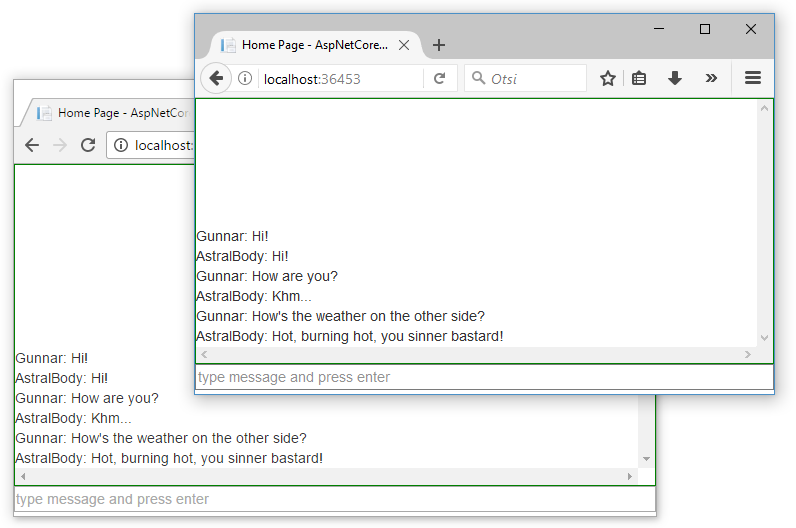
The screenshot below shows how our chat room looks like. It’s extremely primitive and simple but it works. There’s room enough for improvements but this is the fun I leave to all my dear readers.
Wrapping up
Using WebSockets in ASP.NET Core is simple. Without any additional libraries we can use the one by Microsoft. We had to write custom middleware class for WebSocket communication and in our case the class came pretty small. We used concurrent dictionary as a WebSockets cache and this enabled us to broadcast messages over sockets. Our solution is very primitive and simple, there is a lot of room for improvements but as a proof of concept it works well.
ASP.NET Core Building chat room using WebSocket的更多相关文章
- Real-time chart using ASP.NET Core and WebSocket
Solution in glance The following diagram illustrates our solution where IoT device reports readings ...
- WebSocket In ASP.NET Core(一)
.NET-Core Series Server in ASP.NET-Core DI in ASP.NET-Core Routing in ASP.NET-Core Error Handling in ...
- 关于ASP.NET Core WebSocket实现集群的思考
前言 提到WebSocket相信大家都听说过,它的初衷是为了解决客户端浏览器与服务端进行双向通信,是在单个TCP连接上进行全双工通讯的协议.在没有WebSocket之前只能通过浏览器到服务端的请求应答 ...
- WebSocket in ASP.NET Core
一.WebSocket WebSocket是HTML5出的东西(协议),也就是说HTTP协议没有变化,或者说没关系,但HTTP是不支持持久连接的(长连接,循环连接的不算) 首先HTTP有1.1和1.0 ...
- 网络游戏开发-服务器(01)Asp.Net Core中的websocket,并封装一个简单的中间件
先拉开MSDN的文档,大致读一遍 (https://docs.microsoft.com/zh-cn/aspnet/core/fundamentals/websockets) WebSocket 是一 ...
- 快速搭建CentOS+ASP.NET Core环境支持WebSocket
环境:CentOS 7.x,.net core 2 以下.net core 2安装操作为官方方法.如果你使用Docker,那么更简单了,只需要docker pull microsoft/dotnet就 ...
- 在Asp.net Core中使用中间件来管理websocket
介绍 ASP.NET Core SignalR是一个有用的库,可以简化Web应用程序中实时通信的管理.但是,我宁愿使用WebSockets,因为我想要更灵活,并且与任何WebSocket客户端兼容. ...
- ASP.NET Core 集成 WebSocket
1. 环境 AspNetCore Web 2.0 (MVC) Windows 10 IIS 10 Express/IIS VS 2017 2.如何配置 在已有的或者新创建的 AspNet Core M ...
- ASP.NET Core 中的 WebSocket 支持(转自MSDN)
本文介绍 ASP.NET Core 中 WebSocket 的入门方法. WebSocket (RFC 6455) 是一个协议,支持通过 TCP 连接建立持久的双向信道. 它用于从快速实时通信中获益的 ...
随机推荐
- 【LOJ 2144】「SHOI2017」摧毁「树状图」
LOJ 2144 84pts 首先\(op2\)很简单.直接并查集一搞就好了(话说我现在什么东西都要写个并查集有点...) 然后\(op0\)我不会,就直接\(O(n^2)\)枚举一下\(P\)这个人 ...
- Z370主板的黑苹果usb3.0驱动安装
注意每个版本的usb端口代码是不一样的!一般是10.10到10.12 是一个版本,10.13 是一个版本 配合USBInjectAll.kext这个驱动就能顺利驱动你的usb3.0 .如果你是比较新 ...
- numpy.loadtxt()
简介 np.loadtxt()用于从文本加载数据. 文本文件中的每一行必须含有相同的数据. loadtxt(fname, dtype=<class 'float'>, comments=' ...
- ASP.NET Core依赖注入——依赖注入最佳实践
在这篇文章中,我们将深入研究.NET Core和ASP.NET Core MVC中的依赖注入,将介绍几乎所有可能的选项,依赖注入是ASP.Net Core的核心,我将分享在ASP.Net Core应用 ...
- Oracle 一个用户将表权限赋给另一个用户
原文地址:https://blog.csdn.net/u012129031/article/details/76218764 1.将用户user1的表权限赋给用户user2 select 'gra ...
- 计算机名称改名之后,tfs连接问题
计算机名称改名之后,我们发现tfs连接会有问题 打开vs下的“开发人员命令提示”执行下面两条语句: 1.tf workspaces 2.tf workspaces /collection:http:/ ...
- c++入门之引用
引用通常被用在函数形参传递的过程中.一般的参数传递的过程:将实参进行拷贝,函数中都是对拷贝的变量进行操作,而不是对原变量进行操作.但很多情况下,我们都希望对原变量进行操作.(比如交换两个变量的数值). ...
- 多路选择器实现总线结构——Verilog
////////////////////////////////////////////////////////////////////////////////// //该程序完成通过多路选择器MUX ...
- 福大软工1816 · 课程计划预报(K班)
实践课安排 对应教学周序 时间 内容 3 09.22 业界交流讲座 6 10.13 团队选题报告答辩 7 10.20 UML设计 8 10.27 团队项目需求答辩 11 11.17 团队现场编程实战与 ...
- Atcoder E - Knapsack 2 (01背包进阶版 ex )
E - Knapsack 2 Time Limit: 2 sec / Memory Limit: 1024 MB Score : 100100 points Problem Statement The ...