
Netty入门(一)之webSocket聊天室
一:简介
- Netty 是一个提供 asynchronous event-driven (异步事件驱动)的网络应用框架,是一个用以快速开发高性能、高可靠性协议的服务器和客户端。
- 换句话说,Netty 是一个 NIO 客户端服务器框架,使用它可以快速简单地开发网络应用程序,比如服务器和客户端的协议。Netty 大大简化了网络程序的开发过程比如 TCP 和 UDP 的 socket 服务的开发。
- 下载地址:http://netty.io/downloads.html
二:实例
1.自定义配置类
import io.netty.channel.group.ChannelGroup;
import io.netty.channel.group.DefaultChannelGroup;
import io.netty.util.concurrent.GlobalEventExecutor;

/**
* Created by 巅峰小学生
* 2018年3月3日 下午9:51:27
*/
public class NettyConfig {

    /**
     * 储存每一个客户端接入进来时的channel对象
     */
    public static ChannelGroup group = new DefaultChannelGroup(GlobalEventExecutor.INSTANCE);
    /**
     * 服务器端口号
     */
    public static final int port = 8888;
    /**
     * WebSocket地址
     */
    public static final String WEB_SOCKET_URL="ws://localhost:"+port+"/websocket";

}
2.接受/处理/响应webSocket请求的核心业务处理类
import io.netty.buffer.ByteBuf;
import io.netty.buffer.Unpooled;
import io.netty.channel.Channel;
import io.netty.channel.ChannelFuture;
import io.netty.channel.ChannelFutureListener;
import io.netty.channel.ChannelHandlerContext;
import io.netty.channel.SimpleChannelInboundHandler;
import io.netty.handler.codec.http.DefaultFullHttpResponse;
import io.netty.handler.codec.http.FullHttpRequest;
import io.netty.handler.codec.http.HttpResponseStatus;
import io.netty.handler.codec.http.HttpVersion;
import io.netty.handler.codec.http.websocketx.CloseWebSocketFrame;
import io.netty.handler.codec.http.websocketx.PingWebSocketFrame;
import io.netty.handler.codec.http.websocketx.PongWebSocketFrame;
import io.netty.handler.codec.http.websocketx.TextWebSocketFrame;
import io.netty.handler.codec.http.websocketx.WebSocketFrame;
import io.netty.handler.codec.http.websocketx.WebSocketServerHandshaker;
import io.netty.handler.codec.http.websocketx.WebSocketServerHandshakerFactory;
import io.netty.util.CharsetUtil;

/**
 * Created by 巅峰小学生
 * 2018年3月3日 下午10:00:52
 *
 * 接受/处理/响应webSocket请求的核心业务处理类
 */
public class MyWebSocketHandler extends SimpleChannelInboundHandler<Object> {

    private WebSocketServerHandshaker handshaker;

    /**
     * 每当从服务端收到新的客户端连接时, 客户端的 Channel 存入ChannelGroup列表中,
     * 并通知列表中的其他客户端 Channel
     */
    @Override
    public void handlerAdded(ChannelHandlerContext ctx) throws Exception { // (2)
        Channel incoming = ctx.channel();
        for (Channel channel : NettyConfig.group) {
            channel.writeAndFlush("[SERVER] - " + incoming.remoteAddress() + " 加入\n");
        }
        NettyConfig.group.add(ctx.channel());
    }

    /*
     * 每当从服务端收到客户端断开时,客户端的 Channel 移除 ChannelGroup 列表中,
     *  并通知列表中的其他客户端 Channel
     */
    @Override
    public void handlerRemoved(ChannelHandlerContext ctx) throws Exception {
        Channel incoming = ctx.channel();
        for (Channel channel : NettyConfig.group) {
            channel.writeAndFlush("[SERVER] - " + incoming.remoteAddress() + " 离开\n");
        }
        NettyConfig.group.remove(ctx.channel());
    }

    /**
     * 服务端监听到客户端活动
     */
    @Override
    public void channelActive(ChannelHandlerContext ctx) throws Exception {
        Channel incoming = ctx.channel();
        System.out.println("Client:" + incoming.remoteAddress() + "在线");
    }

    /*
     * 客户端与服务端断开连接的时候调用
     */
    @Override
    public void channelInactive(ChannelHandlerContext ctx) throws Exception {
        Channel incoming = ctx.channel();
        System.out.println("Client:" + incoming.remoteAddress() + "掉线");
    }

    /**
     * 服务端接收客户端发送过来的数据结束之后调用
     */
    @Override
    public void channelReadComplete(ChannelHandlerContext ctx) throws Exception {
        ctx.flush();
    }

    /**
     * 当出现 Throwable 对象才会被调用,即当 Netty 由于 IO 错误或者处理器在处理事件时抛出的异常时。
     * 在大部分情况下,捕获的异常应该被记录下来并且把关联的 channel 给关闭掉。
     */
    @Override
    public void exceptionCaught(ChannelHandlerContext ctx, Throwable cause) throws Exception {
        Channel incoming = ctx.channel();
        System.out.println("Client:" + incoming.remoteAddress() + "异常");
        cause.printStackTrace();
        ctx.close();
    }

    /**
     * 服务端处理客户端webSocket请求的核心方法。
     *
     * 如果你使用的是 Netty 5.x 版本时,需要把 channelRead0() 重命名为messageReceived()
     */
    @Override
    protected void channelRead0(ChannelHandlerContext context, Object msg) throws Exception {
        // 处理客户端向服务端发起http握手请求的业务
        if (msg instanceof FullHttpRequest) {
            handHttpRequest(context, (FullHttpRequest) msg);
        } else if (msg instanceof WebSocketFrame) {// 处理websocket连接业务
            handWebSocketFrame(context, (WebSocketFrame) msg);
        }
    }

    // -----------重写方法结束-------------

    /**
     * 处理客户端与服务端之前的websocket业务
     *
     * @param ctx
     * @param frame
     */
    private void handWebSocketFrame(ChannelHandlerContext ctx, WebSocketFrame frame) {
        // 判断是否是关闭webSocket的指令
        if (frame instanceof CloseWebSocketFrame) {
            handshaker.close(ctx.channel(), (CloseWebSocketFrame) frame.retain());
        }
        // 判断是否ping消息
        if (frame instanceof PingWebSocketFrame) {
            ctx.channel().write(new PongWebSocketFrame(frame.content().retain()));
            return;
        }
        // 每当从服务端读到客户端写入信息时,将信息转发给其他客户端的 Channel
        if (frame instanceof TextWebSocketFrame) {
            TextWebSocketFrame msg = (TextWebSocketFrame) frame;
            Channel incoming = ctx.channel();
            for (Channel channel : NettyConfig.group) {
                if (channel != incoming) {
                    channel.writeAndFlush(new TextWebSocketFrame("[" + incoming.remoteAddress() + "]" + msg.text()));
                } else {
                    channel.writeAndFlush(new TextWebSocketFrame("[you]" + msg.text()));
                }
            }
        }
        // 群发消息
        // NettyConfig.group.writeAndFlush(tws);
    }

    /**
     * 处理客户端向服务端发起http握手请求的业务
     *
     * @param ctx
     * @param req
     */
    @SuppressWarnings("deprecation")
    private void handHttpRequest(ChannelHandlerContext ctx, FullHttpRequest req) {
        if (!req.getDecoderResult().isSuccess() || !("websocket".equals(req.headers().get("Upgrade")))) {
            sendHttpResponse(ctx, req,
                    new DefaultFullHttpResponse(HttpVersion.HTTP_1_1, HttpResponseStatus.BAD_REQUEST));
            return;
        }
        WebSocketServerHandshakerFactory wsFactory = new WebSocketServerHandshakerFactory(NettyConfig.WEB_SOCKET_URL,
                null, false);
        handshaker = wsFactory.newHandshaker(req);
        if (handshaker == null) {
            WebSocketServerHandshakerFactory.sendUnsupportedWebSocketVersionResponse(ctx.channel());
        } else {
            handshaker.handshake(ctx.channel(), req);
        }
    }

    /**
     * 服务端向客户端响应消息
     *
     * @param ctx
     * @param req
     * @param res
     */
    @SuppressWarnings("deprecation")
    private void sendHttpResponse(ChannelHandlerContext ctx, FullHttpRequest req, DefaultFullHttpResponse res) {
        if (res.getStatus().code() != 200) {
            ByteBuf buf = Unpooled.copiedBuffer(res.getStatus().toString(), CharsetUtil.UTF_8);
            res.content().writeBytes(buf);
            buf.release();
        }
        // 服务端向客户端发送数据
        ChannelFuture f = ctx.channel().writeAndFlush(res);
        if (res.getStatus().code() != 200) {
            f.addListener(ChannelFutureListener.CLOSE);
        }
    }

}
3.初始化连接时候的各个组件
import io.netty.channel.ChannelInitializer;
import io.netty.channel.socket.SocketChannel;
import io.netty.handler.codec.http.HttpObjectAggregator;
import io.netty.handler.codec.http.HttpServerCodec;
import io.netty.handler.stream.ChunkedWriteHandler;

/**
* Created by 巅峰小学生
* 2018年3月4日 下午12:15:13
*
* 初始化连接时候的各个组件
*/
public class MyWebSocketChannelHandler extends ChannelInitializer<SocketChannel> {

    @Override
    protected void initChannel(SocketChannel ch) throws Exception {
        ch.pipeline().addLast("http-codec", new HttpServerCodec());
        ch.pipeline().addLast("aggregator", new HttpObjectAggregator(65536));
        ch.pipeline().addLast("http-chunket", new ChunkedWriteHandler());
        ch.pipeline().addLast("handler", new MyWebSocketHandler());
    }

}
4.程序启动入口
import io.netty.bootstrap.ServerBootstrap;
import io.netty.channel.Channel;
import io.netty.channel.EventLoopGroup;
import io.netty.channel.nio.NioEventLoopGroup;
import io.netty.channel.socket.nio.NioServerSocketChannel;

/**
 * Created by 巅峰小学生
 *  2018年3月4日
 *
 *  程序入口 负责启动程序
*/
public class Main {

    public static void main(String[] args) {
        EventLoopGroup bossGroup = new NioEventLoopGroup();
        EventLoopGroup workGroup = new NioEventLoopGroup();
        try{
            ServerBootstrap b = new ServerBootstrap();
            b.group(bossGroup, workGroup);
            b.channel(NioServerSocketChannel.class);
            b.childHandler(new MyWebSocketChannelHandler());
            System.out.println("服务端开启等待客户端连接...");
            Channel ch = b.bind(NettyConfig.port).sync().channel();
            ch.closeFuture().sync();
        }catch(Exception e){
            e.printStackTrace();
        }finally{
            //优雅的退出程序
            bossGroup.shutdownGracefully();
            workGroup.shutdownGracefully();
        }
    }

}
5.html聊天室页面
<!DOCTYPE html>
<html>
<head>
<meta charset="UTF-8">
<title>WebSocket Chat</title>
</head>
<body>
    <script type="text/javascript">
        var socket;
        if (!window.WebSocket) {
            window.WebSocket = window.MozWebSocket;
        }
        if (window.WebSocket) {
            socket = new WebSocket("ws://localhost:8888/websocket");
            socket.onmessage = function(event) {
                var ta = document.getElementById('responseText');
                ta.value = ta.value + '\n' + event.data
            };
            socket.onopen = function(event) {
                var ta = document.getElementById('responseText');
                ta.value = "连接开启!";
            };
            socket.onclose = function(event) {
                var ta = document.getElementById('responseText');
                ta.value = ta.value + "连接被关闭";
            };
        } else {
            alert("你的浏览器不支持 WebSocket!");
        }
        function send(message) {
            if (!window.WebSocket) {
                return;
            }
            if (socket.readyState == WebSocket.OPEN) {
                socket.send(message);
            } else {
                alert("连接没有开启.");
            }
        }
    </script>
    <form onsubmit="return false;">
        <h3>WebSocket 聊天室:</h3>
        <textarea id="responseText" style="width: 500px; height: 300px;"></textarea>
        <br> <input type="text" name="message" style="width: 300px"
            value="Welcome to www.zyzpp.cn"> <input type="button"
            value="发送消息" onclick="send(this.form.message.value)"> <input
            type="button"
            onclick="javascript:document.getElementById('responseText').value=''"
            value="清空聊天记录">
    </form>
    <br>
    <br>
    <a href="http://www.zyzpp.cn/">更多例子请访问 www.zyzpp.cn</a>
</body>
</html>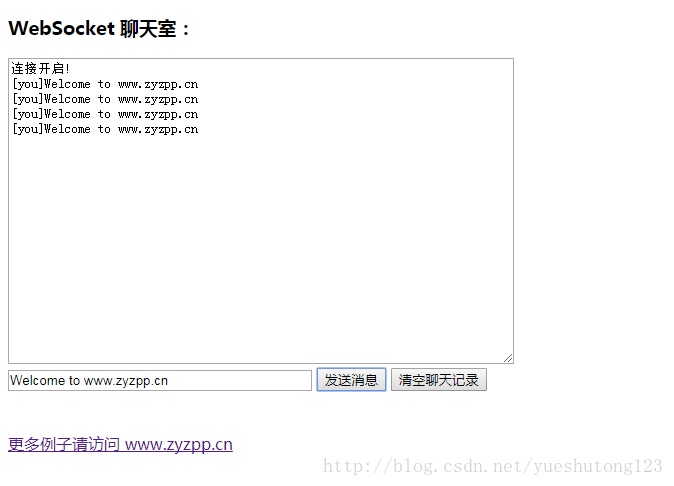
三:扩展
- 如何在让很多客户机进行聊天呢?
- 比如:电脑版QQ。
- 请阅读:Netty入门(二)之PC聊天室
Netty入门(一)之webSocket聊天室的更多相关文章
- 用Java构建一个简单的WebSocket聊天室
前言 首先对于一个简单的聊天室,大家应该都有一定的概念了,这里我们省略用户模块的讲解,而是单纯的先说说聊天室的几个功能:自我对话.好友交流.群聊.离线消息等. 今天我们要做的demo就能帮我们做到这一 ...
- WebSocket聊天室demo
根据Socket异步聊天室修改成WebSocket聊天室 WebSocket特别的地方是 握手和消息内容的编码.解码(添加了ServerHelper协助处理) ServerHelper: using ...
- 使用.NET Core和Vue搭建WebSocket聊天室
博客地址是:https://qinyuanpei.github.io. WebSocket是HTML5标准中的一部分,从Socket这个字眼我们就可以知道,这是一种网络通信协议.WebSocket是 ...
- websocket聊天室
目录 websocket方法总结 群聊功能 基于websocket聊天室(版本一) websocket方法总结 # 后端 3个 class ChatConsumer(WebsocketConsumer ...
- 实现一个简单的WebSocket聊天室
WebSocket 简介 WebSocket 是 HTML5 开始提供的一种在单个 TCP 连接上进行全双工通讯的协议. WebSocket 使得客户端和服务器之间的数据交换变得更加简单,允许服务端主 ...
- Netty学习摘记 —— 简单WEB聊天室开发
本文参考 本篇文章是对<Netty In Action>一书第十二章"WebSocket"的学习摘记,主要内容为开发一个基于广播的WEB聊天室 聊天室工作过程 请求的 ...
- php +html5 websocket 聊天室
针对内容比较长出错,修改后的解码函数 和 加码函数 原文请看上一篇 http://yixun.yxsss.com/yw3104.html function uncode($str,$key){ $ma ...
- koa2+webSocket 聊天室
做了一个简单的的聊天室,用来看看 koa和 websocket的使用还是挺好的,已经放到gitHub. https://github.com/zhaowanhua/koa2WebSocket
- tornado websocket聊天室
1.app.py #!/usr/bin/env python # -*- coding:utf-8 -*- import uuid import json import tornado.ioloop ...
随机推荐
- 微信小程序中如何获取for循环的item相关值到JS页面的问题
今天小程序开发过程中,遇到了这个棘手的问题.由于我没有前端基础,只是知道一点儿基本的HTML标签,所以卡了好久,特此分享,望后来的你,可以有所收获. measure step 1 *.WXML: ...
- IPD咨询如何才能真正落地?
文/资深顾问 杨学明 IPD作为先进的产品开发理念,思想起源于PRTM公司,PACE,培思的力量,首先在IBM和波音公司迅速完善,中国是深圳华为公司. 1992年IBM公司利润停止增长,财务困难,IB ...
- JS辨别访问浏览器判断是android还是ios系统
function isIOSOrAndroid() { var browser = { versions: function() { var u = navigator.userAgent, app ...
- 腾讯云Centos安装gitlab
参考了网上很多人写的安装教程,结果并不好,最后阅读了官方的英文api,才安装成功,这里记录下来,方便以后使用.我的安装环境为腾讯云主机Centos7.3 64bit gitlab官方api地址点我试试 ...
- MSSQL-sql server-视图简介
转自:http://www.maomao365.com/?p=4511 一.视图简介 视图在MSSQL中是一张虚拟表. 视图的数据由sql语句定义生成,视图中指定新生成数据的列名称和数据格式,视图中的 ...
- 探索SQL Server元数据(三):索引元数据
背景 在第一篇中我介绍了如何访问元数据,元数据为什么在数据库里面,以及如何使用元数据.介绍了如何查出各种数据库对象的在数据库里面的名字.第二篇,我选择了触发器的主题,因为它是一个能提供很好例子的数据库 ...
- 解决终端SSH连接服务器一段时间不操作之后卡死的问题
卡死是因为LIUNX安全设置问题,在一段时间内没有使用数据的情况下会自动断开,解决方法就是让本地或者服务器隔一段时间发送一个请求给对方即可 在本地打开配置文件(不建议在server端设置) sudo ...
- Java(使用JNA)调用DLL库与C#调用DLL库的对比
前言:在项目中经常使用DLL库对硬件进行操作,在发卡过程中使用频率尤为多,今天就Java与C#中调用DLL库的使用区别做一个介绍,本文着重具体的代码编写,具体过程看以下代码. 前提条件: 笔者已经封装 ...
- Web开发人员vs网页设计师
Web开发人员vs网页设计师 我们都遇到过,但实际的区别是什么?如果您是该领域的新手,请阅读详细内容,这些内容比您想象的更重要. 经过几周(或几个月)的规划和准备,进行市场调查,与其他企业家交谈,现在 ...
- XPATH如何选择不包含某一个属性的节点?
XPATH如何选择不包含某一个属性的节点?今天博主在写一个爬虫的时候就碰到了这个问题. 我们知道选择包含某一特定属性的节点,可以使用例如//tbody/tr[@class]来选择.那么不含某属性的节点 ...