
Using SharePoint 2010 dialogs
转:http://www.techbubbles.com/sharepoint/using-sharepoint-2010-dialogs/
SharePoint 2010 dialogs are JavaScript pop-up dialogs consisting of an iframe to request the other pages in the SharePoint. These pages can be publishing pages or application pages.When you call a pop-up dialog in SharePoint 2010, the content is displayed
by using the system master page. The dialog functionality in SharePoint exposed by
SP.UI.Dialog and SP.UI.ModalDialog classes.The dialog code is included in
C:\Program Files\Common Files\Microsoft Shared\Web Server Extensions\14\TEMPLATE\LAYOUTS\SP.UI.Dialog.js file in SharePoint server.
In order to get intellisense support for dialog functions inside VisualStudio you have to refer SP.UI.Dialog.js file. You can use the
SP.UI.ModalDialog.showModalDialog method to create a new dialog. This method takes in an options parameter which gives the details for what the dialog will display, such as the Uniform Resource Locator (URL) and the Heading for the dialog boxes.
The following code can be used to call a modal dialog window.
function OpenModalDialog(url, heading)

{

var options = SP.UI.$create_DialogOptions();

options.url = url;

options.heading = heading;

SP.UI.ModalDialog.showModalDialog(options);

}
You can call the function as below
<a href="javascript:OpenModalDialog('/SitePages/Dialogs/DefaultView.aspx?SpeakingID=52', 'SharePoint Modal dialog Demo ');"> Open Window</a>
If you do not want to pass parameters in for URL and heading then you can wrap the function as shown below
function OpenWebPage() {

var options = {

url: "/SitePages/Dialogs/DefaultView.aspx",

width: 800,

height: 600,

};

SP.UI.ModalDialog.showModalDialog(options);

}
<a href="javascript:OpenWebPage();">Open Dialog </a>
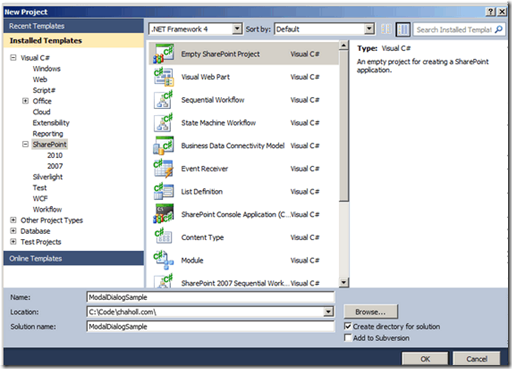
You can create an application page and then can open in dialog window, Create an empty SharePoint project in Visual Studio.
Add a new item to the project and select Application page from the dialog
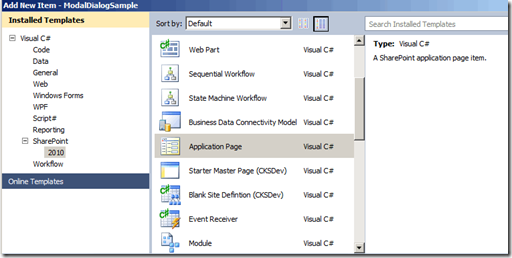
Visual Studio application will automatically add a mapped folder for the %SPROOT%/Template/Layouts folder and will add the new application page in a folder named after your project.In SharePoint 2010, all system generated dialogs are based on the dialog.master
master page that can be found at %SPROOT%/Template/Layouts/Dialog.master.
Using SharePoint 2010 dialogs的更多相关文章
- SharePoint 2010 Pop-Up Dialogs
转:http://kyleschaeffer.com/sharepoint/sharepoint-2010-pop-up-dialogs/ SharePoint 2010 makes it incre ...
- SharePoint 2010 Pop-Up Dialogs SharePoint 2010 弹出对话框
SharePoint 2010 Pop-Up Dialogs SharePoint 2010 弹出对话框 SharePoint 2010 使得往你的站点加入对话框内容变得出乎意料的简单 ...
- 在SharePoint 2010中,如何找回丢失的服务账号(Service Account)密码
背景信息: 通常在SharePoint环境中我们会使用很多的服务账号来运行各种不同的服务,尤其在企业环境中,由于权限管理条例严格,这些服务账号更是只能多不能少.面对如此多的服务账号,各个企业都会有自己 ...
- 安装InfoPath 2013后 SharePoint 2010 出现 “找不到 Microsoft.Office.InfoPath, Version=14.0.0....” 的错误的解决方案
1. 症状 您的SharePoint 2010的服务器是不是最近一直出现这个错误呢? Could not load file or assembly 'Microsoft.Office.InfoPat ...
- Upgrade from SharePoint 2010 to SharePoint 2016
[转]http://nikcharlebois.com/upgrade-from-sharepoint-2010-to-sharepoint-2016/ In this blog, I will go ...
- [SharePoint 2010] 自定义字段类型开发(二)
在SharePoint 2010中实现View Action Button效果. http://www.sharepointblogs.be/blogs/vandest/archive/2008/06 ...
- SharePoint 2010 + 左侧导航(Left Nav Bar)二级菜单的修改
SharePoint 2010 + 修改左侧导航类似顶部导航菜单的样式 查找aspmenu的控件,ID为“V4QuickLaunchMenu”,修改分别将属性“StaticDisplayLevels” ...
- 关于SharePoint 2010中不能使用AjaxControlToolkit的解决办法
因为项目中有一个需求需要使用calendar控件,而且样式要和Reporting Service中的尽量一致,搜索了很久发现还是微软的AjaxControlToolkit提供的CalendarExte ...
- SharePoint 2010商业智能组件
Microsoft Office SharePoint Server (MOSS) 2007中,就已经提供了很多支持商业智能的能力.其中主要的组件包含Excel Services, Reporting ...
随机推荐
- EXTJS 3.0 资料 控件之 html 潜入label用法
这是在Extjs 中插入html 控件label! html: "<div><label id='howMany'>您共选中了</label><br ...
- response 返回 带双引号 的字符串解决办法 springmvc
springmvc json配置 返回的时候给你加上了
- linux 批量重命名文件
模拟结果文件路径结构大概是:/当前目录/模型名/字模型名模拟/模拟温度/模拟结果文件. 模拟结果文件命名时相同的.模拟结果文件需要修改模拟结果文件的后缀名. 附shell脚本: find -type ...
- 1015: [JSOI2008]星球大战starwar - BZOJ
Description 很久以前,在一个遥远的星系,一个黑暗的帝国靠着它的超级武器统治者整个星系.某一天,凭着一个偶然的机遇,一支反抗军摧毁了帝国的超级武器,并攻下了星系中几乎所有的星球.这些星球通过 ...
- PAT-乙级-1021. 个位数统计 (15)
1021. 个位数统计 (15) 时间限制 100 ms 内存限制 65536 kB 代码长度限制 8000 B 判题程序 Standard 作者 CHEN, Yue 给定一个k位整数N = dk-1 ...
- 团体程序设计天梯赛-练习集L2-011. 玩转二叉树
L2-011. 玩转二叉树 时间限制 400 ms 内存限制 65536 kB 代码长度限制 8000 B 判题程序 Standard 作者 陈越 给定一棵二叉树的中序遍历和前序遍历,请你先将树做个镜 ...
- uva 348
dp还是比较容易 关键是输出路径 .... #include <cstdlib> #include <cstdio> #include <cstring> #de ...
- jquery类选择器无法取得对象问题原因
<html> <script type="text/javascript" src="jquery-1.9.1.js"></scr ...
- linux下c++實現簡單的生產者消費者隊列模式
引言 生產者消費者是一個經典的模式 利用生產者,消費者和緩衝區降低了生產者和消費者之間的的耦合度 便於對生產者和消費者的修改 下面記錄的是一個經典的單一生產者多消費者的模式 設計思路 以隊列做為緩衝區 ...
- 跟随屏幕滚动层、遮罩层、获取Div相对定位、整个屏幕、html文档的jquery基本操作
一.层跟随屏幕滚动 <div style="width:120px;height:120px;border:1px solid red; position:absolute; left ...