
How To Install Development Tools In Linux
In this brief tutorial, we will be discussing how to install development tools in popular Linux distributions like Arch Linux, CentOS, RHEL, Fedora, Debian, Ubuntu, and openSUSE etc. These development tools includes all necessary applications, such as GNU GCC C/C++ compilers, make, debuggers, man pages and others which are needed to compile and build new softwares, packages.
Install Development Tools In Linux
The developer tools can be installed either individually one by one or all at once. We are going to install all at once to make things much easier.
1. Install Development Tools In Arch Linux and derivatives
To install development tools in Arch Linux and its derivatives like Antergos, Manjaro Linux, just run:
sudo pacman -Syyu
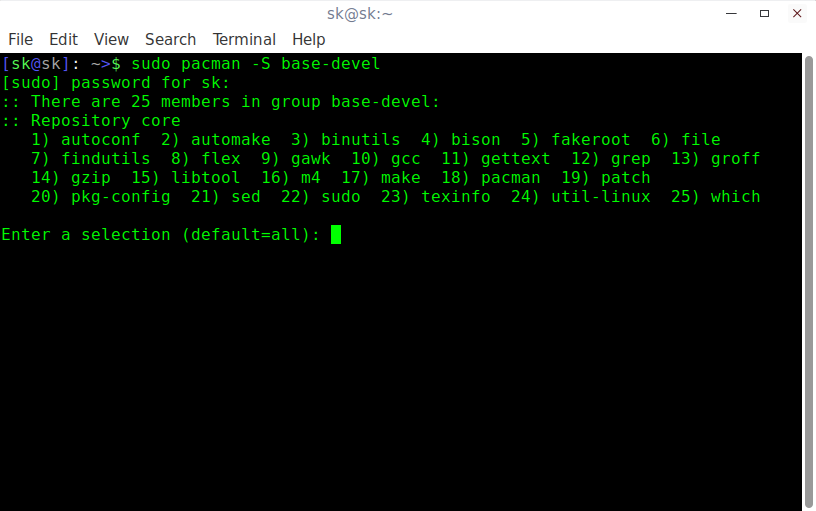
sudo pacman -S base-devel
There are 25 members in the Arch Linux development tools group, such as,
- autoconf
- automake
- binutils
- bison
- fakeroot
- file
- findutils
- flex
- gawk
- gcc
- gettext
- grep
- groff
- gzip
- libtool
- m4
- make
- pacman
- patch
- pkg-config
- sed
- sudo
- texinfo
- util-linux
- which
Just hit ENTER to install all of them.
2. Install Development Tools In RHEL, CentOS, Scientific Linux, Fedora
To install development tools in Fedora, RHEL and its clones such as CentOS, Scientific Linux, run the following commands as root user.
yum update
yum groupinstall "Development Tools"
The above command is going to install all necessary developer tools, such as:
- autoconf
- automake
- bison
- byacc
- cscope
- ctags
- diffstat
- doxygen
- elfutils
- flex
- gcc/gcc-c++/gcc-gfortran
- git
- indent
- intltool
- libtool
- patch
- patchutils
- rcs
- subversion
- swig

3. Install Development Tools In Debian, Ubuntu and derivatives
To install required developer tools in DEB based systems, run:
sudo apt-get update
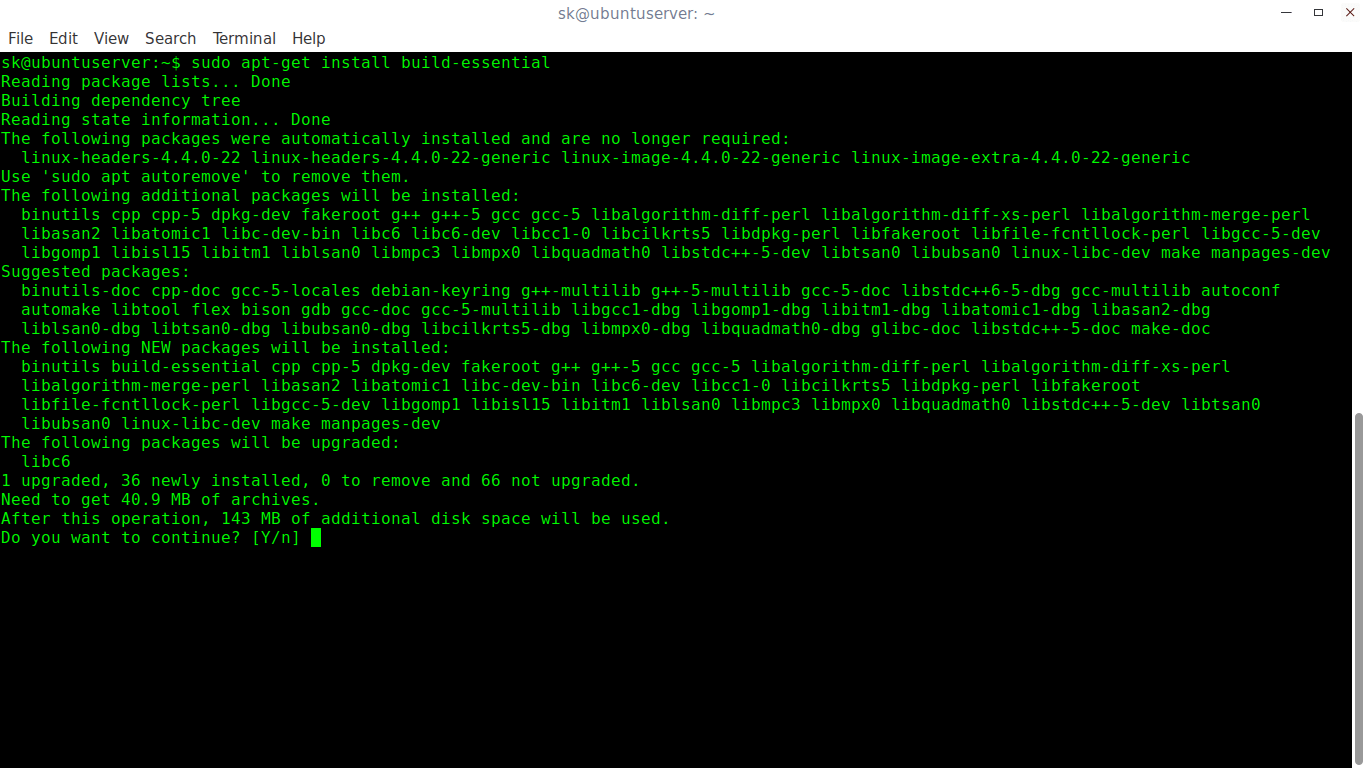
sudo apt-get install build-essential
This command will all necessary packages to setup the development environment in Debian, Ubuntu and its derivatives.
- binutils
- cpp
- gcc-5-locales
- g++-multilib
- g++-5-multilib
- gcc-5-doc
- gcc-multilib
- autoconf
- automake
- libtool
- flex
- bison
- gdb
- gcc-doc
- gcc-5-multilib
- and many.
You now have the necessary development tools to develop a software in your Linux box.
4. Install Development Tools In openSUSE/SUSE
To setup development environment in openSUSE and SUSE enterprise, run the following commands as root user:
zypper refresh
zypper update
zypper install -t pattern devel_C_C++
Verifying Installation
Now, Let us verify the develop tools have been installed or not. To do so, run:
gcc -v
make -v

As you see in the above output, the development tools have been successfully installed. Start developing your applications!
That’s all for today! On behalf of OSTechNix, I wish you a very Happy New Year 2017. May the new year bring new hopes and opportunities for you!
Cheers!!
How To Install Development Tools In Linux的更多相关文章
- RHEL / CentOS Linux Install Core Development Tools Automake, Gcc (C/C++), Perl, Python & Debuggers
how do I install all developer tools such as GNU GCC C/C++ compilers, make and others, after install ...
- Linux小记 -- apt-get install build-essential和yum groupinstall "Development Tools"
Ubuntu的apt install build-essential 作用:配置Debian系统编译环境,就是下载安装支持编译Debian包的依赖/包,比如gcc等. 直接执行 #apt instal ...
- How to install JDK (Java Development Kit) on Linux
This tutorial will guide you on how to install JDK (Java Development Kit) on Linux. Since I use Cent ...
- 转 How to install XenServer Tools – Linux(forward)
本文转自: http://blog.csdn.net/zhongguoren666/article/details/7088798 比较懒....大家看图说话就行了.... 说句实在话…还是老外写的地 ...
- How-to Install VMware Tools on Debian Stretch 9 32/64bit Linux+GNU
在虚拟机VMWARE上安装debian9 安装vmwaretools时候遇到问题 询问我IFCONFIG安装在哪里? 新版的debian不知道是用户权限问题还是使用了其他网络配置工具 vmwareto ...
- 环境初始化 Build and Install the Apache Thrift IDL Compiler Install the Platform Development Tools
Apache Thrift - Centos 6.5 Install http://thrift.apache.org/docs/install/centos Building Apache Thri ...
- Linux之一次性安装开发工具:yum groupinstall Development tools
[spark@sparksinglenode ~]$ yum grouplist | moreLoaded plugins: fastestmirror, refresh-packagekit, se ...
- How to install Node.js on Linux
How to install Node.js on Linux Posted on November 13, 2015 by Dan Nanni Leave a comment Question: H ...
- yum groupinstall "Development Tools" 批量安装软件
注:可以通过 yum grouplist 来查看可能批量安装哪些列表 从Windows转到Linux下面,一个不习惯的地方就是在图形界面下安装和删除软件的时候非常缓慢.但是如果你掌握了用yum的命令行 ...
随机推荐
- Form动态下拉框
FORM级触发器:WHEN-NEW-FORM-INSTANCE 1.定义: V_LIST_NAME11 VARCHAR2(100) := 'QUERY_FIND.UPDATE_TYPE' ...
- 如果浏览器自动调用quirks模式打开的话
(从已经死了一次又一次终于挂掉的百度空间人工抢救出来的,发表日期 2014-03-21) 则肯定你的html的声明,没有写好. 今天遇到几个,前面莫名其妙的多了个空格(在网页上看源码是多空格,复制到n ...
- ie10中元素超出父元素的宽度时不能自动隐藏
(从已经死了一次又一次终于挂掉的百度空间人工抢救出来的,发表日期2014-02-21) 今天遇到一个问题,ie10中元素超出父元素的宽度时不能自动隐藏,而其余浏览器却正常显示. 解决方法是,手动给其设 ...
- 为什么SSL证书流量暴增?
网络服务提供商 Sandvine 近日发布了一份报告,中提到了一个非常有趣的现象:和去年的数据相比,加密网络流量(SSL)在今年正在呈现出爆发式增长. 这个变化在欧洲表现得十分明显:和去年的 1.47 ...
- PL/pgSQL函数带output参数例子
例子1,不带returns : [postgres@cnrd56 bin]$ ./psql psql () Type "help" for help. postgres=# CRE ...
- ARM&Linux 下驱动开发第三节
后台驱动代码如下:比较昨天的,添加了读写指针位置移动操作 #include<linux/init.h> #include<linux/module.h> #include< ...
- FluorineFx 播放FLV 时堆棧溢出解决 FluorineFx NetStream.play 并发时,无法全部连接成功的解决办法
http://25swf.blogbus.com/tag/FluorineFx/ http://www.doc88.com/p-7002019966618.html 基于Red5的视频监控系统的研究 ...
- CSDN蒋涛:我为什么和王峰一起创办极客帮天使基金?
i 黑马 记者:王静静 7月15日,i黑马在一家咖啡厅见到了CSDN创始人蒋涛,这位中国最大的程序猿社区的创始人,正在经营一份新事业,他和蓝港在线创始人王峰正式成立了天使基金"极客 ...
- C语言中的各种修饰符
C允许同时使用多于一个的修饰符,这就使得可以创建一下各种类型: int board[8][8];//int数组的数组 int **ptr;//指向int的指针的指针 int *risk[10];//具 ...
- WPF 之 窗口间传参数
有如下几种方式: 1) 声明个全局变量,就是App.xaml里面声明:在所有窗体里面都可以引用 Application.Current.Properties["ArgumentName&qu ...