
Fragment (一)
1,简介
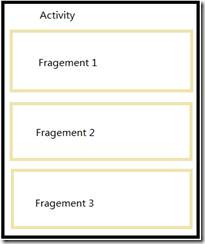
Fragement(碎片)允许将Activity拆分成多个完全独立封装的可重用组件,每个组件有它自己的生命周期和UI布局,由此可见,Fragement依赖于Activity,它的生命周期直接被其所属的宿主activity的生命周期影响。
形象的理解Fragement,手机屏幕如下图所示:
Fragement 具有以下优点:
- 组件重用,多个Activity可重用同一个Fragement;
- 为不同屏幕大小的设备创建动态的灵活的UI,在Activity运行过程中,可以添加、移除或者替换Fragment(add()、remove()、replace())
2,生命周期
Fragement的生命周期镜像它的宿主Activity的生命周期事件。若Activity进入active-resumed状态的时候,添加或者移除一个Fragement就会影响它自己的生命周期。
Fragement生命周期方面如下:
/**

 * Listing 4-4: Fragment skeleton code

 * Listing 4-5: Fragment lifecycle event handlers

 */

package com.paad.fragments;

import android.app.Activity;

import android.app.Fragment;

import android.os.Bundle;

import android.view.LayoutInflater;

import android.view.View;

import android.view.ViewGroup;

public class MySkeletonFragment extends Fragment {

  // Called when the Fragment is attached to its parent Activity.

  @Override

  public void onAttach(Activity activity) {

    super.onAttach(activity);

    // Get a reference to the parent Activity.

  }

  // Called to do the initial creation of the Fragment.

  @Override

  public void onCreate(Bundle savedInstanceState) {

    super.onCreate(savedInstanceState);

    // Initialize the Fragment.

  }

  // Called once the Fragment has been created in order for it to

  // create its user interface.

  @Override

  public View onCreateView(LayoutInflater inflater,

                           ViewGroup container,

                           Bundle savedInstanceState) {

    // Create, or inflate the Fragment's UI, and return it.

    // If this Fragment has no UI then return null.

    return inflater.inflate(R.layout.my_fragment, container, false);

  }

  // Called once the parent Activity and the Fragment's UI have

  // been created.

  @Override

  public void onActivityCreated(Bundle savedInstanceState) {

    super.onActivityCreated(savedInstanceState);

    // Complete the Fragment initialization �particularly anything

    // that requires the parent Activity to be initialized or the

    // Fragment's view to be fully inflated.

  }

  // Called at the start of the visible lifetime.

  @Override

  public void onStart(){

    super.onStart();

    // Apply any required UI change now that the Fragment is visible.

  }

  // Called at the start of the active lifetime.

  @Override

  public void onResume(){

    super.onResume();

    // Resume any paused UI updates, threads, or processes required

    // by the Fragment but suspended when it became inactive.

  }

  // Called at the end of the active lifetime.

  @Override

  public void onPause(){

    // Suspend UI updates, threads, or CPU intensive processes

    // that don't need to be updated when the Activity isn't

    // the active foreground activity.

    // Persist all edits or state changes

    // as after this call the process is likely to be killed.

    super.onPause();

  }

  // Called to save UI state changes at the

  // end of the active lifecycle.

  @Override

  public void onSaveInstanceState(Bundle savedInstanceState) {

    // Save UI state changes to the savedInstanceState.

    // This bundle will be passed to onCreate, onCreateView, and

    // onCreateView if the parent Activity is killed and restarted.

    super.onSaveInstanceState(savedInstanceState);

  }

  // Called at the end of the visible lifetime.

  @Override

  public void onStop(){

    // Suspend remaining UI updates, threads, or processing

    // that aren't required when the Fragment isn't visible.

    super.onStop();

  }

  // Called when the Fragment's View has been detached.

  @Override

  public void onDestroyView() {

    // Clean up resources related to the View.

    super.onDestroyView();

  }

  // Called at the end of the full lifetime.

  @Override

  public void onDestroy(){

    // Clean up any resources including ending threads,

    // closing database connections etc.

    super.onDestroy();

  }

  // Called when the Fragment has been detached from its parent Activity.

  @Override

  public void onDetach() {

    super.onDetach();

  }

}
生命周期要点:
- 开始于绑定到它的你Activity,结束于从父Activity分离,对应于onAttach 和onDetach事件,通常情况下,onAttach用来获取一下Fragement的父Activity的引用,为进一步初始化做准备;
- 不能依赖调用onDestroy方法来销毁它,因为此方面不定会被执行;
- 与Activity一样,应该使用onCreate方法来初始化Fragement,在其生命周期内创建的作用域对象,且确保只创建一次;
- 在onCreateView和onDestroyView上初始化和销毁UI;
- 当Fragement暂停或停止时,保存所有的UI状态和持久化所有的数据。
3,使用Fragement
最佳实践是使用容器View来创建布局,将Fragement在运行时放入容器内
<?xml version="1.0" encoding="utf-8"?>

<LinearLayout xmlns:android="http://schemas.android.com/apk/res/android"

  android:orientation="horizontal"

  android:layout_width="match_parent"

  android:layout_height="match_parent">

    <FrameLayout

        android:id="@+id/ui_container"

        android:layout_width="match_parent"

        android:layout_height="match_parent"

        android:layout_weight="1" >

    </FrameLayout>

  <FrameLayout

    android:id="@+id/details_container"

    android:layout_width="match_parent"

    android:layout_height="match_parent"

    android:layout_weight="3"
android:visibility =”gone” --隐藏
/>
</LinearLayout>
在运行时使用Fragement transaction来动态填充布局,从而当配置改变时,能确保一致性,框架代码如下:
package com.paad.fragments;

import android.app.Activity;

import android.app.FragmentManager;

import android.app.FragmentTransaction;

import android.os.Bundle;

public class MyFragmentActivity extends Activity {

  public void onCreate(Bundle savedInstanceState) {

    super.onCreate(savedInstanceState);

    // Inflate the layout containing the Fragment containers

    setContentView(R.layout.fragment_container_layout);

    FragmentManager fm = getFragmentManager();

    // Check to see if the Fragment back stack has been populated

    // If not, create and populate the layout.

    DetailsFragment detailsFragment =

      (DetailsFragment)fm.findFragmentById(R.id.details_container);

    if (detailsFragment == null) {

       FragmentTransaction ft = fm.beginTransaction();

       ft.add(R.id.details_container, new DetailsFragment());

       ft.add(R.id.ui_container, new MyListFragment());

       ft.commit();

     }

  }

}
package com.paad.weatherstation;

import com.paad.fragments.R;

import android.app.Fragment;

import android.os.Bundle;

import android.view.LayoutInflater;

import android.view.View;

import android.view.ViewGroup;

public class DetailsFragment extends Fragment {

  public DetailsFragment() {

  }

  // Called once the Fragment has been created in order for it to

  // create its user interface.

  @Override

  public View onCreateView(LayoutInflater inflater,

                           ViewGroup container,

                           Bundle savedInstanceState) {

    // Create, or inflate the Fragment's UI, and return it.

    // If this Fragment has no UI then return null.

    return inflater.inflate(R.layout.details_fragment, container, false);

  }

}
package com.paad.weatherstation;

import com.paad.fragments.R;

import android.annotation.SuppressLint;

import android.app.Fragment;

import android.os.Bundle;

import android.view.LayoutInflater;

import android.view.View;

import android.view.ViewGroup;

public class MyListFragment extends Fragment {

  public MyListFragment() {

  }

  // Called once the Fragment has been created in order for it to

  // create its user interface.

  @Override

  public View onCreateView(LayoutInflater inflater,

                           ViewGroup container,

                           Bundle savedInstanceState) {

    // Create, or inflate the Fragment's UI, and return it.

    // If this Fragment has no UI then return null.

    return inflater.inflate(R.layout.list_fragment, container, false);

  }

}
Fragement 和Activity之间的接口:
- 任何Fragement中可使用getActivity方法返回对父Activity的引用;
- 在fragement需要和它的主Activity共享事件的地方,最好在Fragement中创建回调接口,而主Activity必须实现它来监听Fragement中的改变;
package com.paad.fragments;

import android.app.Activity;

import android.app.Fragment;

/**

 * MOVED TO PA4AD_Ch04_Seasons

 */

public class SeasonFragment extends Fragment {

  public interface OnSeasonSelectedListener {

    public void onSeasonSelected(Season season);

  }

  private OnSeasonSelectedListener onSeasonSelectedListener;

  private Season currentSeason;

  @Override

  public void onAttach(Activity activity) {

    super.onAttach(activity);

    try {

      onSeasonSelectedListener = (OnSeasonSelectedListener)activity;

    } catch (ClassCastException e) {

      throw new ClassCastException(activity.toString() +

                " must implement OnSeasonSelectedListener");

    }

  }

  private void setSeason(Season season) {

    currentSeason = season;

    onSeasonSelectedListener.onSeasonSelected(season);

  }

}
若理解有难道,可以了解一下JAVA编程思想中的上塑造型,内部类,接口方面的知识
Fragment (一)的更多相关文章
- 浅谈 Fragment 生命周期
版权声明:本文为博主原创文章,未经博主允许不得转载. 微博:厉圣杰 源码:AndroidDemo/Fragment 文中如有纰漏,欢迎大家留言指出. Fragment 是在 Android 3.0 中 ...
- 札记:Fragment基础
Fragment概述 在Fragment出现之前,Activity是app中界面的基本组成单位,值得一提的是,作为四大组件之一,它是需要"注册"的.组件的特性使得一个Activit ...
- EventBus实现activity跟fragment交互数据
最近老是听到技术群里面有人提出需求,activity跟fragment交互数据,或者从一个activity跳转到另外一个activity的fragment,所以我给大家介绍一个开源项目,EventBu ...
- Android:Activity+Fragment及它们之间的数据交换.
Android:Activity+Fragment及它们之间的数据交换 关于Fragment与Fragment.Activity通信的四种方式 比较好一点的Activity+Fragment及它们之间 ...
- Android中Fragment和ViewPager那点事儿(仿微信APP)
在之前的博文<Android中使用ViewPager实现屏幕页面切换和引导页效果实现>和<Android中Fragment的两种创建方式>以及<Android中Fragm ...
- Android开发学习—— Fragment
#Fragment* 用途:在一个Activity里切换界面,切换界面时只切换Fragment里面的内容* 生命周期方法跟Activity一致,可以理解把其为就是一个Activity* 定义布局文件作 ...
- Android中Fragment与Activity之间的交互(两种实现方式)
(未给Fragment的布局设置BackGound) 之前关于Android中Fragment的概念以及创建方式,我专门写了一篇博文<Android中Fragment的两种创建方式>,就如 ...
- Android中Fragment的两种创建方式
fragment是Activity中用户界面的一个行为或者是一部分.你可以在一个单独的Activity上把多个Fragment组合成为一个多区域的UI,并且可以在多个Activity中再使用.你可以认 ...
- Android Fragment 剖析
1.Fragment如何产生?2.什么是Fragment Android运行在各种各样的设备中,有小屏幕的手机,超大屏的平板甚至电视.针对屏幕尺寸的差距,很多情况下,都是先针对手机开发一套App,然后 ...
- ILJMALL project过程中遇到Fragment嵌套问题:IllegalArgumentException: Binary XML file line #23: Duplicate id
出现场景:当点击"分类"再返回"首页"时,发生error退出 BUG描述:Caused by: java.lang.IllegalArgumentExcep ...
随机推荐
- L014-oldboy-mysql-dba-lesson14
L014-oldboy-mysql-dba-lesson14 来自为知笔记(Wiz) 附件列表
- u-boot ctr0.S详解 包含_main函数
/** ****************************************************************************** * @author Maox ...
- jquery 处理字符串 【转】
1,去掉空格 var txt=$.trim($("txt1").val()); 2,转为数字 txtNum=Number($.trim(txt)) + 1; var thi ...
- width100%,设置padding或border溢出解决方法
.box { width: 100px; height: 100px; background: red;} .bd { width: 100%; padding: 10px; background: ...
- PHP流程控制语句下
ok,继续搞. while循环: while(expr){ 程序块: } 条件expr成立执行程序块,否则结束. do while循环:do while循环比while循环要多循环一次,它要先执行程序 ...
- KBase使用教程
1. SELECT * FROM EXPERT_BASEINFO WHERE (源照片='*' not 源照片 is null) and 标准一级机构='山东大学' and 当前职称='*教授' 2. ...
- java中print\println\printf的区别
print\println\printf的区别 print将它的参数显示在命令窗口,并将输出光标定位在所显示的最后一个字符之后. println 将它的参数显示在命令窗口,并在结尾加上换行符,将输出光 ...
- Ubuntu中设置环境变量详解
1, 为单一用户:.bashrc: 为每一个运行bash shell的用户执行此文件.当bash shell被打开时,该文件被读取.打开用户主目录下的.bashrc,在这个文件中加入export PA ...
- 说说iOS中的手势及触摸
一.响应链 在IOS开发中会遇到各种操作事件,通过程序可以对这些事件做出响应. 首先,当发生事件响应时,必须知道由谁来响应事件.在IOS中,由响应者链来对事件进行响应,所有事件响应的类都是UIResp ...
- Error: Cannot find module 'express'
安装Express命令如下: npm install -g express 安装成功之后会在C:\Users\[YOUR_USER_NAME]\AppData\Roaming\npm\node_mod ...