
angularjs component
Component
https://docs.angularjs.org/guide/component
component本质上就是directive。
This is a shorthand for registering a special type of directive, which represents a self-contained UI component in your application. Such components are always isolated (i.e. scope: {}) and are always restricted to elements (i.e. restrict: 'E').
Component definitions are very simple and do not require as much configuration as defining general directives. Component definitions usually consist only of a template and a controller backing it.
MVC的本质就是将controller和template关联起来,controller将数据显示到template中。component将这种关联做的更好。
When not to use Components:
- for directives that need to perform actions in compile and pre-link functions, because they aren't available
- when you need advanced directive definition options like priority, terminal, multi-element
- when you want a directive that is triggered by an attribute or CSS class, rather than an element
component解决了什么问题:
- app中的某个部分如何重用
- app中各部分之间的scope不是隔离的
- component可以自由的重复使用
- index.html被简化了,细节的实现都分离出来了,提高了可维护性
- component是隔离的,不受外界影响,同时也不会影响app中的其他部分
- 可以独立的测试我们的component
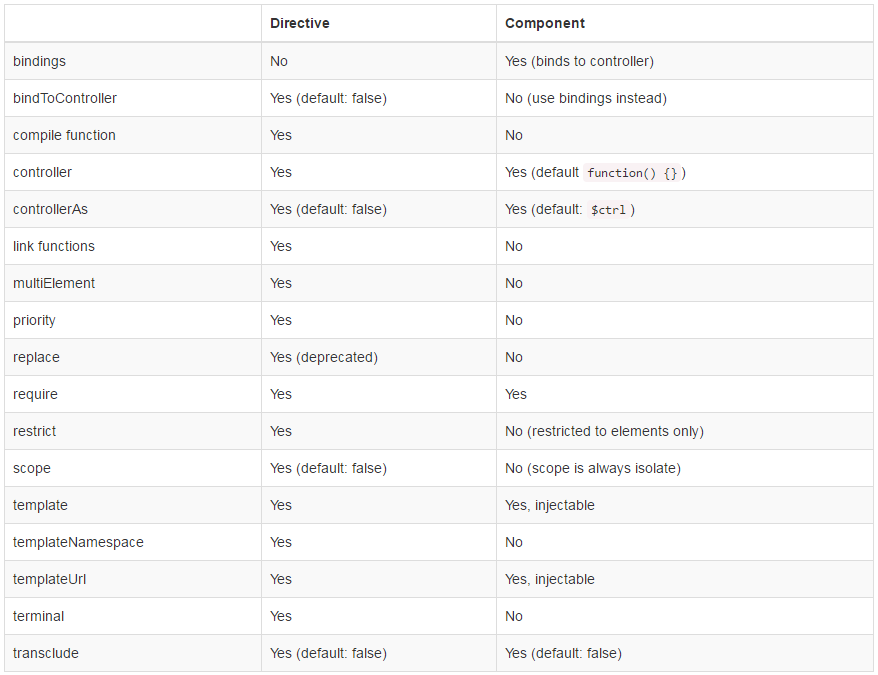
Comparison between Directive definition and Component definition
component使用
- 文件名建议:xxxComponent.component.js
- component名字规则和directive一样,定义的时候使用驼峰样式(myAwesomeComponent),模板中使用的时候使用-分割(my-awesome-component)
- template中使用controller的实例$ctrl替代scope来访问数据,这个实例别名可以自定义 - 使用controllerAs属性
- controller可以使用controller()注册的controller,也可以使用行内定义的方式
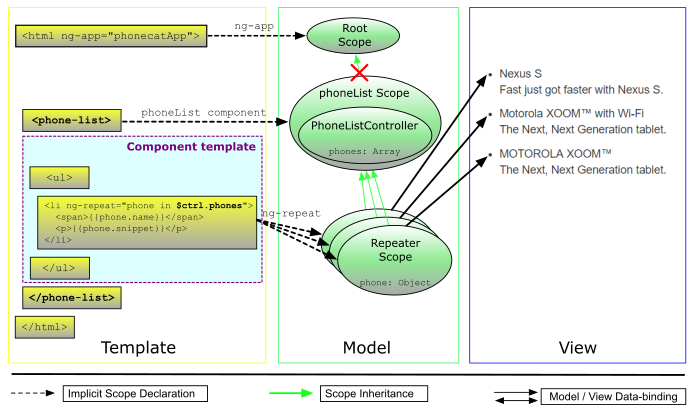
<html ng-app="phonecatApp">

<head>

  ...

  <script src="bower_components/angular/angular.js"></script>

  <script src="app.js"></script>

  <script src="phone-list.component.js"></script>

</head>

<body>

  <!-- Use a custom component to render a list of phones -->

  <phone-list></phone-list>

</body>

</html>
// Define the `phonecatApp` module

angular.module('phonecatApp', []);

// Register `phoneList` component, along with its associated controller and template

angular.

  module('phonecatApp').

  component('phoneList', {

    template:

        '<ul>' +

          '<li ng-repeat="phone in $ctrl.phones">' +

            '<span>{{phone.name}}</span>' +

            '<p>{{phone.snippet}}</p>' +

          '</li>' +

        '</ul>',

    controller: function PhoneListController() {

      this.phones = [

        {

          name: 'Nexus S',

          snippet: 'Fast just got faster with Nexus S.'

        }, {

          name: 'Motorola XOOM™ with Wi-Fi',

          snippet: 'The Next, Next Generation tablet.'

        }, {

          name: 'MOTOROLA XOOM™',

          snippet: 'The Next, Next Generation tablet.'

        }

      ];

    },

   controllerAs: 'ctrl'

  });
example
var myMod = angular.module(...);

myMod.component('myComp', {

  template: '<div>My name is {{$ctrl.name}}</div>',

  controller: function() {

    this.name = 'shahar';

  }

});

myMod.component('myComp', {

  template: '<div>My name is {{$ctrl.name}}</div>',

  bindings: {name: '@'}

});

myMod.component('myComp', {

  templateUrl: 'views/my-comp.html',

  controller: 'MyCtrl',

  controllerAs: 'ctrl',

  bindings: {name: '@'}

});
API
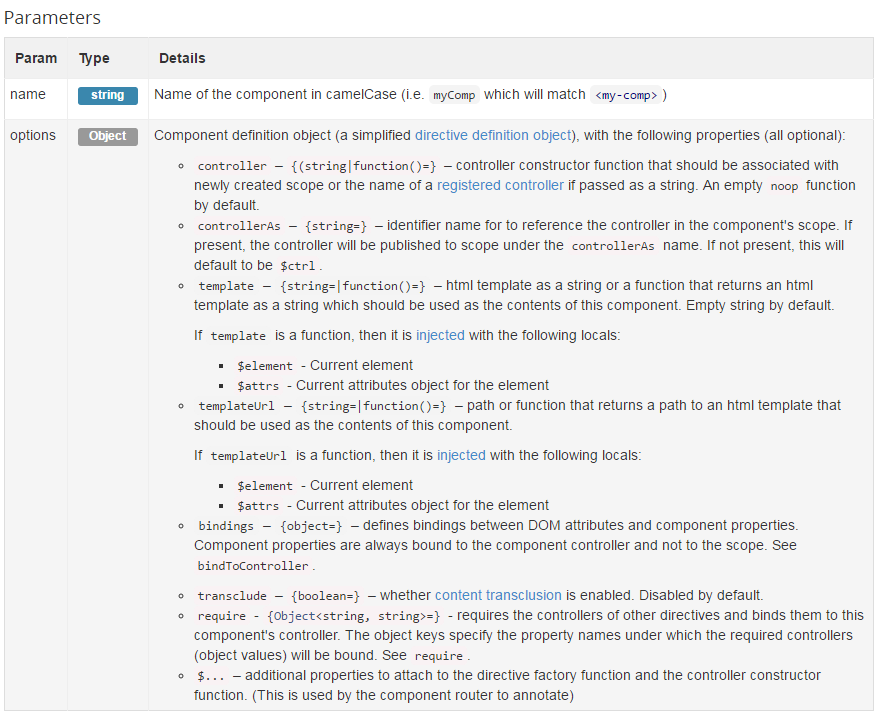
component(name, options) returns ng.$compileProvider
https://docs.angularjs.org/api/ng/service/$compile#directive-definition-object
bindings
这个就是类似于directive中的scope属性, 支持:
@字符值 - input<单向绑定 - input&回调传递 - 父组件的方法,用于向上的交互 - output=双向绑定 - 设计原则中不推荐使用
angular.module('docsIsolateScopeDirective', [])

.controller('Controller', ['$scope', function($scope) {

  $scope.naomi = { name: 'Naomi', address: '1600 Amphitheatre' };

  $scope.igor = { name: 'Igor', address: '123 Somewhere' };

}])

.directive('myCustomer', function() {

  return {

    restrict: 'E',

    scope: {

      customerInfo: '=info'

    },

    templateUrl: 'my-customer-iso.html'

  };

});
    .component('qqtrMenu',{

        templateUrl:'/secu/components/menu/menu.component.html',

        bindings: {

            menuitems: "<"

        },

        controller: 'menuCompCtrl',

    })
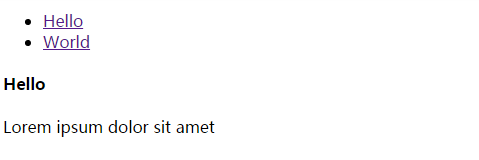
交互式组件实例
https://plnkr.co/edit/?p=preview
index.html
<!doctype html>

<html lang="en">

<head>

  <meta charset="UTF-8">

  <title>Example - example-component-tabs-pane-production</title>

  <script src="//code.angularjs.org/snapshot/angular.min.js"></script>

  <script src="script.js"></script>

</head>

<body ng-app="docsTabsExample">

  <my-tabs>

  <my-pane title="Hello">

    <h4>Hello</h4>

    <p>Lorem ipsum dolor sit amet</p>

  </my-pane>

  <my-pane title="World">

    <h4>World</h4>

    <em>Mauris elementum elementum enim at suscipit.</em>

    <p><a href ng-click="i = i + 1">counter: {{i || 0}}</a></p>

  </my-pane>

</my-tabs>

</body>

</html>

<!--

Copyright 2017 Google Inc. All Rights Reserved.

Use of this source code is governed by an MIT-style license that

can be found in the LICENSE file at http://angular.io/license

-->
script.js
(function(angular) {

  'use strict';

angular.module('docsTabsExample', [])

  .component('myTabs', {

    transclude: true,

    controller: function MyTabsController() {

      var panes = this.panes = [];

      this.select = function(pane) {

        angular.forEach(panes, function(pane) {

          pane.selected = false;

        });

        pane.selected = true;

      };

      this.addPane = function(pane) {

        if (panes.length === 0) {

          this.select(pane);

        }

        panes.push(pane);

      };

    },

    templateUrl: 'my-tabs.html'

  })

  .component('myPane', {

    transclude: true,

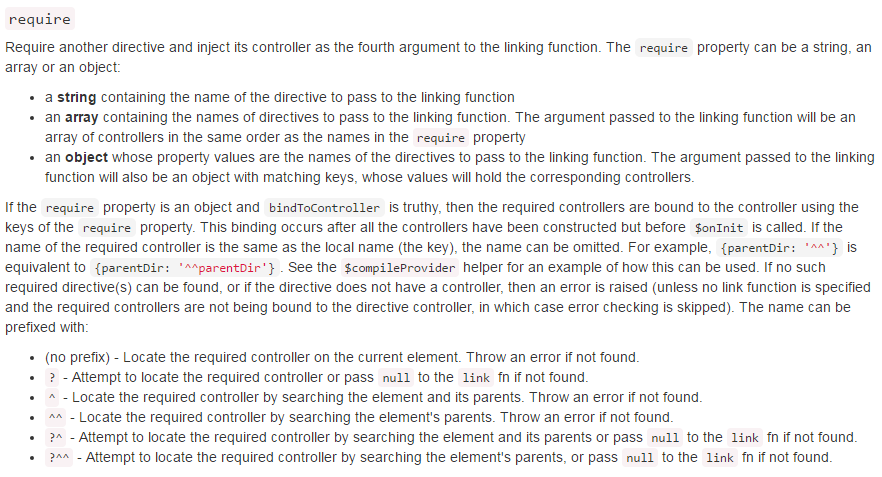
    require: {

      tabsCtrl: '^myTabs'

    },

    bindings: {

      title: '@'

    },

    controller: function() {

      this.$onInit = function() {

        this.tabsCtrl.addPane(this);

        console.log(this);

      };

    },

    templateUrl: 'my-pane.html'

  });

})(window.angular);

/*

Copyright 2017 Google Inc. All Rights Reserved.

Use of this source code is governed by an MIT-style license that

can be found in the LICENSE file at http://angular.io/license

*/
my-pane.html
<div class="tab-pane" ng-show="$ctrl.selected" ng-transclude></div>

<!--

Copyright 2017 Google Inc. All Rights Reserved.

Use of this source code is governed by an MIT-style license that

can be found in the LICENSE file at http://angular.io/license

-->
my-tabs.html
<div class="tabbable">

  <ul class="nav nav-tabs">

    <li ng-repeat="pane in $ctrl.panes" ng-class="{active:pane.selected}">

      <a href="" ng-click="$ctrl.select(pane)">{{pane.title}}</a>

    </li>

  </ul>

  <div class="tab-content" ng-transclude></div>

</div>

<!--

Copyright 2017 Google Inc. All Rights Reserved.

Use of this source code is governed by an MIT-style license that

can be found in the LICENSE file at http://angular.io/license

-->
基于组件的开发
https://docs.angularjs.org/guide/component
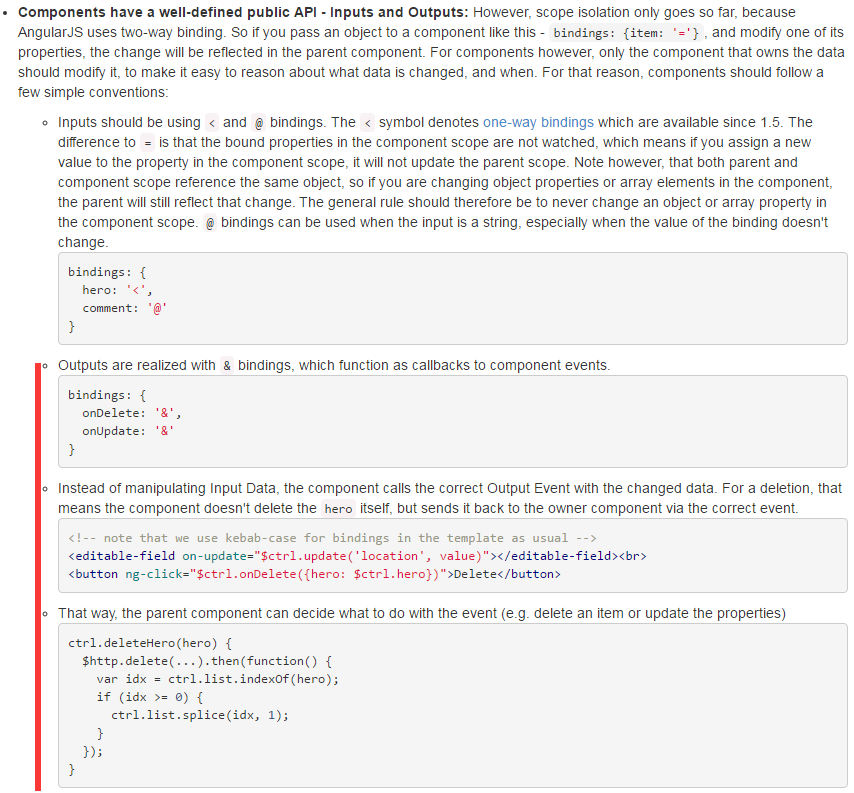
一个应用应该是一个组件数,每个组件只控制自己的视图和数据. bindings只用字符和单向绑定,数据单向流入; 使用&绑定父组件的方法,实现向上交互
推荐和参考:
https://docs.angularjs.org/tutorial/step_03
https://docs.angularjs.org/api/ng/provider/$compileProvider#component
In order to retrieve and instantiate a component's controller, AngularJS provides the $componentController service.
angularjs component的更多相关文章
- 一篇文章看懂angularjs component组件
壹 ❀ 引 我在 angularjs 一篇文章看懂自定义指令directive 一文中详细介绍了directive基本用法与完整属性介绍.directive是个很神奇的存在,你可以不设置templa ...
- angularjs中directive指令与component组件有什么区别?
壹 ❀ 引 我在前面花了两篇博客分别系统化介绍了angularjs中的directive指令与component组件,当然directive也能实现组件这点毋庸置疑.在了解完两者后,即便我们知道co ...
- Using RequireJS in AngularJS Applications
http://www.sitepoint.com/using-requirejs-AngularJS-applications/ While writing large JavaScript appl ...
- 升级 AngularJS 至 Angular
Victor Savkin 大神撰写了一系列文章详细介绍如何升级 AngularJS 应用: NgUpgrade in Depth Upgrade Shell Two Approaches to Up ...
- 了解angularjs中的生命周期钩子函数$onInit,$onChange,$onDestory,$postLink
壹 ❀ 引 我在前面花了三篇文章用于介绍angularjs的指令directive,组件component,并专门花了一篇文章介绍directive与component的不同,其中提到在compon ...
- angularjs 一篇文章看懂自定义指令directive
壹 ❀ 引 在angularjs开发中,指令的使用是无处无在的,我们习惯使用指令来拓展HTML:那么如何理解指令呢,你可以把它理解成在DOM元素上运行的函数,它可以帮助我们拓展DOM元素的功能.比如 ...
- angular directive 深入理解
由于业务的需要,最近angular 的diretive 研究的比较多,有和同事一起共同协作开发scada的项目, 对directive 有了进一步更深的理解. 感觉才开始真正理解了这句话的意思: In ...
- angularjs directive and component 指令与组件 ( 1.5.0 以后 )
之前写过一篇了 http://www.cnblogs.com/keatkeat/p/3903673.html 但某些部分写的不太清楚,甚至有点错误,所以今天特地在这里再来谈谈. 这篇主要是说指令的隔离 ...
- AngularJs学习笔记--Understanding the Model Component
原版地址:http://docs.angularjs.org/guide/dev_guide.mvc.understanding_model 在angular文档讨论的上下文中,术语“model”可以 ...
随机推荐
- 【python】python编码方式,chardet编码识别库
环境: python3.6 需求: 针对于打开一个文件,可以读取到文本的编码方式,根据默认的文件编码方式来获取文件,就不会出现乱码. 针对这种需求,python中有这个方式可以很好的解决: 解决策略: ...
- Android 实时视频编码—H.264硬编码
from://http://www.cnblogs.com/skyseraph/archive/2012/04/04/2431771.html 1 硬编码 & 软编码 硬编码:通过调用And ...
- 增加定时检测linux占用内存,及时清理功能
centos为了提高效率,把部分使用过的文件缓存到了内存里. 如果是这样的话,我又不需要这样的文件性能,那就可以释放.如下两个命令就可以: #sync #echo 3 > /proc/sys/v ...
- zoj2334 Monkey King , 并查集,可并堆,左偏树
提交地址:点击打开链接 题意: N(N<=10^5)仅仅猴子,初始每仅仅猴子为自己猴群的猴王.每仅仅猴子有一个初始的力量值.这些猴子会有M次会面. 每次两仅仅猴子x,y会面,若x,y属于同一个 ...
- RAISR: rapid and accurate image super resolution
准确地说,RAISR并不是用来压缩图像的,而是用来upsample图像的. 众所周知,图片缩小到半分辨率后,在拉回原大小,会出现强烈的锯齿.从80年代开始就有很多super sampling的方法 ...
- django的数据库操作
ORM是通过使用描述对象和数据库之间映射的元数据,将程序中的对象自动持久化到关系数据库中,ORM在业务逻辑层和数据库层之间充当了桥梁的作用. django的交互式shell python manage ...
- (八十七)AutoLayout的简单介绍与实例
AutoLayout是继AutoResizing之后的一种自己主动布局方法.攻克了AutoResizing无法处理控件间相互关系的问题. AutoLayout在storyboard中通过底部工具条设置 ...
- Excel表数据导入Sql Server数据库中
Excel表数据导入Sql Server数据库的方法很多,这里只是介绍了其中一种: 1.首先,我们要先在test数据库中新建一个my_test表,该表具有三个字段tid int类型, tname nv ...
- protobuf Protocol Buffers 简介 案例 MD
Markdown版本笔记 我的GitHub首页 我的博客 我的微信 我的邮箱 MyAndroidBlogs baiqiantao baiqiantao bqt20094 baiqiantao@sina ...
- MFC中查找替换对话框CFindReplaceDialog类
void CCFindReplaceDialogView::OnFind() { CFindReplaceDialog* pDlg = new CFindReplaceDialog(); pDlg-& ...