
蓝瓶的钙,好喝的钙——windows,我要蓝屏的
原文地址:http://80x86.io/post/windows-blue-screen-0x00000050-page_fault_in_nonpaged_area
这里只截取一部分。
windows死掉时,为什么“没有”产生dump文件?这个问题依旧不明。 于是再次用神一样的Google找到了答案。
windows可以产生三种不同的dump文件: 完全内存dump 内核内存dump 迷你内存dump(64KB)
Windows can generate any one of the following memory dump file types:
Complete memory dump

Kernel memory dump

Small memory dump (64 KB)
而通常系统产生的是Small memory dump (64 KB),其位置默认在 C:\Windows\Minidump
而此次蓝屏我却没有在这里找到任何dump文件。为什么? 这跟和dump文件产生相关的启动配置有关。 windows的dump文件产生存在一定的规则,这些规则包括: 对于Complete memory dump: If a second problem occurs and another complete memory dump (or kernel memory dump) file is created, the previous file is overwritten.
对于Kernel memory dump: If a second problem occurs and another kernel memory dump file (or a complete memory dump file) is created, the previous file is overwritten when the 'Overwrite any existing file' setting is checked.
对于Small memory dump: If a second problem occurs and a second small memory dump file is created, the previous file is preserved. Each additional file is given a distinct name. The date is encoded in the file name. For example, Mini022900-01.dmp is the first memory dump generated on February 29, 2000. A list of all small memory dump files is kept in the %SystemRoot%\Minidump folder.
详情见:http://support.microsoft.com/kb/254649
由此可见: Complete memory dump在蓝屏再次发生时会被无条件覆盖掉,而Kernel memory dump是否被覆盖要看配置( HKEY_LOCAL_MACHINE\SYSTEM\CurrentControlSet\Control\CrashControl分支下的Overwrite值是否为1,为1值覆盖。 ),Small memory dump则总是被保留。
于是我看了下我的win 7 的配置:

我这里勾选了“自动重启”,也就是说,蓝屏之后,马上会重启,根本没时间去看蓝屏代码了。那么我是怎么看到蓝屏代码的?开机时按F8,然后选择 Disable automatic restart on system failure 选项启动,就可以无视那个自动重启配置了。
然后,我看到,我这里配置的dump类型居然是Kernel memory dump ,记得默认应该是Small memory dump (64 KB)的。 既然是Kernel memory dump ,为什么在%SystemRoot% (C:\Windows)下面没有看到 MEMORY.DMP 文件? 原因是 memory.dmp 文件的存储/删除算法。其算法如下:
a. 首先把内核错误报告给Online Crash Analysis Service. b. 然后,如果机器注册表中 AlwaysKeepMemoryDump 项的值被设置为 1, 那么将dump文件存储在磁盘。 c. 否则, 如果机器上的操作系统是Windows Server SKU, 那么将dump文件存储在磁盘。 d. 再则, 如此这台机器加入了windows域 (如一些大公司的工作站会有域服务器,工作站可以加入某个域), 那么将dump文件存储在磁盘。 e. 否则, 如果机器不属于某个域(而是属于某个workgroup,通常家用电脑是这样),那么就进行如下判断: 如果磁盘空闲容量 >= 25GB, 那么将dump文件存储在磁盘。 否则 (磁盘空闲容量 < 25 GB), 删除dump文件.

很明显,我这里的情况是AlwaysKeepMemoryDump值为0. 即使到害最后一种,也无法保留dump文件。。。看了下,我的C盘的剩余容量只有12.7GB了。 好了,现在解释了为什么dump文件没有在我的电脑上保存下来。
AlwaysKeepMemoryDump 的确切位置是:
HKEY_LOCAL_MACHINE\SYSTEM\CurrentControlSet\Control\CrashControl ! AlwaysKeepMemoryDump Type: REG_DWORD.
修改成Small memory dump ,然后把那个自动重启也给去掉。以备防止以后crash系统能保存dump文件。
====================================================
Small memory dump (64 KB) 文件的保存策略: kernel minidumps 文件默认保存在 %SystemRoot%\Minidump 目录下。 而这个位置值也是在注册表 HKEY_LOCAL_MACHINE\SYSTEM\CurrentControlSet\Control\CrashControl 分支下的。键名为 MinidumpDir . kernel minidumps 文件的保存策略相对来说比较简单。它是根据以下注册表项来决定是否保存dump文件到磁盘的:
HKEY_LOCAL_MACHINE\SYSTEM\CurrentControlSet\Control\CrashControl ! MinidumpsCount Type: REG_DWORD, default value is 50
minidump分析工具
bluescreenview
由nirsoft出品的一个小工具。很实用。 BlueScreenView scans all your minidump files created during 'blue screen of death' crashes, and displays the information about all crashes in one table. For each crash, BlueScreenView displays the minidump filename, the date/time of the crash, the basic crash information displayed in the blue screen (Bug Check Code and 4 parameters), and the details of the driver or module that possibly caused the crash (filename, product name, file description, and file version). For each crash displayed in the upper pane, you can view the details of the device drivers loaded during the crash in the lower pane. BlueScreenView also mark the drivers that their addresses found in the crash stack, so you can easily locate the suspected drivers that possibly caused the crash.
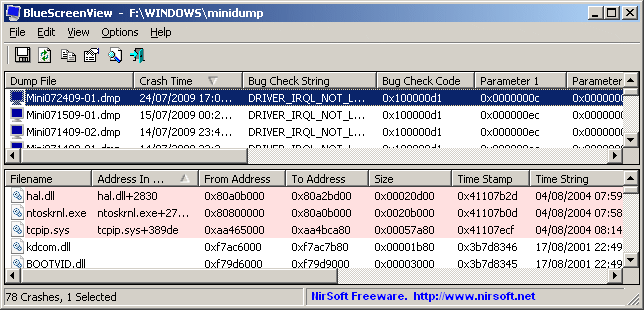
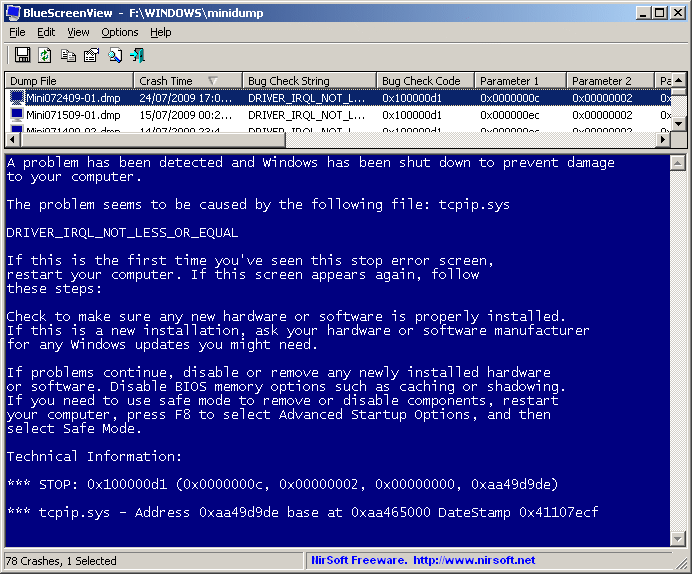
=====================================================
Minilyzer
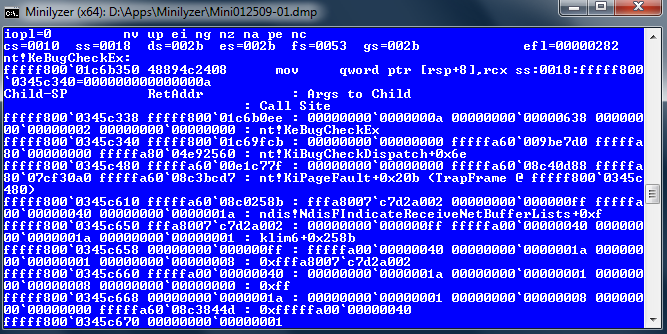
这是一个利用windows调试工具分析dump文件的Windows shell脚本文件。 它还支持分析 Full memory dumps (C:\Windows\Memory.dmp) 。
Minilyzer is a Windows shell script that uses Microsoft’s Debugging Tools for Windows to analyze the Minidump files that are created when a BSOD occurs and generate a report detailing the event. Full memory dumps (C:\Windows\Memory.dmp) can also be analyzed.
下载: http://patrickmylund.com/projects/minilyzer/ github地址: https://github.com/pmylund/minilyzer
参考文档
http://support.microsoft.com/kb/254649
Kernel dump storage and clean up behavior in Windows 7
SKU: SKU是一个通用零售的专业词汇,是英文Stock-Keeping Unit 的缩写,字面意思是库存量单位, 简称SKU,定义为保存库存控制的最小可用单位,这是企业为了方便商品仓库管理而分配的商品编号,一种归类的方法. 详见: http://en.wikipedia.org/wiki/Stock_keeping_unit
蓝瓶的钙,好喝的钙——windows,我要蓝屏的的更多相关文章
- 分析Windows的死亡蓝屏(BSOD)机制
这篇文章本来是投Freebuf的,结果没过.就贴到博客里吧,图懒得发上来了 对于Windows系统来说,被人们视为洪水猛兽的蓝屏也是一种有利于系统稳定的机制.蓝屏其实是Windows系 统的一种自查机 ...
- windows监控 排查蓝屏问题
DUMP包分析 工具WinDbg,下载打开,按ctrl+S 输入:SRV*C:\websymbols*http://msdl.microsoft.com/download/symbols:点击OK, ...
- Windows Server 2003 蓝屏 -- 系统故障:停止错误
Windows Server 2003 EE 出现蓝屏: 0X0000004D (0X000f27D9, 0X000F27D9, 0X0000000C, 0X00000000) 蓝屏拍照: 重启机器 ...
- Windows Server 2012 蓝屏 Wpprecorder.sys 故障
坑爹的园区昨天停电了,导致运行中的服务器中断,来电之后,其中有一台Windows 系统的服务无法运行了,接了个显示器,发现无法进入系统了,挂掉了,这下可完蛋了,虽然做了Radio 磁盘阵列,数据不会丢 ...
- Windows常见蓝屏故障分析
转自Windows常见蓝屏故障分析 症状描述: 当您在运行Microsoft Windows 2000/XP/Server 2003.Microsoft Windows Vista/Server 20 ...
- Windows 7 蓝屏代码大全 & 蓝屏全攻略
关于Windows 7.Vista等系统的蓝屏,之前软媒在Win7之家和Vista之家都有很多文章讨论过,但是都是筛选的常见的一些问题,今天这个文章是个大全,希望大家看着别头痛,文章收藏下来以后待查即 ...
- Windows 7 蓝屏代码大全 & 蓝屏全攻略
关于Windows 7.Vista等系统的蓝屏.之前软媒在Win7之家和Vista之家都有非常多文章讨论过,可是都是筛选的常见的一些问题,今天这个文章是个大全.希望大家看着别头痛.文章收藏下来以后待查 ...
- windows 8.1 下蓝屏报错:SYSTEM_SERVICE_EXCEPTION(NETIO.SYS)的解决办法
大概2周前,电脑突然蓝屏了,我上网查了一下解决办法,因为大部分内容是英文的,所以我只大概看了下,看到这个问题好像是由于软件冲突造成的,于是就把小红伞去掉了,而那天电脑也真的没有再蓝屏(之前大 ...
- 烂泥:kvm安装windows系统蓝屏
本文由秀依林枫提供友情赞助,首发于烂泥行天下. 最近一直在学习有关KVM的知识,实验一直是在虚拟机VM中进行的.今天刚好公司有一台空闲的服务器,直接拿来安装centos.kvm等等,然后相关的配置. ...
随机推荐
- [LeetCode&Python] Problem 876. Middle of the Linked List
Given a non-empty, singly linked list with head node head, return a middle node of linked list. If t ...
- ACM大牛的BLOG(转)
Twilightgod CUSThttp://blog.csdn.net/twilightgodAekdycoin FZU http://hi.baidu.com/aekdycoinForeverli ...
- (dfs痕迹清理兄弟篇)bfs作用效果的后效性
dfs通过递归将每种情景分割在不同的时空,但需要对每种情况对后续时空造成的痕迹进行清理(这是对全局变量而言的,对形式变量不需要清理(因为已经被分割在不同时空)) bfs由于不是利用递归则不能分割不同的 ...
- 南阳oj-ASCII码排序-用了一个晚上
#include <iostream> #include <sstream> #include <stdio.h> #include <string> ...
- PostgREST docker-compose 试用
PostgREST 是一款很不错的直接将pg 数据库暴露为restapi ,使用了基于行级别安全访问控制, 比较全的restapi 查询以及集成了swagger openapi docker-comp ...
- streamsets 集成 minio s3测试
具体streamsets crate 集成可以参考 streamsets crate 以下文档只关注minio 集成的配置 minio 服务 搭建 具体搭建参考: https://www.cnblog ...
- linux平台下防火墙iptables原理
iptables简单介绍 netfilter/iptables(简称为iptables)组成Linux平台下的包过滤防火墙,与大多数的Linux软件一样,这个包过滤防火墙是免费的,它能够取代昂贵的商业 ...
- ThinkPHP 更新 5.0.23 和 5.1.31
ThinkPHP 更新 5.0.23 和 5.1.31 FastAdmin 也跟着更新. V1.0.0.20181210_beta 修复 ThinkPHP5.0发布了一个重要安全更新,强烈建议更新 修 ...
- [脚本] 一个用于BMP到EPS转换的BAT脚本实现(需要安装bmeps)
最近用LaTeX写文章, 图片需要使用eps格式. 如果你安装了bmeps这个工具(一般你装了CTeX就自带这个工具的), 可以在需要转换的目录打开CMD窗口, 然后输入: bmeps -c a.jp ...
- gl attribute和uniform的用法
gl attribute和uniform的用法 http://blog.csdn.net/jackers679/article/details/6848085 attribute attribu ...