
Unity3D学习笔记(十七):IK动画、粒子系统和塔防
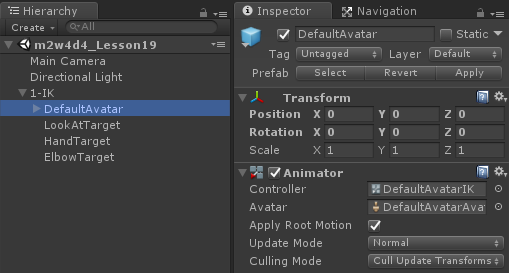
设置头、手、肘的目标点
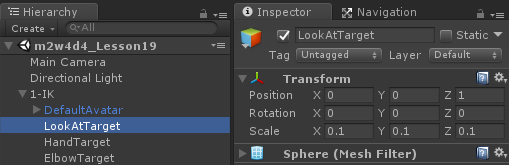
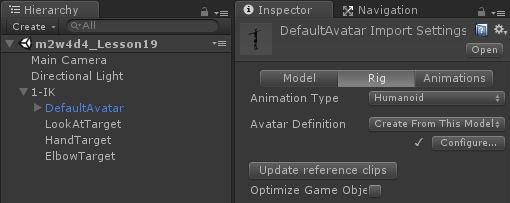
2、动画类型必须是Humanoid,除此之外其他类型都不可以
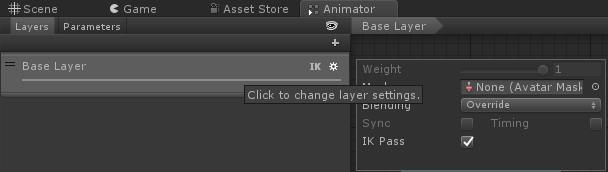
3、动画系统对应层级的IKPass必须开启
4、相应的IK调整方法只能写在OnAnimatorIK(脚本挂载和Animator同一级别)
using System.Collections;

using System.Collections.Generic;

using UnityEngine;

public class DefaultAvatarIK : MonoBehaviour {

    public Animator anim;

    public Transform lookPoint;

    public Transform HandPoint;

    public Transform ElbowPoint;

    // Use this for initialization

    void Start () {

       }

       // Update is called once per frame

       void Update () {

       }

    private void OnAnimatorIK(int layerIndex)

    {

        //用代码调整头部看向的方向

        anim.SetLookAtPosition(lookPoint.position);

        //调整IK动画的权重

        //如果是1代表完全按代码逻辑播放动画(完全融合)

        //如果是0完全按原动画播放

        anim.SetLookAtWeight();

        //调整四肢IK的目标点

        anim.SetIKPosition(AvatarIKGoal.LeftHand, HandPoint.position);//AvatarIKGoal是枚举

        anim.SetIKPositionWeight(AvatarIKGoal.LeftHand, );

        //调整四肢IK关节的目标点

        anim.SetIKHintPosition(AvatarIKHint.RightElbow, ElbowPoint.position);

        anim.SetIKHintPositionWeight(AvatarIKHint.RightElbow, );

        //调整四肢IK的朝向

        //anim.SetIKRotation();

    }

}
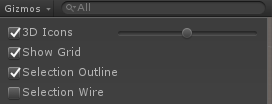
取消物体描边
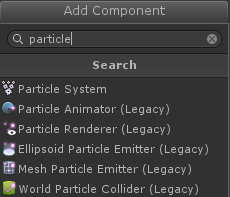
一个粒子效果由若干个Particle System构成


可以通过SizeOverLife曲线

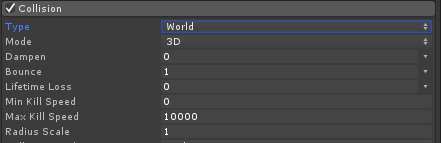
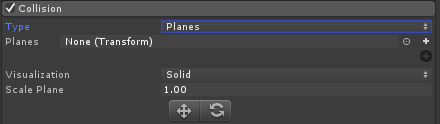
也可以选择Type为Planes,设置一个平面触发效果
拖尾效果
脚本使用:播放,停止,销毁
using System.Collections;

using System.Collections.Generic;

using UnityEngine;

public class ParticleTest : MonoBehaviour {

    public ParticleSystem ps;

       // Use this for initialization

       void Start () {

       }

       // Update is called once per frame

       void Update () {

        if (Input.GetKeyDown(KeyCode.Alpha1))

        {

            //调用粒子系统播放

            ps.Play();

        }

        if (Input.GetKeyDown(KeyCode.Alpha2))

        {

            //调用粒子系统停止

            ps.Stop();

        }

        if (Input.GetKeyDown(KeyCode.Alpha3))

        {

            if (ps.isStopped)

            {

                //失活粒子

                gameObject.SetActive(false);

            }

        }

    }

}
重载,连同子级一起处理,填flase只负责自身

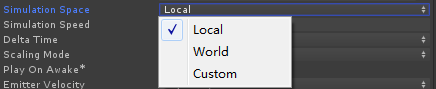
取消唤醒,改为代码播放

using System.Collections;

using System.Collections.Generic;

using UnityEngine;

public class MonsterA : MonsterBase {

    public Animator anim;

    public Transform pathParent;

    public List<Transform> pathNodeList;

    public int currentPathNodeID;

    public float speed;

       // Use this for initialization

       void Start () {

        anim = GetComponent<Animator>();

        //初始化路点列表

        pathNodeList = new List<Transform>();

        //把路点导入到路点列表

        for (int i = ; i < pathParent.childCount; i++)

        {

            pathNodeList.Add(pathParent.GetChild(i));

        }

        //把自己放在路点的第一个位置

        transform.position = pathNodeList[].position;

        currentPathNodeID = ;

        monsterSta = MonsterSta.Move;

        anim.SetBool("isMove", true);

    }

       // Update is called once per frame

       void Update () {

        #region 动画测试

        //if (Input.GetKeyDown(KeyCode.Alpha1))

        //{

        //    monsterSta = MonsterSta.Move;

        //    anim.SetBool("isMove", true);

        //}

        //if (Input.GetKeyDown(KeyCode.Alpha2))

        //{

        //    monsterSta = MonsterSta.Idle;

        //    anim.SetBool("isMove", false);

        //}

        //if (Input.GetKeyDown(KeyCode.Alpha3))

        //{

        //    monsterSta = MonsterSta.Death;

        //    anim.SetTrigger("Death");

        //}

        #endregion

        Action();

    }

    public override void Action()

    {

        switch (monsterSta)

        {

            case MonsterSta.Idle:

                Idle();

                break;

            case MonsterSta.Move:

                Move();

                break;

            case MonsterSta.Death:

                Death();

                break;

            default:

                break;

        }

    }

    public override void Move()

    {

        //如果怪物还没有到达路点中最后一个点

        if (currentPathNodeID < pathNodeList.Count-)

        {

            //向下一个点前进

            float distance = Vector3.Distance(transform.position, pathNodeList[currentPathNodeID + ].position);

            transform.position = Vector3.Lerp(transform.position, pathNodeList[currentPathNodeID + ].position, speed/ distance*Time.deltaTime);

            //如果我离下一个点的距离到达某一个值

            Quaternion targetRot = Quaternion.LookRotation(pathNodeList[currentPathNodeID + ].position - pathNodeList[currentPathNodeID].position);

            transform.rotation = Quaternion.Slerp(transform.rotation, targetRot, 0.1f);

            //transform.LookAt(pathNodeList[currentPathNodeID + 1]);

            if (distance < speed * Time.deltaTime)

            {

                //改变我的当前点,进而改变目标点,成下一个点

                currentPathNodeID++;

            }

        }

    }

}
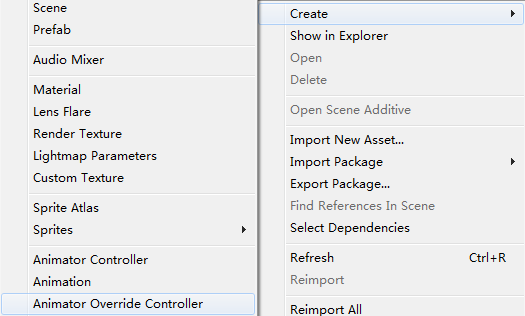
保留原动画状态机的逻辑,可以替换原动画片段
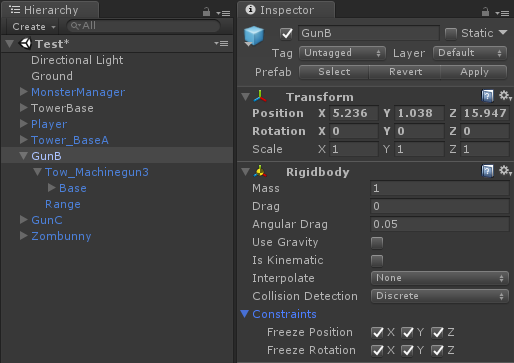
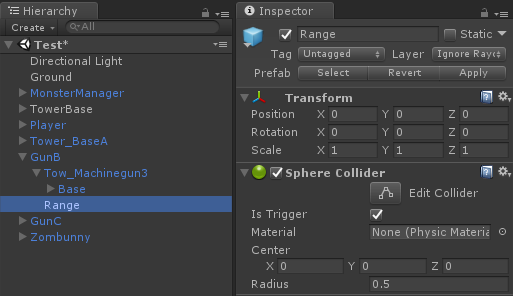
内层添加球形碰撞体,勾选Is Trigger
塔基父类代码逻辑
using System.Collections;

using System.Collections.Generic;

using UnityEngine;

public class GunBase : MonoBehaviour {

    public float attackRange;

    public MonsterBase tragetMonster;

    public SphereCollider attackTrigger;

    // Use this for initialization

    void Start () {

    }

       // Update is called once per frame

       void Update () {

       }

    public virtual void Indit() {

        attackTrigger.radius = attackRange;

    }

    public virtual void Attack() {

    }

}
塔基子类代码逻辑
using System.Collections;

using System.Collections.Generic;

using UnityEngine;

public class GunB : GunBase {

    public Transform gunPos;

    public ParticleSystem ps;

       // Use this for initialization

    void Start () {

        Indit();

    }

       // Update is called once per frame

    void Update () {

        Attack();

        fireCDTime += Time.deltaTime;

       }

    public override void Attack()

    {

        if (tragetMonster!=null)

        {

            if (AttackCheck())

            {

                if (fireCDTime> fireCD)

                {

                    Fire();

                }

            }

            else

            {

                RotatGun();

            }

        }

        else

        {

            ps.Stop();

        }

    }

    public void RotatGun() {

        Vector3 dir = tragetMonster.transform.position - gunPos.position;

        dir.y = ;

        Quaternion targetRot = Quaternion.LookRotation(dir);

        gunPos.rotation = Quaternion.Slerp(gunPos.rotation, targetRot, 0.5f);

    }

    float fireCD = 0.1f;

    float fireCDTime;

    public void Fire() {

        fireCDTime = ;

        tragetMonster.Damage();

        ps.Play();//特效代码逻辑

    }

    public bool AttackCheck() {

        Vector3 monsterDir = tragetMonster.transform.position - gunPos.position;

        monsterDir.y = ;

        if (Vector3.Angle(gunPos.forward, monsterDir)<)

        {

            return true;

        }

        return false;

    }

    //如果有物体进入我的攻击范围

    private void OnTriggerEnter(Collider other)

    {

        //如果我没有目标

        if (tragetMonster==null)

        {

            //如果进入我攻击范围的Collider标签是"Monster"

            if (other.tag == "Monster")

            {

                //把这个Monster设置成我的目标

                tragetMonster = other.GetComponent<MonsterBase>();

            }

        }

    }

    //如果有物体离开我的攻击范围

    private void OnTriggerExit(Collider other)

    {

        //如果我有目标

        if (tragetMonster != null)

        {

            //如果离开的目标是我的目标

            if (tragetMonster == other.GetComponent<MonsterBase>())

            {

                //我的目标为空

                tragetMonster = null;

            }

        }

    }

}
设置攻击范围
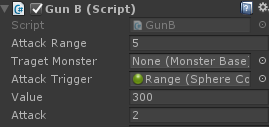
塔基父类代码逻辑:设置Indit初始化,给碰撞器添加攻击范围
public virtual void Indit() {

    attackTrigger.radius = attackRange;

}
    public override void Attack()

    {

        if (tragetMonster!=null)

        {

            if (AttackCheck())

            {

                if (fireCDTime> fireCD)

                {

                    Fire();

                }

            }

            else

            {

                RotatGun();

            }

        }

        else

        {

            ps.Stop();

        }

    }

    public void RotatGun() {

        Vector3 dir = tragetMonster.transform.position - gunPos.position;

        dir.y = ;

        Quaternion targetRot = Quaternion.LookRotation(dir);

        gunPos.rotation = Quaternion.Slerp(gunPos.rotation, targetRot, 0.5f);

    }
    public void RotatGun() {

        Vector3 dir = tragetMonster.transform.position - gunPos.position;

        dir.y = ;

        Quaternion targetRot = Quaternion.LookRotation(dir);

        gunPos.rotation = Quaternion.Slerp(gunPos.rotation, targetRot, 0.5f);

    }

    float fireCD = 0.1f;

    float fireCDTime;

    public void Fire() {

        fireCDTime = ;

        tragetMonster.Damage();

        ps.Play();//特效代码逻辑

    }

    public bool AttackCheck() {

        Vector3 monsterDir = tragetMonster.transform.position - gunPos.position;

        monsterDir.y = ;

        if (Vector3.Angle(gunPos.forward, monsterDir)<)

        {

            return true;

        }

        re
Unity3D学习笔记(十七):IK动画、粒子系统和塔防的更多相关文章
- python3.4学习笔记(十七) 网络爬虫使用Beautifulsoup4抓取内容
python3.4学习笔记(十七) 网络爬虫使用Beautifulsoup4抓取内容 Beautiful Soup 是用Python写的一个HTML/XML的解析器,它可以很好的处理不规范标记并生成剖 ...
- iOS学习笔记-自定义过渡动画
代码地址如下:http://www.demodashi.com/demo/11678.html 这篇笔记翻译自raywenderlick网站的过渡动画的一篇文章,原文用的swift,由于考虑到swif ...
- unity3d学习笔记(一) 第一人称视角实现和倒计时实现
unity3d学习笔记(一) 第一人称视角实现和倒计时实现 1. 第一人称视角 (1)让mainCamera和player(视角对象)同步在一起 因为我们的player是生成的,所以不能把mainCa ...
- Unity3D学习笔记2——绘制一个带纹理的面
目录 1. 概述 2. 详论 2.1. 网格(Mesh) 2.1.1. 顶点 2.1.2. 顶点索引 2.2. 材质(Material) 2.2.1. 创建材质 2.2.2. 使用材质 2.3. 光照 ...
- Unity3D学习笔记3——Unity Shader的初步使用
目录 1. 概述 2. 详论 2.1. 创建材质 2.2. 着色器 2.2.1. 名称 2.2.2. 属性 2.2.3. SubShader 2.2.3.1. 标签(Tags) 2.2.3.2. 渲染 ...
- Unity3D学习笔记4——创建Mesh高级接口
目录 1. 概述 2. 详论 3. 其他 4. 参考 1. 概述 在文章Unity3D学习笔记2--绘制一个带纹理的面中使用代码的方式创建了一个Mesh,不过这套接口在Unity中被称为简单接口.与其 ...
- Unity3D学习笔记6——GPU实例化(1)
目录 1. 概述 2. 详论 3. 参考 1. 概述 在之前的文章中说到,一种材质对应一次绘制调用的指令.即使是这种情况,两个三维物体使用同一种材质,但它们使用的材质参数不一样,那么最终仍然会造成两次 ...
- Unity3D学习笔记7——GPU实例化(2)
目录 1. 概述 2. 详论 2.1. 实现 2.2. 解析 3. 参考 1. 概述 在上一篇文章<Unity3D学习笔记6--GPU实例化(1)>详细介绍了Unity3d中GPU实例化的 ...
- Unity3D学习笔记8——GPU实例化(3)
目录 1. 概述 2. 详论 2.1. 自动实例化 2.2. MaterialPropertyBlock 3. 参考 1. 概述 在前两篇文章<Unity3D学习笔记6--GPU实例化(1)&g ...
- Unity3D学习笔记12——渲染纹理
目录 1. 概述 2. 详论 3. 问题 1. 概述 在文章<Unity3D学习笔记11--后处理>中论述了后处理是帧缓存(Framebuffer)技术实现之一:而另外一个帧缓存技术实现就 ...
随机推荐
- 【Jason】Jason拓展
Java-script是最基础语言(即前端脚本),而jquery是基于javascript封装出来的包,这些包里面含有能调用ajax的方法. ajax是一种异步交互,局部刷新的一种形式,是一种通讯 ...
- Jedis 对 Redis 的操作详解
1. JedisUtil2. 键操作3. 字符串操作4. 字节串4. 整数和浮点数5. 列表6. 集合(Set)7. 散列8. 排序sort 本篇主要阐述Jedis对redis的五大类型的操作:字符串 ...
- shell date 获取昨天日期
使用date -d 选项: date +"%Y%m%d" -d "+n days" 今天的后n天日期 date +" ...
- easyUI中datebox的格式显示
使用datebox的问题: 1.需要YYYY-MM-dd这种时间格式: 2.月份显示的是中文. 上述两个问题只要引入国际化的js文件即可. 注:下图为easyUI使用时需要引入的文件,红框就可以解决上 ...
- C语言进阶之路(三)----野指针的产生原因及解决办法
1.会产生野指针的做法 #include <stdio.h> //这就是一种错误的写法 int main(){ int *p = NULL; p = (); //释放P所指向的内存空间,但 ...
- js值类型和引用类型的区别
1:赋值 值类型的赋值:直接将存储的数据赋值一份进行赋值,两份数据在内存中是完全独立的. 引用类型赋值:引用类型的赋值的时候,是将变量中的存储的地址赋值一份单独存储,但是两个变量中修改其中一个对象,另 ...
- 015-awk
1.awk的处理方式: 一次处理一行. 对每行可以进行切片处理,针对字段处理.2.awk的格式: awk BEGIN{循环之前初始化} [options] 'command' END{循环之后结尾} ...
- zw版【转发·台湾nvp系列Delphi例程】HALCON BitXor
zw版[转发·台湾nvp系列Delphi例程]HALCON BitXor procedure TForm1.Button1Click(Sender: TObject);var image0, imag ...
- Understanding Convolutional Neural Networks for NLP
When we hear about Convolutional Neural Network (CNNs), we typically think of Computer Vision. CNNs ...
- iOS 绘图 (UIImage的一些操作)
UIGraphicsBeginImageContextWithOptions,本文主要在图片类型上下文中对图片进行操作,具体实现的功能: - 1.生成图片 - 2.绘制图片到视图 - 3.添加水印 ...