
【大数据系列】windows下连接Linux环境开发
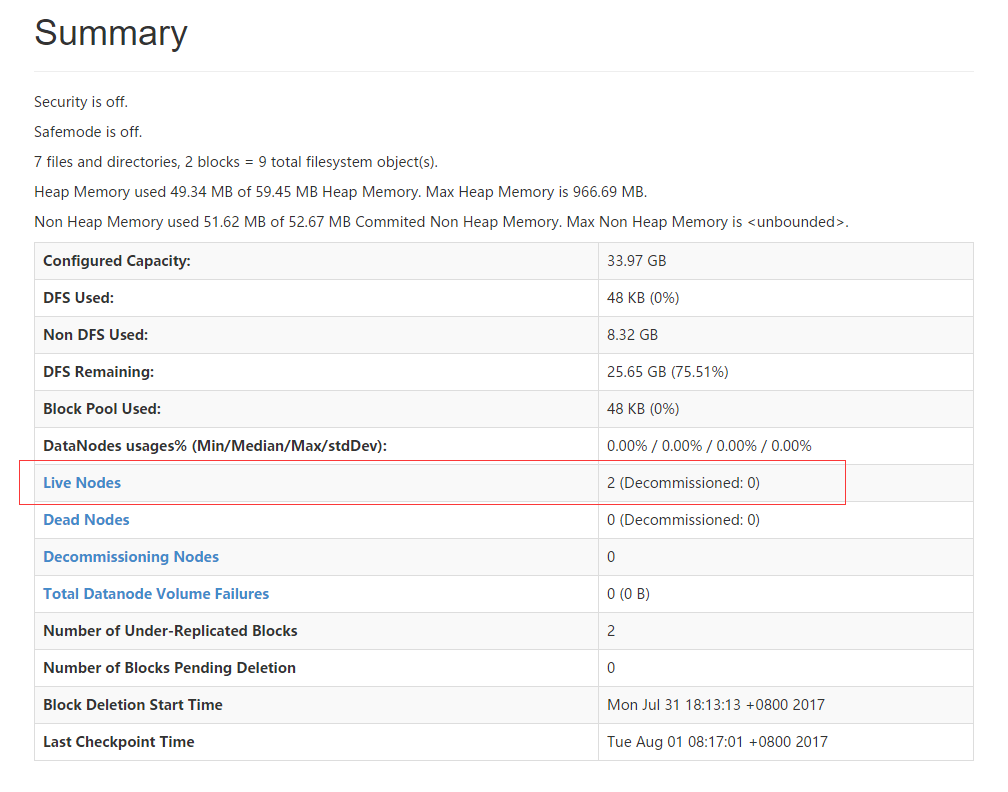
一、配置文件
1.core-site.xml
<configuration>

   <property>

     <name>fs.defaultFS</name>

     <value>hdfs://www.node1.com:9000</value>

   </property>

</configuration>
2、hdfs-site.xml
<configuration>

  <property>

    <name>dfs.replication</name>

    <value>2</value>

  </property>

</configuration>
3、yarn-site.xml
<property>

<name>yarn.resourcemanager.hostname</name>

<value>www.node1.com</value>

</property>

<property>

<name>yarn.nodemanager.aux-services</name>

<value>mapreduce_shuffle</value>

</property>

</configuration>
4、slaves
www.node2.com

www.node3.com
二、建立本地连接
三、创建MapReduceProject
1、File -- new - Other --MapReduceProject
2、建立测试文件
import java.io.IOException;

import java.util.StringTokenizer;

import org.apache.hadoop.conf.Configuration;

import org.apache.hadoop.fs.Path;

import org.apache.hadoop.io.IntWritable;

import org.apache.hadoop.io.Text;

import org.apache.hadoop.mapreduce.Job;

import org.apache.hadoop.mapreduce.Mapper;

import org.apache.hadoop.mapreduce.Reducer;

import org.apache.hadoop.mapreduce.lib.input.FileInputFormat;

import org.apache.hadoop.mapreduce.lib.output.FileOutputFormat;

import org.apache.hadoop.util.GenericOptionsParser;

public class WordCount {

    public static class TokenizerMapper

    extends Mapper<Object, Text, Text, IntWritable>{

    private final static IntWritable one = new IntWritable(1);

    private Text word = new Text();

    public void map(Object key, Text value, Context context

    ) throws IOException, InterruptedException {

    StringTokenizer itr = new StringTokenizer(value.toString());

    while (itr.hasMoreTokens()) {

    word.set(itr.nextToken());

    context.write(word, one);

    }

    }

    }

    public static class IntSumReducer

    extends Reducer<Text,IntWritable,Text,IntWritable> {

    private IntWritable result = new IntWritable();

    public void reduce(Text key, Iterable<IntWritable> values,

    Context context

    ) throws IOException, InterruptedException {

    int sum = 0;

    for (IntWritable val : values) {

    sum += val.get();

    }

    result.set(sum);

    context.write(key, result);

    }

    }

    public static void main(String[] args) throws Exception {

    Configuration conf = new Configuration();

    String[] otherArgs = new GenericOptionsParser(conf, args).getRemainingArgs();

    if (otherArgs.length != 2) {

    System.err.println(otherArgs.length);

    System.err.println("Usage: wordcount <in> <out>");

    System.exit(2);

    }

    System.out.println(otherArgs[0]);

    System.out.println(otherArgs[1]);

    Job job = new Job(conf, "word count");

    job.setJarByClass(WordCount.class);

    job.setMapperClass(TokenizerMapper.class);

    job.setCombinerClass(IntSumReducer.class);

    job.setReducerClass(IntSumReducer.class);

    job.setOutputKeyClass(Text.class);

    job.setOutputValueClass(IntWritable.class);

    FileInputFormat.addInputPath(job, new Path(otherArgs[0]));

    FileOutputFormat.setOutputPath(job, new Path(otherArgs[1]));

    System.exit(job.waitForCompletion(true) ? 0 : 1);

    }

}
3、run configuration
hdfs://www.node1.com:9000/usr/wc

hdfs://www.node1.com:9000/usr/wc/output
4、run
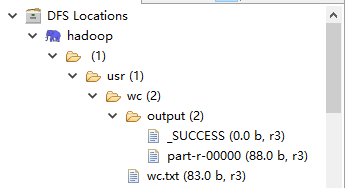
5、part-r-00000
apple    2

banana    1

cat    1

dog    1

hadoop    1

hadpp    1

hello    1

mapreduce    1

name    1

world    1

yarn    2
6、wc.txt
hadoop hello

hadpp world

apple dog

banana cat

mapreduce name

yarn

apple

yarn
【大数据系列】windows下连接Linux环境开发的更多相关文章
- 在Windows下配置Linux远程开发环境
在Windows下配置Linux远程开发环境 欢迎光临我的个人博客 https://source.chens.life/Configure-Linux-remote-development-envir ...
- 在windows下使用linux的开发环境
windows下做开发确实有些不方便,比如python.ruby什么的都要自己装,不过这还是小事情.有一次想安装node-sass,windows下报错缺少MSBuild什么的,可能需要装一个vs解决 ...
- 【大数据系列】win10上安装hadoop开发环境
为了方便采用了Cygwin模拟linux环境的方法 一.安装JDK以及下载hadoop hadoop官网下载hadoop http://hadoop.apache.org/releases.html ...
- 【大数据系列】在windows下连接linux 下的hadoop环境进行开发
一.下载Eclipse并安装 二.下载exlipse的hadoop plugin 三.打开Map Reduce视图 Window --> Perspective --> Open pers ...
- 大数据:Windows下配置flink的Stream
对于开发人员来说,最希望的是需要在windows中进行测试,然后把调试好的程序放在集群中运行.下面写一个Socket,上面是监控本地的一个运行端口,来实时的提取数据.获取视频中文档资料及完整视频的伙伴 ...
- Android学习——windows下搭建Cygwin环境
在上一篇博文<Android学习——windows下搭建NDK_r9环境>中,我们详细的讲解了在windows下进行Android NDK开发环境的配置,我们也讲到了在NDk r7以后,我 ...
- windows下搭建Cygwin环境
windows下搭建Cygwin环境 在上一篇博文<Android学习——windows下搭建NDK_r9环境>中,我们详细的讲解了在windows下进行Android NDK开发环境的配 ...
- 12.Linux软件安装 (一步一步学习大数据系列之 Linux)
1.如何上传安装包到服务器 有三种方式: 1.1使用图形化工具,如: filezilla 如何使用FileZilla上传和下载文件 1.2使用 sftp 工具: 在 windows下使用CRT 软件 ...
- 【转】linux和windows下安装python集成开发环境及其python包
本系列分为两篇: 1.[转]windows和linux中搭建python集成开发环境IDE 2.[转]linux和windows下安装python集成开发环境及其python包 3.windows和l ...
随机推荐
- CI框架 -- 核心文件 之 Hooks.php
钩子 - 扩展框架核心 CodeIgniter 的钩子特性提供了一种方法来修改框架的内部运作流程,而无需修改 核心文件.CodeIgniter 的运行遵循着一个特定的流程,你可以参考这个页面的 应用程 ...
- android中清空一个表---类似truncate table 表名 这样的功能 android sqlite 清空数据库的某个表
public void clearFeedTable(){ String sql = "DELETE FROM " + FEED_TABLE_NAME +";" ...
- Php反转字符串函数
From: http://blog.csdn.net/happy664618843/article/details/5861138
- Android立刻终止一个线程
/** * Created by JuTao on 2017/2/4. * 如何中止一个线程 */ public class ThreadDone { public static void main( ...
- hql Hibernate.gethibernatetemplate()
1. find(String hql); //普通查询 示例:this.gethibernateTemplate().find("from User"); 2. find(Str ...
- sp_replication_agent_checkup
Transact-SQL 参考sp_replication_agent_checkup 检查每个分发数据库的复制代理程序,这些复制代理程序正在运行但在指定的心跳信号间隔内没有历史记录.此存储过程在分发 ...
- 在PHP中使用curl_init函数的说明
$ch = curl_init(); $c_url = 'http://www.baidu.com'; $c_url_data = "product_&type=".$ty ...
- Masonry插件:内容始终水平居中
跟随浏览器框架大小,主题内容居中 代码 <!DOCTYPE html> <html> <head> <title>masonry瀑布流插件</ti ...
- MVC Controller向View传递数据
ASP.NET MVC中,Controller向View传递数据的方式有一下6种 ViewData ViewBag PartialView TempData ViewModel Tuple 1.Vie ...
- ios开发之--把秒转换为天时分秒
把秒转换成时分秒: - (NSString *)timeFormatted:(int)totalSeconds { ; ) % ; ; return [NSString stringWithForma ...