
Android之极光推送发送自定义消息
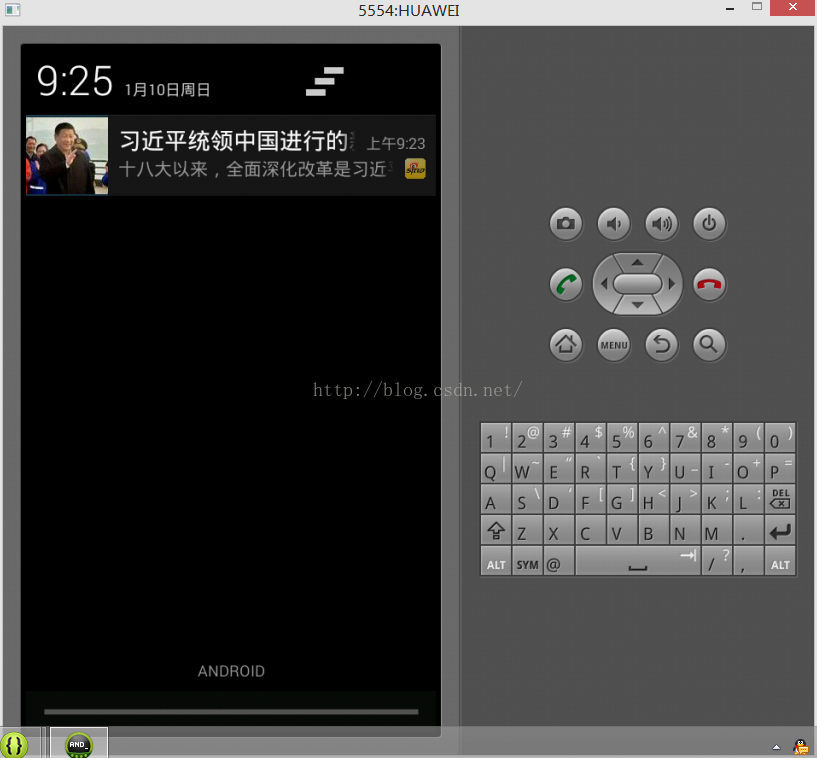
Android端实现主要代码:
<span style="font-size:14px;">import java.io.IOException;

import java.io.InputStream;

import java.net.HttpURLConnection;

import java.net.MalformedURLException;

import java.net.URL;

import org.json.JSONException;

import org.json.JSONObject;

import android.annotation.SuppressLint;

import android.app.Notification;

import android.app.NotificationManager;

import android.app.PendingIntent;

import android.content.BroadcastReceiver;

import android.content.Context;

import android.content.Intent;

import android.graphics.Bitmap;

import android.graphics.BitmapFactory;

import android.os.Bundle;

import android.os.Handler;

import android.os.Message;

import android.support.v4.app.NotificationCompat;

import com.mine.xinlangapp.R;

import com.mine.xinlangapp.activity.BaseActivity;

import cn.jpush.android.api.JPushInterface;

/**

 * 自定义接收器

 *

 * 如果不定义这个 Receiver,则:

 * 1) 默认用户会打开主界面

 * 2) 接收不到自定义消息

 */

public class MyReceiver extends BroadcastReceiver {

	private Bitmap bitmap = null;

	private NotificationManager notifyManager = null;

	private NotificationCompat.Builder notifyBuilder = null;

	private Notification notification = null;

    private String url = "";

	@SuppressLint("HandlerLeak")

	private Handler handler = new Handler(){

		@Override

		public void handleMessage(Message msg){

			if(bitmap!=null){

				notifyBuilder.setLargeIcon(bitmap);

			}else{

				notifyBuilder.setSmallIcon(R.drawable.sina);

			}

			notification = notifyBuilder.build();

			notification.defaults |= Notification.DEFAULT_SOUND;

			notification.defaults |= Notification.DEFAULT_VIBRATE;

			notifyManager.notify(1000, notification);

		}

	};

	@SuppressLint("InflateParams")

	@Override

	public void onReceive(Context context, Intent intent) {

        Bundle bundle = intent.getExtras();

        /*

        //  自定义样式放在init()之后.

        CustomPushNotificationBuilder builder=new CustomPushNotificationBuilder(

       		 context.getApplicationContext(),

       		 R.layout.customer_notitfication_layout,

       		 R.id.icon, R.id.title, R.id.text);

        builder.layoutIconDrawable=R.drawable.menu_home;  //下拉状态时显示的通知图标.

        builder.layout = R.layout.customer_notitfication_layout;

        JPushInterface.setPushNotificationBuilder(2, builder);

        */

        if (JPushInterface.ACTION_MESSAGE_RECEIVED.equals(intent.getAction())) {

        	/*

        	//接收到推送下来的自定义消息,开启服务执行耗时的操作

        	Intent i = new Intent(context, MyService.class);

        	i.putExtras(bundle);

        	context.startService(i);

        	*/

        	processCustomMessage(context, bundle);

        }else if(JPushInterface.ACTION_NOTIFICATION_RECEIVED.equals(intent.getAction())){

        }else if (JPushInterface.ACTION_NOTIFICATION_OPENED.equals(intent.getAction())) {

        	Intent i = new Intent(context, BaseActivity.class);

        	bundle.putBoolean("push", true);

        	i.putExtras(bundle);

        	//i.setFlags(Intent.FLAG_ACTIVITY_NEW_TASK);

        	i.setFlags(Intent.FLAG_ACTIVITY_NEW_TASK | Intent.FLAG_ACTIVITY_CLEAR_TOP );

        	context.startActivity(i);

        }

	}

	private void processCustomMessage(Context context, Bundle bundle){

		notifyManager = (NotificationManager) context.getSystemService(Context.NOTIFICATION_SERVICE);

		notifyBuilder = new NotificationCompat.Builder(context);

		String title = bundle.getString(JPushInterface.EXTRA_TITLE);

		String message = bundle.getString(JPushInterface.EXTRA_MESSAGE);

        String extras = bundle.getString(JPushInterface.EXTRA_EXTRA);

        //自定义信息: 获取

        if (extras != null) {

            try {

                JSONObject object = new JSONObject(extras);

                url = object.optString("src");

            } catch (JSONException e) {

                e.printStackTrace();

            }

        }

    	Intent i = new Intent(context, BaseActivity.class);

    	bundle.putBoolean("push", true);

    	i.putExtras(bundle);

    	PendingIntent pi = PendingIntent.getActivity(context, 1000, i, PendingIntent.FLAG_UPDATE_CURRENT);

    	notifyBuilder.setContentTitle(title);

        notifyBuilder.setContentText(message);

        notifyBuilder.setContentIntent(pi);

        notifyBuilder.setAutoCancel(true);

		new Thread(new Runnable() {

			@Override

			public void run() {

				bitmap = returnBitMap(url);

				handler.sendEmptyMessage(1);

			}

		}).start();

		handler.sendEmptyMessage(1);  //这里要先发送一次,因为</span><span style="font-size:14px;">onReceive</span><span style="font-size:14px;">方法实现不可以超过10秒,获取图片是耗时的,然而Notification没有图片通知是发送不了的。

	}

	//以Bitmap的方式获取一张图片

	public Bitmap returnBitMap(String url){

		URL myFileUrl = null;

		Bitmap bitmap = null;

		try{

			myFileUrl = new URL(url);

		}catch(MalformedURLException e){

			e.printStackTrace();

		}

		try{

			HttpURLConnection conn = (HttpURLConnection) myFileUrl.openConnection();

			conn.setDoInput(true);

			conn.connect();

			InputStream is = conn.getInputStream();

			bitmap = BitmapFactory.decodeStream(is);

			is.close();

		}catch(IOException e){

			e.printStackTrace();

		}

		return bitmap;

	}

}

</span>
服务器端java代码:
<span style="font-size:14px;">import java.util.HashMap;

import java.util.Map;

import java.util.Timer;

import java.util.TimerTask;

import org.jsoup.Jsoup;

import org.jsoup.nodes.Document;

import org.jsoup.nodes.Element;

import org.jsoup.select.Elements;

import cn.jpush.api.ErrorCodeEnum;

import cn.jpush.api.JPushClient;

import cn.jpush.api.MessageResult;

public class JPushClientExample {

	private static final String appKey ="43bbac097a385c25c157e385";	//必填,例如</span><span style="font-size:14px;">43bbac097a385c25c157e385</span><span style="font-size:14px;">

	private static final String masterSecret = "90ac96cf260c77e64cc2004b";//"</span><span style="font-size:14px;">90ac96cf260c77e64cc2004b</span><span style="font-size:14px;">";//必填,每个应用都对应一个masterSecret

	private static JPushClient jpush = null;

	/**

	 * 保存离线的时长。秒为单位。最多支持10天(864000秒)。

	 * 0 表示该消息不保存离线。即:用户在线马上发出,当前不在线用户将不会收到此消息。

	 * 此参数不设置则表示默认,默认为保存1天的离线消息(86400秒)。

	 */

	private static long timeToLive = 60 * 60 * 24;

	private static String top_href = "";

//	public static void main(String[] args) {

	public void main(){

		/*

		 * Example1: 初始化,默认发送给android和ios,同时设置离线消息存活时间

		 * jpush = new JPushClient(masterSecret, appKey, timeToLive);

		 */

		/*

		 * Example2: 只发送给android

		 * jpush = new JPushClient(masterSecret, appKey, DeviceEnum.Android);

		 */

		/*

		 * Example3: 只发送给IOS

		 * jpush = new JPushClient(masterSecret, appKey, DeviceEnum.IOS);

		 */

		/*

		 * Example4: 只发送给android,同时设置离线消息存活时间

		 * jpush = new JPushClient(masterSecret, appKey, timeToLive, DeviceEnum.Android);

		 */

		jpush = new JPushClient(masterSecret, appKey, timeToLive);

		/*

		 * 是否启用ssl安全连接, 可选

		 * 参数:启用true, 禁用false,默认为非ssl连接

		 */

		//jpush.setEnableSSL(true);

		Timer timer = new Timer();

		//在1秒后执行此任务,每次间隔半小时,如果传递一个Data参数,就可以在某个固定的时间执行这个任务

		timer.schedule(new MyTask(), 1000, 1800*1000);

	}

	private static class MyTask extends TimerTask{

		@Override

		public void run() {

			Map<String, String> map = getNews();

			String href = map.get("href");

			if(!top_href.equals(href)){     //判断与上次发送的是否相同,不相同就推送

				top_href = href;

				//测试发送消息或者通知

				testSend(map);

			}

		}

	}

	private static Map<String, String> getNews(){

		Document doc = null;

		Map<String, String> map = new HashMap<String, String>();

        try {

        	 doc = Jsoup.connect("http://news.sina.cn/").get();

             Elements ListDiv = doc.getElementsByAttributeValue("class","carditems");

 			for (int i = 0; i<ListDiv.select("dl").size() ; i++) {

 				Element a = ListDiv.select("a").get(i);

 				String href = a.attr("href");

 				Element dl = ListDiv.select("dl").get(i);

 				Element dd = dl.select("dd").get(0);

 				Elements dt = dl.getElementsByTag("img");

 				Elements h3 = dd.select("h3");    //标题

 				Elements h4 = dd.select("h4");	//内容

 				String title = h3.text();

 				String fu_title = h4.text();

 				String url = dt.attr("src"); // 图片链接

 				if(fu_title!=null && !fu_title.equals("")){

	        			map.put("src", url);

	        			map.put("title", title);

	        			map.put("fu_title", fu_title);

	        			map.put("href", href);

	        			break;

 				}

 			}

        } catch (Exception e) {

            e.printStackTrace();

        }

        return map;

	}

	private static void testSend(Map<String, String> map) {

		// 在实际业务中,建议 sendNo 是一个你自己的业务可以处理的一个自增数字。

		// 除非需要覆盖,请确保不要重复使用。详情请参考 API 文档相关说明。

		int sendNo = getRandomSendNo();

		//String msgTitle = "+;//jpush\"\"";

		//String msgContent = "\\&;w\"\"a--【\npush】";

		String href = map.get("href");

		String msgTitle = map.get("title");

		String msgContent=map.get("fu_title");

		String url = map.get("src");    //图片地址

		/*

		 * IOS设备扩展参数,

		 * 设置badge,设置声音

		 */

		Map<String, Object> extra = new HashMap<String, Object>();

		extra.put("href", href);

		extra.put("src", url);

	//	IOSExtra iosExtra = new IOSExtra(10, "WindowsLogonSound.wav");

	//	extra.put("ios", iosExtra);

		//对所有用户发送通知, 更多方法请参考文档    message字段

	//	MessageResult msgResult = jpush.sendNotificationWithAppKey(sendNo, msgTitle, msgContent, 2, extra);

		MessageResult msgResult = jpush.sendCustomMessageWithAppKey(sendNo, msgTitle, msgContent, "a", extra);  //发送自定义消息

		//MessageResult msgResult = jpush.sendCustomMessageWithAppKey(sendNo,msgTitle, msgContent);

		//MessageResult msgResult  = jpush.sendNotificationWithAlias(sendNo, "a", msgTitle, msgContent);

		//覆盖指定msgId的消息,msgId可以从msgResult.getMsgid()获取。

		//MessageResult msgResult = jpush.sendNotificationWithAppKey(sendNo, msgTitle, msgContent, 0, extra,msgResult.getMsgid());

		if (null != msgResult) {

			System.out.println("服务器返回数据: " + msgResult.toString());

			if (msgResult.getErrcode() == ErrorCodeEnum.NOERROR.value()) {

				System.out.println(String.format("发送成功, sendNo= %s,messageId= %s",msgResult.getSendno(),msgResult.getMsg_id()));

			} else {

				System.out.println("发送失败, 错误代码=" + msgResult.getErrcode() + ", 错误消息=" + msgResult.getErrmsg());

			}

		} else {

			System.out.println("无法获取数据");

		}

	}

	public static final int MAX = Integer.MAX_VALUE;

	public static final int MIN = (int) MAX/2;

	/**

	 * 保持 sendNo 的唯一性是有必要的

	 * It is very important to keep sendNo unique.

	 * @return sendNo

	 */

	public static int getRandomSendNo() {

		return (int) (MIN + Math.random() * (MAX - MIN));

	}

}

</span>
关注公众号,分享干货,讨论技术

Android之极光推送发送自定义消息的更多相关文章
- Android集成极光推送
要说学习极光推送,个人感觉官方文档就非常好啦,但是没法,人太懒啦,为了下次能够快速的将极光推送集成到项目中,故结合之前开发的项目和官方文档记录下简单的Android集成极光推送,在这之前,先上一张简单 ...
- Xamarin.Forms学习系列之Android集成极光推送
一般App都会有消息推送的功能,如果是原生安卓或者IOS集成消息推送很容易,各大推送平台都有相关的Sample,但是关于Xamarin.Forms的消息推送集成的资料非常少,下面就说下Xamarin. ...
- Android JPush极光推送应用
JPush纠结了5-6个小时,一直报下面的错误,纠结! [AndroidUtil] AndroidManifest.xml missing required intent filter for Pus ...
- Android JPush(极光推送)的使用教程
首先进入官网https://www.jpush.cn/,先注册一个账号. 注册号以后,创建应用 1.点击右上角进入个人中心 2.点击创建应用 3.在创建应用界面输入自己项目的应用名和应用的包名,输入后 ...
- Ionic项目中使用极光推送-android
对于Ionic项目中使用消息推送服务,Ionic官方提供了ngCordova项目,这个里面的提供了用angularjs封装好的消息推送服务(官方文档),使用的是GitHub上的 PushPlugin ...
- 总结:极光推送java服务端(1)
遇到的问题: 1.怎么用极光推送 2.极光推送发送失败报错 返回{ } 3.透传和推送区别以及怎么设置 我的解决方案: 问题1.极光推送类里面有不同的方法,需要发给那些人就调用相应的方法.有安卓.io ...
- Ionic项目中使用极光推送
Ionic项目中使用极光推送-android 对于Ionic项目中使用消息推送服务,Ionic官方提供了ngCordova项目,这个里面的提供了用angularjs封装好的消息推送服务(官方文档) ...
- JPush Flutter Plugin(Futter推送-极光推送)
https://pub.flutter-io.cn/packages/jpush_flutter JPush's officially supported Flutter plugin (Androi ...
- ios 开发之 -- 极光推送,发送自定义消息,进入制定页面
在进行极光推送时候,发现版本有所更新,以前截取didfinish入口方法里面的launchOptions,获取一个本地的通知内容,进行本地展示不可用了,通过查询官方文档和网上的资料才发现,方法改变了, ...
随机推荐
- POJ 1696 Space Ant(凸包变形)
Description The most exciting space discovery occurred at the end of the 20th century. In 1999, scie ...
- UVA 11922 Permutation Transformer(平衡二叉树)
Description Write a program to transform the permutation 1, 2, 3,..., n according to m instructions. ...
- iOS-开发过程中应用间跳转问题
- 可用于jquery animate()方法的css属性
* backgroundPosition * borderWidth * borderBottomWidth * borderLeftWidth * borderRightWidth * border ...
- 如何在flink中传递参数
众所周知,flink作为流计算引擎,处理源源不断的数据是其本意,但是在处理数据的过程中,往往可能需要一些参数的传递,那么有哪些方法进行参数的传递?在什么时候使用?这里尝试进行简单的总结. 使用conf ...
- Linux中实现在系统启动时自动加载模块
下面是以前学习Linux时写的,后来仔细研究rc.sysinit后发现,只需要修改下列地方就可以了,不必这么麻烦的: rc.sysinit中有这样的一段代码: # Load other user-de ...
- bzoj3998-弦论
给定一个长度为\(n(n\le 5\times 10^5)\)的字符串,求它的第\(k\)小字串.有两种模式: \(Type=0\),不同位置的相同字串只算一个 \(Type=1\),不同位置相同字串 ...
- 【bzoj4278】[ONTAK2015]Tasowanie 贪心+后缀数组
题目描述 给定两个数字串A和B,通过将A和B进行二路归并得到一个新的数字串T,请找到字典序最小的T. 输入 第一行包含一个正整数n(1<=n<=200000),表示A串的长度. 第二行包含 ...
- P1365 WJMZBMR打osu! / Easy
题目背景 原 维护队列 参见P1903 题目描述 某一天WJMZBMR在打osu~~~但是他太弱逼了,有些地方完全靠运气:( 我们来简化一下这个游戏的规则 有 nnn 次点击要做,成功了就是o,失败了 ...
- Oracle数据库表被锁定以及去除方式
select t2.username, t2.sid, t2.serial#, t3.object_name, t2.OSUSER, t2.MACHINE, t2.PROGRAM, t2.LOGON_ ...