
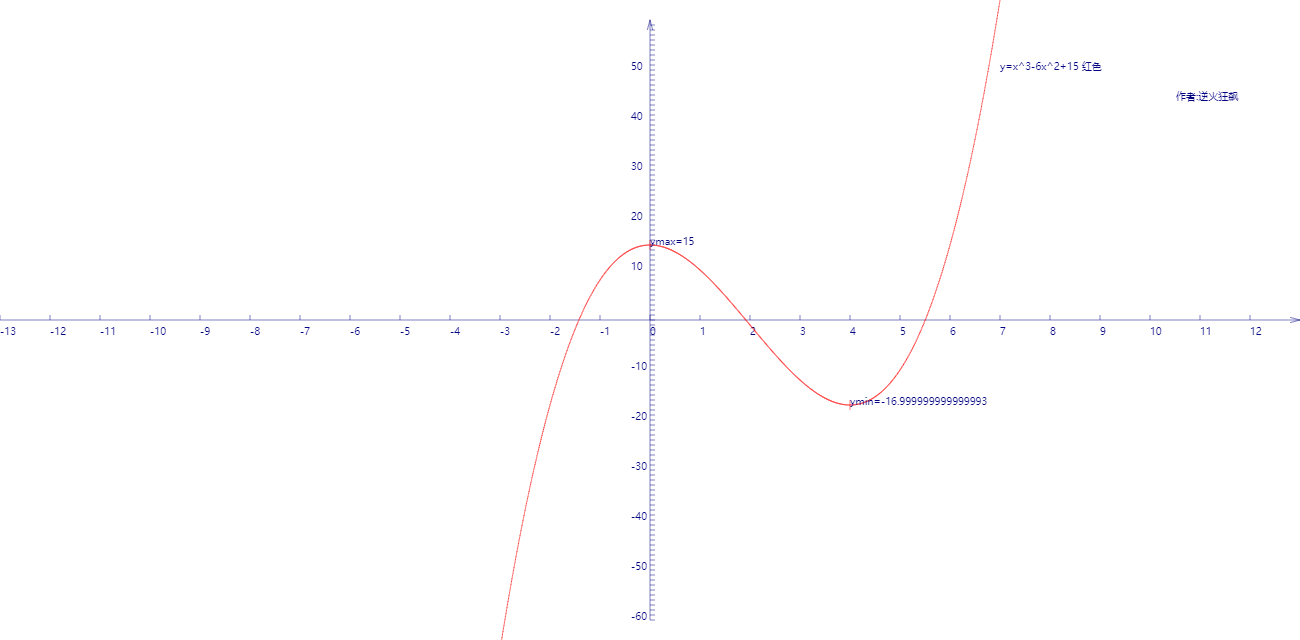
求x>0时,y=x^3-6x^2+15的极值
解:
当x→∞时,y也→∞,所以y没有最大值。
y=x3-6x2+15=-4*(x/2)*(x/2)*(6-x)+15
而根据几何平均数小于等于算术平均数的定理,(x/2)*(x/2)*(6-x)在x/2=6-x时取得最大值,同时y取得最小值。
而x/2=6-x可以得出x=4,此时ymin=16*(-2)+15=-17
上述结果的正确性可以用微分验证,当y的导数y'=3x2-12x=0时,y有极值。
而3x2-12x=0也可以得出x=4.
下图可以直观看出y=x3-6x2+15的极值
曲线:
代码:
<!DOCTYPE html>
<html lang="utf-8">
<meta http-equiv="Content-Type" content="text/html; charset=utf-8"/>
<head>
     <title>绘制函数y=x^3-6x^2+15曲线</title>
    </head>

     <body onload="draw()">
        <canvas id="myCanvus" width="1300px" height="640px" style="border:1px dashed black;">
            出现文字表示你的浏览器不支持HTML5
        </canvas>
     </body>
</html>
<script type="text/javascript">
<!--
    function draw(){
        var canvas=document.getElementById("myCanvus");
        var canvasWidth=1300;
        var canvasHeight=640;

        var context=canvas.getContext("2d");

        context.fillStyle = "white";
        context.fillRect(0, 0, canvasWidth, canvasHeight);

        context.strokeStyle = "black";
        context.fillStyle = "black";

        // 进行坐标变换:把原点放在左下角,东方为X轴正向,北方为Y轴正向
        var offsetY=320;// Y向偏移值,正值向上偏,用来画坐标轴
        var offsetX=650;// X向偏移值,正值向右偏,用来画坐标轴

        context.save();
        context.translate(0+offsetX,canvasHeight-offsetY);

        drawAxisXText(context);// 文字和线分开画比较好处理
        drawAxisYText(context);
        drawTitleText(context);

        context.rotate(getRad(180));
        context.scale(-1,1);

        drawAxisX(context);
        drawAxisY(context);
        drawCurve(context);

        context.restore();
    }

    function drawTitleText(ctx){
        ctx.lineWidth=0.5;
        ctx.strokeStyle='navy';
        ctx.fillStyle='navy';

        var x=350;
        var y=-250;

        // 写文字
        ctx.fillText("y=x^3-6x^2+15 红色",x,y);
        //ctx.fillText("y=x*x-4*x+4 绿色",x,y+20);
        //ctx.fillText("y=x*x 黄色",x,y+40);
        //ctx.fillText("y=x*x+4*x+5 青柠色",x,y+60);
        //ctx.fillText("y=-(x*x-7*x+12)/5 紫色",x,y+80);
        //ctx.fillText("y=-(x*x+2*x+2)*4 栗色",x,y+100);

        ctx.fillText("  作者:逆火狂飙",x+170,y+30);
    }

    function drawCurve(ctx){
        var cds=[{}];
        var cds1=[{}];
        var cds2=[{}];
        var cds3=[{}];
        var cds4=[{}];
        var cds5=[{}];
        var cds6=[{}];

        var ymax=-1000,ymin=1000,xmax,xmin;

        var x,y;
        for(x=-13;x<=13;x+=0.01){
            y=Math.pow(x,3)-6*Math.pow(x,2)+15;//
            var arr={"x":x,"y":y};
            cds.push(arr);
        }

        paintCurve(ctx,"red",cds);

        for(var i=0; i<cds.length; i++){
            // 求y最大值
            if(cds[i].x<0 && cds[i].y>ymax){
                ymax=cds[i].y;
                xmax=cds[i].x;
            }

            // 求y最小值
            if(cds[i].x>=0 && cds[i].y<ymin){
                ymin=cds[i].y;
                xmin=cds[i].x;
            }
        }

        console.log("ymin="+ymin+" xmin="+xmin+" ymax="+ymax+" ymin="+ymin+" xmax="+xmax);
        var SU=50;// Scale Unit
        // 极大值
        ctx.beginPath();
        ctx.moveTo(xmax*SU,ymax*5-5);
        ctx.lineTo(xmax*SU,ymax*5+5);

        ctx.save();
        ctx.scale(1,-1);
        ctx.fillText("ymax="+cutShort(ymax.toString(),8),xmax*SU,-ymax*5);
        ctx.restore();

        ctx.stroke();
        ctx.closePath();

        // 极小值
        ctx.beginPath();
        ctx.moveTo(xmin*SU,ymin*5-5);
        ctx.lineTo(xmin*SU,ymin*5+5);

        ctx.save();
        ctx.scale(1,-1);
        ctx.fillText("ymin="+ymin,xmin*SU,-ymin*5);
        ctx.restore();

        ctx.stroke();
        ctx.closePath();

        /*paintCurve(ctx,"green",cds1);
        paintCurve(ctx,"yellow",cds2);
        paintCurve(ctx,"lime",cds3);
        paintCurve(ctx,"purple",cds4);
        paintCurve(ctx,"maroon",cds5);*/
        //paintCurve(ctx,"maroon",cds6);*/
    }

    function paintCurve(ctx,color,cds){
        var SU=50;// Scale Unit

        ctx.strokeStyle = color;
        ctx.beginPath();
        for(var i=0; i<cds.length; i++){
            ctx.lineTo(cds[i].x*SU,cds[i].y*5);// 注意y轴比例
        }
        ctx.stroke();
        ctx.closePath();
    }

    function drawAxisX(ctx){
        ctx.save();

        ctx.lineWidth=0.5;
        ctx.strokeStyle='navy';
        ctx.fillStyle='navy';

        var start=-650;
        var end=650;

        // 画轴
        ctx.beginPath();
        ctx.moveTo(start, 0);
        ctx.lineTo(end, 0);
        ctx.stroke();
        ctx.closePath();

        // 画箭头
        ctx.beginPath();
        ctx.moveTo(end-Math.cos(getRad(15))*10, Math.sin(getRad(15))*10);
        ctx.lineTo(end, 0);
        ctx.lineTo(end-Math.cos(getRad(15))*10, -Math.sin(getRad(15))*10);
        ctx.stroke();
        ctx.closePath();

        // 画刻度
        var x,y;
        y=5;
        for(x=start;x<end;x+=50){
            ctx.beginPath();
            ctx.moveTo(x, 0);
            ctx.lineTo(x, y);

            ctx.stroke();
            ctx.closePath();
        }

        ctx.restore();
    }

    function drawAxisXText(ctx){
        ctx.lineWidth=0.5;
        ctx.strokeStyle='navy';
        ctx.fillStyle='navy';

        var start=-650;
        var end=650;

        // 写文字
        var x,y=5;
        for(x=start;x<end;x+=50){
            ctx.fillText(x/50,x,y+10);
        }
    }

    function drawAxisY(ctx){
        ctx.save();

        ctx.lineWidth=0.5;
        ctx.strokeStyle='navy';
        ctx.fillStyle='navy';

        var start=-300;
        var end=300;

        // 画轴
        ctx.beginPath();
        ctx.moveTo(0, start);
        ctx.lineTo(0, end);
        ctx.stroke();
        ctx.closePath();

        // 画箭头
        ctx.beginPath();
        ctx.moveTo(Math.sin(getRad(15))*10, end-Math.cos(getRad(15))*10);
        ctx.lineTo(0, end);
        ctx.lineTo(-Math.sin(getRad(15))*10, end-Math.cos(getRad(15))*10);
        ctx.stroke();
        ctx.closePath();

        // 画刻度
        var x,y;
        x=5;
        for(y=start;y<end;y+=5){// 注意y轴比例
            ctx.beginPath();
            ctx.moveTo(x, y);
            ctx.lineTo(0, y);

            ctx.stroke();
            ctx.closePath();
        }
    }

    function drawAxisYText(ctx){
        ctx.lineWidth=0.5;
        ctx.strokeStyle='navy';
        ctx.fillStyle='navy';

        var start=-250;
        var end=350;

        // 写文字
        var x=-19,y=5;
        for(y=start;y<end;y+=50){

            if(y!=0){
                ctx.fillText(-y/5,x,y);// 注意y轴比例
            }
        }
    }

    function getRad(degree){
        return degree/180*Math.PI;
    }

    function cutShort(str,length){
        if(str.length>length){
            str=str.substr(0,length)+"...";
        }

        return str;
    }
//-->
</script>
求x>0时,y=x^3-6x^2+15的极值的更多相关文章
- 求x>0时,y=x^3-6x^2+15的极值
解: 当x→∞时,y也→∞,所以y没有最大值. y=x3-6x2+15=-4*(x/2)*(x/2)*(6-x)+15 而根据几何平均数小于等于算术平均数的定理,(x/2)*(x/2)*(6-x)在x ...
- chart.js插件生成折线图时数据普遍较大时Y轴数据不从0开始的解决办法[bubuko.com]
chart.js插件生成折线图时数据普遍较大时Y轴数据不从0开始的解决办法,原文:http://bubuko.com/infodetail-328671.html 默认情况下如下图 Y轴并不是从0开始 ...
- 2017-12-15python全栈9期第二天第七节之x or y ,x 为 非 0时,则返回x
#!/user/bin/python# -*- coding:utf-8 -*-# x or y ,x 为 非 0时,则返回xprint(1 or 2)print(3 or 2)print(0 or ...
- 编写一函数用来实现左右循环移位。函数原型为move(value,n);n>0时右移n位,n<0时左移|n|位。
#include<stdio.h> #include<stdlib.h> int main(){ setbuf(stdout,NULL); int move(int,int); ...
- 给定n,求1/x + 1/y = 1/n (x<=y)的解数~hdu-1299~(分解素因子详解)
链接:https://www.nowcoder.com/acm/contest/90/F来源:牛客网 题目描述 给定n,求1/x + 1/y = 1/n (x<=y)的解数.(x.y.n均为正整 ...
- MySQL relay_log_purge=0 时的风险
转自: http://xiezhenye.com/2015/12/mysql-relay_log_purge0-%E6%97%B6%E7%9A%84%E9%A3%8E%E9%99%A9.html 有时 ...
- .net4.0切换2.0时,SplitContainer”的对象强制转换为类型
问 题:将dotnet framework 4.0 切换到2.0时,编译没有问题,在运行时出现如下错误:System.InvalidCastException: 无法将类型为“System.Windo ...
- mybatis查询参数为0时无法识别问题
最近在工作中遇到一个mybatis参数问题,主要是列表查询按照状态进行过滤,其中已完成状态值是0,被退回是1.如图所示 , 然后Mapper里面是和平常一样的写法<if test="s ...
- Shell脚本中字符串判空:使用-z 字符串长度为0时,为真,-n字符串长度不为0,为真。这两个都不靠谱【转】
最近发现使用 -z 和 -n 来判断字符串判空,或不空时,很不靠谱. 使用下面的方法最可靠: if [ "x${value}" == "x" ] ...
随机推荐
- 解决CentOS7 firefox崩溃问题
现象:我在博客园写随笔的时候插入图片,每次都会崩溃,百度了好久,发现这个方法还挺好用的 在终端敲入如下命令: setsebool -P unconfined_mozilla_plugin_transi ...
- 如何让js在最后执行
$(window).bind("load", function () { var height = $(document.body).height(); $('.syntaxhig ...
- Unity做360度的全景照片
这里推荐两种方法,第一种是用鼠标滑动,第二种是用手机的陀螺仪进行全景查看 第一种: 1.新建一Sphere,然后为其赋予材质,注意材质的Shader类型为:Mobile/particles/Alpha ...
- 【爬虫】python 多线程知识
第一段代码: __author__ = 'Administrator' import threading import time index = 0 class MyThread(threading. ...
- 【Numpy】python机器学习包Numpy基础知识学习
一.安装:在之前的博客中已经写过:http://www.cnblogs.com/puyangsky/p/4763234.html 二.python数组切片知识: python中序列类有list.str ...
- 原型开发工具 mockplus
韩梦飞沙 韩亚飞 313134555@qq.com yue31313 han_meng_fei_sha 原型开发工具 mockplus 微信(演示) - Mockup Plus Web Ap ...
- Standard - 多线程基本概念面试题待整理
http://blog.csdn.net/dazhong159/article/details/7948327 http://z-jiankun.iteye.com/blog/1408471 http ...
- 【HDU 5730】Shell Necklace
http://acm.hdu.edu.cn/showproblem.php?pid=5730 分治FFT模板. DP:\(f(i)=\sum\limits_{j=0}^{i-1}f(j)\times ...
- canvas之arcTo
arc与arcTo,从名字都能看出来相似.arcTo也是画曲线的方法,而且他画出的曲线也是正圆的一段弧线.但他的参数和arc简直是不共戴天~ ctx.arcTo(x1,y1,x2,y2,radius) ...
- HDU 4665 Unshuffle (2013多校6 1011 )
Unshuffle Time Limit: 2000/1000 MS (Java/Others) Memory Limit: 65536/65536 K (Java/Others)Total S ...