
Spring_HelloWorld
目录:
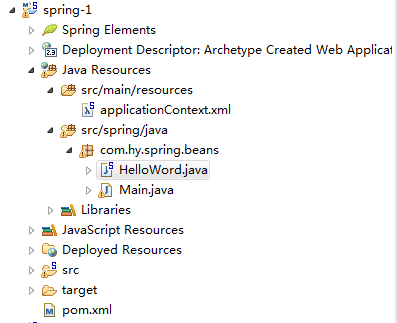
各个类文件:
pom.xml
<project xmlns="http://maven.apache.org/POM/4.0.0" xmlns:xsi="http://www.w3.org/2001/XMLSchema-instance"
xsi:schemaLocation="http://maven.apache.org/POM/4.0.0 http://maven.apache.org/maven-v4_0_0.xsd">
<modelVersion>4.0.0</modelVersion>
<groupId>com.hy</groupId>
<artifactId>spring-1</artifactId>
<packaging>war</packaging>
<version>0.0.1-SNAPSHOT</version>
<name>spring-1 Maven Webapp</name>
<url>http://maven.apache.org</url>
<build>
<finalName>spring-1</finalName>
</build>
<properties>
<!-- Spring -->
<spring-framework.version>4.1.6.RELEASE</spring-framework.version>
</properties>
<dependencies>
<dependency>
<groupId>junit</groupId>
<artifactId>junit</artifactId>
<version>3.8.1</version>
<scope>test</scope>
</dependency>
<!-- spring需要的jar包 -->
<dependency>
<groupId>org.springframework</groupId>
<artifactId>spring-beans</artifactId>
<version>${spring-framework.version}</version>
</dependency>
<dependency>
<groupId>org.springframework</groupId>
<artifactId>spring-context</artifactId>
<version>${spring-framework.version}</version>
</dependency>
<dependency>
<groupId>org.springframework</groupId>
<artifactId>spring-core</artifactId>
<version>${spring-framework.version}</version>
</dependency>
<dependency>
<groupId>commons-logging</groupId>
<artifactId>commons-logging</artifactId>
<version>1.1</version>
</dependency>
<dependency>
<groupId>org.springframework</groupId>
<artifactId>spring-expression</artifactId>
<version>${spring-framework.version}</version>
</dependency>
</dependencies>
</project>
applicationContext.xml
<?xml version="1.0" encoding="UTF-8"?>
<beans xmlns="http://www.springframework.org/schema/beans"
xmlns:xsi="http://www.w3.org/2001/XMLSchema-instance"
xsi:schemaLocation="http://www.springframework.org/schema/beans http://www.springframework.org/schema/beans/spring-beans.xsd">
<bean id="helloWord" class="com.hy.spring.beans.HelloWord">
<property name="name" value="Tom"></property>
</bean>
</beans>
HelloWord.java
package com.hy.spring.beans;
public class HelloWord {
private String name;
public void setName(String name) {
System.out.println("setName:" + name);
this.name = name;
}
public void hello(){
System.out.println("Hello:" + name);
}
public HelloWord() {
System.out.println("HelloWorld's Constructor");
}
}
Main.java
package com.hy.spring.beans;
import org.springframework.context.ApplicationContext;
import org.springframework.context.support.ClassPathXmlApplicationContext;
public class Main {
public static void main(String[] args) {
//1.创建 Spring 的 IOC容器的对象
ApplicationContext ctx = new ClassPathXmlApplicationContext("applicationContext.xml");
//2.从IOC容器中获取Bean实例
HelloWord helloWord = (HelloWord) ctx.getBean("helloWord");
//3.调用hello方法
helloWord.hello();
}
}
结果:

Spring_HelloWorld的更多相关文章
- 1) Spring_HelloWorld
1. Spring Tool Suite™ 方式一:下载对应eclipse版本的文件,离线安装 4.4.2 springsource-tool-suite-3.6.4.RELEASE-e4.4.2-u ...
- Spring学习之旅(一)极速创建Spring框架java工程项目
编译工具:eclipse 1)创建java工程:Spring_helloworld 2)导入所需jar包: 3)创建一个实体类: public class HelloBeans { private S ...
- Spring4.x 基础
把以下 jar 包加入到工程的 classpath 下: 搭建Spring开发环境 Spring 的配置文件: 一个典型的 Spring 项目需要创建一个或多个 Bean 配置文件, 这些配置文件用于 ...
- spring 课程
官网 参考文档 // 1. Spring_HelloWorld 20:22 // 2. Spring_IOC&DI概述 08:07 // 3. Spring_配置 Bean 21:58 // ...
- java之spring之helloword
这篇文章主要讲 spring的基础的使用案例 项目整体目录结构: 1.新建一个java项目:spring_helloworld 2.在项目下创建一个lib文件夹,并把一些必须的jar包复制过去 新建l ...
- Spring从入门到源码—IOC基本使用(二)
1.spring_helloworld 使用maven的方式来构建项目(Mavaen) 添加对应的pom依赖 pom.xml <dependencies> <!-- https:// ...
随机推荐
- poj 2752 Seek the Name, Seek the Fame (KMP纯模版)
Seek the Name, Seek the Fame Time Limit: 2000MS Memory Limit: 65536K Total Submissions: 13840 Ac ...
- Android去掉标题的方法
我们写程序的时候经常要全屏显示或者不显示标题.比如我们做地图导航的时候就不要标题了,下面介绍三种方法来实现Android去掉标题. 第一种:也一般入门的时候经常使用的一种方法 在setContentV ...
- pycharm 变量批量重命名
Ctrl + R 替换 Ctrl + Shift + F 全局查找 Ctrl + Shift + R 全局替换
- oracle的order by decode根据文字自定义排序的例子
oracle的order by decode根据文字自定义排序的例子: order by decode(t.title, '当前生效预警', 1, '今日即将生效', 2, '明日预计生效', 3, ...
- Jupyter Notebook远程服务器配置
首先要生成密码,打开python终端. In [1]: from IPython.lib import passwd In [2]: passwd() Enter password: Verify p ...
- javamail+postfix发送邮件
由于在做项目时,需要用到邮箱服务.但是不想使用163,qq的,所以就自己搭一个邮箱服务器. 在搜索资料发现postfix是个不错的选择,于是就开始配置了. 这是我搜到的最全的的教程了:http://w ...
- Centos6.5 DNS配置
服务器端:192.168.186.130 1.安装 # yum -y install bind* 2.主要配置文件 [root@localhost named]# vim /etc/named.con ...
- AI篇6====>第一讲
1.人工智能 小米:小爱 百度:AI云平台 科大讯飞AI平台 2.百度语音合成 # Author: studybrother sun from aip import AipSpeech #从文本到声音 ...
- Create a Group Policy Central Store
一.How to create a Group Policy Central Store You have downloaded or created your own Group Policy Ad ...
- 使用electron进行原生应用的打包
因为信奉一句话:JavaScript 终将一统天下,所以要想方设法开疆扩土. 今天介绍的这个electron就是一大神器,可以很方便的将网页应用打包为Mac, Win, Linux下的可执行文件,只需 ...