
Halo新年灯笼-halonewyaer
title: Halo新年灯笼

date: 2021-12-29 15:49:34.665

updated: 2022-03-10 16:00:53.189

url: https://www.yby6.com/archives/halonewyaer

categories:

- 前端

tags:

- html

- css

- 自定义halo新功能
前言
这不是快过年了博客整点新年效果啊我记得见到过一个灯笼不多说直接来
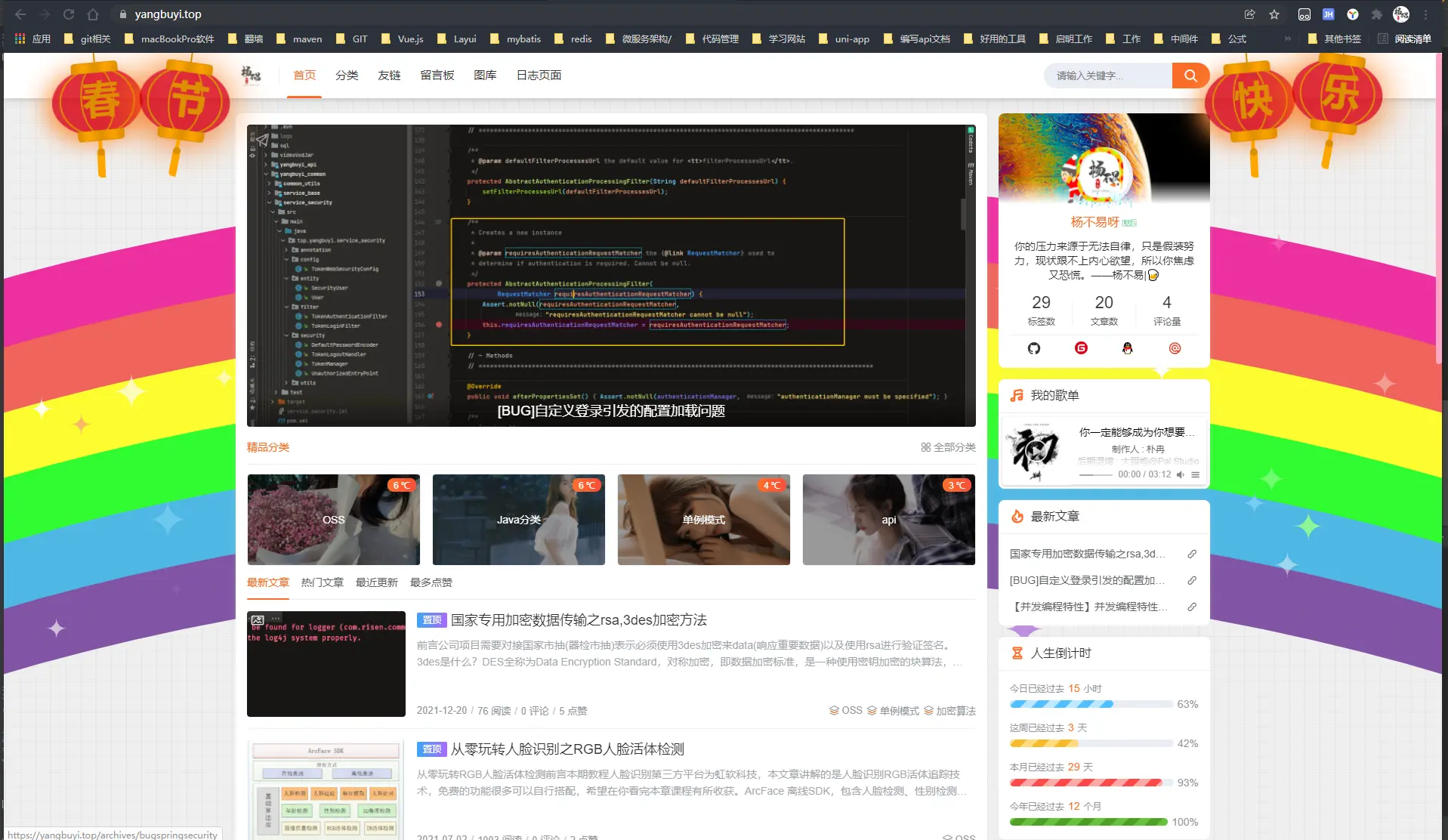
这灯笼好听好看的配置到halo当中
一、使用halo后台编辑你对应的模板
首页-》外观-》主题编辑 拉到最下面编辑
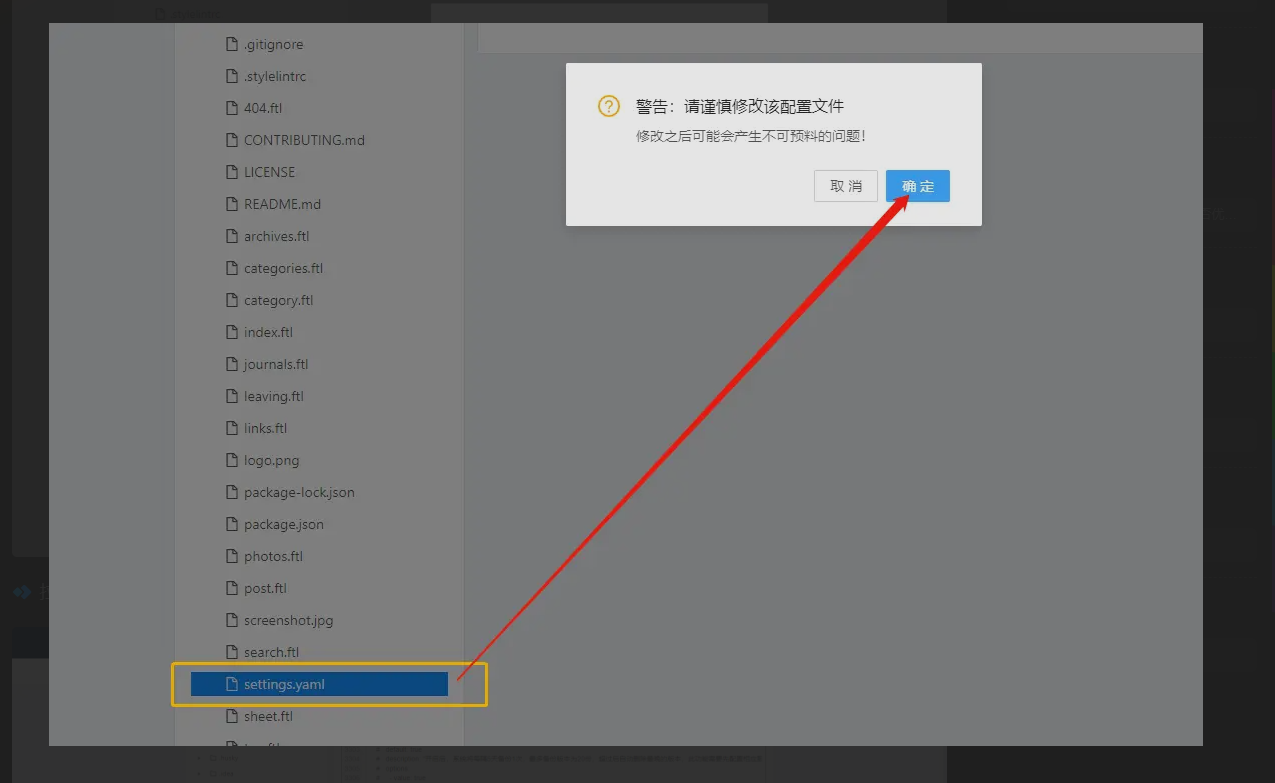
拉到最底下复制一份
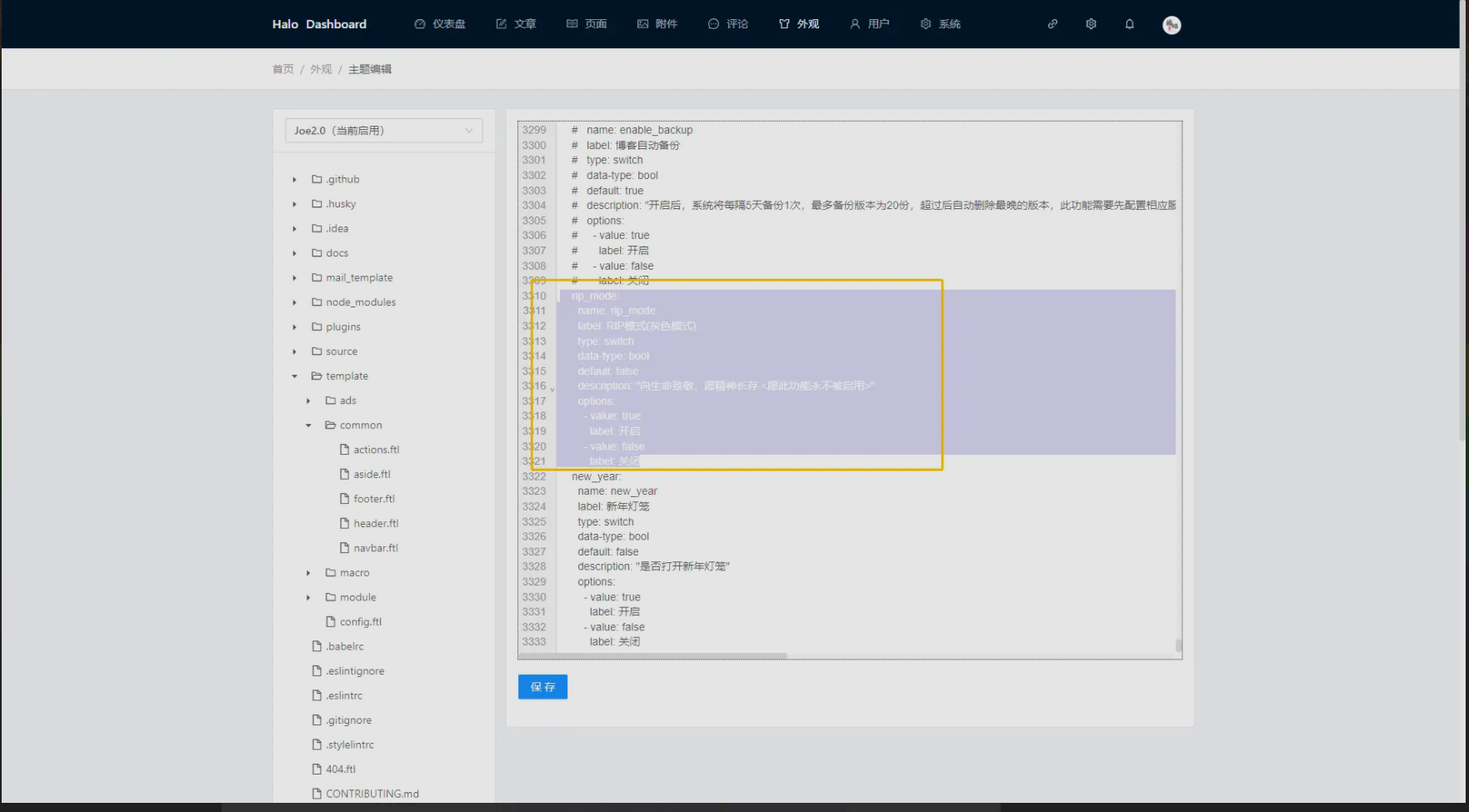
更改为你想要的名称(用于按钮控制)
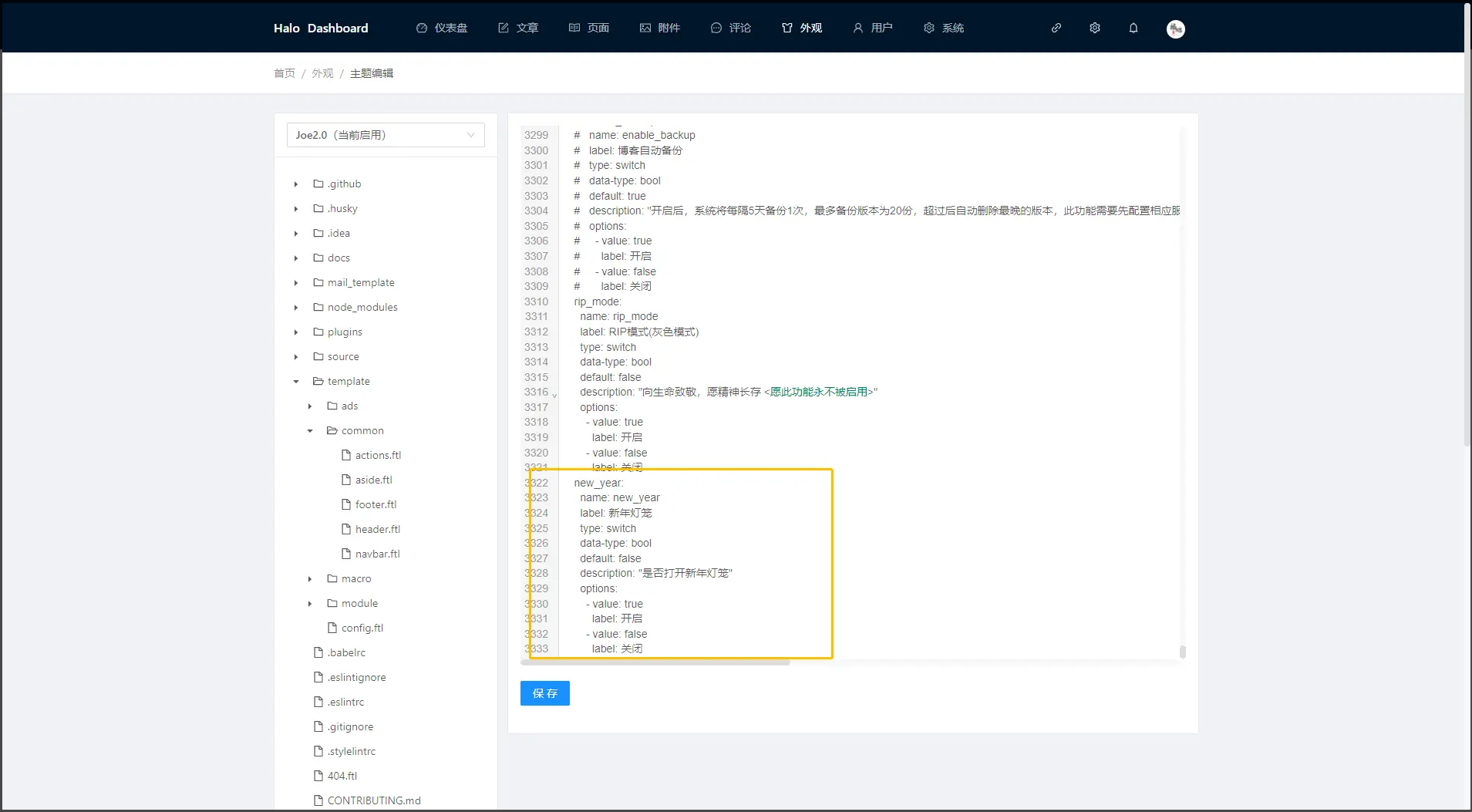
示例:
    new_year:

      name: new_year

      label: 新年灯笼

      type: switch

      data-type: bool

      default: false

      description: "是否打开新年灯笼"

      options:

        - value: true

          label: 开启

        - value: false

          label: 关闭
二、灯笼代码编写
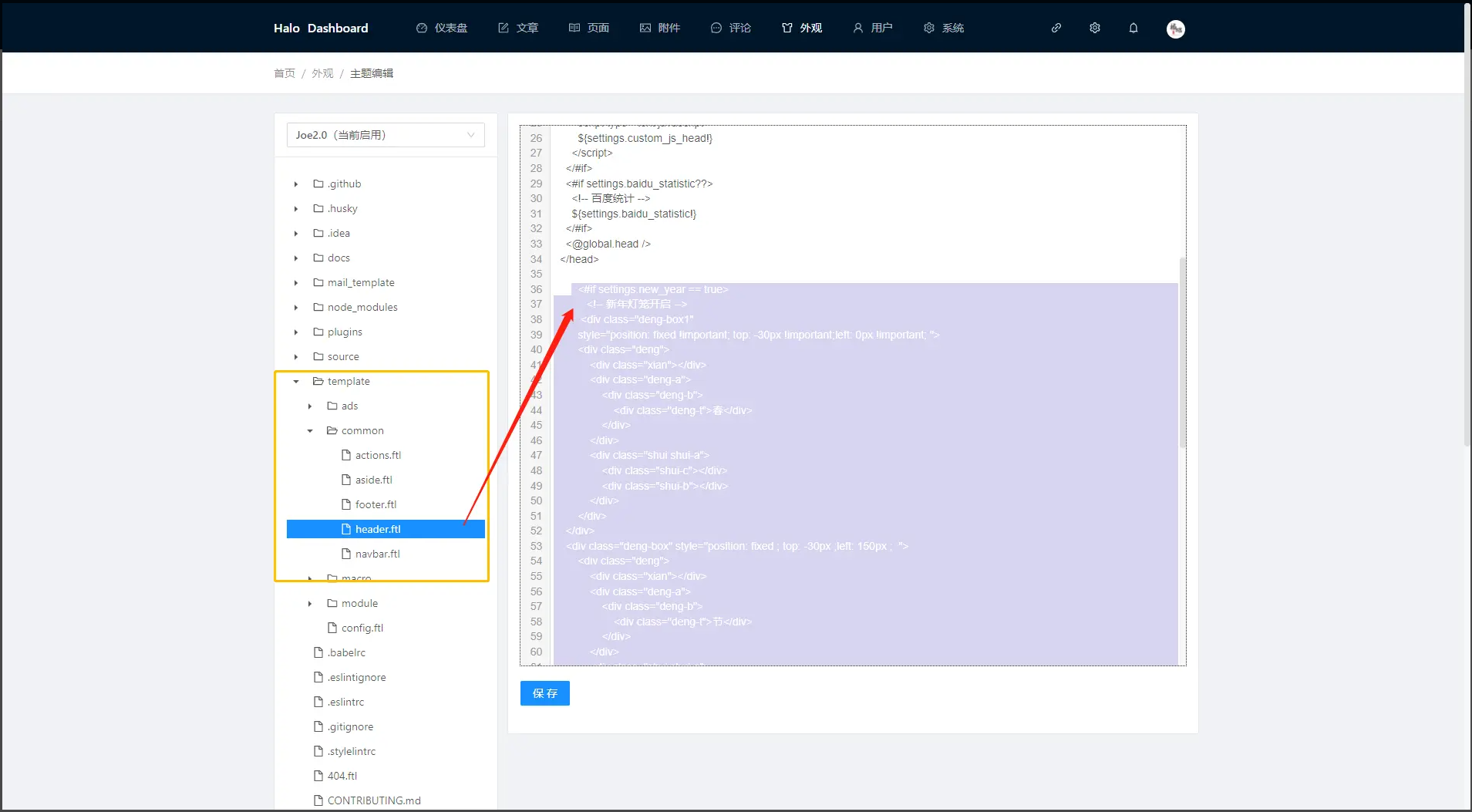
将此代码贴入
        <#if settings.new_year == true>

           <!-- 新年灯笼开启 -->

           <div class="pc">

                    <div class="deng-box1 s1"

        style="position: fixed !important; top: -30px !important;left: 0px !important; width: 0;height: 0;">

        <div class="deng">

            <div class="xian"></div>

            <div class="deng-a">

                <div class="deng-b">

                    <div class="deng-t">春</div>

                </div>

            </div>

            <div class="shui shui-a">

                <div class="shui-c"></div>

                <div class="shui-b"></div>

            </div>

        </div>

    </div>

    <div class="deng-box s2" style="position: fixed ; top: -30px ;left: 150px ; width: 0;height: 0; ">

        <div class="deng">

            <div class="xian"></div>

            <div class="deng-a">

                <div class="deng-b">

                    <div class="deng-t">节</div>

                </div>

            </div>

            <div class="shui shui-a">

                <div class="shui-c"></div>

                <div class="shui-b"></div>

            </div>

        </div>

    </div>

    <div class="deng-box1 s3" style="right: 341px;width: 0;height: 0;">

        <div class="deng">

            <div class="xian"></div>

            <div class="deng-a">

                <div class="deng-b">

                    <div class="deng-t">快</div>

                </div>

            </div>

            <div class="shui shui-a">

                <div class="shui-c"></div>

                <div class="shui-b"></div>

            </div>

        </div>

    </div>

    <div class="deng-box s4" style="right: 174px;width: 0;height: 0;">

        <div class="deng">

            <div class="xian"></div>

            <div class="deng-a">

                <div class="deng-b">

                    <div class="deng-t">乐</div>

                </div>

            </div>

            <div class="shui shui-a">

                <div class="shui-c"></div>

                <div class="shui-b"></div>

            </div>

        </div>

    </div>

          </div>

           <!-- 手机端 -->

             <div class="phone">

                    <div class="deng-box1 s1"

        style="position: fixed !important; top: -30px !important;left: 0px !important; width: 0;height: 0;">

        <div class="deng">

            <div class="xian"></div>

            <div class="deng-a">

                <div class="deng-b">

                    <div class="deng-t">春节</div>

                </div>

            </div>

            <div class="shui shui-a">

                <div class="shui-c"></div>

                <div class="shui-b"></div>

            </div>

        </div>

    </div>

    <div class="deng-box s2" style="position: fixed ; top: -30px ;left: 150px ; width: 0;height: 0; ">

        <div class="deng">

            <div class="xian"></div>

            <div class="deng-a">

                <div class="deng-b">

                    <div class="deng-t">快乐</div>

                </div>

            </div>

            <div class="shui shui-a">

                <div class="shui-c"></div>

                <div class="shui-b"></div>

            </div>

        </div>

    </div>

          </div>

    </#if>
将此代码贴入主题的自定义css样式当中
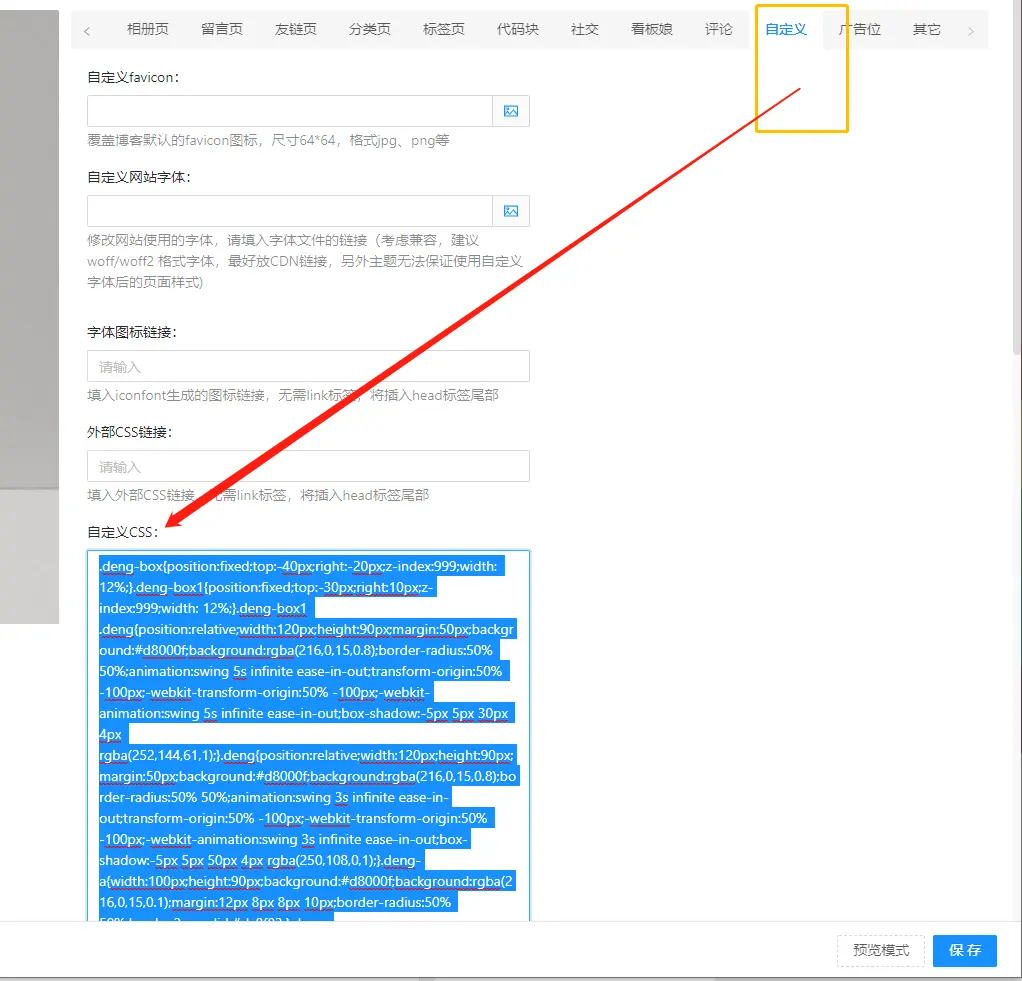
css样式
.deng-box { position:fixed; top:-30px; right:-20px; z-index:999; width:12%; }

.deng-box1 { position:fixed; top:-30px; right:10px; z-index:999; width:12%; }

.deng-box1 .deng { position:relative; width:120px; height:90px; margin:50px; background:#d8000f; background:rgba(216,0,15,0.8); border-radius:50% 50%; animation:swing 5s infinite ease-in-out; transform-origin:50% -100px; -webkit-transform-origin:50% -100px; -webkit-animation:swing 5s infinite ease-in-out; box-shadow:-5px 5px 30px 4px rgba(252,144,61,1); }

.deng { position:relative; width:120px; height:90px; margin:50px; background:#d8000f; background:rgba(216,0,15,0.8); border-radius:50% 50%; animation:swing 3s infinite ease-in-out; transform-origin:50% -100px; -webkit-transform-origin:50% -100px; -webkit-animation:swing 3s infinite ease-in-out; box-shadow:-5px 5px 50px 4px rgba(250,108,0,1); }

.deng-a { width:100px; height:90px; background:#d8000f; background:rgba(216,0,15,0.1); margin:12px 8px 8px 10px; border-radius:50% 50%; border:2px solid #dc8f03; }

.deng-b { width:45px; height:90px; background:#d8000f; background:rgba(216,0,15,0.1); margin:-4px 8px 8px 26px; border-radius:50% 50%; border:2px solid #dc8f03; }

.xian { position:absolute; top:-20px; left:60px; width:2px; height:20px; background:#dc8f03; }

.shui-a { position:relative; width:5px; height:20px; margin:-5px 0 0 59px; animation:swing 4s infinite ease-in-out; transform-origin:swing 4s infinite ease-in-out; -webkit-animation:swing 4s infinite ease-in-out; -webkit-transform-origin:50% -45px; background:#ffa500; border-radius:0 0 5px 5px; }

.shui-b { position:absolute; top:14px; left:-2px; width:10px; height:10px; background:#dc8f03; border-radius:50%; }

.shui-c { position:absolute; top:18px; left:-2px; width:10px; height:35px; background:#ffa500; border-radius:0 0 0 5px; }

.deng:before { position:absolute; top:-7px; left:29px; height:12px; width:60px; content:" "; display:block; z-index:999; border-radius:5px 5px 0 0; border:solid 1px #dc8f03; background:#ffa500; background:linear-gradient(to right,#dc8f03,#ffa500,#dc8f03,#ffa500,#dc8f03); }

.deng:after { position:absolute; bottom:-7px; left:10px; height:12px; width:60px; content:" "; display:block; margin-left:20px; border-radius:0 0 5px 5px; border:solid 1px #dc8f03; background:#ffa500; background:linear-gradient(to right,#dc8f03,#ffa500,#dc8f03,#ffa500,#dc8f03); }

.deng-t { font-family:Arial,Lucida Grande,Tahoma,sans-serif; font-size:3.2rem; color:#dc8f03; font-weight:bold; line-height:85px; text-align:center; }

@keyframes swing {

  0% { transform:rotate(-10deg); -ms-transform:rotate(-10deg); }

  50% { transform:rotate(10deg); -ms-transform:rotate(10deg); }

  100% { transform:rotate(-10deg); -ms-transform:rotate(-10deg); }

}

@-moz-keyframes swing {

  0% { -moz-transform:rotate(-10deg) }

  50% { -moz-transform:rotate(10deg) }

  100% { -moz-transform:rotate(-10deg) }

}

@-webkit-keyframes swing {

  0% { -webkit-transform:rotate(-10deg) }

  50% { -webkit-transform:rotate(10deg) }

  100% { -webkit-transform:rotate(-10deg) }

}

/* ios手机端 */

@media screen and (min-width:320px) {

  .pc { display:none !important}

  .phone { display:block !important}

  .s3 { display:none !important}

  .s2 { left:195px !important }

    .deng-t {

    font-family: Arial,Lucida Grande,Tahoma,sans-serif;

    font-size: 41px !important;

    font-weight: bold;

    line-height: 85px;

    text-align: center;

    width: 82px;

    text-indent: -38px;

  }

}

/* pc端 */

@media screen and (min-width:800px) {

  .pc { display:block !important }

  .phone { display:none !important }

  .s3 { display:block !important }

  .deng-t { font-size:2.2rem !important }

}
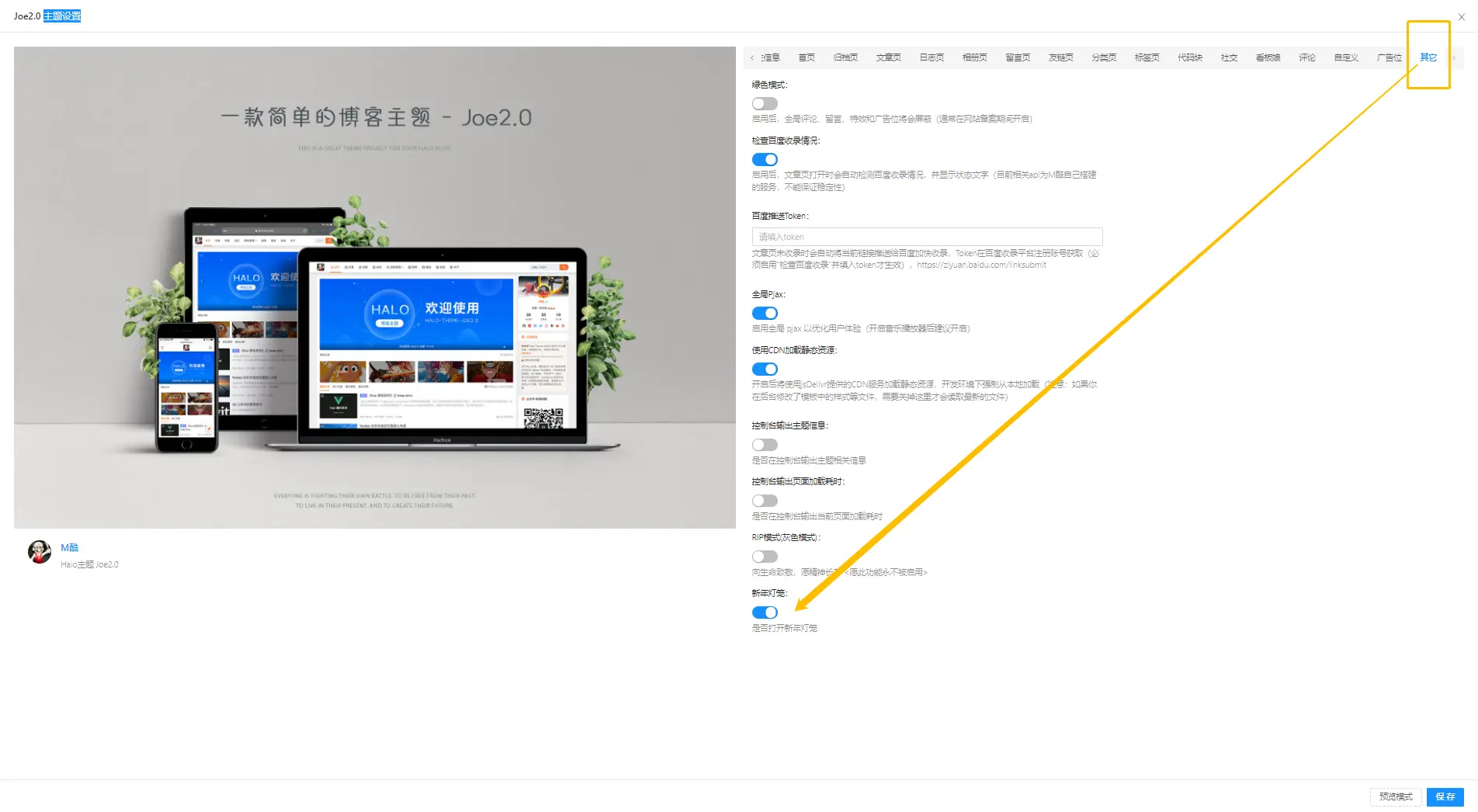
三、设置打开新年灯笼
进入主题设置点击其他选项下拉 保存即可
我的博客即将同步至腾讯云+社区,邀请大家一同入驻:https://cloud.tencent.com/developer/support-plan?invite_code=2fe81frlwha1
Halo新年灯笼-halonewyaer的更多相关文章
- 0基础90分钟会用PS——GenJi笔记
数码图像的相关基础概念 1.位图和矢量图 位图 也叫点阵图像,位图使用也称像素的一格一格的小点来描述图像,图放大后我们可以看到像素点 矢量图 根据几何特性来绘制图形,用线段和曲线描述图像,可以是一个一 ...
- 五步打造APP节日主题设计:以Lofter新年图标设计为例
我们需要做有依据,有逻辑,有理念的设计,需要发散思维,整合创意,严谨输出,让设计经得起推敲 前言 2018年春节已远去,一直想把Lofter新年Logo设计思路分享给大家,直到现在才整理出来,希望 ...
- 新年抢红包效果(New Year Red Packet)
新年抢红包效果(New Year Red Packet) 晓娜的文章(微信公众号:migufe) 2016即将过去,我们将迎来新的一年2017,这里小编提前祝大家新年快乐!万事如意!那我们新年最开心的 ...
- Html5 实现灯笼绘制
最近在学习Html5,就用JavaScript在Canvas试着绘制了一个灯笼,并作了简要的说明. 具体绘制思路在页面上有说明,不再赘述,代码如下: <script type="tex ...
- 【UOJ#67】新年的毒瘤 Tarjan 割点
#67. 新年的毒瘤 UOJ直接黏贴会炸... 还是戳这里吧: http://uoj.ac/problem/67#tab-statement Solution 看到这题的标签就进来看了一眼. 想 ...
- 喜迎2015年新年:坦克大战(Robocode)游戏编程比赛图文总结
2015春节前,葡萄城的软件工程师以特有的方式来迎接新年——2015新年编程邀请赛. 邀请赛的初衷,是和大家一起,寻找编程最初的单纯的快乐. 在代码的世界里,添加动力,继续远航. ...
- uoj 67 新年的毒瘤 割点
题目链接: 题目 #67. 新年的毒瘤 问题描述 辞旧迎新之际,喜羊羊正在打理羊村的绿化带,然后他发现了一棵长着毒瘤的树. 这个长着毒瘤的树可以用 nn 个结点 mm 条无向边的无向图表示.这个图中有 ...
- CT 来值班,让您安心过新年!
春节,盼了整整一年的节日,我们一定要抛开工作,狠狠的开心,狠狠的幸福,但是作为苦逼的运维,你们真的能完全抛开工作(对网站不闻不问)吗?OneAPM CT 24 小时监控您的网站,让您无忧无虑过新年. ...
- 新年之际,盘点一些APP开发技巧
(原文:Reader Submissions - New Year's 2015 作者:Mattt Thompson 译者:培子 校对:蓝魂) 回顾过去一年发生在我们身边的事情时,有一点不得不提:对苹 ...
- vijosP1071 新年趣事之打牌
vijosP1071 新年趣事之打牌 链接:https://vijos.org/p/1071 [思路] 01背包+路径输出. 用d[][]记录[][]可转移的数目,>=2则输出-1,0输出0,否 ...
随机推荐
- SK 简化流行编程语言对 生成式AI 应用开发的支持
Semantic Kernel[1] 是一个将大型语言模型(LLM)与流行的编程语言相结合的SDK. Microsoft将Semantic Kernel(简称SK)称为轻量级SDK,支持AI LLM的 ...
- AcWing 第102场周赛 题解
第一次ak周赛,写篇题解纪念一下 第一题 给定两个长度为 n n n 的整数序列 a 1 , a 2 , - , a n a_1,a_2,-,a_n a1,a2,-,an 以及 b 1 , b ...
- 洛谷P2433 小学数学 N 合一
写完了这道题结果脑子断电把浏览器关了......打开一看 没保存 寄 传送门:[深基1-2]小学数学 N 合一 - 洛谷 第一题 第二题 第三题 这几道题没啥好说的,直接输出就彳亍了 cout < ...
- 在线问诊 Python、FastAPI、Neo4j — 提供咨询接口服务
目录 构建服务层 接口路由层 PostMan 调用 采用 Fast API 搭建服务接口: https://www.cnblogs.com/vipsoft/p/17684079.html Fast A ...
- [ABC216G] 01Sequence 题解
01Sequence 题目大意 构造一个满足 \(m\) 个形如 \((l,r,x)\) 的限制条件的 \(01\) 序列,其中 \((l,r,x)\) 表示区间 \([l,r]\) 的和不小于 \( ...
- umicv cv-summary1-全连接神经网络模块化实现
全连接神经网络模块化实现 Linear与Relu单层实现 LossLayer实现 多层神经网络 不同梯度下降方法 Dropout层 今天这篇博文针对Assignment3的全连接网络作业,对前面学习的 ...
- 探索CPU的黑盒子:解密指令执行的秘密
引言 在我们之前的章节中,我们着重讲解了CPU内部的处理过程,以及与之密切相关的数据总线知识.在这个基础上,我们今天将继续深入探讨CPU执行指令的相关知识,这对于我们理解计算机的工作原理至关重要. C ...
- Hall定理(霍尔定理)证明及推广
引言 网络上有许多Hall定理的证明,但是对于Hall定理的几个推广的介绍却少之又少,因此本文来简单介绍一下 注:为了使这篇文章看起来简单易懂,本文将不会使用图论语言,会图论的朋友们可以自行翻译为图论 ...
- kafka和zookeeper安装
一.Kafka简介 Kafka 被称为下一代分布式消息系统,是非营利性组织ASF(Apache Software Foundation,简称为ASF)基金会中的一个开源项目,比如HTTP Server ...
- 操作PDF的方法
PDF的内容提取.转换见上篇 PDF操作: 旋转 删除 合并 拆分 转成图片 导出内嵌资源图片 两页合并成一页 添加.去除密码 添加水印 PDF旋转某一页 var document = pdfView ...