
C# 二维码生成、识别
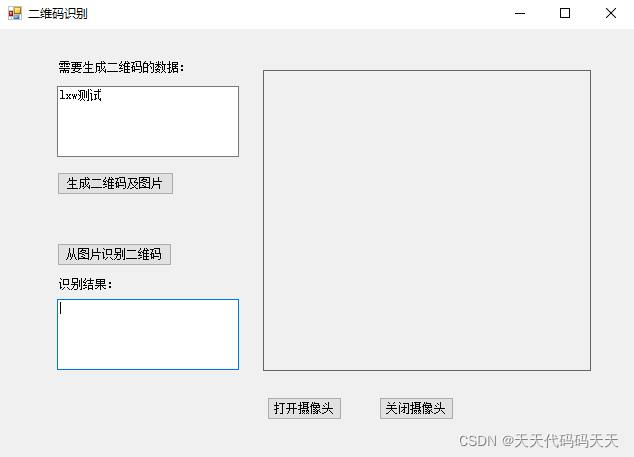
using System;

using System.Collections.Generic;

using System.ComponentModel;

using System.Data;

using System.Drawing;

using System.Linq;

using System.Text;

using System.Windows.Forms;

using com.google.zxing.common;

using AForge.Video.DirectShow;

using com.google.zxing;

using AForge.Video;

namespace CameraQRCode

{

    public partial class frmMain : Form

    {

        public frmMain()

        {

            InitializeComponent();

        }

        ///调用AForge使用摄像头

        FilterInfoCollection Use_Webcams = null;

        VideoCaptureDevice cam = null;

        OpenFileDialog openFileDialog1 = new OpenFileDialog();

        /// <summary>

        /// 生成二维码并保存图片

        /// </summary>

        /// <param name="sender"></param>

        /// <param name="e"></param>

        private void btnQRCode_Click(object sender, EventArgs e)

        {

            string content = txtInputForQR.Text;

            ByteMatrix byteMatrix = new MultiFormatWriter().encode(content, BarcodeFormat.QR_CODE, 300, 300);

            Bitmap bitmap = toBitmap(byteMatrix);

            pictureBox1.Image = bitmap;

            SaveFileDialog sFD = new SaveFileDialog();

            sFD.Filter = "保存图片(*.png) |*.png|所有文件(*.*) |*.*";

            sFD.DefaultExt = "*.png|*.png";

            sFD.AddExtension = true;

            if (sFD.ShowDialog() == DialogResult.OK)

            {

                if (sFD.FileName != "")

                {

                    writeToFile(byteMatrix, System.Drawing.Imaging.ImageFormat.Png, sFD.FileName);

                }

            }

        }

        /// <summary>

        /// 解析

        /// </summary>

        /// <param name="sender"></param>

        /// <param name="e"></param>

        private void btnQRDeCode_Click(object sender, EventArgs e)

        {

            if (this.openFileDialog1.ShowDialog() != DialogResult.OK)

            {

                return;

            }

            Image img = Image.FromFile(this.openFileDialog1.FileName);

            Bitmap bmap;

            try

            {

                bmap = new Bitmap(img);

            }

            catch (System.IO.IOException ioe)

            {

                MessageBox.Show(ioe.ToString());

                return;

            }

            if (bmap == null)

            {

                MessageBox.Show("Could not decode image");

                return;

            }

            LuminanceSource source = new RGBLuminanceSource(bmap, bmap.Width, bmap.Height);

            com.google.zxing.BinaryBitmap bitmap1 = new com.google.zxing.BinaryBitmap(new HybridBinarizer(source));

            Result result;

            try

            {

                result = new MultiFormatReader().decode(bitmap1);

            }

            catch (ReaderException re)

            {

                MessageBox.Show(re.ToString());

                return;

            }

            txtOutputQR.Text = result.Text;

            //MessageBox.Show(result.Text);

        }

        /// <summary>

        /// 关闭摄像头

        /// </summary>

        /// <param name="sender"></param>

        /// <param name="e"></param>

        private void btnStop_Click(object sender, EventArgs e)

        {

            if (cam != null)

            {

                //关闭摄像头

                if (cam.IsRunning)

                {

                    cam.Stop();

                }

            }

        }

        /// <summary>

        /// 打开摄像头

        /// </summary>

        /// <param name="sender"></param>

        /// <param name="e"></param>

        private void btnOpen_Click(object sender, EventArgs e)

        {

            cam.Start();

            if (!timer1.Enabled)

            {

                timer1.Enabled = true;

            }

        }

        private void Cam_NewFrame(object obj, NewFrameEventArgs eventArgs)

        {

            this.pictureBox1.Image = (Bitmap)eventArgs.Frame.Clone();

        }

        public static void writeToFile(ByteMatrix matrix, System.Drawing.Imaging.ImageFormat format, string file)

        {

            Bitmap bmap = toBitmap(matrix);

            bmap.Save(file, format);

        }

        public static Bitmap toBitmap(ByteMatrix matrix)

        {

            int width = matrix.Width;

            int height = matrix.Height;

            Bitmap bmap = new Bitmap(width, height, System.Drawing.Imaging.PixelFormat.Format32bppArgb);

            for (int x = 0; x < width; x++)

            {

                for (int y = 0; y < height; y++)

                {

                    bmap.SetPixel(x, y, matrix.get_Renamed(x, y) != -1 ? ColorTranslator.FromHtml("0xFF000000") : ColorTranslator.FromHtml("0xFFFFFFFF"));

                }

            }

            return bmap;

        }

        /// <summary>

        /// 扫描识别二维码

        /// </summary>

        /// <param name="sender"></param>

        /// <param name="e"></param>

        private void timer1_Tick(object sender, EventArgs e)

        {

            //识别图片中的二维码

            Image img = this.pictureBox1.Image; ;// Image.FromFile(this.openFileDialog1.FileName);

            if (img == null)

                return;

            Bitmap bmap;

            try

            {

                bmap = new Bitmap(img);

            }

            catch (System.IO.IOException ioe)

            {

                MessageBox.Show(ioe.ToString());

                return;

            }

            if (bmap == null)

            {

                MessageBox.Show("Could not decode image");

                return;

            }

            LuminanceSource source = new RGBLuminanceSource(bmap, bmap.Width, bmap.Height);

            com.google.zxing.BinaryBitmap bitmap1 = new com.google.zxing.BinaryBitmap(new HybridBinarizer(source));

            Result result;

            try

            {

                result = new MultiFormatReader().decode(bitmap1);

            }

            catch (ReaderException re)

            {

                //MessageBox.Show(re.ToString());

                return;

            }

            txtOutputQR.Text = result.Text;

            this.timer1.Enabled = false;

            this.cam.Stop();

            this.pictureBox1.Image = null;

            MessageBox.Show("图中二维码:" + result.Text);

        }

        private void frmMain_Load(object sender, EventArgs e)

        {

            //初始化AForge内容

            Use_Webcams = new FilterInfoCollection(FilterCategory.VideoInputDevice);

            if (Use_Webcams.Count > 0)

            {

                //实例化对象

                cam = new VideoCaptureDevice(Use_Webcams[0].MonikerString);

                //绑定事件

                cam.NewFrame += new NewFrameEventHandler(Cam_NewFrame);

            }

        }

    }

}
demo下载 https://download.csdn.net/download/lw112190/84384040
C# 二维码生成、识别的更多相关文章
- Android 二维码 生成和识别(附Demo源码)
今天讲一下目前移动领域很常用的技术——二维码.现在大街小巷.各大网站都有二维码的踪迹,不管是IOS. Android.WP都有相关支持的软件.之前我就想了解二维码是如何工作,最近因为工作需要使用相关技 ...
- Android 二维码 生成和识别(转)
原博客地址 :http://www.cnblogs.com/weixing/archive/2013/08/28/3287120.html 还有几个写的也可以参考一下:http://www.itnos ...
- 玩转Android之二维码生成与识别
二维码,我们也称作QRCode,QR表示quick response即快速响应,在很多App中我们都能见到二维码的身影,最常见的莫过于微信了.那么今天我们就来看看怎么样在我们自己的App中集成二维码的 ...
- 【转】Android 二维码 生成和识别(附Demo源码)--不错
原文网址:http://www.cnblogs.com/mythou/p/3280023.html 今天讲一下目前移动领域很常用的技术——二维码.现在大街小巷.各大网站都有二维码的踪迹,不管是IOS. ...
- C# ZXing.Net生成二维码、识别二维码、生成带Logo的二维码(二)
1.使用ZXint.Net生成带logo的二维码 /// <summary> /// 生成带Logo的二维码 /// </summary> /// <param name ...
- Python 实现二维码生成和识别
今天突然想给自己自己做个头像,然后还是二维码的形式,这样只要扫一扫就可以访问我的主页.然后就开始自己的苦逼之路... 其实实现二维码java,c#,C++等都可以实现:由于自己正在学python,所以 ...
- python qrcode二维码生成与识别
二维码 二维码生成 1.用法 https://github.com/lincolnloop/python-qrcode 2.使用 简单实用 import qrcode # 二维码内容 data = & ...
- [开源]C#二维码生成解析工具,可添加自定义Logo
二维码又称 QR Code,QR 全称 Quick Response,是一个近几年来移动设备上超流行的一种编码方式,它比传统的 Bar Code 条形码能存更多的信息,也能表示更多的数据类型:比如:字 ...
- PHP二维码生成的方法(google APi,PHP类库,libqrencode等)
原文地址: http://blog.csdn.net/liuxinmingcode/article/details/7910975 ================================== ...
- android 二维码生成+扫描
android 二维码生成+扫描 1.在Android应用当中,很多时候都要用到二维码扫描,来避免让用户手动输入的麻烦. Google官方自己推出了一个二维码开源项目:ZXing库. 2.这里简单介绍 ...
随机推荐
- CSS实现图形效果
CSS实现图形效果 CSS实现正方形.长方形.圆形.半圆.椭圆.三角形.平行四边形.菱形.梯形.六角星.五角星.心形.消息框. 正方形 <section> <div id=" ...
- Swoole从入门到入土(23)——多进程[进程池Process\Pool]
Swoole提供的进程池为Process\Pool,基于 Swoole\Server 的 Manager 管理进程模块实现.可管理多个工作进程.该模块的核心功能为进程管理,相比 Process 实现多 ...
- Java设计模式-访问者模式Visitor
介绍 访问者模式(Visitor Pattern),封装一些作用于某种数据结构的各元素的操作,它可以在不改变数据结构的前 提下定义作用于这些元素的新的操作. 主要将数据结构与数据操作分离,解决 数据结 ...
- Python之机器人卡牌
介绍 这个例子主要利用turtle库实现根据输入动态展示不同机器人的图像和属性信息. 代码部分非原创只是做了些许修改和整理使得更易阅读. 图片和文件资源请访问git仓库获取: https://gite ...
- 全栈式测试平台RunnerGo核心功能模块-接口管理
全栈式测试平台RunnerGo相对于市面上其他性能测试产品来说更简单,它不用其他相关配件,天然支持分布式,有单独的机器做分布式的负载均衡,自有一套智能算法算压力机的配置从而平均分配,并从场景链路的流 ...
- gin中间件&控制器
中间件 Gin 框架允许开发者在处理请求的过程中,加入用户自己的钩子(Hook)函数.这个钩子函数就叫中间件,中间件适合处理一些公共的业务逻辑,比如登录认证.权限校验.数据分页.记录日志.耗时统计等. ...
- 【Azure Redis】Redis-CLI连接Redis 6380端口始终遇见 I/O Error
问题描述 使用Redis-cli连接Redis服务,因为工具无法直接支持TLS 6380端口连接,所以需要使用 stunnel 配置TLS/SSL服务.根据文章(Linux VM使用6380端口(SS ...
- 【Azure 服务总线】Azure.Messaging.ServiceBus 多次发送消息报超时错误,是否可以配置重新发送?是否有内置重试机制?
问题描述 使用 Azure Service Bus,提供应用程序之间松耦合的消息交换,但是有时候发送消息多次出现超时错误. A connection attempt failed because th ...
- 【Azure Redis 缓存】遇见Azure Redis不能创建成功的问题:至少一个资源部署操作失败,因为 Microsoft.Cache 资源提供程序未注册。
问题描述 在中国区微软云上创建Redis失败.收到的错误消息为: { "code": "DeploymentFailed", "message&quo ...
- C笔记(2014-12备份)
Video1: 1-编译器对待全局变量和局部变量的差别.全局变量分配空间是在数据区,局部变量分配在代码区. (比如局部变量 int lo_var = 2;后面的 = 2;是赋值语句,被编译器转化成机器 ...