
IL编制器 --- Fody
介绍

这个项目的名称“Fody”来源于属于织巢鸟科(Ploceidae)的小鸟(Fody),本身意义为编织。
核心Fody引擎的代码库地址 :https://github.com/Fody/Fody
Github上是这样介绍的:
Fody 是一个用于织制 .NET 程序集的可扩展工具。它允许在构建过程中作为一部分来操纵程序集的中间语言(IL),这需要大量的底层代码编写。这些底层代码需要了解 MSBuild 和 Visual Studio 的 API。Fody 通过可扩展的插件模型试图消除这些底层代码。这种技术非常强大,例如,可以将简单属性转换为完整的 INotifyPropertyChanged 实现,添加对空参数的检查,添加方法计时,甚至使所有字符串比较都不区分大小写。
Fody 处理的底层任务包括:
- 将
MSBuild任务注入到构建流程中。 - 解析程序集和
pdb文件的位置。 - 抽象了与
MSBuild日志记录的复杂性。 - 将程序集和
pdb文件读入Mono.Cecil对象模型中。 - 根据需要重新应用强名称。
- 保存程序集和
pdb文件。
Fody 使用 Mono.Cecil 和基于插件的方法在编译时修改 .NET 程序集的中间语言(IL)。
- 它不需要额外的安装步骤来构建。
- 属性是可选的,具体取决于所使用的编织器。
- 不需要部署运行时依赖项。
插件
从介绍就可以看出,理论上只要你想要,基于这个库基本上能做任何事情。
所以基于该库,诞生了非常非常多的插件库,下面简单介绍及编写Demo简单使用
| 插件 | 描述 | Github URL |
|---|---|---|
| Fody | 编织.net程序集的可扩展工具 | https://github.com/Fody/Fody |
| AutoProperties.Fody | 这个外接程序为您提供了对自动属性的扩展控制,比如直接访问backing字段或拦截getter和setter。 | https://github.com/tom-englert/AutoProperties.Fody |
| PropertyChanged.Fody | 将属性通知添加到实现INotifyPropertyChanged的所有类。 | https://github.com/Fody/PropertyChanged |
| InlineIL.Fody | 在编译时注入任意IL代码。 | https://github.com/ltrzesniewski/InlineIL.Fody |
| MethodDecorator.Fody | 通过IL重写编译时间装饰器模式 | https://github.com/Fody/MethodDecorator |
| NullGuard.Fody | 将空参数检查添加到程序集 | https://github.com/Fody/NullGuard |
| ToString.Fody | 给属性生成ToString()方法 | https://github.com/Fody/ToString |
| Rougamo.Fody | 在编译时生效的AOP组件,类似于PostSharp。 | https://github.com/inversionhourglass/Rougamo |
AutoProperties.Fody
这个插件提供了对自动属性的扩展控制,比如直接访问backing字段或拦截getter和setter。
using System;

using AutoProperties;

using Xunit;

public class AutoPropertiesInterceptor

{

    [Fact]

    public void Run()

    {

        Assert.Equal(10, Property1);

        Assert.Equal("11", Property2);

        Property1 = 42;

        Assert.Equal(45, Property1);

        Assert.Equal("11", Property2);

        Property2 = "44";

        Assert.Equal(45, Property1);

        Assert.Equal("47", Property2);

    }

    [GetInterceptor]

    T GetInterceptor<T>(string propertyName, T fieldValue)

    {

        return (T)Convert.ChangeType(Convert.ToInt32(fieldValue) + 1, typeof(T));

    }

    [SetInterceptor]

    void SetInterceptor<T>(T value, string propertyName, out T field)

    {

        field = (T)Convert.ChangeType(Convert.ToInt32(value) + 2, typeof(T));

    }

    public int Property1 { get; set; } = 7;

    public string Property2 { get; set; } = "8";

}
PropertyChanged.Fody
该插件在编译时将INotifyPropertyChanged代码注入属性中:
using System.ComponentModel;

using System.Runtime.CompilerServices;

using AutoProperties;

using Xunit;

public class AutoPropertiesSample : INotifyPropertyChanged

{

    int numberOfPropertyChangedCalls;

    public string AutoProperty1 { get; set; }

    public string AutoProperty2 { get; set; }

    public AutoPropertiesSample()

    {

        AutoProperty2.SetBackingField("42");

    }

    [Fact]

    public void Run()

    {

        // no property changed call was generated in constructor:

        Assert.Equal(0, numberOfPropertyChangedCalls);

        Assert.Equal("42", AutoProperty2);

        AutoProperty1 = "Test1";

        Assert.Equal(1, numberOfPropertyChangedCalls);

        Assert.Equal("Test1", AutoProperty1);

        AutoProperty1.SetBackingField("Test2");

        Assert.Equal(1, numberOfPropertyChangedCalls);

        Assert.Equal("Test2", AutoProperty1);

    }

    public event PropertyChangedEventHandler PropertyChanged;

    protected virtual void OnPropertyChanged([CallerMemberName] string propertyName = null)

    {

        numberOfPropertyChangedCalls += 1;

        PropertyChanged?.Invoke(this, new(propertyName));

    }

}
除此之外,该插件附带了一个 C# 代码生成器,只需将实现 INotifyPropertyChanged 接口或包含 [AddINotifyPropertyChangedInterface] 属性的类标记为 partial,生成器将会自动添加必要的事件和事件触发器。
可以通过项目文件中的属性配置代码生成器:
<PropertyGroup>

  <PropertyChangedAnalyzerConfiguration>

    <IsCodeGeneratorDisabled>false</IsCodeGeneratorDisabled>

    <EventInvokerName>OnPropertyChanged</EventInvokerName>

  </PropertyChangedAnalyzerConfiguration>

</PropertyGroup>
更多用法建议查看官方文档。
InlineIL.Fody
该插件允许在编译时将任意IL注入到程序集中。
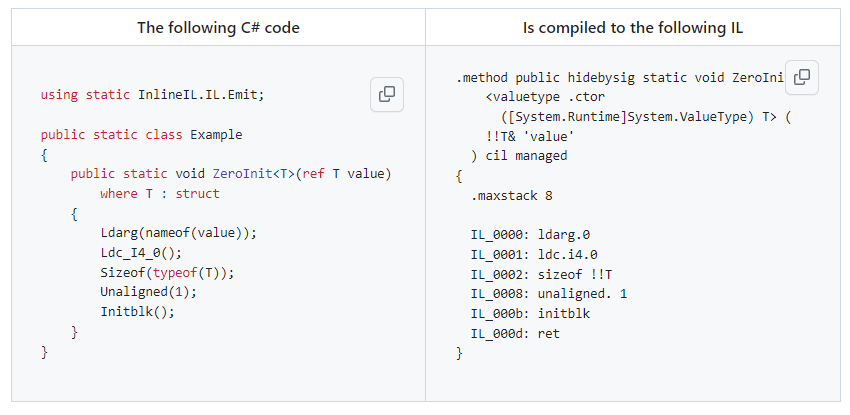
示例代码
using System;

using Xunit;

using static InlineIL.IL.Emit;

public class Sample

{

    [Fact]

    public void Run()

    {

        var item = new MyStruct

        {

            Int = 42,

            Guid = Guid.NewGuid()

        };

        ZeroInit.InitStruct(ref item);

        Assert.Equal(0, item.Int);

        Assert.Equal(Guid.Empty, item.Guid);

    }

    struct MyStruct

    {

        public int Int;

        public Guid Guid;

    }

}

public static class ZeroInit

{

    public static void InitStruct<T>(ref T value)

        where T : struct

    {

        Ldarg(nameof(value));

        Ldc_I4_0();

        Sizeof(typeof(T));

        Unaligned(1);

        Initblk();

    }

}
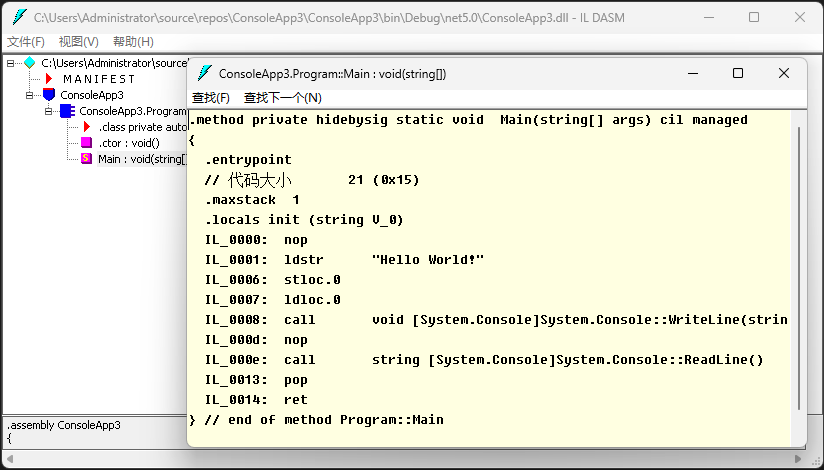
小技巧:这里可以借助ILDASM工具先生成想要的 IL 代码,在按照 IL 代码取编写要注入的 C# 代码,也可以参照我之前的文章工具 --- IL指令集解释,理解 IL 执行过程。
MethodDecorator.Fody
通过IL重写编译时装饰器模式。
定义拦截器属性:
using System;

using System.Reflection;

using MethodDecorator.Fody.Interfaces;

[AttributeUsage(AttributeTargets.Method | AttributeTargets.Constructor | AttributeTargets.Module)]

public class InterceptorAttribute : Attribute, IMethodDecorator

{

    public void Init(object instance, MethodBase method, object[] args)

    {

    }

    public void OnEntry()

    {

        InterceptionRecorder.OnEntryCalled = true;

    }

    public void OnExit()

    {

        InterceptionRecorder.OnExitCalled = true;

    }

    public void OnException(Exception exception)

    {

        InterceptionRecorder.OnExceptionCalled = true;

    }

}
定义拦截记录器
public static class InterceptionRecorder

{

    public static bool OnEntryCalled;

    public static bool OnExitCalled;

    public static bool OnExceptionCalled;

    public static void Clear()

    {

        OnExitCalled= OnEntryCalled = OnExceptionCalled = false;

    }

}
定义目标类
public static class Target

{

    [Interceptor]

    public static void MyMethod()

    {

    }

    [Interceptor]

    public static void MyExceptionMethod()

    {

        throw new("Foo");

    }

}
示例:
using Xunit;

public class MethodDecoratorSample

{

    [Fact]

    public void SimpleMethodSample()

    {

        InterceptionRecorder.Clear();

        Target.MyMethod();

        Assert.True(InterceptionRecorder.OnEntryCalled);

        Assert.True(InterceptionRecorder.OnExitCalled);

        Assert.False(InterceptionRecorder.OnExceptionCalled);

    }

    [Fact]

    public void ExceptionMethodSample()

    {

        InterceptionRecorder.Clear();

        try

        {

            Target.MyExceptionMethod();

        }

        catch

        {

        }

        Assert.True(InterceptionRecorder.OnEntryCalled);

        Assert.False(InterceptionRecorder.OnExitCalled);

        Assert.True(InterceptionRecorder.OnExceptionCalled);

    }

}
NullGuard.Fody
该插件向程序集添加null参数检查,支持三种操作模式:隐式模式、显式模式和可为空引用类型模式。
- 在隐式模式下,假定一切都不为空,除非标记为 [AllowNull]。这是 NullGuard 一直以来的工作方式。
- 在显式模式下,假定一切都可为空,除非标记为 [NotNull]。这种模式旨在支持 ReSharper(R#)的可为空性分析,使用悲观模式。
- 在可为空引用类型模式下,使用 C# 8 可为空引用类型(NRT)注释来确定类型是否可为空。
如果没有显式配置,NullGuard 将按以下方式自动检测模式:
- 如果检测到 C# 8 可为空属性,则使用可为空引用类型模式。
- 引用 JetBrains.Annotations 并在任何地方使用 [NotNull] 将切换到显式模式。
- 如果不满足上述条件,则默认为隐式模式。
示例:
using Xunit;

public class NullGuardSample

{

    [Fact(Skip = "Explicit")]

    public void Run()

    {

        var targetClass = new TargetClass();

        Assert.Throws<ArgumentNullException>(() => targetClass.Method(null));

    }

}

public class TargetClass

{

    public void Method(string param)

    {

    }

}
ToString.Fody
该插件可以从带有[ToString]属性修饰的类的公共属性中生成ToString方法。
using System.Diagnostics;

using Xunit;

public class ToStringSample

{

    [Fact]

    public void Run()

    {

        var target = new Person

                     {

                         GivenNames = "John",

                         FamilyName = "Smith"

                     };

        Debug.WriteLine(target.ToString());

        Assert.Equal("{T: \"Person\", GivenNames: \"John\", FamilyName: \"Smith\"}", target.ToString());

    }

}

[ToString]

class Person

{

    public string GivenNames { get; set; }

    public string FamilyName { get; set; }

    [IgnoreDuringToString]

    public string FullName => $"{GivenNames} {FamilyName}";

}
Rougamo.Fody
Rougamo是一个静态代码织入的AOP组件,类似Postsharp的一个组件,具有 MethodDecorator.Fody的功能,但功能更加强大,我个人觉得最为突出,优秀的两个功能点:
- 匹配
- 编织
匹配指的是命中AOP要拦截的目标匹配,比如有特征匹配,表达式匹配,类型匹配,更细化到模糊匹配,正则匹配。
编制则指的是拦截后能做的操作,比如有重写方法参数,修改返回值,异常处理,重试等。
该插件很强大,示例代码太多,就不再本篇内列出示例代码,官方文档中文介绍非常详细,建议直接查看官方文档。
其他
在Github库中,它提供了一些插件使用的Demo,除以上简单介绍的部分插件以外,还有这些
<Weavers VerifyAssembly="true"

         VerifyIgnoreCodes="0x80131869"

         xmlns:xsi="http://www.w3.org/2001/XMLSchema-instance"

         xsi:noNamespaceSchemaLocation="FodyWeavers.xsd">

  <Anotar.Catel />

  <Anotar.Splat />

  <Anotar.Serilog />

  <Anotar.NLog />

  <Anotar.Custom />

  <Anotar.CommonLogging />

  <AsyncErrorHandler />

  <BasicFodyAddin />

  <Caseless />

  <ConfigureAwait  ContinueOnCapturedContext="false" />

  <EmptyConstructor />

  <ExtraConstraints />

  <Equatable />

  <InfoOf />

  <Ionad />

  <Janitor />

  <MethodTimer />

  <ModuleInit />

  <Obsolete />

  <PropertyChanging />

  <PropertyChanged />

  <Validar />

  <Resourcer />

  <Publicize />

  <Virtuosity />

  <Visualize />

</Weavers>
若是在 Visual Studio 的 NuGet 管理器中搜索 Fody 相关包,会有更多的一些三方或者小众的库,依旧值得尝试。
小结
从 Fody 实现原理上就能看出,这个库强,很强,非常强。加上现在已有的非常之多的插件,除了能够提升开发效率之外,以在一定程度上实现一些难以实现的功能。强烈推荐大家学习使用。
链接
Fody官方Demo:https://github.com/Fody/FodyAddinSamples
工具 --- IL指令集解释:https://niuery.com/post/61
IL编制器 --- Fody的更多相关文章
- 认识IL代码---从开始到现在 <第二篇>
·IL代码分析方法 ·IL命令解析 ·.NET学习方法论 1.引言 自从『你必须知道.NET』系列开篇以来,受到大家很多的关注和支持,给予了anytao巨大的鼓励和动力.俱往昔,我发现很多的园友都把目 ...
- .NEL IL实现对象深拷贝
对于深拷贝,通常的方法是将对象进行序列化,然后再反序化成为另一个对象.例如在stackoverflow上有这样的解决办法:https://stackoverflow.com/questions/785 ...
- 【转】.NET IL实现对象深拷贝
对于深拷贝,通常的方法是将对象进行序列化,然后再反序化成为另一个对象.例如在stackoverflow上有这样的解决办法:https://stackoverflow.com/questions/785 ...
- .NET IL实现对象深拷贝
对于深拷贝,通常的方法是将对象进行序列化,然后再反序化成为另一个对象.例如在stackoverflow上有这样的解决办法:https://stackoverflow.com/questions/785 ...
- 基于Dynamic Proxy技术的方法AOP拦截器开发
在面向对象编程中,会用到大量的类,并且会多次调用类中的方法.有时可能需要对这些方法的调用进行一些控制.如在权限管理中,一些用户没有执行某些方法的权限.又如在日志系统中,在某个方法执行完后,将其执行的结 ...
- 【抬杠.NET】如何进行IL代码的开发(续)
背景 之前写了一篇文 [抬杠.NET]如何进行IL代码的开发 介绍了几种IL代码的开发方式. 创建IL项目 C#项目混合编译IL 使用InlineIL.Fody 使用DynamicMethod(ILG ...
- [No0000BB]ReSharper操作指南4/16-配置ReSharper代码快修与导航
代码问题的快速修复 ReSharper可以帮助您立即修复设计时检测到的大部分代码问题.就像按Alt+Enter突出显示的代码问题一样简单,并选择合适的方法来解决问题或改进次优代码. GIF 应用快速修 ...
- VNC+SSH相关应用
1.安装vnc-server vncviewer2.执行vncserver 输入密码3.执行vncserver -kill :1 杀死1号屏幕4.修改/root/.vnc/xstartup u ...
- Linux服务器使用SSH的命令(有详细的参数解释)
前一阵远程维护Linux服务器,使用的是SSH,传说中的secure shell. 登陆:ssh [hostname] -u user 输入密码:***** 登陆以后就可以像控制自己的机器一样控制它了 ...
- [译]聊聊C#中的泛型的使用(新手勿入)
写在前面 今天忙里偷闲在浏览外文的时候看到一篇讲C#中泛型的使用的文章,因此加上本人的理解以及四级没过的英语水平斗胆给大伙进行了翻译,当然在翻译的过程中发现了一些问题,因此也进行了纠正,当然,原文的地 ...
随机推荐
- 行行AI人才直播第5期:系列课-AI理解及ChatGPT从基础到高级应用
当前,人工智能是全世界研究的重点对象,也是人们茶余饭后讨论的经典话题.自从 OpenAI 发布 ChatGPT-4 之后,似乎无论是在工作.娱乐.甚至是日常生活中,我们都能感受到AI带来的便利和改变. ...
- 2 opencv-python核心库模块core
core模块定义了opencv中的基础数据结构和基础运算,是整个库的核心模块.而mat数据结构是opencv中最重要的数据结构,是opencv中图像最常用的存储格式. 1 基本数据结构 opencv的 ...
- pip install lxml 总是失败
- Python 潮流周刊第 11 期(2023-07-15)
查看全文:Python潮流周刊#11:如何使用 Golang 运行 Python 代码? 文章&教程 1.使用 Golang 和 Docker 运行 Python 代码 2.答案在代码中:&q ...
- linux中利用crontab设置定时任务
linux中利用crontab设置定时任务: # 每隔1个小时运行一次命令,四个*分别代表分,时,日,月,周 # crontab -l查看:crontab -e编辑 */1 * * * * /root ...
- 2021-4-19 vs加速启动小技巧之intellitrace
在选项界面中将intellitrace的启用关闭后对于程序的打开有加速作用.
- Linux-基本常用命令2
cat 查看文件内容 cat -n 查看文件内容并且显示行数 more 用vi的形式查看文件内容 less 类似于vim查看文件内容 echo 输出内容到控制台 echo -e 支持反斜线控制 ...
- 本地连接阿里云上的mysql centos
首先写下原因: 未让3306端口通过防火墙 1. 检查端口是否被防火墙挡住 telnet ip地址 3306 在windows中打开telnet应用, 参考:https://www.cnblogs. ...
- 青少年CTF平台 Web签到
题目说明 Web一星简单题,Web签到. 直接启动环境,等待30秒左右访问题目链接. 做题过程 进入后,题目好像没有告诉我们什么有用的信息, F12,看遍了题目源码,也没有发现flag,正当我怀疑这个 ...
- GIT保存记录原理之commit对象
GIT 中提交对象非常的重要,我们通过它记录代码提交过程.进行文件保存.回退等操作,那么它是怎样帮助我们记录这些信息的呢?其实就是都保存在项目根目录的 .git 文件夹中. 新建空项目 ```gitD ...