
Vue05-Vuex
01. 什么是状态管理
在开发中,我们的应用程序需要处理各种各样的数据,这些数据需要保存在我们应用程序的某一个位置,对于这些数据的管理我们就称之为 状态管理。
在Vue开发中,我们使用组件化的开发方式:
在组件中我们定义data或者在setup中返回使用的数据,这些数据我们称之为state(状态);
在模块template中我们可以使用这些数据,模块最终会被渲染成DOM,我们称之为View;
在模块中我们会产生一些行为事件,处理这些行为事件时,有可能会修改state,这些行为事件我们称之为actions;

JavaScript开发的应用程序,已经变得越来越复杂了,这意味着JavaScript需要管理的状态越来越多了,
这些状态包括服务器返回的数据、缓存数据、用户操作产生的数据;
也包括一些UI的状态,比如某些元素是否被选中,是否显示加载动效,当前分页等等;
与此同时,状态之间相互会存在依赖,一个状态的变化会引起另一个状态的变化,这些都在加大状态管理的难度。
对于一些简单的状态,我们可以通过props的传递或者Provide的方式来共享状态;
但是对于复杂的状态管理,显然单纯通过传递和共享的方式是不足以解决问题的,这时候就需要专门的状态管理库了。
状态管理的第三方库有vuex和Pinia。
02. Vuex简介
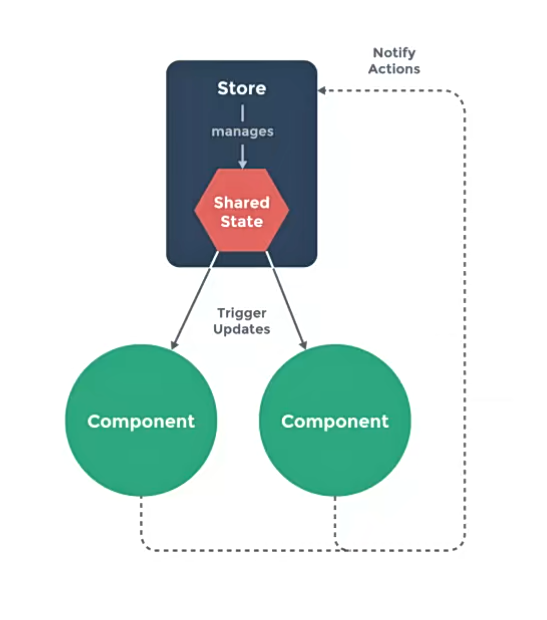
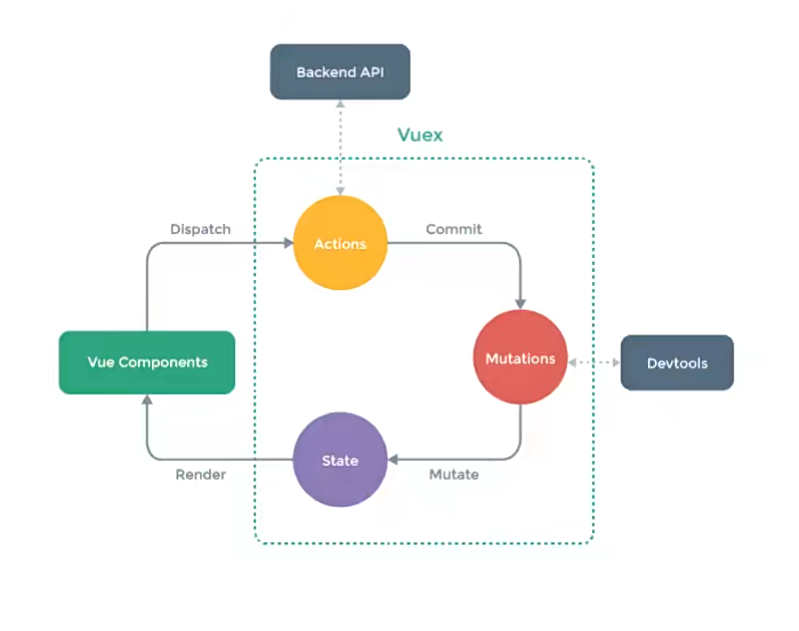
Vuex的状态管理图:
vuex将所有的state抽离存放于一个仓库Store,任何组件都可以去访问state。
- 组件读取state,进行渲染;组件不能直接修改state;
- 组件需要修改state时,需要派发(dispatch)一个行为(actions);
- 行为(actions)一般为访问服务器获取数据;
- 通过mutations修改state。
03. 安装vuex
npm install vuex
04. 从案例入手
我们从一个简单案例入手:在setup中定义了一个counter,在模板中显示这个counter。
常规写法
<template>

<div class="app">

    <!-- 以前写法 -->

    <h2>App当前计数: {{ counter }}</h2>

    </div>

</template>

<script setup>

    import {ref} from 'vue'

    const counter = ref(0)

</script>
运用vuex
每一个Vuex应用的核心就是store(仓库),store本质上是一个容器,它包含着应用中大部分的状态(state)。
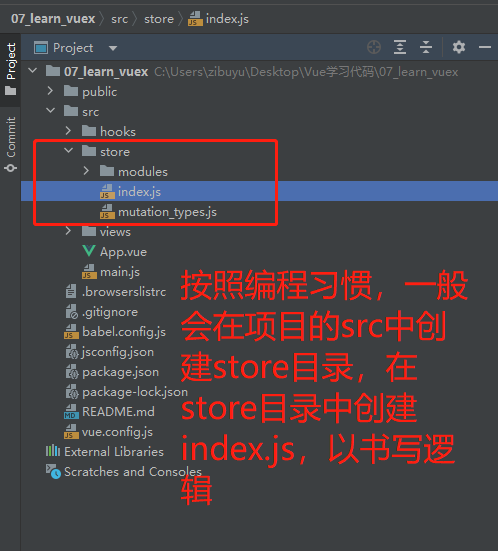
按照编程习惯,一般会在项目的src目录中,创建store目录,在store目录中创建index.js,在index.js中书写关于状态管理的逻辑。
Vuex和单纯的全局对象有什么区别呢?
第一:Vuex的状态存储是响应式的。当Vue组件从store中读取状态的时候,若store中的状态发生变化,那么相应的组件也会被更新;
第二:不能直接改变store中的状态。改变store中的状态的唯一途径就显示提交 (commit) mutation;
这样我们就可以方便跟踪每一个状态的变化,从而让我们能够通过一些工具帮助我们更好的管理应用的状态。
需要注意的是,一个项目只能创建一个store,这种官方的描述中被称为“单一状态树”。
单一状态树(SSOT,Single Source of Truth),也称为“单一数据源”。
这是vuex中的一个概念,指vuex用一个对象(一个store),就包含了全部的应用层级的状态。
App.vue:
<template>

    <div class="app">

        <!-- store中的counter:用 $store 访问-->

        <h2>App当前计数: {{ $store.state.counter }}</h2>

    </div>

</template>

<script setup>

    // 代码中需要先导入useStore

    import {useStore} from 'vuex'

    const store = useStore()

    function printCounter(){

        console.log(store.state.counter)

    }

</script>
index.js
import { createStore } from 'vuex'

const store = createStore({

    state: () => ({

        counter: 100,

    })

export default store
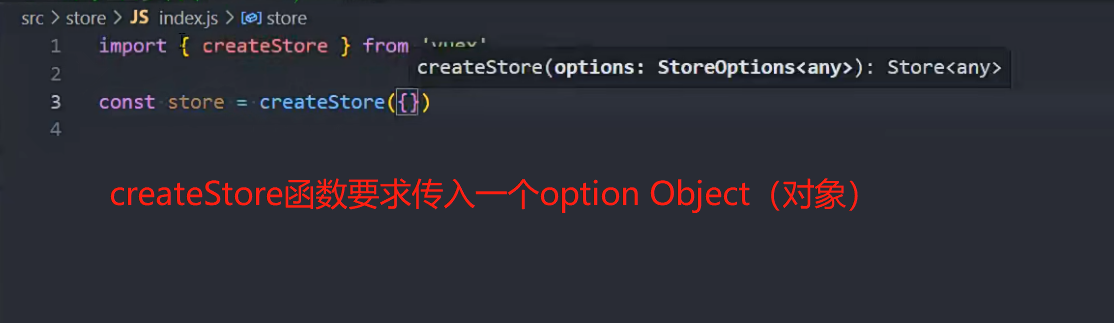
createStore函数的写法

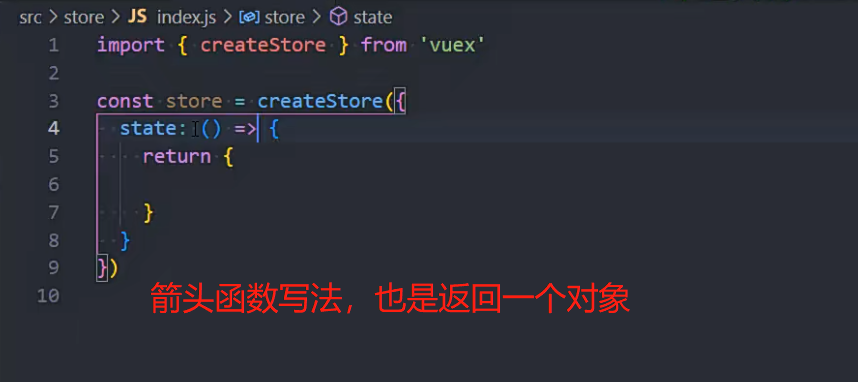
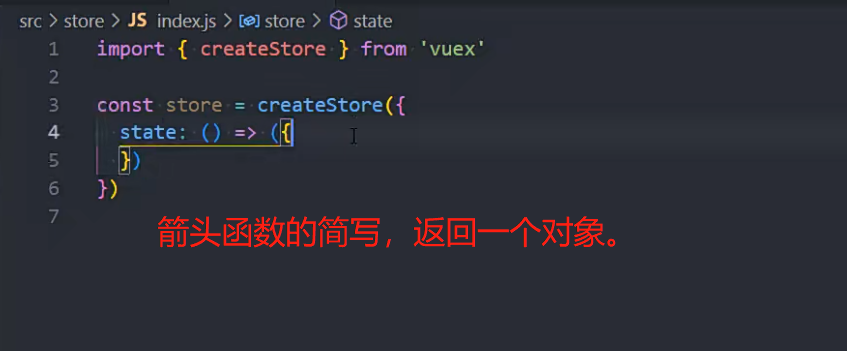
05. mapState
在模板中访问state,一般的写法 $store.state.name,显得很冗长。
<template>

    <div class="app">

        <!-- 在模板中直接访问state -->

        <h2>name: {{ $store.state.name }}</h2>

        <h2>age: {{ $store.state.age }}</h2>

        <h2>avatar: {{ $store.state.avatarURL }}</h2>

    </div>

</template>
有没有更好的办法呢?你可能会想到computed。
<template>

    <div class="app">

        <!-- 通过computed访问state -->

        <h2>name: {{ name }}</h2>

        <h2>age: {{ age }}</h2>

        <h2>avatar: {{ avatar }}</h2>

    </div>

</template>

<script>

    export default {

        computed: {

            name(){

                return $store.state.name

            },

            age(){

                return $store.state.age

            },

            avatar(){

                return $store.state.avatarURL

            },

        }

    }

</script>
这种写法虽然简化了模板中的书写,但又需要在computed中定义函数,并没有优化多少。
vuex考虑到这种情况,提供了更简洁的写法,mapState函数。
mapState函数用于映射state到组件中,返回的是数组,内含一个个函数。
- 数组写法:需要保证state不与data中其他数据重名;
- 对象写法:可以给state取别名。
<template>

    <div class="app">

        <!-- mapState的数组写法 -->

        <h2>name: {{ name }}</h2>

        <h2>age: {{ age }}</h2>

        <h2>avatar: {{ avatarURL }}</h2>

        <!-- mapState的对象写法 -->

        <h2>name: {{ sName }}</h2>

        <h2>age: {{ sAge }}</h2>

    </div>

</template>

<script>

    import { mapState } from 'vuex'

    export default {

        computed: {

            // 舍弃这种繁琐的写法

            // name() {

            //   return this.$store.state.name

            // },

            // computed中可正常定义其他函数

            fullname() {

                return "xxx"

            },

            // 1. mapState的数组写法

            ...mapState(["name", "age", "avatarURL"]),

            // 2. mapState的对象写法:用于给变量取别名

            ...mapState({

                sName: state => state.name,

                sAge: state => state.age

            })

        }

    }

</script>
vuex适用于Vue2,或Vue3的optionAPI写法,
在setup中适用vuex,会略微繁琐。
官方推荐Vue3使用Pinia库作状态管理。
<template>

    <div class="app">

        <h2>name: {{ name }}</h2>

        <h2>age: {{ age }}</h2>

    </div>

</template>

<script setup>

    import { computed, toRefs } from 'vue'

    import { mapState, useStore } from 'vuex'

    import useState from "../hooks/useState"

    // 1.一步步完成

    // const { name, level } = mapState(["name", "level"])

    // 注意:name,level是函数,这个函数的执行需要传入store

    // setup中的computed函数要求传入一个函数,所以可以直接把上面的name和level传递进入,同时绑定所需要的store

    // const store = useStore()

    // const cName = computed(name.bind({ $store: store }))

    // const cLevel = computed(level.bind({ $store: store }))

    // 2.简洁写法:直接对store.state进行解构,同时赋予响应式。

    const store = useStore()

    const { name, age } = toRefs(store.state)

</script>
06. getters
如果我们在输出state之前,需要对数据进行逻辑处理,可以使用getters。
import {createStore} from 'vuex'

const store = createStore({

    state: () => ({

        name: "Mark",

        age: 18,

        height: 173,

        avatarURL: "http://xxxxxx",

        scores: [

            {id: 111, name: "语文", score: 89},

            {id: 112, name: "英语", score: 90},

            {id: 113, name: "数学", score: 96}

        ],

    }),

    getters: {

        // 1.基本使用:对身高进行格式化输出

        formatHeight(state) {

            return state.height / 100

        },

        // 1.复杂逻辑:计算总分

        totalScores(state) {

            return state.scores.reduce((preValue, item) => {

                return preValue + item.score

            }, 0)

        },

        // 3.在该getters属性中, 获取其他的getters

        message(state, getters) {

            return `name:${state.name} age:${state.age} height:${getters.height}`

        },

        // 4.getters也可以返回一个函数, 调用这个函数可以传入参数(了解)

        getScoreById(state) {

            return function (id) {

                 // 数组的find用法。

                const score = state.scores.find(item => item.id === id)

                return score

            }

        }

    },

})

export default store
07. mapGetters
为了方便对getters的使用,vuex也提供了mapGetters函数,使用方法于mapState类似。
<template>

  <div class="app">

    <h2>formatHeight: {{ formatHeight }}</h2>

    <h2>totalScores: {{ totalScores }}</h2>

    <h2>message: {{ message }}</h2>

    <!-- 根据id获取某一科目的成绩 -->

    <h2>id-111的科目分数: {{ getScoreById(111) }}</h2>

    <h2>id-112的科目分数: {{ getScoreById(112) }}</h2>

  </div>

</template>

<script>

    import { mapGetters } from 'vuex'

    export default {

        computed: {

            ...mapGetters(["formatHeight", "totalScores",'message']),

            ...mapGetters(["getScoreById"])

        }

    }

</script>
setup中使用:
<script setup>

    import { computed, toRefs } from 'vue';

    import { mapGetters, useStore } from 'vuex'

    const store = useStore()

    // 1.使用mapGetters

    // const { message: messageFn } = mapGetters(["message"])

    // const message = computed(messageFn.bind({ $store: store }))

    // 2.直接解构, 并且包裹成ref,提供响应式

    // const { message } = toRefs(store.getters)

    // 3.针对某一个getters属性使用computed,比mapGetters好用

    const message = computed(() => store.getters.message)

</script>
08. mutations
更改 Vuex 的 store 中的状态的唯一方法是提交 mutation。
在mutations中书写对应的函数,默认会传入一个参数state,用于获取所有的state
import {createStore} from 'vuex'

import {CHANGE_INFO} from './mutation_types'

import homeModule from './modules/home'

import counterModule from './modules/counter'

import {CHANGE_INFO} from "@/store/mutation_types"

const store = createStore({

    state: () => ({

        name: "Mark",

        age: 18,

        height: 173,

        avatarURL: "http://xxxxxx",

        scores: [

            {id: 111, name: "语文", score: 89},

            {id: 112, name: "英语", score: 90},

            {id: 113, name: "数学", score: 96}

        ],

    }),

    getters: {

        // 1.基本使用:对身高进行格式化输出

        formatHeight(state) {

            return state.height / 100

        },

        // 1.复杂逻辑:计算总分

        totalScores(state) {

            return state.scores.reduce((preValue, item) => {

                return preValue + item.score

            }, 0)

        },

        // 2.在该getters属性中, 获取其他的getters

        message(state, getters) {

            return `name:${state.name} age:${state.age} height:${getters.height}`

        },

        // 3.getters也可以返回一个函数, 调用这个函数可以传入参数(了解)

        getScoreById(state) {

            return function (id) {

                const score = state.scores.find(item => item.id === id)

                return score

            }

        }

    },

    mutations: {

        incrementAge(state) {

            state.age++

        },

        changeName(state, payload) {

            state.name = payload

        },

        changeInfo(state, newInfo) {

            state.age = newInfo.age

            state.name = newInfo.name

        },

        // 使用常量的写法:

        [CHANGE_INFO](state, newInfo) {

            state.age = newInfo.age

            state.name = newInfo.name

        },

    },

})

export default store
组件中应用:
<template>

<div class="app">

    <button @click="changeName">修改name</button>

    <button @click="incrementAge">递增age</button>

    <button @click="changeInfo">修改info</button>

    <h2>Store Name: {{ $store.state.name }}</h2>

    <h2>Store Level: {{ $store.state.level }}</h2>

    </div>

</template>

<script>

    import {CHANGE_INFO} from "@/store/mutation_types"

    export default {

        computed: {},

        methods: {

            changeName() {

                // 这种写法虽然可以修改值,但不推荐。

                // this.$store.state.name = "Tom"

                this.$store.commit("changeName", "Tom")  // 第一个参数为mutations中的名称,第二个参数为值

            },

            incrementAge() {

                this.$store.commit("incrementAge")

            },

            changeInfo() {

                this.$store.commit(changeInfo, {

                    name: "Tom",

                    age: 20

                })

            },

            // 使用常量的写法:

            changeInfo() {

                this.$store.commit(CHANGE_INFO, {

                    name: "Tom",

                    age: 20

                })

            }

        }

    }

</script>
store/mutation_types.js:
export const CHANGE_INFO = "changeInfo"
mutation是重要原则: mutation 必须是同步函数,不要执行异步操作。
这是因为devtool工具会记录mutation的日志;
每一条mutation被记录,devtools都需要捕捉到前一状态和后一状态的快照;
但是在mutation中执行异步操作,就无法追踪到数据的变化;
对于异步操作,vuex放在action中。
09. mapMutations
为了方便对Mutations的使用,vuex也提供了mapMutations函数,使用方法于mapState类似。
<template>

<div class="app">

    <button @click="changeName('王小波')">修改name</button>

    <button @click="incrementAge">递增Age</button>

    <button @click="changeInfo({ name: '王二', age: 22 })">修改info</button>

    <h2>Store Name: {{ $store.state.name }}</h2>

    <h2>Store Level: {{ $store.state.level }}</h2>

    </div>

</template>

<script>

    import { mapMutations } from 'vuex'

    import { CHANGE_INFO } from "@/store/mutation_types"

    export default {

        computed: {

        },

        methods: {

            btnClick() {

                console.log("btnClick")

            },

            // 注意这里通过CHANGE_INFO取出常量,但模板中使用的是changeInfo

            // ...mapMutations(["changeName", "incrementAge", CHANGE_INFO])

        }

    }

</script>

<script setup>

    import { mapMutations, useStore } from 'vuex'

    import { CHANGE_INFO } from "@/store/mutation_types"

    const store = useStore()

    // 手动的映射和绑定

    const mutations = mapMutations(["changeName", "incrementLevel", CHANGE_INFO])

    const newMutations = {}

    Object.keys(mutations).forEach(key => {

        newMutations[key] = mutations[key].bind({ $store: store })

    })

    const { changeName, incrementLevel, changeInfo } = newMutations

</script>
10. actions
Action类似于mutation,不同在于:
Action提交的是mutation,而不是直接变更状态;
Action可以包含任意异步操作;
在actions中书写函数,默认会传入一个参数context(上下文)。可以通过context访问到当前的state和getters。
context.commit(mutation名称) 用于提交mutation
import {createStore} from 'vuex'

const store = createStore({

    // ...

    actions: {

        incrementAction(context) {

            // console.log(context.commit) // 用于提交mutation

            // console.log(context.getters) // 访问getters

            // console.log(context.state) // 访问state

            context.commit("incrementAge")

        },

        changeNameAction(context, payload) {

            context.commit("changeName", payload)

        },

    },

    // ...

}
在组件中运用:通过 $store.dispatch
<template>

<div class="home">

    <h2>当前计数: {{ $store.state.counter }}</h2>

    <button @click="counterBtnClick">发起action修改counter</button>

    <h2>name: {{ $store.state.name }}</h2>

    <button @click="nameBtnClick">发起action修改name</button>

    </div>

</template>

<script>

    export default {

        methods: {

            counterBtnClick() {

                this.$store.dispatch("incrementAction")

            },

            nameBtnClick() {

                this.$store.dispatch("changeNameAction", "aaa")

            }

        }

    }

</script>
setup直接定义函数即可。
action中进行网络请求,继而处理请求得到的数据。
import {createStore} from 'vuex'

const store = createStore({

    actions: {

        incrementAction(context) {

            // console.log(context.commit) // 用于提交mutation

            // console.log(context.getters) // getters

            // console.log(context.state) // state

            context.commit("increment")

        },

        changeNameAction(context, payload) {

            context.commit("changeName", payload)

        },

        // 以下模拟网络请求

        // fetchHomeMultidataAction(context) {

        //   // 1.返回Promise, 给Promise设置then

        //   // fetch("http://123.207.32.32:8000/home/multidata").then(res => {

        //   //   res.json().then(data => {

        //   //     console.log(data)

        //   //   })

        //   // })

        //   // 2.Promise链式调用

        //   // fetch("http://123.207.32.32:8000/home/multidata").then(res => {

        //   //   return res.json()

        //   // }).then(data => {

        //   //   console.log(data)

        //   // })

        //   return new Promise(async (resolve, reject) => {

        //     // 3.await/async

        //     const res = await fetch("http://123.207.32.32:8000/home/multidata")

        //     const data = await res.json()

        //     // 修改state数据

        //     context.commit("changeBanners", data.data.banner.list)

        //     context.commit("changeRecommends", data.data.recommend.list)

        //     resolve("aaaaa")

        //   })

        // }

    },

})

export default store
11. mapActions
<template>

    <div class="home">

        <h2>当前计数: {{ $store.state.counter }}</h2>

        <button @click="incrementAgeBtn">发起action修改Age</button>

        <h2>name: {{ $store.state.name }}</h2>

        <button @click="changeNameBtn('bbbb')">发起action修改name</button>

    </div>

</template>

<script>

    import { mapActions } from 'vuex'

    export default {

        methods: {

            // incrementAgeBtn() {

            //   this.$store.dispatch("incrementAction")

            // },

            // changeNameBtn() {

            //   this.$store.dispatch("changeNameAction", "aaa")

            // }

            // 这种方法需要注意的调用名称需一致

            // ...mapActions(["incrementAction", "changeNameAction"])

        }

    }

</script>

<!-- ↓ setup写法 ↓ -->

<script setup>

    import { useStore, mapActions } from 'vuex'

    const store = useStore()

    // 1.在setup中使用mapActions辅助函数

    // const actions = mapActions(["incrementAction", "changeNameAction"])

    // const newActions = {}

    // Object.keys(actions).forEach(key => {

    //   newActions[key] = actions[key].bind({ $store: store })

    // })

    // const { incrementAction, changeNameAction } = newActions

    // 2.使用默认的做法

    function increment() {

        store.dispatch("incrementAction")

    }

</script>
12. module
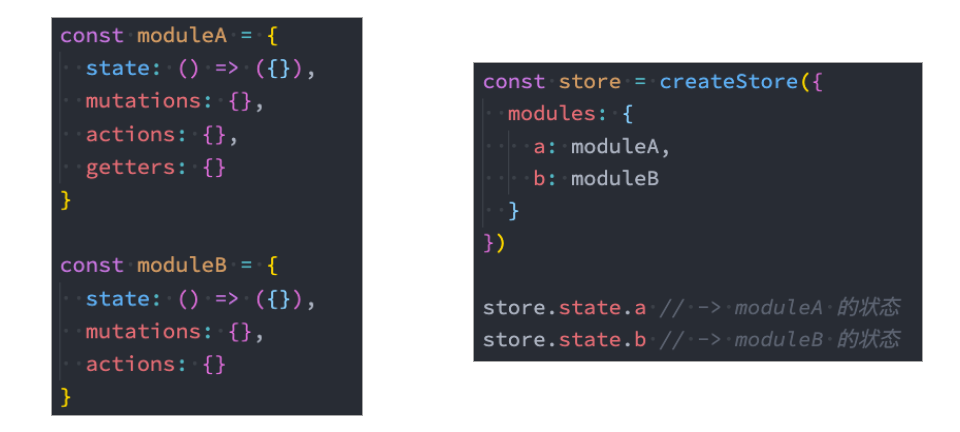
由于使用单一状态树,应用的所有状态会集中到一个比较大的对象,当应用变得非常复杂时,store 对象就有可能变得相当臃肿;
为了解决以上问题,Vuex 允许我们将 store 分割成模块(module);
每个模块拥有自己的 state、mutation、action、getter、甚至是嵌套子模块。
使用module时,mutation、action和getter会自动合并到一起,所以在模板中可以直接通过
$store.getters.xxxx去调用;而state是独立的,在模板中需要用
$store.state.module_name.state_name去访问。由于mutation、action和getter会自动合并到一起,一起放到全局,所以对于这些函数的命名需要特别小心,重名就会被覆盖;
为了避免重名问题,也可以设置namespace。
index.js:
import {createStore} from 'vuex'

import homeModule from './modules/home'

import counterModule from './modules/counter'

const store = createStore({

    state: () => ({

        name: "Mark",

        age: 18,

        height: 173,

        rootCounter: 100,

        avatarURL: "http://xxxxxx",

        scores: [

            {id: 111, name: "语文", score: 89},

            {id: 112, name: "英语", score: 90},

            {id: 113, name: "数学", score: 96}

        ],

    }),

    // ......

    modules: {

        home: homeModule,

        counter: counterModule

    }

})

export default store
home.js:
export default {

    state: () => ({

        // 服务器数据

        banners: [],

        recommends: []

    }),

    mutations: {

        changeBanners(state, banners) {

            state.banners = banners

        },

        changeRecommends(state, recommends) {

            state.recommends = recommends

        }

    },

    actions: {

        // 向服务器发起请求,获取home页面数据

        fetchHomeMultidataAction(context) {

            return new Promise(async (resolve, reject) => {

                // 3.await/async

                const res = await fetch("http://123.207.32.32:8000/home/multidata")

                const data = await res.json()

                // 修改state数据

                context.commit("changeBanners", data.data.banner.list)

                context.commit("changeRecommends", data.data.recommend.list)

                resolve("aaaaa")

            })

        }

    }

}
counter.js:
const counter = {

    namespaced: true,

    state: () => ({

        count: 99

    }),

    mutations: {

        incrementCount(state) {

            state.count++

        }

    },

    getters: {

        // 注意:module中,getters函数有第三个参数rootState

        doubleCount(state, getters, rootState) {

            return state.count + rootState.rootCounter

        }

    },

    actions: {

        incrementCountAction(context) {

            context.commit("incrementCount")

        }

    }

}

export default counter
对store的代码逻辑进行拆分后,在组件中如何访问数据呢?
<template>

    <div class="home">

        <h2>Home Page</h2>

        <ul>

            <!-- 获取数据: 需要从模块中获取 state.modulename.xxx -->

            <template v-for="item in $store.state.home.banners" :key="item.acm">

                <li>{{ item.title }}</li>

        	</template>

        </ul>

        <h2>Counter Page</h2>

        <!-- 使用state时, 是需要state.moduleName.xxx -->

        <h2>Counter模块的counter: {{ $store.state.counter.count }}</h2>

        <!-- 使用getters时, 默认可以直接getters.xxx -->

        <!--  <h2>Counter模块的doubleCounter: {{ $store.getters.doubleCount }}</h2>-->

        <!--  如果设置了namespace,则需要用下面的方式: -->

        <h2>Counter模块的doubleCounter: {{ $store.getters["counter/doubleCount"] }}</h2>

        <button @click="incrementCount">count模块+1</button>

    </div>

</template>

<script>

</script>

<script setup>

    import { useStore } from 'vuex'

    const store = useStore()

    // 默认:dispatch一个action的时候,直接调用即可

    store.dispatch("fetchHomeMultidataAction").then(res => {

        console.log("home中的then被回调:", res)

    })

    // 如果module中设置了 namespaced: true, 那么dispatch时就需要加上模块名

    function incrementCount() {

        store.dispatch("counter/incrementCountAction")

  	}

</script>
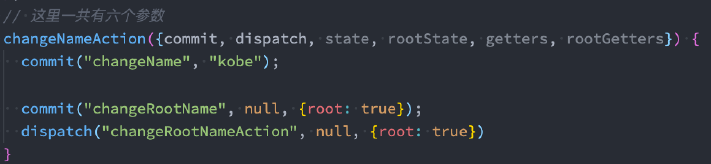
在module中,如果希望修改root中的state,有如下方式:
(完)
Vue05-Vuex的更多相关文章
- 关于Vue.js 2.0 的 Vuex 2.0,你需要更新的知识库
应用结构 实际上,Vuex 在怎么组织你的代码结构上面没有任何限制,相反,它强制规定了一系列高级的原则: 应用级的状态集中放在 store 中. 改变状态的唯一方式是提交mutations,这是个同步 ...
- vuex复习方案
这次复习vuex,发现官方vuex2.0的文档写得太简略了,有些看不懂了.然后看了看1.0的文档,感觉很不错.那以后需要复习的话,还是先看1.0的文档吧.
- vuex 初体验
vuex是vue的状态管理工具,vue进阶从es6和npm开始,es6推荐阮一峰大神的教程. vuex学习从官方文档和一个记忆小游戏开始.本着兴趣为先的原则,我先去试玩了一把-->. Vuex ...
- vuex(1.0版本写法)
Vuex 是一个专门为 Vue.js 应用所设计的集中式状态管理架构. 官方文档:http://vuex.vuejs.org/zh-cn/ 2.0和1.0都能在此找到 每一个 Vuex 应用的核心就 ...
- 关于Vue vuex vux 文档
01. vue 链接 http://vuejs.org.cn/guide/ 02. vuex ----->>状态管理模块儿<<------- https://vuex.vue ...
- vuex
英文:(Introduction)中文:https://github.com/vuejs/vuex/issues/176(贡献者努力中)
- Vue 2.0 + Vue Router + Vuex
用 Vue.js 2.x 与相配套的 Vue Router.Vuex 搭建了一个最基本的后台管理系统的骨架. 当然先要安装 node.js(包括了 npm).vue-cli 项目结构如图所示: ass ...
- Vue2.X的状态管理vuex记录
记住上述的顺序情况:想要改变state,只能通过Mutation,虽然action可以直接改变state,这样会使每个状态可以方便的跟踪和记录(用Devtools跟踪) vue Method -- ...
- 在vue1.0遇到vuex和v-model的坑
事情是这样的,在开发项目的过程中我使用了vuex并且在store中定义了一个保存用户信息的对象 userInfo : { 'nickName' : '', // 昵称 'password' :'', ...
- vuex 笔记
Vuex 笔记 一个简单的状态管理 单一数据源: const sourceOfTruth = {} const vmA = new Vue({ data: sourceOfTruth }) const ...
随机推荐
- 记一次 .NET某培训学校系统 内存碎片化分析
一:背景 1. 讲故事 前些天有位朋友微信上找到我,说他们学校的Web系统内存一直下不去,让我看下到底是怎么回事,老规矩让朋友生成一个dump文件丢给我,看一下便知. 二:WinDbg 分析 1. 托 ...
- 创建本地yum仓库
创建本地yum仓库 1,将镜像挂载到/mnt 如果失败打开虚拟机把设备状态的两个选项打勾 2,切换到客户端的指定目录 3,创建文件夹bak存放网络yum创库配置文件 4,将网络源移动到bak减少干扰 ...
- React Router@3.x 升级到 @6.x 的实施方案
我们是袋鼠云数栈 UED 团队,致力于打造优秀的一站式数据中台产品.我们始终保持工匠精神,探索前端道路,为社区积累并传播经验价值. 本文作者:景明 升级背景 目前公司产品有关 react 的工具版本普 ...
- 操作系统实验——利用Linux的消息队列通信机制实现两个线程间的通信
目录 一. 题目描述 二.实验思路 三.代码及实验结果 四.遇到问题及解决方法 五.参考文献 一. 题目描述 编写程序创建三个线程:sender1线程.sender2线程和receive线程,三个线程 ...
- ignite
目录 简介 运行 制作vm文件系统 制作vm基础文件系统文件 创建contianerdClient 创建cniInstance 拉取基础镜像 创建基础文件系统文件 制作vm内核文件 Create vm ...
- Visual Studio Code(vscode)下载慢 插件安装失败解决方案
目录 一.系统环境 二.前言 三.Visual Studio Code(vscode)简介 四.解决Visual Studio Code(vscode)下载慢的问题 4.1 问题描述 4.2 解决方案 ...
- Mysql高阶自定义排序
Mysql高阶自定义排序 嗨,大家好,我是远码,隔三岔五给大家分享一点工作的技术总结,花费的时间不多,几分钟就行,谢谢! Mysql对我们码农来说是在熟悉不过的日常了,就不在介绍它的基础用法了,今天我 ...
- 揭秘ChatGPT,如何打造自己的自定义指令
一.ChatGPT-0720更新 又在深夜,正要打开ChatGPT官网测试下pdf对话功能,发现ChatGPT又有更新.本次更新总结有2点: 1.对于Plus用户,GPT-4的使用限额从25条/3h提 ...
- Vue 脚手架编程
1.1 初始化脚手架 1.1.1 说明 Vue 脚手架是 Vue 官方提供的标准化开发工具(开发平台) 最新的版本是 4.x 文档 1.1.2 具体步骤 第一步(仅第一次执行):全局安装 @vue/c ...
- mpi转以太网连接200plc以太网监控同时与步科触摸屏通信
西门子PLC200 226PLC转以太网通过PPI-ETH-XD1.0集中采集不占用编程口同时与步科触摸屏通信 现有设备及联网要求客户车间内有6台纺机设备,控制系统采用西门子PLC,型号为CPU226 ...