
【转载】 机器学习数据可视化 (t-SNE 使用指南)—— Why You Are Using t-SNE Wrong
原文地址:
https://towardsdatascience.com/why-you-are-using-t-sne-wrong-502412aab0c0
=====================================
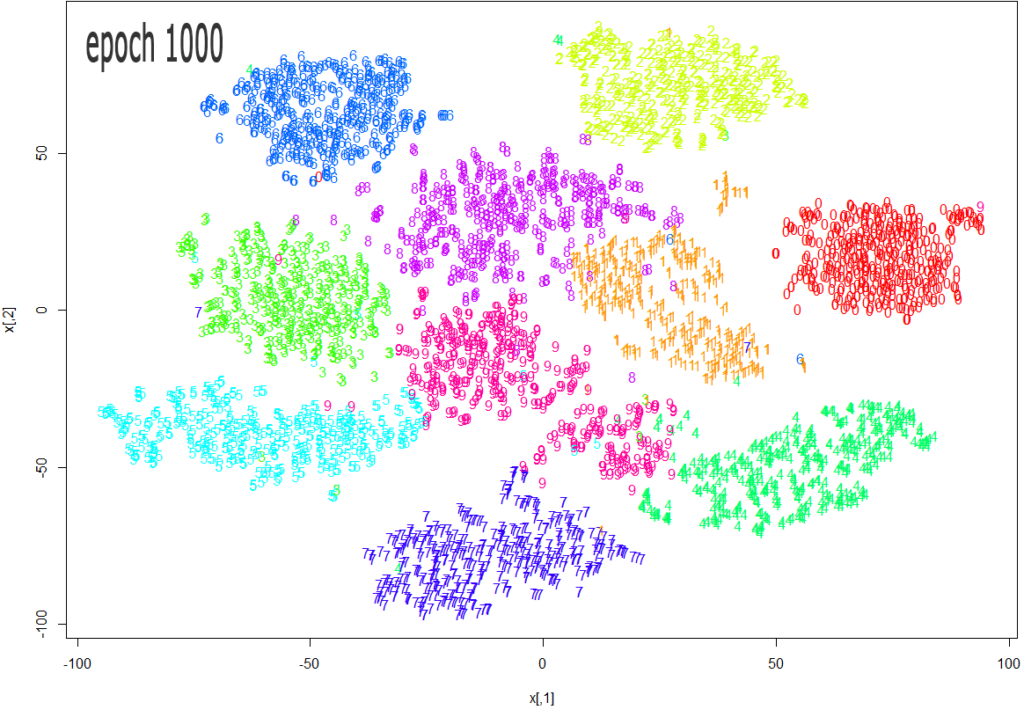
Source: https://datascienceplus.com/multi-dimensional-reduction-and-visualisation-with-t-sne/
t-SNE has become a very popular technique for visualizing high dimensional data. It’s extremely common to take the features from an inner layer of a deep learning model and plot them in 2-dimensions using t-SNE to reduce the dimensionality. Unfortunately, most people just use scikit-learn’s implementation without actually understanding the results and misinterpreting what they mean.
While t-SNE is a dimensionality reduction technique, it is mostly used for visualization and not data pre-processing (like you might with PCA). For this reason, you almost always reduce the dimensionality down to 2 with t-SNE, so that you can then plot the data in two dimensions.
The reason t-SNE is common for visualization is that the goal of the algorithm is to take your high dimensional data and represent it correctly in lower dimensions — thus points that are close in high dimensions should remain close in low dimensions. It does this in a non-linear and local way, so different regions of data could be transformed differently.
t-SNE has a hyper-parameter called perplexity. Perplexity balances the attention t-SNE gives to local and global aspects of the data and can have large effects on the resulting plot. A few notes on this parameter:
- It is roughly a guess of the number of close neighbors each point has. Thus, a denser dataset usually requires a higher perplexity value.
- It is recommended to be between 5 and 50.
- It should be smaller than the number of data points.
The biggest mistake people make with t-SNE is only using one value for perplexity and not testing how the results change with other values. If choosing different values between 5 and 50 significantly change your interpretation of the data, then you should consider other ways to visualize or validate your hypothesis.
It is also overlooked that since t-SNE uses gradient descent, you also have to tune appropriate values for your learning rate and the number of steps for the optimizer. The key is to make sure the algorithm runs long enough to stabilize.
There is an incredibly good article on t-SNE that discusses much of the above as well as the following points that you need to be aware of:
- You cannot see the relative sizes of clusters in a t-SNE plot. This point is crucial to understand as t-SNE naturally expands dense clusters and shrinks spares ones. I often see people draw inferences by comparing the relative sizes of clusters in the visualization. Don’t make this mistake.
- Distances between well-separated clusters in a t-SNE plot may mean nothing. Another common fallacy. So don’t necessarily be dismayed if your “beach” cluster is closer to your “city” cluster than your “lake” cluster.
- Clumps of points — especially with small perplexity values — might just be noise. It is important to be careful when using small perplexity values for this reason. And to remember to always test many perplexity values for robustness.
Now — as promised some code! A few things of note with this code:
- I first reduce the dimensionality to 50 using PCA before running t-SNE. I have found that to be good practice (when having over 50 features) because otherwise, t-SNE will take forever to run.
- I don’t show various values for perplexity as mentioned above. I will leave that as an exercise for the reader. Just run the t-SNE code a few more times with different perplexity values and compare visualizations.
from sklearn.datasets import fetch_mldata

from sklearn.manifold import TSNE

from sklearn.decomposition import PCA

import seaborn as sns

import numpy as np

import matplotlib.pyplot as plt

# get mnist data

mnist = fetch_mldata("MNIST original")

X = mnist.data / 255.0

y = mnist.target

# first reduce dimensionality before feeding to t-sne

pca = PCA(n_components=50)

X_pca = pca.fit_transform(X)

# randomly sample data to run quickly

rows = np.arange(70000)

np.random.shuffle(rows)

n_select = 10000

# reduce dimensionality with t-sne

tsne = TSNE(n_components=2, verbose=1, perplexity=50, n_iter=1000, learning_rate=200)

tsne_results = tsne.fit_transform(X_pca[rows[:n_select],:])

# visualize

df_tsne = pd.DataFrame(tsne_results, columns=['comp1', 'comp2'])

df_tsne['label'] = y[rows[:n_select]]sns.lmplot(x='comp1', y='comp2', data=df_tsne, hue='label', fit_reg=False)
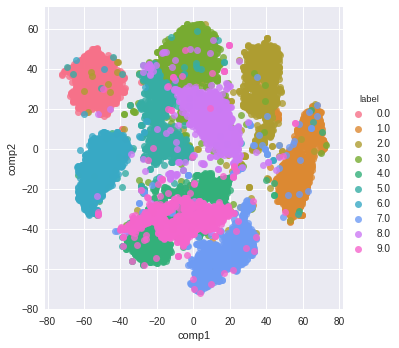
And here is the resulting visualization:
=========================================
【转载】 机器学习数据可视化 (t-SNE 使用指南)—— Why You Are Using t-SNE Wrong的更多相关文章
- 前端数据可视化echarts.js使用指南
一.开篇 首先这里要感谢一下我的公司,因为公司需求上面的新颖(奇葩)的需求,让我有幸可以学习到一些好玩有趣的前端技术,前端技术中好玩而且比较实用的我想应该要数前端的数据可视化这一方面,目前市面上的数据 ...
- 机器学习-数据可视化神器matplotlib学习之路(五)
这次准备做一下pandas在画图中的应用,要做数据分析的话这个更为实用,本次要用到的数据是pthon机器学习库sklearn中一组叫iris花的数据,里面组要有4个特征,分别是萼片长度.萼片宽度.花瓣 ...
- 机器学习-数据可视化神器matplotlib学习之路(四)
今天画一下3D图像,首先的另外引用一个包 from mpl_toolkits.mplot3d import Axes3D,接下来画一个球体,首先来看看球体的参数方程吧 (0≤θ≤2π,0≤φ≤π) 然 ...
- 机器学习-数据可视化神器matplotlib学习之路(三)
之前学习了一些通用的画图方法和技巧,这次就学一下其它各种不同类型的图.好了先从散点图开始,上代码: from matplotlib import pyplot as plt import numpy ...
- 机器学习-数据可视化神器matplotlib学习之路(二)
之前学习了matplotlib的一些基本画图方法(查看上一节),这次主要是学习在图中加一些文字和其其它有趣的东西. 先来个最简单的图 from matplotlib import pyplot as ...
- 机器学习-数据可视化神器matplotlib学习之路(一)
直接上代码吧,说明写在备注就好了,这次主要学习一下基本的画图方法和常用的图例图标等 from matplotlib import pyplot as plt import numpy as np #这 ...
- Python数据可视化编程实战pdf
Python数据可视化编程实战(高清版)PDF 百度网盘 链接:https://pan.baidu.com/s/1vAvKwCry4P4QeofW-RqZ_A 提取码:9pcd 复制这段内容后打开百度 ...
- python数据可视化编程实战PDF高清电子书
点击获取提取码:3l5m 内容简介 <Python数据可视化编程实战>是一本使用Python实现数据可视化编程的实战指南,介绍了如何使用Python最流行的库,通过60余种方法创建美观的数 ...
- Python Seaborn综合指南,成为数据可视化专家
概述 Seaborn是Python流行的数据可视化库 Seaborn结合了美学和技术,这是数据科学项目中的两个关键要素 了解其Seaborn作原理以及使用它生成的不同的图表 介绍 一个精心设计的可视化 ...
- 机器学习PAL数据可视化
机器学习PAL数据可视化 本文以统计全表信息为例,介绍如何进行数据可视化. 前提条件 完成数据预处理,详情请参见数据预处理. 操作步骤 登录PAI控制台. 在左侧导航栏,选择模型开发和训练 > ...
随机推荐
- Maven常用命令有哪些?
a.install 本地安装, 包含编译,打包,安装到本地仓库编译 - javac 打包 - jar, 将java代码打包为jar文件 安装到本地仓库 - 将打包的jar文件,保存到本地仓库目录中. ...
- Libgdx游戏开发(5)——碰撞反弹的简单实践
原文: Libgdx游戏开发(5)--碰撞反弹的简单实践-Stars-One的杂货小窝 本篇简单以一个小球运动,一步步实现碰撞反弹的效果 本文代码示例以kotlin为主,且需要有一定的Libgdx入门 ...
- VIP视频解析
效果图 新建窗口 import tkinter as tk# 创建一个窗口 root = tk.Tk() # 设置窗口大小 root.geometry('700x250+200+200') # 设置标 ...
- 在Linux驱动中使用regmap
背景 在学习SPI的时候,看到了某个rtc驱动中用到了regmap,在学习了对应的原理以后,也记录一下如何使用. 介绍 在Linu 3.1开始,Linux引入了regmap来统一管理内核的I2C, S ...
- 有手就会的 Java 处理压缩文件
@ 目录 前言 背景 第一步:编写代码 1.1 请求层 1.2 业务处理层 1.3 新增配置 第二步:解压缩处理 2.1 引入依赖 2.2 解压缩工具类 总结 前言 请各大网友尊重本人原创知识分享,谨 ...
- 什么是Selenium Grid?如何搭建Selenium Grid?
标签(空格分隔): 测试架构 什么是测试基础架构? 测试基础架构指的是,执行测试的过程中用到的所有基础硬件设施以及相关的软件设施.因此,我们也把测试基础架构称之为广义的测试执行环境.通常来讲,测试基础 ...
- mac 安装jdk1.8 附详细教程
详细步骤 下载 链接: https://pan.baidu.com/s/1xQr6_9_7lFNtSes7HsKveA 密码: edme 安装包 一直按继续 配置系统环境变量 上一步骤,实标上,我们只 ...
- 机器学习策略篇:详解数据分布不匹配时,偏差与方差的分析(Bias and Variance with mismatched data distributions)
详解数据分布不匹配时,偏差与方差的分析 估计学习算法的偏差和方差真的可以帮确定接下来应该优先做的方向,但是,当训练集来自和开发集.测试集不同分布时,分析偏差和方差的方式可能不一样,来看为什么. 继续用 ...
- 在Django中查找重复项目
在Django中查找重复项目通常涉及使用查询集(QuerySet)和模型(Model).假设你有一个模型,比如Item,你想查找其中重复的项目,可以通过以下步骤来实现: 确定重复的标准: 首先需要确定 ...
- Docker Compose 基本概要
Docker Compose 基本概要 Compose 是一个用于定义和运行多容器 Docker 应用程序的工具.使用 YAML 文件来配置多个应用程序的服务,包括生产.暂存.开发.测试以及 CI 工 ...