
CitusDB Multi-node Install and Test
Multi-node setup on CentOS
参考官网:https://docs.citusdata.com/en/v6.2/installation/production_rhel.html
Test Environments
CentOS Linux release 7.2.1511 (Core)
Three nodes(citus1,citus2,citus3)
Steps to be executed on all nodes
1. Add repository
curl https://install.citusdata.com/community/rpm.sh | sudo bash
2. Install PostgreSQL + Citus and initialize a database
sudo yum install -y citus62_96

sudo service postgresql-9.6 initdb || sudo /usr/pgsql-9.6/bin/postgresql96-setup initdb

echo "shared_preload_libraries = 'citus'" | sudo tee -a /var/lib/pgsql/9.6/data/postgresql.conf
3. Configure connection and authentication
sudo vi /var/lib/pgsql/9.6/data/postgresql.conf

sudo vi /var/lib/pgsql/9.6/data/pg_hba.conf
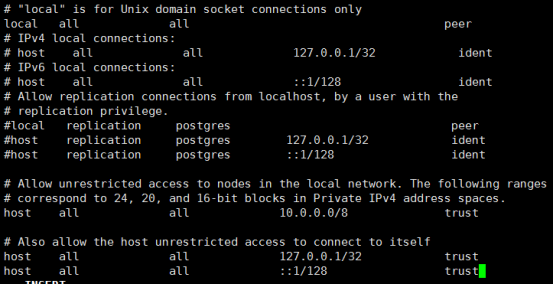
Note:Your DNS settings may differ. Also these settings are too permissive for some environments.The configuration is shown below:
https://www.postgresql.org/docs/9.6/static/auth-pg-hba-conf.html
4. Start database servers, create Citus extension
sudo service postgresql-9.6 restart

sudo chkconfig postgresql-9.6 on
You must add the Citus extension to every database you would like to use in a cluster. The following example adds the extension to the default database which is named postgres.
sudo -i -u postgres psql -c "CREATE EXTENSION citus;"
Steps to be executed only on the coordinator node
1. Add worker node
sudo -i -u postgres psql -c "SELECT * from master_add_node('citus2', 5432);"

sudo -i -u postgres psql -c "SELECT * from master_add_node('citus3', 5432);"
2. Verify
sudo -i -u postgres psql -c "SELECT * FROM master_get_active_worker_nodes();"
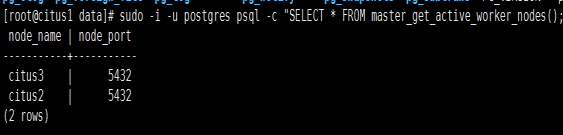
Succeeded!
Notes:Remove worker node command(If you add a node wrong)
sudo -i -u postgres psql -c "SELECT * from master_remove_node('work', 5432);"
See the details below:
https://docs.citusdata.com/en/v6.2/reference/user_defined_functions.html
Test
Download sample data
curl https://examples.citusdata.com/tutorial/companies.csv > /var/lib/pgsql/companies.csv
curl https://examples.citusdata.com/tutorial/campaigns.csv > /var/lib/pgsql/campaigns.csv
curl https://examples.citusdata.com/tutorial/ads.csv > /var/lib/pgsql/ads.csv
Creating tables
To start, you can first connect to the Citus co-ordinator(citus1) using psql.
# sudo -i -u postgres psql
CREATE TABLE companies ( id bigint NOT NULL, name text NOT NULL, image_url text, created_at timestamp without time zone NOT NULL, updated_at timestamp without time zone NOT NULL );

CREATE TABLE campaigns ( id bigint NOT NULL, company_id bigint NOT NULL, name text NOT NULL, cost_model text NOT NULL, state text NOT NULL, monthly_budget bigint, blacklisted_site_urls text[], created_at timestamp without time zone NOT NULL, updated_at timestamp without time zone NOT NULL );

CREATE TABLE ads ( id bigint NOT NULL, company_id bigint NOT NULL, campaign_id bigint NOT NULL, name text NOT NULL, image_url text, target_url text, impressions_count bigint DEFAULT 0, clicks_count bigint DEFAULT 0, created_at timestamp without time zone NOT NULL, updated_at timestamp without time zone NOT NULL );
Next, you can create primary key indexes on each of the tables just like you would do in PostgreSQL
ALTER TABLE companies ADD PRIMARY KEY (id);

ALTER TABLE campaigns ADD PRIMARY KEY (id, company_id);

ALTER TABLE ads ADD PRIMARY KEY (id, company_id);
Distributing tables and loading data
SELECT create_distributed_table('companies', 'id');

SELECT create_distributed_table('campaigns', 'company_id');

SELECT create_distributed_table('ads', 'company_id');
Load the data
postgres=# \copy companies from '/var/lib/pgsql/companies.csv' with csv;

COPY 100

postgres=# \copy campaigns from '/var/lib/pgsql/campaigns.csv' with csv;

COPY 978

postgres=# \copy ads from '/var/lib/pgsql/ads.csv' with csv;

COPY 7364
Running queries
postgres=# INSERT INTO companies VALUES (5000, 'New Company', 'https://randomurl/image.png', now(), now());

INSERT 0 1

postgres=# UPDATE campaigns

postgres-# SET monthly_budget = monthly_budget*2

postgres-# WHERE company_id = 5;

UPDATE 12

postgres=# BEGIN;

BEGIN

postgres=# DELETE from campaigns where id = 46 AND company_id = 5;

DELETE 1

postgres=# DELETE from ads where campaign_id = 46 AND company_id = 5;

DELETE 7

postgres=# COMMIT;

COMMIT

postgres=# SELECT name, cost_model, state, monthly_budget

postgres-# FROM campaigns

postgres-# WHERE company_id = 5

postgres-# ORDER BY monthly_budget DESC

postgres-# LIMIT 10;

name | cost_model | state | monthly_budget

-------------------------+---------------------+----------+----------------

Wondra | cost_per_impression | running | 16732

Quicksilver | cost_per_click | paused | 12664

Cyborg | cost_per_impression | running | 8198

Agent Hancock | cost_per_impression | running | 6996

Mr Cyclops I | cost_per_click | paused | 6122

Sasquatch Eyes | cost_per_impression | archived | 5828

Ultra Namor | cost_per_impression | paused | 5554

Carnage | cost_per_impression | paused | 4300

Cyborg Two-Face Machine | cost_per_click | archived | 4086

Binary | cost_per_impression | paused | 3620

(10 rows)
CitusDB Multi-node Install and Test的更多相关文章
- phantomjs-prebuilt@2.1.14 install: `node install.js`
在用vue-cli构建项目时,npm install 安装包的时候报错了. 错误信息: npm ERR! Failed at the phantomjs-prebuilt@2.1.14 install ...
- vue安装之后的报错处理---chromedriver@2.35.0 install: `node install.js`
报错:chromedriver@2.35.0 install: `node install.js` 这个错误的解决方法就是在你创建的项目目录,比如你创建的项目叫myVue,然后你就要在myVue这个目 ...
- npm ERR! errno 1 npm ERR! chromedriver@2.35.0 install: `node install.js`
在使用webpack+vue-cli进行vue项目构建时可能会出现一下错误,webpack@3.10.0及以上版本和vue-cli@2.9.2及以上版本会自动安装依赖(我在自己电脑上测试是这样的)不用 ...
- How to set an Apache Kafka multi node – multi broker cluster【z】
Set a multi node Apache ZooKeeper cluster On every node of the cluster add the following lines to th ...
- npm install报错:chromedriver@2.27.2 install: node install.js
报错: 刚开始以为是 node 或 npm 版本问题,前前后后折腾了好久,终于解决了 解决: 如果执行过npm install,先删除 node_modules 文件夹,不然运行的时候可能会报错 执行 ...
- 报错---“node install.js”
如图 解决方案: 目录中执行 npm install chromedriver --chromedriver_cdnurl=http://cdn.npm.taobao.org/dist/chromed ...
- phantomjs-prebuilt@2.1.16 install: `node install.js`
今天运行vue项目安装项目依赖(npm install)的时候,报这个错误: 解决办法: npm -g install phantomjs-prebuilt@2.1.16 --ignore-scrip ...
- npm 安装vue 报错Failed at the chromedriver@2.46.0 install script 'node install.js'
原因一般是下载源被封了,我们连接淘宝的下载源下载: npm install chromedriver --chromedriver_cdnurl=http://cdn.npm.taobao.org/d ...
- npm 安装vue 报错Failed at the chromedriver@2.34.0 install script 'node install.js'
提示版本不够,后来百度到,在你的vue项目包下执行: npm install chromedriver --chromedriver_cdnurl=http://cdn.npm.taobao.org/ ...
- vue 环境报错 chromedriver@2.44.1 install: `node install.js`
解决办法: 1. yarn add chromedriver -g 2.yarn add chromedriver --chromedriver_cdnurl=http://cdn.npm.taoba ...
随机推荐
- VS2010调试X86汇编程序
今天突然无聊了一下,想起之前想的用VS来调试汇编程序.之前只是想了一下,没有去做,好吧,今天搜索一下,找到了一个教程,相当的详细具体,我喜欢 按照http://blog.csdn.net/jinson ...
- CS224n笔记二:word2vec
如何表示词语的意思 语言学中meaning近似于"指代,代指,符号". 计算机中如何处理词语的意思 过去一直采用分类词典,计算语言学中常见的方式时WordNet那样的词库,比如NL ...
- 简单封装 Delphi 的 DirectX类
var CreatorRenderer : TCreatorRenderer; Form1: TForm1; 窗体代码: {$R *.dfm} procedure TForm1.FormCreate ...
- <iOS 导航栏>第一节:导航栏透明方法实现代码
说下导航栏的透明方法: 很多应用需要导航栏随着向上滑动,逐渐从透明变成不透明,很炫酷,大部分应用都在使用导航栏渐变效果,现附上代码然后直接将实现,一会讲下如何来实现,这一部分直接上代码. ...
- Qt 之 样式表的使用——样式选择器(上下篇,很详细)
http://blog.csdn.net/goforwardtostep/article/details/60884870 http://blog.csdn.net/goforwardtostep/a ...
- Windows 64 位下安装 psyco 1.6
用 eclipse 运行 python 的时候,第一行总是有红色提示:没有安装 psyco,程序可以正常运行但是会有一点慢.于是就干脆装上吧,红色的提示还是越少越舒服. 百度了一下,在这里,http: ...
- Bitmap的读写和几个小儿科的滤镜效果~
闲来玩玩图像处理,拿破仑说过:“不想自己实现滤镜的美工不是好程序员~~#@!*^...#&!@......” 因为在学校做过很多美工的工作,而且从小就喜欢画画所以对图像相关的东西都还比较感兴 ...
- bootstrap模态框篇【遇到的问题】
<div class="modal fade" tabindex="-1" role="dialog"> <div cl ...
- Appium+python自动化(十)- 元素定位秘籍助你打通任督二脉 - 上卷(超详解)
简介 你有道灵光从天灵盖喷出来你知道吗,年纪轻轻就有一身横练的筋骨,简直百年一见的练武奇才啊,如果有一天让你打通任督二脉,那还不飞龙上天啊.正所谓我不入地狱谁入地狱,警恶惩奸维护世界和平这个任务就交个 ...
- MQ消息队列搭建命令及方法
MQ 是一款稳定.安全又可靠的消息传递中间件.它使用消息和队列来支持应用程序.系统.服务和文件之间的信息交换.它可以简化和加速多个平台中不同应用程序和业务数据的集成.支持各种 API 和语言,并可以在 ...