
(五十二)c#Winform自定义控件-LED数字
官网
前提
入行已经7,8年了,一直想做一套漂亮点的自定义控件,于是就有了本系列文章。
GitHub:https://github.com/kwwwvagaa/NetWinformControl
码云:https://gitee.com/kwwwvagaa/net_winform_custom_control.git
如果觉得写的还行,请点个 star 支持一下吧
欢迎前来交流探讨: 企鹅群568015492 
麻烦博客下方点个【推荐】,谢谢
NuGet
Install-Package HZH_Controls
目录
https://www.cnblogs.com/bfyx/p/11364884.html
用处及效果

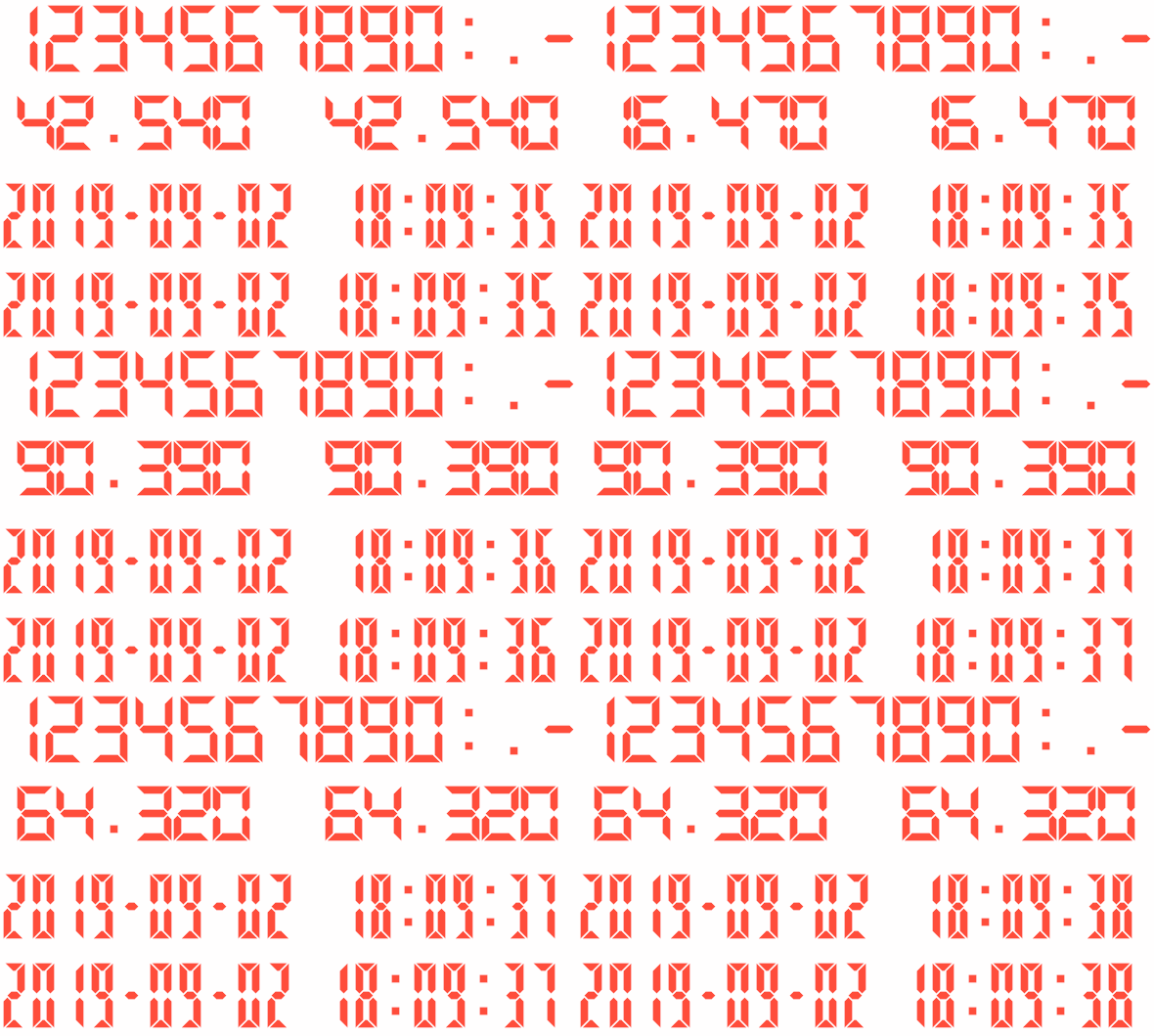
准备工作
使用GID+画的,不了解的话请自行百度
开始
添加一个类UCLEDNum ,继承UserControl
将数字拆分为单独的字,然后根据显示位置进行画出来,将显示位置定义为如下所示
    /* 显示位置序号

     *  ****1***

     *  *      *

     *  6      2

     *  *      *

     *  ****7***

     *  *      *

     *  5      3

     *  *      *

     *  ****4***

     */
从上面可以看出,定义了1-7的位置,然后定义一个数字对应的显示列表
  private static Dictionary<char, int[]> m_nums = new Dictionary<char, int[]>();

         static UCLEDNum()

         {

             m_nums[''] = new int[] { , , , , ,  };

             m_nums[''] = new int[] { ,  };

             m_nums[''] = new int[] { , , , ,  };

             m_nums[''] = new int[] { , , , ,  };

             m_nums[''] = new int[] { , , ,  };

             m_nums[''] = new int[] { , , , ,  };

             m_nums[''] = new int[] { , , , , ,  };

             m_nums[''] = new int[] { , ,  };

             m_nums[''] = new int[] { , , , , , ,  };

             m_nums[''] = new int[] { , , , , ,  };

             m_nums['-'] = new int[] {  };

             m_nums[':'] = new int[];

             m_nums['.'] = new int[];

         }
你看到了还有“-”,“:”,“.”这3个符号,是为了时间和数字时候使用
然后定义一个矩形区域来用作绘画区域,并且在SizeChanged事件中赋值
Rectangle m_drawRect = Rectangle.Empty;

        void LEDNum_SizeChanged(object sender, EventArgs e)

        {

            m_drawRect = new Rectangle(, , this.Width - , this.Height - );

        }
然后就是几个属性
   private char m_value = '';

         [Description("值"), Category("自定义")]

         public char Value

         {

             get { return m_value; }

             set

             {

                 if (!m_nums.ContainsKey(value))

                 {

                     return;

                 }

                 if (m_value != value)

                 {

                     m_value = value;

                     Refresh();

                 }

             }

         }

         private int m_lineWidth = ;

         [Description("线宽度,为了更好的显示效果,请使用偶数"), Category("自定义")]

         public int LineWidth

         {

             get { return m_lineWidth; }

             set

             {

                 m_lineWidth = value;

                 Refresh();

             }

         }

         [Description("颜色"), Category("自定义")]

         public override System.Drawing.Color ForeColor

         {

             get

             {

                 return base.ForeColor;

             }

             set

             {

                 base.ForeColor = value;

             }

         }
最重要的重绘
 protected override void OnPaint(PaintEventArgs e)

         {

             base.OnPaint(e);

             e.Graphics.SetGDIHigh();

             if (m_value == '.')

             {

                 Rectangle r2 = new Rectangle(m_drawRect.Left + (m_drawRect.Width - m_lineWidth) / , m_drawRect.Bottom - m_lineWidth * , m_lineWidth, m_lineWidth);

                 e.Graphics.FillRectangle(new SolidBrush(ForeColor), r2);

             }

             else if (m_value == ':')

             {

                 Rectangle r1 = new Rectangle(m_drawRect.Left + (m_drawRect.Width - m_lineWidth) / , m_drawRect.Top + (m_drawRect.Height /  - m_lineWidth) / , m_lineWidth, m_lineWidth);

                 e.Graphics.FillRectangle(new SolidBrush(ForeColor), r1);

                 Rectangle r2 = new Rectangle(m_drawRect.Left + (m_drawRect.Width - m_lineWidth) / , m_drawRect.Top + (m_drawRect.Height /  - m_lineWidth) /  + m_drawRect.Height / , m_lineWidth, m_lineWidth);

                 e.Graphics.FillRectangle(new SolidBrush(ForeColor), r2);

             }

             else

             {

                 int[] vs = m_nums[m_value];

                 if (vs.Contains())

                 {

                     GraphicsPath path = new GraphicsPath();

                     path.AddLines(new Point[]

                 {

                     new Point(m_drawRect.Left + , m_drawRect.Top),

                     new Point(m_drawRect.Right - , m_drawRect.Top),

                     new Point(m_drawRect.Right - m_lineWidth-, m_drawRect.Top+m_lineWidth),

                     new Point(m_drawRect.Left + m_lineWidth+, m_drawRect.Top+m_lineWidth),

                     new Point(m_drawRect.Left + , m_drawRect.Top)

                 });

                     path.CloseAllFigures();

                     e.Graphics.FillPath(new SolidBrush(ForeColor), path);

                 }

                 if (vs.Contains())

                 {

                     GraphicsPath path = new GraphicsPath();

                     path.AddLines(new Point[]

                 {

                     new Point(m_drawRect.Right, m_drawRect.Top),

                     new Point(m_drawRect.Right, m_drawRect.Top+(m_drawRect.Height-m_lineWidth-)/),

                     new Point(m_drawRect.Right-m_lineWidth/, m_drawRect.Top+(m_drawRect.Height-m_lineWidth-)/+m_lineWidth/),

                     new Point(m_drawRect.Right-m_lineWidth, m_drawRect.Top+(m_drawRect.Height-m_lineWidth-)/),

                     new Point(m_drawRect.Right-m_lineWidth, m_drawRect.Top+m_lineWidth),

                     new Point(m_drawRect.Right, m_drawRect.Top)

                 });

                     path.CloseAllFigures();

                     e.Graphics.FillPath(new SolidBrush(ForeColor), path);

                 }

                 if (vs.Contains())

                 {

                     GraphicsPath path = new GraphicsPath();

                     path.AddLines(new Point[]

                 {

                     new Point(m_drawRect.Right, m_drawRect.Bottom-(m_drawRect.Height-m_lineWidth-)/),

                     new Point(m_drawRect.Right, m_drawRect.Bottom),

                     new Point(m_drawRect.Right-m_lineWidth, m_drawRect.Bottom-m_lineWidth),

                     new Point(m_drawRect.Right-m_lineWidth, m_drawRect.Bottom-(m_drawRect.Height-m_lineWidth-)/),

                     new Point(m_drawRect.Right-m_lineWidth/, m_drawRect.Bottom-(m_drawRect.Height-m_lineWidth-)/-m_lineWidth/),

                     new Point(m_drawRect.Right, m_drawRect.Bottom-(m_drawRect.Height-m_lineWidth-)/),

                 });

                     path.CloseAllFigures();

                     e.Graphics.FillPath(new SolidBrush(ForeColor), path);

                 }

                 if (vs.Contains())

                 {

                     GraphicsPath path = new GraphicsPath();

                     path.AddLines(new Point[]

                 {

                     new Point(m_drawRect.Left + , m_drawRect.Bottom),

                     new Point(m_drawRect.Right - , m_drawRect.Bottom),

                     new Point(m_drawRect.Right - m_lineWidth-, m_drawRect.Bottom-m_lineWidth),

                     new Point(m_drawRect.Left + m_lineWidth+, m_drawRect.Bottom-m_lineWidth),

                     new Point(m_drawRect.Left + , m_drawRect.Bottom)

                 });

                     path.CloseAllFigures();

                     e.Graphics.FillPath(new SolidBrush(ForeColor), path);

                 }

                 if (vs.Contains())

                 {

                     GraphicsPath path = new GraphicsPath();

                     path.AddLines(new Point[]

                 {

                     new Point(m_drawRect.Left, m_drawRect.Bottom-(m_drawRect.Height-m_lineWidth-)/),

                     new Point(m_drawRect.Left, m_drawRect.Bottom),

                     new Point(m_drawRect.Left+m_lineWidth, m_drawRect.Bottom-m_lineWidth),

                     new Point(m_drawRect.Left+m_lineWidth, m_drawRect.Bottom-(m_drawRect.Height-m_lineWidth-)/),

                     new Point(m_drawRect.Left+m_lineWidth/, m_drawRect.Bottom-(m_drawRect.Height-m_lineWidth-)/-m_lineWidth/),

                     new Point(m_drawRect.Left, m_drawRect.Bottom-(m_drawRect.Height-m_lineWidth-)/),

                 });

                     path.CloseAllFigures();

                     e.Graphics.FillPath(new SolidBrush(ForeColor), path);

                 }

                 if (vs.Contains())

                 {

                     GraphicsPath path = new GraphicsPath();

                     path.AddLines(new Point[]

                 {

                     new Point(m_drawRect.Left, m_drawRect.Top),

                     new Point(m_drawRect.Left, m_drawRect.Top+(m_drawRect.Height-m_lineWidth-)/),

                     new Point(m_drawRect.Left+m_lineWidth/, m_drawRect.Top+(m_drawRect.Height-m_lineWidth-)/+m_lineWidth/),

                     new Point(m_drawRect.Left+m_lineWidth, m_drawRect.Top+(m_drawRect.Height-m_lineWidth-)/),

                     new Point(m_drawRect.Left+m_lineWidth, m_drawRect.Top+m_lineWidth),

                     new Point(m_drawRect.Left, m_drawRect.Top)

                 });

                     path.CloseAllFigures();

                     e.Graphics.FillPath(new SolidBrush(ForeColor), path);

                 }

                 if (vs.Contains())

                 {

                     GraphicsPath path = new GraphicsPath();

                     path.AddLines(new Point[]

                 {

                     new Point(m_drawRect.Left+m_lineWidth/, m_drawRect.Height/+),

                     new Point(m_drawRect.Left+m_lineWidth, m_drawRect.Height/-m_lineWidth/+),

                     new Point(m_drawRect.Right-m_lineWidth, m_drawRect.Height/-m_lineWidth/+),

                     new Point(m_drawRect.Right-m_lineWidth/, m_drawRect.Height/+),

                     new Point(m_drawRect.Right-m_lineWidth, m_drawRect.Height/+m_lineWidth/+),

                     new Point(m_drawRect.Left+m_lineWidth, m_drawRect.Height/+m_lineWidth/+),

                     new Point(m_drawRect.Left+m_lineWidth/, m_drawRect.Height/+)

                 });

                     path.CloseAllFigures();

                     e.Graphics.FillPath(new SolidBrush(ForeColor), path);

                 }

             }

         }
完工,看下完整代码和效果
 using System;

 using System.Collections.Generic;

 using System.Linq;

 using System.Text;

 using System.Windows.Forms;

 using System.Drawing;

 using System.Drawing.Drawing2D;

 using System.ComponentModel;

 namespace HZH_Controls.Controls

 {

     /* 显示位置序号

      *  ****1***

      *  *      *

      *  6      2

      *  *      *

      *  ****7***

      *  *      *

      *  5      3

      *  *      *

      *  ****4***

      */

     public class UCLEDNum : UserControl

     {

         Rectangle m_drawRect = Rectangle.Empty;

         private static Dictionary<char, int[]> m_nums = new Dictionary<char, int[]>();

         static UCLEDNum()

         {

             m_nums[''] = new int[] { , , , , ,  };

             m_nums[''] = new int[] { ,  };

             m_nums[''] = new int[] { , , , ,  };

             m_nums[''] = new int[] { , , , ,  };

             m_nums[''] = new int[] { , , ,  };

             m_nums[''] = new int[] { , , , ,  };

             m_nums[''] = new int[] { , , , , ,  };

             m_nums[''] = new int[] { , ,  };

             m_nums[''] = new int[] { , , , , , ,  };

             m_nums[''] = new int[] { , , , , ,  };

             m_nums['-'] = new int[] {  };

             m_nums[':'] = new int[];

             m_nums['.'] = new int[];

         }

         public UCLEDNum()

         {

             SizeChanged += LEDNum_SizeChanged;

             this.AutoScaleMode = System.Windows.Forms.AutoScaleMode.None;

             Size = new System.Drawing.Size(, );

             if (m_drawRect == Rectangle.Empty)

                 m_drawRect = new Rectangle(, , this.Width - , this.Height - );

         }

         void LEDNum_SizeChanged(object sender, EventArgs e)

         {

             m_drawRect = new Rectangle(, , this.Width - , this.Height - );

         }

         private char m_value = '';

         [Description("值"), Category("自定义")]

         public char Value

         {

             get { return m_value; }

             set

             {

                 if (!m_nums.ContainsKey(value))

                 {

                     return;

                 }

                 if (m_value != value)

                 {

                     m_value = value;

                     Refresh();

                 }

             }

         }

         private int m_lineWidth = ;

         [Description("线宽度,为了更好的显示效果,请使用偶数"), Category("自定义")]

         public int LineWidth

         {

             get { return m_lineWidth; }

             set

             {

                 m_lineWidth = value;

                 Refresh();

             }

         }

         [Description("颜色"), Category("自定义")]

         public override System.Drawing.Color ForeColor

         {

             get

             {

                 return base.ForeColor;

             }

             set

             {

                 base.ForeColor = value;

             }

         }

         protected override void OnPaint(PaintEventArgs e)

         {

             base.OnPaint(e);

             e.Graphics.SetGDIHigh();

             if (m_value == '.')

             {

                 Rectangle r2 = new Rectangle(m_drawRect.Left + (m_drawRect.Width - m_lineWidth) / , m_drawRect.Bottom - m_lineWidth * , m_lineWidth, m_lineWidth);

                 e.Graphics.FillRectangle(new SolidBrush(ForeColor), r2);

             }

             else if (m_value == ':')

             {

                 Rectangle r1 = new Rectangle(m_drawRect.Left + (m_drawRect.Width - m_lineWidth) / , m_drawRect.Top + (m_drawRect.Height /  - m_lineWidth) / , m_lineWidth, m_lineWidth);

                 e.Graphics.FillRectangle(new SolidBrush(ForeColor), r1);

                 Rectangle r2 = new Rectangle(m_drawRect.Left + (m_drawRect.Width - m_lineWidth) / , m_drawRect.Top + (m_drawRect.Height /  - m_lineWidth) /  + m_drawRect.Height / , m_lineWidth, m_lineWidth);

                 e.Graphics.FillRectangle(new SolidBrush(ForeColor), r2);

             }

             else

             {

                 int[] vs = m_nums[m_value];

                 if (vs.Contains())

                 {

                     GraphicsPath path = new GraphicsPath();

                     path.AddLines(new Point[]

                 {

                     new Point(m_drawRect.Left + , m_drawRect.Top),

                     new Point(m_drawRect.Right - , m_drawRect.Top),

                     new Point(m_drawRect.Right - m_lineWidth-, m_drawRect.Top+m_lineWidth),

                     new Point(m_drawRect.Left + m_lineWidth+, m_drawRect.Top+m_lineWidth),

                     new Point(m_drawRect.Left + , m_drawRect.Top)

                 });

                     path.CloseAllFigures();

                     e.Graphics.FillPath(new SolidBrush(ForeColor), path);

                 }

                 if (vs.Contains())

                 {

                     GraphicsPath path = new GraphicsPath();

                     path.AddLines(new Point[]

                 {

                     new Point(m_drawRect.Right, m_drawRect.Top),

                     new Point(m_drawRect.Right, m_drawRect.Top+(m_drawRect.Height-m_lineWidth-)/),

                     new Point(m_drawRect.Right-m_lineWidth/, m_drawRect.Top+(m_drawRect.Height-m_lineWidth-)/+m_lineWidth/),

                     new Point(m_drawRect.Right-m_lineWidth, m_drawRect.Top+(m_drawRect.Height-m_lineWidth-)/),

                     new Point(m_drawRect.Right-m_lineWidth, m_drawRect.Top+m_lineWidth),

                     new Point(m_drawRect.Right, m_drawRect.Top)

                 });

                     path.CloseAllFigures();

                     e.Graphics.FillPath(new SolidBrush(ForeColor), path);

                 }

                 if (vs.Contains())

                 {

                     GraphicsPath path = new GraphicsPath();

                     path.AddLines(new Point[]

                 {

                     new Point(m_drawRect.Right, m_drawRect.Bottom-(m_drawRect.Height-m_lineWidth-)/),

                     new Point(m_drawRect.Right, m_drawRect.Bottom),

                     new Point(m_drawRect.Right-m_lineWidth, m_drawRect.Bottom-m_lineWidth),

                     new Point(m_drawRect.Right-m_lineWidth, m_drawRect.Bottom-(m_drawRect.Height-m_lineWidth-)/),

                     new Point(m_drawRect.Right-m_lineWidth/, m_drawRect.Bottom-(m_drawRect.Height-m_lineWidth-)/-m_lineWidth/),

                     new Point(m_drawRect.Right, m_drawRect.Bottom-(m_drawRect.Height-m_lineWidth-)/),

                 });

                     path.CloseAllFigures();

                     e.Graphics.FillPath(new SolidBrush(ForeColor), path);

                 }

                 if (vs.Contains())

                 {

                     GraphicsPath path = new GraphicsPath();

                     path.AddLines(new Point[]

                 {

                     new Point(m_drawRect.Left + , m_drawRect.Bottom),

                     new Point(m_drawRect.Right - , m_drawRect.Bottom),

                     new Point(m_drawRect.Right - m_lineWidth-, m_drawRect.Bottom-m_lineWidth),

                     new Point(m_drawRect.Left + m_lineWidth+, m_drawRect.Bottom-m_lineWidth),

                     new Point(m_drawRect.Left + , m_drawRect.Bottom)

                 });

                     path.CloseAllFigures();

                     e.Graphics.FillPath(new SolidBrush(ForeColor), path);

                 }

                 if (vs.Contains())

                 {

                     GraphicsPath path = new GraphicsPath();

                     path.AddLines(new Point[]

                 {

                     new Point(m_drawRect.Left, m_drawRect.Bottom-(m_drawRect.Height-m_lineWidth-)/),

                     new Point(m_drawRect.Left, m_drawRect.Bottom),

                     new Point(m_drawRect.Left+m_lineWidth, m_drawRect.Bottom-m_lineWidth),

                     new Point(m_drawRect.Left+m_lineWidth, m_drawRect.Bottom-(m_drawRect.Height-m_lineWidth-)/),

                     new Point(m_drawRect.Left+m_lineWidth/, m_drawRect.Bottom-(m_drawRect.Height-m_lineWidth-)/-m_lineWidth/),

                     new Point(m_drawRect.Left, m_drawRect.Bottom-(m_drawRect.Height-m_lineWidth-)/),

                 });

                     path.CloseAllFigures();

                     e.Graphics.FillPath(new SolidBrush(ForeColor), path);

                 }

                 if (vs.Contains())

                 {

                     GraphicsPath path = new GraphicsPath();

                     path.AddLines(new Point[]

                 {

                     new Point(m_drawRect.Left, m_drawRect.Top),

                     new Point(m_drawRect.Left, m_drawRect.Top+(m_drawRect.Height-m_lineWidth-)/),

                     new Point(m_drawRect.Left+m_lineWidth/, m_drawRect.Top+(m_drawRect.Height-m_lineWidth-)/+m_lineWidth/),

                     new Point(m_drawRect.Left+m_lineWidth, m_drawRect.Top+(m_drawRect.Height-m_lineWidth-)/),

                     new Point(m_drawRect.Left+m_lineWidth, m_drawRect.Top+m_lineWidth),

                     new Point(m_drawRect.Left, m_drawRect.Top)

                 });

                     path.CloseAllFigures();

                     e.Graphics.FillPath(new SolidBrush(ForeColor), path);

                 }

                 if (vs.Contains())

                 {

                     GraphicsPath path = new GraphicsPath();

                     path.AddLines(new Point[]

                 {

                     new Point(m_drawRect.Left+m_lineWidth/, m_drawRect.Height/+),

                     new Point(m_drawRect.Left+m_lineWidth, m_drawRect.Height/-m_lineWidth/+),

                     new Point(m_drawRect.Right-m_lineWidth, m_drawRect.Height/-m_lineWidth/+),

                     new Point(m_drawRect.Right-m_lineWidth/, m_drawRect.Height/+),

                     new Point(m_drawRect.Right-m_lineWidth, m_drawRect.Height/+m_lineWidth/+),

                     new Point(m_drawRect.Left+m_lineWidth, m_drawRect.Height/+m_lineWidth/+),

                     new Point(m_drawRect.Left+m_lineWidth/, m_drawRect.Height/+)

                 });

                     path.CloseAllFigures();

                     e.Graphics.FillPath(new SolidBrush(ForeColor), path);

                 }

             }

         }

     }

 }

以上就是单个字符的了
=======================分割线==========================
下面对数字控件处理
添加一个用户控件UCLEDNums
添加一点属性
 private string m_value;

         [Description("值"), Category("自定义")]

         public string Value

         {

             get { return m_value; }

             set

             {

                 m_value = value;

                 ReloadValue();

             }

         }

         private int m_lineWidth = ;

         [Description("线宽度,为了更好的显示效果,请使用偶数"), Category("自定义")]

         public int LineWidth

         {

             get { return m_lineWidth; }

             set

             {

                 m_lineWidth = value;

                 foreach (UCLEDNum c in this.Controls)

                 {

                     c.LineWidth = value;

                 }

             }

         }

         [Description("颜色"), Category("自定义")]

         public override System.Drawing.Color ForeColor

         {

             get

             {

                 return base.ForeColor;

             }

             set

             {

                 base.ForeColor = value;

                 foreach (UCLEDNum c in this.Controls)

                 {

                     c.ForeColor = value;

                 }

             }

         }

         public override RightToLeft RightToLeft

         {

             get

             {

                 return base.RightToLeft;

             }

             set

             {

                 base.RightToLeft = value;

                 ReloadValue();

             }

         }
加载控件的函数
  private void ReloadValue()

         {

             try

             {

                 ControlHelper.FreezeControl(this, true);

                 this.Controls.Clear();

                 foreach (var item in m_value)

                 {

                     UCLEDNum uc = new UCLEDNum();

                     if (RightToLeft == System.Windows.Forms.RightToLeft.Yes)

                         uc.Dock = DockStyle.Right;

                     else

                         uc.Dock = DockStyle.Left;

                     uc.Value = item;

                     uc.ForeColor = ForeColor;

                     uc.LineWidth = m_lineWidth;

                     this.Controls.Add(uc);

                     if (RightToLeft == System.Windows.Forms.RightToLeft.Yes)

                         uc.SendToBack();

                     else

                         uc.BringToFront();

                 }

             }

             finally

             {

                 ControlHelper.FreezeControl(this, false);

             }

         }
完整代码及效果
 using System;

 using System.Collections.Generic;

 using System.ComponentModel;

 using System.Drawing;

 using System.Data;

 using System.Linq;

 using System.Text;

 using System.Windows.Forms;

 namespace HZH_Controls.Controls.LED

 {

     public partial class UCLEDNums : UserControl

     {

         private string m_value;

         [Description("值"), Category("自定义")]

         public string Value

         {

             get { return m_value; }

             set

             {

                 m_value = value;

                 ReloadValue();

             }

         }

         private int m_lineWidth = ;

         [Description("线宽度,为了更好的显示效果,请使用偶数"), Category("自定义")]

         public int LineWidth

         {

             get { return m_lineWidth; }

             set

             {

                 m_lineWidth = value;

                 foreach (UCLEDNum c in this.Controls)

                 {

                     c.LineWidth = value;

                 }

             }

         }

         [Description("颜色"), Category("自定义")]

         public override System.Drawing.Color ForeColor

         {

             get

             {

                 return base.ForeColor;

             }

             set

             {

                 base.ForeColor = value;

                 foreach (UCLEDNum c in this.Controls)

                 {

                     c.ForeColor = value;

                 }

             }

         }

         public override RightToLeft RightToLeft

         {

             get

             {

                 return base.RightToLeft;

             }

             set

             {

                 base.RightToLeft = value;

                 ReloadValue();

             }

         }

         private void ReloadValue()

         {

             try

             {

                 ControlHelper.FreezeControl(this, true);

                 this.Controls.Clear();

                 foreach (var item in m_value)

                 {

                     UCLEDNum uc = new UCLEDNum();

                     if (RightToLeft == System.Windows.Forms.RightToLeft.Yes)

                         uc.Dock = DockStyle.Right;

                     else

                         uc.Dock = DockStyle.Left;

                     uc.Value = item;

                     uc.ForeColor = ForeColor;

                     uc.LineWidth = m_lineWidth;

                     this.Controls.Add(uc);

                     if (RightToLeft == System.Windows.Forms.RightToLeft.Yes)

                         uc.SendToBack();

                     else

                         uc.BringToFront();

                 }

             }

             finally

             {

                 ControlHelper.FreezeControl(this, false);

             }

         }

         public UCLEDNums()

         {

             InitializeComponent();

             Value = "0.00";

         }

     }

 }
 namespace HZH_Controls.Controls.LED

 {

     partial class UCLEDNums

     {

         /// <summary>

         /// 必需的设计器变量。

         /// </summary>

         private System.ComponentModel.IContainer components = null;

         /// <summary>

         /// 清理所有正在使用的资源。

         /// </summary>

         /// <param name="disposing">如果应释放托管资源,为 true;否则为 false。</param>

         protected override void Dispose(bool disposing)

         {

             if (disposing && (components != null))

             {

                 components.Dispose();

             }

             base.Dispose(disposing);

         }

         #region 组件设计器生成的代码

         /// <summary>

         /// 设计器支持所需的方法 - 不要

         /// 使用代码编辑器修改此方法的内容。

         /// </summary>

         private void InitializeComponent()

         {

             this.SuspendLayout();

             //

             // UCLEDNums

             //

             this.AutoScaleDimensions = new System.Drawing.SizeF(6F, 12F);

             this.AutoScaleMode = System.Windows.Forms.AutoScaleMode.Font;

             this.Name = "UCLEDNums";

             this.Size = new System.Drawing.Size(, );

             this.ResumeLayout(false);

         }

         #endregion

     }

 }

=======================分割线==========================
下面是日期类控件了,这里偷懒,分成3个控件,分别是日期控件,时间控件,日期时间控件
先说日期控件,
添加一个用户控件UCLEDData
添加属性
 private DateTime m_value;

         [Description("值"), Category("自定义")]

         public DateTime Value

         {

             get { return m_value; }

             set

             {

                 m_value = value;

                 string str = value.ToString("yyyy-MM-dd");

                 for (int i = ; i < str.Length; i++)

                 {

                     ((UCLEDNum)this.tableLayoutPanel1.Controls.Find("D" + (i + ), false)[]).Value = str[i];

                 }

             }

         }

         private int m_lineWidth = ;

         [Description("线宽度,为了更好的显示效果,请使用偶数"), Category("自定义")]

         public int LineWidth

         {

             get { return m_lineWidth; }

             set

             {

                 m_lineWidth = value;

                 foreach (UCLEDNum c in this.tableLayoutPanel1.Controls)

                 {

                     c.LineWidth = value;

                 }

             }

         }

         [Description("颜色"), Category("自定义")]

         public override System.Drawing.Color ForeColor

         {

             get

             {

                 return base.ForeColor;

             }

             set

             {

                 base.ForeColor = value;

                 foreach (UCLEDNum c in this.tableLayoutPanel1.Controls)

                 {

                     c.ForeColor = value;

                 }

             }

         }
完整代码
 using System;

 using System.Collections.Generic;

 using System.ComponentModel;

 using System.Drawing;

 using System.Data;

 using System.Linq;

 using System.Text;

 using System.Windows.Forms;

 namespace HZH_Controls.Controls

 {

     public partial class UCLEDData : UserControl

     {

         private DateTime m_value;

         [Description("值"), Category("自定义")]

         public DateTime Value

         {

             get { return m_value; }

             set

             {

                 m_value = value;

                 string str = value.ToString("yyyy-MM-dd");

                 for (int i = ; i < str.Length; i++)

                 {

                     ((UCLEDNum)this.tableLayoutPanel1.Controls.Find("D" + (i + ), false)[]).Value = str[i];

                 }

             }

         }

         private int m_lineWidth = ;

         [Description("线宽度,为了更好的显示效果,请使用偶数"), Category("自定义")]

         public int LineWidth

         {

             get { return m_lineWidth; }

             set

             {

                 m_lineWidth = value;

                 foreach (UCLEDNum c in this.tableLayoutPanel1.Controls)

                 {

                     c.LineWidth = value;

                 }

             }

         }

         [Description("颜色"), Category("自定义")]

         public override System.Drawing.Color ForeColor

         {

             get

             {

                 return base.ForeColor;

             }

             set

             {

                 base.ForeColor = value;

                 foreach (UCLEDNum c in this.tableLayoutPanel1.Controls)

                 {

                     c.ForeColor = value;

                 }

             }

         }

         public UCLEDData()

         {

             InitializeComponent();

             Value = DateTime.Now;

         }

     }

 }
 namespace HZH_Controls.Controls

 {

     partial class UCLEDData

     {

         /// <summary>

         /// 必需的设计器变量。

         /// </summary>

         private System.ComponentModel.IContainer components = null;

         /// <summary>

         /// 清理所有正在使用的资源。

         /// </summary>

         /// <param name="disposing">如果应释放托管资源,为 true;否则为 false。</param>

         protected override void Dispose(bool disposing)

         {

             if (disposing && (components != null))

             {

                 components.Dispose();

             }

             base.Dispose(disposing);

         }

         #region 组件设计器生成的代码

         /// <summary>

         /// 设计器支持所需的方法 - 不要

         /// 使用代码编辑器修改此方法的内容。

         /// </summary>

         private void InitializeComponent()

         {

             this.tableLayoutPanel1 = new System.Windows.Forms.TableLayoutPanel();

             this.D1 = new HZH_Controls.Controls.UCLEDNum();

             this.D2 = new HZH_Controls.Controls.UCLEDNum();

             this.D3 = new HZH_Controls.Controls.UCLEDNum();

             this.D4 = new HZH_Controls.Controls.UCLEDNum();

             this.D5 = new HZH_Controls.Controls.UCLEDNum();

             this.D6 = new HZH_Controls.Controls.UCLEDNum();

             this.D7 = new HZH_Controls.Controls.UCLEDNum();

             this.D8 = new HZH_Controls.Controls.UCLEDNum();

             this.D9 = new HZH_Controls.Controls.UCLEDNum();

             this.D10 = new HZH_Controls.Controls.UCLEDNum();

             this.tableLayoutPanel1.SuspendLayout();

             this.SuspendLayout();

             //

             // tableLayoutPanel1

             //

             this.tableLayoutPanel1.ColumnCount = ;

             this.tableLayoutPanel1.ColumnStyles.Add(new System.Windows.Forms.ColumnStyle(System.Windows.Forms.SizeType.Percent, 10F));

             this.tableLayoutPanel1.ColumnStyles.Add(new System.Windows.Forms.ColumnStyle(System.Windows.Forms.SizeType.Percent, 10F));

             this.tableLayoutPanel1.ColumnStyles.Add(new System.Windows.Forms.ColumnStyle(System.Windows.Forms.SizeType.Percent, 10F));

             this.tableLayoutPanel1.ColumnStyles.Add(new System.Windows.Forms.ColumnStyle(System.Windows.Forms.SizeType.Percent, 10F));

             this.tableLayoutPanel1.ColumnStyles.Add(new System.Windows.Forms.ColumnStyle(System.Windows.Forms.SizeType.Percent, 10F));

             this.tableLayoutPanel1.ColumnStyles.Add(new System.Windows.Forms.ColumnStyle(System.Windows.Forms.SizeType.Percent, 10F));

             this.tableLayoutPanel1.ColumnStyles.Add(new System.Windows.Forms.ColumnStyle(System.Windows.Forms.SizeType.Percent, 10F));

             this.tableLayoutPanel1.ColumnStyles.Add(new System.Windows.Forms.ColumnStyle(System.Windows.Forms.SizeType.Percent, 10F));

             this.tableLayoutPanel1.ColumnStyles.Add(new System.Windows.Forms.ColumnStyle(System.Windows.Forms.SizeType.Percent, 10F));

             this.tableLayoutPanel1.ColumnStyles.Add(new System.Windows.Forms.ColumnStyle(System.Windows.Forms.SizeType.Percent, 10F));

             this.tableLayoutPanel1.Controls.Add(this.D1, , );

             this.tableLayoutPanel1.Controls.Add(this.D2, , );

             this.tableLayoutPanel1.Controls.Add(this.D3, , );

             this.tableLayoutPanel1.Controls.Add(this.D4, , );

             this.tableLayoutPanel1.Controls.Add(this.D5, , );

             this.tableLayoutPanel1.Controls.Add(this.D6, , );

             this.tableLayoutPanel1.Controls.Add(this.D7, , );

             this.tableLayoutPanel1.Controls.Add(this.D8, , );

             this.tableLayoutPanel1.Controls.Add(this.D9, , );

             this.tableLayoutPanel1.Controls.Add(this.D10, , );

             this.tableLayoutPanel1.Dock = System.Windows.Forms.DockStyle.Fill;

             this.tableLayoutPanel1.Location = new System.Drawing.Point(, );

             this.tableLayoutPanel1.Name = "tableLayoutPanel1";

             this.tableLayoutPanel1.RowCount = ;

             this.tableLayoutPanel1.RowStyles.Add(new System.Windows.Forms.RowStyle(System.Windows.Forms.SizeType.Percent, 100F));

             this.tableLayoutPanel1.RowStyles.Add(new System.Windows.Forms.RowStyle(System.Windows.Forms.SizeType.Absolute, 20F));

             this.tableLayoutPanel1.Size = new System.Drawing.Size(, );

             this.tableLayoutPanel1.TabIndex = ;

             //

             // D1

             //

             this.D1.Dock = System.Windows.Forms.DockStyle.Fill;

             this.D1.LineWidth = ;

             this.D1.Location = new System.Drawing.Point(, );

             this.D1.Name = "D1";

             this.D1.Size = new System.Drawing.Size(, );

             this.D1.TabIndex = ;

             this.D1.Value = '';

             //

             // D2

             //

             this.D2.Dock = System.Windows.Forms.DockStyle.Fill;

             this.D2.LineWidth = ;

             this.D2.Location = new System.Drawing.Point(, );

             this.D2.Name = "D2";

             this.D2.Size = new System.Drawing.Size(, );

             this.D2.TabIndex = ;

             this.D2.Value = '';

             //

             // D3

             //

             this.D3.Dock = System.Windows.Forms.DockStyle.Fill;

             this.D3.LineWidth = ;

             this.D3.Location = new System.Drawing.Point(, );

             this.D3.Name = "D3";

             this.D3.Size = new System.Drawing.Size(, );

             this.D3.TabIndex = ;

             this.D3.Value = '';

             //

             // D4

             //

             this.D4.Dock = System.Windows.Forms.DockStyle.Fill;

             this.D4.LineWidth = ;

             this.D4.Location = new System.Drawing.Point(, );

             this.D4.Name = "D4";

             this.D4.Size = new System.Drawing.Size(, );

             this.D4.TabIndex = ;

             this.D4.Value = '';

             //

             // D5

             //

             this.D5.Dock = System.Windows.Forms.DockStyle.Fill;

             this.D5.LineWidth = ;

             this.D5.Location = new System.Drawing.Point(, );

             this.D5.Name = "D5";

             this.D5.Size = new System.Drawing.Size(, );

             this.D5.TabIndex = ;

             this.D5.Value = '-';

             //

             // D6

             //

             this.D6.Dock = System.Windows.Forms.DockStyle.Fill;

             this.D6.LineWidth = ;

             this.D6.Location = new System.Drawing.Point(, );

             this.D6.Name = "D6";

             this.D6.Size = new System.Drawing.Size(, );

             this.D6.TabIndex = ;

             this.D6.Value = '';

             //

             // D7

             //

             this.D7.Dock = System.Windows.Forms.DockStyle.Fill;

             this.D7.LineWidth = ;

             this.D7.Location = new System.Drawing.Point(, );

             this.D7.Name = "D7";

             this.D7.Size = new System.Drawing.Size(, );

             this.D7.TabIndex = ;

             this.D7.Value = '';

             //

             // D8

             //

             this.D8.Dock = System.Windows.Forms.DockStyle.Fill;

             this.D8.LineWidth = ;

             this.D8.Location = new System.Drawing.Point(, );

             this.D8.Name = "D8";

             this.D8.Size = new System.Drawing.Size(, );

             this.D8.TabIndex = ;

             this.D8.Value = '-';

             //

             // D9

             //

             this.D9.Dock = System.Windows.Forms.DockStyle.Fill;

             this.D9.LineWidth = ;

             this.D9.Location = new System.Drawing.Point(, );

             this.D9.Name = "D9";

             this.D9.Size = new System.Drawing.Size(, );

             this.D9.TabIndex = ;

             this.D9.Value = '';

             //

             // D10

             //

             this.D10.Dock = System.Windows.Forms.DockStyle.Fill;

             this.D10.LineWidth = ;

             this.D10.Location = new System.Drawing.Point(, );

             this.D10.Name = "D10";

             this.D10.Size = new System.Drawing.Size(, );

             this.D10.TabIndex = ;

             this.D10.Value = '';

             //

             // UCLEDData

             //

             this.AutoScaleMode = System.Windows.Forms.AutoScaleMode.None;

             this.Controls.Add(this.tableLayoutPanel1);

             this.Margin = new System.Windows.Forms.Padding();

             this.Name = "UCLEDData";

             this.Size = new System.Drawing.Size(, );

             this.tableLayoutPanel1.ResumeLayout(false);

             this.ResumeLayout(false);

         }

         #endregion

         private System.Windows.Forms.TableLayoutPanel tableLayoutPanel1;

         private UCLEDNum D1;

         private UCLEDNum D2;

         private UCLEDNum D3;

         private UCLEDNum D4;

         private UCLEDNum D5;

         private UCLEDNum D6;

         private UCLEDNum D7;

         private UCLEDNum D8;

         private UCLEDNum D9;

         private UCLEDNum D10;

     }

 }
=======================分割线==========================
时间控件
添加一个用户控件UCLEDTime
添加属性
  private DateTime m_value;

         [Description("值"), Category("自定义")]

         public DateTime Value

         {

             get { return m_value; }

             set

             {

                 m_value = value;

                 string str = value.ToString("HH:mm:ss");

                 for (int i = ; i < str.Length; i++)

                 {

                     ((UCLEDNum)this.tableLayoutPanel1.Controls.Find("D" + (i + ), false)[]).Value = str[i];

                 }

             }

         }

         private int m_lineWidth = ;

         [Description("线宽度,为了更好的显示效果,请使用偶数"), Category("自定义")]

         public int LineWidth

         {

             get { return m_lineWidth; }

             set

             {

                 m_lineWidth = value;

                 foreach (UCLEDNum c in this.tableLayoutPanel1.Controls)

                 {

                     c.LineWidth = value;

                 }

             }

         }

         [Description("颜色"), Category("自定义")]

         public override System.Drawing.Color ForeColor

         {

             get

             {

                 return base.ForeColor;

             }

             set

             {

                 base.ForeColor = value;

                 foreach (UCLEDNum c in this.tableLayoutPanel1.Controls)

                 {

                     c.ForeColor = value;

                 }

             }

         }
全部代码
 using System;

 using System.Collections.Generic;

 using System.ComponentModel;

 using System.Drawing;

 using System.Data;

 using System.Linq;

 using System.Text;

 using System.Windows.Forms;

 namespace HZH_Controls.Controls

 {

     public partial class UCLEDTime : UserControl

     {

         private DateTime m_value;

         [Description("值"), Category("自定义")]

         public DateTime Value

         {

             get { return m_value; }

             set

             {

                 m_value = value;

                 string str = value.ToString("HH:mm:ss");

                 for (int i = ; i < str.Length; i++)

                 {

                     ((UCLEDNum)this.tableLayoutPanel1.Controls.Find("D" + (i + ), false)[]).Value = str[i];

                 }

             }

         }

         private int m_lineWidth = ;

         [Description("线宽度,为了更好的显示效果,请使用偶数"), Category("自定义")]

         public int LineWidth

         {

             get { return m_lineWidth; }

             set

             {

                 m_lineWidth = value;

                 foreach (UCLEDNum c in this.tableLayoutPanel1.Controls)

                 {

                     c.LineWidth = value;

                 }

             }

         }

         [Description("颜色"), Category("自定义")]

         public override System.Drawing.Color ForeColor

         {

             get

             {

                 return base.ForeColor;

             }

             set

             {

                 base.ForeColor = value;

                 foreach (UCLEDNum c in this.tableLayoutPanel1.Controls)

                 {

                     c.ForeColor = value;

                 }

             }

         }

         public UCLEDTime()

         {

             InitializeComponent();

             Value = DateTime.Now;

         }

     }

 }
 namespace HZH_Controls.Controls

 {

     partial class UCLEDTime

     {

         /// <summary>

         /// 必需的设计器变量。

         /// </summary>

         private System.ComponentModel.IContainer components = null;

         /// <summary>

         /// 清理所有正在使用的资源。

         /// </summary>

         /// <param name="disposing">如果应释放托管资源,为 true;否则为 false。</param>

         protected override void Dispose(bool disposing)

         {

             if (disposing && (components != null))

             {

                 components.Dispose();

             }

             base.Dispose(disposing);

         }

         #region 组件设计器生成的代码

         /// <summary>

         /// 设计器支持所需的方法 - 不要

         /// 使用代码编辑器修改此方法的内容。

         /// </summary>

         private void InitializeComponent()

         {

             this.tableLayoutPanel1 = new System.Windows.Forms.TableLayoutPanel();

             this.D1 = new HZH_Controls.Controls.UCLEDNum();

             this.D2 = new HZH_Controls.Controls.UCLEDNum();

             this.D3 = new HZH_Controls.Controls.UCLEDNum();

             this.D4 = new HZH_Controls.Controls.UCLEDNum();

             this.D5 = new HZH_Controls.Controls.UCLEDNum();

             this.D6 = new HZH_Controls.Controls.UCLEDNum();

             this.D7 = new HZH_Controls.Controls.UCLEDNum();

             this.D8 = new HZH_Controls.Controls.UCLEDNum();

             this.tableLayoutPanel1.SuspendLayout();

             this.SuspendLayout();

             //

             // tableLayoutPanel1

             //

             this.tableLayoutPanel1.ColumnCount = ;

             this.tableLayoutPanel1.ColumnStyles.Add(new System.Windows.Forms.ColumnStyle(System.Windows.Forms.SizeType.Percent, 12.5F));

             this.tableLayoutPanel1.ColumnStyles.Add(new System.Windows.Forms.ColumnStyle(System.Windows.Forms.SizeType.Percent, 12.5F));

             this.tableLayoutPanel1.ColumnStyles.Add(new System.Windows.Forms.ColumnStyle(System.Windows.Forms.SizeType.Percent, 12.5F));

             this.tableLayoutPanel1.ColumnStyles.Add(new System.Windows.Forms.ColumnStyle(System.Windows.Forms.SizeType.Percent, 12.5F));

             this.tableLayoutPanel1.ColumnStyles.Add(new System.Windows.Forms.ColumnStyle(System.Windows.Forms.SizeType.Percent, 12.5F));

             this.tableLayoutPanel1.ColumnStyles.Add(new System.Windows.Forms.ColumnStyle(System.Windows.Forms.SizeType.Percent, 12.5F));

             this.tableLayoutPanel1.ColumnStyles.Add(new System.Windows.Forms.ColumnStyle(System.Windows.Forms.SizeType.Percent, 12.5F));

             this.tableLayoutPanel1.ColumnStyles.Add(new System.Windows.Forms.ColumnStyle(System.Windows.Forms.SizeType.Percent, 12.5F));

             this.tableLayoutPanel1.Controls.Add(this.D1, , );

             this.tableLayoutPanel1.Controls.Add(this.D2, , );

             this.tableLayoutPanel1.Controls.Add(this.D3, , );

             this.tableLayoutPanel1.Controls.Add(this.D4, , );

             this.tableLayoutPanel1.Controls.Add(this.D5, , );

             this.tableLayoutPanel1.Controls.Add(this.D6, , );

             this.tableLayoutPanel1.Controls.Add(this.D7, , );

             this.tableLayoutPanel1.Controls.Add(this.D8, , );

             this.tableLayoutPanel1.Dock = System.Windows.Forms.DockStyle.Fill;

             this.tableLayoutPanel1.Location = new System.Drawing.Point(, );

             this.tableLayoutPanel1.Name = "tableLayoutPanel1";

             this.tableLayoutPanel1.RowCount = ;

             this.tableLayoutPanel1.RowStyles.Add(new System.Windows.Forms.RowStyle(System.Windows.Forms.SizeType.Percent, 100F));

             this.tableLayoutPanel1.Size = new System.Drawing.Size(, );

             this.tableLayoutPanel1.TabIndex = ;

             //

             // D1

             //

             this.D1.Dock = System.Windows.Forms.DockStyle.Fill;

             this.D1.LineWidth = ;

             this.D1.Location = new System.Drawing.Point(, );

             this.D1.Name = "D1";

             this.D1.Size = new System.Drawing.Size(, );

             this.D1.TabIndex = ;

             this.D1.Value = '';

             //

             // D2

             //

             this.D2.Dock = System.Windows.Forms.DockStyle.Fill;

             this.D2.LineWidth = ;

             this.D2.Location = new System.Drawing.Point(, );

             this.D2.Name = "D2";

             this.D2.Size = new System.Drawing.Size(, );

             this.D2.TabIndex = ;

             this.D2.Value = '';

             //

             // D3

             //

             this.D3.Dock = System.Windows.Forms.DockStyle.Fill;

             this.D3.LineWidth = ;

             this.D3.Location = new System.Drawing.Point(, );

             this.D3.Name = "D3";

             this.D3.Size = new System.Drawing.Size(, );

             this.D3.TabIndex = ;

             this.D3.Value = ':';

             //

             // D4

             //

             this.D4.Dock = System.Windows.Forms.DockStyle.Fill;

             this.D4.LineWidth = ;

             this.D4.Location = new System.Drawing.Point(, );

             this.D4.Name = "D4";

             this.D4.Size = new System.Drawing.Size(, );

             this.D4.TabIndex = ;

             this.D4.Value = '';

             //

             // D5

             //

             this.D5.Dock = System.Windows.Forms.DockStyle.Fill;

             this.D5.LineWidth = ;

             this.D5.Location = new System.Drawing.Point(, );

             this.D5.Name = "D5";

             this.D5.Size = new System.Drawing.Size(, );

             this.D5.TabIndex = ;

             this.D5.Value = '';

             //

             // D6

             //

             this.D6.Dock = System.Windows.Forms.DockStyle.Fill;

             this.D6.LineWidth = ;

             this.D6.Location = new System.Drawing.Point(, );

             this.D6.Name = "D6";

             this.D6.Size = new System.Drawing.Size(, );

             this.D6.TabIndex = ;

             this.D6.Value = ':';

             //

             // D7

             //

             this.D7.Dock = System.Windows.Forms.DockStyle.Fill;

             this.D7.LineWidth = ;

             this.D7.Location = new System.Drawing.Point(, );

             this.D7.Name = "D7";

             this.D7.Size = new System.Drawing.Size(, );

             this.D7.TabIndex = ;

             this.D7.Value = '';

             //

             // D8

             //

             this.D8.Dock = System.Windows.Forms.DockStyle.Fill;

             this.D8.LineWidth = ;

             this.D8.Location = new System.Drawing.Point(, );

             this.D8.Name = "D8";

             this.D8.Size = new System.Drawing.Size(, );

             this.D8.TabIndex = ;

             this.D8.Value = '';

             //

             // UCLEDTime

             //

             this.AutoScaleMode = System.Windows.Forms.AutoScaleMode.None;

             this.Controls.Add(this.tableLayoutPanel1);

             this.Name = "UCLEDTime";

             this.Size = new System.Drawing.Size(, );

             this.tableLayoutPanel1.ResumeLayout(false);

             this.ResumeLayout(false);

         }

         #endregion

         private System.Windows.Forms.TableLayoutPanel tableLayoutPanel1;

         private UCLEDNum D1;

         private UCLEDNum D2;

         private UCLEDNum D3;

         private UCLEDNum D4;

         private UCLEDNum D5;

         private UCLEDNum D6;

         private UCLEDNum D7;

         private UCLEDNum D8;

     }

 }
=======================分割线==========================
日期时间控件
添加一个用户控件UCLEDDataTime
添加属性
  private DateTime m_value;

         [Description("值"), Category("自定义")]

         public DateTime Value

         {

             get { return m_value; }

             set

             {

                 m_value = value;

                 string str = value.ToString("yyyy-MM-dd HH:mm:ss");

                 for (int i = ; i < str.Length; i++)

                 {

                     if (i == )

                         continue;

                     ((UCLEDNum)this.tableLayoutPanel1.Controls.Find("D" + (i + ), false)[]).Value = str[i];

                 }

             }

         }

         private int m_lineWidth = ;

         [Description("线宽度,为了更好的显示效果,请使用偶数"), Category("自定义")]

         public int LineWidth

         {

             get { return m_lineWidth; }

             set

             {

                 m_lineWidth = value;

                 foreach (UCLEDNum c in this.tableLayoutPanel1.Controls)

                 {

                     c.LineWidth = value;

                 }

             }

         }

         [Description("颜色"), Category("自定义")]

         public override System.Drawing.Color ForeColor

         {

             get

             {

                 return base.ForeColor;

             }

             set

             {

                 base.ForeColor = value;

                 foreach (UCLEDNum c in this.tableLayoutPanel1.Controls)

                 {

                     c.ForeColor = value;

                 }

             }

         }
全部代码
 using System;

 using System.Collections.Generic;

 using System.ComponentModel;

 using System.Drawing;

 using System.Data;

 using System.Linq;

 using System.Text;

 using System.Windows.Forms;

 namespace HZH_Controls.Controls

 {

     public partial class UCLEDDataTime : UserControl

     {

         private DateTime m_value;

         [Description("值"), Category("自定义")]

         public DateTime Value

         {

             get { return m_value; }

             set

             {

                 m_value = value;

                 string str = value.ToString("yyyy-MM-dd HH:mm:ss");

                 for (int i = ; i < str.Length; i++)

                 {

                     if (i == )

                         continue;

                     ((UCLEDNum)this.tableLayoutPanel1.Controls.Find("D" + (i + ), false)[]).Value = str[i];

                 }

             }

         }

         private int m_lineWidth = ;

         [Description("线宽度,为了更好的显示效果,请使用偶数"), Category("自定义")]

         public int LineWidth

         {

             get { return m_lineWidth; }

             set

             {

                 m_lineWidth = value;

                 foreach (UCLEDNum c in this.tableLayoutPanel1.Controls)

                 {

                     c.LineWidth = value;

                 }

             }

         }

         [Description("颜色"), Category("自定义")]

         public override System.Drawing.Color ForeColor

         {

             get

             {

                 return base.ForeColor;

             }

             set

             {

                 base.ForeColor = value;

                 foreach (UCLEDNum c in this.tableLayoutPanel1.Controls)

                 {

                     c.ForeColor = value;

                 }

             }

         }

         public UCLEDDataTime()

         {

             InitializeComponent();

             Value = DateTime.Now;

         }

     }

 }
 namespace HZH_Controls.Controls

 {

     partial class UCLEDDataTime

     {

         /// <summary>

         /// 必需的设计器变量。

         /// </summary>

         private System.ComponentModel.IContainer components = null;

         /// <summary>

         /// 清理所有正在使用的资源。

         /// </summary>

         /// <param name="disposing">如果应释放托管资源,为 true;否则为 false。</param>

         protected override void Dispose(bool disposing)

         {

             if (disposing && (components != null))

             {

                 components.Dispose();

             }

             base.Dispose(disposing);

         }

         #region 组件设计器生成的代码

         /// <summary>

         /// 设计器支持所需的方法 - 不要

         /// 使用代码编辑器修改此方法的内容。

         /// </summary>

         private void InitializeComponent()

         {

             this.tableLayoutPanel1 = new System.Windows.Forms.TableLayoutPanel();

             this.D1 = new HZH_Controls.Controls.UCLEDNum();

             this.D2 = new HZH_Controls.Controls.UCLEDNum();

             this.D3 = new HZH_Controls.Controls.UCLEDNum();

             this.D4 = new HZH_Controls.Controls.UCLEDNum();

             this.D5 = new HZH_Controls.Controls.UCLEDNum();

             this.D6 = new HZH_Controls.Controls.UCLEDNum();

             this.D7 = new HZH_Controls.Controls.UCLEDNum();

             this.D8 = new HZH_Controls.Controls.UCLEDNum();

             this.D9 = new HZH_Controls.Controls.UCLEDNum();

             this.D10 = new HZH_Controls.Controls.UCLEDNum();

             this.D12 = new HZH_Controls.Controls.UCLEDNum();

             this.D13 = new HZH_Controls.Controls.UCLEDNum();

             this.D14 = new HZH_Controls.Controls.UCLEDNum();

             this.D15 = new HZH_Controls.Controls.UCLEDNum();

             this.D16 = new HZH_Controls.Controls.UCLEDNum();

             this.D17 = new HZH_Controls.Controls.UCLEDNum();

             this.D18 = new HZH_Controls.Controls.UCLEDNum();

             this.D19 = new HZH_Controls.Controls.UCLEDNum();

             this.tableLayoutPanel1.SuspendLayout();

             this.SuspendLayout();

             //

             // tableLayoutPanel1

             //

             this.tableLayoutPanel1.ColumnCount = ;

             this.tableLayoutPanel1.ColumnStyles.Add(new System.Windows.Forms.ColumnStyle(System.Windows.Forms.SizeType.Percent, 5.263158F));

             this.tableLayoutPanel1.ColumnStyles.Add(new System.Windows.Forms.ColumnStyle(System.Windows.Forms.SizeType.Percent, 5.263158F));

             this.tableLayoutPanel1.ColumnStyles.Add(new System.Windows.Forms.ColumnStyle(System.Windows.Forms.SizeType.Percent, 5.263158F));

             this.tableLayoutPanel1.ColumnStyles.Add(new System.Windows.Forms.ColumnStyle(System.Windows.Forms.SizeType.Percent, 5.263158F));

             this.tableLayoutPanel1.ColumnStyles.Add(new System.Windows.Forms.ColumnStyle(System.Windows.Forms.SizeType.Percent, 5.263158F));

             this.tableLayoutPanel1.ColumnStyles.Add(new System.Windows.Forms.ColumnStyle(System.Windows.Forms.SizeType.Percent, 5.263158F));

             this.tableLayoutPanel1.ColumnStyles.Add(new System.Windows.Forms.ColumnStyle(System.Windows.Forms.SizeType.Percent, 5.263158F));

             this.tableLayoutPanel1.ColumnStyles.Add(new System.Windows.Forms.ColumnStyle(System.Windows.Forms.SizeType.Percent, 5.263158F));

             this.tableLayoutPanel1.ColumnStyles.Add(new System.Windows.Forms.ColumnStyle(System.Windows.Forms.SizeType.Percent, 5.263158F));

             this.tableLayoutPanel1.ColumnStyles.Add(new System.Windows.Forms.ColumnStyle(System.Windows.Forms.SizeType.Percent, 5.263158F));

             this.tableLayoutPanel1.ColumnStyles.Add(new System.Windows.Forms.ColumnStyle(System.Windows.Forms.SizeType.Percent, 5.263158F));

             this.tableLayoutPanel1.ColumnStyles.Add(new System.Windows.Forms.ColumnStyle(System.Windows.Forms.SizeType.Percent, 5.263158F));

             this.tableLayoutPanel1.ColumnStyles.Add(new System.Windows.Forms.ColumnStyle(System.Windows.Forms.SizeType.Percent, 5.263158F));

             this.tableLayoutPanel1.ColumnStyles.Add(new System.Windows.Forms.ColumnStyle(System.Windows.Forms.SizeType.Percent, 5.263158F));

             this.tableLayoutPanel1.ColumnStyles.Add(new System.Windows.Forms.ColumnStyle(System.Windows.Forms.SizeType.Percent, 5.263158F));

             this.tableLayoutPanel1.ColumnStyles.Add(new System.Windows.Forms.ColumnStyle(System.Windows.Forms.SizeType.Percent, 5.263158F));

             this.tableLayoutPanel1.ColumnStyles.Add(new System.Windows.Forms.ColumnStyle(System.Windows.Forms.SizeType.Percent, 5.263158F));

             this.tableLayoutPanel1.ColumnStyles.Add(new System.Windows.Forms.ColumnStyle(System.Windows.Forms.SizeType.Percent, 5.263158F));

             this.tableLayoutPanel1.ColumnStyles.Add(new System.Windows.Forms.ColumnStyle(System.Windows.Forms.SizeType.Percent, 5.263158F));

             this.tableLayoutPanel1.Controls.Add(this.D1, , );

             this.tableLayoutPanel1.Controls.Add(this.D2, , );

             this.tableLayoutPanel1.Controls.Add(this.D3, , );

             this.tableLayoutPanel1.Controls.Add(this.D4, , );

             this.tableLayoutPanel1.Controls.Add(this.D5, , );

             this.tableLayoutPanel1.Controls.Add(this.D6, , );

             this.tableLayoutPanel1.Controls.Add(this.D7, , );

             this.tableLayoutPanel1.Controls.Add(this.D8, , );

             this.tableLayoutPanel1.Controls.Add(this.D9, , );

             this.tableLayoutPanel1.Controls.Add(this.D10, , );

             this.tableLayoutPanel1.Controls.Add(this.D12, , );

             this.tableLayoutPanel1.Controls.Add(this.D13, , );

             this.tableLayoutPanel1.Controls.Add(this.D14, , );

             this.tableLayoutPanel1.Controls.Add(this.D15, , );

             this.tableLayoutPanel1.Controls.Add(this.D16, , );

             this.tableLayoutPanel1.Controls.Add(this.D17, , );

             this.tableLayoutPanel1.Controls.Add(this.D18, , );

             this.tableLayoutPanel1.Controls.Add(this.D19, , );

             this.tableLayoutPanel1.Dock = System.Windows.Forms.DockStyle.Fill;

             this.tableLayoutPanel1.Location = new System.Drawing.Point(, );

             this.tableLayoutPanel1.Name = "tableLayoutPanel1";

             this.tableLayoutPanel1.RowCount = ;

             this.tableLayoutPanel1.RowStyles.Add(new System.Windows.Forms.RowStyle(System.Windows.Forms.SizeType.Percent, 100F));

             this.tableLayoutPanel1.Size = new System.Drawing.Size(, );

             this.tableLayoutPanel1.TabIndex = ;

             //

             // D1

             //

             this.D1.Dock = System.Windows.Forms.DockStyle.Fill;

             this.D1.LineWidth = ;

             this.D1.Location = new System.Drawing.Point(, );

             this.D1.Name = "D1";

             this.D1.Size = new System.Drawing.Size(, );

             this.D1.TabIndex = ;

             this.D1.Value = '';

             //

             // D2

             //

             this.D2.Dock = System.Windows.Forms.DockStyle.Fill;

             this.D2.LineWidth = ;

             this.D2.Location = new System.Drawing.Point(, );

             this.D2.Name = "D2";

             this.D2.Size = new System.Drawing.Size(, );

             this.D2.TabIndex = ;

             this.D2.Value = '';

             //

             // D3

             //

             this.D3.Dock = System.Windows.Forms.DockStyle.Fill;

             this.D3.LineWidth = ;

             this.D3.Location = new System.Drawing.Point(, );

             this.D3.Name = "D3";

             this.D3.Size = new System.Drawing.Size(, );

             this.D3.TabIndex = ;

             this.D3.Value = '';

             //

             // D4

             //

             this.D4.Dock = System.Windows.Forms.DockStyle.Fill;

             this.D4.LineWidth = ;

             this.D4.Location = new System.Drawing.Point(, );

             this.D4.Name = "D4";

             this.D4.Size = new System.Drawing.Size(, );

             this.D4.TabIndex = ;

             this.D4.Value = '';

             //

             // D5

             //

             this.D5.Dock = System.Windows.Forms.DockStyle.Fill;

             this.D5.LineWidth = ;

             this.D5.Location = new System.Drawing.Point(, );

             this.D5.Name = "D5";

             this.D5.Size = new System.Drawing.Size(, );

             this.D5.TabIndex = ;

             this.D5.Value = '-';

             //

             // D6

             //

             this.D6.Dock = System.Windows.Forms.DockStyle.Fill;

             this.D6.LineWidth = ;

             this.D6.Location = new System.Drawing.Point(, );

             this.D6.Name = "D6";

             this.D6.Size = new System.Drawing.Size(, );

             this.D6.TabIndex = ;

             this.D6.Value = '';

             //

             // D7

             //

             this.D7.Dock = System.Windows.Forms.DockStyle.Fill;

             this.D7.LineWidth = ;

             this.D7.Location = new System.Drawing.Point(, );

             this.D7.Name = "D7";

             this.D7.Size = new System.Drawing.Size(, );

             this.D7.TabIndex = ;

             this.D7.Value = '';

             //

             // D8

             //

             this.D8.Dock = System.Windows.Forms.DockStyle.Fill;

             this.D8.LineWidth = ;

             this.D8.Location = new System.Drawing.Point(, );

             this.D8.Name = "D8";

             this.D8.Size = new System.Drawing.Size(, );

             this.D8.TabIndex = ;

             this.D8.Value = '-';

             //

             // D9

             //

             this.D9.Dock = System.Windows.Forms.DockStyle.Fill;

             this.D9.LineWidth = ;

             this.D9.Location = new System.Drawing.Point(, );

             this.D9.Name = "D9";

             this.D9.Size = new System.Drawing.Size(, );

             this.D9.TabIndex = ;

             this.D9.Value = '';

             //

             // D10

             //

             this.D10.Dock = System.Windows.Forms.DockStyle.Fill;

             this.D10.LineWidth = ;

             this.D10.Location = new System.Drawing.Point(, );

             this.D10.Name = "D10";

             this.D10.Size = new System.Drawing.Size(, );

             this.D10.TabIndex = ;

             this.D10.Value = '';

             //

             // D12

             //

             this.D12.Dock = System.Windows.Forms.DockStyle.Fill;

             this.D12.LineWidth = ;

             this.D12.Location = new System.Drawing.Point(, );

             this.D12.Name = "D12";

             this.D12.Size = new System.Drawing.Size(, );

             this.D12.TabIndex = ;

             this.D12.Value = '';

             //

             // D13

             //

             this.D13.Dock = System.Windows.Forms.DockStyle.Fill;

             this.D13.LineWidth = ;

             this.D13.Location = new System.Drawing.Point(, );

             this.D13.Name = "D13";

             this.D13.Size = new System.Drawing.Size(, );

             this.D13.TabIndex = ;

             this.D13.Value = '';

             //

             // D14

             //

             this.D14.Dock = System.Windows.Forms.DockStyle.Fill;

             this.D14.LineWidth = ;

             this.D14.Location = new System.Drawing.Point(, );

             this.D14.Name = "D14";

             this.D14.Size = new System.Drawing.Size(, );

             this.D14.TabIndex = ;

             this.D14.Value = ':';

             //

             // D15

             //

             this.D15.Dock = System.Windows.Forms.DockStyle.Fill;

             this.D15.LineWidth = ;

             this.D15.Location = new System.Drawing.Point(, );

             this.D15.Name = "D15";

             this.D15.Size = new System.Drawing.Size(, );

             this.D15.TabIndex = ;

             this.D15.Value = '';

             //

             // D16

             //

             this.D16.Dock = System.Windows.Forms.DockStyle.Fill;

             this.D16.LineWidth = ;

             this.D16.Location = new System.Drawing.Point(, );

             this.D16.Name = "D16";

             this.D16.Size = new System.Drawing.Size(, );

             this.D16.TabIndex = ;

             this.D16.Value = '';

             //

             // D17

             //

             this.D17.Dock = System.Windows.Forms.DockStyle.Fill;

             this.D17.LineWidth = ;

             this.D17.Location = new System.Drawing.Point(, );

             this.D17.Name = "D17";

             this.D17.Size = new System.Drawing.Size(, );

             this.D17.TabIndex = ;

             this.D17.Value = ':';

             //

             // D18

             //

             this.D18.Dock = System.Windows.Forms.DockStyle.Fill;

             this.D18.LineWidth = ;

             this.D18.Location = new System.Drawing.Point(, );

             this.D18.Name = "D18";

             this.D18.Size = new System.Drawing.Size(, );

             this.D18.TabIndex = ;

             this.D18.Value = '';

             //

             // D19

             //

             this.D19.Dock = System.Windows.Forms.DockStyle.Fill;

             this.D19.LineWidth = ;

             this.D19.Location = new System.Drawing.Point(, );

             this.D19.Name = "D19";

             this.D19.Size = new System.Drawing.Size(, );

             this.D19.TabIndex = ;

             this.D19.Value = '';

             //

             // UCLEDDataTime

             //

             this.AutoScaleMode = System.Windows.Forms.AutoScaleMode.None;

             this.Controls.Add(this.tableLayoutPanel1);

             this.Name = "UCLEDDataTime";

             this.Size = new System.Drawing.Size(, );

             this.tableLayoutPanel1.ResumeLayout(false);

             this.ResumeLayout(false);

         }

         #endregion

         private System.Windows.Forms.TableLayoutPanel tableLayoutPanel1;

         private UCLEDNum D1;

         private UCLEDNum D2;

         private UCLEDNum D3;

         private UCLEDNum D4;

         private UCLEDNum D5;

         private UCLEDNum D6;

         private UCLEDNum D7;

         private UCLEDNum D8;

         private UCLEDNum D9;

         private UCLEDNum D10;

         private UCLEDNum D12;

         private UCLEDNum D13;

         private UCLEDNum D14;

         private UCLEDNum D15;

         private UCLEDNum D16;

         private UCLEDNum D17;

         private UCLEDNum D18;

         private UCLEDNum D19;

     }

 }
最后的话
如果你喜欢的话,请到 https://gitee.com/kwwwvagaa/net_winform_custom_control 点个星星吧
(五十二)c#Winform自定义控件-LED数字的更多相关文章
- (五十)c#Winform自定义控件-滑块
前提 入行已经7,8年了,一直想做一套漂亮点的自定义控件,于是就有了本系列文章. GitHub:https://github.com/kwwwvagaa/NetWinformControl 码云:ht ...
- Bristol大学密码学博士生的五十二个知识点
Bristol大学密码学博士生的五十二个知识点 这个系列,是Bristol大学的密码安全工作组为密码学和信息安全相关的博士准备了52个基本知识点. 原地址:http://bristolcrypto.b ...
- Gradle 1.12用户指南翻译——第五十二章. Maven 插件
本文由CSDN博客貌似掉线翻译,其他章节的翻译请参见:http://blog.csdn.net/column/details/gradle-translation.html翻译项目请关注Github上 ...
- Java进阶(五十二)利用LOG4J生成服务日志
Java进阶(五十二)利用LOG4J生成服务日志 前言 由于论文写作需求,需要进行流程挖掘.前提是需要有真实的事件日志数据.真实的事件日志数据可以用来发现.监控和提升业务流程. 为了获得真实的事件日志 ...
- SQL注入之Sqli-labs系列第五十关,第五十一关,第五十二关,第五十三关(ORDER BY堆叠注入)
0x1第五十关 源码中使用的mysqli_multi_query()函数,而之前使用的是mysqli_query(),区别在于mysqli_multi_query()可以执行多个sql语句,而mysq ...
- “全栈2019”Java第五十二章:继承与初始化详解
难度 初级 学习时间 10分钟 适合人群 零基础 开发语言 Java 开发环境 JDK v11 IntelliJ IDEA v2018.3 文章原文链接 "全栈2019"Java第 ...
- 《手把手教你》系列技巧篇(五十二)-java+ selenium自动化测试-处理面包屑(详细教程)
1.简介 面包屑(Breadcrumb),又称面包屑导航(BreadcrumbNavigation)这个概念来自童话故事"汉赛尔和格莱特",当汉赛尔和格莱特穿过森林时,不小心迷路了 ...
- (二十)c#Winform自定义控件-有后退的窗体
前提 入行已经7,8年了,一直想做一套漂亮点的自定义控件,于是就有了本系列文章. 开源地址:https://gitee.com/kwwwvagaa/net_winform_custom_control ...
- (三十)c#Winform自定义控件-文本框(三)
前提 入行已经7,8年了,一直想做一套漂亮点的自定义控件,于是就有了本系列文章. 开源地址:https://gitee.com/kwwwvagaa/net_winform_custom_control ...
随机推荐
- to_string()函数(C++)
to_string函数,这是C++11新增的,使用非常方便,简单查了下:C++11标准增加了全局函数std::to_string 函数原型:string to_string (int val);str ...
- Java初中级程序员面试题宝典
Java基础部分 &与&&区别? &和&&都是逻辑运算符,都是判断两边同时真则为真,否则为假:但是&&当第一个条件不成之后,后面的条件都 ...
- yum源使用报错
CentOS系统yum源使用报错:Error: Cannot retrieve repository metadata (repomd.xml) for repository: rpmforge. 服 ...
- JS面向对象编程(一):封装
js是一门基于面向对象编程的语言. 如果我们要把(属性)和(方法)封装成一个对象,甚至要从原型对象生成一个实例,我们应该怎么做呢? 一.生成对象的原始模式 假定把猫看 ...
- STL 大法好
#include <vector> 1.支持随机访问,但不支持在任意位置O(1)插入: 2.定义: ```cpp vector<int> a; ``` ...
- tomcat配置启动文件
修改tomcat到指定文件夹 conf -> server.xml <Host name="localhost" appBase="webapps" ...
- java并发程序和共享对象实用策略
java并发程序和共享对象实用策略 在并发程序中使用和共享对象时,可以使用一些实用的策略,包括: 线程封闭 只读共享.共享的只读对象可以由多个线程并发访问,但任何线程都不能修改它.共享的只读对象包括不 ...
- Vue+Typescript中在Vue上挂载axios使用时报错
Vue+Typescript中在Vue上挂载axios使用时报错 在vue项目开发过程中,为了方便在各个组件中调用axios,我们通常会在入口文件将axios挂载到vue原型身上,如下: main.t ...
- elk系列教程:docker中安装配置elk
elasticSearch Docker安装elasticsearch: docker pull docker.io/elasticsearch:7.2.0 启动: docker run -p 920 ...
- LeetCode——264. Ugly Number II
题目: Write a program to find the n-th ugly number. Ugly numbers are positive numbers whose prime fact ...