
Python安装pyinstaller方法,以及将项目生成可执行程序的步骤
pyinstaller安装方法
前提:确保计算机安装了Python语言环境,并且正确配置了环境变量。
方法一:联网在线自动安装
选择一 Windows OS下进入cmd(命令行窗口) 输入:pip install pyinstaller
选择二 在Pycharm IDE 终端下 输入:pip install pyinstaller
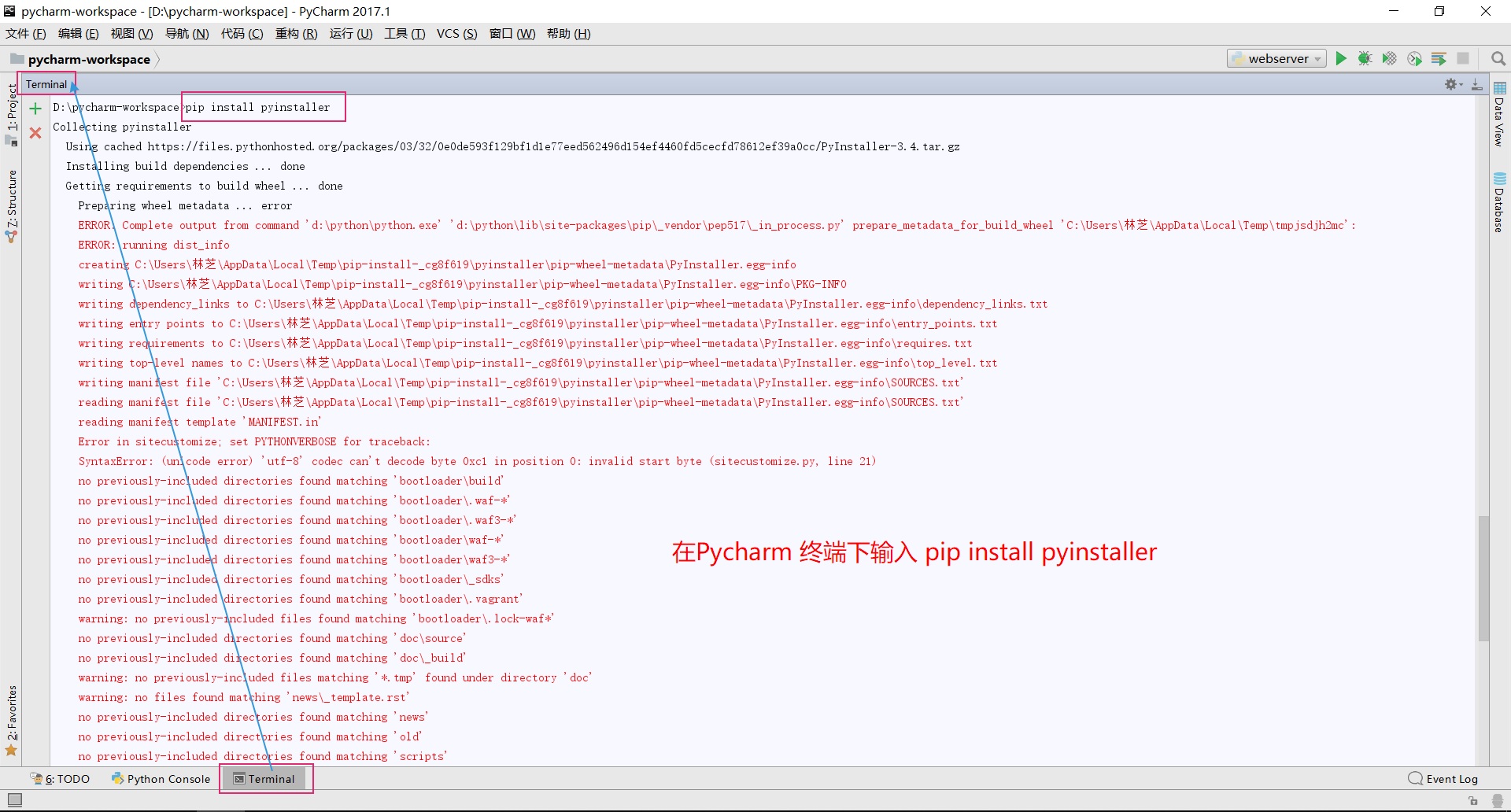
我在Pycharm 终端下安装pyinstaller时,遇到这样的安装错误:
D:\pycharm-workspace>pip install pyinstaller
Collecting pyinstaller
Using cached https://files.pythonhosted.org/packages/03/32/0e0de593f129bf1d1e77eed562496d154ef4460fd5cecfd78612ef39a0cc/PyInstaller-3.4.tar.gz
Installing build dependencies ... done
Getting requirements to build wheel ... done
Preparing wheel metadata ... error
ERROR: Complete output from command 'd:\python\python.exe' 'd:\python\lib\site-packages\pip\_vendor\pep517\_in_process.py' prepare_metadata_for_build_wheel 'C:\Users\林芝\AppData\Local\Temp\tmpjsdjh2mc':
ERROR: running dist_info
creating C:\Users\林芝\AppData\Local\Temp\pip-install-_cg8f619\pyinstaller\pip-wheel-metadata\PyInstaller.egg-info
writing C:\Users\林芝\AppData\Local\Temp\pip-install-_cg8f619\pyinstaller\pip-wheel-metadata\PyInstaller.egg-info\PKG-INFO
writing dependency_links to C:\Users\林芝\AppData\Local\Temp\pip-install-_cg8f619\pyinstaller\pip-wheel-metadata\PyInstaller.egg-info\dependency_links.txt
writing entry points to C:\Users\林芝\AppData\Local\Temp\pip-install-_cg8f619\pyinstaller\pip-wheel-metadata\PyInstaller.egg-info\entry_points.txt
writing requirements to C:\Users\林芝\AppData\Local\Temp\pip-install-_cg8f619\pyinstaller\pip-wheel-metadata\PyInstaller.egg-info\requires.txt
writing top-level names to C:\Users\林芝\AppData\Local\Temp\pip-install-_cg8f619\pyinstaller\pip-wheel-metadata\PyInstaller.egg-info\top_level.txt
writing manifest file 'C:\Users\林芝\AppData\Local\Temp\pip-install-_cg8f619\pyinstaller\pip-wheel-metadata\PyInstaller.egg-info\SOURCES.txt'
reading manifest file 'C:\Users\林芝\AppData\Local\Temp\pip-install-_cg8f619\pyinstaller\pip-wheel-metadata\PyInstaller.egg-info\SOURCES.txt'
reading manifest template 'MANIFEST.in'
Error in sitecustomize; set PYTHONVERBOSE for traceback:
SyntaxError: (unicode error) 'utf-8' codec can't decode byte 0xc1 in position 0: invalid start byte (sitecustomize.py, line 21)
no previously-included directories found matching 'bootloader\build'
no previously-included directories found matching 'bootloader\.waf-*'
no previously-included directories found matching 'bootloader\.waf3-*'
no previously-included directories found matching 'bootloader\waf-*'
no previously-included directories found matching 'bootloader\waf3-*'
no previously-included directories found matching 'bootloader\_sdks'
no previously-included directories found matching 'bootloader\.vagrant'
warning: no previously-included files found matching 'bootloader\.lock-waf*'
no previously-included directories found matching 'doc\source'
no previously-included directories found matching 'doc\_build'
warning: no previously-included files matching '*.tmp' found under directory 'doc'
warning: no files found matching 'news\_template.rst'
no previously-included directories found matching 'news'
no previously-included directories found matching 'old'
no previously-included directories found matching 'scripts'
no previously-included directories found matching 'tests\scripts'
no previously-included directories found matching '.github'
warning: no previously-included files found matching '.*'
warning: no previously-included files found matching '*.yml'
warning: no previously-included files found matching '*~'
warning: no previously-included files found matching '.directory'
writing manifest file 'C:\Users\林芝\AppData\Local\Temp\pip-install-_cg8f619\pyinstaller\pip-wheel-metadata\PyInstaller.egg-info\SOURCES.txt'
creating 'C:\Users\林芝\AppData\Local\Temp\pip-install-_cg8f619\pyinstaller\pip-wheel-metadata\PyInstaller.dist-info'
error: invalid command 'bdist_wheel'
----------------------------------------
ERROR: Command "'d:\python\python.exe' 'd:\python\lib\site-packages\pip\_vendor\pep517\_in_process.py' prepare_metadata_for_build_wheel 'C:\Users\林芝\AppData\Local\Temp\tmpjsdjh2mc'" failed with error code 1 in C:\Users\林芝\
AppData\Local\Temp\pip-install-_cg8f619\pyinstaller
######################## 终端提示我 命令执行失败,错误代码1 我也不知道这种方法安装失败的原因, 欢迎大家交流讨论#######################
方法二:自主下载pyinstaller包,进行手动安装
pyinstaller 的下载地址:http://www.pyinstaller.org/downloads.html
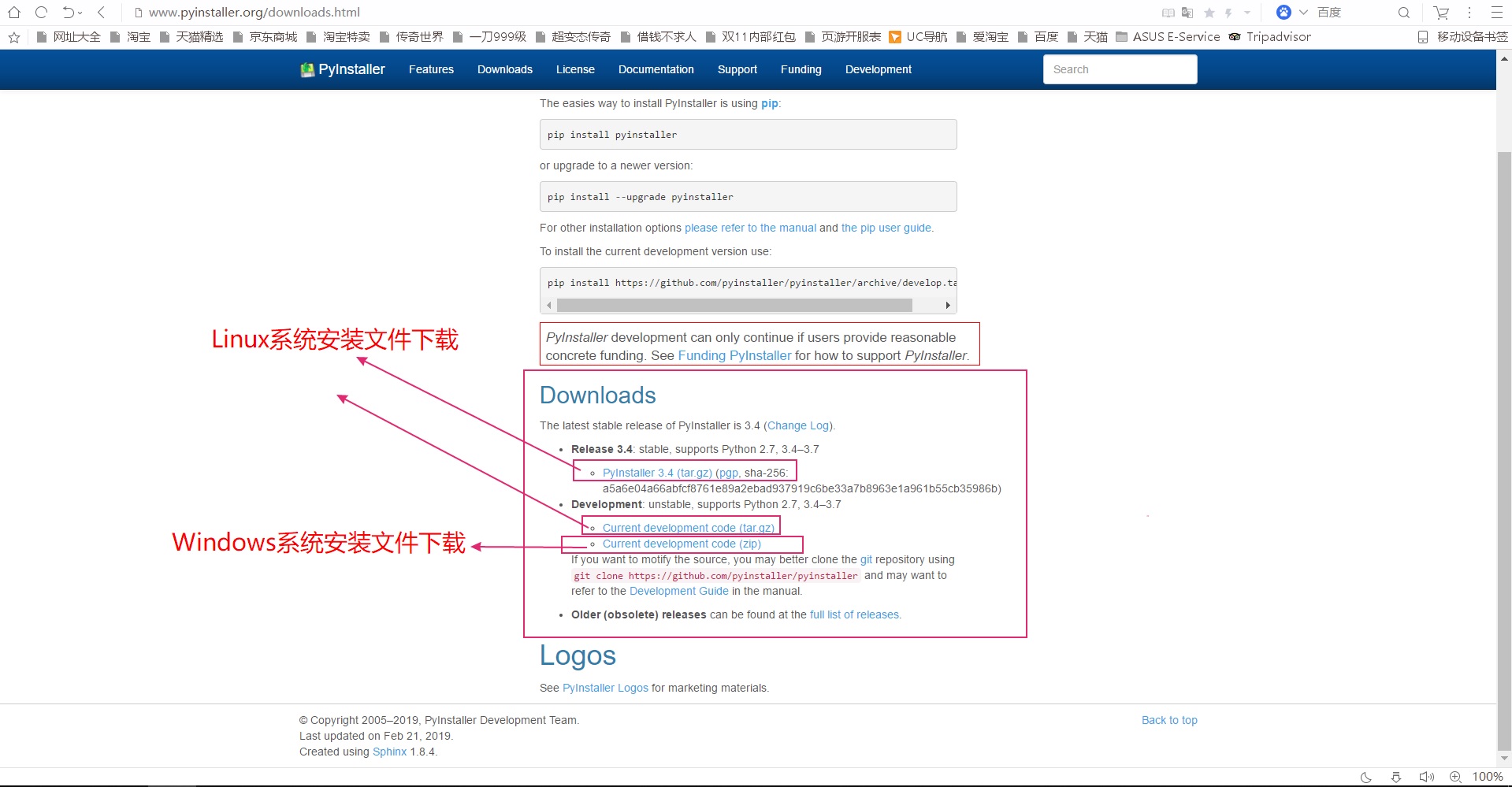
下载文件后,解压文件。
我的解压路径是: D:\python\pyinstaller-pyinstaller-d740524
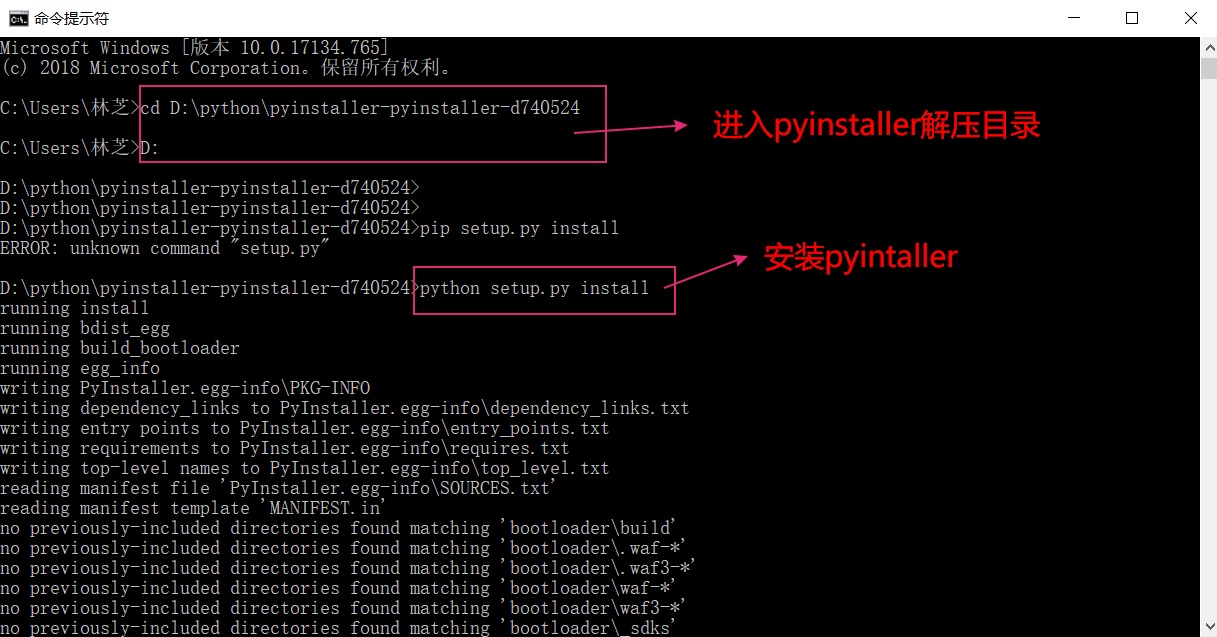
windows OS cmd(命令行窗口)进入 解压文件所在的目录。
cd D:\python\pyinstaller-pyinstaller-d740524
D:\
输入: python setup.py install
等待一段时间,pyinstaller就会安装成功
安装成功后,查看一下pyinstaller的版本信息
pyinstaller --version
出现结果如下,证明安装成功!

Python项目生成可执行程序的步骤
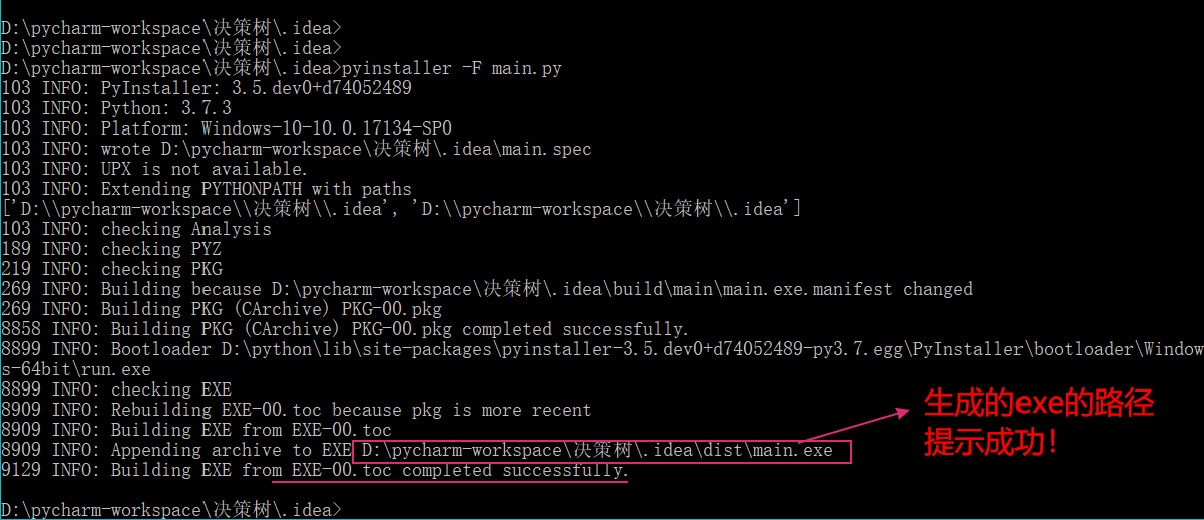
选择一:Windows OS下进入cmd(命令行窗口) 输入:pyinstaller -F xx.py xxx.py ......
选择二:在Pycharm IDE 终端下 输入:pyinstaller -F xx.py xxx.py ......
xx.py 和 xxx.py 是要打包的文件名
-F参数的含义是,将多个.py脚本文件打包成为一个可执行程序。
Python安装pyinstaller方法,以及将项目生成可执行程序的步骤的更多相关文章
- python安装模块方法汇总
方法一: 原文地址: http://blog.csdn.net/cighao/article/details/47860041 在 windows 系统下,只需要输入命令 pip install re ...
- python安装pip方法
1.先下载pip安装脚本: https://bootstrap.pypa.io/get-pip.py 2.执行python get-pip.py 3.安装完成.
- python 安装pyinstaller
pip install https://github.com/pyinstaller/pyinstaller/archive/develop.tar.gz
- c#项目调用Python模块的方法
将Python模块用pyinstaller打包成exe程序 下载安装UPX((http://upx.sourceforge.net/)) ,并把路径加到环境变量中. UPX是开源的加壳和压缩exe的程 ...
- PyInstaller安装使用方法
PyInstaller可以把Python应用程序及其所有依赖项捆绑到一个包中.用户可以在不安装Python解释器或任何模块的情况下运行打包的应用程序.PyInstaller支持Python 2.7和P ...
- 在Win8上安装pyinstaller打包python成为可执行文件
首先我使用的电脑系统是: Windows-8-6.2.9200 Python的版本是: 2.7.8 默认已安装python2.7且设置好了环境变量. 仅为个人记录,非教程. 首先先安装pip: 首先先 ...
- IDEA内的SpringBoot插件安装与SpringBoot项目生成地址
最新安装idea,在新建项目时没有spring initializr选项,也没有spring assistant选项.因此需要安装相应插件 在菜单栏 file>>settings>& ...
- 源码安装python +NGINX 的坎坷路 +uwsgi安装 部署django 的CRM项目
一.Nginx安装(基于ubuntu17.10 版本) 首先我们是基于源码安装,主要有如下步骤 1.安装依赖包 1.安装gcc g++的依赖库 sudo apt-get install build-e ...
- 在Eclipse中安装python插件的方法
一个博士给了我一堆代码,原本以为是C++或者java写的,结果是python,我压根没学过呀,不过本着语言都是相通的原则,我硬着头皮开始学习Python,当然先学习安装IDE(以前学习一门新语言,我会 ...
随机推荐
- postman工具使用小结
序言 现在,postman在做接口测试方面,发挥着越来越重大的作用,其支持多种请求方式.并可以模拟各种类型的数据请求类型,在实际开发中使用它可以极大的提高开发的效率. 安装postman 1. 安装 ...
- 【SQL server基础】初步学习存储过程(好学易懂)
-------------------------------------------------------------------------- ------------------------- ...
- java架构之路-(JVM优化与原理)JVM类的加载机制
话不多说,先上图. ***.class文件执行大概就是这样来走的.我们都知道我们的java文件经过编译以后会生成对应的class文件.先经过类装载子系统,然后塞进运行时内存模型的元空间,开始执行方法, ...
- k8s pod访问不通外网问题排查
环境概况 自建k8s集群,主机操作系统ubuntu16.04,k8s版本v1.14, 集群网络方案calico-3.3.6. worker节点数50+,均为GPU物理服务器,服务器类型异构,如Nvid ...
- Jenkins 管道 工作流 自动化部署
jenkins Jenkins是一个用Java编写的开源的持续集成工具.在与Oracle发生争执后,项目从Hudson项目复刻. Jenkins提供了软件开发的持续集成服务.它运行在Servlet容器 ...
- XCTF-web2
这种题目是比较简单地..直接写个小脚本就行了2333 <?php $a=" a1zLbgQsCESEIqRLwuQAyMwLyq2L5VwBxqGA3RQAyumZ0tmMvSGM2Z ...
- Linux内核版本介绍与查询
Linux内核版本命名在不同时期有着不同的规范,在涉及到Linux版本问题时经常容易混淆,主线版本/稳定版/长期支持版本经常搞不清楚,本文主要记录下内核版本命名的规则以及如何查看Linux系统版本信息 ...
- Web性能优化:雅虎35条
对web性能优化,一直知道是个很重要的方面,平时有注意到,但是对于雅虎35条是第一次听说,查了一下,发现平时都有用过,只是没有总结到一块,今天就总结一下吧. 雅虎35条: 1.[内容]尽量减少HTTP ...
- HashMap底层数据结构详解
一.HashMap底层数据结构 JDK1.7及之前:数组+链表 JDK1.8:数组+链表+红黑树 关于HashMap基本的大家都知道,但是为什么数组的长度必须是2的指数次幂,为什么HashMap的加载 ...
- e课表项目第二次冲刺周期第二天
昨天干了什么? 昨天与我们小组的成员商量了一个重大的决定,确定了我们转型发展的主题,简要的设计了我们软件要实现的功能,并且完成了首导航栏的设计,和一部分框架的内容填充. 今天干了什么? 我们组今天通过 ...