
asp.net core IdentityServer4 实现 resource owner password credentials(密码凭证)
前言
OAuth 2.0默认四种授权模式(GrantType)
- 授权码模式(authorization_code)
- 简化模式(implicit)
- 密码模式(resource owner password credentials)
- 客户端模式(client_credentials)
本章主要介绍密码模式(resource owner password credentials),OAuth2.0资源所有者密码授权功能允许客户端将用户名和密码发送到令牌服务,并获得该用户的访问令牌.
认证步骤:
- 用户将用户名密码提供给客户端
- 客户端再将用户名密码发送给授权服务器,请求令牌
- 授权服务器确定判断信息是否有误,返回给客户端令牌
创建授权服务器
创建一个API项目工程,我这边以端口5000的形式进行后面的讲解.
Package
PM> Install-package IdentityServer4 -version 2.5.3
创建一个类Config(配置要保护的资源,和可以访问的API的客户端服务器)
   public class Config

    {

        /// <summary>

        ///     定义要保护的资源

        /// </summary>

        /// <returns></returns>

        public static IEnumerable<ApiResource> GetApiResources() {

            return new List<ApiResource>

            {

               new ApiResource("api1","MyApi")

            };

        }

        /// <summary>

        ///     定义授权客户端

        /// </summary>

        /// <returns></returns>

        public static IEnumerable<Client> GetClients() {

            return new List<Client>

            {

                new Client(){

                    ClientId="client",

                    AllowedGrantTypes=GrantTypes.ResourceOwnerPassword,

                    ClientSecrets=

                    {

                      new Secret("secret".Sha256())

                    },

                    AllowedScopes={ "api1",IdentityServerConstants.StandardScopes.OfflineAccess //如果要获取refresh_tokens ,必须在scopes中加上OfflineAccess

                    },

                    AllowOfflineAccess=true// 主要刷新refresh_token,

                }

            };

        }

    }
此处AllowedGrantTypes需要设置为ResourceOwnerPassword(密码凭证).
配置Startup
再走到ConfigureServices方法注入IdentityServer4服务
   public void ConfigureServices(IServiceCollection services)

        {

            services.AddMvc().SetCompatibilityVersion(CompatibilityVersion.Version_2_2);

            services.AddIdentityServer()

                .AddDeveloperSigningCredential()

                .AddInMemoryApiResources(Config.GetApiResources())

                .AddInMemoryClients(Config.GetClients())

                .AddResourceOwnerValidator<ResourceOwnerPasswordValidator>();//注入自定义登录验证

        }
IdentityServer4默认提供了两种证书加密配置
AddDeveloperSigningCredential AddTemporarySigningCredential
添加内存ApiResourceAddInMemoryApiResources
添加内存Client AddInMemoryClients
添加自定义登录验证AddResourceOwnerValidator
自定义用户验证
    public class ResourceOwnerPasswordValidator : IResourceOwnerPasswordValidator

    {

        public Task ValidateAsync(ResourceOwnerPasswordValidationContext context)

        {

            if (context.UserName == "test" && context.Password == "test")

            {

                context.Result = new GrantValidationResult(

                 subject: context.UserName,

                 authenticationMethod: OidcConstants.AuthenticationMethods.Password);

            }

            else

            {

                //验证失败

                context.Result = new GrantValidationResult(

                    TokenRequestErrors.InvalidGrant,

                    "invalid custom credential"

                    );

            }

            return Task.FromResult(0);

        }

    }
在Configure方法中添加IdentityServer4服务中间件
app.UseIdentityServer();
创建ApiResource
创建一个客户端项目,这边我将端口设置为5001
Package
PM> Install-package IdentityServer4 -version 2.5.3
配置Startup
在ConfigureServices添加认证服务器地址
      public void ConfigureServices(IServiceCollection services)

        {

            services.AddMvc().SetCompatibilityVersion(CompatibilityVersion.Version_2_2);

            services.AddAuthentication("Bearer")

              .AddIdentityServerAuthentication(options =>

              {

                  options.Authority = "http://localhost:5000";//授权服务器地址

                   options.RequireHttpsMetadata = false;//不需要https

                   options.ApiName = "api1";

              });

        }
在Configure方法中添加认证服务中间件
app.UseAuthentication();
Run
在客户端程序values控制器上面增加[Authorize]
直接访问资源服务器http://localhost:5001/api/values
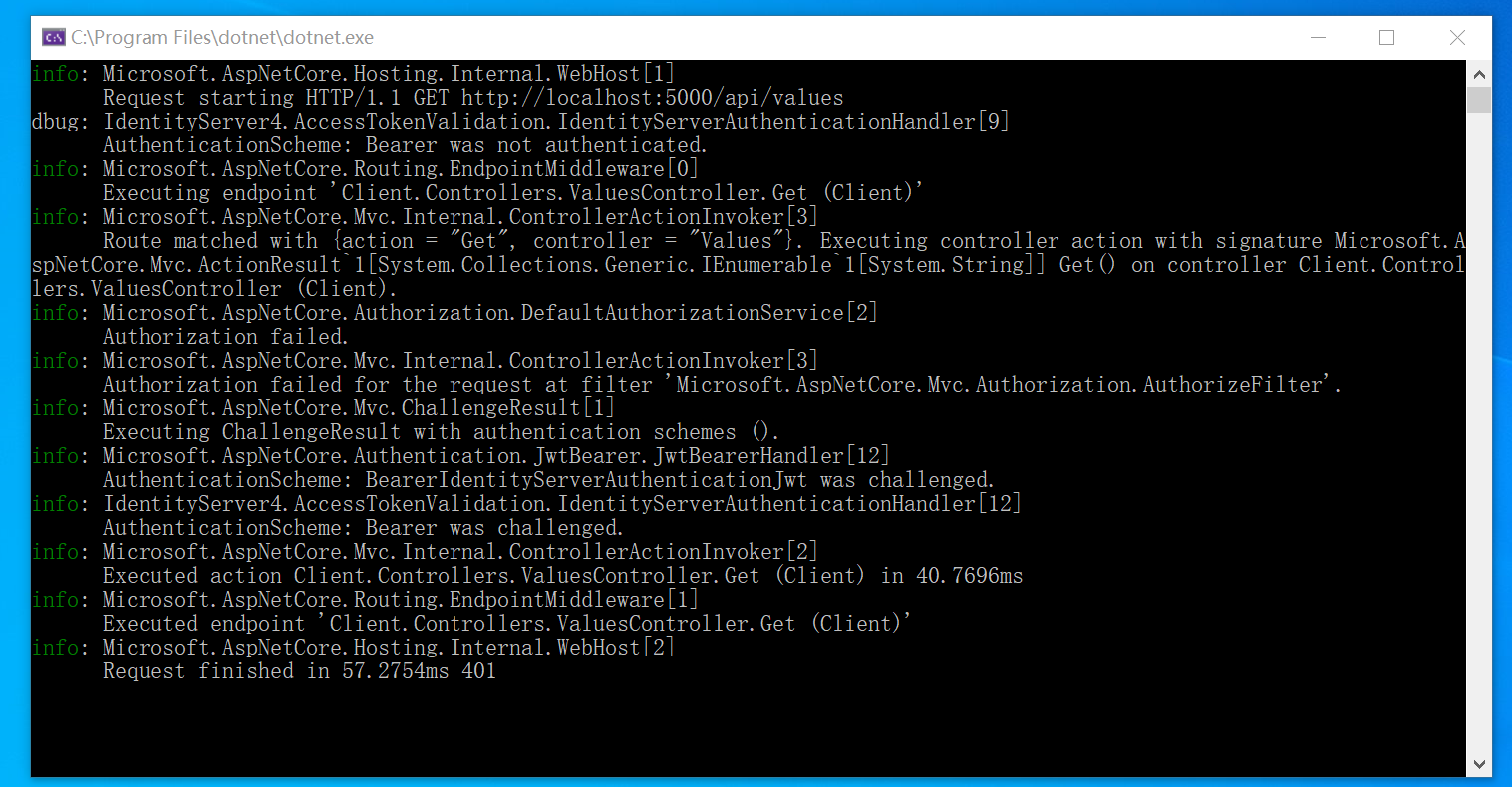
code 401
启动授权服务器
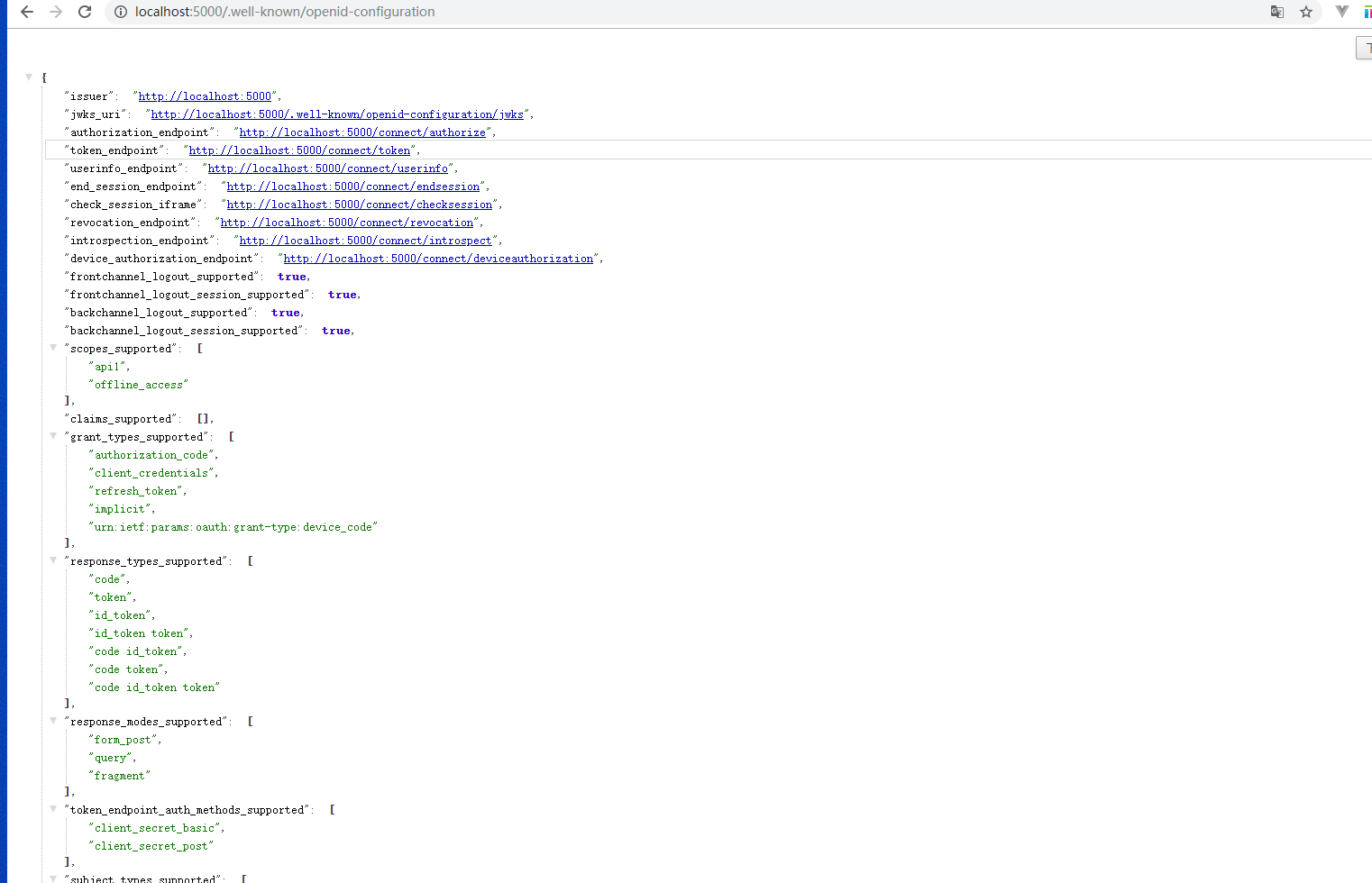
http://localhost:5000/.well-known/openid-configuration
发现端点可通过/.well-known/openid-configuration
获取token
这边我用postman进行测试
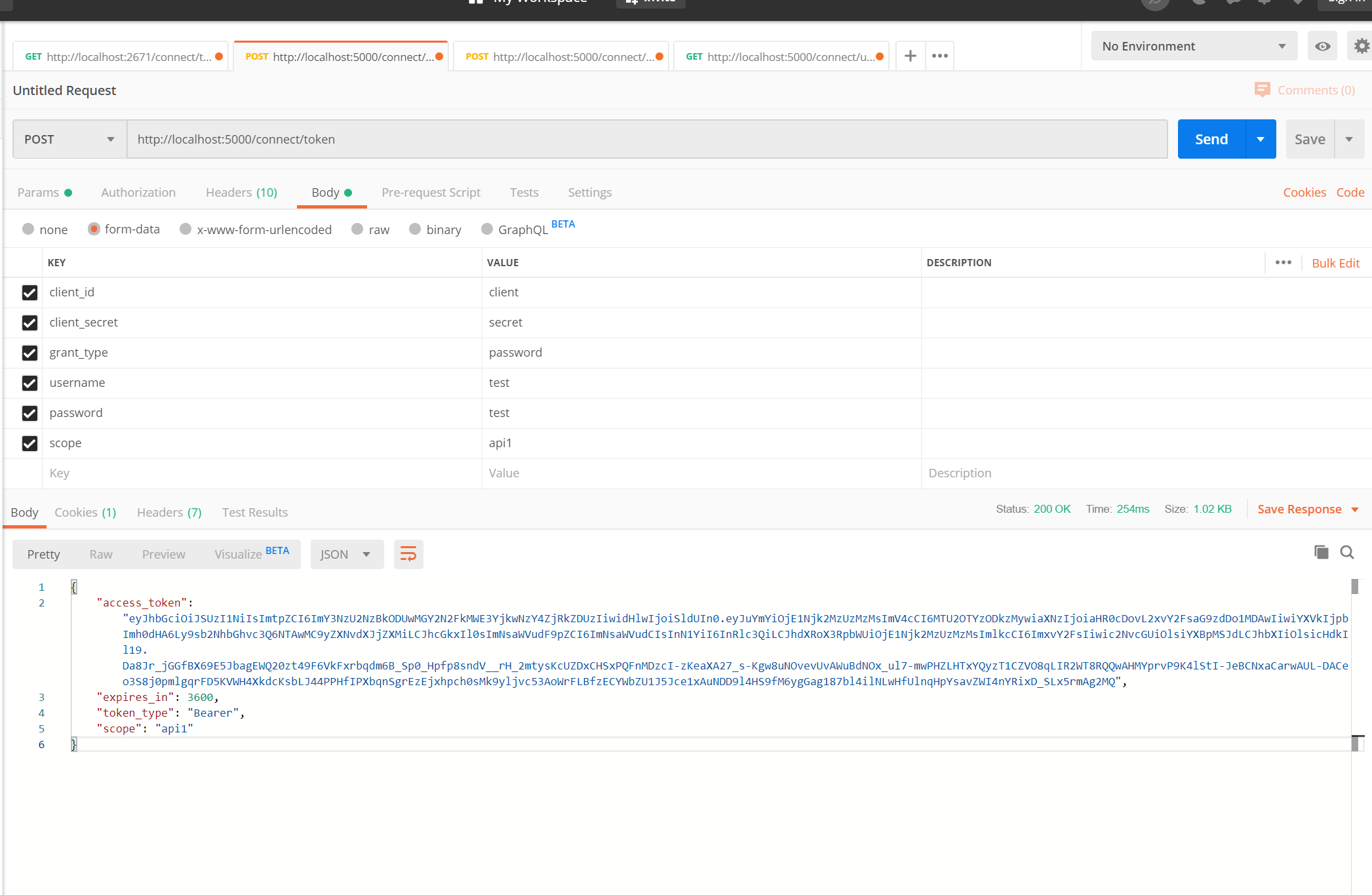
code 200
access_token我们获取到了,再拿着token通过postman请求资源程序,
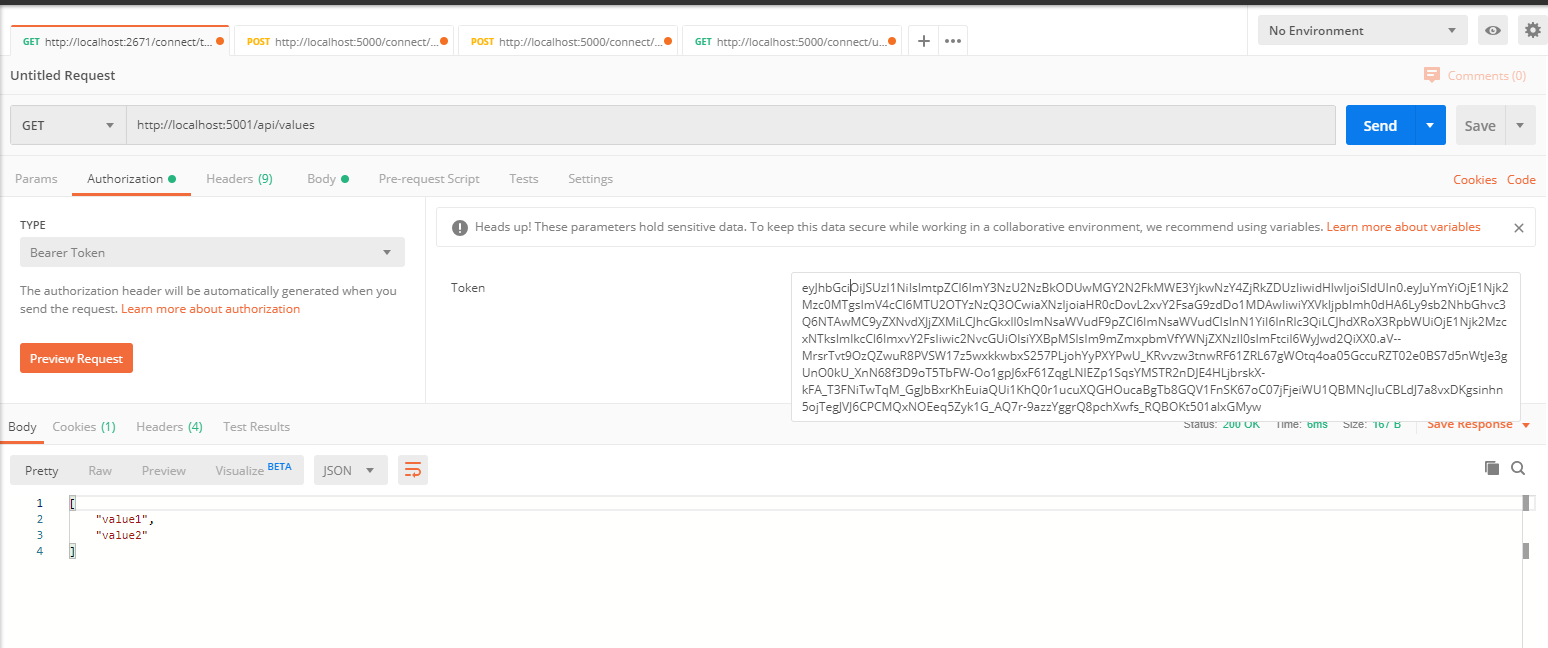
code 200
成功了
refresh_token
获取请求授权接口后会返回access_token expires
_in 等内容,expires_in是有效期(s),当然我们可以自定义有效期,access_token失效后用户需要重新授权,client才能拿到新的access_token.但是有了refresh_token后,client检测到token失效后可以直接通过refresh_token向授权服务器申请新的token,当然refresh_token也是有有效期的。
AbsoluteRefreshTokenLifetime的默认有效期为2592000秒/30天。SlidingRefreshTokenLifetime的默认有效期为1296000秒/15天。
在认证服务器中我再scopes加上了OfflineAccess
IdentityServerConstants.StandardScopes.OfflineAccess //如果要获取refresh_tokens ,必须在scopes中加上OfflineAccess
获取refresh_token
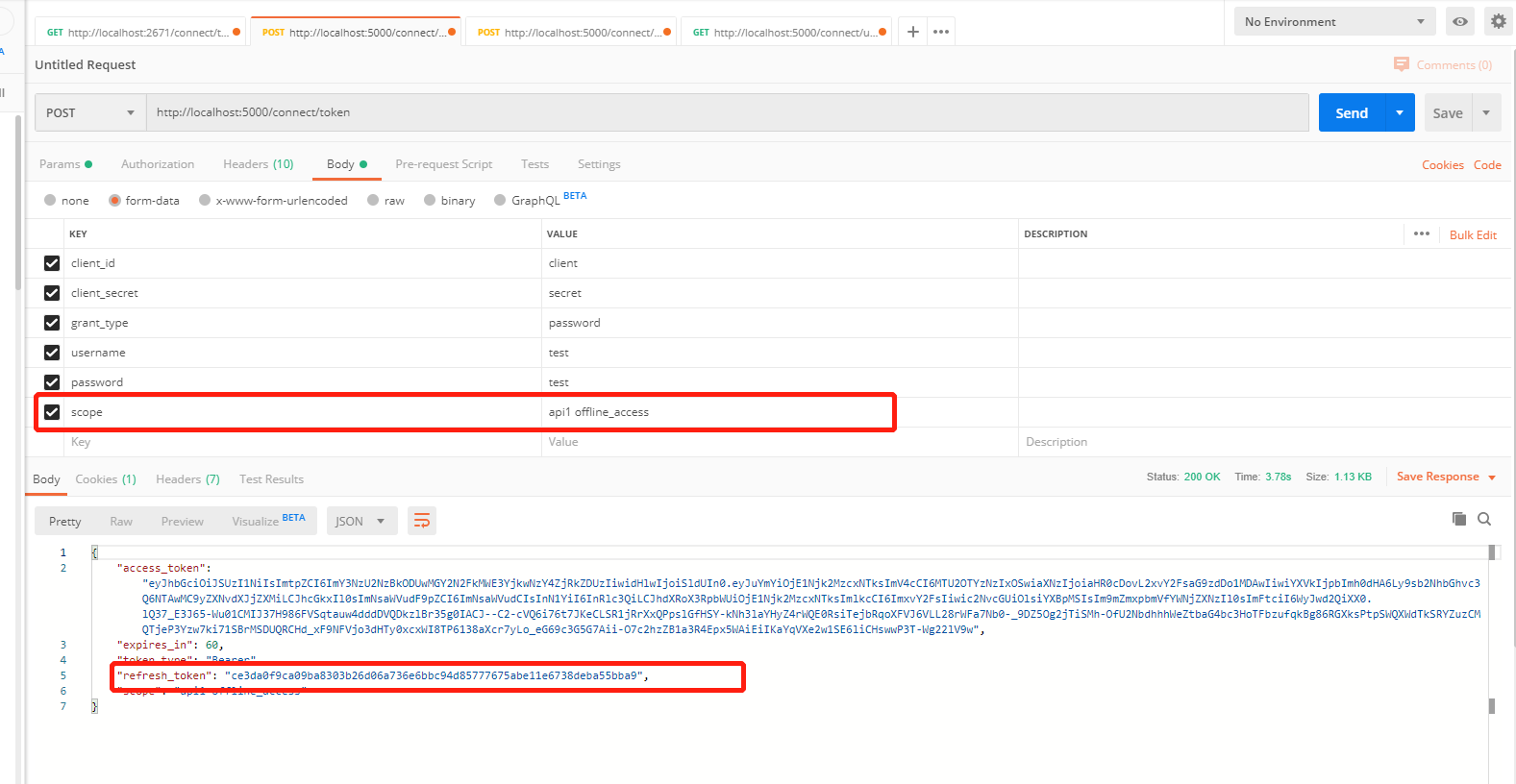
通过refresh_token再去获取access_token
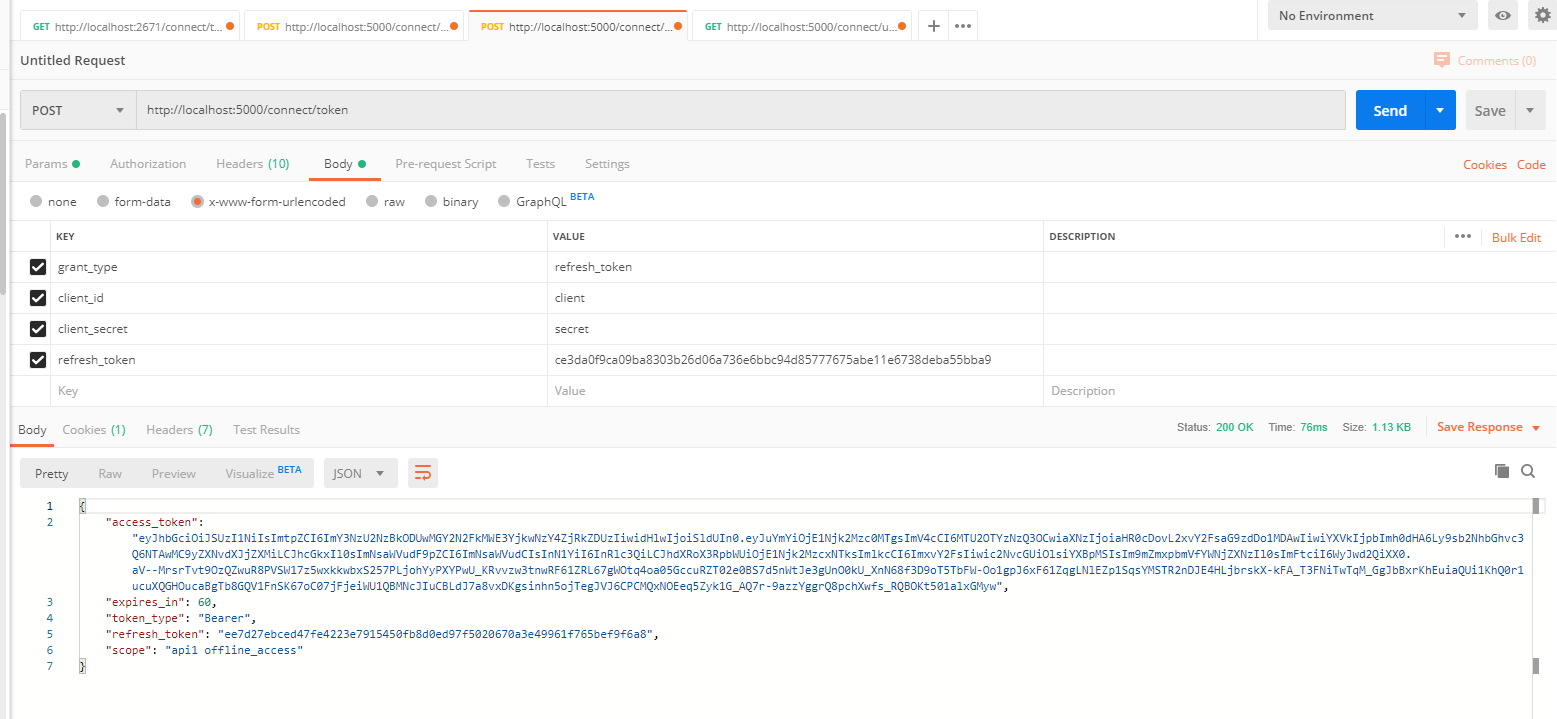
通过postman请求获取资源

概要
示例地址https://github.com/fhcodegit/IdentityServer4.Samples
asp.net core IdentityServer4 实现 resource owner password credentials(密码凭证)的更多相关文章
- IdentityServer4之Resource Owner Password Credentials(资源拥有者密码凭据许可)
IdentityServer4之Resource Owner Password Credentials(资源拥有者密码凭据许可) 参考 官方文档:2_resource_owner_passwords ...
- IdentityServer4 之 Resource Owner Password Credentials 其实有点尴尬
前言 接着IdentityServer4的授权模式继续聊,这篇来说说 Resource Owner Password Credentials授权模式,这种模式在实际应用场景中使用的并不多,只怪其太开放 ...
- 基于OWIN WebAPI 使用OAuth授权服务【客户端验证授权(Resource Owner Password Credentials Grant)】
适用范围 前面介绍了Client Credentials Grant ,只适合客户端的模式来使用,不涉及用户相关.而Resource Owner Password Credentials Grant模 ...
- 不要使用Resource Owner Password Credentials
不要使用Resource Owner Password Credentials 文章链接在这里 前言 最近公司项目在做一些重构,因为公司多个业务系统各自实现了一套登录逻辑,比较混乱.所以,现在需要做一 ...
- 使用Resource Owner Password Credentials Grant授权发放Token
对应的应用场景是:为自家的网站开发手机 App(非第三方 App),只需用户在 App 上登录,无需用户对 App 所能访问的数据进行授权. 客户端获取Token: public string Get ...
- 基于 IdentityServer3 实现 OAuth 2.0 授权服务【密码模式(Resource Owner Password Credentials)】
密码模式(Resource Owner Password Credentials Grant)中,用户向客户端提供自己的用户名和密码.客户端使用这些信息,向"服务商提供商"索要授权 ...
- OAuth2.0学习(1-6)授权方式3-密码模式(Resource Owner Password Credentials Grant)
授权方式3-密码模式(Resource Owner Password Credentials Grant) 密码模式(Resource Owner Password Credentials Grant ...
- IdentityServer4专题之六:Resource Owner Password Credentials
实现代码: (1)IdentityServer4授权服务器代码: public static class Config { public static IEnumerable<Identity ...
- ABP中使用OAuth2(Resource Owner Password Credentials Grant模式)
ABP目前的认证方式有两种,一种是基于Cookie的登录认证,一种是基于token的登录认证.使用Cookie的认证方式一般在PC端用得比较多,使用token的认证方式一般在移动端用得比较多.ABP自 ...
随机推荐
- 分布式事务TransactionScope所导致几个坑
记录一下,个人见解,欢迎指正 错误: 1.该伙伴事务管理器已经禁止了它对远程/网络事务的支持. (异常来自 HRESULT:0x8004D025)2.事务已被隐式或显式提交,或已终止3.此操作对该事务 ...
- C++ 线程安全的单例模式总结
什么是线程安全? 在拥有共享数据的多条线程并行执行的程序中,线程安全的代码会通过同步机制保证各个线程都可以正常且正确的执行,不会出现数据污染等意外情况. 如何保证线程安全? 给共享的资源加把锁,保证每 ...
- Leetcode之回溯法专题-40. 组合总和 II(Combination Sum II)
Leetcode之回溯法专题-40. 组合总和 II(Combination Sum II) 给定一个数组 candidates 和一个目标数 target ,找出 candidates 中所有可以使 ...
- 【IDEA】在IDEA中使用@Slf4j报错,找不到log
题:在IDEA中使用@Slf4j报错,找不到log 解决方法:需要在IDEA中安装插件lombok 详细步骤: 1.File->Settings 2.Plugins->Browse rep ...
- Linux之Shell编程(16)
读取从控制台输入的值(read): 系统函数: basename:返回完整路径最后/部分,常用于获取文件名 basename [pathname] [suffix] dirname:返回完整路径最后/ ...
- Linux下手动安装JDK
一.删除自带的JDK 查询系统自带JDK rpm -qa | grep java rpm -qa | grep jdk 删除查询出来的文件名 rpm -e --nodeps 文件名 命令执行成功后重新 ...
- log4j配置相对路径
整理自网上: 一般在我们开发项目过程中,log4j日志输出路径固定到某个文件夹,这样如果我换一个环境,日志路径又需要重新修改,比较不方便, 1.log4j的FileAppender本身就有这样的机制, ...
- 2019年牛客多校第一场 B题 Integration 数学
题目链接 传送门 思路 首先我们对\(\int_{0}^{\infty}\frac{1}{\prod\limits_{i=1}^{n}(a_i^2+x^2)}dx\)进行裂项相消: \[ \begin ...
- hdu 5534 Partial Tree(完全背包)
题目链接:http://acm.split.hdu.edu.cn/showproblem.php?pid=5534 题解:这题一看有点像树形dp但是树形dp显然没什么思路.然后由于这里的约束几乎没有就 ...
- Codeforces 938D Buy a Ticket
Buy a Ticket 题意要求:求出每个城市看演出的最小费用, 注意的一点就是车票要来回的. 题解:dijkstra 生成优先队列的时候直接将在本地城市看演出的费用放入队列里, 然后直接跑就好了, ...