
Xamarin.Forms学习系列之Syncfusion 制作图形报表
Syncfusion是一家微软生态下的第三方组件/控件供应商,除了用于HTML5和JavaScript的控件外,他们产品还涉及如下领域:
- WEB
- ASP.NET MVC
- ASP.NET WebForms
- HTML5/JavaScript
- LightSwitch
- Silverlight
- MOBILE
- iOS
- Android
- Windows Phone
- WinRT
- Xamarin
- HTML5/JavaScript
- Orubase
- DESKTOP
- Windows Forms
- WPF
- FILE FORMATS
- Excel
- Word
- Presentation
主要记录下如何在Xamarin中使用Syncfusion组件
一、在官网注册一个使用账号 https://www.syncfusion.com
二、查看Syncfusion版本,Syncfusion分为社区免费版和付费版,付费版可以免费试用30天,官网有详细说明
社区免费版需要满足以下条件:年收入低于100万美元的公司和个人以及5个以下(包含5个)的开发人员。
然后用LinkedIn或者Xing登录,就可以获取社区免费版秘钥

https://www.syncfusion.com/downloads/communitylicense
三、30天试用期可以分为两种,一种是完整的安装评估,一种是通过nuget安装程序集, https://www.syncfusion.com/downloads/xamarin/confirm
四、查看官方文档,了解nuget安装程序集详细操作步骤 https://help.syncfusion.com/xamarin/licensing
五、下面详细介绍如何在Xamarin中添加一个图形报表
1、获取试用版本密钥 https://help.syncfusion.com/xamarin/nuget-packages
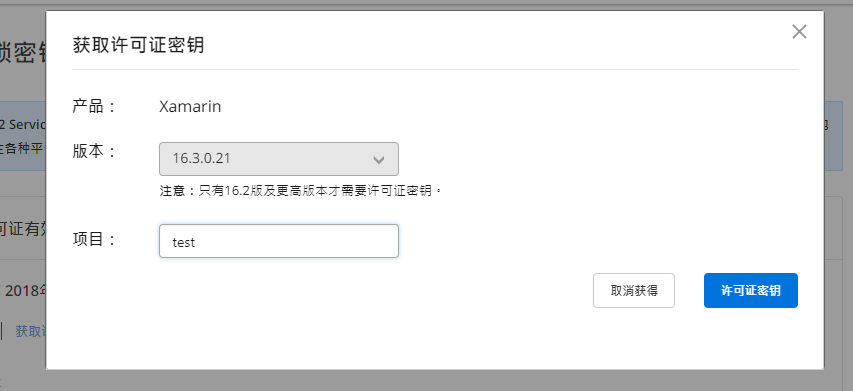
登录官网之后,通过地址 https://www.syncfusion.com/account/manage-trials/downloads 可以获取许可证密钥

注意选择对应的版本,然后保存生成的密钥
2、在Xamrin forms 程序启动的时候加载密钥
在nuget中引用Syncfusion.Licensing程序集,然后再App.xaml.cs文件中加入如下代码:
public App()

{

    //Register Syncfusion license

    Syncfusion.Licensing.SyncfusionLicenseProvider.RegisterLicense("YOUR LICENSE KEY");

    InitializeComponent();

    MainPage = new App1.MainPage();

}
3、引用图表控件,创建图表页面
在nuget中引用Syncfusion.Xamarin.SfChart程序集,然后就可以使用图表控件了
添加一个示例数据视图 CategoryAxisViewModel
using System.Collections.ObjectModel;

using Xamarin.Forms;

namespace SampleBrowser.SfChart

{

    public class CategoryAxisViewModel

    {

        public ObservableCollection<ChartDataModel> CategoryData { get; set; }

        public CategoryAxisViewModel()

        {

            CategoryData = new ObservableCollection<ChartDataModel>

            {

                new ChartDataModel("South Korea", ),

                new ChartDataModel("India", ),

                new ChartDataModel("South Africa", ),

                new ChartDataModel("China", ),

                new ChartDataModel("France", ),

                new ChartDataModel("Saudi Arabia", ),

                new ChartDataModel("Japan", ),

                new ChartDataModel("Mexico", )

            };

        }

    }

}
添加一个图形报表页面
<?xml version="1.0" encoding="utf-8" ?>

<ContentPage xmlns="http://xamarin.com/schemas/2014/forms"

             xmlns:x="http://schemas.microsoft.com/winfx/2009/xaml"

             xmlns:chart="clr-namespace:Syncfusion.SfChart.XForms;assembly=Syncfusion.SfChart.XForms"

             xmlns:sampleBrowser="clr-namespace:SampleBrowser.SfChart"

             x:Class="Mobile.Views.Overview.Listings.ListingPage">

    <ContentPage.Content>

            <StackLayout x:Name="stack">

                <StackLayout.Resources>

                    <ResourceDictionary>

                        <DataTemplate x:Key="toolTipTemplate1">

                            <StackLayout BackgroundColor="#404041">

                                <StackLayout.Padding>

                                    <OnPlatform x:TypeArguments="Thickness" WinPhone="3,3,3,3" />

                                </StackLayout.Padding>

                                <Label Text="Users" HorizontalTextAlignment="Center" VerticalTextAlignment="Center" TextColor="White" FontAttributes="Bold" FontFamily="Helvetica" Margin="" FontSize="" Grid.Row="" />

                                <BoxView Color="White" HeightRequest="0.75" VerticalOptions="FillAndExpand" HorizontalOptions="FillAndExpand" />

                                <StackLayout Orientation="Horizontal"  VerticalOptions="FillAndExpand" BackgroundColor="#404041" Spacing="" Padding="" Margin="">

                                    <Label Text="{Binding Name}" VerticalTextAlignment="Center" HorizontalOptions="StartAndExpand" TextColor="#CCCCCC" FontAttributes="Bold" FontFamily="Helvetica" FontSize="" />

                                    <Label Text="{Binding Value,StringFormat=' :  {0}M'}" VerticalTextAlignment="Center" HorizontalOptions="EndAndExpand" TextColor="White" FontAttributes="Bold" FontFamily="Helvetica" Margin="" FontSize="" />

                                </StackLayout>

                            </StackLayout>

                        </DataTemplate>

                    </ResourceDictionary>

                </StackLayout.Resources>

                <chart:SfChart x:Name="Chart" HorizontalOptions="FillAndExpand" VerticalOptions="FillAndExpand">

                    <chart:SfChart.Margin>

                        <OnPlatform x:TypeArguments="Thickness" WinPhone="0,0,15,0" />

                    </chart:SfChart.Margin>

                    <chart:SfChart.Title>

                        <chart:ChartTitle Text="Internet Users - 2016" />

                    </chart:SfChart.Title>

                    <chart:SfChart.BindingContext>

                        <sampleBrowser:CategoryAxisViewModel />

                    </chart:SfChart.BindingContext>

                    <chart:SfChart.ChartBehaviors>

                        <chart:ChartTooltipBehavior BackgroundColor="#404041" />

                    </chart:SfChart.ChartBehaviors>

                    <chart:SfChart.PrimaryAxis>

                        <chart:CategoryAxis x:Name="primary" LabelPlacement="BetweenTicks" ShowMajorGridLines="false">

                            <chart:CategoryAxis.LabelStyle>

                                <chart:ChartAxisLabelStyle x:Name="axisLabelStyle" WrappedLabelAlignment="Center" TextColor="Black">

                                    <chart:ChartAxisLabelStyle.MaxWidth>

                                        <OnPlatform x:TypeArguments="x:Double" WinPhone="" Android="" iOS="" />

                                    </chart:ChartAxisLabelStyle.MaxWidth>

                                </chart:ChartAxisLabelStyle>

                            </chart:CategoryAxis.LabelStyle>

                        </chart:CategoryAxis>

                    </chart:SfChart.PrimaryAxis>

                    <chart:SfChart.SecondaryAxis>

                        <chart:NumericalAxis Minimum="" Maximum="" IsVisible="false" ShowMajorGridLines="false">

                        </chart:NumericalAxis>

                    </chart:SfChart.SecondaryAxis>

                    <chart:SfChart.Series>

                        <chart:ColumnSeries x:Name="Series" ItemsSource="{Binding CategoryData}" XBindingPath="Name" YBindingPath="Value" EnableTooltip="true" TooltipTemplate="{StaticResource toolTipTemplate1}">

                            <chart:ColumnSeries.ColorModel>

                                <chart:ChartColorModel Palette="Natural"/>

                            </chart:ColumnSeries.ColorModel>

                            <chart:ColumnSeries.DataMarker>

                                <chart:ChartDataMarker >

                                    <chart:ChartDataMarker.LabelStyle>

                                        <chart:DataMarkerLabelStyle LabelPosition="Outer" LabelFormat="#.#'M'" Font="">

                                        </chart:DataMarkerLabelStyle>

                                    </chart:ChartDataMarker.LabelStyle>

                                </chart:ChartDataMarker>

                            </chart:ColumnSeries.DataMarker>

                        </chart:ColumnSeries>

                    </chart:SfChart.Series>

                </chart:SfChart>

            </StackLayout>

    </ContentPage.Content>

</ContentPage>
syncfusion文档:https://help.syncfusion.com/xamarin/introduction/overview
Xamarin.Forms学习系列之Syncfusion 制作图形报表的更多相关文章
- Xamarin.Forms学习系列之Android集成极光推送
一般App都会有消息推送的功能,如果是原生安卓或者IOS集成消息推送很容易,各大推送平台都有相关的Sample,但是关于Xamarin.Forms的消息推送集成的资料非常少,下面就说下Xamarin. ...
- Xamarin.Forms 学习系列之底部tab
App中一般都会有一个底部tab,用于切换不同的功能,在Xamarin中应该制作底部tab了,需要把Android的TabbedPage做一次渲染,IOS的则不用,接下来说下详细步骤: 1.在共享项目 ...
- Xamarin.Forms 学习系列之优秀UI收集
1.各种优秀UI例子 https://github.com/jsuarezruiz/xamarin-forms-goodlooking-UI 输入框例子 https://github.com/enis ...
- Xamarin.Forms学习系列之SQLite
在App中我们通常不会实时获取服务器数据,会在用户手机中保存历史数据,这个时候就需要用到数据库SQLite,由于微软的封装,在Xamarin中操作SQLite非常简单,类似EF的操作. 1.我们需要在 ...
- Xamarin.Forms学习之Platform-specific API和文件操作
这篇文章的分享原由是由于上篇关于Properties的保存不了,调用SavePropertiesAsync()方法也不行,所以我希望通过操作文件的方式保存我的需要的数据,然后我看了一下电子书中的第二十 ...
- Xamarin.Forms学习之Page Navigation(一)
在最初接触Xamarin.Forms的时候,我是跟着Xamarin官方的名为“learning-xamarin-ebook”的pdf文档进行学习的,我在成功运行Hello world程序之后,我开始跟 ...
- Xamarin.Forms学习之XAML命名空间
大家好,我又悄咪咪的来了,在上一篇的Xamarin文章中简单介绍了Xamarin的安装过程,妈蛋没想到很多小朋友很感激我,让他们成功的安装了Xamarin,然后......成功的显示了经典的两个单词( ...
- Xamarin.Forms学习之初
微软的Build 2016结束的有段时间了,对于一个简单的小屌丝程序员--我来说,关注最大的无疑是Xamarin的免费(开源什么的让大神们上吧),内心激动啊.大会结束的周末我就迫不及待的安装了,然后. ...
- Xamarin.Forms学习之位图(二)
上篇文章分享了如何加载网络图片和PCL中的图片,所以今天继续分享关于如何加载平台的内嵌图片,在这之前说一下上篇文章开头的一个问题:为什么不能加载UWP项目,这是因为我升级了UWP的SDK,而Xamar ...
随机推荐
- GStreamer基础教程12 - 常用命令工具
摘要 GStreamer提供了不同的命令行工具用于快速的查看信息以及验证Pipeline的是否能够正确运行,在平时的开发过程中,我们也优先使用GStreamer的命令行工具验证,再将Pipeline集 ...
- Linux 编译与交叉编译
在Linux环境中,所处平台不同,执行文件也就不同,同一执行文件不能在不同平台下使用 如在Ubnutu下 是用gcc编译一个.c文件 gcc main.c -o main.out -o 可以指定输出文 ...
- 明解C语言 入门篇 第一章答案
练习1-1 #include <stdio.h> int main() { int a; a = 15; int b; b = 37; int c; c = a - b; printf(& ...
- 心脏滴血漏洞复现(CVE-2014-0160)
心脏滴血漏洞简述 2014年4月7日,OpenSSL发布安全公告,在OpenSSL1.0.1版本至OpenSSL1.0.1f Beta1版本中存在漏洞,该漏洞中文名称为心脏滴血,英文名称为HeartB ...
- mysql设计规范二
一.基本规范 必须使用InnoDB存储引擎 必须使用UTF8字符集 数据表.数据字段必须加入中文注释 二.设计规范 库名称.表名称.字段名称必须使用小写,最好不要使用驼峰式,使用“_”区分,例如use ...
- 关于多线程start()方法原理解读
1.为什么启动线程不用run()方法而是使用start()方法 run()方法只是一个类中的普通方法,调用run方法跟调用普通方法一样 而start()是创建线程等一系列工作,然后自己调用run里面的 ...
- [考试反思]0904NOIP模拟测试37:守望
100分并列的还有4个没粘 总分是大脸的一半,然而还只低了2名.差距好大...但其实后面的分数段又很密集,和我都差不了多少... 我可能也是最水的那一个,排行榜前7个里面就我没有AC.全是暴力... ...
- m98 lsc rp-- 赛
lsc 这次又烧rp了! T1随机化艹spj 本机测试输出字符串长度没有低于1W的,考完发现凉凉 但是lemon又救了我的*命,垃圾lsc又烧rp了!
- FastDFS图片服务器单机安装步骤(修订版)
前面已经讲 一张图秒懂微服务的网络架构,通过此文章可以了解FastDFS组件中单机安装流程. 单机版架构图 以下为单机FastDFS安装步骤 一.环境准备 CentOS 7.X libfastcomm ...
- Hybrid App: 了解JavaScript如何与Native实现混合开发
一.简介 Hybrid Development混合开发是目前移动端开发异常火热的新兴技术,它能够实现跨平台开发,极大地节约了人力和资源成本.跨平台开发催生了很多新的开源框架,就目前而言,在混合开发中比 ...