
Hybrid App: 了解JavaScript如何与Native实现混合开发
一、简介
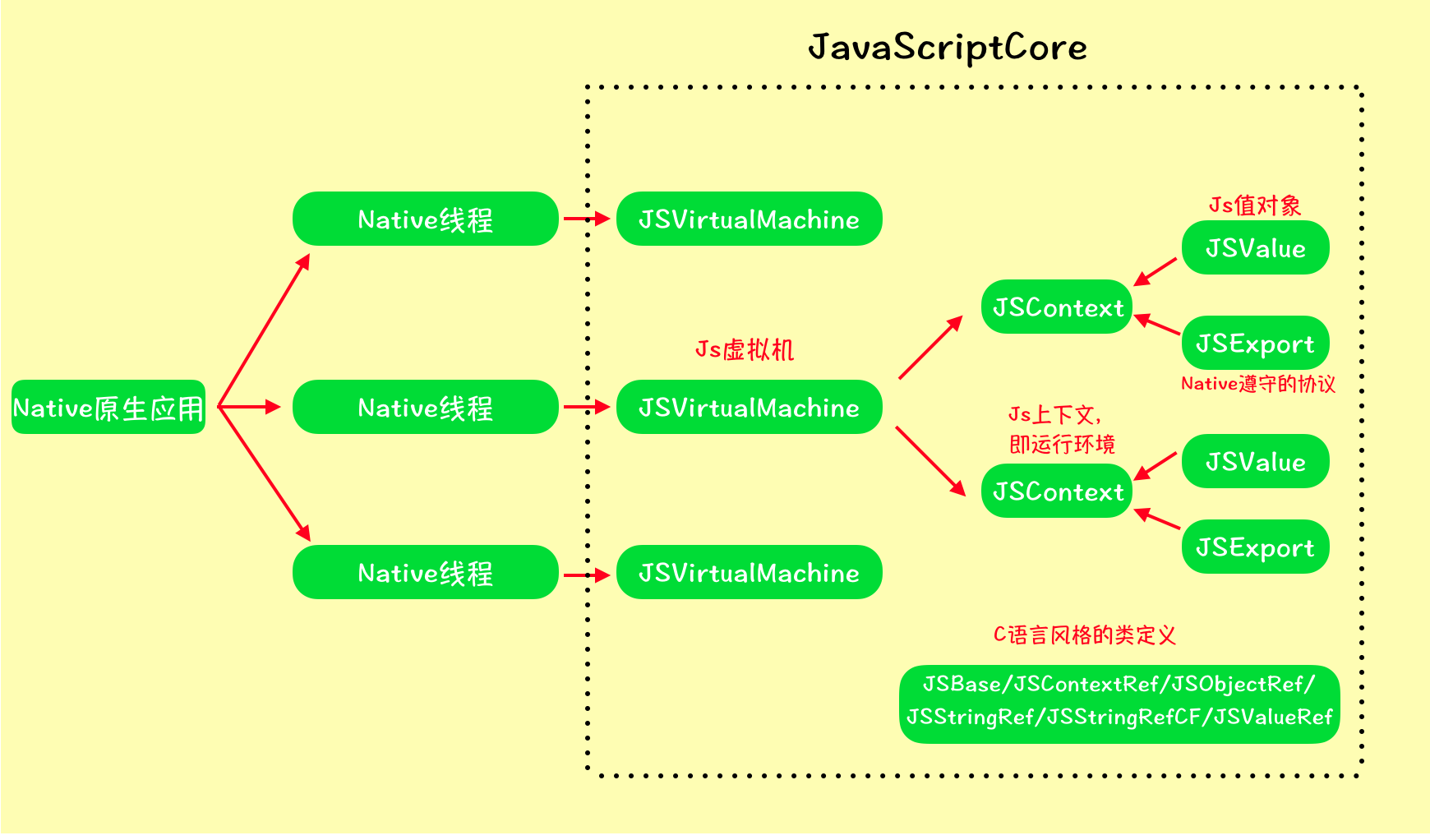
Hybrid Development混合开发是目前移动端开发异常火热的新兴技术,它能够实现跨平台开发,极大地节约了人力和资源成本。跨平台开发催生了很多新的开源框架,就目前而言,在混合开发中比较流行的有FaceBook开源React Native,有Goggle开源的Flutter。React Native实现的是通过下发JS脚本的方式达到JS与Native交互。Flutter实现的则是通过采用现代响应式框架来构建UI,Flutter与ReactiveCocoa框架配合使用最佳。当然开发者也可以在Native中内嵌WebView的方式(WebKit)实现混合开发。虽然方式不同,但目的相同,都是跨平台,殊途同归吧。对跨平台有了粗略的了解后,再来看看iOS系统中对JS与Native是如何交互的,其实,系统是给开发者提供了一个极其强大的框架来实现这个功能的,即JavaScriptCore框架。这个框架通过定义JSValue值对象和声明JSExport协议作为桥梁完成Native与JS的通信。JS虽然是单线程语言,但是iOS是支持多线程执行任务的,开发者可以在异步情况下执行任意一个环境的JavaScript代码。大概结构图如下:
二、分析
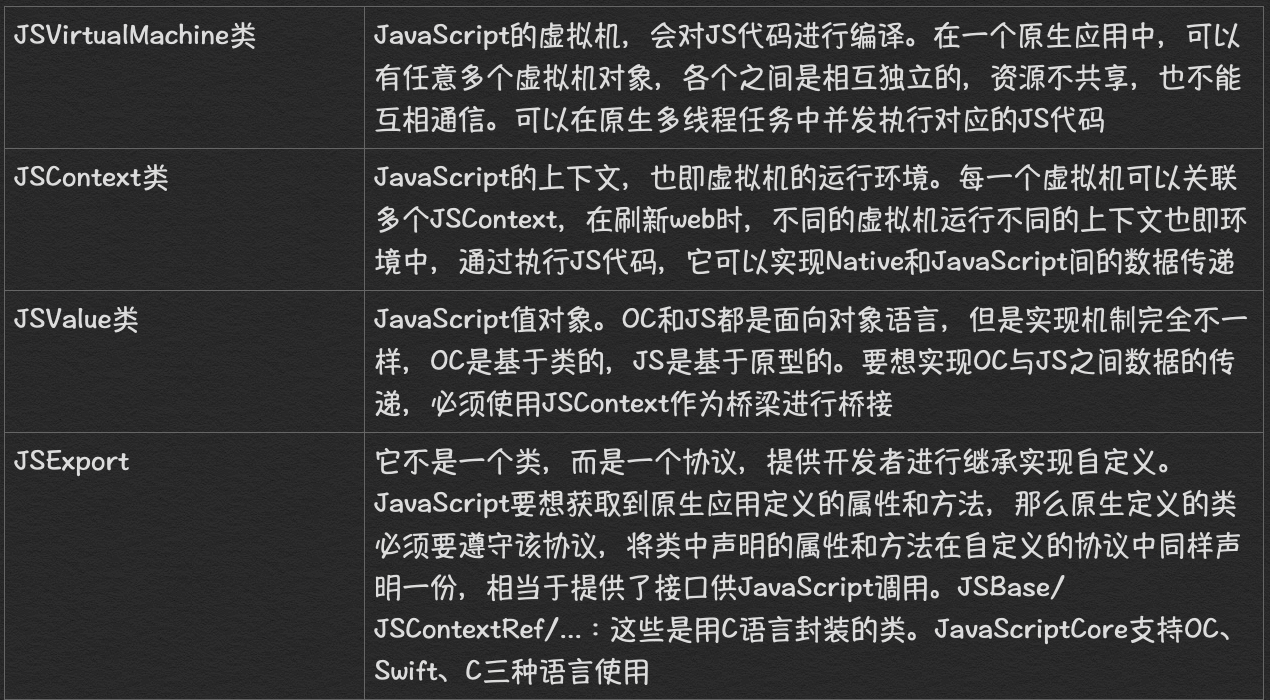
参考这上图,可以看出JavaScriptCore框架结构还是很清晰的,JavaScriptCore中有那么几个核心的类在开发者是很常用的,需要弄懂它们代表的意思。
三、API
知道了这几个核心类的概念已经对这个框架有了个基本的认识,具体的API如何使用,我们可以选择性点击去深入研究一下。只有对它们的属性和方法都了如指掌,开发起来才能得心应手,手到擒来。哎呀妈,不废话了。。。例如JSContext和JSValue开发中必用的类,额外的可能还会用JSManagerValue,如下:
JSContetxt类:
//初始化,可以选择对应的虚拟机

- (instancetype)init;

- (instancetype)initWithVirtualMachine:(JSVirtualMachine *)virtualMachine;

//执行js代码,返回js值对象

- (JSValue *)evaluateScript:(NSString *)script;

- (JSValue *)evaluateScript:(NSString *)script withSourceURL:(NSURL *)sourceURL;

//获取当前的js上下文

+ (JSContext *)currentContext;

//获取当前的js执行函数,返回js值对象

+ (JSValue *)currentCallee;

//获取当前的js函数中this指向的对象,返回js值对象

+ (JSValue *)currentThis;

//获取当前的js函数中的所有参数

+ (NSArray *)currentArguments;

//js的全局对象

@property (readonly, strong) JSValue *globalObject;

//js执行的异常数据

@property (strong) JSValue *exception;

@property (copy) void(^exceptionHandler)(JSContext *context, JSValue *exception);

//js运行的虚拟机

@property (readonly, strong) JSVirtualMachine *virtualMachine;

//js上下文名称

@property (copy) NSString *name;

//分类

@interface JSContext (SubscriptSupport)

//获取和设置属性为js全局对象

- (JSValue *)objectForKeyedSubscript:(id)key;

- (void)setObject:(id)object forKeyedSubscript:(NSObject <NSCopying> *)key;

@end

//分类(C函数风格)

@interface JSContext (JSContextRefSupport)

//获取和设置全局上下文

+ (JSContext *)contextWithJSGlobalContextRef:(JSGlobalContextRef)jsGlobalContextRef;

@property (readonly) JSGlobalContextRef JSGlobalContextRef;

@end
JSValue类:
//js上下文

@property (readonly, strong) JSContext *context;

//使用OC数据初始化js值对象,创建有值的JSValue

+ (JSValue *)valueWithObject:(id)value inContext:(JSContext *)context;

+ (JSValue *)valueWithBool:(BOOL)value inContext:(JSContext *)context;

+ (JSValue *)valueWithDouble:(double)value inContext:(JSContext *)context;

+ (JSValue *)valueWithInt32:(int32_t)value inContext:(JSContext *)context;

+ (JSValue *)valueWithUInt32:(uint32_t)value inContext:(JSContext *)context;

+ (JSValue *)valueWithPoint:(CGPoint)point inContext:(JSContext *)context;

+ (JSValue *)valueWithRange:(NSRange)range inContext:(JSContext *)context;

+ (JSValue *)valueWithRect:(CGRect)rect inContext:(JSContext *)context;

+ (JSValue *)valueWithSize:(CGSize)size inContext:(JSContext *)context;

//使用OC数据初始化js值对象,创建空的JSValue

+ (JSValue *)valueWithNewObjectInContext:(JSContext *)context;

+ (JSValue *)valueWithNewArrayInContext:(JSContext *)context;

+ (JSValue *)valueWithNewRegularExpressionFromPattern:(NSString *)pattern flags:(NSString *)flags inContext:(JSContext *)context;

+ (JSValue *)valueWithNewErrorFromMessage:(NSString *)message inContext:(JSContext *)context;

+ (JSValue *)valueWithNewPromiseInContext:(JSContext *)context fromExecutor:(void (^)(JSValue *resolve, JSValue *reject))callback;

+ (JSValue *)valueWithNewPromiseResolvedWithResult:(id)result inContext:(JSContext *)context;

+ (JSValue *)valueWithNewPromiseRejectedWithReason:(id)reason inContext:(JSContext *)context;

+ (JSValue *)valueWithNewSymbolFromDescription:(NSString *)description inContext:(JSContext *)context;

+ (JSValue *)valueWithNullInContext:(JSContext *)context;

+ (JSValue *)valueWithUndefinedInContext:(JSContext *)context;

//js数据转OC数据

- (id)toObject;

- (id)toObjectOfClass:(Class)expectedClass;

- (BOOL)toBool;

- (double)toDouble;

- (int32_t)toInt32;

- (uint32_t)toUInt32;

- (NSNumber *)toNumber;

- (NSString *)toString;

- (NSDate *)toDate;

- (NSArray *)toArray;

- (NSDictionary *)toDictionary;

- (CGPoint)toPoint;

- (NSRange)toRange;

- (CGRect)toRect;

- (CGSize)toSize;

//js值对象判断

@property (readonly) BOOL isUndefined;

@property (readonly) BOOL isNull;

@property (readonly) BOOL isBoolean;

@property (readonly) BOOL isNumber;

@property (readonly) BOOL isString;

@property (readonly) BOOL isObject;

@property (readonly) BOOL isArray;

@property (readonly) BOOL isDate;

@property (readonly) BOOL isSymbol;

- (BOOL)isEqualToObject:(id)value;

- (BOOL)isEqualWithTypeCoercionToObject:(id)value;

- (BOOL)isInstanceOf:(id)value;

//js调用函数

- (JSValue *)callWithArguments:(NSArray *)arguments;

- (JSValue *)constructWithArguments:(NSArray *)arguments;

- (JSValue *)invokeMethod:(NSString *)method withArguments:(NSArray *)arguments;

//js属性设置

- (JSValue *)valueForProperty:(JSValueProperty)property;

- (void)setValue:(id)value forProperty:(JSValueProperty)property;

- (BOOL)deleteProperty:(JSValueProperty)property;

- (BOOL)hasProperty:(JSValueProperty)property;

- (void)defineProperty:(JSValueProperty)property descriptor:(id)descriptor;

- (JSValue *)valueAtIndex:(NSUInteger)index;

- (void)setValue:(id)value atIndex:(NSUInteger)index;

- (JSValue *)objectForKeyedSubscript:(id)key;

- (JSValue *)objectAtIndexedSubscript:(NSUInteger)index;

- (void)setObject:(id)object forKeyedSubscript:(id)key;

- (void)setObject:(id)object atIndexedSubscript:(NSUInteger)index;

+ (JSValue *)valueWithJSValueRef:(JSValueRef)value inContext:(JSContext *)context;

//OC与JS类型对应关系

  Objective-C type    |   JavaScript type

 ---------------------+---------------------

         nil          |     undefined

        NSNull        |        null

       NSString       |       string

       NSNumber       |   number, boolean

     NSDictionary     |   Object object

       NSArray        |    Array object

        NSDate        |     Date object

       NSBlock (1)    |   Function object (1)

          id (2)      |   Wrapper object (2)

        Class (3)     | Constructor object (3)

 ---------------------+---------------------
JSManagerValue类:
//对JSValue进行一层包装,对内存进行有效的管理,防止提前或者过度释放

+ (JSManagedValue *)managedValueWithValue:(JSValue *)value;

+ (JSManagedValue *)managedValueWithValue:(JSValue *)value andOwner:

- (instancetype)initWithValue:(JSValue *)value;

@property (readonly, strong) JSValue *value;
四、案例
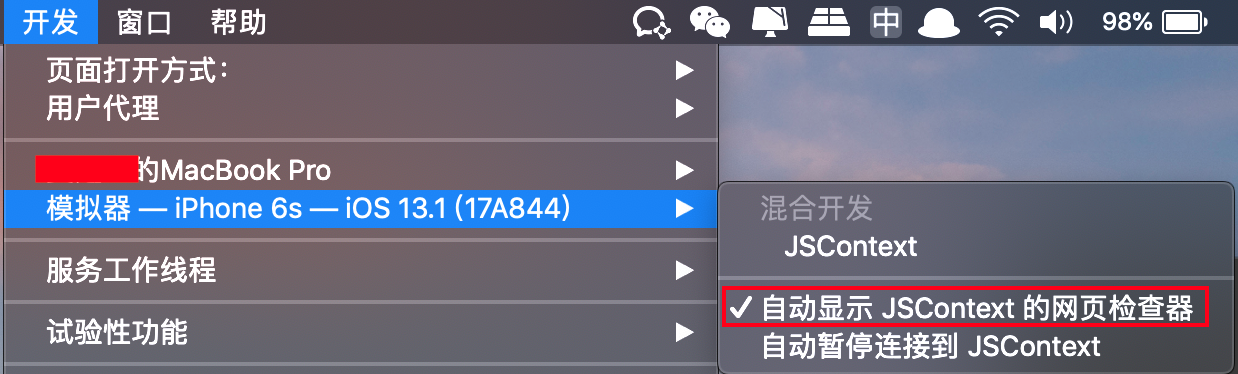
[1] 首先打开Safari浏览器的web检查器,会用来查看js运行的效果 ,控制台打印
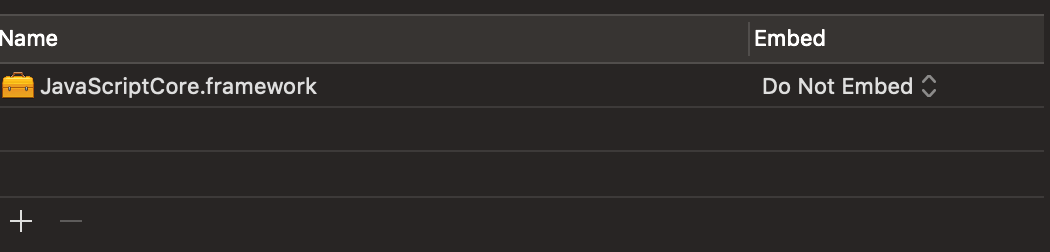
[2] 导入JavaScriptCore框架
[3] 导入头文件开始测试,Native调用JS
[3-1] 调用无参数的JS函数
native.js

-(void)nativeCallJs {

    //方式一

    //从js文件获取js代码

    NSString *path = [[NSBundle mainBundle] pathForResource:@"native" ofType:@"js"];

    NSData *jsData = [NSData dataWithContentsOfFile:path];

    NSString *script = [[NSString alloc] initWithData:jsData encoding:NSUTF8StringEncoding];

    //执行js代码

    [self.jsContext evaluateScript:script];

}
-(void)nativeCallJs {

    //方式二

    //js代码写在端上

    NSString *script = @"\

                    (function(){ \

                        console.log(\"native call js ------- Wellcome Native\");\

                    })();";

    //执行js代码

    [self.jsContext evaluateScript:script];

}
- (void)viewDidLoad {

    [super viewDidLoad];

    //js上下文

    self.jsContext = [[JSContext alloc] init];

    //native调用js

    [self nativeCallJs];

}
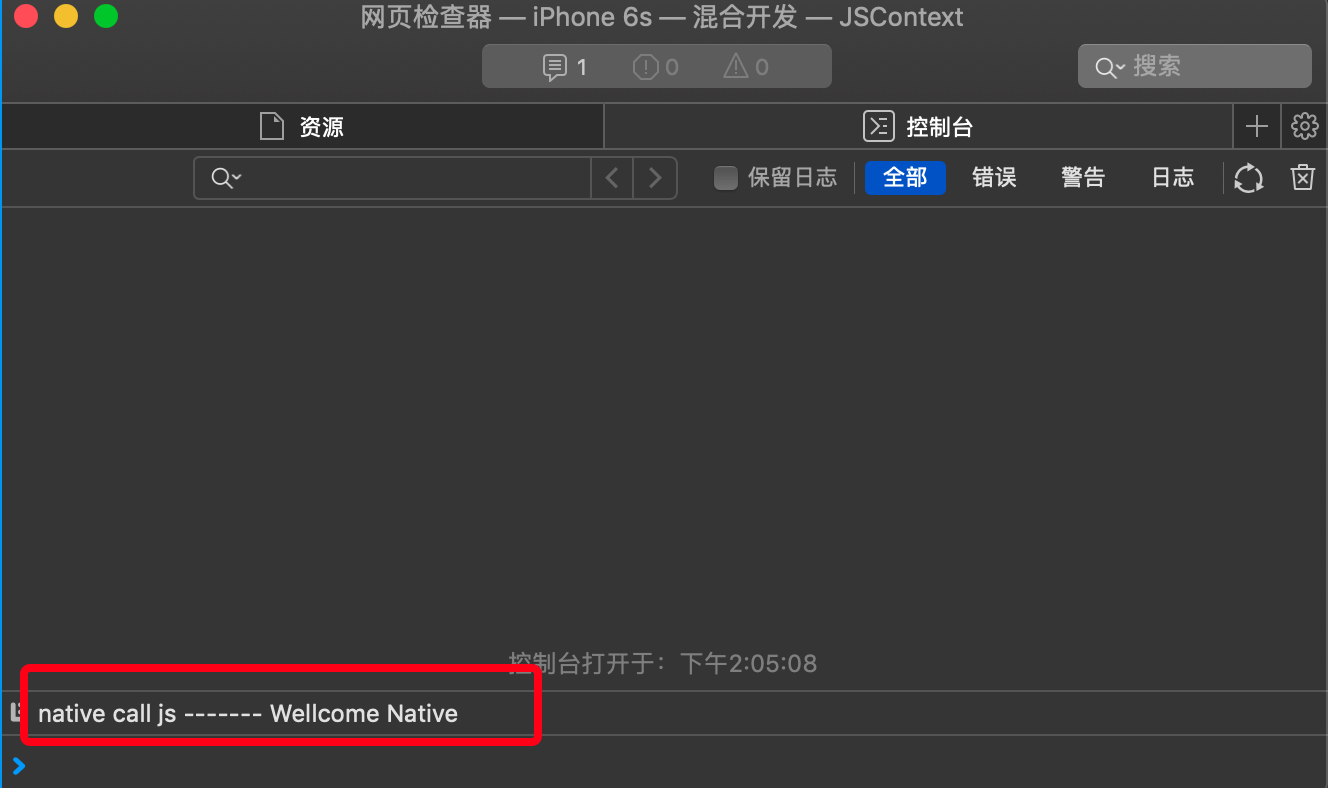
[3-2] 调用有参数的JS函数
native.js
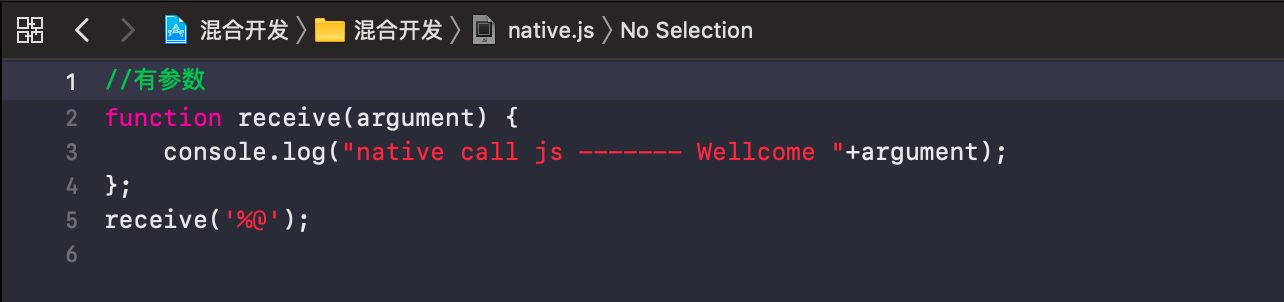
-(void)nativeCallJsWithArguments:(NSString *)argument {

    //方式一

    //从js文件获取js代码

    NSString *path = [[NSBundle mainBundle] pathForResource:@"native" ofType:@"js"];

    NSData *jsData = [NSData dataWithContentsOfFile:path];

    NSString *jsString = [[NSString alloc] initWithData:jsData encoding:NSUTF8StringEncoding];

    //拼接js参数

    NSString *script = [NSString stringWithFormat:jsString,argument];

    //执行js代码

    [self.jsContext evaluateScript:script];

}
-(void)nativeCallJsWithArguments:(NSString *)argument {

    //方式二

    //js代码写在端上

    NSString *jsString = @"\

                    function receive(argument) { \

                        console.log(\"native call js ------- Wellcome \"+argument);\

                    };\

                    receive('%@')";

    //拼接js参数

    NSString *script = [NSString stringWithFormat:jsString,argument];

    //执行js代码

    [self.jsContext evaluateScript:script];

}
- (void)viewDidLoad {

    [super viewDidLoad];

    //js上下文

    self.jsContext = [[JSContext alloc] init];

    //native调用js

    [self nativeCallJsWithArguments:@"我的老哥"];

}
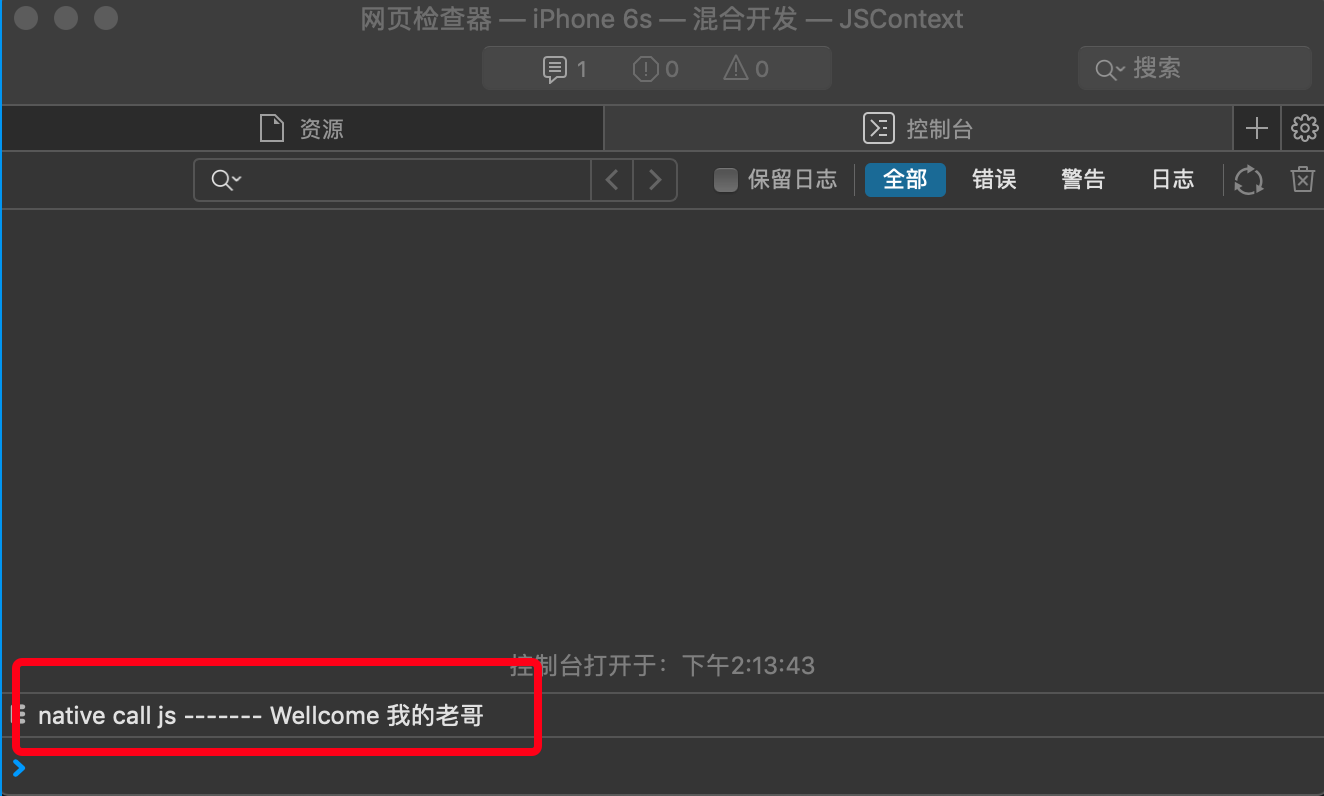
[4] 导入头文件开始测试,JS调用Native
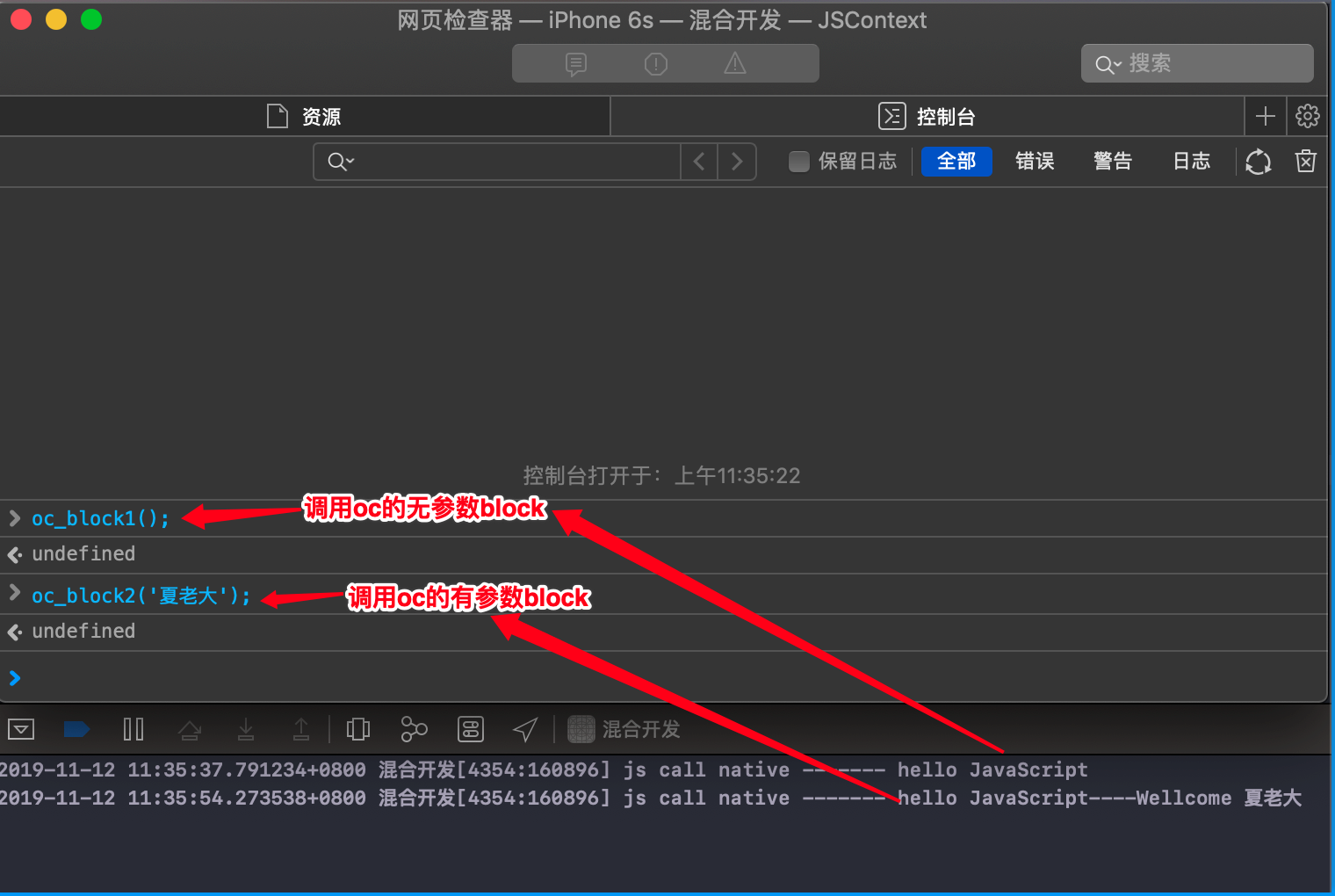
注意:调用包括无参数和有参数的OC方法,这里使用代码块Block为例
-(void)jsCallNative {

    //定义无参数block

    void (^Block1)(void) = ^(){

        NSLog(@"js call native ------- hello JavaScript");

    };

    //定义有参数block

    void (^Block2)(NSString *) = ^(NSString *argument){

        NSLog(@"js call native ------- hello JavaScript----Wellcome %@",argument);

    };

    //设置block为JSContext全局对象的属性,然后可以在safari控制台执行函数oc_block()输出打印;

    [self.jsContext setObject:Block1 forKeyedSubscript:@"oc_block1"];

    [self.jsContext setObject:Block2 forKeyedSubscript:@"oc_block2"];

}
- (void)viewDidLoad {

    [super viewDidLoad];

    //js上下文

    self.jsContext = [[JSContext alloc] init];

    //js调用native

    [self jsCallNative];

}
[5]导入头文件开始测试, OC和JS对象的映射
//OC与JS数据传递的数据就是JSValue值对象,存储在JS的全局对象中

//存和取的过程

[self.jsContext setObject:(id) forKeyedSubscript:(NSObject<NSCopying> *)];

[self.jsContext objectForKeyedSubscript:(id)]
[5-1] 系统提供的OC数据类型,不用特殊存储,可以直接存取
//系统提供的OC数据类型,不用特殊存储,可以直接存取

[self.jsContext setObject:@"mac" forKeyedSubscript:@"os"];

JSValue *osValue = [self.jsContext objectForKeyedSubscript:@"os"];

NSString *osName = [osValue toString];

NSLog(@"-----osName = %@-----",osName);
-- ::17.471840+ 混合开发[:] -----osName = mac-----
[5-2] 特殊的OC类型,如自定义对象,则必须遵守JSExport协议,JS才能拿到自定义对象的所有属性和方法
#import <UIKit/UIKit.h>

#import <JavaScriptCore/JavaScriptCore.h>

//遵守JSExport协议,使得JS在上下文中可以获取到OC中定义的属性和方法

@protocol PersonProtocol <JSExport>

@property (nonatomic,   copy) NSString *name;

@property (nonatomic, assign) int age;

@property (nonatomic, assign) int grade;

@property (nonatomic, assign) float score;

-(void)description;

@end

@interface Person : NSObject<PersonProtocol>

@property (nonatomic,   copy) NSString *name;

@property (nonatomic, assign) int age;

@property (nonatomic, assign) int grade;

@property (nonatomic, assign) float score;

-(void)description;

@end

#import "Person.h"

@implementation Person

-(void)description {

    NSLog(@"姓名:name = %@",self.name);

    NSLog(@"年龄:age = %d",self.age);

    NSLog(@"年级:grade = %d",self.grade);

    NSLog(@"分数:score = %.1f",self.score);

}

@end
//特殊的OC类型,自定义对象,则必须遵守JSExport协议,JS才能拿到自定义对象的所有属性和方法

Person *person = [[Person alloc] init];

person.name = @"张三";

person.age = ;

person.grade = ;

person.score = ;

[self.jsContext setObject:person forKeyedSubscript:@"personEntity"];

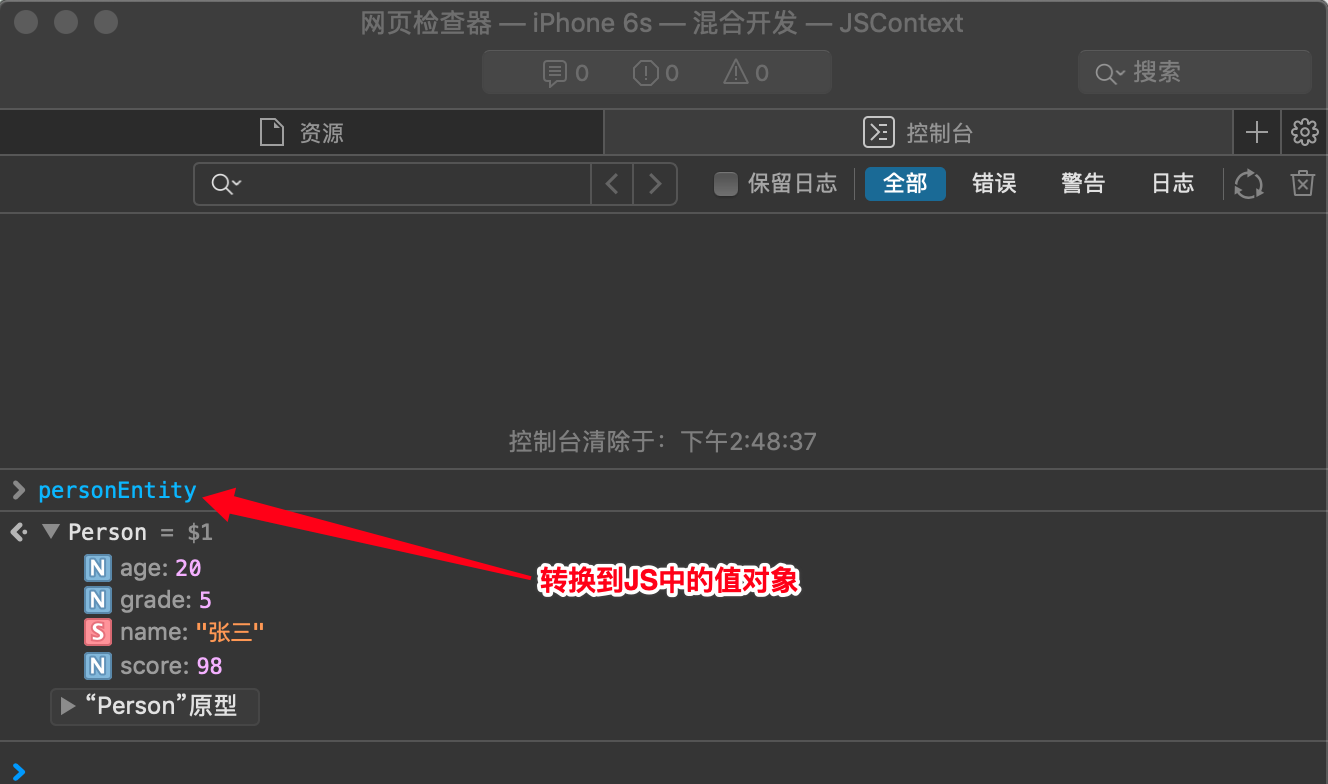
JSValue *personValue = [self.jsContext objectForKeyedSubscript:@"personEntity"]; //personEntity为OC在JS的对象形式

Person *xyq_person = (Person *)[personValue toObject];

[xyq_person description];
-- ::17.472563+ 混合开发[:] 姓名:name = 张三

-- ::17.472709+ 混合开发[:] 年龄:age =

-- ::17.472810+ 混合开发[:] 年级:grade =

-- ::17.472889+ 混合开发[:] 分数:score = 98.0
五、实践
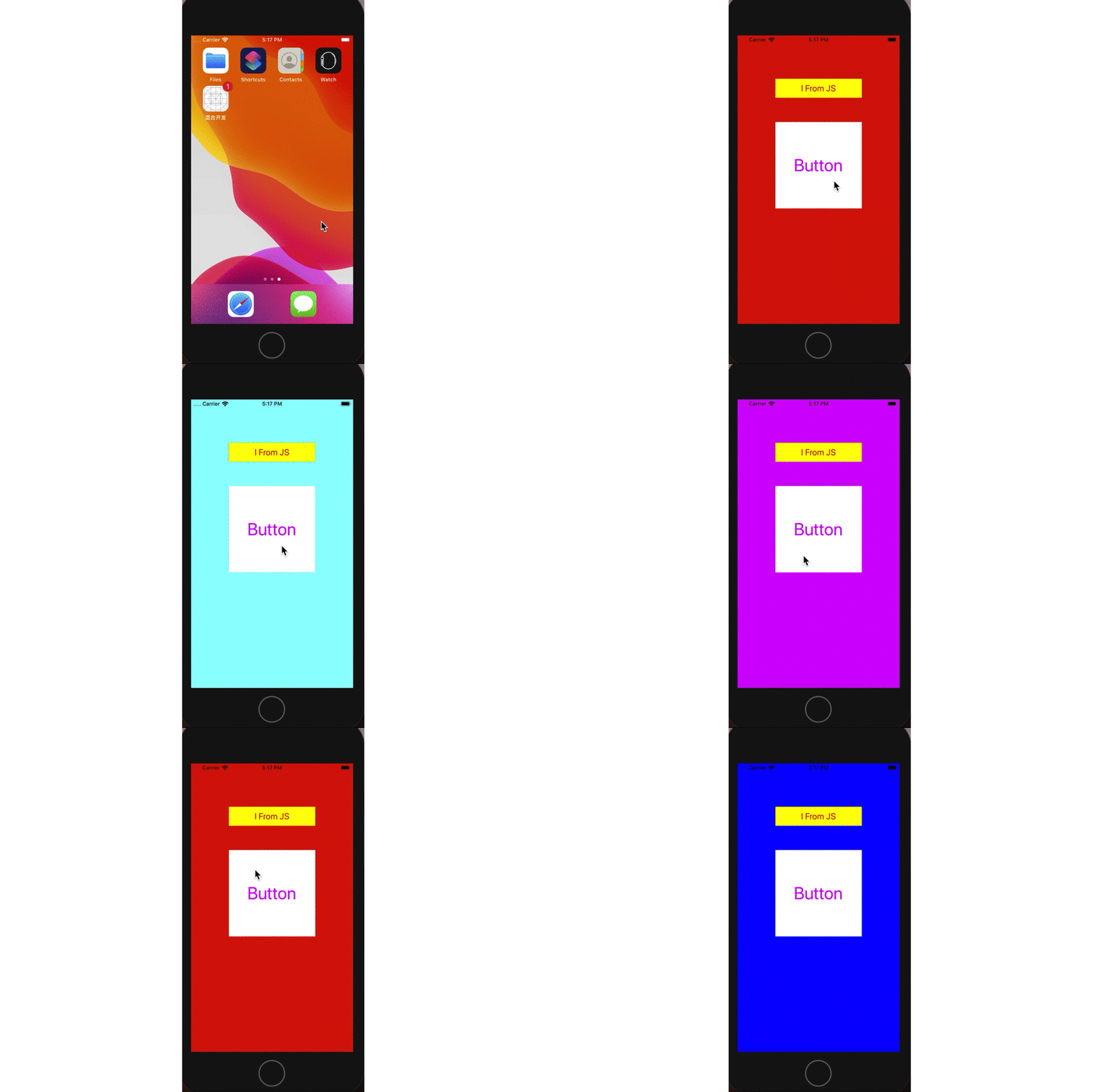
到现在为止,相信我们对JS和Native的交互原理有了自己的理解。在案例中使用了js文件下发和解析的方式实现了Native执行JS代码,这个正是Facebook开源的React Native的设计思路。React Native支持跨平台,通过一套js文件就可以在Andriod和iOS上完成Native的界面渲染。现在我们通过一个小测试来模拟Hybrid App的构建原理,通过按钮点击切换控制器视图的背景色。
(1) 创建JavaScript脚本,在脚本中创建Native需要的任意UI控件存到数组,作为函数的返回值
UIKit.js
//定义一个自调用函数,JavaScript脚本加载完成立即执行

(function(){

    return renderUI();

 })();

/* JavaScript脚本  定义一个Label类

 * rect:尺寸   text:文本  color:颜色

 */

function Label(rect,text,fontSize,textColor,textAlignment,bgColor){

    this.rect = rect;

    this.text = text;

    this.fontSize = fontSize;

    this.textColor = textColor;

    this.textAlignment = textAlignment; //NSTextAlignmentCenter = 1

    this.bgColor = bgColor;

    this.type = "Label";

}

/* JavaScript脚本  定义一个Button类

 * rect:尺寸   text:文本  color:颜色  callFunction:函数

 */

function Button(rect,title,fontSize,titleColor,bgColor,callFunction){

    this.rect = rect;

    this.title = title;

    this.fontSize = fontSize;

    this.titleColor = titleColor;

    this.bgColor = bgColor;

    this.callFunction = callFunction;

    this.type = "Button";

}

/* JavaScript脚本  Rect类

 * x:坐标x   y:坐标y  w:宽度  h:高度

 */

function Rect(x,y,w,h){

    this.x = x;

    this.y = y;

    this.w = w;

    this.h = h;

}

/* JavaScript脚本  Color类

 * r:red  g:green  b:black  a:alpa

 */

function Color(r,g,b,a){

    this.r = r;

    this.g = g;

    this.b = b;

    this.a = a;

}

//渲染方法,实例化上面类的对象

function renderUI() {

    //创建js标签对象

    var screenWidth = 375.0;

    var labeWidth = 200;

    var labelRect = new Rect((screenWidth-labeWidth)*0.5, 100, labeWidth, 44);

    var labeFontSize  = 20;

    var labelTextColor = new Color(1,0,0,1);

    var labelBgColor = new Color(1,1,0,1);

    var label = new Label(labelRect, "I From JS", labeFontSize, labelTextColor, 1, labelBgColor);

    //创建js按钮对象

    var buttonWidth = 200;

    var buttonRect = new Rect((screenWidth-buttonWidth)*0.5, 200, buttonWidth, buttonWidth);

    var buttonFontSize  = 40;

    var buttonTitleColor = new Color(1,0,1,1);

    var buttonbgColor = new Color(1,1,1,1);

    var button = new Button(buttonRect,"Button",buttonFontSize,buttonTitleColor,buttonbgColor,function(r,g,b){

                                var randColor = new Color(r,g,b,1);

                                configEntity.chageViewColor(randColor);

                          });

    //返回js对象

    return [label, button];

}
(2) 创建自定义对象,遵守JSExport协议,添加为JS的全局对象的属性,作为与Native交互的桥接器
//自定义Config类

#import <Foundation/Foundation.h>

#import <UIKit/UIKit.h>

#import <JavaScriptCore/JavaScriptCore.h>

NS_ASSUME_NONNULL_BEGIN

@protocol ConfigProtocol <JSExport>

-(void)chageViewColor:(JSValue *)colorValue;

@end

@interface Config : NSObject<ConfigProtocol>

@property (nonatomic, strong) UIViewController *currentVc;

-(void)chageViewColor:(JSValue *)colorValue; //改变当前控制器视图背景色

@end

NS_ASSUME_NONNULL_END
//Created by 夏远全 on 2019/11/12.

#import "Config.h"

@implementation Config

-(void)chageViewColor:(JSValue *)colorValue {

    CGFloat red = colorValue[@"r"].toDouble;

    CGFloat green = colorValue[@"g"].toDouble;

    CGFloat blue = colorValue[@"b"].toDouble;

    CGFloat alpha = colorValue[@"a"].toDouble;

    self.currentVc.view.backgroundColor = [UIColor colorWithRed:red green:green blue:blue alpha:alpha];

}

@end
(3) 在VC中解析JavaScript脚本,获取UI控件元素,进行界面的渲染
#import "ViewController.h"

#import <JavaScriptCore/JavaScriptCore.h>

#import "Person.h"

#import "Config.h"

@interface ViewController ()

@property (nonatomic, strong) JSContext *jsContext;

@property (nonatomic, strong) NSMutableArray *actions; //所有的回调函数

@end

@implementation ViewController

- (void)viewDidLoad {

    [super viewDidLoad];

    self.view.backgroundColor = [UIColor redColor];

    //js上下文

    self.jsContext = [[JSContext alloc] init];

    //从JS文件获取UI进行渲染

    [self renderUIFromJs];

}

-(void)renderUIFromJs {

    //创建Config对象

    Config *config = [[Config alloc] init];

    config.currentVc = self;

    [self.jsContext setObject:config forKeyedSubscript:@"configEntity"];

    //从js文件获取js代码

    NSString *path = [[NSBundle mainBundle] pathForResource:@"UIKit" ofType:@"js"];

    NSData *jsData = [NSData dataWithContentsOfFile:path];

    NSString *script = [[NSString alloc] initWithData:jsData encoding:NSUTF8StringEncoding];

    //执行js代码

    JSValue *jsValue = [self.jsContext evaluateScript:script];

    for (int i=; i<jsValue.toArray.count; i++) {

        //取出每一个控件对象值

        JSValue *subValue = [jsValue objectAtIndexedSubscript:i];

        //创建控件

        NSString *type = [subValue objectForKeyedSubscript:@"type"].toString;

        if ([type isEqualToString:@"Label"]) {

            //this.rect = rect;

            //this.text = text;

            //this.fontSize = fontSize;

            //this.textColor = textColor;

            //this.textAlignment = textAlignment; //NSTextAlignmentCenter = 1

            //this.bgColor = bgColor;

            //this.type = "Label";

            CGFloat X = subValue[@"rect"][@"x"].toDouble;

            CGFloat Y = subValue[@"rect"][@"y"].toDouble;

            CGFloat W = subValue[@"rect"][@"w"].toDouble;

            CGFloat H = subValue[@"rect"][@"h"].toDouble;

            NSString *text = subValue[@"text"].toString;

            NSInteger fontSize = subValue[@"fontSize"].toInt32;

            UIColor *textColor = [UIColor colorWithRed:subValue[@"textColor"][@"r"].toDouble green:subValue[@"textColor"][@"g"].toDouble blue:subValue[@"textColor"][@"b"].toDouble alpha:subValue[@"textColor"][@"a"].toDouble];

            UIColor *bgColor = [UIColor colorWithRed:subValue[@"bgColor"][@"r"].toDouble green:subValue[@"bgColor"][@"g"].toDouble blue:subValue[@"bgColor"][@"b"].toDouble alpha:subValue[@"bgColor"][@"a"].toDouble];

            NSTextAlignment alignment = subValue[@"textAlignment"].toInt32;

            UILabel *label = [[UILabel alloc] initWithFrame:CGRectMake(X, Y, W, H)];

            label.text = text;

            label.font = [UIFont systemFontOfSize:fontSize];

            label.textColor = textColor;

            label.textAlignment = alignment;

            label.backgroundColor = bgColor;

            [self.view addSubview:label];

        }

        if ([type isEqualToString:@"Button"]) {

            //this.rect = rect;

            //this.title = title;

            //this.fontSize = fontSize;

            //this.titleColor = titleColor;

            //this.bgColor = bgColor;

            //this.type = "Button";

            //this.callFunction = callFunction;

            CGFloat X = subValue[@"rect"][@"x"].toDouble;

            CGFloat Y = subValue[@"rect"][@"y"].toDouble;

            CGFloat W = subValue[@"rect"][@"w"].toDouble;

            CGFloat H = subValue[@"rect"][@"h"].toDouble;

            NSInteger fontSize = subValue[@"fontSize"].toInt32;

            NSString *title = subValue[@"title"].toString;

            UIColor *titleColor = [UIColor colorWithRed:subValue[@"titleColor"][@"r"].toDouble green:subValue[@"titleColor"][@"g"].toDouble blue:subValue[@"titleColor"][@"b"].toDouble alpha:subValue[@"titleColor"][@"a"].toDouble];

            UIColor *bgColor = [UIColor colorWithRed:subValue[@"bgColor"][@"r"].toDouble green:subValue[@"bgColor"][@"g"].toDouble blue:subValue[@"bgColor"][@"b"].toDouble alpha:subValue[@"bgColor"][@"a"].toDouble];

            JSValue *actionValue = subValue[@"callFunction"];

            [self.actions addObject:actionValue];

            UIButton *button = [[UIButton alloc] initWithFrame:CGRectMake(X, Y, W, H)];

            [button setTitleColor:titleColor forState:UIControlStateNormal];

            [button addTarget:self action:@selector(buttonClick:) forControlEvents:UIControlEventTouchUpInside];

            [button setTitle:title forState:UIControlStateNormal];

            button.titleLabel.font = [UIFont systemFontOfSize:fontSize];

            button.backgroundColor = bgColor;

            button.tag = self.actions.count-;

            [self.view addSubview:button];

        }

    }

}

-(void)buttonClick:(UIButton *)button {

    JSValue *actionValue = [self.actions objectAtIndex:button.tag];

    [actionValue callWithArguments:@[@(arc4random_uniform()),@(arc4random_uniform()),@(arc4random_uniform())]];

}

- (NSMutableArray *)actions {

    if (!_actions) {

        _actions = [NSMutableArray array];

    }

    return _actions;

}
(4) 演示gif
六、思考
这个js文件目前是写死的放在了Bundle目录下,试想一下,如果在本地每次更改js文件后再重新渲染界面,是不是都得端上重新发版,例如样式相同改一个颜色啥的,发个版就太繁琐了。最好的做法是将js文件部署到服务器上,每次只需要更新js内容后提交到服务器,端上进入当前页面时,从服务器拉取新的js文件渲染界面即可,效率高,成本低,可以实现快速更新迭代。好开心,吃个竹子吧,
Hybrid App: 了解JavaScript如何与Native实现混合开发的更多相关文章
- Hybrid小程序混合开发之路 - 数据交互
HTML+CSS是历史悠久.超高自由度.控制精准.表现能力极强.编码简单.学习门槛超低.真跨平台的一种UI界面开发方式. 本文介绍的是微信小程序和H5混合开发的一种数据交互方式. 很多应用在原生界面中 ...
- 利用C#开发移动跨平台Hybrid App(一):从Native端聊Hybrid的实现
0x00 前言 前一段时间分别读了两篇博客,分别是叶小钗兄的<浅谈Hybrid技术的设计与实现>以及徐磊哥的<从技术经理的角度算一算,如何可以多快好省的做个app>.受到了很多 ...
- Native App vs Web App 以及 Hybrid App的实现原理
移动应用基本的三种类型 1) Native 应用程序 2) Web 应用程序 3) 混合应用程序(Hybrid: Native应用和web应用结合) Native 应用 直接运行在电脑上或者智能 ...
- 聊聊Web App、Hybrid App与Native App的设计差异
目前主流应用程序大体分为三类:Web App.Hybrid App. Native App. 一.Web App.Hybrid App.Native App 纵向对比 首先,我们来看看什么是 Web ...
- 超赞!聊聊WEB APP、HYBRID APP与NATIVE APP的设计差异
编者按:这3类主流应用你都了解吗?设计师除了要有视觉功夫,对不同形式的APP也应当了然于胸,今天百度的同学写了一篇非常全面的总结,帮你迅速搞定3类主流APP的设计方法,附带一大波避雷针,带你巧妙跳过A ...
- Web App、Hybrid App与Native App的设计差异
目前主流应用程序大体分为三类:Web App.Hybrid App. Native App. 一.Web App.Hybrid App.Native App 纵向对比 首先,我们来看看什么是 Web ...
- 聊聊Web App、Hybrid App与Native App的设计差异(转)
目前主流应用程序大体分为三类:Web App.Hybrid App. Native App. 一.Web App.Hybrid App.Native App 纵向对比 首先,我们来看看什么是 Web ...
- [转帖]聊聊Web App、Hybrid App与Native App的设计差异
聊聊Web App.Hybrid App与Native App的设计差异 https://www.cnblogs.com/zhuiluoyu/p/6056672.html 编者按:这3类主流应用你都了 ...
- Hybrid App移动应用开发初探
一.移动App类型及其优缺点 1.1 Native App Native App(原生App)是用原生语言(Object-C/Java/C#/....)开发,用户需要下载安装的手机应用. 优点是 可以 ...
随机推荐
- Mysql高手系列 - 第24篇:如何正确的使用索引?【高手进阶】
Mysql系列的目标是:通过这个系列从入门到全面掌握一个高级开发所需要的全部技能. 欢迎大家加我微信itsoku一起交流java.算法.数据库相关技术. 这是Mysql系列第24篇. 学习索引,主要是 ...
- .NET Core 读取配置文件方式总结
基于.NET Core的跨平台开发,配置文件与之前.NET Framework采用xml的config文件不同,目前主要是采用json文件键值对配置方式读取. 参考网上相关资料总结如下: 一.引入扩展 ...
- 【NOIP2016】蚯蚓
Description 本题中,我们将用符号 ⌊c⌋表示对 cc 向下取整,例如:⌊3.0⌋=⌊3.1⌋=⌊3.9⌋=3. 蛐蛐国最近蚯蚓成灾了!隔壁跳蚤国的跳蚤也拿蚯蚓们没办法,蛐蛐国王只好去请神刀 ...
- Spring源码分析之IOC的三种常见用法及源码实现(二)
Spring源码分析之IOC的三种常见用法及源码实现(二) 回顾上文 我们研究的是 AnnotationConfigApplicationContext annotationConfigApplica ...
- Vue部分编译不生效,解决Vue渲染时候会闪一下
0828自我总结 Vue部分编译不生效,解决Vue渲染时候会闪一下 一.Vue编译不生效 在标签里添加v-pre <script src="vue.js"></s ...
- 基于常规DNS隧道进行的tcp端口转发dns2tcp的使用
0x01 安装Dns2TCP dns2tcp 是一个利用DNS隧道转发TCP连接的工具,使用C语言开发. sudo apt-get install dns2tcp 0x02配置dns2tcp 配置DN ...
- [BZOJ3813] 奇数国 - 线段树
3813: 奇数国 Time Limit: 10 Sec Memory Limit: 256 MBSubmit: 912 Solved: 508[Submit][Status][Discuss] ...
- java架构之路-(Redis专题)SpringBoot连接Redis超简单
上次我们搭建了Redis的主从架构,哨兵架构以及我们的集群架构,但是我们一直还未投入到实战中去,这次我们用jedis和springboot两种方式来操作一下我们的redis 主从架构 如何配置我上次已 ...
- SSH通道来访问MySQL
许多时候当要使用Mysql时,会遇到如下情况: 1. 信息比较重要,希望通信被加密.2. 一些端口,比如3306端口,被路由器禁用. 对第一个问题的一个比较直接的解决办法就是更改mysql的代码,或 ...
- ESP8266开发之旅 网络篇⑮ DNSServer——真正的域名服务
1. 前言 Arduino for esp8266中有两个DNS服务相关的库: ESP8266mDNS库 这个库是mDNS库,使用这个库的时候ESP8266可以在AP模式或是以STA模式接入局 ...