
SpringCloud之Eureka服务注册与发现(一)
一 Eureka的基本架构
Spring Cloud 封装了 Netflix 公司开发的 Eureka 模块来实现服务注册和发现(请对比Zookeeper)。
Eureka 采用了 C-S 的设计架构。Eureka Server 作为服务注册功能的服务器,它是服务注册中心。
而系统中的其他微服务,使用 Eureka 的客户端连接到 Eureka Server并维持心跳连接。这样系统的维护人员就可以通过 Eureka Server 来监控系统中各个微服务是否正常运行。SpringCloud 的一些其他模块(比如Zuul)就可以通过 Eureka Server 来发现系统中的其他微服务,并执行相关的逻辑。

二 Eureka的三大角色
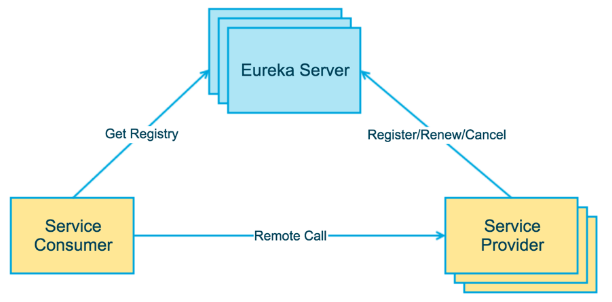
Eureka Server 提供服务注册和发现
Service Provider服务提供方将自身服务注册到Eureka,从而使服务消费方能够找到
Service Consumer服务消费方从Eureka获取注册服务列表,从而能够消费服务
三 构建步骤
创建eureka-server项目
pom.xml
<dependencies>
<dependency>
<groupId>org.springframework.boot</groupId>
<artifactId>spring-boot-starter-web</artifactId>
</dependency>
<dependency>
<groupId>org.springframework.cloud</groupId>
<artifactId>spring-cloud-starter-netflix-eureka-server</artifactId>
</dependency>
<dependency>
<groupId>org.springframework.boot</groupId>
<artifactId>spring-boot-starter-test</artifactId>
<scope>test</scope>
</dependency>
</dependencies>
<dependencyManagement>
<dependencies>
<dependency>
<groupId>org.springframework.cloud</groupId>
<artifactId>spring-cloud-dependencies</artifactId>
<version>${spring-cloud.version}</version>
<type>pom</type>
<scope>import</scope>
</dependency>
</dependencies>
</dependencyManagement>
<build>
<plugins>
<plugin>
<groupId>org.springframework.boot</groupId>
<artifactId>spring-boot-maven-plugin</artifactId>
</plugin>
</plugins>
</build>registerWithEureka: 是否将自己注册到Eureka服务中,本身就是所有无需注册
fetchRegistry : 是否从Eureka中获取注册信息
serviceUrlEureka: 客户端与Eureka服务端进行交互的地址yml
server:
port: 8761
eureka:
instance:
hostname: localhost
client:
registerWithEureka: false
fetchRegistry: false
serviceUrl:
defaultZone: http://${eureka.instance.hostname}:${server.port}/eureka/启动类
@SpringBootApplication
@EnableEurekaServer
public class EurekaServerApplication {
public static void main(String[] args) {
SpringApplication.run(EurekaServerApplication.class, args);
}
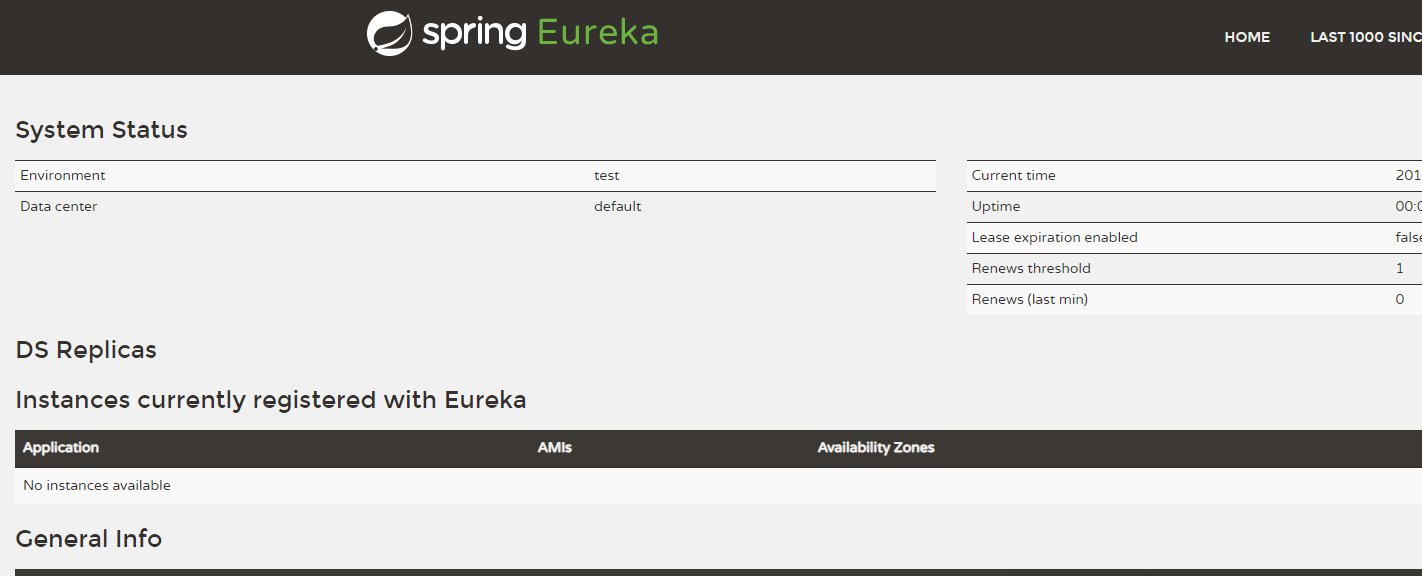
}启动结果
创建producer-service
pom.xml
<dependencies>
<dependency>
3 <groupId>org.springframework.boot</groupId>
4 <artifactId>spring-boot-starter-actuator</artifactId>
5 </dependency>
<dependency>
<groupId>org.springframework.boot</groupId>
<artifactId>spring-boot-starter-web</artifactId>
</dependency>
<dependency>
<groupId>org.springframework.cloud</groupId>
<artifactId>spring-cloud-starter-netflix-eureka-client</artifactId>
</dependency>
<dependency>
<groupId>org.springframework.boot</groupId>
<artifactId>spring-boot-starter-test</artifactId>
<scope>test</scope>
</dependency>
</dependencies>
<dependencyManagement>
<dependencies>
<dependency>
<groupId>org.springframework.cloud</groupId>
<artifactId>spring-cloud-dependencies</artifactId>
<version>${spring-cloud.version}</version>
<type>pom</type>
<scope>import</scope>
</dependency>
</dependencies>
</dependencyManagement>
<!-- 微服务info内容详细信息 -->
<build>
<finalName>microservicecloud</finalName>
<resources>
<resource>
<directory>src/main/resources</directory>
<filtering>true</filtering>
</resource>
</resources>
<plugins>
<plugin>
<groupId>org.apache.maven.plugins</groupId>
<artifactId>maven-resources-plugin</artifactId>
<configuration>
<delimiters>
<delimit>$</delimit>
</delimiters>
</configuration>
</plugin>
</plugins>
</build>yml
eureka:
client:
serviceUrl:
defaultZone: http://localhost:8761/eureka/
instance:
instance-id: product-service8080 #主机名称:服务名称修改
prefer-ip-address: true #访问路径可以显示IP地址
server:
port: 8080
spring:
application:
name: product-service
#微服务info内容详细信息
info:
app.name: product-service
company.name: www.topcheer.com注info信息到最好还是访问的/actuator/info接口
启动类
@SpringBootApplication
#从Spring Cloud Edgware版本开始, @EnableDiscoveryClient 或 @EnableEurekaClient 可
- #省略。只需加上相关依赖,并进行相应配置,即可将微服务注册到服务发现组件上 public class ProducerServiceApplication { public static void main(String[] args) { SpringApplication.run(ProducerServiceApplication.class, args); } }
结果:

Eureka中的元数据获取
/**

     * 参数:商品id

     *  通过订单系统,调用商品服务根据id查询商品信息

     *      1.需要配置商品对象

     *      2.需要调用商品服务

     *  使用java中的urlconnection,httpclient,okhttp

     */

    @RequestMapping(value = "/buy1/{id}",method = RequestMethod.GET)

    public Product findById1(@PathVariable Long id) {

        //调用discoveryClient方法

        //已调用服务名称获取所有的元数据

        List<ServiceInstance> instances = discoveryClient.getInstances("service-product");

        //获取唯一的一个元数据

        ServiceInstance instance = instances.get(0);

        //根据元数据中的主机地址和端口号拼接请求微服务的URL

        Product product = null;

        //如何调用商品服务?

        product = restTemplate.getForObject("http://service-product/product/1",Product.class);

        return product;

    }

SpringCloud之Eureka服务注册与发现(一)的更多相关文章
- SpringCloud(3)---Eureka服务注册与发现
Eureka服务注册与发现 一.Eureka概述 1.Eureka特点 (1) Eureka是一个基于REST的服务,用于定位服务,以实现云端中间层服务发现和故障转移. (2) Eureka 主管服务 ...
- SpringCloud系列——Eureka 服务注册与发现
前言 Eureka是一种基于REST(具像状态传输)的服务,主要用于AWS云中定位服务,以实现中间层服务器的负载平衡和故障转移.本文记录一个简单的服务注册与发现实例. GitHub地址:https:/ ...
- java框架之SpringCloud(3)-Eureka服务注册与发现
在上一章节完成了一个简单的微服务案例,下面就通过在这个案例的基础上集成 Eureka 来学习 Eureka. 介绍 概述 Eureka 是 Netflix 的一个子模块,也是核心模块之一.Eureka ...
- SpringCloud:Eureka服务注册与发现
1.Eureka简介 Spring Cloud 封装了 Netflix 公司开发的 Eureka 模块来实现服务注册和发现(请对比Zookeeper). Eureka 采用了 C-S 的设计架构.Eu ...
- 三(1)、springcloud之Eureka服务注册与发现
1.认识Eureka Eureka是Netflix的一个子模块,也是核心模块之一.Eureka是一个基于REST的服务,用于定位服务,以实现云端中间层服务发现和故障转移.服务注册与发现对于微服务架 ...
- SpringCloud学习--Eureka 服务注册与发现
目录 一:构建项目 二:服务注册与发现 为什么选择Eureka,请看上一篇博客 Eureka -- 浅谈Eureka 项目构建 IDEA 选择 New Project 选择 Spring Initia ...
- 【分布式】SpringCloud(3)--Eureka服务注册与发现
1.Eureka概述 1.1.什么是Eureka Eureka是Netflix的一个子模块.基于REST的服务,用于定位服务,以实现云端中间层服务发现和故障转移. 只需要使用服务的标识符,就可以访问到 ...
- SpringCloud 进阶之Eureka(服务注册和发现)
1. Eureka 服务注册与发现 Eureka 是一个基于REST的服务,用于服务的的注册与发现; Eureka采用C-S的设计架构,Eureka Server作为服务注册功能的服务器,它是服务注册 ...
- SpringCloud的入门学习之概念理解、Eureka服务注册与发现入门
1.微服务与微服务架构.微服务概念如下所示: 答:微服务强调的是服务的大小,它关注的是某一个点,是具体解决某一个问题.提供落地对应服务的一个服务应用,狭意的看,可以看作Eclipse里面的一个个微服务 ...
随机推荐
- 难题解决:Mycat数据库中间件+Mybatis批量插入数据并返回行记录的所有主键ID
一.mybatis的版本必须为3.3.1及其以上 项目所依赖的mybatis的版本必须为3.3.1及其以上,低版本的不行,保证hap项目的依赖的mybatis的jar的版本必需为需要的版本: 二.在 ...
- 12-z-index
z-index 这个东西非常简单,它有四大特性,每个特性你记住了,页面布局就不会出现找不到盒子的情况. z-index 值表示谁压着谁,数值大的压盖住数值小的, 只有定位了的元素,才能有z-index ...
- 分库分表(2) --- ShardingSphere(理论)
ShardingSphere---理论 ShardingSphere在中小企业需要分库分表的时候用的会比较多,因为它维护成本低,不需要额外增派人手;而且目前社区也还一直在开发和维护,还算是比较活跃. ...
- yum install php-gd 安装php gd库报错Error: php56w-common conflicts with php-common-5.3.3-48.el6_8.x86_64 大
yum install php-gd安装php gd库报错Error: php56w-common conflicts with php-common-5.3.3-48.el6_8.x86_64大概的 ...
- 【IE低配杀手】html5shiv.js和respond.min.js
HTML5现在越来越流行了,但是一遇到IE低版本浏览器就傻眼了,今天整理了一下一些解决办法. html5shiv:解决ie9以下浏览器对html5新增标签的不识别,并导致CSS不起作用的问题. res ...
- Mysql高手系列 - 第18篇:mysql流程控制语句详解(高手进阶)
Mysql系列的目标是:通过这个系列从入门到全面掌握一个高级开发所需要的全部技能. 这是Mysql系列第18篇. 环境:mysql5.7.25,cmd命令中进行演示. 代码中被[]包含的表示可选,|符 ...
- JAVA之类的动手动脑
1.默认构造方法与自定义的构造方法的冲突 package com.xu; class fool { int value; fool(int nowvalue) { value=nowvalue; } ...
- PCA 算法核心:高维度向量向低维度投影
Principal Component Analysis:主成分分析 步骤 5 步: 1.去平均值,也就是将向量中每一项都减去各自向量的平均值 2.计算矩阵的方差,协方差,特征值, 3,.把特征值从大 ...
- 【DP合集】棋盘 chess
给出一张 n × n 的棋盘,格子有黑有白.现在要在棋盘上放棋子,要求: • 黑格子上不能有棋子 • 每行每列至多只有一枚棋子 你的任务是求出有多少种合法的摆放方案.答案模 109+7109+7 . ...
- SQL SERVER数据库三种数据插入方式
数据插入:INSERT INTO A(CBM,CMC) VALUES('1','测试')--单条数据插入INSERT INTO A(CBM,CMC)SELECT '1','测试'--单条数据插入INS ...