
SpringCloud之Eureka服务注册与发现(一)
一 Eureka的基本架构
Spring Cloud 封装了 Netflix 公司开发的 Eureka 模块来实现服务注册和发现(请对比Zookeeper)。
Eureka 采用了 C-S 的设计架构。Eureka Server 作为服务注册功能的服务器,它是服务注册中心。
而系统中的其他微服务,使用 Eureka 的客户端连接到 Eureka Server并维持心跳连接。这样系统的维护人员就可以通过 Eureka Server 来监控系统中各个微服务是否正常运行。SpringCloud 的一些其他模块(比如Zuul)就可以通过 Eureka Server 来发现系统中的其他微服务,并执行相关的逻辑。

二 Eureka的三大角色
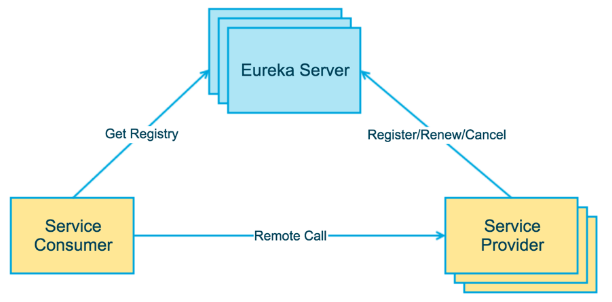
Eureka Server 提供服务注册和发现
Service Provider服务提供方将自身服务注册到Eureka,从而使服务消费方能够找到
Service Consumer服务消费方从Eureka获取注册服务列表,从而能够消费服务
三 构建步骤
创建eureka-server项目
pom.xml
<dependencies>
<dependency>
<groupId>org.springframework.boot</groupId>
<artifactId>spring-boot-starter-web</artifactId>
</dependency>
<dependency>
<groupId>org.springframework.cloud</groupId>
<artifactId>spring-cloud-starter-netflix-eureka-server</artifactId>
</dependency>
<dependency>
<groupId>org.springframework.boot</groupId>
<artifactId>spring-boot-starter-test</artifactId>
<scope>test</scope>
</dependency>
</dependencies>
<dependencyManagement>
<dependencies>
<dependency>
<groupId>org.springframework.cloud</groupId>
<artifactId>spring-cloud-dependencies</artifactId>
<version>${spring-cloud.version}</version>
<type>pom</type>
<scope>import</scope>
</dependency>
</dependencies>
</dependencyManagement>
<build>
<plugins>
<plugin>
<groupId>org.springframework.boot</groupId>
<artifactId>spring-boot-maven-plugin</artifactId>
</plugin>
</plugins>
</build>registerWithEureka: 是否将自己注册到Eureka服务中,本身就是所有无需注册
fetchRegistry : 是否从Eureka中获取注册信息
serviceUrlEureka: 客户端与Eureka服务端进行交互的地址yml
server:
port: 8761
eureka:
instance:
hostname: localhost
client:
registerWithEureka: false
fetchRegistry: false
serviceUrl:
defaultZone: http://${eureka.instance.hostname}:${server.port}/eureka/启动类
@SpringBootApplication
@EnableEurekaServer
public class EurekaServerApplication {
public static void main(String[] args) {
SpringApplication.run(EurekaServerApplication.class, args);
}
}启动结果
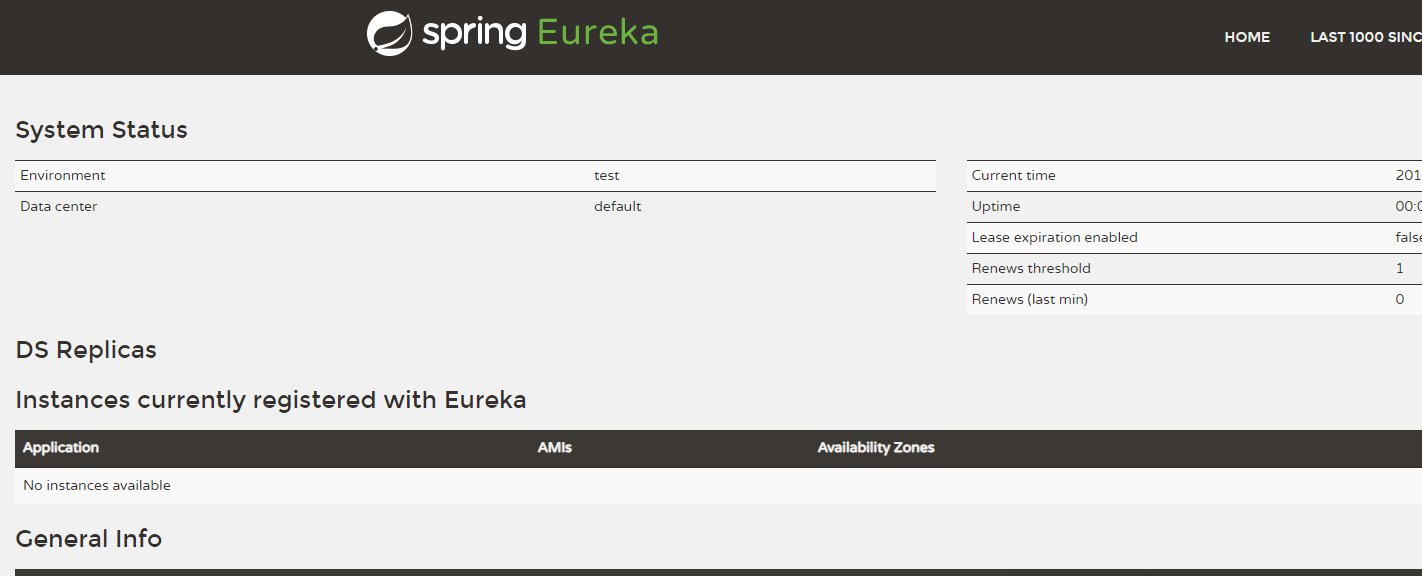
创建producer-service
pom.xml
<dependencies>
<dependency>
3 <groupId>org.springframework.boot</groupId>
4 <artifactId>spring-boot-starter-actuator</artifactId>
5 </dependency>
<dependency>
<groupId>org.springframework.boot</groupId>
<artifactId>spring-boot-starter-web</artifactId>
</dependency>
<dependency>
<groupId>org.springframework.cloud</groupId>
<artifactId>spring-cloud-starter-netflix-eureka-client</artifactId>
</dependency>
<dependency>
<groupId>org.springframework.boot</groupId>
<artifactId>spring-boot-starter-test</artifactId>
<scope>test</scope>
</dependency>
</dependencies>
<dependencyManagement>
<dependencies>
<dependency>
<groupId>org.springframework.cloud</groupId>
<artifactId>spring-cloud-dependencies</artifactId>
<version>${spring-cloud.version}</version>
<type>pom</type>
<scope>import</scope>
</dependency>
</dependencies>
</dependencyManagement>
<!-- 微服务info内容详细信息 -->
<build>
<finalName>microservicecloud</finalName>
<resources>
<resource>
<directory>src/main/resources</directory>
<filtering>true</filtering>
</resource>
</resources>
<plugins>
<plugin>
<groupId>org.apache.maven.plugins</groupId>
<artifactId>maven-resources-plugin</artifactId>
<configuration>
<delimiters>
<delimit>$</delimit>
</delimiters>
</configuration>
</plugin>
</plugins>
</build>yml
eureka:
client:
serviceUrl:
defaultZone: http://localhost:8761/eureka/
instance:
instance-id: product-service8080 #主机名称:服务名称修改
prefer-ip-address: true #访问路径可以显示IP地址
server:
port: 8080
spring:
application:
name: product-service
#微服务info内容详细信息
info:
app.name: product-service
company.name: www.topcheer.com注info信息到最好还是访问的/actuator/info接口
启动类
@SpringBootApplication
#从Spring Cloud Edgware版本开始, @EnableDiscoveryClient 或 @EnableEurekaClient 可
- #省略。只需加上相关依赖,并进行相应配置,即可将微服务注册到服务发现组件上 public class ProducerServiceApplication { public static void main(String[] args) { SpringApplication.run(ProducerServiceApplication.class, args); } }
结果:

Eureka中的元数据获取
/**

     * 参数:商品id

     *  通过订单系统,调用商品服务根据id查询商品信息

     *      1.需要配置商品对象

     *      2.需要调用商品服务

     *  使用java中的urlconnection,httpclient,okhttp

     */

    @RequestMapping(value = "/buy1/{id}",method = RequestMethod.GET)

    public Product findById1(@PathVariable Long id) {

        //调用discoveryClient方法

        //已调用服务名称获取所有的元数据

        List<ServiceInstance> instances = discoveryClient.getInstances("service-product");

        //获取唯一的一个元数据

        ServiceInstance instance = instances.get(0);

        //根据元数据中的主机地址和端口号拼接请求微服务的URL

        Product product = null;

        //如何调用商品服务?

        product = restTemplate.getForObject("http://service-product/product/1",Product.class);

        return product;

    }

SpringCloud之Eureka服务注册与发现(一)的更多相关文章
- SpringCloud(3)---Eureka服务注册与发现
Eureka服务注册与发现 一.Eureka概述 1.Eureka特点 (1) Eureka是一个基于REST的服务,用于定位服务,以实现云端中间层服务发现和故障转移. (2) Eureka 主管服务 ...
- SpringCloud系列——Eureka 服务注册与发现
前言 Eureka是一种基于REST(具像状态传输)的服务,主要用于AWS云中定位服务,以实现中间层服务器的负载平衡和故障转移.本文记录一个简单的服务注册与发现实例. GitHub地址:https:/ ...
- java框架之SpringCloud(3)-Eureka服务注册与发现
在上一章节完成了一个简单的微服务案例,下面就通过在这个案例的基础上集成 Eureka 来学习 Eureka. 介绍 概述 Eureka 是 Netflix 的一个子模块,也是核心模块之一.Eureka ...
- SpringCloud:Eureka服务注册与发现
1.Eureka简介 Spring Cloud 封装了 Netflix 公司开发的 Eureka 模块来实现服务注册和发现(请对比Zookeeper). Eureka 采用了 C-S 的设计架构.Eu ...
- 三(1)、springcloud之Eureka服务注册与发现
1.认识Eureka Eureka是Netflix的一个子模块,也是核心模块之一.Eureka是一个基于REST的服务,用于定位服务,以实现云端中间层服务发现和故障转移.服务注册与发现对于微服务架 ...
- SpringCloud学习--Eureka 服务注册与发现
目录 一:构建项目 二:服务注册与发现 为什么选择Eureka,请看上一篇博客 Eureka -- 浅谈Eureka 项目构建 IDEA 选择 New Project 选择 Spring Initia ...
- 【分布式】SpringCloud(3)--Eureka服务注册与发现
1.Eureka概述 1.1.什么是Eureka Eureka是Netflix的一个子模块.基于REST的服务,用于定位服务,以实现云端中间层服务发现和故障转移. 只需要使用服务的标识符,就可以访问到 ...
- SpringCloud 进阶之Eureka(服务注册和发现)
1. Eureka 服务注册与发现 Eureka 是一个基于REST的服务,用于服务的的注册与发现; Eureka采用C-S的设计架构,Eureka Server作为服务注册功能的服务器,它是服务注册 ...
- SpringCloud的入门学习之概念理解、Eureka服务注册与发现入门
1.微服务与微服务架构.微服务概念如下所示: 答:微服务强调的是服务的大小,它关注的是某一个点,是具体解决某一个问题.提供落地对应服务的一个服务应用,狭意的看,可以看作Eclipse里面的一个个微服务 ...
随机推荐
- java-newInstance()和new()
public <T> T genericMethod(Class<T> tClass)throws InstantiationException , IllegalAccess ...
- Spring 梳理 - @Component
使用@Component注解,表示该类定义为Spring管理Bean,使用默认value(可选)属性表示Bean标识符.如果不指定标识符,默认为首字母小写类名.例如类UserController的标识 ...
- spring boot 配置访问其他模块包中的mapper和xml
maven项目结构如下,这里只是简单测试demo,使用的springboot版本为2.1.3.RELEASE 1.comm模块主要是一些mybatis的mapper接口和对应的xml文件,以及数据库表 ...
- Python爬虫(一):爬虫伪装
1 简介 对于一些有一定规模或盈利性质比较强的网站,几乎都会做一些防爬措施,防爬措施一般来说有两种:一种是做身份验证,直接把虫子挡在了门口,另一种是在网站设置各种反爬机制,让虫子知难而返. 2 伪装策 ...
- PSSH工具
目录 PSSH工具 参考 PSSH工具的介绍 PSSH工具的使用 PSSH工具
- vue——动态路由以及地址传参
动态路由: 当我们很多个页面或者组件都要被很多次重复利用的时候,我们的路由都指向同一个组件,这时候从不同组件进入一个”共用”的组件,并且还要传参数,渲染不同的数据 这就要用到动态路由跟路由传参了! 1 ...
- 让你如绅士般基于描述编写 Python 命令行工具的开源项目:docopt
作者:HelloGitHub-Prodesire HelloGitHub 的<讲解开源项目>系列,项目地址:https://github.com/HelloGitHub-Team/Arti ...
- Java类和对象动手动脑
动手动脑1 以下代码为何无法通过编译?哪儿出错了?
- C# 获取顶级(一级)域名方法
/// <summary> /// 获取域名的顶级域名 /// </summary> /// <param name="domain">< ...
- ToShowDoc拯救不想写文档的你
ToShowDoc拯救不想写文档的你 写注释已经够折磨开发者了,显然天天curd的我们再去写文档岂不是分分种要被逼疯. 我想每个人都有这种经历 加了一个参数文档忘了更新 参数名更改文档忘了更新 删掉一 ...