
从零开始把项目发布到maven仓库中心
sonatype准备操作
注册账号
1. 密码符号规范,并且工记住
新建项目
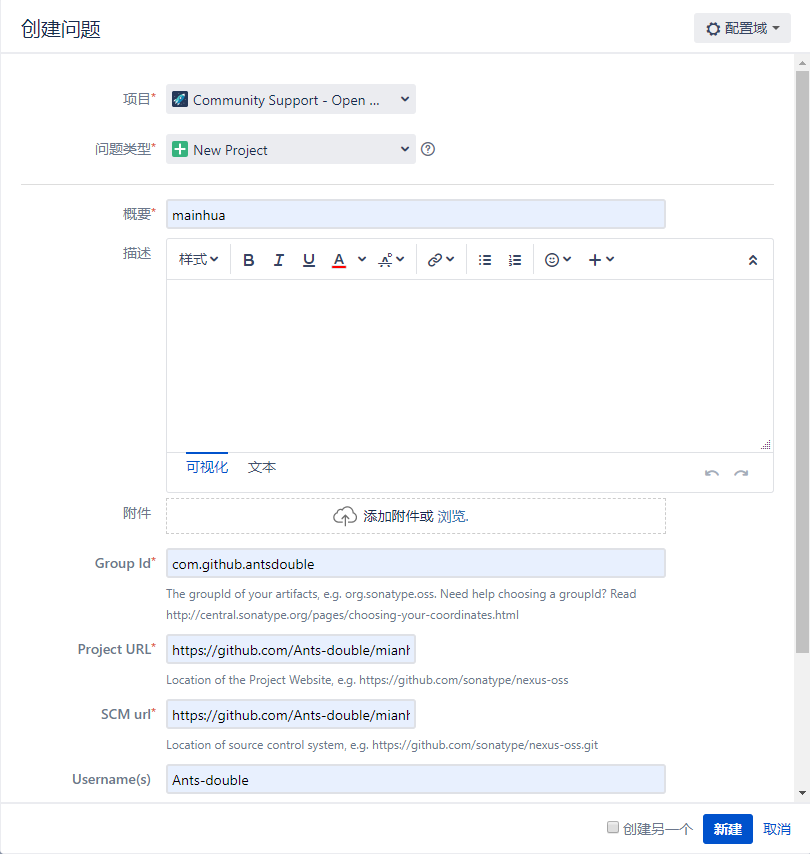
1. group id 如果你有com域名的所有权可以直接使用,如果不符合可以使用com.github.{账号名来定义}

2. 如果有问题管理员会在下方留言通知你如下文(github所有权验证)
然后等会有类似的通知发出,并按通知进行操作。
When choosing a groupId that reflects your project hosting, in this case, something like io.github.ants-double or com.github.ants-double would be correct. Also, please create a public repo called OSSRH-52139 to verify github account ownership.
然后你就创建对应的公有仓库,等创建成功后在些回复一下,看到如下评论前期准备工作就正式结束了
com.github.ants-double has been prepared, now user(s) antsdouble,Ants-double can:

Deploy snapshot artifacts into repository https://oss.sonatype.org/content/repositories/snapshots

Deploy release artifacts into the staging repository https://oss.sonatype.org/service/local/staging/deploy/maven2

Release staged artifacts into repository 'Releases'

please comment on this ticket when you promoted your first release, thanks
GPG的准备工作
windows安装gpg https://www.gpg4win.org/get-gpg4win.html,这里使用git命令行工具
生成秘钥
gpg --gen-key 按照提示输入姓名/邮箱,然后按O即可生成
查看秘钥
gpg --list-keys
同步公钥
gpg --keyserver http://keys.gnupg.net:11371/ --send-keys [xxxxxxxxx] 其中的[xxxxxxxxx],可用gpg --list-keys显示出来。
```
Maven准备工作
更新setting.xml文件添加仓库
<server>

  <id>sonatype-nexus-snapshots</id>

  <username>Sonatype账号</username>

  <password>Sonatype密码</password>

</server>

<server>

  <id>sonatype-nexus-staging</id>

  <username>Sonatype账号</username>

  <password>Sonatype密码</password>

</server>
修改pom.xml文件 增加许可协议、SCM信息、开发者信息 (最后附完整的pom.xml文件)
<licenses>

        <license>

            <name>The Apache Software License, Version 2.0</name>

            <url>http://www.apache.org/licenses/LICENSE-2.0.txt</url>

            <distribution>repo</distribution>

        </license>

    </licenses>

    <scm>

        <tag>master</tag>

        <url>git@github.com:Ants-double/mianhua.git</url>

        <connection>scm:git:git@github.com:Ants-double/mianhua.git</connection>

        <developerConnection>scm:git:git@github.com:Ants-double/mianhua.git</developerConnection>

    </scm>

    <developers>

        <developer>

            <name>ants-double</name>

            <email>ants_double@yeah.net</email>

            <organization>ants-double</organization>

        </developer>

    </developers>
添加相关插件和仓库信息
<build>

                <plugins>

                    <!-- Source -->

                    <plugin>

                        <groupId>org.apache.maven.plugins</groupId>

                        <artifactId>maven-source-plugin</artifactId>

                        <version>2.2.1</version>

                        <executions>

                            <execution>

                                <phase>package</phase>

                                <goals>

                                    <goal>jar-no-fork</goal>

                                </goals>

                            </execution>

                        </executions>

                    </plugin>

                    <!-- Javadoc -->

                    <plugin>

                        <groupId>org.apache.maven.plugins</groupId>

                        <artifactId>maven-javadoc-plugin</artifactId>

                        <version>2.9.1</version>

                        <configuration>

                            <encoding>${chartset.UTF8}</encoding>

                            <aggregate>true</aggregate>

                            <charset>${chartset.UTF8}</charset>

                            <docencoding>${chartset.UTF8}</docencoding>

                        </configuration>

                        <executions>

                            <execution>

                                <id>attach-javadocs</id>

                                <phase>package</phase>

                                <goals>

                                    <goal>jar</goal>

                                </goals>

                                <configuration>

                                    <additionalparam>-Xdoclint:none</additionalparam>

                                </configuration>

                            </execution>

                        </executions>

                    </plugin>

                    <!-- GPG -->

                    <plugin>

                        <groupId>org.apache.maven.plugins</groupId>

                        <artifactId>maven-gpg-plugin</artifactId>

                        <version>1.5</version>

                        <executions>

                            <execution>

                                <phase>verify</phase>

                                <goals>

                                    <goal>sign</goal>

                                </goals>

                            </execution>

                        </executions>

                    </plugin>

                    <!--Compiler-->

                    <plugin>

                        <groupId>org.apache.maven.plugins</groupId>

                        <artifactId>maven-compiler-plugin</artifactId>

                        <version>3.0</version>

                        <configuration>

                            <source>1.8</source>

                            <target>1.8</target>

                            <fork>true</fork>

                            <verbose>true</verbose>

                            <encoding>UTF-8</encoding>

                            <showWarnings>false</showWarnings>

                        </configuration>

                    </plugin>

                    <!--Release-->

                    <plugin>

                        <groupId>org.apache.maven.plugins</groupId>

                        <artifactId>maven-release-plugin</artifactId>

                        <version>2.5.1</version>

                    </plugin>

                </plugins>

            </build>

            <distributionManagement>

                <snapshotRepository>

                    <id>sonatype-nexus-snapshots</id>

                    <name>Sonatype Nexus Snapshots</name>

                    <url>https://oss.sonatype.org/content/repositories/snapshots/</url>

                </snapshotRepository>

                <repository>

                    <id>sonatype-nexus-staging</id>

                    <name>Nexus Release Repository</name>

                    <url>https://oss.sonatype.org/service/local/staging/deploy/maven2/</url>

                </repository>

            </distributionManagement>
打包发布
使用 命令,一键打包。
`mvn clean deploy -P <profile-id>`
打包过程中会要求输入gpg密钥的
Passphase信息,输入即可

然后到https://oss.sonatype.org/#stagingRepositories 查看,看到如下信息
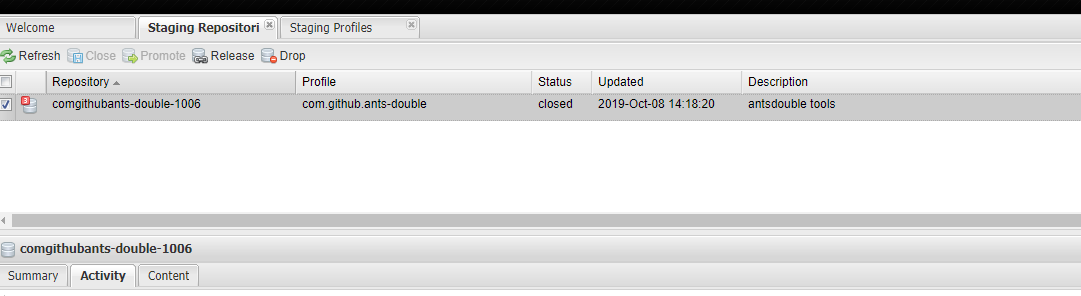
然后去账号下面去回复评论,大概意思是我弄完了,你处理一下吧

最后在 nexus repository manager中staging repositories选中最新发布的项目,然后执行
open -> closed

closed->release

执行完可以在activity中查看状态以角错误的原因
最后按官网上说的过一会,maven Center可以更久一点就能查到了。
https://search.maven.org/

https://mvnrepository.com/
附图

完整的pom.xml
<?xml version="1.0" encoding="UTF-8"?>

<project xmlns="http://maven.apache.org/POM/4.0.0"

         xmlns:xsi="http://www.w3.org/2001/XMLSchema-instance"

         xsi:schemaLocation="http://maven.apache.org/POM/4.0.0 http://maven.apache.org/xsd/maven-4.0.0.xsd">

    <modelVersion>4.0.0</modelVersion>

    <groupId>com.github.ants-double</groupId>

    <artifactId>mainhua</artifactId>

    <version>1.0-RELEASE</version>

    <name>mainhua</name>

    <url>https://github.com/Ants-double/mianhua</url>

    <description>常用工具集成</description>

    <properties>

        <!-- Environment Settings -->

        <java.version>1.8</java.version>

        <maven.compiler.encoding>UTF-8</maven.compiler.encoding>

        <chartset.UTF8>UTF-8</chartset.UTF8>

        <project.build.sourceEncoding>UTF-8</project.build.sourceEncoding>

        <project.reporting.outputEncoding>UTF-8</project.reporting.outputEncoding>

        <!--        json-->

        <project.fastjson.version>1.2.56</project.fastjson.version>

        <lombok.version>1.18.8</lombok.version>

        <project.test.version>4.12</project.test.version>

    </properties>

    <dependencyManagement>

        <dependencies>

            <dependency>

                <groupId>com.alibaba</groupId>

                <artifactId>fastjson</artifactId>

                <version>${project.fastjson.version}</version>

            </dependency>

            <dependency>

                <groupId>org.projectlombok</groupId>

                <artifactId>lombok</artifactId>

                <version>${lombok.version}</version>

            </dependency>

            <dependency>

                <groupId>junit</groupId>

                <artifactId>junit</artifactId>

                <version>${project.test.version}</version>

                <scope>test</scope>

            </dependency>

        </dependencies>

    </dependencyManagement>

    <dependencies>

        <dependency>

            <groupId>com.alibaba</groupId>

            <artifactId>fastjson</artifactId>

        </dependency>

        <dependency>

            <groupId>org.projectlombok</groupId>

            <artifactId>lombok</artifactId>

        </dependency>

        <dependency>

            <groupId>junit</groupId>

            <artifactId>junit</artifactId>

        </dependency>

    </dependencies>

    <licenses>

        <license>

            <name>The Apache Software License, Version 2.0</name>

            <url>http://www.apache.org/licenses/LICENSE-2.0.txt</url>

            <distribution>repo</distribution>

        </license>

    </licenses>

    <scm>

        <tag>master</tag>

        <url>git@github.com:Ants-double/mianhua.git</url>

        <connection>scm:git:git@github.com:Ants-double/mianhua.git</connection>

        <developerConnection>scm:git:git@github.com:Ants-double/mianhua.git</developerConnection>

    </scm>

    <developers>

        <developer>

            <name>ants-double</name>

            <email>ants_double@yeah.net</email>

            <organization>ants-double</organization>

        </developer>

    </developers>

    <profiles>

        <profile>

            <id>Releases</id>

            <build>

                <plugins>

                    <!-- Source -->

                    <plugin>

                        <groupId>org.apache.maven.plugins</groupId>

                        <artifactId>maven-source-plugin</artifactId>

                        <version>2.2.1</version>

                        <executions>

                            <execution>

                                <phase>package</phase>

                                <goals>

                                    <goal>jar-no-fork</goal>

                                </goals>

                            </execution>

                        </executions>

                    </plugin>

                    <!-- Javadoc -->

                    <plugin>

                        <groupId>org.apache.maven.plugins</groupId>

                        <artifactId>maven-javadoc-plugin</artifactId>

                        <version>2.9.1</version>

                        <configuration>

                            <encoding>${chartset.UTF8}</encoding>

                            <aggregate>true</aggregate>

                            <charset>${chartset.UTF8}</charset>

                            <docencoding>${chartset.UTF8}</docencoding>

                        </configuration>

                        <executions>

                            <execution>

                                <id>attach-javadocs</id>

                                <phase>package</phase>

                                <goals>

                                    <goal>jar</goal>

                                </goals>

                                <configuration>

                                    <additionalparam>-Xdoclint:none</additionalparam>

                                </configuration>

                            </execution>

                        </executions>

                    </plugin>

                    <!-- GPG -->

                    <plugin>

                        <groupId>org.apache.maven.plugins</groupId>

                        <artifactId>maven-gpg-plugin</artifactId>

                        <version>1.5</version>

                        <executions>

                            <execution>

                                <phase>verify</phase>

                                <goals>

                                    <goal>sign</goal>

                                </goals>

                            </execution>

                        </executions>

                    </plugin>

                    <!--Compiler-->

                    <plugin>

                        <groupId>org.apache.maven.plugins</groupId>

                        <artifactId>maven-compiler-plugin</artifactId>

                        <version>3.0</version>

                        <configuration>

                            <source>1.8</source>

                            <target>1.8</target>

                            <fork>true</fork>

                            <verbose>true</verbose>

                            <encoding>UTF-8</encoding>

                            <showWarnings>false</showWarnings>

                        </configuration>

                    </plugin>

                    <!--Release-->

                    <plugin>

                        <groupId>org.apache.maven.plugins</groupId>

                        <artifactId>maven-release-plugin</artifactId>

                        <version>2.5.1</version>

                    </plugin>

                </plugins>

            </build>

            <distributionManagement>

                <snapshotRepository>

                    <id>sonatype-nexus-snapshots</id>

                    <name>Sonatype Nexus Snapshots</name>

                    <url>https://oss.sonatype.org/content/repositories/snapshots/</url>

                </snapshotRepository>

                <repository>

                    <id>sonatype-nexus-staging</id>

                    <name>Nexus Release Repository</name>

                    <url>https://oss.sonatype.org/service/local/staging/deploy/maven2/</url>

                </repository>

            </distributionManagement>

        </profile>

    </profiles>

</project>
出现的问题
java1.8javadoc严格验证
解决是添加

 <configuration>

                                    <additionalparam>-Xdoclint:none</additionalparam>

                                </configuration>
项目id不存在,解决是添加命名的项目id
从零开始把项目发布到maven仓库中心的更多相关文章
- 从零开始把项目发布到NPM仓库中心
从零开始把项目发布到NPM仓库中心 前期准备 注册账号 https://www.npmjs.com/signup 网易邮箱注册失败,用QQ邮箱成功 使用npm 命令注册(建议使用网页): npm ad ...
- 从零开始把项目发布到Nuget仓库中心
从零开始把项目发布到Nuget仓库中心 我的项目地址 https://github.com/Ants-double/dasuan ### 前期准备 下载并注册nuget帐号 下载地址 https:// ...
- 把自己的项目发布到maven仓库并在maven和gradle中开始使用
把自己的项目发布到maven仓库并在maven和gradle中开始使用 上一条博客中提到的日志打印项目总算是维护的差不多了, 不过现在使用它还是打成jar包放到其他项目内, 所以决定把项目传到mave ...
- maven仓库中心mirrors配置多个下载中心(执行最快的镜像)
E:\Program FilesApache Software Foundationapache-maven-3.5.4-binconf\settings.xmlmaven仓库中心mirrors配置多 ...
- 将Gradle项目公布到maven仓库
将Gradle项目公布到maven仓库 1 Gradle简单介绍 1.1 Ant.Maven还是Gradle? 1.1.1 Ant和Maven介绍 全称为Apache Maven,是一个软件(特别是J ...
- 3.将maven项目jar纳入maven仓库,Mave项目依赖另外一个Maven项目的案例
1 若想让maven项目依赖另外一个maven项目.被依赖的项目要在maven仓库中有对应的jar包,所以要对依赖的项目运行mvninstall命令. 2 新建第二个项目模块HelloFrien ...
- 将项目发布到Maven中央仓库的不完整纪要
背景 有几个Utils性质的Jar需要跨项目引用,原本想部署私有Maven仓库,后来感觉太麻烦,索性直接发布到中央库,引用时也方便. 发布成功之后,觉得某些细节还是有必要记录一下. 资源 Sonaty ...
- 将Gradle项目发布到Maven Central库中
本文主要介绍如何一个由gradle构建的项目部署到Maven Central. 网上大部分都是介绍如何将由maven构建的项目部署到Maven Central.与Gradle相关的比较少. 申请账号 ...
- 如何将项目发布到npm仓库
有时候,我们希望将项目里的模块提升为公共模块,以便其他项目也能使用.在前端可以将模块发布到npm仓库,这样所有项目都可以通过 npm install youProject 使用模块了. 这个过程很简单 ...
随机推荐
- [Spark] 06 - What is Spark Streaming
前言 Ref: 一文读懂 Spark 和 Spark Streaming[简明扼要的概览] 在讲解 "流计算" 之前,先做一个简单的回顾,亲! 一.MapReduce 的问题所在 ...
- toString(),String.valueOf,(String)在处理空对象时的区别
public static void main(String[] args) { Map<String,Object> map = new HashMap<>(); map.p ...
- Scrapy项目 - 实现豆瓣 Top250 电影信息爬取的爬虫设计
通过使Scrapy框架,掌握如何使用Twisted异步网络框架来处理网络通讯的问题,进行数据挖掘和对web站点页面提取结构化数据,可以加快我们的下载速度,也可深入接触各种中间件接口,灵活的完成各种需求 ...
- Spring boot 官网学习笔记 - logging
commons-logging和slf4j是java中的日志门面,即它们提供了一套通用的接口,具体的实现可以由开发者自由选择.log4j和logback则是具体的日志实现方案. 比较常用的搭配是com ...
- Spring 梳理-el表达式和jstl
JSP中有这么几种元素 1: Scriptlet <% ... %> 2: 声明元素 <%! ... %> 3: Java表达式 <%= ... %> 4: 指令元 ...
- DocumentFormat.OpenXml read excel file
这里向大家介绍一种读取excel 数据的方法,用的是DoucmentFormat.OpenXml.dll 废话不多说,向大家展示一下在项目中处理过的方法,如果有任何疑问,随时联系我. using Do ...
- mysql 对返回字段进行拼接
使用concat函数进行拼接:示例如下: select id,username,concat( id, '-' , username) as idName from user;
- 【SQL server初级】数据库性能优化一:数据库自身优化(大数据量)
数据库优化包含以下三部分,数据库自身的优化,数据库表优化,程序操作优化.此文为第一部分 数据库性能优化一:数据库自身优化 优化①:增加次数据文件,设置文件自动增长(粗略数据分区) 1.1:增加次数据文 ...
- 整理基础的CentOS常用命令
如何知道apache装在哪里? which httpd 1.查看系统使用端口并释放端口 [root@my_nn_01 WEB-INF]# lsof -w -n -i tcp:80 COMMAND ...
- JavaScript 类型 检测
前言 ECMAScript中有5种数据类型,分别为Number,Boolean,Null,Undifined和String,以及一种复杂的数据类型Object(由名值对组成,是这门语言所有对象的基础类 ...