
Ubuntu14.04和16.04官方默认更新源sources.list和第三方源推荐(干货!)
不多说,直接上干货!
写在前面:笔者由于还在学校学习,学校没有开发给Linux用的上网客户端,所以只能用在windows系统中通过安装虚拟机运行linux比较方便,但没有外网,只有学校的教育网,所以我需要将ubuntu的默认源修改为教育网中的资源才可以完美运行ubuntu,当然这个教程也适用于修改为非教育源。
- 第一步,备份官方的默认源
避免自己手贱操作失误,重装系统太费时间
cp /etc/apt/sources.list /etc/apt/sources.list.bak 此命令是备份该官方源文件
Ubuntu 14.04.4官方默认更新源sources.list
# deb cdrom:[Ubuntu 14.04. LTS _Trusty Tahr_ - Release amd64 (20160217.1)]/ trusty main restricted

# See http://help.ubuntu.com/community/UpgradeNotes for how to upgrade to

# newer versions of the distribution.

deb http://cn.archive.ubuntu.com/ubuntu/ trusty main restricted

deb-src http://cn.archive.ubuntu.com/ubuntu/ trusty main restricted

## Major bug fix updates produced after the final release of the

## distribution.

deb http://cn.archive.ubuntu.com/ubuntu/ trusty-updates main restricted

deb-src http://cn.archive.ubuntu.com/ubuntu/ trusty-updates main restricted

## N.B. software from this repository is ENTIRELY UNSUPPORTED by the Ubuntu

## team. Also, please note that software in universe WILL NOT receive any

## review or updates from the Ubuntu security team.

deb http://cn.archive.ubuntu.com/ubuntu/ trusty universe

deb-src http://cn.archive.ubuntu.com/ubuntu/ trusty universe

deb http://cn.archive.ubuntu.com/ubuntu/ trusty-updates universe

deb-src http://cn.archive.ubuntu.com/ubuntu/ trusty-updates universe

## N.B. software from this repository is ENTIRELY UNSUPPORTED by the Ubuntu

## team, and may not be under a free licence. Please satisfy yourself as to

## your rights to use the software. Also, please note that software in

## multiverse WILL NOT receive any review or updates from the Ubuntu

## security team.

deb http://cn.archive.ubuntu.com/ubuntu/ trusty multiverse

deb-src http://cn.archive.ubuntu.com/ubuntu/ trusty multiverse

deb http://cn.archive.ubuntu.com/ubuntu/ trusty-updates multiverse

deb-src http://cn.archive.ubuntu.com/ubuntu/ trusty-updates multiverse

## N.B. software from this repository may not have been tested as

## extensively as that contained in the main release, although it includes

## newer versions of some applications which may provide useful features.

## Also, please note that software in backports WILL NOT receive any review

## or updates from the Ubuntu security team.

deb http://cn.archive.ubuntu.com/ubuntu/ trusty-backports main restricted universe multiverse

deb-src http://cn.archive.ubuntu.com/ubuntu/ trusty-backports main restricted universe multiverse

deb http://security.ubuntu.com/ubuntu trusty-security main restricted

deb-src http://security.ubuntu.com/ubuntu trusty-security main restricted

deb http://security.ubuntu.com/ubuntu trusty-security universe

deb-src http://security.ubuntu.com/ubuntu trusty-security universe

deb http://security.ubuntu.com/ubuntu trusty-security multiverse

deb-src http://security.ubuntu.com/ubuntu trusty-security multiverse

## Uncomment the following two lines to add software from Canonical's

## 'partner' repository.

## This software is not part of Ubuntu, but is offered by Canonical and the

## respective vendors as a service to Ubuntu users.

# deb http://archive.canonical.com/ubuntu trusty partner

# deb-src http://archive.canonical.com/ubuntu trusty partner

## This software is not part of Ubuntu, but is offered by third-party

## developers who want to ship their latest software.

deb http://extras.ubuntu.com/ubuntu trusty main

deb-src http://extras.ubuntu.com/ubuntu trusty main
Ubuntu 16.04官方默认更新源sources.list
#deb cdrom:[Ubuntu 16.04. LTS _Xenial Xerus_ - Release amd64 ()]/ xenial main restricted

# See http://help.ubuntu.com/community/UpgradeNotes for how to upgrade to

# newer versions of the distribution.

deb http://cn.archive.ubuntu.com/ubuntu/ xenial main restricted

# deb-src http://cn.archive.ubuntu.com/ubuntu/ xenial main restricted

## Major bug fix updates produced after the final release of the

## distribution.

deb http://cn.archive.ubuntu.com/ubuntu/ xenial-updates main restricted

# deb-src http://cn.archive.ubuntu.com/ubuntu/ xenial-updates main restricted

## N.B. software from this repository is ENTIRELY UNSUPPORTED by the Ubuntu

## team, and may not be under a free licence. Please satisfy yourself as to

## your rights to use the software. Also, please note that software in

## universe WILL NOT receive any review or updates from the Ubuntu security

## team.

deb http://cn.archive.ubuntu.com/ubuntu/ xenial universe

# deb-src http://cn.archive.ubuntu.com/ubuntu/ xenial universe

deb http://cn.archive.ubuntu.com/ubuntu/ xenial-updates universe

# deb-src http://cn.archive.ubuntu.com/ubuntu/ xenial-updates universe
- 第二步,修改官方源为第三方源
sudo vim /etc/apt/sources.list 申请root权限修改该文件(sudo)
附赠网上多数人推荐的第三方源:
清华源ubuntu清华源

- 中科大源:
deb http://mirrors.ustc.edu.cn/ubuntu/ precise-updates main restricted

deb-src http://mirrors.ustc.edu.cn/ubuntu/ precise-updates main restricted

deb http://mirrors.ustc.edu.cn/ubuntu/ precise universe

deb-src http://mirrors.ustc.edu.cn/ubuntu/ precise universe

deb http://mirrors.ustc.edu.cn/ubuntu/ precise-updates universe

deb-src http://mirrors.ustc.edu.cn/ubuntu/ precise-updates universe

deb http://mirrors.ustc.edu.cn/ubuntu/ precise multiverse

deb-src http://mirrors.ustc.edu.cn/ubuntu/ precise multiverse

deb http://mirrors.ustc.edu.cn/ubuntu/ precise-updates multiverse

deb-src http://mirrors.ustc.edu.cn/ubuntu/ precise-updates multiverse

deb http://mirrors.ustc.edu.cn/ubuntu/ precise-backports main restricted universe multiverse

deb-src http://mirrors.ustc.edu.cn/ubuntu/ precise-backports main restricted universe multiverse

deb http://security.ubuntu.com/ubuntu precise-security main restricted

deb-src http://security.ubuntu.com/ubuntu precise-security main restricted

deb http://security.ubuntu.com/ubuntu precise-security universe

deb-src http://security.ubuntu.com/ubuntu precise-security universe

deb http://security.ubuntu.com/ubuntu precise-security multiverse

deb-src http://security.ubuntu.com/ubuntu precise-security multiverse
- 搜狐源
deb http://mirrors.sohu.com/ubuntu/ precise-updates main restricted

deb-src http://mirrors.sohu.com/ubuntu/ precise-updates main restricted

deb http://mirrors.sohu.com/ubuntu/ precise universe

deb-src http://mirrors.sohu.com/ubuntu/ precise universe

deb http://mirrors.sohu.com/ubuntu/ precise-updates universe

deb-src http://mirrors.sohu.com/ubuntu/ precise-updates universe

deb http://mirrors.sohu.com/ubuntu/ precise multiverse

deb-src http://mirrors.sohu.com/ubuntu/ precise multiverse

deb http://mirrors.sohu.com/ubuntu/ precise-updates multiverse

deb-src http://mirrors.sohu.com/ubuntu/ precise-updates multiverse

deb http://mirrors.sohu.com/ubuntu/ precise-backports main restricted universe multiverse

deb-src http://mirrors.sohu.com/ubuntu/ precise-backports main restricted universe multiverse
- 网易源
deb http://mirrors.163.com/ubuntu/ precise-updates main restricted

deb-src http://mirrors.163.com/ubuntu/ precise-updates main restricted

deb http://mirrors.163.com/ubuntu/ precise universe

deb-src http://mirrors.163.com/ubuntu/ precise universe

deb http://mirrors.163.com/ubuntu/ precise-updates universe

deb-src http://mirrors.163.com/ubuntu/ precise-updates universe

deb http://mirrors.163.com/ubuntu/ precise multiverse

deb-src http://mirrors.163.com/ubuntu/ precise multiverse

deb http://mirrors.163.com/ubuntu/ precise-updates multiverse

deb-src http://mirrors.163.com/ubuntu/ precise-updates multiverse

deb http://mirrors.163.com/ubuntu/ precise-backports main restricted universe multiverse

deb-src http://mirrors.163.com/ubuntu/ precise-backports main restricted universe multiverse
阿里云
# deb cdrom:[Ubuntu 16.04 LTS _Xenial Xerus_ - Release amd64 (20160420.1)]/ xenial main restricted

deb-src http://archive.ubuntu.com/ubuntu xenial main restricted #Added by software-properties

deb http://mirrors.aliyun.com/ubuntu/ xenial main restricted

deb-src http://mirrors.aliyun.com/ubuntu/ xenial main restricted multiverse universe #Added by software-properties

deb http://mirrors.aliyun.com/ubuntu/ xenial-updates main restricted

deb-src http://mirrors.aliyun.com/ubuntu/ xenial-updates main restricted multiverse universe #Added by software-properties

deb http://mirrors.aliyun.com/ubuntu/ xenial universe

deb http://mirrors.aliyun.com/ubuntu/ xenial-updates universe

deb http://mirrors.aliyun.com/ubuntu/ xenial multiverse

deb http://mirrors.aliyun.com/ubuntu/ xenial-updates multiverse

deb http://mirrors.aliyun.com/ubuntu/ xenial-backports main restricted universe multiverse

deb-src http://mirrors.aliyun.com/ubuntu/ xenial-backports main restricted universe multiverse #Added by software-properties

deb http://archive.canonical.com/ubuntu xenial partner

deb-src http://archive.canonical.com/ubuntu xenial partner

deb http://mirrors.aliyun.com/ubuntu/ xenial-security main restricted

deb-src http://mirrors.aliyun.com/ubuntu/ xenial-security main restricted multiverse universe #Added by software-properties

deb http://mirrors.aliyun.com/ubuntu/ xenial-security universe

deb http://mirrors.aliyun.com/ubuntu/ xenial-security multiverse
大家,有时候,需要把http改成https
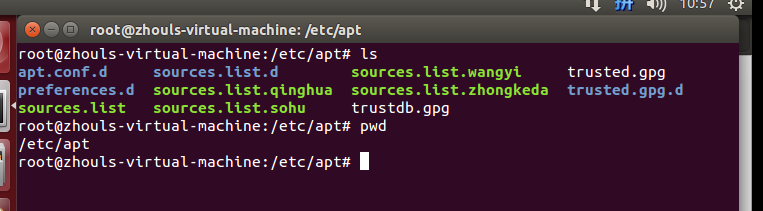
然后,大家可以像我这样,来做好备份,有时候,会因为网络问题,需要用到不同的源,好切换!
/etc/apt/sources.list (比如,这是官方的源)
/etc/apt/sources.list.qinghua (比如,这是清华的源)
/etc/apt/sources.list.zhongkeda (比如,这是中科大的源)
/etc/apt/sources.list.sohu (比如,这是搜狐的源)
/etc/apt/sources.list.wangyi (比如,这是网易的源)
然后,需要用到哪个了,在比如,我需要用到清华源,则,
mv sources.list.qinghua sources.list
然后,把官方的源,暂时改为
mv sources.list sources.list.bak
扩展学习
现在没有可用的软件包 *** ,但是它被其它的软件包引用了 和 E: 无法定位软件包 ***问题解决(思路清晰干货)
同时,大家可以关注我的个人博客:
http://www.cnblogs.com/zlslch/ 和 http://www.cnblogs.com/lchzls/ http://www.cnblogs.com/sunnyDream/
详情请见:http://www.cnblogs.com/zlslch/p/7473861.html
人生苦短,我愿分享。本公众号将秉持活到老学到老学习无休止的交流分享开源精神,汇聚于互联网和个人学习工作的精华干货知识,一切来于互联网,反馈回互联网。
目前研究领域:大数据、机器学习、深度学习、人工智能、数据挖掘、数据分析。 语言涉及:Java、Scala、Python、Shell、Linux等 。同时还涉及平常所使用的手机、电脑和互联网上的使用技巧、问题和实用软件。 只要你一直关注和呆在群里,每天必须有收获
对应本平台的讨论和答疑QQ群:大数据和人工智能躺过的坑(总群)(161156071)



Ubuntu14.04和16.04官方默认更新源sources.list和第三方源推荐(干货!)的更多相关文章
- buntu14.04和16.04官方默认更新源sources.list和第三方源推荐(干货!)转
配置完成后: sudo apt-get update 安装和删除软件: sudo apt-get install sudo apt-get remove buntu14.04和16.04官方默认更新源 ...
- Ubuntu 14.04.4官方默认更新源sources.list
Ubuntu 14.04.4官方默认更新源sources.list # deb cdrom:[Ubuntu LTS _Trusty Tahr_ - Release amd64 (20160217.1) ...
- Ubuntu18.04更换官方默认更新源sources.list
⒈备份官方默认更新源文件 cp /etc/apt/sources.list /etc/apt/sources.list.bak 备份官方更新源文件 ⒉编辑 1.打开 vi /etc/apt/sourc ...
- Change default network name (ens33) to old “eth0” on Ubuntu 18.04 / Ubuntu 16.04
Change default network name (ens33) to old “eth0” on Ubuntu 18.04 / Ubuntu 16.04 By Raj Last updated ...
- linux: ubuntu 14.04 和16.04 快速下载
由于官网服务器在国外,下载速度奇慢,所以我们可以利用阿里云镜像下载ubuntuubuntu 14.04:http://mirrors.aliyun.com/ubuntu-releases/14.04/ ...
- 阿里云,腾讯云,等等的云 Ubuntu14.04升级16.04
16.04有很多好处.在此不说了 这几天来回折腾了各种的云,然后发现国内的都没有16.04 但是ubuntu可以直接在线升级 在此记下来升级的过程 不管是腾讯云也好 阿里云也好,或者别的什么云,只要是 ...
- Ubuntu14.04或16.04下安装JDK1.8+Scala+Hadoop2.7.3+Spark2.0.2
为了将Hadoop和Spark的安装简单化,今日写下此帖. 首先,要看手头有多少机器,要安装伪分布式的Hadoop+Spark还是完全分布式的,这里分别记录. 1. 伪分布式安装 伪分布式的Hadoo ...
- Ubuntu14.04或16.04下普通用户的root权限获得
Ubuntu系统默认不允许使用root登录,因此初始root帐户是不能使用的,需要在普通账户下利用sudo权限修改root密码.然后以root帐户进行相关操作. 具体操作: 1.打开系统,用普通帐户登 ...
- Ubuntu14.04或16.04下Hadoop及Spark的开发配置
对于Hadoop和Spark的开发,最常用的还是Eclipse以及Intellij IDEA. 其中,Eclipse是免费开源的,基于Eclipse集成更多框架配置的还有MyEclipse.Intel ...
随机推荐
- GCC __builtin_expect的作用
https://blog.csdn.net/shuimuniao/article/details/8017971 #define LIKELY(x) __builtin_expect(!!(x), 1 ...
- Kubernetes之服务发现及负载Services
Service 概述 kubernetes 中的pod是有生生灭灭的,时刻都有可能被新的pod所代替,而不可复活(pod的生命周期).一旦一个pod生命终止,通过ReplicaSets动态创建和销毁p ...
- Java Properties 类读配置文件保持顺序
前几天,公司项目中有一个需求是读取配置文件的,而且最好能够保证加载到内存中的顺序能够和配置文件中的顺序一致,但是,如果使用 jdk 中提供的 Properties 类的话,读取配置文件后,加载到内存中 ...
- 利用 /proc/sys/kernel/core_pattern隐藏系统后门
ref:https://xz.aliyun.com/t/1098/ 这里所说的core_pattern 指的是:/proc/sys/kernel/core_pattern. 我们知道在Linux系统中 ...
- 跨站请求伪造 | ajax
一.简介 django为用户实现防止跨站请求伪造的功能,通过中间件 django.middleware.csrf.CsrfViewMiddleware 来完成.而对于django中设置防跨站请求伪造功 ...
- HTML常用知识点代码演示
1 HTML部分常用知识点 <!-- 版本声明 --> <!DOCTYPE html> <!-- 唯一根元素 --> <html> <!-- 对网 ...
- android:shape 设置圆形
组件高度和宽度设置为相同的值即可<?xml version="1.0" encoding="utf-8"?><shape xmlns:andr ...
- Django组件-用户认证
用户认证 一.auth模块 from django.contrib import auth django.contrib.auth中提供了许多方法,这里主要介绍其中的三个: 1.1 .authenti ...
- 第六章 使用 Bootstrap Typeahead 组件(百度下拉效果)(续)
官方:http://twitter.github.io/typeahead.js/ 示例:http://twitter.github.io/typeahead.js/examples/(本文展示:Op ...
- Fatal error: cannot initialize AIO sub-system
在一台服务器中以各数据库的备份文件为数据文件启动多个MySQL实例供SQL Review使用.之前运行一直没有问题(最多的时候有23个MySQL实例同时运行),后来新配置了一台服务器,启动其对应的实例 ...