
git 服务器 LINUX端的使用
首先,需要建立一个git服务器-----
这里介绍如何使用git这个服务器
我们在github上下载一份代码,里面有如下内容
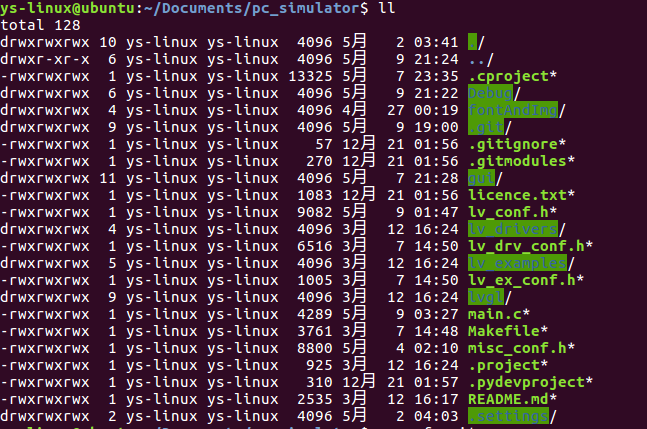
我们使用git服务器的时候不能有.git 文件,所以在此将其删除
ys-linux@ubuntu:~/Documents/pc_simulator$ rm -rf .git

ys-linux@ubuntu:~/Documents/pc_simulator$ rm -rf .gitmodules
然后屏蔽上传编译文件
ys-linux@ubuntu:~/Documents/pc_simulator$ cat .gitignore

然后创建一个git
登陆服务器创建一个账户
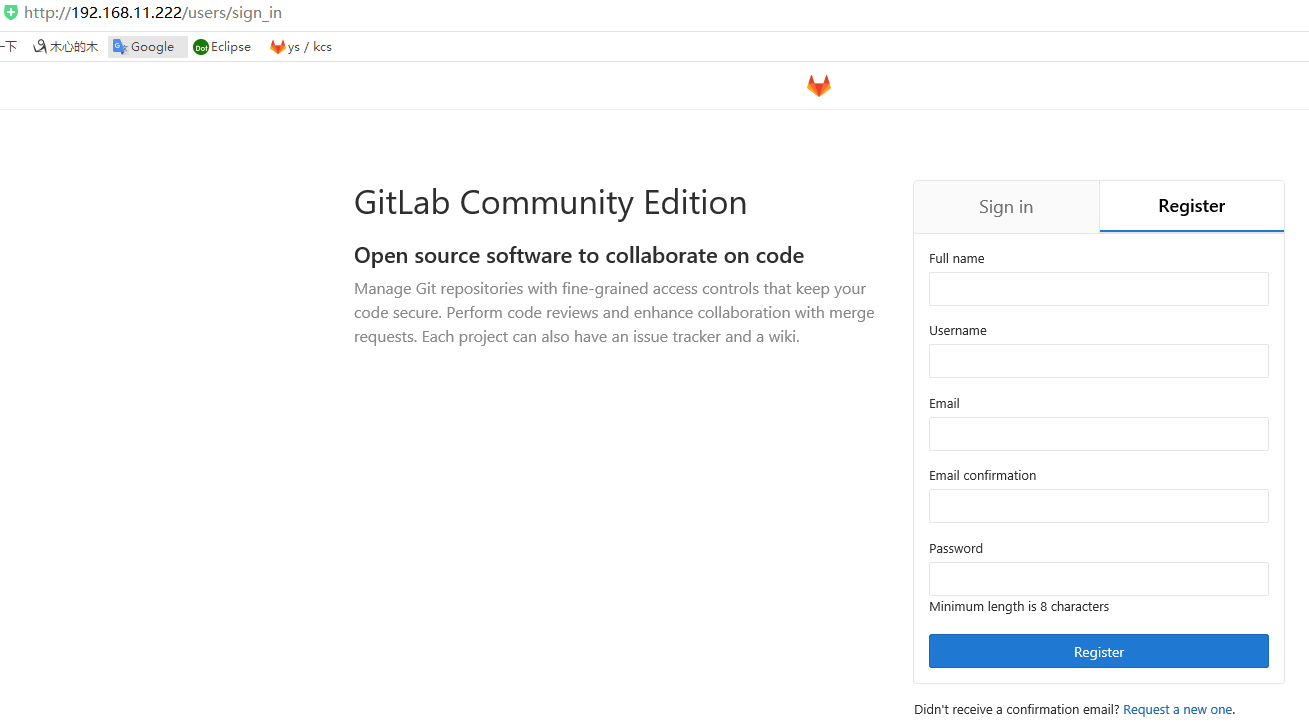
ys-linux@ubuntu:~/Documents/pc_simulator$ git init

Initialized empty Git repository in /home/ys-linux/Documents/pc_simulator/.git/

ys-linux@ubuntu:~/Documents/pc_simulator$ git remote add origin http://192.168.11.222/ys/kcsdr_ui.git

ys-linux@ubuntu:~/Documents/pc_simulator$ git remote -v

origin    http://192.168.11.222/ys/kcsdr_ui.git (fetch)

origin    http://192.168.11.222/ys/kcsdr_ui.git (push)

ys-linux@ubuntu:~/Documents/pc_simulator$ git status
On branch master
Initial commit
Untracked files:
(use "git add <file>..." to include in what will be committed)
.cproject
.gitignore
.project
Makefile
README.md
fontAndImg/
gui/
licence.txt
lv_conf.h
lv_drivers/
lv_drv_conf.h
lv_ex_conf.h
lv_examples/
lvgl/
main.c
misc_conf.h
nothing added to commit but untracked files present (use "git add" to track)
现在库创建好了,然后增加内容
ys-linux@ubuntu:~/Documents/pc_simulator$ git add .

ys-linux@ubuntu:~/Documents/pc_simulator$ git status

On branch master

Initial commit

Changes to be committed:

  (use "git rm --cached <file>..." to unstage)

    new file:   .cproject

    new file:   .gitignore

    new file:   .project

.......................................................
然后填写更新内容
ys-linux@ubuntu:~/Documents/pc_simulator$ git commit -m "<base> <first commit>"

*** Please tell me who you are.

Run

  git config --global user.email "you@example.com"

  git config --global user.name "Your Name"

to set your account's default identity.

Omit --global to set the identity only in this repository.

fatal: unable to auto-detect email address (got 'ys-linux@ubuntu.(none)')

ys-linux@ubuntu:~/Documents/pc_simulator$ git config --global user.email "ys@qq.com"

ys-linux@ubuntu:~/Documents/pc_simulator$ git config --global user.name "ys"

ys-linux@ubuntu:~/Documents/pc_simulator$ git commit -m "<base> <first commit>"

[master (root-commit) 12d5763] <base> <first commit>

  files changed,  insertions(+)

 create mode  .cproject

 create mode  .gitignor

.............................................................
然后将代码上传
ys-linux@ubuntu:~/Documents/pc_simulator$ git status

On branch master

nothing to commit, working directory clean

ys-linux@ubuntu:~/Documents/pc_simulator$ git log

commit 12d57637f6243951d888fa2

Author: ys <ys@qq.com>

Date:   Wed May  ::  -

    <base> <first commit>

ys-linux@ubuntu:~/Documents/pc_simulator$ git push

warning: push.default is unset; its implicit value has changed in

Git 2.0 from 'matching' to 'simple'. To squelch this message

and maintain the traditional behavior, use:

  git config --global push.default matching

To squelch this message and adopt the new behavior now, use:

  git config --global push.default simple

When push.default is set to 'matching', git will push local branches

to the remote branches that already exist with the same name.

Since Git 2.0, Git defaults to the more conservative 'simple'

behavior, which only pushes the current branch to the corresponding

remote branch that 'git pull' uses to update the current branch.

See 'git help config' and search for 'push.default' for further information.

(the 'simple' mode was introduced in Git 1.7.. Use the similar mode

'current' instead of 'simple' if you sometimes use older versions of Git)

fatal: The current branch master has no upstream branch.

To push the current branch and set the remote as upstream, use

    git push --set-upstream origin master

ys-linux@ubuntu:~/Documents/pc_simulator$ git push --set-upstream origin master

Username for 'http://192.168.11.222': ys

Password for 'http://ys@192.168.11.222': *********

...............................
获取根密钥
ys-linux@ubuntu:~/Documents/pc_simulator$ ssh-keygen
ys-linux@ubuntu:~/Documents/pc_simulator$ cat ~/.ssh/id_rsa
-----BEGIN RSA PRIVATE KEY-----
MIIEpAIBAAKCAQEAo59EMzaF8H3p8u/Ad21xm9kAHatj82Dt5G2Cl0teDibTX/IP
THAynvHKCVX+khgBJuXaAAc1rij***********8y67ZvPfMqKb9YeURw69c
lnudgUmnvWuwqnTvptwsnsI9DdddILAaTr6zWMzu7jiX1Xr67pqUbaq3utAKb8v/
d1/frf4FZu1jAY3K1ST7fsj/f6rTOLm3Z/iM8SZoOuvYBnhsFjy2LC3E0NHzpN+S
wt7HssG9BAYSjSOlLYUEy+EocF**************b96ErNtiNezgzeKsBXk49CmQ
Qoa16Rg6pxs1GhQmdJ8YPzBQLoGRz+M8jrzI2wIDAQABAoIBAGCmW2rE8ik0t1TB
An7g/z2fU31HyGBQq6hqS8oxyjJt1ngVUcb3bWutF12X16DXFDYYV1aSa7oW7iIJ
ZkpuPwKBgQDK*****************************x2ZuuprQBHaiOCdWCT0gHA9
2qr4HRvJF5RTSv/ukct2azlpPvdq0Au5WX/t+N9KjBx7IE9AkXi1K6RtvflsUui8
cIuohVQGC54FxrHda6SU22XEcPcueyoq5Pzs55qdVi9VHAe0ziTRoQ==
-----END RSA PRIVATE KEY-----
将获取的根密钥贴在git网站上
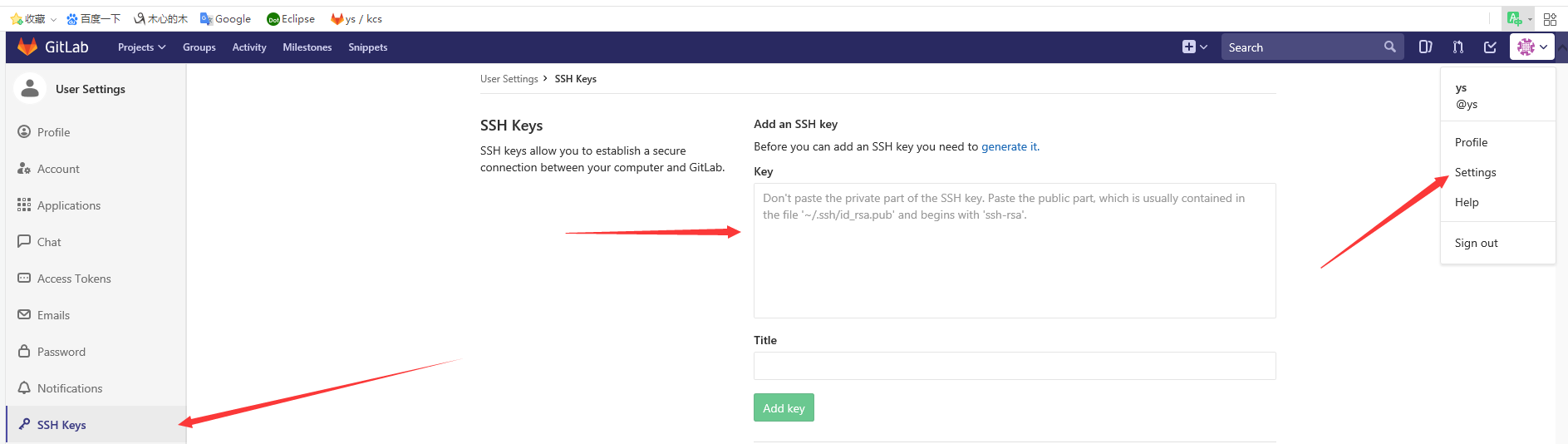
贴上网站后
ys-linux@ubuntu:~/Documents/pc_simulator$ cat ~/.ssh/id_rsa.pub
ys-linux@ubuntu:~/Documents/pc_simulator$ git config --global push.default simple
ys-linux@ubuntu:~/Documents/pc_simulator$ git remote remove origin
ys-linux@ubuntu:~/Documents/pc_simulator$ git remote -v
ys-linux@ubuntu:~/Documents/pc_simulator$ git remote add origin git@192.168.11.222:ys/kcsdr_ui.git -----这里写你上传的本地服务器的地址
ys-linux@ubuntu:~/Documents/pc_simulator$ git remote -v
然后可以正常使用git了
更新代码
git add .
更新提示信息
git commit -m "<update>"
抓取已经存在的代码
git pull
上传本地的代码
git push
git 服务器 LINUX端的使用的更多相关文章
- (转)初学Git及简单搭建git服务器和客户端
终于搞定,mac自己作为git服务器,mac也是客户端,如何免登 从另外一个linux服务器的上传公钥得到提示 ssh-copy-id -i ~/.ssh/id_rsa.pub git@192.168 ...
- git-搭建企业git服务器
1.安装 yum install git 2.增加用户 useradd git -d /home/git -g git 3.查看公钥鉴权文件是否存在 cat /home/git/.ssh/autho ...
- 搭建Git服务器及本机克隆提交
前文 Git是什么? Git是目前世界上最先进的分布式版本控制系统. SVN与Git的最主要的区别? SVN是集中式版本控制系统,版本库是集中放在中央服务器的,而干活的时候,用的都是自己的电脑,所以首 ...
- 在 Linux 下搭建 Git 服务器
环境: 服务器 CentOS6.6 + git(version 1.7.1)客户端 Windows10 + git(version 2.8.4.windows.1) ① 安装 Git Linux 做为 ...
- Linux Ubuntu搭建git服务器
1. 安装 openssh-server ,用于创建SSH服务. sudo apt-get install openssl-server 使用命令ps -e|grep ssh,查看ssh服务是否启动. ...
- 在LINUX上创建GIT服务器【转】
转自:http://blog.csdn.net/xiongmc/article/details/9176785 如果使用git的人数较少,可以使用下面的步骤快速部署一个git服务器环境. 1. Cli ...
- 在 Linux 下搭建 Git 服务器(yum安装)
服务端(linux): 1. 安装git [root@localhost ~]# yum -y install git 2. 增加一个git账户 为了管理的方便,在linux下面增添一个 " ...
- 阿里云 linux搭建git服务器
git是非常方便的版本控制工具,目前网上有很多免费的git仓库可以给我们使用,但是有些时候我们并不放心将我们的项目寄放在别人的服务器上,这个时候就需要自己搭建一个git服务器. 在linux上面搭建g ...
- Windows/Linux 环境搭建Git服务器 + vs2012集成git
1. 下载.安装Git 我的系统是Windows 7,需要安装Git for Windows. 下载地址: http://code.google.com/p/msysgit/downloads/lis ...
随机推荐
- [ffmpeg] 滤波格式协商
ffmpeg的中滤波器是以帧为原料来进行滤波的,那么自然地就会对帧的格式有所要求,可以说如果滤波器不知道帧的格式,就无法对帧进行处理.在进行视频滤波时,滤波格式指的是视频的像素格式:在进行音频滤波时, ...
- win10 安装docker
看介绍说docker不支持win10家庭版,但是一搜安装教程也有好多在家庭版上安装的,而且也不麻烦,不知道咋回事 1.查看虚拟化状态 一开始我的是没有开启的,从bios开启的 一般是开始按F2,进入b ...
- statsmodels.tsa.arima_model预测时报错TypeError: int() argument must be a string, a bytes-like object or a number, not 'Timestamp'
在 python 中用 statsmodels创建 ARIMA 模型进行预测时间序列: import pandas as pd import statsmodels.api as sm df = pd ...
- 洛谷P4630 铁人两项--圆方树
一道很好的圆方树入门题 感谢PinkRabbit巨佬的博客,讲的太好啦 首先是构建圆方树的代码,也比较好想好记 void tarjan(int u) { dfn[u] = low[u] = ++dfn ...
- lumen 支持多文件上传
1.webform (注意:name后面一定要加[]号) <form method="post" enctype="multipart/form-data" ...
- vue-cli 项目踩坑 npm install 时出错
1.报错如下: 2.此时你执行npm run dev / npm run build 会报错如下 npm ERR! code ELIFECYCLEnpm ERR! errno 1npm ERR! v ...
- Evaluation of Forwarding Efficiency in NFV-Nodes Toward Predictable Service Chain Performance
文章名称:Evaluation of Forwarding Efficiency in NFV-Nodes Toward Predictable Service Chain Performance 发 ...
- js javascript 简易随机值穿插加解密【原】
适用场景 本方法适用于需要对敏感信息进行加密传输,但加解密要求又不高的场景,因为是前台的javascript加解密,所以其实还是能通过js代码分析出原始值来的. 如果您对信息极其敏感, 比例登录密码这 ...
- axios 或 ajax 请求文件
axios 或 ajax 请求文件 axios({ url: path + '/monitor/exportPicture' + '?access_token=' + getToken(), meth ...
- JN_0008:win下通过cmd进入指定目录
1,WIN+R,调出运行命令窗口,并输入CMD,回车确认运行 2,先进入盘符,如: d: 3,再进入盘符下的指定目录,如: cd test 4,一次性进入指定目录(要用到 /d 命令): ...