
git 服务器 LINUX端的使用
首先,需要建立一个git服务器-----
这里介绍如何使用git这个服务器
我们在github上下载一份代码,里面有如下内容
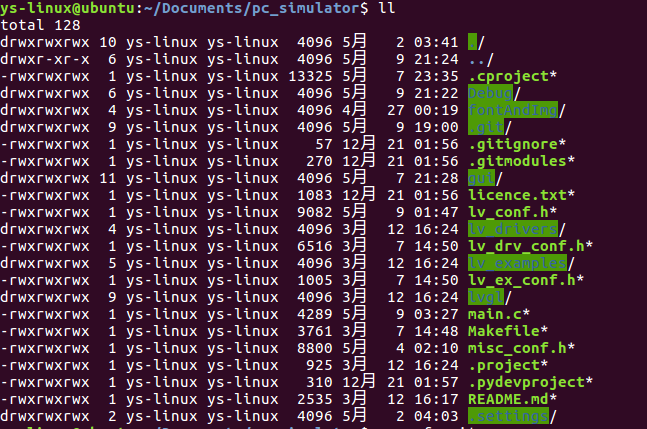
我们使用git服务器的时候不能有.git 文件,所以在此将其删除
ys-linux@ubuntu:~/Documents/pc_simulator$ rm -rf .git

ys-linux@ubuntu:~/Documents/pc_simulator$ rm -rf .gitmodules
然后屏蔽上传编译文件
ys-linux@ubuntu:~/Documents/pc_simulator$ cat .gitignore

然后创建一个git
登陆服务器创建一个账户
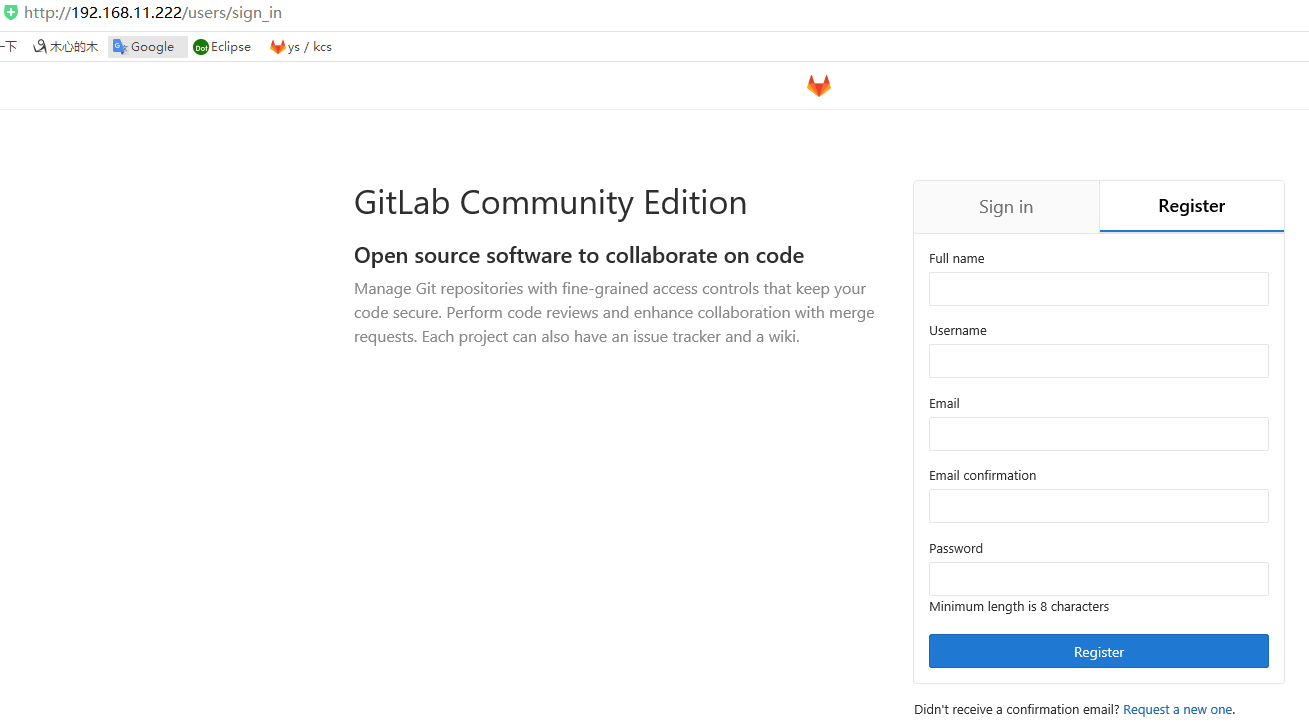
ys-linux@ubuntu:~/Documents/pc_simulator$ git init

Initialized empty Git repository in /home/ys-linux/Documents/pc_simulator/.git/

ys-linux@ubuntu:~/Documents/pc_simulator$ git remote add origin http://192.168.11.222/ys/kcsdr_ui.git

ys-linux@ubuntu:~/Documents/pc_simulator$ git remote -v

origin    http://192.168.11.222/ys/kcsdr_ui.git (fetch)

origin    http://192.168.11.222/ys/kcsdr_ui.git (push)

ys-linux@ubuntu:~/Documents/pc_simulator$ git status
On branch master
Initial commit
Untracked files:
(use "git add <file>..." to include in what will be committed)
.cproject
.gitignore
.project
Makefile
README.md
fontAndImg/
gui/
licence.txt
lv_conf.h
lv_drivers/
lv_drv_conf.h
lv_ex_conf.h
lv_examples/
lvgl/
main.c
misc_conf.h
nothing added to commit but untracked files present (use "git add" to track)
现在库创建好了,然后增加内容
ys-linux@ubuntu:~/Documents/pc_simulator$ git add .

ys-linux@ubuntu:~/Documents/pc_simulator$ git status

On branch master

Initial commit

Changes to be committed:

  (use "git rm --cached <file>..." to unstage)

    new file:   .cproject

    new file:   .gitignore

    new file:   .project

.......................................................
然后填写更新内容
ys-linux@ubuntu:~/Documents/pc_simulator$ git commit -m "<base> <first commit>"

*** Please tell me who you are.

Run

  git config --global user.email "you@example.com"

  git config --global user.name "Your Name"

to set your account's default identity.

Omit --global to set the identity only in this repository.

fatal: unable to auto-detect email address (got 'ys-linux@ubuntu.(none)')

ys-linux@ubuntu:~/Documents/pc_simulator$ git config --global user.email "ys@qq.com"

ys-linux@ubuntu:~/Documents/pc_simulator$ git config --global user.name "ys"

ys-linux@ubuntu:~/Documents/pc_simulator$ git commit -m "<base> <first commit>"

[master (root-commit) 12d5763] <base> <first commit>

  files changed,  insertions(+)

 create mode  .cproject

 create mode  .gitignor

.............................................................
然后将代码上传
ys-linux@ubuntu:~/Documents/pc_simulator$ git status

On branch master

nothing to commit, working directory clean

ys-linux@ubuntu:~/Documents/pc_simulator$ git log

commit 12d57637f6243951d888fa2

Author: ys <ys@qq.com>

Date:   Wed May  ::  -

    <base> <first commit>

ys-linux@ubuntu:~/Documents/pc_simulator$ git push

warning: push.default is unset; its implicit value has changed in

Git 2.0 from 'matching' to 'simple'. To squelch this message

and maintain the traditional behavior, use:

  git config --global push.default matching

To squelch this message and adopt the new behavior now, use:

  git config --global push.default simple

When push.default is set to 'matching', git will push local branches

to the remote branches that already exist with the same name.

Since Git 2.0, Git defaults to the more conservative 'simple'

behavior, which only pushes the current branch to the corresponding

remote branch that 'git pull' uses to update the current branch.

See 'git help config' and search for 'push.default' for further information.

(the 'simple' mode was introduced in Git 1.7.. Use the similar mode

'current' instead of 'simple' if you sometimes use older versions of Git)

fatal: The current branch master has no upstream branch.

To push the current branch and set the remote as upstream, use

    git push --set-upstream origin master

ys-linux@ubuntu:~/Documents/pc_simulator$ git push --set-upstream origin master

Username for 'http://192.168.11.222': ys

Password for 'http://ys@192.168.11.222': *********

...............................
获取根密钥
ys-linux@ubuntu:~/Documents/pc_simulator$ ssh-keygen
ys-linux@ubuntu:~/Documents/pc_simulator$ cat ~/.ssh/id_rsa
-----BEGIN RSA PRIVATE KEY-----
MIIEpAIBAAKCAQEAo59EMzaF8H3p8u/Ad21xm9kAHatj82Dt5G2Cl0teDibTX/IP
THAynvHKCVX+khgBJuXaAAc1rij***********8y67ZvPfMqKb9YeURw69c
lnudgUmnvWuwqnTvptwsnsI9DdddILAaTr6zWMzu7jiX1Xr67pqUbaq3utAKb8v/
d1/frf4FZu1jAY3K1ST7fsj/f6rTOLm3Z/iM8SZoOuvYBnhsFjy2LC3E0NHzpN+S
wt7HssG9BAYSjSOlLYUEy+EocF**************b96ErNtiNezgzeKsBXk49CmQ
Qoa16Rg6pxs1GhQmdJ8YPzBQLoGRz+M8jrzI2wIDAQABAoIBAGCmW2rE8ik0t1TB
An7g/z2fU31HyGBQq6hqS8oxyjJt1ngVUcb3bWutF12X16DXFDYYV1aSa7oW7iIJ
ZkpuPwKBgQDK*****************************x2ZuuprQBHaiOCdWCT0gHA9
2qr4HRvJF5RTSv/ukct2azlpPvdq0Au5WX/t+N9KjBx7IE9AkXi1K6RtvflsUui8
cIuohVQGC54FxrHda6SU22XEcPcueyoq5Pzs55qdVi9VHAe0ziTRoQ==
-----END RSA PRIVATE KEY-----
将获取的根密钥贴在git网站上
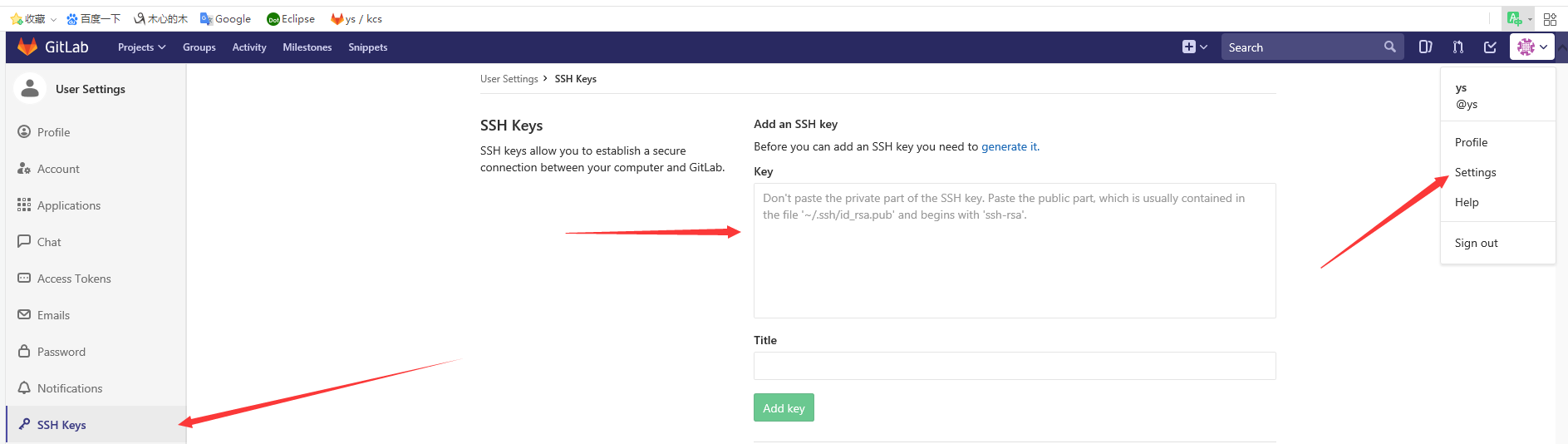
贴上网站后
ys-linux@ubuntu:~/Documents/pc_simulator$ cat ~/.ssh/id_rsa.pub
ys-linux@ubuntu:~/Documents/pc_simulator$ git config --global push.default simple
ys-linux@ubuntu:~/Documents/pc_simulator$ git remote remove origin
ys-linux@ubuntu:~/Documents/pc_simulator$ git remote -v
ys-linux@ubuntu:~/Documents/pc_simulator$ git remote add origin git@192.168.11.222:ys/kcsdr_ui.git -----这里写你上传的本地服务器的地址
ys-linux@ubuntu:~/Documents/pc_simulator$ git remote -v
然后可以正常使用git了
更新代码
git add .
更新提示信息
git commit -m "<update>"
抓取已经存在的代码
git pull
上传本地的代码
git push
git 服务器 LINUX端的使用的更多相关文章
- (转)初学Git及简单搭建git服务器和客户端
终于搞定,mac自己作为git服务器,mac也是客户端,如何免登 从另外一个linux服务器的上传公钥得到提示 ssh-copy-id -i ~/.ssh/id_rsa.pub git@192.168 ...
- git-搭建企业git服务器
1.安装 yum install git 2.增加用户 useradd git -d /home/git -g git 3.查看公钥鉴权文件是否存在 cat /home/git/.ssh/autho ...
- 搭建Git服务器及本机克隆提交
前文 Git是什么? Git是目前世界上最先进的分布式版本控制系统. SVN与Git的最主要的区别? SVN是集中式版本控制系统,版本库是集中放在中央服务器的,而干活的时候,用的都是自己的电脑,所以首 ...
- 在 Linux 下搭建 Git 服务器
环境: 服务器 CentOS6.6 + git(version 1.7.1)客户端 Windows10 + git(version 2.8.4.windows.1) ① 安装 Git Linux 做为 ...
- Linux Ubuntu搭建git服务器
1. 安装 openssh-server ,用于创建SSH服务. sudo apt-get install openssl-server 使用命令ps -e|grep ssh,查看ssh服务是否启动. ...
- 在LINUX上创建GIT服务器【转】
转自:http://blog.csdn.net/xiongmc/article/details/9176785 如果使用git的人数较少,可以使用下面的步骤快速部署一个git服务器环境. 1. Cli ...
- 在 Linux 下搭建 Git 服务器(yum安装)
服务端(linux): 1. 安装git [root@localhost ~]# yum -y install git 2. 增加一个git账户 为了管理的方便,在linux下面增添一个 " ...
- 阿里云 linux搭建git服务器
git是非常方便的版本控制工具,目前网上有很多免费的git仓库可以给我们使用,但是有些时候我们并不放心将我们的项目寄放在别人的服务器上,这个时候就需要自己搭建一个git服务器. 在linux上面搭建g ...
- Windows/Linux 环境搭建Git服务器 + vs2012集成git
1. 下载.安装Git 我的系统是Windows 7,需要安装Git for Windows. 下载地址: http://code.google.com/p/msysgit/downloads/lis ...
随机推荐
- ASP.net中用到的JWT
1.先通过NuGet添加JWT 2.新建一个JwtHelp类 public class JwtHelp { //私钥 web.config中配置 //"GQDstcKsx0NHjPOuXOY ...
- icpc 南昌邀请赛网络赛 Subsequence
题目链接:https://nanti.jisuanke.com/t/38232 就是判断输入是不是子序列 没想到贡献了将近十几次罚时..........可以说是菜的真实了 用cin cout超时了 改 ...
- python-装饰器的最终形态和固定格式 语法糖
import time def timer(f): # 这是一个装饰器函数 def inner(): start = time.time() f() # 被装饰的函数 end = time.time( ...
- HTML一
什么是前端: 前端,也称web前端对于网站来说,通常是指网站的前台部分,通俗点就是用户可以看到的部分, 浏览器.APP.应用程序的界面展现和用户交互就是前端 前端要学习那些技术:html+css+ja ...
- docker容器的安装与使用
docker 容器概念 1.什么是容器 容器就是在隔离环境运行的一个进程,如果进程停止,容器就会销毁.隔离的环境拥有自己的系统文件,IP地址,主机名等. kvm虚拟机,linux,系统文件 程序: 代 ...
- php 两个数组,若键相同,则值合并
<?php $arr1 = array('9' => '4.08', '10' => '0.10', '11' => '4.08', '12' => '0.01'); $ ...
- LCA Binary Lifting 倍增
留坑 待填 一篇不错的CF博客 这篇纯讲理论的,比较清楚. 去CF上搜Gym algorithm 可以看到很多算法文章.
- Arrays和String单元测试(课下作业,选做)
在IDEA中以TDD的方式对String类和Arrays类进行学习- 测试相关方法的正常,错误和边界情况 - String类 - charAt - split - Arrays类 - sort - b ...
- <02>labSQL的配置和使用方法
任务布置:制作简单地铁站点管理系统<2> 要求一:正确配置系统,建立基本正常的数据通道:要求二:实现地铁站点的登记,拥有查询功能: 正文: 今天介绍labview虚拟仪器软件中 labS ...
- [Luogu P2966][BZOJ 1774][USACO09DEC]牛收费路径Cow Toll Paths
原题全英文的,粘贴个翻译题面,经过一定的修改. 跟所有人一样,农夫约翰以宁教我负天下牛,休叫天下牛负我的伟大精神,日日夜夜苦思生财之道.为了发财,他设置了一系列的规章制度,使得任何一只奶牛在农场中的道 ...