
马昕璐 201771010118《面向对象程序设计(java)》第十六周学习总结
第一部分:理论知识学习部分
程序:一段静态的代码,应用程序执行的蓝本。
进程:是程序的一次动态执行,它对应了从代码加载、执行至执行完毕的一个完整过程。
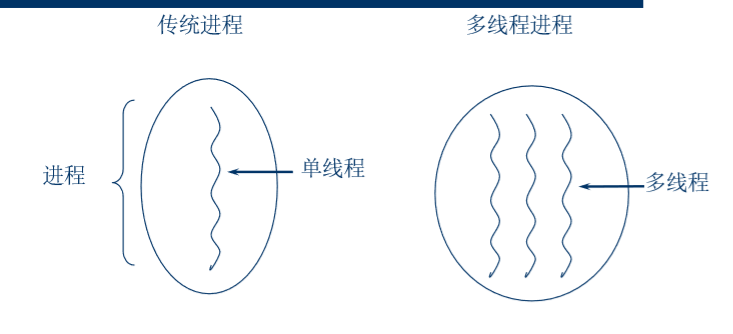
多线程:进程执行过程中产生的多条执行线索,比进程执行更小的单位。
线程不能独立存在,必须存在于进程中,同一进程的各线程间共享进程空间的数据。
每个线程有它自身的产生、存在和消亡的过程, 是一个动态的概念。
多线程意味着一个程序的多行语句可以看上去几 乎在同一时间内同时运行。
线程创建、销毁和切换的负荷远小于进程,又称 为轻量级进程
Java实现多线程有两种途径:
‐创建Thread类的子类
‐在程序中定义实现Runnable接口的类
用Thread类的子类创建多线程的关键性操作:
–定义Thread类的子类并实现用户线程操作,即 run()方法的实现。
–在适当的时候启动线程。
由于Java只支持单重继承,用这种方法定义的类不 可再继承其他父类。
二、实验部分
1、实验目的与要求
(1) 掌握线程概念;
(2) 掌握线程创建的两种技术;
(3) 理解和掌握线程的优先级属性及调度方法;
(4) 掌握线程同步的概念及实现技术;
2、实验内容和步骤
实验1:测试程序并进行代码注释。
测试程序1:
l 在elipse IDE中调试运行ThreadTest,结合程序运行结果理解程序;
l 掌握线程概念;
l 掌握用Thread的扩展类实现线程的方法;
l 利用Runnable接口改造程序,掌握用Runnable接口创建线程的方法。
|
class Lefthand extends Thread { public void run() { for(int i=0;i<=5;i++) { System.out.println("You are Students!"); try{ sleep(500); } catch(InterruptedException e) { System.out.println("Lefthand error.");} } } } class Righthand extends Thread { public void run() { for(int i=0;i<=5;i++) { System.out.println("I am a Teacher!"); try{ sleep(300); } catch(InterruptedException e) { System.out.println("Righthand error.");} } } } public class ThreadTest { static Lefthand left; static Righthand right; public static void main(String[] args) { left=new Lefthand(); right=new Righthand(); left.start(); right.start(); } } |
Runnable接口改造的程序:
class Lefthand extends Thread {
   public void run()
   {
       for(int i=0;i<=5;i++)
       {  System.out.println("You are Students!");
           try{   sleep(500);   }//在指定的毫秒数内让当前正在执行的线程休眠(暂停执行
           catch(InterruptedException e)
           //当线程在活动之前或活动期间处于正在等待、休眠或占用状态且该线程被中断时,抛出该异常。有时候,一种方法可能希望测试当前线程是否已被中断,如果已被中断,则立即抛出此异常。
           { System.out.println("Lefthand error.");}
       }
  }
}
class Righthand extends Thread {
    public void run()
    {
         for(int i=0;i<=5;i++)
         {   System.out.println("I am a Teacher!");
             try{  sleep(300);  }
             catch(InterruptedException e)
             { System.out.println("Righthand error.");}
         }
    }
}
public class ThreadTest
{
     static Lefthand left;
     static Righthand right;
     public static void main(String[] args) {
         Runnable left1 = new Lefthand();
         Runnable right1 = new Righthand() ;
         Thread left = new Thread(left1);
         Thread right = new Thread(right1);
         left.start();//使该线程开始执行;Java 虚拟机调用该线程的 run 方法。
         right.start();
     }
}
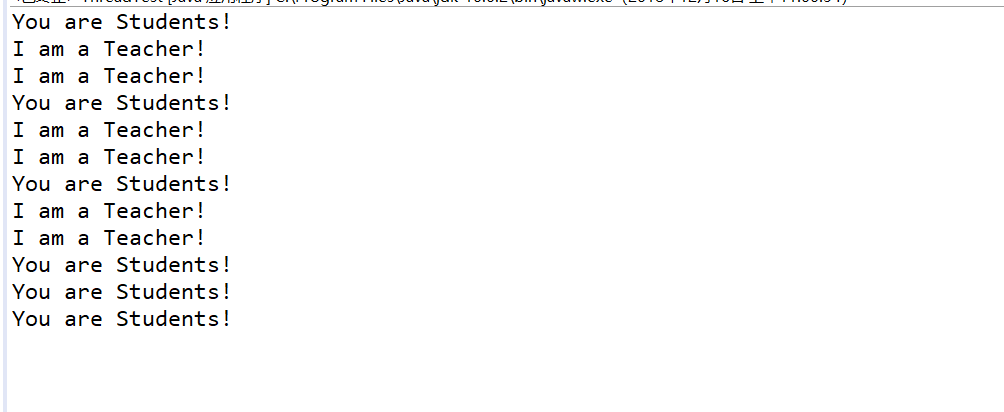
运行结果均为:
测试程序2:
l 在Elipse环境下调试教材625页程序14-1、14-2 、14-3,结合程序运行结果理解程序;
l 在Elipse环境下调试教材631页程序14-4,结合程序运行结果理解程序;
l 对比两个程序,理解线程的概念和用途;
l 掌握线程创建的两种技术。
package bounce;

import java.awt.*;
import java.awt.event.*;
import javax.swing.*;

/**
 * Shows an animated bouncing ball.
 * @version 1.34 2015-06-21
 * @author Cay Horstmann
 */
public class Bounce
{
   public static void main(String[] args)
   {
      EventQueue.invokeLater(() -> {
         JFrame frame = new BounceFrame();
         frame.setDefaultCloseOperation(JFrame.EXIT_ON_CLOSE);
         frame.setVisible(true);
      });
   }
}

Bounce
package bounce;

import java.awt.*;
import java.util.*;
import javax.swing.*;

/**
 * The component that draws the balls.
 * @version 1.34 2012-01-26
 * @author Cay Horstmann
 */
public class BallComponent extends JPanel
{
   private static final int DEFAULT_WIDTH = 450;
   private static final int DEFAULT_HEIGHT = 350;

   private java.util.List<Ball> balls = new ArrayList<>();

   /**
    * Add a ball to the component.
    * @param b the ball to add
    */
   public void add(Ball b)
   {
      balls.add(b);
   }

   public void paintComponent(Graphics g)
   {
      super.paintComponent(g); // erase background
      Graphics2D g2 = (Graphics2D) g;
      for (Ball b : balls)
      {
         g2.fill(b.getShape());
      }
   }

   public Dimension getPreferredSize() { return new Dimension(DEFAULT_WIDTH, DEFAULT_HEIGHT); }
}
package bounce;

import java.awt.geom.*;

/**
 * A ball that moves and bounces off the edges of a rectangle
 * @version 1.33 2007-05-17
 * @author Cay Horstmann
 */
public class Ball
{
   private static final int XSIZE = 15;
   private static final int YSIZE = 15;
   private double x = 0;
   private double y = 0;
   private double dx = 1;
   private double dy = 1;

   /**
    * Moves the ball to the next position, reversing direction if it hits one of the edges
    */
   public void move(Rectangle2D bounds)
   {
      x += dx;
      y += dy;
      if (x < bounds.getMinX())
      {
         x = bounds.getMinX();
         dx = -dx;
      }
      if (x + XSIZE >= bounds.getMaxX())
      {
         x = bounds.getMaxX() - XSIZE;
         dx = -dx;
      }
      if (y < bounds.getMinY())
      {
         y = bounds.getMinY();
         dy = -dy;
      }
      if (y + YSIZE >= bounds.getMaxY())
      {
         y = bounds.getMaxY() - YSIZE;
         dy = -dy;
      }
   }

   /**
    * Gets the shape of the ball at its current position.
    */
   public Ellipse2D getShape()
   {
      return new Ellipse2D.Double(x, y, XSIZE, YSIZE);
   }
}
运行结果: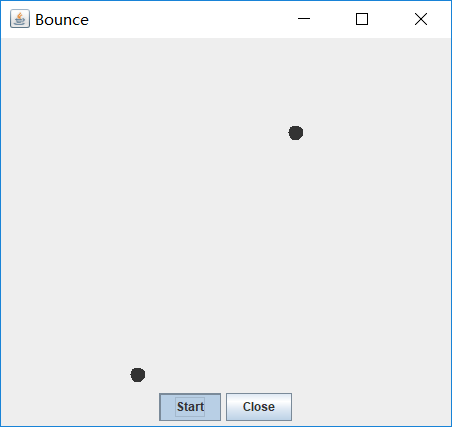
测试程序3:
分析以下程序运行结果并理解程序。
|
class Race extends Thread { public static void main(String args[]) { Race[] runner=new Race[4]; for(int i=0;i<4;i++) runner[i]=new Race( ); for(int i=0;i<4;i++) runner[i].start( ); runner[1].setPriority(MIN_PRIORITY); runner[3].setPriority(MAX_PRIORITY);} public void run( ) { for(int i=0; i<1000000; i++); System.out.println(getName()+"线程的优先级是"+getPriority()+"已计算完毕!"); } } |
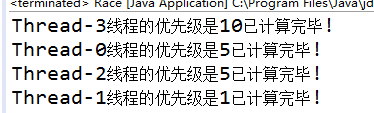
运行结果:
测试程序4
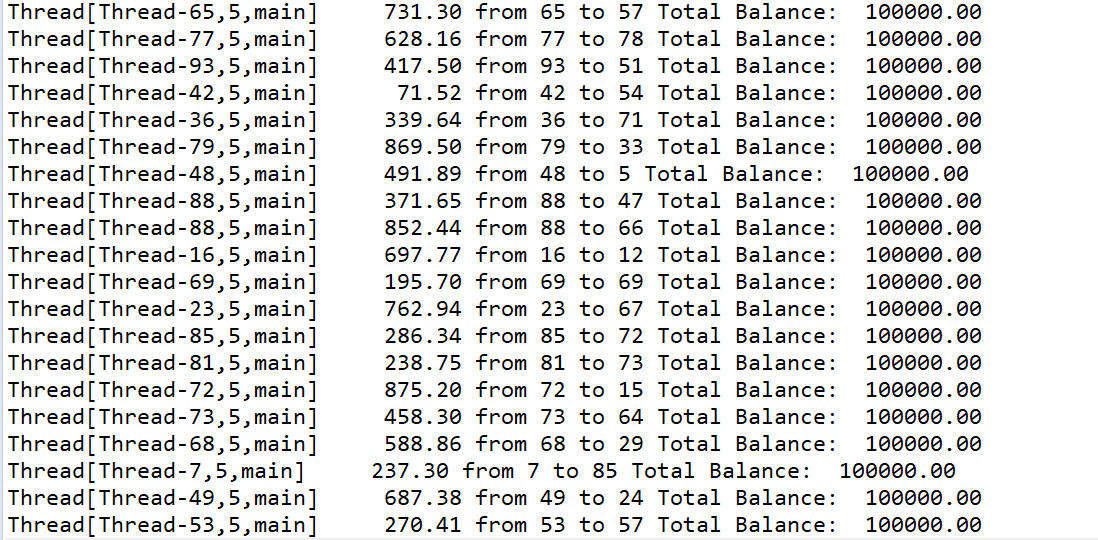
l 教材642页程序模拟一个有若干账户的银行,随机地生成在这些账户之间转移钱款的交易。每一个账户有一个线程。在每一笔交易中,会从线程所服务的账户中随机转移一定数目的钱款到另一个随机账户。
l 在Elipse环境下调试教材642页程序14-5、14-6,结合程序运行结果理解程序;
package synch;

/**
 * This program shows how multiple threads can safely access a data structure.
 * @version 1.31 2015-06-21
 * @author Cay Horstmann
 */
public class SynchBankTest
{
   public static final int NACCOUNTS = 100;
   public static final double INITIAL_BALANCE = 1000;
   public static final double MAX_AMOUNT = 1000;
   public static final int DELAY = 10;

   public static void main(String[] args)
   {
      Bank bank = new Bank(NACCOUNTS, INITIAL_BALANCE);
      for (int i = 0; i < NACCOUNTS; i++)
      {
         int fromAccount = i;
         Runnable r = () -> {
            try
            {
               while (true)
               {
                  int toAccount = (int) (bank.size() * Math.random());
                  double amount = MAX_AMOUNT * Math.random();
                  bank.transfer(fromAccount, toAccount, amount);
                  Thread.sleep((int) (DELAY * Math.random()));
               }
            }
            catch (InterruptedException e)
            {
            }
         };
         Thread t = new Thread(r);
         t.start();
      }
   }
}
package synch;

import java.util.*;
import java.util.concurrent.locks.*;

/**
 * A bank with a number of bank accounts that uses locks for serializing access.
 * @version 1.30 2004-08-01
 * @author Cay Horstmann
 */
public class Bank
{
   private final double[] accounts;
   private Lock bankLock;
   private Condition sufficientFunds;

   /**
    * Constructs the bank.
    * @param n the number of accounts
    * @param initialBalance the initial balance for each account
    */
   public Bank(int n, double initialBalance)
   {
      accounts = new double[n];
      Arrays.fill(accounts, initialBalance);
      bankLock = new ReentrantLock();
      sufficientFunds = bankLock.newCondition();
   }

   /**
    * Transfers money from one account to another.
    * @param from the account to transfer from
    * @param to the account to transfer to
    * @param amount the amount to transfer
    */
   public void transfer(int from, int to, double amount) throws InterruptedException
   {
      bankLock.lock();
      try
      {
         while (accounts[from] < amount)
            sufficientFunds.await();
         System.out.print(Thread.currentThread());
         accounts[from] -= amount;
         System.out.printf(" %10.2f from %d to %d", amount, from, to);
         accounts[to] += amount;
         System.out.printf(" Total Balance: %10.2f%n", getTotalBalance());
         sufficientFunds.signalAll();
      }
      finally
      {
         bankLock.unlock();
      }
   }

   /**
    * Gets the sum of all account balances.
    * @return the total balance
    */
   public double getTotalBalance()
   {
      bankLock.lock();
      try
      {
         double sum = 0;

         for (double a : accounts)
            sum += a;

         return sum;
      }
      finally
      {
         bankLock.unlock();
      }
   }

   /**
    * Gets the number of accounts in the bank.
    * @return the number of accounts
    */
   public int size()
   {
      return accounts.length;
   }
}
综合编程练习
编程练习1
- 设计一个用户信息采集程序,要求如下:
(1) 用户信息输入界面如下图所示:
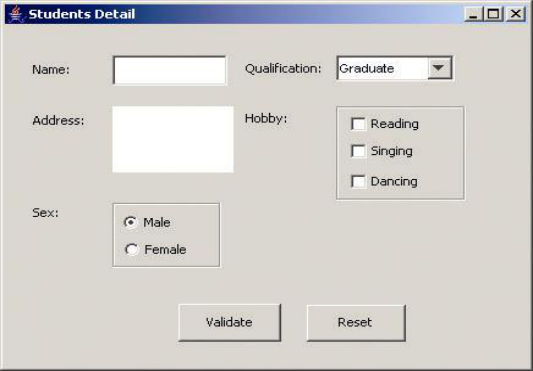
(2) 用户点击提交按钮时,用户输入信息显示控制台界面;
(3) 用户点击重置按钮后,清空用户已输入信息;
(4) 点击窗口关闭,程序退出。
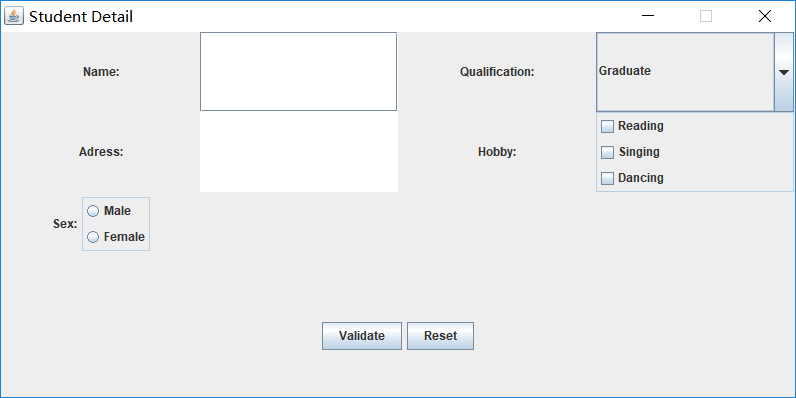
package demo;

import java.awt.*;
import javax.swing.*;

public class Test {
    public static void main(String[] args) {
        EventQueue.invokeLater(() -> {
            Frame frame = new Frame();
            frame.setTitle("Student Detail");
            frame.setDefaultCloseOperation(JFrame.EXIT_ON_CLOSE);
            frame.setVisible(true);
            frame.setResizable(false);
        });
    }
}
package demo;

import java.awt.*;
import javax.swing.*;
import java.awt.event.*;

public class Frame extends JFrame {
    private JPanel panel;
    private JPanel panel1;
    private JPanel panel2;
    private JPanel buttonPanel;
    private JComboBox<String> faceCombo;
    private JCheckBox Reading;
    private JCheckBox Singing;
    private JCheckBox Dancing;
    private JPanel panelDanXuan;
    private ButtonGroup option;
    private JRadioButton optionA;
    private JRadioButton optionB;
    private static final int DEFAULT_WITH = 800;
    private static final int DEFAULT_HEIGHT = 400;

    public Frame() {
        //框架a
        panel = new JPanel();
        panel.setPreferredSize(new Dimension(200,160));
        panel.setLayout(new GridLayout(2,4));
        JLabel lab = new JLabel("Name:", JLabel.CENTER);
        final JTextField jt = new JTextField();
        JLabel lab1 = new JLabel("Qualification:", JLabel.CENTER);
        faceCombo = new JComboBox<>();
        faceCombo.addItem("Graduate");
        faceCombo.addItem("Not graduated");
        JLabel lab2 = new JLabel("Adress:", JLabel.CENTER);
        final JTextArea jt1 = new JTextArea();
        JLabel lab3 = new JLabel("Hobby:", JLabel.CENTER);
        panel1 = new JPanel();
        Reading = new JCheckBox("Reading");
        Singing = new JCheckBox("Singing");
        Dancing = new JCheckBox("Dancing ");
        //框架b
        panel2 = new JPanel();
        panel2.setPreferredSize(new Dimension(200,160));
        JLabel lab4 = new JLabel("Sex:", JLabel.CENTER);
        panelDanXuan = new JPanel();
        option = new ButtonGroup();
        optionA = new JRadioButton("Male");
        optionB = new JRadioButton("Female");
        //框架c
        buttonPanel = new JPanel();
        buttonPanel.setPreferredSize(new Dimension(200,80));
        JButton jButton1 = new JButton("Validate");
        JButton jButton2 = new JButton("Reset");

        panel.add(lab);
        panel.add(jt);
        panel.add(lab1);
        panel.add(faceCombo);
        panel.add(lab2);
        panel.add(jt1);
        panel.add(lab3);

        panel1.add(Reading);
        panel1.add(Singing);
        panel1.add(Dancing);
        panel1.setBorder(BorderFactory.createTitledBorder(""));
        panel1.setLayout(new BoxLayout(panel1, BoxLayout.Y_AXIS));
        panel.add(panel1);

        panel2.add(lab4);
        option.add(optionA);
        option.add(optionB);
        panelDanXuan.add(optionA);
        panelDanXuan.add(optionB);
        panelDanXuan.setBorder(BorderFactory.createTitledBorder(""));
        panelDanXuan.setLayout(new BoxLayout(panelDanXuan, BoxLayout.Y_AXIS));

        panel2.add(panelDanXuan);
        buttonPanel.add(jButton1);
        buttonPanel.add(jButton2);
        add(panel, BorderLayout.NORTH);
        add(panel2, BorderLayout.WEST);
        add(buttonPanel, BorderLayout.SOUTH);
        setSize(DEFAULT_WITH, DEFAULT_HEIGHT);

        jButton1.addActionListener(new ActionListener() {
            public void actionPerformed(ActionEvent e) {
                String Name = jt.getText();
                if (Name != null) {
                    System.out.println("Name:"+Name);
                }
                String m = faceCombo.getSelectedItem().toString();
                System.out.println("Qualification:"+m);
                String Adress = jt1.getText();
                if (Adress != null) {
                    System.out.println("Adress:"+Adress);
                }
                System.out.println("Hobby:");
                if(Reading.isSelected()) {
                System.out.println(Reading.getText());
                }
                if(Singing.isSelected()) {
                System.out.println(Singing.getText());
                }
                if(Dancing.isSelected()) {
                System.out.println(Dancing.getText());
                }
                System.out.println("Sex:");
                if(optionA.isSelected()) {
                System.out.println(optionA.getText());
                }
                if(optionB.isSelected()) {
                System.out.println(optionB.getText());
                }
            }
        });
        jButton2.addActionListener(new ActionListener() {
            public void actionPerformed(ActionEvent e) {
                jt.setText("");
                jt1.setText("");
                faceCombo.setSelectedItem("Graduate");
                Reading.setSelected(false);
                Singing.setSelected(false);
                Dancing.setSelected(false);
                option.clearSelection();
            }
        });
    }
}
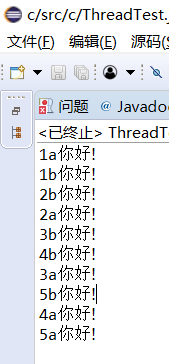
2.创建两个线程,每个线程按顺序输出5次“你好”,每个“你好”要标明来自哪个线程及其顺序号。
package demo;

class Lefthand extends Thread {
    public void run() {
        for (int i = 1; i <= 5; i++) {
            System.out.println(i+":a.你好!");
            try {
                sleep(300);
            } catch (InterruptedException e) {
                System.out.println("Lefthand error.");
            }
        }
    }
}

class Righthand extends Thread {
    public void run() {
        for (int i = 1; i <= 5; i++) {
            System.out.println(i+":b.你好!");
            try {
                sleep(300);
            } catch (InterruptedException e) {
                System.out.println("Righthand error.");
            }
        }
    }
}

public class ThreadTest {
    static Lefthand left;
    static Righthand right;

    public static void main(String[] args) {
        left = new Lefthand();
        right = new Righthand();
        left.start();
        right.start();
    }
}
3. 完善实验十五 GUI综合编程练习程序。
实验总结:通过这周的学习知道了什么是线程、 掌握了线程创建的两种技术,实现Runnable接口。理解和掌握线程的优先级属性及调度方法,但没有完全掌握。
马昕璐 201771010118《面向对象程序设计(java)》第十六周学习总结的更多相关文章
- 201771010118马昕璐《面向对象程序设计java》第八周学习总结
第一部分:理论知识学习部分 1.接口 在Java程序设计语言中,接口不是类,而是对类的一组需求描述,由常量和一组抽象方法组成.Java为了克服单继承的缺点,Java使用了接口,一个类可以实现一个或多个 ...
- 201771010118 马昕璐《面向对象程序设计java》第十二周学习总结
第一部分:理论知识学习部分 用户界面:用户与计算机系统(各种程序)交互的接口 图形用户界面:以图形方式呈现的用户界面 AET:Java 的抽象窗口工具箱包含在java.awt包中,它提供了许多用来设计 ...
- 201771010118 马昕璐《面向对象程序设计java》第十周学习总结
第一部分:理论知识学习部分 泛型:也称参数化类型(parameterized type)就是在定义类.接口和方法时,通过类型参数 指示将要处理的对象类型. 泛型程序设计(Generic program ...
- 201771010118 马昕璐 《面向对象设计 java》第十七周实验总结
1.实验目的与要求 (1) 掌握线程同步的概念及实现技术: (2) 线程综合编程练习 2.实验内容和步骤 实验1:测试程序并进行代码注释. 测试程序1: l 在Elipse环境下调试教材651页程序1 ...
- 201571030332 扎西平措 《面向对象程序设计Java》第八周学习总结
<面向对象程序设计Java>第八周学习总结 项目 内容 这个作业属于哪个课程 https://www.cnblogs.com/nwnu-daizh/ 这个作业的要求在哪里 https: ...
- 201771010134杨其菊《面向对象程序设计java》第八周学习总结
第八周学习总结 第一部分:理论知识 一.接口.lambda和内部类: Comparator与comparable接口: 1.comparable接口的方法是compareTo,只有一个参数:comp ...
- 201771010118 马昕璐 《面向对象程序设计(java)》第十三周学习总结
第一部分:理论知识学习部分 事件处理基础 1.事件源(event source):能够产生事件的对象都可以成为事件源.一个事件源是一个能够注册监听器并向监听器发送事件对象的对象. 2.事件监听器(ev ...
- 201771010134杨其菊《面向对象程序设计java》第七周学习总结
第七周学习总结 第一部分:理论知识 1.继承是面向对象程序设计(Object Oriented Programming-OOP)中软件重用的关键技术.继承机制使用已经定义的类作为基础建立新的类定义,新 ...
- 201771010128 王玉兰《面象对象程序设计 (Java) 》第六周学习总结
---恢复内容开始--- 第一部分:基础知识总结: 1.继承 A:用已有类来构建新类的一种机制,当定义了一个新类继承一个类时,这个新类就继承了这个类的方法和域以适应新的情况: B:特点:具有层次结构. ...
- 201871010126 王亚涛《面向对象程序设计 JAVA》 第十三周学习总结
内容 这个作业属于哪个课程 https://www.cnblogs.com/nwnu-daizh/ 这个作业的要求在哪里 https://www.cnblogs.com/nwnu-daizh/p/ ...
随机推荐
- 哇,快看,那里有React Native的坑
一.红黑屏,我的天呀,怎么办?睡一觉吧 第一次玩React Native,按着文档来,跑着跑着,咦,红黑屏了. 怎么办?不玩了?那先放着,过两天再来看看咯. 二.粗心大意,原来还有配置没配好 好了,已 ...
- $HOME
Ubuntu中 命令行输入$HOME bash: /home/XXX: Is a directory $HOME 是用户主目录
- day13 闭包及装饰器
""" 今日内容: 1.函数的嵌套定义及必包 2.global 与 nonlocal 关键字 3.开放封闭原则及装饰器 """ " ...
- 「luogu2569」[ZJOI2006] 书架
「luogu2569」[ZJOI2006]书架 题目大意 给定一个长度为 \(n\) 序列,序列中第 \(i\) 个元素有编号 \(a_i(a_i \in \Z \cap [1,n])\),需要支持五 ...
- 极客时间-左耳听风-程序员攻略-Linux系统、内存和网络
程序员练级攻略:Linux系统.内存和网络 Linux 系统相关 Red Hat Enterprise Linux 文档 . Linux Insides ,GitHub 上的一个开源电子书,其中讲述了 ...
- 计算机网络基础——OSI七层网络模型
计算机网络基础——OSI七层网络模型 OSI的是什么: 开放式系统互联通信参考模型(英语:Open System Interconnection Reference Model,缩写为 OSI),简称 ...
- 初学python之路-day08前期总结
# 1# 计算机原理:控制器 运算器 存储器 input设备 output设备 IO流# 三大核心:CPU 内存 硬盘 # 内存分布:栈区 与 堆区# 如二进制与十进制的转换,如1111转成十进制为1 ...
- spring security 学习一
1.配置基本的springboot web项目,加入security5依赖,启动项目 浏览器访问,即可出现一个默认的登录页面 2.什么都没有配置 登录页面哪里来的 一般不知从何入手,就看官方文档里是如 ...
- MySQL数据库快速造大量数据
这段时间做性能测试,发现数据都是分库写进数据库了,并且要构造大量数据,大概4000万的数据量,用普通的方法,写个MySQL函数,之前测试过,大概200万数据也要跑一个多小时,太慢了. 后面研究发现有个 ...
- java 模拟浏览器爬虫