
TextInputLayout 用法
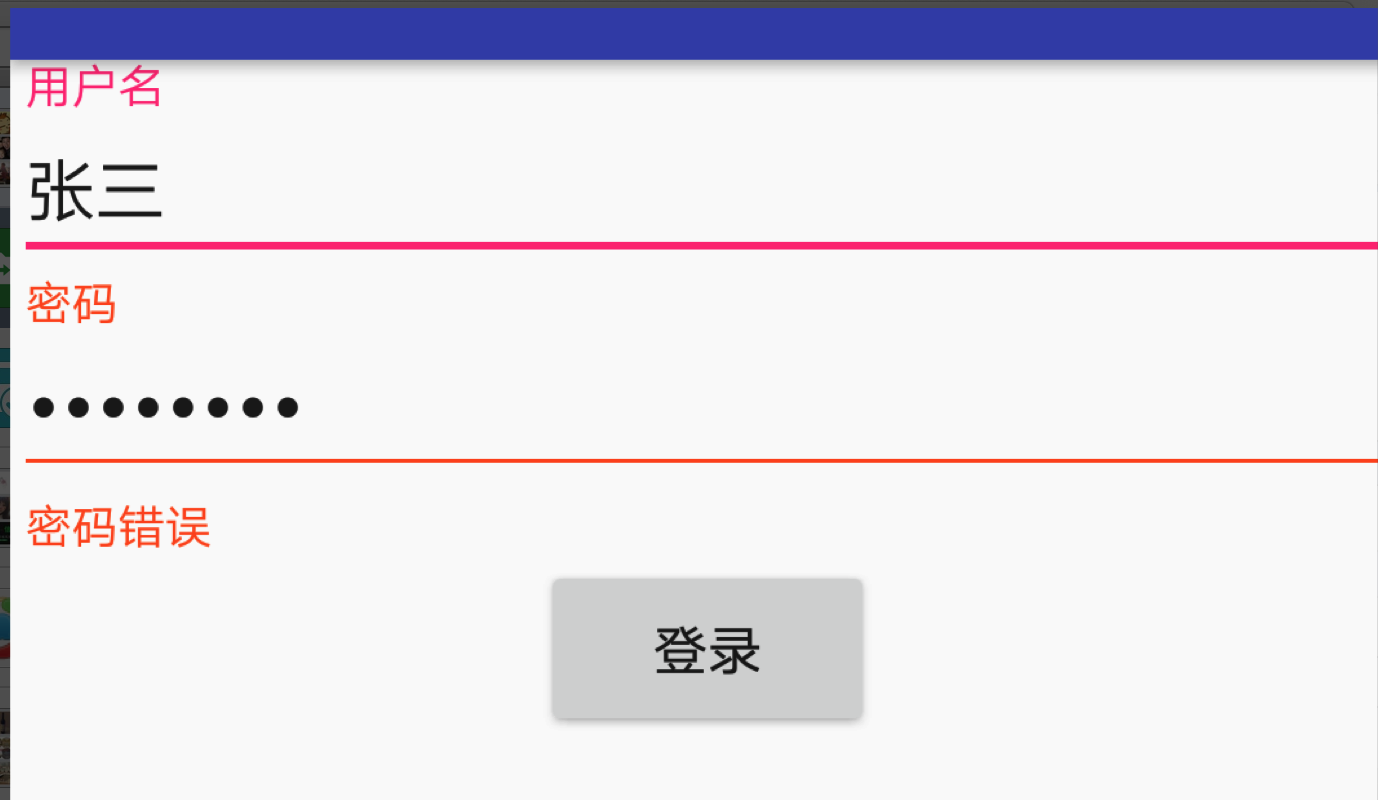
<?xml version="1.0" encoding="utf-8"?>

<LinearLayout

    xmlns:android="http://schemas.android.com/apk/res/android"

    android:layout_width="match_parent"

    android:layout_height="match_parent"

    android:orientation="vertical"

    >

    <!--只能有一个子控件,必须是edit-->

    <android.support.design.widget.TextInputLayout

        android:layout_width="match_parent"

        android:id="@+id/tl_username"

        android:layout_height="wrap_content">

        <android.support.design.widget.TextInputEditText

            android:layout_width="match_parent"

            android:layout_height="wrap_content"

            android:hint="用户名"

            android:maxLength="25"

            android:maxLines="1"

            />

    </android.support.design.widget.TextInputLayout>

    <android.support.design.widget.TextInputLayout

        android:layout_width="match_parent"

        android:id="@+id/tl_password"

        android:layout_height="wrap_content">

        <android.support.design.widget.TextInputEditText

            android:layout_width="match_parent"

            android:layout_height="wrap_content"

            android:hint="密码"

            android:maxLength="25"

            android:maxLines="1"

            android:inputType="textPassword"

            />

    </android.support.design.widget.TextInputLayout>

    <Button

        android:layout_width="wrap_content"

        android:layout_height="wrap_content"

        android:text="登录"

        android:layout_gravity="center_horizontal"

        android:id="@+id/btnLogin"

        />

</LinearLayout>
package com.xiaozhuyisheng.jinjiedemos.activity;

import android.support.design.widget.TextInputLayout;

import android.view.View;

import com.xiaozhuyisheng.jinjiedemos.BaseActivity;

import com.xiaozhuyisheng.jinjiedemos.R;

import butterknife.BindView;

public class TextInputLayoutDemoActivity extends BaseActivity {

    @BindView(R.id.tl_password)

    TextInputLayout tl_password;

    @Override

    protected int initLayoutID() {

        return R.layout.activity_text_input;

    }

    @Override

    protected void initLogic() {

        findViewById(R.id.btnLogin).setOnClickListener(new View.OnClickListener() {

            @Override

            public void onClick(View view) {

                tl_password.setError("密码错误");

            }

        });

    }

}
TextInputLayout 用法的更多相关文章
- Android5.0之TextInputLayout、FloatingActionButton的使用
TextInputLayout和FloatingActionButton都属于MD风格的控件,比起普通的EditText和Button.ImageButton,TextInputLayout和Floa ...
- 【Android - MD】之TextInputLayout的使用
TextInputLayout是Android 5.0新特性--Material Design中的一个布局控件,主要用来嵌套EditText,实现数据输入时的一些效果,如: 当输入框获取焦点时,输入提 ...
- Android学习之Design Support Library中TextInputLayout的使用
今天学习了一个Android Design Support Library 中的TextInputLayout控件,感觉还不错,较之以往的Editetxt,多了几分灵活性,使用也非常easy,故此给大 ...
- Android Material Design控件学习(三)——使用TextInputLayout实现酷市场登录效果
前言 前两次,我们学习了 Android Material Design控件学习(一)--TabLayout的用法 Android Material Design控件学习(二)--Navigation ...
- Android Design Support Library(2)- TextInputLayout的使用
原创文章,转载请注明 http://blog.csdn.net/leejizhou/article/details/50494634 这篇文章介绍下Android Design Support Lib ...
- 【Android - 控件】之MD - TextInputLayout的使用
TextInputLayout是Android 5.0新特性——Material Design中的一个布局控件,主要用来嵌套EditText,实现数据输入时的一些效果,如: 当输入框获取焦点时,输入提 ...
- EditText 基本用法
title: EditText 基本用法 tags: EditText,编辑框,输入框 --- EditText介绍: EditText 在开发中也是经常用到的控件,也是一个比较必要的组件,可以说它是 ...
- jquery插件的用法之cookie 插件
一.使用cookie 插件 插件官方网站下载地址:http://plugins.jquery.com/cookie/ cookie 插件的用法比较简单,直接粘贴下面代码示例: //生成一个cookie ...
- Java中的Socket的用法
Java中的Socket的用法 Java中的Socket分为普通的Socket和NioSocket. 普通Socket的用法 Java中的 ...
随机推荐
- [Luogu P1516]青蛙的约会
按照题意,显然可以列出同余方程,k即为所求天数,再将其化为不定方程 ,那么对这个方程用扩展欧几里德算法即可得出k,q的一组解,但是方程有解的充要条件是(m – n) 和L不同时为零并且x – y是m ...
- 支持动态调频_配置AXP228电源管理_4核8核兼容设计_iTOP-4418/6818开发板
iTOP-4418/6818开发板 支持动态调频,AXP228电源管理, 系统支持:Android4.4/5.1.1.Linux3.4.39.QT2.2/4.7/5.7.Ubuntu12.04 内存: ...
- SQL Server安全
第一篇 SQL Server安全概述 第二篇 SQL Server安全验证 第三篇 SQL Server安全主体和安全对象 第四篇 SQL Server安全权限 第五篇 SQL Server安全架构和 ...
- 分布式系列四: HTTP及HTTPS协议
分布式系列四: HTTP及HTTPS协议 非常全面的一篇HTTP的文章: 关于HTTP协议,一篇就够了 还有一个帮助理解HTTPS的文章: 也许,这样理解HTTPS更容易 本文的一些描述摘自这篇文章 ...
- 深度学习在graph上的使用
原文地址:https://zhuanlan.zhihu.com/p/27216346 本文要介绍的这一篇paper是ICML2016上一篇关于 CNN 在图(graph)上的应用.ICML 是机器学习 ...
- gcc 8.2.1 / MCF thread 简介
gcc 8.2.1 下载 地址 https://gcc-mcf.lhmouse.com/ MCF threadhttps://github.lhmouse.com/ MCF thread 简介MCF ...
- ES--06
第51.初识搜索引擎_上机动手实战多搜索条件组合查询 课程大纲 GET /website/article/_search{ "query": { "bool": ...
- 【原创】大叔问题定位分享(2)spark任务一定几率报错java.lang.NoSuchFieldError: HIVE_MOVE_FILES_THREAD_COUNT
最近用yarn cluster方式提交spark任务时,有时会报错,报错几率是40%,报错如下: 18/03/15 21:50:36 116 ERROR ApplicationMaster91: Us ...
- POJ 3104 Drying
最让HSQ学长头疼的就是洗衣服了.洗完之后,每件衣服都有一定单位水分,在不使用烘干器的情况下,每件衣服每分钟自然流失1个单位水分,但如果使用了烘干机则每分钟流失K个单位水分.令人遗憾是HSQ所在的宿舍 ...
- CentOS 7 中 Systemd详解
一.systemd的由来 Linux一直以来采用init进程但是init有两个缺点: 1.启动时间长.Init进程是串行启动,只有前一个进程启动完,才会启动下一个进程.(这也是CentOS5的主要特征 ...