
图片美化增强AI接口调用手册
在调合合AI平台提供的图片美化增强API接口,API平台链接:https://ai.ccint.com/doc/api/crop_enhance_image, 因为有遇到一些问题,写篇博客记录一下
API文档提供的说明: url中参数app_key为个人中心实例的app_key
请求方式: POST
返回类型: JSON
POST BODY请求字段描述
| 字段 | 说明 |
|---|---|
| image_data | 必填,图像的base64串 |
| app_secret | 必填,个人中心实例的app_secret |
| scan-m | 扫描模式, 建议为 1 |
| detail | 锐化程度,建议为-1 |
| contrast | 对比度 ,建议为 0 |
| bright | 增亮 ,建议为 0 |
| enhanceMode | 增强模式,1:增亮,2:增强并锐化,3:黑白,4:灰度 |
POST BODY,接口要求以Post body方式发送,因为要传base64字符串,请求参数过长有400错误的
{

    "image_data": "", // 必填,图像的base64串

    "app_secret": "" // 必填,个人中心实例的app_secret

  "scan-m": 1, //扫描模式, 建议为 1

  "detail": -1, //锐化程度,建议为-1

  "contrast": 0, //对比度 ,建议为 0

  "bright": 0, //增亮 ,建议为 0

  "enhanceMode": 0 //增强模式,1:增亮,2:增强并锐化,3:黑白,4:灰度

}
提示:POST BODY 为 JSON字符串。
返回字段描述
| 字段 | 说明 |
|---|---|
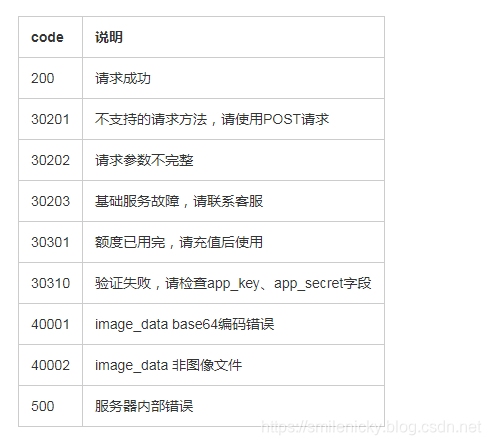
| code | 返回状态码。200:正常返回; 500:服务器内部错误 |
| message | 返回对应code的状态说明 |
| result | base64编码的图片信息 |
正常返回示例
{

    "code": 200,

    "message": "success",

    "result": “图片base64信息”

}
失败返回示例
    {

    "code":30301,

    "message":"额度已用完,请充值后使用"

}
返回码说明
API文档提供的实例代码:
import sun.misc.BASE64Encoder;

import java.io.*;

import java.net.HttpURLConnection;

import java.net.URL;

import java.net.URLConnection;

public class Main {

    public static void main(String[] args) throws Exception {

        String url = "https://ocr-api.ccint.com/ocr_service?app_key=%s";

        String appKey = "xxxxxx"; // your app_key

      String appSecret = "xxxxxx"; // your app_secret

      url = String.format(url, appKey);

        OutputStreamWriter out = null;

        BufferedReader in = null;

        String result = "";

        try {

            String imgData = imageToBase64("example.jpg");

            String param="{\"app_secret\":\"%s\",\"image_data\":\"%s\"}";

            param=String.format(param,appSecret,imgData);

            URL realUrl = new URL(url);

            HttpURLConnection conn = (HttpURLConnection) realUrl.openConnection();

            conn.setRequestProperty("accept", "*/*");

            conn.setRequestProperty("connection", "Keep-Alive");

            conn.setRequestProperty("user-agent", "Mozilla/4.0 (compatible; MSIE 6.0; Windows NT 5.1;SV1)");

            conn.setDoOutput(true);

            conn.setDoInput(true);

            conn.setRequestMethod("POST"); // 设置请求方式

            conn.setRequestProperty("Content-Type", "application/json"); // 设置发送数据的

            conn.connect();

            out = new OutputStreamWriter(conn.getOutputStream(), "UTF-8");

            out.append(param);

            out.flush();

            out.close();

            in = new BufferedReader(new InputStreamReader(conn.getInputStream()));

            String line;

            while ((line = in.readLine()) != null) {

                result += line;

            }

        } catch (Exception e) {

            System.out.println("发送 POST 请求出现异常!" + e);

            e.printStackTrace();

        }

        finally {

            try {

                if (out != null) {

                    out.close();

                }

                if (in != null) {

                    in.close();

                }

            } catch (IOException ex) {

                ex.printStackTrace();

            }

        }

        System.out.println(result);

    }

    public static String imageToBase64(String path)

    {

        String imgFile = path;

        InputStream in = null;

        byte[] data = null;

        try

        {

            in = new FileInputStream(imgFile);

            data = new byte[in.available()];

            in.read(data);

            in.close();

        }

        catch (IOException e)

        {

            e.printStackTrace();

        }

        BASE64Encoder encoder = new BASE64Encoder();

        return encoder.encode(data);

    }

}
注意要点:
- 写文件流时记得outputstream要flush,才能拿到数据
- 接口返回的json格式的数据,同时带有base64的字符串,所以需要json解析一下,然后调工具类,将base64字符串转换为文件,保存在本地,下面给出调用的代码,仅供参考
/**

	 * 图片切边增强接口调用

	 * @author nicky.ma

	 * @date   2019年5月20日下午3:44:27

	 * @param scanM   扫描模式, 建议为 1

	 * @param bright    增亮 ,建议为 0

	 * @param contrast   对比度 ,建议为 0

	 * @param detail     锐化程度,建议为-1

	 * @param sourcePath

	 * @param destPath

	 * detail=0&contrast=0&bright=50  增到最亮

	 * @return

	 */

	public static void ccintCropEnhanceHttpService(final int scanM,final int bright,final int contrast,

			final int detail,final int enhanceMode,String sourcePath,String destPath) throws Exception{

		logger.info("sourcePath:{}"+sourcePath);

		logger.info("destPath:{}"+destPath);

		//base64转换

		final String imgData = imageToBase64(sourcePath);

		Map<String,Object> paramsMap=new HashMap<String,Object>(){

		private static final long serialVersionUID=1L;

		{

				put("image_data",imgData);

				put("app_secret",CCINT_APP_SECRET);

				put("scan-m",scanM);

				put("detail",detail);

				put("contrast",contrast);

				put("bright",bright);

				put("enhanceMode",enhanceMode);

		}};

		String param = JSON.toJSONString(paramsMap);

//		String param="{\"app_secret\":\"%s\",\"image_data\":\"%s\",\"scan-m\":\"%s\",\"detail\":\"%s\",\"contrast\":\"%s\",\"bright\":\"%s\",\"enhanceMode\":\"%s\"}";

//		param=String.format(param,CCINT_APP_SECRET,imgData,scanM,detail,contrast,bright,enhanceMode);

        String url = CCINT_CROP_ENHANCE_URL+"?app_key="+CCINT_APP_KEY;

        OutputStreamWriter out = null;

        BufferedReader in = null;

        String result = "";

        try {

            URL realUrl = new URL(url);

            HttpURLConnection conn = (HttpURLConnection) realUrl.openConnection();

            conn.setConnectTimeout(20*1000);

			conn.setReadTimeout(20*1000);

            conn.setRequestProperty("accept", "*/*");

            conn.setRequestProperty("connection", "Keep-Alive");

            conn.setRequestProperty("user-agent", "Mozilla/4.0 (compatible; MSIE 6.0; Windows NT 5.1;SV1)");

            conn.setDoOutput(true);

            conn.setDoInput(true);

            conn.setRequestMethod("POST"); // 设置请求方式

            //conn.setRequestProperty("transfer-encoding","chunked");

            conn.setRequestProperty("Content-Type", "application/json"); // 设置发送数据的

            conn.connect();

            out = new OutputStreamWriter(conn.getOutputStream(), "UTF-8");

            out.append(param);

            //要记得flush,才能拿到数据

            out.flush();

            out.close();

            in = new BufferedReader(new InputStreamReader(conn.getInputStream()));

            String line;

            while ((line = in.readLine()) != null) {

                result += line;

            }

            logger.info("返回Result:{}"+result);

			int code=conn.getResponseCode();

			if(code==200){

				JSONObject obj = JSON.parseObject(result);

//				copyFileByInputStream(conn.getInputStream(),destPath);

				FileBase64Util.decoderBase64File(obj.getString("result"), destPath);

				logger.info("图片增强后文件大小:{}"+new File(destPath).length()/1024+"KB");

			}

			conn.disconnect();

        } catch (Exception e) {

            logger.error("AI平台接口调用异常:{}"+e);

            e.printStackTrace();

        }finally {

            try {

                if (out != null) {

                    out.close();

                }

                if (in != null) {

                    in.close();

                }

            } catch (IOException ex) {

                ex.printStackTrace();

            }

        }

	}

	private static String imageToBase64(String path)

    {

        String imgFile = path;

        InputStream in = null;

        byte[] data = null;

        try

        {

            in = new FileInputStream(imgFile);

            data = new byte[in.available()];

            in.read(data);

            in.close();

        }

        catch (IOException e)

        {

            e.printStackTrace();

        }

        BASE64Encoder encoder = new BASE64Encoder();

        return encoder.encode(data);

    }
base64字符串和文件转换工具类:
import java.io.File;

import java.io.FileInputStream;

import java.io.FileOutputStream;

import org.apache.commons.codec.binary.Base64;

public class FileBase64Util{

	 /**

	  * 将文件转成base64 字符串

	  * @param path文件路径

	  * @return

	  * @throws Exception

	  */

	 public static String encodeBase64File(String path) throws Exception {

	   File file = new File(path);

	   FileInputStream inputFile = new FileInputStream(file);

	   byte[] buffer = new byte[(int) file.length()];

	   inputFile.read(buffer);

	   inputFile.close();

	   return Base64.encodeBase64String(buffer);

	 }

	 /**

	  * 将base64字符解码保存文件

	  * @param base64String

	  * @param targetPath

	  * @throws Exception

	  */

	 public static void decoderBase64File(String base64String, String targetPath)throws Exception {

	     byte[] buffer=Base64.decodeBase64(base64String);

	     FileOutputStream out = new FileOutputStream(targetPath);

	     out.write(buffer);

	     out.close();

	 }

	 /**

	  * 将base64字符保存文本文件

	  * @param base64Code

	  * @param targetPath

	  * @throws Exception

	  */

	 public static void toFile(String base64Code, String targetPath)throws Exception {

	    byte[] buffer=base64Code.getBytes();

	    FileOutputStream out = new FileOutputStream(targetPath);

	    out.write(buffer);

	    out.close();

	  }

	 public static void main(String[] args){

	     try{

	        String base64String=${base64字符串};

	        decoderBase64File(encodeBase64File("d://2018-11-27 14_34_28_reject_dq.pdf"),"D:/2.pdf");

	     }catch(Exception e){

	        e.printStackTrace();

	     }

	 }

}
图片美化增强AI接口调用手册的更多相关文章
- 百度AI接口调用
创建应用 登录网站 登录www.ai.baidu.com 进入控制台 进入语音技术 创建应用 管理应用 技术文档 SDK开发文档 接口能力 版本更新记录 注意事项 目前本SDK的功能同REST API ...
- 百度ai 接口调用
1.百度智能云 2.右上角 管理控制台 3.左上角产品服务 选择应用 4.创建应用 5.应用详情下面的查看文档 6.选择pythonSDK 查看下面快速入门文档 和 接口说明文档. 7.按步骤写 ...
- WebApiClientCore简约调用百度AI接口
WebApiClientCore WebApiClient.JIT/AOT的netcore版本,集高性能高可扩展性于一体的声明式http客户端库,特别适用于微服务的restful资源请求,也适用于各种 ...
- PJzhang:exiftool图片信息提取工具和短信接口调用工具TBomb
猫宁!!! 作者:Phil Harvey 这是图片信息提取工具的地址: https://sno.phy.queensu.ca/~phil/exiftool/ 网站隶属于Sudbury 中微子天文台,从 ...
- OpenCV4Android开发之旅(一)----OpenCV2.4简介及 app通过Java接口调用OpenCV的示例
转自: http://blog.csdn.net/yanzi1225627/article/details/16917961 开发环境:windows+ADT Bundle+CDT+OpenCV-2 ...
- 阿里云OCR图片转换成文字识别调用
using Newtonsoft.Json; using System; using System.Collections.Generic; using System.Drawing; using S ...
- Python库 - Albumentations 图片数据增强库
Python图像处理库 - Albumentations,可用于深度学习中网络训练时的图片数据增强. Albumentations 图像数据增强库特点: 基于高度优化的 OpenCV 库实现图像快速数 ...
- 记一次TCP重发接口调用的问题
问题描述:基于微软RDP协议,使用开源rdp库与微软skpye软件进行基于tcp的p2p通讯,由于rdp协议传输原始图片数据较大,调用公司内部ice p2p通讯接口处会导致失败. 错误思路:一开始是怀 ...
- Spring-Boot ☞ ShapeFile文件读写工具类+接口调用
一.项目目录结构树 二.项目启动 三.往指定的shp文件里写内容 (1) json数据[Post] { "name":"test", "path&qu ...
随机推荐
- esri和ArcGIS
1 esri esri是environment system research institute,环境系统研究所.总部在美国加州.它是世界上最大的GIS技术提供商. 主要产品有ArcGIS.ArcV ...
- 设置开启telnet功能
今天访问服务器的时候发现ip可以ping通,但是不能访问,就telnet一下端口吧,谁知系统逗我:
- linux杂谈(十四):ftp的企业应用级的配置(一)
版权声明:本文为博主原创文章.未经博主同意不得转载. https://blog.csdn.net/linux_player_c/article/details/24869877 1.ftp简单介绍 ( ...
- objective-c的代码块block
一.block 1.bock是由于^开头,括号里面填写参数类型. 标准代码块: 返回值 (^代码块名称) (参数类型) = ^(参数) {方法体}; 2.我们的块即可以定义在函数内或者对象 ...
- Spring 4.2框架中注释驱动的事件监听器详解
事件交互已经成为很多应用程序不可或缺的一部分,spring框架提供了一个完整的基础设施来处理瞬时事件.下面我们来看看Spring 4.2框架中基于注释驱动的事件监听器. 1.早期的方式 在早期,组件要 ...
- 使用dbms_stats.gather_table_stats调整表的统计信息
创建实验表,插入10万行数据 SQL> create table test (id number,name varchar2(10)); Table created. SQL> decla ...
- 分布式session之redis解决方案实现
一.首先Session Session 是客户端与服务器通讯会话技术, 比如浏览器登陆.记录整个浏览会话信息.session存放在服务器,关闭浏览器不会失效. Session实现原理 客户对向服务器端 ...
- Android Dalvik虚拟机
虽然Android平台使用Java来开发应用程序,但Android程序却不是运行在标准Java虚拟机上的. 可能是出于效率和版权的考虑,Google为Android专门设计了一套虚拟机Dalvik V ...
- Chapter2——如何分析Android程序
前几天买了<Android软件安全与逆向分析>这本书,决定在这里记一些笔记. 第一章介绍了如何搭建环境,此处略去:第二章开始讲分析Android程序. 下面按顺序记录关键内容. ----- ...
- bzoj 4260 Codechef REBXOR——trie树
题目:https://www.lydsy.com/JudgeOnline/problem.php?id=4260 一段的异或和就是两个前缀的异或和.正反扫两边,用trie树算每个位置为左/右端点时最大 ...