
elasticsearch 中文分词(elasticsearch-analysis-ik)安装
elasticsearch 中文分词(elasticsearch-analysis-ik)安装
在elasticsearch的plugins目录下,创建ik目录
cd /usr/local/elasticsearch-6.3.0/plugins

mkdir ik
将解压的内容,放入其中
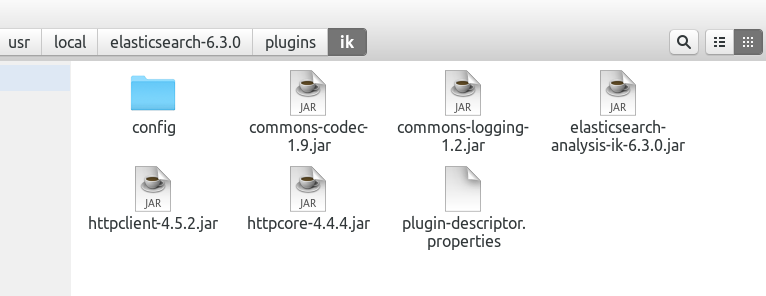
重新启动elasticsearch服务
elasticsearch restart
这个时候中文分词就生效了,数据重新插入即可
GET /megacorp/employee/_search

{

    "query" : {

        "match" : {

            "about" : "程序员 编程"

        }

    }

}
搜索结果
{

  "took": 8,

  "timed_out": false,

  "_shards": {

    "total": 5,

    "successful": 5,

    "skipped": 0,

    "failed": 0

  },

  "hits": {

    "total": 1,

    "max_score": 1.654172,

    "hits": [

      {

        "_index": "megacorp",

        "_type": "employee",

        "_id": "2",

        "_score": 1.654172,

        "_source": {

          "first_name": "张",

          "last_name": "三",

          "age": 24,

          "about": "一个PHP程序员,热爱编程,热爱生活,充满激情。",

          "interests": [

            "英雄联盟"

          ]

        }

      }

    ]

  }

}
或者通过(elasticsearch-plugin)在线安装,速度有点慢。
./bin/elasticsearch-plugin install https://github.com/medcl/elasticsearch-analysis-ik/releases/download/v6.3.0/elasticsearch-analysis-ik-6.3.0.zip
-> Downloading https://github.com/medcl/elasticsearch-analysis-ik/releases/download/v6.3.0/elasticsearch-analysis-ik-6.3.0.zip

[=================================================] 100%

-> Installed analysis-ik

发现多了一个文件夹
使用
GET _analyze?pretty

{

  "analyzer": "ik_smart",

  "text": "中华人民共和国国歌"

}
{

  "tokens": [

    {

      "token": "中华人民共和国",

      "start_offset": 0,

      "end_offset": 7,

      "type": "CN_WORD",

      "position": 0

    },

    {

      "token": "国歌",

      "start_offset": 7,

      "end_offset": 9,

      "type": "CN_WORD",

      "position": 1

    }

  ]

}
再一个例子
GET _analyze?pretty

{

  "analyzer": "ik_smart",

  "text": "王者荣耀是最好玩的游戏"

}
{

  "tokens": [

    {

      "token": "王者",

      "start_offset": 0,

      "end_offset": 2,

      "type": "CN_WORD",

      "position": 0

    },

    {

      "token": "荣耀",

      "start_offset": 2,

      "end_offset": 4,

      "type": "CN_WORD",

      "position": 1

    },

    {

      "token": "是",

      "start_offset": 4,

      "end_offset": 5,

      "type": "CN_CHAR",

      "position": 2

    },

    {

      "token": "最",

      "start_offset": 5,

      "end_offset": 6,

      "type": "CN_CHAR",

      "position": 3

    },

    {

      "token": "好玩",

      "start_offset": 6,

      "end_offset": 8,

      "type": "CN_WORD",

      "position": 4

    },

    {

      "token": "的",

      "start_offset": 8,

      "end_offset": 9,

      "type": "CN_CHAR",

      "position": 5

    },

    {

      "token": "游戏",

      "start_offset": 9,

      "end_offset": 11,

      "type": "CN_WORD",

      "position": 6

    }

  ]

}
elasticsearch 中文分词(elasticsearch-analysis-ik)安装的更多相关文章
- elasticsearch 中文分词、插件的安装和使用(一)
1. 安装elasticsearch.kibana.x-pack #安装elasticsearch wget https://artifacts.elastic.co/downloads/elasti ...
- elasticsearch中文分词器(ik)配置
elasticsearch默认的分词:http://localhost:9200/userinfo/_analyze?analyzer=standard&pretty=true&tex ...
- Elasticsearch 中文分词(elasticsearch-analysis-ik) 安装
由于elasticsearch基于lucene,所以天然地就多了许多lucene上的中文分词的支持,比如 IK, Paoding, MMSEG4J等lucene中文分词原理上都能在elasticsea ...
- Windows ElasticSearch中文分词配置
elasticsearch官方只提供smartcn这个中文分词插件,效果不是很好,好在国内有medcl大神(国内最早研究es的人之一)写的两个中文分词插件,一个是ik的,一个是mmseg的,下面分别介 ...
- ElasticSearch(三) ElasticSearch中文分词插件IK的安装
正因为Elasticsearch 内置的分词器对中文不友好,会把中文分成单个字来进行全文检索,所以我们需要借助中文分词插件来解决这个问题. 一.安装maven管理工具 Elasticsearch 要使 ...
- ElasticSearch中文分词(IK)
ElasticSearch常用的很受欢迎的是IK,这里稍微介绍下安装过程及测试过程. 1.ElasticSearch官方分词 自带的中文分词器很弱,可以体检下: [zsz@VS-zsz ~]$ c ...
- ElasticSearch 中文分词插件ik 的使用
下载 IK 的版本要与 Elasticsearch 的版本一致,因此下载 7.1.0 版本. 安装 1.中文分词插件下载地址:https://github.com/medcl/elasticsearc ...
- 实战ELK(8) 安装ElasticSearch中文分词器
安装 方法1 - download pre-build package from here: https://github.com/medcl/elasticsearch-analysis-ik/re ...
- elasticsearch中文分词器ik-analyzer安装
前面我们介绍了Centos安装elasticsearch 6.4.2 教程,elasticsearch内置的分词器对中文不友好,只会一个字一个字的分,无法形成词语,别急,已经有大拿把中文分词器做好了, ...
随机推荐
- 【APIO2015】Palembang Bridges
题目描述 一条东西走向的穆西河将巴邻旁市一分为二,分割成了区域 $A$ 和区域 $B$. 每一块区域沿着河岸都建了恰好 $1000000001$ 栋的建筑,每条岸边的建筑都从 $0$ 编号到 $100 ...
- Play框架连接Mysql遇到的一些问题
最近,在基于Play框架的项目中需要连接Mysql数据库.在这个过程中遇到了一些问题.在此,把它记录下来. 首先,Play框架和Mysql连接有两种方式,这两种方式都是在application.con ...
- Git 的使用Git Bash和Git GUI
使用Github也有一年的时间了,之前一直都是使用的Github客户端,对提交,更新,克隆,合并,分支有一定的了解和实践.一直都想试试命令行的形式,但是感觉可能桌面版的方便就没有做. 可是Github ...
- Java中的BigInteger在ACM中的应用
Java中的BigInteger在ACM中的应用 在ACM中的做题时,常常会遇见一些大数的问题.这是当我们用C或是C++时就会认为比較麻烦.就想有没有现有的现有的能够直接调用的BigInter,那样就 ...
- PS 抠图如何使用通道法处理头发
通道抠图法抠出美女飘逸头发-PS抠图实例教程 抠图更换背景后效果图 通道抠图法抠出美女飘逸头发-PS抠图实例教程 教程步骤: 1 打开原图,进入通道面板. 通道抠图法抠出美女飘逸头发-PS抠图实 ...
- OpenGL之路(七)为立方体加入丰富色彩
在立方体的六个面贴上不同的颜色,假设想达到混合颜色的效果,能够參照立方体的前面代码在每一行前都加上颜色 代码例如以下 #include <gl/glut.h> #pragma commen ...
- Atitit.ati  str  字符串增强api
Atitit.ati str 字符串增强api 1. java StringUtils方法全览 分类: Java2011-11-30 17:22 8194人阅读 评论(2) 收藏 举报 javas ...
- Android Studio Ndk 编程
如今开发Android程序基本都已经从Eclipse转到了Android Studio了, 近期项目需求, 须要用到ndk编程, 于是就折腾了一下. 开发环境 Android Studio 1.5.1 ...
- mysql drop table命令使用总结
drop性能 drop table(innodb引擎) 数量2000w,只需要5m
- HDMI各版本对比
转:一文看懂从HDMI1.0到HDMI2.1的历代规格变化 hdmi HDMI详解 https://blog.csdn.net/xubin341719/article/details/7713450 ...