
vue2.0 仿手机新闻站(六)详情页制作
1.结构
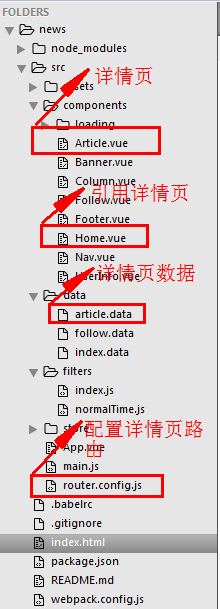
2.配置详情页路由


router.config.js
/**

 * 配置 路由

 */

// 导入组件

import Home from './components/Home.vue'

import Follow from './components/Follow.vue'

import Column from './components/Column.vue'

import UserInfo from './components/UserInfo.vue'

import Article from './components/Article.vue'

// 导出路由数组

export default [

	{ // 首页

		path:'/home',

		component:Home

	},

	{ // 关注页

		path:'/follow',

		component:Follow

	},

	{ // 栏目页

		path:'/column',

		component:Column

	},

	{ // 我的页

		path:'/user-info',

		component:UserInfo

	},

	{ // 文章详情页

		path:'/article/:id',

		component:Article

	},

	{ // 配置默认路由

		path:'/',

		redirect:'/home' // 路由重定向

	},

	{

		path:'*',

		redirect:'/home' // 路由重定向

	}

]
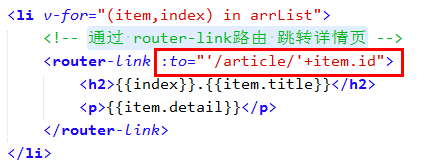
3.通过 router-link路由 跳转详情页
Home.vue
<!-- 首页 -->

<template>

	<div id="home">

		<div class="content mt30">

			<div class="newsList">

				<ul>

					<li v-for="(item,index) in arrList">

						<!-- 通过 router-link路由 跳转详情页 -->

						<router-link :to="'/article/'+item.id">

							<h2>{{index}}.{{item.title}}</h2>

							<p>{{item.detail}}</p>

						</router-link>

					</li>

				</ul>

			</div>

		</div>

	</div>

</template>

<script>

	export default{

		data(){

			return {

				arrList:[]

			}

		},

		mounted(){

			// 获取数据

			this.fetchData();

		},

		methods:{

			fetchData(){

				var _this = this;

				// this 为 vue的实例

				this.$http.get('src/data/index.data').then(function(res){

					_this.arrList = res.data;

				}).catch(function(err){

					console.log('Home',err);

				});

			}

		}

	}

</script>

<style scoped>

	.mt30{

		margin-top: 30px;

	}

</style>
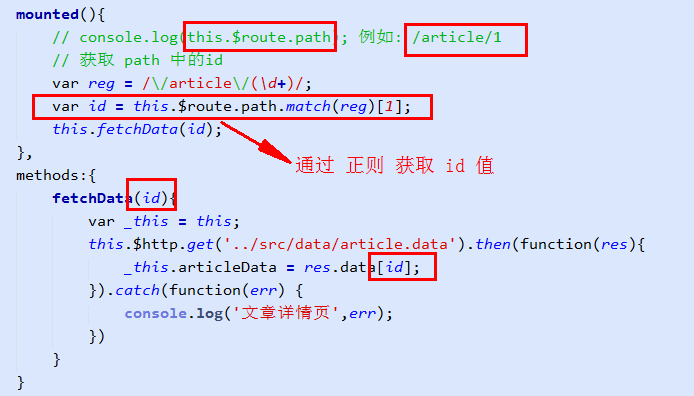
4.通过 正则 获取 path 中的 id, 并 通过 id 获取该详情页信息
Article.vue
<!-- 文章详情页 -->

<template>

	<div id="article">

		<div class="nav">

			<ul>

				<li class="l-btn" onclick="window.history.go(-1)"></li>

			</ul>

		</div>

		<!-- 内容部分 -->

		<div class="content">

			<div class="header clear">

				<h2><img :src="articleData.author_face" alt="" /></h2>

				<p>百度</p>

			</div>

			<div class="cont">

				<h3>{{articleData.title}}</h3>

				<div class="time">

					<p>{{articleData.time}}<span><img src="../assets/img/zan.png" alt="" /></span></p>

				</div>

				<div class="text-box" v-html="articleData.content"></div>

			</div>

		</div>

		<!-- 底部 -->

		<div class="foot-btn">

			<ul>

				<li class="say"><a href="javascript:;">

					<i></i><span>0</span>

				</a></li>

				<li class="zan"><a href="javascript:;">

					<i></i><span>0</span>

				</a></li>

				<li class="xing"><a href="javascript:;">

					<i><img src="../assets/img/xing.png" alt="" /></i>

				</a></li>

				<li class="fx"><a href="javascript:;">

					<i><img src="../assets/img/fx.png" alt="" /></i>

				</a></li>

			</ul>

		</div>

	</div>

</template>

<script>

	export default{

		data(){

			return{

				// articleData 是个json

				articleData:{}

			}

		},

		mounted(){

			// console.log(this.$route.path); 例如: /article/1

			// 获取 path 中的id

			var reg = /\/article\/(\d+)/;

			var id = this.$route.path.match(reg)[1];

			console.log(id);

			this.fetchData(id);

		},

		methods:{

			fetchData(id){

				var _this = this;

				this.$http.get('../src/data/article.data').then(function(res){

					_this.articleData = res.data[id];

				}).catch(function(err) {

					console.log('文章详情页',err);

				})

			}

		}

	}

</script>

<style scoped>

	html,body{ overflow-x: hidden; }

	.nav{width:100%; position:fixed;top:0;left:0; background:#fff; border-bottom:1px solid #e8eaec; z-index:99;}

	.nav ul{width:6.4rem;height:0.45rem; padding-top:0.15rem; margin:0 auto;}

	.nav ul li{width:0.29rem;height:0.31rem; background:url(../assets/img/history.png) no-repeat 0 0; background-size:100%; margin:0 0 0 0.38rem;}

	.content{max-width:6.4rem; margin:0 auto; margin-top:0.6rem; background:#f2f4f5; padding-bottom:0.85rem;}

	.content .header{ padding:0.39rem 0.28rem 0.15rem 0.28rem; height:auto; background: none}

	.header h2{ float:left; margin-right:0.18rem;}

	.header p{ float:left; margin-top:0.18rem; font-size:0.3rem;}

	.content .cont{ padding:0 0.38rem; color:#494d4d;}

	.cont h3{ font-size:0.4rem; line-height:0.6rem; padding-bottom:0.25rem; border-bottom:1px solid #494d4d;}

	.cont .time{height:0.24rem; line-height:0.24rem; margin:0.26rem 0; }

	.time p{ float:left;position:relative;}

	.time span{width:0.33rem;height:0.32rem; position:absolute; top:-0.02rem;right:-0.35rem;}

	.time span img{width:100%;height:100%;}

	.cont .text-box{ font-size:0.25rem;}

	.text-box p{ line-height:0.45rem; margin-bottom:0.1rem;}

	.foot-btn{width:100%;height:0.8rem; background:#fff; border-top:1px solid #e8eaec; position:fixed; left:0;bottom:0;}

	.foot-btn ul{width:6.4rem; margin:0 auto;height:0.52rem; margin-top:0.16rem;}

	.foot-btn ul li{ float:left;}

	.foot-btn ul li a{width:100%;height:100%; display:block;}

	.foot-btn ul .say{width:2.03rem;height:0.52rem; border-right:1px solid #e8eaec;}

	.say i{width:0.36rem;height:0.26rem; background:url(../assets/img/say.png) no-repeat 0 0; background-size:100%; float:left; margin-left:0.7rem; margin-top:0.13rem;}

	.say span{height:0.26rem; float:left; line-height:0.26rem; margin-left:0.16rem; margin-top:0.13rem;}

	.foot-btn ul .zan{width:1.86rem;height:0.52rem; border-right:1px solid #e8eaec;}

	.zan i{width:0.36rem;height:0.28rem; background:url(../assets/img/zan1.png) no-repeat 0 0; background-size:100%; float:left; margin-left:0.54rem; margin-top:0.13rem;}

	.zan span{height:0.26rem; float:left; line-height:0.26rem; margin-left:0.16rem; margin-top:0.13rem;}

	.foot-btn ul .xing{width:1.2rem;height:0.52rem; border-right:1px solid #e8eaec;}

	.xing i{width:0.34rem;height:0.24rem; margin:0 auto; display:block; padding-top:0.1rem;}

	.xing i img{width:100%;}

	.foot-btn ul .fx{width:1.25rem;height:0.52rem;}

	.fx i{width:0.33rem;height:0.08rem;display:block; margin:0 auto; padding-top:0.15rem;}

	.fx i img{width:100%;}

</style>
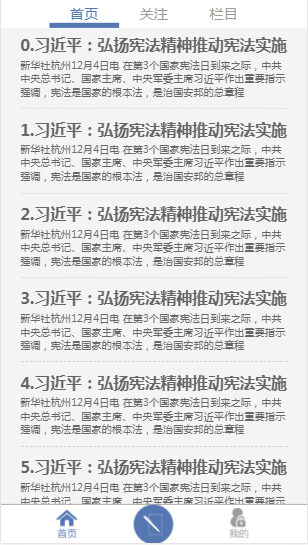
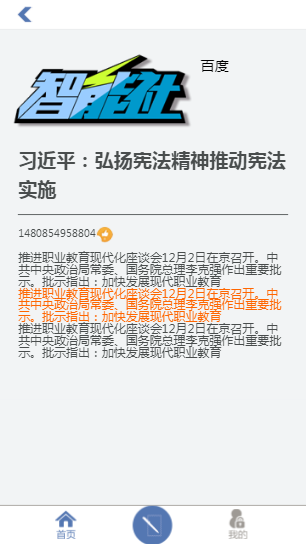
5.效果图
vue2.0 仿手机新闻站(六)详情页制作的更多相关文章
- vue2.0 仿手机新闻站(一)项目开发流程
vue仿手机新闻站: 1.拿到静态页面,直接用vue边布局,边写 2.假数据 没有用任何UI组件,切图完成 做项目基本流程: 1.规划组件结构 Nav.vue Header.vue Home.vue ...
- vue2.0 仿手机新闻站(七)过滤器、动画效果
1.全局过滤器 (1)normalTime.js 自定义 将 时间戳 转换成 日期格式 过滤器 /** * 将 时间戳 转换成 日期格式 */ export const normalTime = ( ...
- vue2.0 仿手机新闻站(五)全局的 loading 组件
1.组件结构 index.js const LoadingComponent = require('./Loading.vue') const loading = { install: functio ...
- vue2.0 仿手机新闻站(四)axios
1.axios的配置 main.js import Vue from 'vue' import App from './App.vue' // 引入 路由 import VueRouter from ...
- vue2.0 仿手机新闻站(二)项目结构搭建 及 路由配置
1.项目结构 $ vue init webpack-simple news $ npm install vuex vue-router axios style-loader css-loader -D ...
- vue2.0 仿手机新闻站(三)通过 vuex 进行状态管理
1.创建 store 结构 2.main.js 引入 vuex 3. App.vue 组件使用 vuex <template> <div id="app"&g ...
- 项目vue2.0仿外卖APP(六)
goods 商品列表页开发 布局编写 除了商品之外还有购物车,还有个详情页,挺复杂的. 两栏布局:左侧固定宽度,右侧自适应,还是用flex. 因为内容可能会超过手机高度,超过就隐藏.左右两侧的内容是可 ...
- Vue2.0仿饿了么webapp单页面应用
Vue2.0仿饿了么webapp单页面应用 声明: 代码源于 黄轶老师在慕课网上的教学视频,我自己用vue2.0重写了该项目,喜欢的同学可以去支持老师的课程:http://coding.imooc.c ...
- 第六章 “我要点爆”微信小程序云开发实例之爆文详情页制作
爆文详情页制作 从首页中数据列表打开相应详情页面的方法: 给数据列表中每个数据项加一个点击事件,同时将当前数据项的id暂时记录在本地,然后跳转到详情页面detail goopen: function ...
随机推荐
- 第六篇:python基础_6 内置函数与常用模块(一)
本篇内容 内置函数 匿名函数 re模块 time模块 random模块 os模块 sys模块 json与pickle模块 shelve模块 一. 内置函数 1.定义 内置函数又被称为工厂函数. 2.常 ...
- 【bzoj3998】[TJOI2015]弦论 后缀自动机+dp
题目描述 对于一个给定长度为N的字符串,求它的第K小子串是什么. 输入 第一行是一个仅由小写英文字母构成的字符串S 第二行为两个整数T和K,T为0则表示不同位置的相同子串算作一个.T=1则表示不同位置 ...
- 学习RMQ-ST表
RMQ一般是一个二维数组,用$dp[i][j]$表示起点为i开始连续数$2^j$个元素其中的最值,由于对于一个闭区间有:$R-L+1=len$因此也可以用另外一种记法:闭区间为$[i,i+2^j-1] ...
- CSDN数据库下载地址 CSDN 用户名密码泄漏,600万数据下载
原文发布时间为:2011-12-21 -- 来源于本人的百度文章 [由搬家工具导入] 12月21日消息,下午有网友爆料称国内最大的开发者社区CSDN.NET的安全系统遭到黑客攻击,CSDN数据库中的6 ...
- js判断手机的左右滑动
js代码 $(function() { function judge() { var startx;//让startx在touch事件函数里是全局性变量. var endx; var el = doc ...
- 2017-2018 ACM-ICPC, NEERC, Southern Subregional Contest A E F G H I K M
// 深夜补水题,清早(雾)写水文 A. Automatic Door 题意 \(n(n\leq 1e9)\)个\(employee\)和\(m(m\leq 1e5)\)个\(client\)要进门, ...
- python的上下文管理
说道上下文管理首先想到的就是这个: class MyResource: def __enter__(self): print("查询开始") return self def __e ...
- maven更换阿里云仓库
本来不想写,网上到处都是,不过好多到我这不行,自己记录下,省的到处找 D:\apache-maven-3.6.1\conf目录下setting.xml文件(这是我的解压的位置) <mirrors ...
- 搭建https本地服务器:如何得到被所有客户端认可的ssl证书
https,作为http的加密版,作用还是很大的:能够提升网站搜索权重,让你的网站更安全,而且如果你的网站没有使用https的话,将无法作为移动设备原生应用的api接口.可见掌握为网站启用https的 ...
- 大型网站优化-memcache技术
大型网站优化-memcache技术 memory+cache 内存缓存 memcache简介 memcache是一套分布式的高速缓存系统,由LiveJournal的Brad Fitzpatrick开发 ...