
Struts2学习八----------接收参数
© 版权声明:本文为博主原创文章,转载请注明出处
接收参数
- 使用Action的属性接收参数
- 使用Domain Model接收参数
- 使用ModelDriven接收参数
实例
1.项目结构
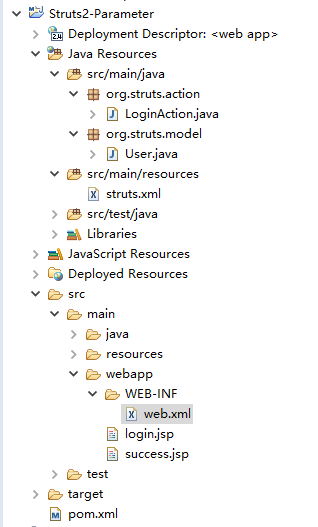
2.pom.xml
<project xmlns="http://maven.apache.org/POM/4.0.0" xmlns:xsi="http://www.w3.org/2001/XMLSchema-instance"

  xsi:schemaLocation="http://maven.apache.org/POM/4.0.0 http://maven.apache.org/maven-v4_0_0.xsd">

  	<modelVersion>4.0.0</modelVersion>

	<groupId>org.struts</groupId>

	<artifactId>Struts2-Parameter</artifactId>

	<packaging>war</packaging>

	<version>0.0.1-SNAPSHOT</version>

	<name>Struts2-Parameter Maven Webapp</name>

	<url>http://maven.apache.org</url>

	<properties>

		<project.build.sourceEncoding>UTF-8</project.build.sourceEncoding>

		<struts.version>2.5.10</struts.version>

	</properties>

	<dependencies>

		<!-- junit -->

		<dependency>

			<groupId>junit</groupId>

			<artifactId>junit</artifactId>

			<version>4.12</version>

			<scope>test</scope>

		</dependency>

		<!-- Struts2 -->

		<dependency>

		    <groupId>org.apache.struts</groupId>

		    <artifactId>struts2-core</artifactId>

		    <version>${struts.version}</version>

		</dependency>

	</dependencies>

	<build>

		<plugins>

			<plugin>

			    <groupId>org.apache.maven.plugins</groupId>

			    <artifactId>maven-compiler-plugin</artifactId>

			    <version>3.6.1</version>

			    <configuration>

					<source>1.7</source>

			    	<target>1.7</target>

			    </configuration>

			</plugin>

		</plugins>

	  	<finalName>Struts2-Parameter</finalName>

	</build>

</project>
3.web.xml
<?xml version="1.0" encoding="UTF-8"?>

<web-app xmlns="http://java.sun.com/xml/ns/javaee"

  xmlns:xsi="http://www.w3.org/2001/XMLSchema-instance"

  xsi:schemaLocation="http://java.sun.com/xml/ns/javaee

                      http://java.sun.com/xml/ns/javaee/web-app_3_0.xsd"

  version="3.0" metadata-complete="true">

	<welcome-file-list>

		<welcome-file>login.jsp</welcome-file>

	</welcome-file-list>

	<!-- struts2接入 -->

	<filter>

		<filter-name>struts2</filter-name>

		<filter-class>org.apache.struts2.dispatcher.filter.StrutsPrepareAndExecuteFilter</filter-class>

	</filter>

	<filter-mapping>

		<filter-name>struts2</filter-name>

		<url-pattern>/*</url-pattern>

	</filter-mapping>

</web-app>
4.User.java
package org.struts.model;

public class User {

	private String username;

	private String password;

	public String getUsername() {

		return username;

	}

	public void setUsername(String username) {

		this.username = username;

	}

	public String getPassword() {

		return password;

	}

	public void setPassword(String password) {

		this.password = password;

	}

}
5.LoginAction.java
5.1 方式一:使用Action的属性接收参数
package org.struts.action;

import com.opensymphony.xwork2.ActionSupport;

public class LoginAction extends ActionSupport {

	private static final long serialVersionUID = 1L;

	private String username;

	private String password;

	public String getUsername() {

		return username;

	}

	public void setUsername(String username) {

		this.username = username;

	}

	public String getPassword() {

		return password;

	}

	public void setPassword(String password) {

		this.password = password;

	}

	public String login() {

		System.out.println("username = " + username);

		System.out.println("password = " + password);

		return SUCCESS;

	}

}
5.2 方式二:使用Domain Model接收参数
package org.struts.action;

import org.struts.model.User;

import com.opensymphony.xwork2.ActionSupport;

public class LoginAction extends ActionSupport {

	private static final long serialVersionUID = 1L;

	private User user;

	public User getUser() {

		return user;

	}

	public void setUser(User user) {

		this.user = user;

	}

	public String login() {

		System.out.println("username = " + user.getUsername());

		System.out.println("password = " + user.getPassword());

		return SUCCESS;

	}

}
5.3 方式三:使用ModelDriven接收参数
package org.struts.action;

import org.struts.model.User;

import com.opensymphony.xwork2.ActionSupport;

import com.opensymphony.xwork2.ModelDriven;

public class LoginAction extends ActionSupport implements ModelDriven<User> {

	private static final long serialVersionUID = 1L;

	private User user = new User();

	public User getModel() {

		return user;

	}

	public String login() {

		System.out.println("username = " + user.getUsername());

		System.out.println("password = " + user.getPassword());

		return SUCCESS;

	}

}
6.struts.xml
<?xml version="1.0" encoding="UTF-8"?>

<!DOCTYPE struts PUBLIC

    "-//Apache Software Foundation//DTD Struts Configuration 2.5//EN"

    "http://struts.apache.org/dtds/struts-2.5.dtd">

<struts>

	<package name="login" extends="struts-default" namespace="/">

		<action name="login" class="org.struts.action.LoginAction" method="login">

			<result>/success.jsp</result>

		</action>

	</package>

</struts>
7.login.jsp
7.1 方式一和方式三
<%@ page language="java" contentType="text/html; charset=UTF-8"

    pageEncoding="UTF-8"%>

<!DOCTYPE html PUBLIC "-//W3C//DTD HTML 4.01 Transitional//EN" "http://www.w3.org/TR/html4/loose.dtd">

<html>

<head>

<meta http-equiv="Content-Type" content="text/html; charset=UTF-8">

<title>用户登录</title>

</head>

<body>

	<form action="login" method="post">

		用户名:<input type="text" name="username"/><br/>

		密码:<input type="password" name="password"/><br/>

		<input type="submit" value="登录">

		<input type="reset" value="重置">

	</form>

</body>

</html>
7.2 方式二
<%@ page language="java" contentType="text/html; charset=UTF-8"

    pageEncoding="UTF-8"%>

<!DOCTYPE html PUBLIC "-//W3C//DTD HTML 4.01 Transitional//EN" "http://www.w3.org/TR/html4/loose.dtd">

<html>

<head>

<meta http-equiv="Content-Type" content="text/html; charset=UTF-8">

<title>用户登录</title>

</head>

<body>

	<form action="login" method="post">

		用户名:<input type="text" name="user.username"/><br/>

		密码:<input type="password" name="user.password"/><br/>

		<input type="submit" value="登录">

		<input type="reset" value="重置">

	</form>

</body>

</html>
8.success.jsp
<%@ page language="java" contentType="text/html; charset=UTF-8"

    pageEncoding="UTF-8"%>

<!DOCTYPE html PUBLIC "-//W3C//DTD HTML 4.01 Transitional//EN" "http://www.w3.org/TR/html4/loose.dtd">

<html>

<head>

<meta http-equiv="Content-Type" content="text/html; charset=UTF-8">

<title>登录成功界面</title>

</head>

<body>

	登录成功

</body>

</html>
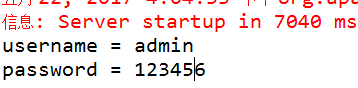
9.效果预览
Struts2学习八----------接收参数的更多相关文章
- Struts2中Action接收参数的四种形式
1.Struts2的Action接收参数的三种形式. a. 使用Action的属性接收(直接在action中利用get方法来接收参数): login.js ...
- Struts2中Action接收参数的方法
详见:http://blog.yemou.net/article/query/info/tytfjhfascvhzxcyt112 Struts2中Action接收参数的方法主要有以下三种: 1.使用A ...
- Struts2中Action接收参数的方法主要有以下三种:
Struts2中Action接收参数的方法主要有以下三种: 1.使用Action的属性接收参数(最原始的方式): a.定义:在Action类中定义属性,创建get和set方法: b.接 ...
- Struts2中Action接收参数
Struts2中Action接收参数的方法主要有以下三种: Struts2中Action接收参数的方法主要有以下三种: 1.使用Action的属性接收参数: a.定义:在Action类中定义属 ...
- struts2属性Struts2中属性接收参数中文问题和简单数据验证
PS:今天上午,非常郁闷,有很多简单基础的问题搞得我有些迷茫,哎,代码几天不写就忘.目前又不当COO,还是得用心记代码哦! 一:如果表单提交数据中有中文时,尽量应用post方式. 需要在Struts. ...
- 学习笔记之Struts2—浅析接收参数
最近自己通过视频与相关书籍的学习,对action里面接收参数做一些总结与自己的理解. 0.0.接收参数的(主要)方法 使用Action的属性接收参数 使用DomainModel接收参数 使用Mod ...
- Struts2学习---基本配置,action,动态方法调用,action接收参数
首先我们先来直接配置,然后再来讲原理: 第一步:jar包的引入: 我们可以到struts2的官网上下载: http://struts.apache.org/download.cgi#struts251 ...
- struts2学习笔记(4)接收参数
①用action属性接收 登录界面例子 在webroot下创建login.jsp和success.jsp login.jsp中加入表单: <form action="LoginActi ...
- Struts2 DomainModel、ModelDriven接收参数
一.DomainModel(域模型) 1. 应用场景:一般我们在struts2的action中接收参数通常是如下方式 package cn.orlion.user; import com.opensy ...
随机推荐
- redis在linux上的安装和配置
https://blog.csdn.net/lzding/article/details/52040501(直接可以用的安装phpredis) http://www.runoob.com/redis/ ...
- PE第n弹
PE201 -- F[i][j][k] 和为i前j个选了k个方案数.因为值域很小. PE202 -- 那个反射其实挺酷炫的,你考虑把它的镜面反射去掉,把它扩展成一个无限大的正三角网格.. PE410 ...
- 【Codeforces Round #518 (Div. 2)】
A:https://www.cnblogs.com/myx12345/p/9847588.html B:https://www.cnblogs.com/myx12345/p/9847590.html ...
- C#图解教程学习笔记——类相关的概念
一.一些基本概念1. 字段:隶属于类的变量,即类的成员变量.2. 方法:隶属于类的函数,即类的成员函数.3. 实例成员:类的每个实例拥有自己的各个类成员的副本,这些成员称为实例成员. 改变一个实例字段 ...
- EOJ 3.30 A. 打工时不可能打工的【贪心】
[链接]:https://acm.ecnu.edu.cn/contest/59/problem/A/ A. 打工时不可能打工的 Time limit per test: 2.0 seconds Mem ...
- 关于asp.netCore3.0区域和路由配置
在ASP.NET Core 3.0中路由配置和2.0不一样了 一.MVC 服务注册 ASP.NET Core 3.0 添加了用于注册内部的 MVC 方案的新选项Startup.ConfigureSer ...
- SELinux下更改mysql端口
默认情况下 mysql更改端口后是不能通过selinux的 提示启动错误,那么首先就要看mysql的错误日志 可是我不知道mysql错误日志的位置 首先,更改selinux的模式为passive 然后 ...
- [译]在IB中实现自动布局
有关自动布局的其他文章: Autolayout Visual format language for autolayout Creating individual constraints 可怜的界面编 ...
- 在Android中实现阴影效果
在Android L推出后,Google提出了全新的设计语言:材质设计.其中很重要的一点就是阴影效果的使用,你可以为每一个View设置一个elevation值,相当于除了x.y之外的z值,z值决定了阴 ...
- 卸载django
首先找到django安装路径 Python import sys; sys.path = sys.path[1:]; import django; print(django.__path__) 得到 ...