
css水平垂直居中块整理
1、绝对定位+负margin
兼容性很好,但需要指定子块的高度和宽度,以及负margin
.wp{

    position: relative;

    width: 200px;

    height: 200px;

    background-color: #ccc;

}

.test{

    height: 100px;

    position: absolute;

    top:50%;

    left: 50%;

    margin-top: -50px;

    margin-left: -50px;

    background-color: #edd;

    width: 100px;

}
<div class="wp">

    <div class="test"></div>

</div>
2、绝对定位加margin:auto
缺点:IE6\7不支持,需要指定子块的宽度和高度
.wp{

    position: relative;

    width: 200px;

    height: 200px;

    background-color: #ccc;

}

.test {

    position:absolute;

    top:;

    bottom:;

    left:;

    right:;

    margin:auto;

    height:100px;

    width: 100px;

    background-color: #edd;

}
<div class="wp">

    <div class="test"></div>

</div>
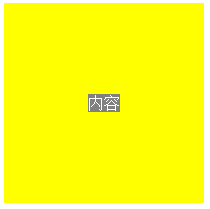
3、绝对定位+translate
不需要指定子块的高宽,当子块中无内容且未设置高宽,子块不可见。
IE6/7/8不支持
  .wp {

      width:200px;

      height:200px;

      background-color:yellow;

      position:relative;

  }

  .test {

      left:50%; top:50%;

      transform:translate(-50%,-50%);

      -webkit-transform:translate(-50%,-50%);

      background-color:gray;

      color:white;

      position:absolute;

  }
<div class="wp">

    <div class="test">内容</div>

</div>
4、弹性盒
不需要指定子块的高宽,当子块中无内容且未设置高宽,子块不可见。
IE6/7/8/9不支持
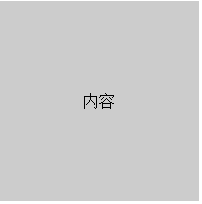
.wp{

  display: -webkit-box;

  display: -moz-box;

  display: -ms-flexbox;

  display: -webkit-flex;

  display: flex;

  -webkit-box-align: center;

     -moz-box-align: center;

     -ms-flex-align: center;

  -webkit-align-items: center;

          align-items: center;

  -webkit-box-pack: center;

     -moz-box-pack: center;

     -ms-flex-pack: center;

  -webkit-justify-content: center;

          justify-content: center;

    height: 200px;

    width: 200px;

    background-color: #ccc;

}

.test{

background-color: #edd;

}
<div class="wp">

    <div class="test">内容</div>

</div>
5、table-cell
IE6/7不支持
.wp{

    width: 200px;

    height: 200px;

    display: table;

    background-color: #ccc;

}

.test {

    display: table-cell;

    text-align: center;

    vertical-align: middle;

}
<div class="wp">

    <div class="test">内容</div>

</div>
css水平垂直居中块整理的更多相关文章
- CSS水平垂直居中总结
行内元素水平居中 把行内元素包裹在块级父元素中,且父元素中的css设置text-align:center; <!DOCTYPE html> <html> <head> ...
- CSS水平垂直居中的方法
原文链接:http://caibaojian.com/370.html 水平垂直居中,特别是使用在列表的时候经常会用到的,以前有需求的时候我也做过类似的代码,是使用display:table-cell ...
- HTML+CSS水平垂直居中
啦啦啦,好了,今天来分享自己的第一个知识点,难得自己还能想起来过来博客园,写写博客的. 好了,言归正传,今天分享关于html和css的一个简单的知识点,对于大部分从事前端开发的人员来说可能都是很简单的 ...
- css水平垂直居中对齐方式
1.文字或者内联元素的垂直水平居中对齐 css属性 -- 水平居中:text-aligin:center; 垂直居中: line-height:height; 例子:. html: <div c ...
- 把简单做好也不简单-css水平垂直居中
44年前我们把人送上月球,但在CSS中我们仍然不能很好实现水平垂直居中. 作者:Icarus 原文链接:http://xdlrt.github.io/2016/12/15/2016-12-15 水平垂 ...
- css 水平垂直居中总结
空闲总结了下水平垂直居中方案,欢迎补充: 水平居中 水平居中有两种情况: 子元素是内联元素 这种那个情况下只需要在父元素定义: text-align:center; 例子: html: //省略了bo ...
- 常见的几种 CSS 水平垂直居中解决办法
用CSS实现元素的水平居中,比较简单,可以设置text-align center,或者设置 margin-left:auto; margin-right:auto 之类的即可. 主要麻烦的地方还是在垂 ...
- css水平垂直居中
margin法(水平居中) 需要满足三个条件: 元素定宽 元素为块级元素或行内元素设置display:block 元素的margin-left和margin-right都必须设置为auto 三个条件缺 ...
- css水平垂直居中的方法与 vertical-align 的用法
前言:这是笔者学习之后自己的理解与整理.如果有错误或者疑问的地方,请大家指正,我会持续更新! 1. 已知元素宽度 方法一:已知宽高,可以用position定位 + margin负值的方法 : 绝对定位 ...
随机推荐
- Nginx配置故障转移
当上游服务器(真实访问服务器),一旦出现故障或者是没有及时相应的话,应该直接轮训到下一台服务器,保证服务器的高可用. 如果上游服务器的某一台宕机了,直接轮训到下一个~ 8080 8081 8082 关 ...
- iOS7默认状态栏文字颜色为黑色,项目需要修改为白色。
1在Info.plist中设置UIViewControllerBasedStatusBarAppearance 为NO2 在需要改变状态栏颜色的 AppDelegate中在 didFinishLaun ...
- RTree算法Java实现 JSI RTree Library的调用实例 标签:jsi-rtree-library
1. [代码]jsi-rtree-library /** * */package com.mycompany.project; //package net.sourceforge.jsi.examp ...
- nginx: error while loading shared libraries: libGeoIP.so.1
wget http://geolite.maxmind.com/download/geoip/api/c/GeoIP.tar.gz wget http://geolite.maxmind.com/do ...
- poj1639顶点度限制生成树
题目:http://poj.org/problem?id=1639 对根的度数有限制的最小生成树: 先忽略根,跑最小生成树,得到几个连通块,再一一与根连上: 然后在限制内用根连出去的边来使生成树更小, ...
- 使用Node.js实现简单的网络爬取
由于最近要实现一个爬取H5游戏的代理服务器,隧看到这么一篇不错的文章(http://blog.miguelgrinberg.com/post/easy-web-scraping-with-nodejs ...
- PHP 单引号与双引号的区别 SQL中的使用
php单引号与双引号用法:引号嵌套方法 1.双引号内不能直接就再嵌套双引号 2.双引号与单引号互相嵌套使用 如: 双引号内直接嵌套单引号 echo "<script language= ...
- 3 pyspark学习---sparkContext概述
1 Tutorial Spark本身是由scala语言编写,为了支持py对spark的支持呢就出现了pyspark.它依然可以通过导入Py4j进行RDDS等操作. 2 sparkContext (1) ...
- Lua 5.1.1 源代码阅读笔记
http://blog.csdn.net/hamenny/article/details/4506130
- mysql使用小结
一.修改 mysql 的 root 密码 mysql> use mysql; mysql> update user set password=password('123456') whe ...