
css水平垂直居中块整理
1、绝对定位+负margin
兼容性很好,但需要指定子块的高度和宽度,以及负margin
.wp{

    position: relative;

    width: 200px;

    height: 200px;

    background-color: #ccc;

}

.test{

    height: 100px;

    position: absolute;

    top:50%;

    left: 50%;

    margin-top: -50px;

    margin-left: -50px;

    background-color: #edd;

    width: 100px;

}
<div class="wp">

    <div class="test"></div>

</div>
2、绝对定位加margin:auto
缺点:IE6\7不支持,需要指定子块的宽度和高度
.wp{

    position: relative;

    width: 200px;

    height: 200px;

    background-color: #ccc;

}

.test {

    position:absolute;

    top:;

    bottom:;

    left:;

    right:;

    margin:auto;

    height:100px;

    width: 100px;

    background-color: #edd;

}
<div class="wp">

    <div class="test"></div>

</div>
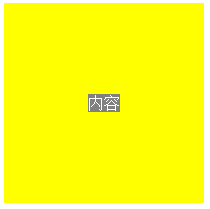
3、绝对定位+translate
不需要指定子块的高宽,当子块中无内容且未设置高宽,子块不可见。
IE6/7/8不支持
  .wp {

      width:200px;

      height:200px;

      background-color:yellow;

      position:relative;

  }

  .test {

      left:50%; top:50%;

      transform:translate(-50%,-50%);

      -webkit-transform:translate(-50%,-50%);

      background-color:gray;

      color:white;

      position:absolute;

  }
<div class="wp">

    <div class="test">内容</div>

</div>
4、弹性盒
不需要指定子块的高宽,当子块中无内容且未设置高宽,子块不可见。
IE6/7/8/9不支持
.wp{

  display: -webkit-box;

  display: -moz-box;

  display: -ms-flexbox;

  display: -webkit-flex;

  display: flex;

  -webkit-box-align: center;

     -moz-box-align: center;

     -ms-flex-align: center;

  -webkit-align-items: center;

          align-items: center;

  -webkit-box-pack: center;

     -moz-box-pack: center;

     -ms-flex-pack: center;

  -webkit-justify-content: center;

          justify-content: center;

    height: 200px;

    width: 200px;

    background-color: #ccc;

}

.test{

background-color: #edd;

}
<div class="wp">

    <div class="test">内容</div>

</div>
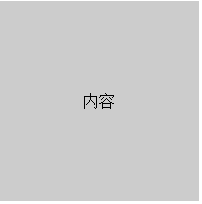
5、table-cell
IE6/7不支持
.wp{

    width: 200px;

    height: 200px;

    display: table;

    background-color: #ccc;

}

.test {

    display: table-cell;

    text-align: center;

    vertical-align: middle;

}
<div class="wp">

    <div class="test">内容</div>

</div>
css水平垂直居中块整理的更多相关文章
- CSS水平垂直居中总结
行内元素水平居中 把行内元素包裹在块级父元素中,且父元素中的css设置text-align:center; <!DOCTYPE html> <html> <head> ...
- CSS水平垂直居中的方法
原文链接:http://caibaojian.com/370.html 水平垂直居中,特别是使用在列表的时候经常会用到的,以前有需求的时候我也做过类似的代码,是使用display:table-cell ...
- HTML+CSS水平垂直居中
啦啦啦,好了,今天来分享自己的第一个知识点,难得自己还能想起来过来博客园,写写博客的. 好了,言归正传,今天分享关于html和css的一个简单的知识点,对于大部分从事前端开发的人员来说可能都是很简单的 ...
- css水平垂直居中对齐方式
1.文字或者内联元素的垂直水平居中对齐 css属性 -- 水平居中:text-aligin:center; 垂直居中: line-height:height; 例子:. html: <div c ...
- 把简单做好也不简单-css水平垂直居中
44年前我们把人送上月球,但在CSS中我们仍然不能很好实现水平垂直居中. 作者:Icarus 原文链接:http://xdlrt.github.io/2016/12/15/2016-12-15 水平垂 ...
- css 水平垂直居中总结
空闲总结了下水平垂直居中方案,欢迎补充: 水平居中 水平居中有两种情况: 子元素是内联元素 这种那个情况下只需要在父元素定义: text-align:center; 例子: html: //省略了bo ...
- 常见的几种 CSS 水平垂直居中解决办法
用CSS实现元素的水平居中,比较简单,可以设置text-align center,或者设置 margin-left:auto; margin-right:auto 之类的即可. 主要麻烦的地方还是在垂 ...
- css水平垂直居中
margin法(水平居中) 需要满足三个条件: 元素定宽 元素为块级元素或行内元素设置display:block 元素的margin-left和margin-right都必须设置为auto 三个条件缺 ...
- css水平垂直居中的方法与 vertical-align 的用法
前言:这是笔者学习之后自己的理解与整理.如果有错误或者疑问的地方,请大家指正,我会持续更新! 1. 已知元素宽度 方法一:已知宽高,可以用position定位 + margin负值的方法 : 绝对定位 ...
随机推荐
- jQuery comet
下面程序是例用从数据端推送信息,原理是每隔10秒读取一下data.txt文件,看有木有新的数据输入,如果有,则alert文件内容. hmtl代码是 <!DOCTYPE html> < ...
- 百度API从经纬度坐标到地址的转换服务
/// <summary> /// 百度API从经纬度坐标到地址的转换服务 /// </summary> /// <param name="lng"& ...
- 【转载】如何在 C#中访问 JavaScript函数?
如何在 C#中访问 JavaScript函数? 时间:13-10-17 栏目:Unity3D教程 作者:zqcyou 评论:0 如何在 C#中访问 JavaScript函数?答案如下:c#代码 ...
- 封装class类为jar包提供给其他项目使用
一.完成class类的编写与测试工作 二.完善javadoc注释,生成自己的API 注释要按照标准要求进行 Project -- generate javadoc
- Day01:Python入门
一.编程与编程语言 编程的目的是将人类的思想流程按照某种能够被计算机识别的表达方式传递给计算机,从而让计算机能像人脑一样自动执行工作. 能被计算机所识别的表达方式是编程语言,python就是一门编程语 ...
- JS-React:目录
ylbtech-JS-React:目录 1.返回顶部 2.返回顶部 3.返回顶部 4.返回顶部 5.返回顶部 6.返回顶部 作者:ylbtech出处:http://ylbt ...
- 《Kubernetes权威指南第2版》学习(二)一个简单的例子
1: 安装VirtualBox, 并下载CentOS-7-x86_64-DVD-1708.iso, 安装centOS7,具体过程可以百度. 2:开启centOS的SSH, 步骤如下: (1) yum ...
- EF之贪婪加载和延迟加载
这篇文章将讨论查询结果的控制 在使用EF(Entity Framework)的过程中,很多时候我们会进行查询的操作,因此知道哪些数据会被加载到内存当中就至关重要.在多多的情况下,你可能并并不需要加载全 ...
- python_xrange和range的异同
1,range: 函数说明:range([start,]stop[,step]),根据start和stop的范围以及步长step生成一个序列 代码示例: >>> range(5) [ ...
- B - School Marks
Time Limit:2000MS Memory Limit:262144KB 64bit IO Format:%I64d & %I64u Description Little ...