
Selenium support for PhantomJS has been deprecated, please use headless
今天在使用Selenuim+PhantomJS动态抓取网页时,出现如下报错信息:
C:\Python36\lib\site-packages\selenium-3.11.0-py3.6.egg\selenium\webdriver\phantomjs\webdriver.py:49: UserWarning: Selenium support for PhantomJS has been deprecated, please use headless versions of Chrome or Firefox instead

  warnings.warn('Selenium support for PhantomJS has been deprecated, please use headless '
意思就是Selenuim已经放弃PhantomJS,了,建议使用火狐或者谷歌无界面浏览器。

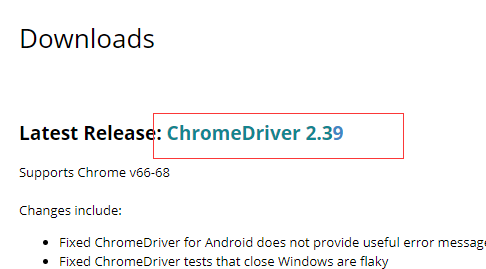
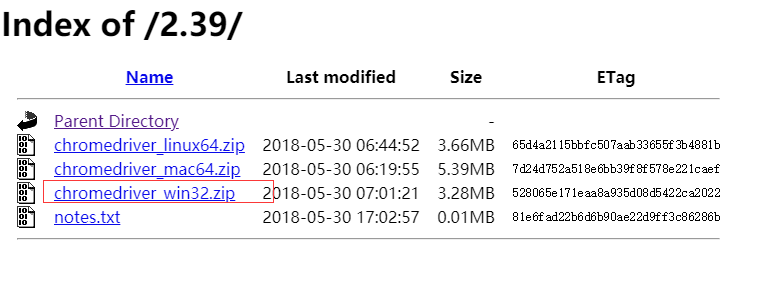
要确保机器上安装谷歌浏览器
把chromedriver.exe放在C:\Python27\Scripts路径下
Chrome-headless 模式, Google 针对 Chrome 浏览器 59版 新增加的一种模式,可以让你不打开UI界面的情况下使用 Chrome 浏览器,所以运行效果与 Chrome 保持完美一致。
火狐驱动:https://github.com/mozilla/geckodriver/releases
https://github.com/mozilla/geckodriver/releases/download/v0.19.1/geckodriver-v0.19.1-linux64.tar.gz
Geckodriver版本与Firefox版本映射关系
https://blog.csdn.net/u013250071/article/details/78803230
下载驱动后,可以放在python27/scrpts目录下,也可以放在某个目录,设置在环境变量path里面
具体实现代码:
        chrome_options = Options()
     #Chrome-headless 模式, Google 针对 Chrome 浏览器 59版 新增加的一种模式,可以让你不打开UI界面的情况下使用 Chrome 浏览器,所以运行效果与 Chrome 保持完美一致。

        chrome_options.add_argument('--headless')

        chrome_options.add_argument('--disable-gpu')

        self.driver = webdriver.Chrome(chrome_options=chrome_options)

        self.driver.set_page_load_timeout(10)

        self.driver.maximize_window()
其它使用同 phantomjs 一样
完整python代码
# coding=utf-8

import os

import re

from selenium import webdriver

from selenium.webdriver.chrome.options import Options

from datetime import datetime,timedelta

import time

from pyquery import PyQuery as pq

import re

import datetime

class consumer:

    def __init__(self):

        #通过配置文件获取IEDriverServer.exe路径

        # IEDriverServer ='C:\Program Files\Internet Explorer\IEDriverServer.exe'

        # self.driver = webdriver.Ie(IEDriverServer)

        # self.driver.maximize_window()

        # self.driver = webdriver.PhantomJS(service_args=['--load-images=false'])

        # self.driver = driver = webdriver.Chrome()

        # chrome_options = Options()

        # chrome_options.add_argument('--headless')

        # chrome_options.add_argument('--disable-gpu')

        # self.driver = webdriver.Chrome(chrome_options=chrome_options)

        options = webdriver.FirefoxOptions()

        options.set_headless()

        # options.add_argument('-headless')

        options.add_argument('--disable-gpu')

        self.driver = webdriver.Firefox(firefox_options=options)

        self.driver.set_page_load_timeout(10)

        self.driver.maximize_window()

    def WriteLog(self, message,date):

        fileName = os.path.join(os.getcwd(), 'consumer/' + date  +   '.txt')

        with open(fileName, 'a') as f:

            f.write(message)

    # http://search.cctv.com/search.php?qtext=消费主张&type=video

    def CatchData(self,url='http://search.cctv.com/search.php?qtext=%E6%B6%88%E8%B4%B9%E4%B8%BB%E5%BC%A0&type=video'):

        error = ''

        try:

            self.driver.get(url)

            selenium_html = self.driver.execute_script("return document.documentElement.outerHTML")

            doc = pq(selenium_html)

            filename = datetime.datetime.now().strftime('%Y-%m-%d')

            message = '{0},{1}'.format( '标题', '时间')

            filename = datetime.datetime.now().strftime('%Y-%m-%d')

            self.WriteLog(message, filename)

            pages = doc("div[class='page']").find("a")

            # 2018-06-05 00:12:21

            pattern = re.compile("\d{4}-\d{2}-\d{2}\s\d{2}:\d{2}:\d{2}")

            for index in range(1,6):

                url = "get_data('{0}', '消费主张', 'relevance', 'video', '-1', '1', '', '20', '1')".format(index)

                self.driver.execute_script(url)

                selenium_html = self.driver.execute_script("return document.documentElement.outerHTML")

                doc = pq(selenium_html)

                print(index)

                try:

                    Elements = doc("div[class='jvedio']").find("a")

                    for sub in Elements.items():

                        title = sub.attr('title')

                        print(title)

                        ts = pattern.findall(title)

                        strtime = ''

                        if ts and len(ts) == 1:

                            strtime = ts[0]

                        if strtime:

                            index1 = title.index(strtime)

                            title = str(title[0:index1]).replace("•","")

                        title = '\n{0},{1}'.format(title, strtime)

                        self.WriteLog(title, filename)

                except Exception as e:

                    print("OS error: {0}".format(e))

        except Exception as e1:

            error = "ex"

# python "C:\Program Files (x86)\JetBrains\PyCharm 2016.2.3\helpers\pydev\setup_cython.py" build_ext --inplace

obj = consumer()

obj.CatchData()

# obj.CatchContent('')

# obj.export('')
Selenium support for PhantomJS has been deprecated, please use headless的更多相关文章
- selenium抓取淘宝数据报错:warnings.warn('Selenium support for PhantomJS has been deprecated, please use headless
ssh://root@192.168.33.12:22/root/anaconda3/bin/python3 -u /www/python3/maoyantop100/meishi_selenium. ...
- 使用PhantomJS报warnings.warn('Selenium support for PhantomJS has been deprecated, please use headless '解决方法
selenium已经放弃PhantomJS了,建议使用火狐或者谷歌无界面浏览器.使用无界面浏览器Selenium+Headless Firefox Selenium+Headless Firefox和 ...
- PhantomJS报错warnings.warn('Selenium support for PhantomJS has been deprecated, please use headless '
原因:Selenuim已经放弃PhantomJS3.x了,建议使用火狐或者谷歌无头浏览器. 解决方法: 1.phantomjs降级,换个2.x版本的 2.使用无头浏览器,示例代码(自己改了改,如有错误 ...
- 新版的 selenium已经放弃PhantomJS改用Chorme headless
新版的 selenium已经放弃PhantomJS改用Chorme headless 使用pip show selenium显示默认安装的是3.1.3版本目前使用新版selenium调用Phant ...
- PhantomJS的替代品--无头浏览器(Headless Chrome)
在使用PhantomJS时候,出现提示: UserWarning: Selenium support for PhantomJS has been deprecated, please use hea ...
- selenium + firefox/chrome/phantomjs登陆之模拟点击
登陆之模拟点击 工具:python/java + selenium + firefox/chrome/phantomjs (1)windows开发环境搭建 默认已经安装好了firefox 安装pip ...
- selenium support
org.openqa.selenium.support.ui.Select select = new org.openqa.selenium.support.ui.Select(driver.fi ...
- 第三百三十七节,web爬虫讲解2—PhantomJS虚拟浏览器+selenium模块操作PhantomJS
第三百三十七节,web爬虫讲解2—PhantomJS虚拟浏览器+selenium模块操作PhantomJS PhantomJS虚拟浏览器 phantomjs 是一个基于js的webkit内核无头浏览器 ...
- 在 Selenium 中让 PhantomJS 执行它的 API
from selenium import webdriver driver = webdriver.PhantomJS() script = "var page = this; page.o ...
随机推荐
- input text 去掉标签下拉提示
autocomplete 属性 autocomplete 属性规定输入字段是否应该启用自动完成功能. 自动完成允许浏览器预测对字段的输入.当用户在字段开始键入时,浏览器基于之前键入过的值,应该显示出在 ...
- webpack 3之hash、chunkhash和contenthash三者的区别
在使用webpack 3中,文件名的hash值可以有三种hash生成方式,那具体使用哪一种呢? 1.hash 如果都使用hash的话,所有文件的hash都是一样的,而且每次修改任何一个文件,所有文件名 ...
- Scala集合笔记
Scala的集合框架类比Java提供了更多的一些方便的api,使得使用scala编程时代码变得非常精简,尤其是在Spark中,很多功能都是由scala的这些api构成的,所以,了解这些方法的使用,将更 ...
- java.util.Random 类
//: object/ForEachFloat.java package object; import java.util.Random; public class ForEachFloat { pu ...
- (三)使用CXF开发WebService客户端
前面一讲开发了webservice服务器端接口,今天的话,我们来开发webservice客户端,让大家来体验下过程: 首先建一个Maven项目,项目名字,WS_Client: 然后我们要用CXF给我们 ...
- HTTP请求报文和响应报文
HTTP请求报文 GET / HTTP/1.1 Host: www.baidu.com Connection: keep-alive Upgrade-Insecure-Requests: 1 User ...
- [CQOI2015]任务查询系统(未完成)
链接:https://www.luogu.org/problemnew/show/P3168 题意:有n个任务,在si-ti发生,有优先级pi,求x时刻前k个pi之和 n,si,ti<=1000 ...
- openstack学习-nove计算节点部署(五)
nova-compute一般运行在计算节点上,通过message Queue接收管理VM的生命周期 nova-compute通过Libvirt管理KVM,通过XenAPI管理Xen等 一.安装Open ...
- python全栈开发day24-__new__、__del__、item系列、异常处理
一.昨日内容回顾 1.反射 用字符串类型的名字,操作命名空间的变量. 反射使用场景:明显的简化代码,能拿到的变量名本来就是一个字符串类型的时候, 用户输入的,文件读入的,网上传输的 2.__call_ ...
- 关于SSH不能连接及报错的问题总结
前言 此文不涉及到因网络.防火墙设备而导致的SSH不能访问.运维常见问题,这里不做过多的讲解,主要讲讲出了大家所知道的,还有其他什么原因会导致SSH无法访问呢?好了,那么,如果想知道的话,那就继续往下 ...