
(8)视图层参数request详解
PS:浏览器页面请求的都是get请求
PS:post请求是通过form表单,ajax请求
request里面的常用方法
def index(request):
print(request.META) #请求对象的所有内容都包含在了这个META里面,包括访问的地址等等信息
    #request就是一个对象,请求对象,请求的所有东西都被封装到requres里
    print(request.method)  #请求方式分get和post,如果是get请求,则method打印出来的是get,同理post
    print(request.path)  #请求的地址
    print(request.get_full_path())  #请求的全路径
    print(request.GET)  #请求get形式传的参数,全都在这里,以字典形式
    print(request.body)  #请求体的内容
    print(request.POST)  #以post请求的参数全在这里
    return render(request,'index.html')

PS:当requests.POST的时候发送数据使用data封装的,取值的时候直接用post取值即可,如果发送数据时候是用json封装的,则取值的时候必须在body中取值
request参数实例
urls.py #这个是总路由
from django.conf.urls import url,include  #include就是用来做路由分发的
from django.contrib import admin

from app01 import views
urlpatterns = [
    url(r'^admin/', admin.site.urls),
    url(r'index/',views.index)
]
index.html #模板层内
<!DOCTYPE html>
<html lang="en">
<head>
    <meta charset="UTF-8">
    <title>我是首页</title>
</head>
<body>
    <h1>django的index页面</h1>
    {# action:请求的地址  /  post:请求的方式 #}
    {# action里的地址可以写全路径,也可以只写一个地址名字index,不写也可以就默认当前路径   #}
    <form action="http://127.0.0.1:8000/index/" method="post">
        <p>
            名字:<input type="text" name="name">
        </p>
        <p>
            密码:<input type="password" name="pwd">
        </p>
        <input type="submit" value="提交">
    </form>
</body>
</html>
views.py #这个是app的视图层
from django.shortcuts import render,HttpResponse,redirect,reverse

def test(request):
    return HttpResponse('我是app01的test')

def index(request):
    print(request.method)
    print(request.path)
    print(request.get_full_path())
    print(request.GET)
    print(request.body)
    print(request.POST)
    return render(request,'index.html')
点击提交出现

注释掉settings里面的
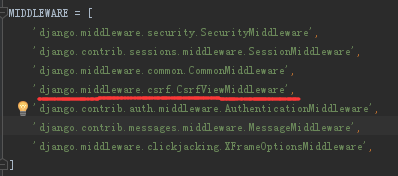
简单的登陆功能实例
views.py #app下的视图层
from django.shortcuts import render,HttpResponse,redirect,reverse

def test(request):
    return HttpResponse('我是app01的test')

def login(request):
    if request.method == 'GET':
        return render(request,'login.html')
    elif request.method == 'POST':
        print(request.POST)
        name = request.POST.get('name')  #name = request.POST[name] 也可以这样取值,但是当无值的时候会报错
        pwd = request.POST.get('pwd')
        print(name)
        print(pwd)
        if name == 'lqz' and pwd == '123':
            return redirect('http://www.baidu.com')
        else:
            return HttpResponse('用户名或密码错误')
login.html #模板层的页面文件
<!DOCTYPE html>
<html>
<head>
    <meta charset="UTF-8">
    <title>登陆页面</title>
</head>
<body>
    <form action="http://127.0.0.1:8000/login/" method="post">
        <p>
            名字:<input type="text" name="name">
        </p>
        <p>
            密码:<input type="password" name="pwd">
        </p>
        <input type="submit" value="提交">
    </form>
</body>
</html>
urls.py
from django.conf.urls import url,include  #include就是用来做路由分发的
from django.contrib import admin

from app01 import views
urlpatterns = [
    url(r'^admin/', admin.site.urls),
    url(r'login/',views.login)
]
(8)视图层参数request详解的更多相关文章
- iOS 视图控制器转场详解
iOS 视图控制器转场详解 前言的前言 唐巧前辈在微信公众号「iOSDevTips」以及其博客上推送了我的文章后,我的 Github 各项指标有了大幅度的增长,多谢唐巧前辈的推荐.有些人问我相关的问题 ...
- Scala 深入浅出实战经典 第62讲:Scala中上下文界定内幕中的隐式参数实战详解
王家林亲授<DT大数据梦工厂>大数据实战视频 Scala 深入浅出实战经典(1-87讲)完整视频.PPT.代码下载: 百度云盘:http://pan.baidu.com/s/1c0noOt ...
- Scala 深入浅出实战经典 第60讲:Scala中隐式参数实战详解以及在Spark中的应用源码解析
王家林亲授<DT大数据梦工厂>大数据实战视频 Scala 深入浅出实战经典(1-87讲)完整视频.PPT.代码下载:百度云盘:http://pan.baidu.com/s/1c0noOt6 ...
- Oracle GoldenGate中HANDLECOLLISIONS参数使用详解
Oracle GoldenGate中HANDLECOLLISIONS参数使用详解 HANDLECOLLISIONS 是一个 replicat 进程参数,主要在 initial load 中使用.在 ...
- 机器学习——随机森林,RandomForestClassifier参数含义详解
1.随机森林模型 clf = RandomForestClassifier(n_estimators=200, criterion='entropy', max_depth=4) rf_clf = c ...
- DAX/PowerBI系列 - 查询参数用法详解(Query Parameter)
PowerBI - 查询参数用法详解(Query Parameter) 很多人都不知道查询参数用来干啥,下面总结一下日常项目中常用的几个查询参数的地方.(本人不太欢hardcode的东西) 使用查询 ...
- MySQL高可用架构之Mycat-关于Mycat安装和参数设置详解
MySQL高可用架构之Mycat-关于Mycat安装和参数设置详解 作者:尹正杰 版权声明:原创作品,谢绝转载!否则将追究法律责任. 一.Mycat介绍 1>.什么是Mycat Mycat背后是 ...
- java newInstance() 的参数版本与无参数版本详解
newInstance() 的参数版本与无参数版本详解 博客分类: Core Java 通过反射创建新的类示例,有两种方式: Class.newInstance() Constructor.new ...
- [转帖]技术扫盲:新一代基于UDP的低延时网络传输层协议——QUIC详解
技术扫盲:新一代基于UDP的低延时网络传输层协议——QUIC详解 http://www.52im.net/thread-1309-1-1.html 本文来自腾讯资深研发工程师罗成的技术分享, ...
随机推荐
- 阿里云免费申请https证书
申请地址 https://common-buy.aliyun.com/?spm=a2c4e.11153940.blogcont65199.22.30f968210RsUSx&commodi ...
- flask项目结构(三)使用蓝图
简介: Flask中的蓝图旨在针对这些情况: 把一个应用分解成一系列的蓝图.对于大型的应用是理想化的:一个项目能实例化一个应用, 初始化一些扩展,以及注册一系列的蓝图. 以一个 URL 前缀和/或子域 ...
- vue-4-Class 与 Style 绑定
v-if <h1 v-if="ok">Yes</h1> 切换多个元素://最终的渲染结果不会包含 <template> 元素 <templ ...
- 项目导入时报错:The import javax.servlet.http.HttpServletRequest cannot be resolved 解决方法
Error: The import javax.servlet cannot be resolved The import javax.servlet.http.HttpServletRequest ...
- Linux文件管理常用命令用法总结
1.touch change file timestamps. 命令用于修改文件或者目录的时间属性,包括存取时间和更改时间.若文件不存在,系统会建立一个新的文件.stat,ls -l 可以显示档案的时 ...
- 201621123001 《Java程序设计》第7周学习总结
1. 本周学习总结 1.1 思维导图:Java图形界面总结 1.2 可选:使用常规方法总结其他上课内容. 掌握了NetBeans基本使用方法 掌握布局管理器基本概念 尝试了自己在界面布置组件 网格组布 ...
- layer 问题 汇总
1.搭配iframe 子页面遮罩层 覆盖父页面 window.parent.layer.open({ // type: 1, //skin: 'layui-layer-rim', //加上 ...
- adb shell按键操作(input keyevent)
前言:input keyeven操作发送手机上常用的一些按键操作 一.keyevent事件对应数字 电话键 KEYCODE_CALL: 拨号键 KEYCODE_ENDCALL: 挂机键 KEYCODE ...
- Beta阶段复审
名字 优点 缺点 排名 都行可以随它去 1.界面美观,比较的友好: 2.新增记账的邮箱提醒功能. 1.程序有什么具体的bug和或缺陷?(1)没有账单删除的功能:(2)预算没有什么必要.2.项目的目标实 ...
- 分析攻击IP来源地并画出饼图
此文中的API将台湾列为国家,非本人立场,台湾属于中国,台湾岛生活的人不一定! 上码: #!/usr/bin/python #coding=utf-8 ''' http://ip-api.com/js ...