
学习Spring Security OAuth认证(一)-授权码模式
一.环境
spring boot+spring security+idea+maven+mybatis
主要是spring security
二.依赖
    <dependency>

            <groupId>org.springframework.security.oauth</groupId>

            <artifactId>spring-security-oauth2</artifactId>

        </dependency>

        <dependency>

            <groupId>org.springframework.boot</groupId>

            <artifactId>spring-boot-starter-security</artifactId>

        </dependency>
不需要版本号,spring boot的pom中已经声明了合适的版本号
三.springsecurity登录配置
package com.haitian.security;

import com.haitian.service.security.CustomUserService;

import com.haitian.utils.PathUtils;

import org.springframework.beans.factory.annotation.Autowired;

import org.springframework.context.MessageSource;

import org.springframework.context.annotation.Bean;

import org.springframework.context.annotation.Configuration;

import org.springframework.context.support.ReloadableResourceBundleMessageSource;

import org.springframework.security.authentication.dao.DaoAuthenticationProvider;

import org.springframework.security.authentication.encoding.BasePasswordEncoder;

import org.springframework.security.authentication.encoding.Md5PasswordEncoder;

import org.springframework.security.config.annotation.web.builders.HttpSecurity;

import org.springframework.security.config.annotation.web.configuration.EnableWebSecurity;

import org.springframework.security.config.annotation.web.configuration.WebSecurityConfigurerAdapter;

import org.springframework.security.core.userdetails.UserDetailsService;

import org.springframework.security.crypto.bcrypt.BCryptPasswordEncoder;

import org.springframework.security.crypto.password.PasswordEncoder;

import org.springframework.security.web.authentication.AuthenticationFailureHandler;

import org.springframework.security.web.authentication.AuthenticationSuccessHandler;

import org.springframework.security.web.authentication.SimpleUrlAuthenticationFailureHandler;

import org.springframework.security.web.authentication.UsernamePasswordAuthenticationFilter;

import java.util.Locale;

/**

 * User:zhangweixiao

 * Description:

 */

@Configuration

@EnableWebSecurity

public class WebSecurityConfig extends WebSecurityConfigurerAdapter {

    @Autowired

    private AuthenticationFailureHandler authenticationFailureHandler;

    @Autowired

    private AuthenticationSuccessHandler authenticationSuccessHandler;

    @Autowired

    private  UserDetailsService userDetailsService;

    @Bean

    public BasePasswordEncoder getPasswordEncoder()

    {

        return new Md5PasswordEncoder();

    }

   @Bean

    public DaoAuthenticationProvider authProvider() {

        DaoAuthenticationProvider authProvider = new DaoAuthenticationProvider();

        authProvider.setPasswordEncoder(getPasswordEncoder());

        authProvider.setUserDetailsService(userDetailsService);

        return authProvider;

    }

    @Override

    protected void configure(HttpSecurity http) throws Exception {

        ValidateCodeFilter validateCodeFilter=new ValidateCodeFilter();

        validateCodeFilter.setAuthenticationFailureHandler(authenticationFailureHandler);

        http

                .authorizeRequests()

                .antMatchers("/**").permitAll()

                .and()

                .addFilterBefore(validateCodeFilter, UsernamePasswordAuthenticationFilter.class)

                .formLogin().loginPage("/login").loginProcessingUrl("/zshop_login")

                .failureHandler(authenticationFailureHandler)

                .successHandler(authenticationSuccessHandler)

                .and()

                .csrf().disable();

    }

}
/**

 * 前台登录的数据库桥梁

 */

@Service

public class CustomUserService implements UserDetailsService{

    @Autowired

    private UserService userService;

    /**

     * @param username

     * @return

     * @throws UsernameNotFoundException

     * @throws DataAccessException

     */

    public UserDetails loadUserByUsername(String username) throws UsernameNotFoundException, DataAccessException {

        User user = this.userService.getUserByUserName(username);

        if (user == null) {

            throw new UsernameNotFoundException("用户名不存在");

        }

        Set authorities = new HashSet();

        for (Role role : user.getRoles()) {

            GrantedAuthority grantedAuthority = new SimpleGrantedAuthority(role.getRoleCode());

            authorities.add(grantedAuthority);

        }

        user.setAuthorities(authorities);

        return user;

    }

}
数据库中User表对应的User类继承了UserDetails,这里就不发了.
加密算法最好用bcrypt,因为数据库存的是md5的,所以先用md5了.
了解加密:http://www.cnblogs.com/ptqueen/p/8448396.html
配置完成之后要保证能登录成功.
四.配置认证服务器
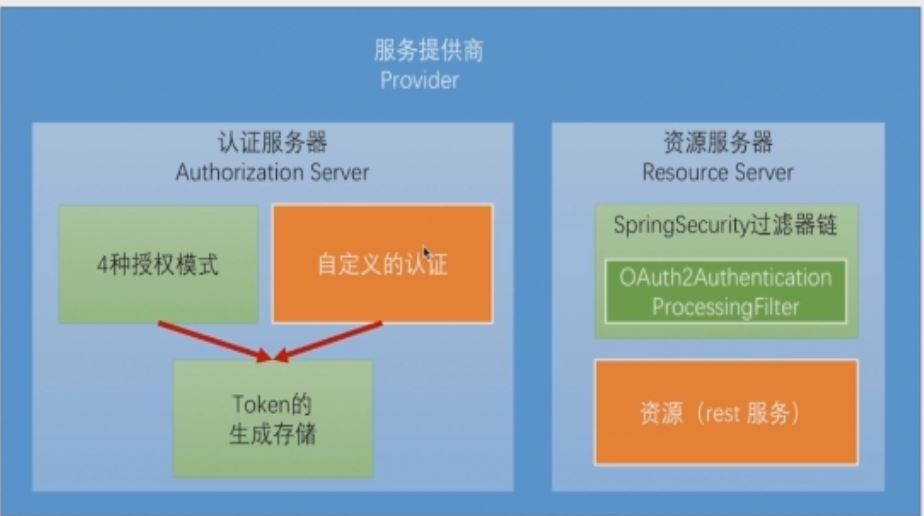
1.配置注解提供认证服务器
@Configuration

@EnableAuthorizationServer

public class AuthorizationServerConfig {

}
2配置client-id和secret.
security:

  oauth2:

    client:

      client-id: zshop

      client-secret: zshop_secret
client-id就是第三方申请认证的id,前后端分离中前端也就相当于第三方.
你的认证服务器就好比QQ的认证服务器,你的前端就好比需要QQ第三方登录的网站.
3启动当前模块
可以看到控制台中oath2包的为我们做的mapping
 Mapped "{[/oauth/authorize]}" onto public org.springframework.web.servlet.ModelAndView org.springframework.security.oauth2.provider.endpoint.AuthorizationEndpoint.authorize(java.util.Map<java.lang.String, java.lang.Object>,java.util.Map<java.lang.String, java.lang.String>,org.springframework.web.bind.support.SessionStatus,java.

 Mapped "{[/oauth/authorize],methods=[POST],params=[user_oauth_approval]}" onto public org.springframework.web.servlet.View org.springframework.security.oauth2.provider.endpoint.AuthorizationEndpoint.approveOrDeny(java.util.Map<java.lang.String, java.lang.String>,java.util.Map<java.lang.String, ?>,org.springframework.web.bind.support.SessionStatus,java.security.Principal)
4.用rest client插件测试
关于插件简单介绍请看:
http://www.cnblogs.com/ptqueen/p/8449046.html
关于oath2文档
https://tools.ietf.org/html/rfc6749#page-24
上面是oath2文档中需要认证的参数信息
先这样测试,http://localhost:8082/oauth/authorize?response_type=code&client_id=zshop&redirect_uri=https://cnblogs.com&scope=all
五.获取授权码code

关于授权码模式的流程请看:
http://www.cnblogs.com/ptqueen/p/8449150.html
成功的话会跳转到登录页面,这个登录页面相当于从某个论坛QQ登录跳转出来的登陆窗口
登录成功后出现这样一个
OAuth Approval
Do you authorize 'zshop' to access your protected resources?
如果是自己的前端登录成功之后应该会直接拿到所有权限,不显示此页面,然后继续换取令牌,
第三方QQ登录的 approval是和登录页面一起的.后面看看怎么配置.
同意授权之后会跳转到https://cnblogs.com,同时会携带一个code,这个code就是授权码.下一步需要通过授权码来换取令牌.
https://www.cnblogs.com/?code=D120US
六.发送授权码到认证服务器换取令牌
参照oauth2文档
https://tools.ietf.org/html/rfc6749#page-29
post的参数有
grant_tpye,值必须为authorization_code
code,第一篇中获得的授权码
redirect_uri,必须和第一篇相同
client_id,配置文件中定义的client_id
scope,获取授权码时定义的scope
请求的header中需要包含client-id和client-secret.

七.获得令牌
成功之后即可获取,令牌是有有效期的,必须在有效期之前进行刷新
{"access_token": "f035137f-def1-4bae-9adc-718a26e6c141","token_type": "bearer","refresh_token": "e7f65ace-6c5d-44a6-94fb-e7ca65ff12fd","expires_in": 43199,"scope": "all"}
学习Spring Security OAuth认证(一)-授权码模式的更多相关文章
- 阶段5 3.微服务项目【学成在线】_day16 Spring Security Oauth2_06-SpringSecurityOauth2研究-Oauth2授权码模式-申请令牌
3.3 Oauth2授权码模式 3.3.1 Oauth2授权模式 Oauth2有以下授权模式: 授权码模式(Authorization Code) 隐式授权模式(Implicit) 密码模式(Reso ...
- 阶段5 3.微服务项目【学成在线】_day16 Spring Security Oauth2_07-SpringSecurityOauth2研究-Oauth2授权码模式-资源服务授权测试
下面要完成 5.6两个步骤 3.3.4 资源服务授权 3.3.4.1 资源服务授权流程 资源服务拥有要访问的受保护资源,客户端携带令牌访问资源服务,如果令牌合法则可成功访问资源服务中的资 源,如下图 ...
- 单点登录 - OAuth 2.0 授权码模式(一)
OAuth 2.0定义了四种授权方式 授权码模式(authorization code) 简化模式(implicit) 密码模式(resource owner password credentials ...
- Spring Security OAuth2 Demo —— 授权码模式
本文可以转载,但请注明出处https://www.cnblogs.com/hellxz/p/oauth2_oauthcode_pattern.html 写在前边 在文章OAuth 2.0 概念及授权流 ...
- Oauth2.0认证---授权码模式
目录: 1.功能描述 2.客户端的授权模式 3.授权模式认证流程 4.代码实现 1.功能描述 OAuth在"客户端"与"服务提供商"之间,设置了一个授权层(au ...
- OAuth 2.0之授权码模式
转载自:http://www.ruanyifeng.com/blog/2014/05/oauth_2_0.html OAuth 2.0授权码模式 授权码模式(authorization code)是功 ...
- Spring Security OAuth2 授权码模式
背景: 由于业务实现中涉及到接入第三方系统(app接入有赞商城等),所以涉及到第三方系统需要获取用户信息(用户手机号.姓名等),为了保证用户信息的安全和接入方式的统一, 采用Oauth2四种模式之一 ...
- asp.net权限认证:OWIN实现OAuth 2.0 之授权码模式(Authorization Code)
asp.net权限认证系列 asp.net权限认证:Forms认证 asp.net权限认证:HTTP基本认证(http basic) asp.net权限认证:Windows认证 asp.net权限认证 ...
- Spring Security OAuth笔记
因为工作需要,系统权限安全方面可能要用到Spring Security OAuth2.0,所以,近几天了解了一下OAuth相关的东西.目前好像还没有系统的学习资料,学习主要是通过博客,内容都是大同小异 ...
随机推荐
- Kylin工作原理、体系架构
核心思想:预计算. 对多维分析可能用到的度量进行预计算,将计算好的结果保存成Cube,并存在HBase中,供查询时直接访问 将高复杂度的聚合运算.多表连接……操作转换成对预计算结果的查询.决定了Kyl ...
- sublime配置 sublimecondeintel 分号后不要提示
https://github.com/SublimeCodeIntel/SublimeCodeIntel/issues/461 Thanks to @catgsmith ,I find a simil ...
- 【译】第24节---Fluent API - 属性映射
原文:http://www.entityframeworktutorial.net/code-first/configure-property-mappings-using-fluent-api.as ...
- Codeforces Round #424 (Div. 2, rated, based on VK Cup Finals) D. Office Keys time limit per test2 seconds 二分
D. Office Keys time limit per test 2 seconds memory limit per test 256 megabytes input standard inpu ...
- js代码点击触发事件
js触发按钮点击事件 function load(){ //下面两种方法效果是一样的 document.getElementById("target").onclick(); do ...
- art-template
art-template 输出 标准语法 {{value}} {{data.key}} {{data['key']}} {{a ? b : c}} {{a || b}} {{a + b}} 原始语法 ...
- STL——set
(转) 1.关于set C++ STL 之所以得到广泛的赞誉,也被很多人使用,不只是提供了像vector, string, list等方便的容器,更重要的是STL封装了许多复杂的数据结构算法和大量常用 ...
- 原生ajax的请求封装get和post
一个完整的AJAX请求包括五个步骤: 1.创建XMLHTTPRequest对象 2.使用open方法创建http请求,并设置请求地址 3.设置发送的数据,开始和服务器端交互 4.注册事件 5.获取响应 ...
- 第 2 章 容器架构 - 008 - Docker 组件如何协作?
容器启动过程如下: Docker 客户端执行 docker run 命令. Docker daemon 发现本地没有 httpd 镜像. daemon 从 Docker Hub 下载镜像. 下载完成, ...
- HTML标签使用
`<!-- 什么是HTML 超文本标记语言 由标签(属性和实体组成)和内容组成 --> <!-- 定义文档类型 --> <!DOCTYPE html> <!- ...