
Selenium2+python自动化38-显式等待(WebDriverWait)
From: https://www.cnblogs.com/yoyoketang/p/6517477.html
前言:
在脚本中加入太多的sleep后会影响脚本的执行速度,虽然implicitly_wait()这种方法隐式等待方法一定程度上节省了很多时间。
但是一旦页面上某些js无法加载出来(其实界面元素经出来了),左上角那个图标一直转圈,这时候会一直等待的。
一、参数解释
1.这里主要有三个参数:
class WebDriverWait(object):driver, timeout, poll_frequency
2.driver:返回浏览器的一个实例,这个不用多说
3.timeout:超时的总时长
4.poll_frequency:循环去查询的间隙时间,默认0.5秒
以下是源码的解释文档(案例一个是元素出现,一个是元素消失)
def __init__(self, driver, timeout, poll_frequency=POLL_FREQUENCY, ignored_exceptions=None):
"""Constructor, takes a WebDriver instance and timeout in seconds.
:Args:
- driver - Instance of WebDriver (Ie, Firefox, Chrome or Remote)
- timeout - Number of seconds before timing out
- poll_frequency - sleep interval between calls
By default, it is 0.5 second.
- ignored_exceptions - iterable structure of exception classes ignored during calls.
By default, it contains NoSuchElementException only.
Example:
from selenium.webdriver.support.ui import WebDriverWait \n
element = WebDriverWait(driver, 10).until(lambda x: x.find_element_by_id("someId")) \n
is_disappeared = WebDriverWait(driver, 30, 1, (ElementNotVisibleException)).\ \n
until_not(lambda x: x.find_element_by_id("someId").is_displayed())
"""
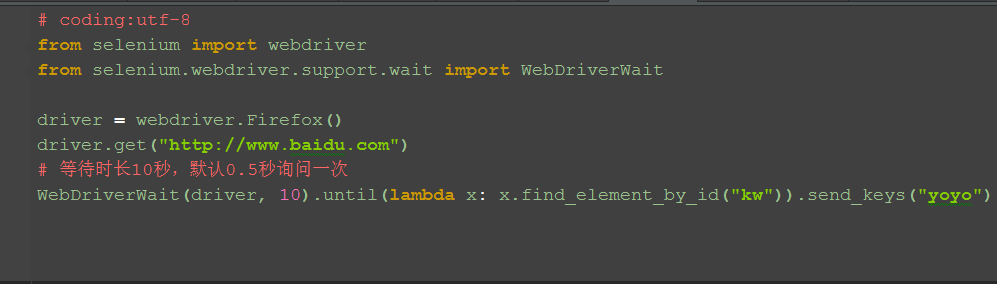
二、元素出现:until()
1.until里面有个lambda函数,这个语法看python文档吧
2.以百度输入框为例
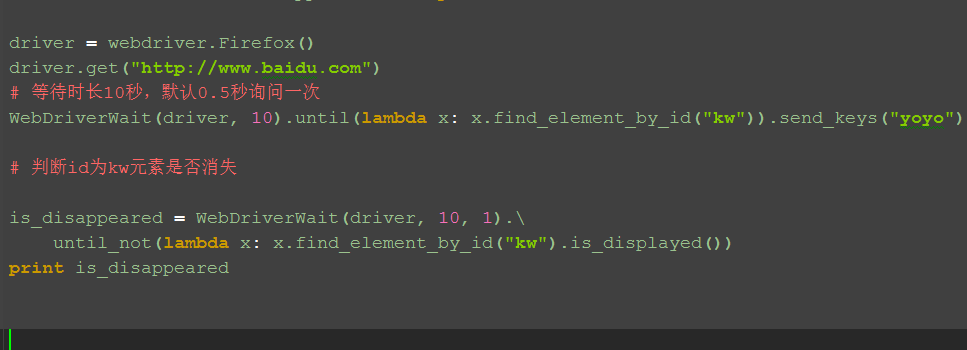
三、元素消失:until_not()
1.判断元素是否消失,是返回Ture,否返回False
备注:此方法未调好,暂时放这
四、参考代码:
# coding:utf-8
from selenium import webdriver
from selenium.webdriver.support.wait import WebDriverWait
driver = webdriver.Firefox()
driver.get("http://www.baidu.com")
# 等待时长10秒,默认0.5秒询问一次
WebDriverWait(driver, 10).until(lambda x: x.find_element_by_id("kw")).send_keys("yoyo")
# 判断id为kw元素是否消失
is_disappeared = WebDriverWait(driver, 10, 1).\
until_not(lambda x: x.find_element_by_id("kw").is_displayed())
print is_disappeared
五、WebDriverWait源码
1.WebDriverWait主要提供了两个方法,一个是until(),另外一个是until_not()
以下是源码的注释,有兴趣的小伙伴可以看下
# Licensed to the Software Freedom Conservancy (SFC) under one
# or more contributor license agreements. See the NOTICE file
# distributed with this work for additional information
# regarding copyright ownership. The SFC licenses this file
# to you under the Apache License, Version 2.0 (the
# "License"); you may not use this file except in compliance
# with the License. You may obtain a copy of the License at
#
# http://www.apache.org/licenses/LICENSE-2.0
#
# Unless required by applicable law or agreed to in writing,
# software distributed under the License is distributed on an
# "AS IS" BASIS, WITHOUT WARRANTIES OR CONDITIONS OF ANY
# KIND, either express or implied. See the License for the
# specific language governing permissions and limitations
# under the License.
import time
from selenium.common.exceptions import NoSuchElementException
from selenium.common.exceptions import TimeoutException
POLL_FREQUENCY = 0.5 # How long to sleep inbetween calls to the method
IGNORED_EXCEPTIONS = (NoSuchElementException,) # exceptions ignored during calls to the method
class WebDriverWait(object):
def __init__(self, driver, timeout, poll_frequency=POLL_FREQUENCY, ignored_exceptions=None):
"""Constructor, takes a WebDriver instance and timeout in seconds.
:Args:
- driver - Instance of WebDriver (Ie, Firefox, Chrome or Remote)
- timeout - Number of seconds before timing out
- poll_frequency - sleep interval between calls
By default, it is 0.5 second.
- ignored_exceptions - iterable structure of exception classes ignored during calls.
By default, it contains NoSuchElementException only.
Example:
from selenium.webdriver.support.ui import WebDriverWait \n
element = WebDriverWait(driver, 10).until(lambda x: x.find_element_by_id("someId")) \n
is_disappeared = WebDriverWait(driver, 30, 1, (ElementNotVisibleException)).\ \n
until_not(lambda x: x.find_element_by_id("someId").is_displayed())
"""
self._driver = driver
self._timeout = timeout
self._poll = poll_frequency
# avoid the divide by zero
if self._poll == 0:
self._poll = POLL_FREQUENCY
exceptions = list(IGNORED_EXCEPTIONS)
if ignored_exceptions is not None:
try:
exceptions.extend(iter(ignored_exceptions))
except TypeError: # ignored_exceptions is not iterable
exceptions.append(ignored_exceptions)
self._ignored_exceptions = tuple(exceptions)
def __repr__(self):
return '<{0.__module__}.{0.__name__} (session="{1}")>'.format(
type(self), self._driver.session_id)
def until(self, method, message=''):
"""Calls the method provided with the driver as an argument until the \
return value is not False."""
screen = None
stacktrace = None
end_time = time.time() + self._timeout
while True:
try:
value = method(self._driver)
if value:
return value
except self._ignored_exceptions as exc:
screen = getattr(exc, 'screen', None)
stacktrace = getattr(exc, 'stacktrace', None)
time.sleep(self._poll)
if time.time() > end_time:
break
raise TimeoutException(message, screen, stacktrace)
def until_not(self, method, message=''):
"""Calls the method provided with the driver as an argument until the \
return value is False."""
end_time = time.time() + self._timeout
while True:
try:
value = method(self._driver)
if not value:
return value
except self._ignored_exceptions:
return True
time.sleep(self._poll)
if time.time() > end_time:
break
raise TimeoutException(message)
Selenium2+python自动化38-显式等待(WebDriverWait)的更多相关文章
- selenium自动化之显式等待和EC(expected_conditions)模块
很多人都有这种经历,selenium脚本当前运行没问题,过了一段时间再运行就报错了,然后过几天又好了.其中的原因估计60%的人都知道,是因为元素加载这块有问题.通常的解决方案就是加上sleep或者隐式 ...
- python+selenium 自动化测试——显式等待详解
1.前言 之前有提到过等待函数,等待函数分为:强制等待(sleep).隐式等待(implicitly_wait),显示等待(WebDriverWait),这次以显示等待方式专门做一次总结,因为我个人是 ...
- selenium的webdriver三种等待方式(显式等待WebDriverWait+implicitly_wait隐式等待+sleep强制等待)
隐式等待是等页面加载,不是等元素!!! 1.显式等待 一个显式等待是你定义的一段代码,用于等待某个条件发生然后再继续执行后续代码.显式等待是等元素加载!!! 2.隐式等待,相当于设置全局的等待,在定位 ...
- 显式等待until传入自定义方法
WebDriverWait(driver,10).until(expected_conditions.element_to_be_clickable(ele)) 通过追踪代码,可以发现上面的eleme ...
- 【java+selenium3】隐式等待+显式等待 (七)
一.隐式等待 -- implicitlyWait 调用方式:driver.manage().timeouts().implicitlyWait(long time, TimeUnit unit); / ...
- 基于Selenium2+Java的UI自动化(8)- 显式等待和隐式等待
一.隐式等待 package com.automation.waits; import java.util.concurrent.TimeUnit; import org.openqa.seleniu ...
- Selenium2+python自动化39-关于面试的题
前言 最近看到群里有小伙伴贴出一组面试题,最近又是跳槽黄金季节,小编忍不住抽出一点时间总结了下, 回答不妥的地方欢迎各位高手拍砖指点. 一.selenium中如何判断元素是否存在? 首先selen ...
- Selenium2+python自动化39-关于面试的题【转载】
前言 最近看到群里有小伙伴贴出一组面试题,最近又是跳槽黄金季节,小编忍不住抽出一点时间总结了下, 回答不妥的地方欢迎各位高手拍砖指点. 一.selenium中如何判断元素是否存在? 首先selen ...
- Selenium2+python自动化47-判断弹出框存在(alert_is_present)
前言 系统弹窗这个是很常见的场景,有时候它不弹出来去操作的话,会抛异常.那么又不知道它啥时候会出来,那么久需要去判断弹窗是否弹出了. 本篇接着Selenium2+python自动化42-判断元素(ex ...
- Selenium2+python自动化47-判断弹出框存在(alert_is_present)【转载】
前言 系统弹窗这个是很常见的场景,有时候它不弹出来去操作的话,会抛异常.那么又不知道它啥时候会出来,那么久需要去判断弹窗是否弹出了. 本篇接着Selenium2+python自动化42-判断元素(ex ...
随机推荐
- pytonn04day
参考: https://docs.python.org/3/tutorial/datastructures.html#list-comprehensions 一列表 它是以[ ]括起来, 每个元素⽤用 ...
- python开发day02
一 while循环 while 条件 代码块(循环体) #: 判断条件是否为真,如果是真,则执行代码块, 然后再次回头判断条件是否为真,如果为真,则只执行代码块.......知道循环的判断出代码为 ...
- C与C++中实现 gotoxy()函数
#include <stdio.h> #include <windows.h> void gotoxy(int x, int y) { COORD pos = {x,y}; H ...
- 由testcase数据之分析
一.获取data来源 1.利用openpyxl从excel表格获取数据,相较于xlrd,openpyxl可以将表格里的样式也传递过来的优势 xlrd ----------------- ht ...
- 在学习linux基础入门时的一些问题总结(1)
本周在实验楼完成了<linux基础入门>的21个实验,虽然之前已经学习过linux的相关课程,对linux下的命令也有一些了解和实践,但完成这21个实验以及35个练习题仍然遇到了许多的问题 ...
- heap 的一些用法
noip 合并果子 #include<bits/stdc++.h> using namespace std; int heap[maxn]; ; void input(int d) { ...
- mongodb添加验证用户 删除用户
1.创建用户 db.createUser( { user:<name_string>, #字符串 pwd:<password_string> ...
- oracle完全恢复数据库
完全恢复数据文件 rman target/ list backup summary; 查看是否有备份,如果没有备份,先进行全备份(应该是backup database吧) 现在模拟删除oracle数据 ...
- JDBC事务的处理-----模拟银行转账业务
定义: 数据库事务(简称:事务)是数据库管理系统执行过程中的一个逻辑单位,由一个有限的数据库操作序列构成. 概要: 一个数据库事务通常包含了一个序列的对数据库的读/写操作.它的存在包含有以下两个目的: ...
- <--------------------------构造方法------------------------------>
1 构造方法 初始化阶段 给对象的属性进行赋值 构造方法 什么是构造方法 : 字面 方法构建时 就使用的方法 对象创建的时候就使用的方法 作用:对象的属性值初始化2 如何用构造方法 修饰符 构造方法名 ...