
neutron full stack
1. 通读一下 neutron的那个文档。 里面介绍了, db怎么隔离的, amqp怎么隔离的。
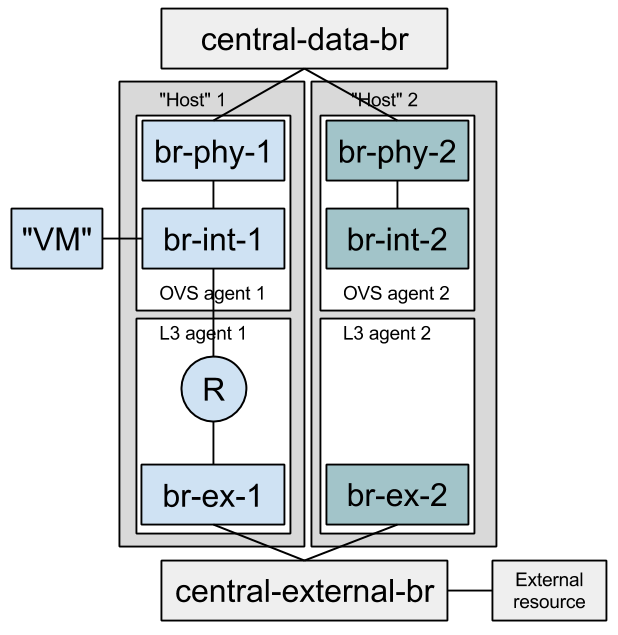
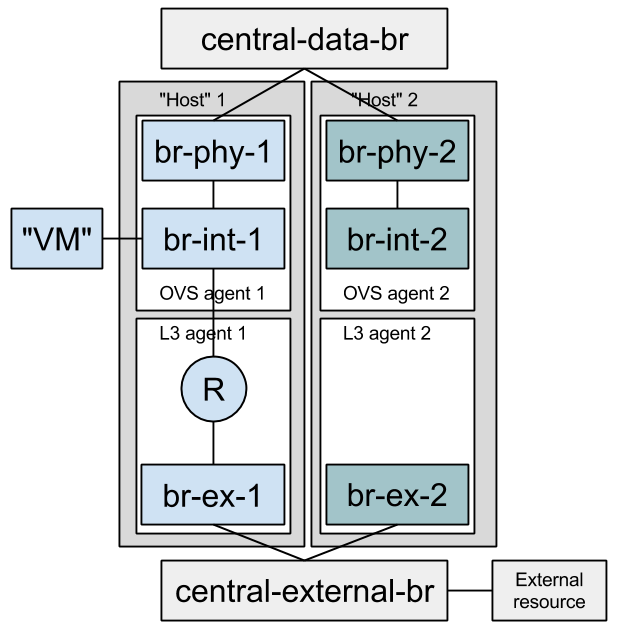
2. 记住文档中,那个full stack的图。
3. 走读代码
从TestOvsConnectivitySameNetwork
开始走读。 这个case
是neutron的文档推荐的。
继承自, BaseConnectivitySameNetworkTest —>
BaseFullStackTestCase
整个图,
是environment的类,
图中的 Host 1 和Host 2
是 一个Host的类。
environment 主要负责
创建 central-data-br, central-external-br, Host 1
和Host 2,
还有启动neutron-server。
Host 创建br-phy, br-int, br-ex,
启动L2,L3的agent。
代码的逻辑性非常好,还是很清晰的,很容易看明白。具体的代码分析,见下面的email。
穆勒的那个介绍neutron的文档 https://assafmuller.com/
1. configure_for_func_testing
_init
# 执行了devstack/stackrc
if [[ "$IS_GATE" != "True" ]]; then
if [[ "$INSTALL_MYSQL_ONLY" == "True" ]]; then
_install_databases nopg #仅仅配置了db, 使用
mysql+pymysql://openstack_citest:***@localhost/etmtdbylqa
else
configure_host_for_func_testing # 配置了db, rpc , 安装了依赖包
fi
fi
if [[ "$VENV" =~ "dsvm-fullstack" ]]; then
echo "***********************************"
_configure_iptables_rules # iptables
配置了INPUT, 240.0.0.0/8 C类网段的 5672 用来做RPC通信。
fi
2. 分析 neutron/tests/fullstack/test_connectivity.py TestOvsConnectivitySameNetwork 这个testcase:
主要分析 db的配置,engine的rul怎么赋值的。
You can get oslo.db to generate a file-based sqlite database by setting OS_TEST_DBAPI_ADMIN_CONNECTION to a file based URL as described in this mailing list post. This file will be created but (confusingly) won’t be the actual file used for the database. To find the actual file, set a break point in your test method and inspect self.engine.url.
$ OS_TEST_DBAPI_ADMIN_CONNECTION=sqlite:///sqlite.db .tox/py27/bin/python -m \

    testtools.run neutron.tests.unit...

...

(Pdb) self.engine.url

sqlite:////tmp/iwbgvhbshp.db
Now, you can inspect this file using sqlite3.
$ sqlite3 /tmp/iwbgvhbshp.db
实际上是调用了,OpportunisticSqlFixture 的 resources_collection
方法。provision.DatabaseResource(driver) 产生了engine.url
provision.DatabaseResource("mysql").getResource().engine
provision.DatabaseResource("mysql").getResource().engine
继承关系依次是:
TestOvsConnectivitySameNetwork -》BaseConnectivitySameNetworkTest -》 BaseFullStackTestCase
class TestOvsConnectivitySameNetwork(BaseConnectivitySameNetworkTest):
l2_agent_type = constants.AGENT_TYPE_OVS
network_scenarios = [
('VXLAN', {'network_type': 'vxlan',
'l2_pop': False}),
('GRE-l2pop-arp_responder', {'network_type': 'gre',
'l2_pop': True,
'arp_responder': True}),
('VLANs', {'network_type': 'vlan',
'l2_pop': False})]
scenarios = testscenarios.multiply_scenarios(
network_scenarios, utils.get_ovs_interface_scenarios())
def test_connectivity(self):
self._test_connectivity()
class BaseConnectivitySameNetworkTest(base.BaseFullStackTestCase):
of_interface = None
ovsdb_interface = None
arp_responder = False
def setUp(self):
host_descriptions = [
# There's value in enabling L3 agents registration when l2pop
# is enabled, because l2pop code makes assumptions about the
# agent types present on machines.
environment.HostDescription(
l3_agent=self.l2_pop,
of_interface=self.of_interface,
ovsdb_interface=self.ovsdb_interface,
l2_agent_type=self.l2_agent_type) for _ in range(3)]
env = environment.Environment(
environment.EnvironmentDescription(
network_type=self.network_type,
l2_pop=self.l2_pop,
arp_responder=self.arp_responder),
host_descriptions)
super(BaseConnectivitySameNetworkTest, self).setUp({})
def _test_connectivity(self):
tenant_uuid = uuidutils.generate_uuid()
network = self.safe_client.create_network(tenant_uuid)
self.safe_client.create_subnet(
tenant_uuid, network['id'], '20.0.0.0/24')
vms = machine.FakeFullstackMachinesList([
self.useFixture(
machine.FakeFullstackMachine(
self.environment.hosts[i],
network['id'],
tenant_uuid,
self.safe_client))
for i in range(3)])
vms.block_until_all_boot()
vms.ping_all()
class BaseFullStackTestCase(testlib_api.MySQLTestCaseMixin,
testlib_api.SqlTestCase):
"""Base test class for full-stack tests."""
BUILD_WITH_MIGRATIONS = True
def setUp(self, environment):
super(BaseFullStackTestCase, self).setUp()
tests_base.setup_test_logging(
cfg.CONF, DEFAULT_LOG_DIR, '%s.txt' % self.get_name())
# NOTE(zzzeek): the opportunistic DB fixtures have built for
# us a per-test (or per-process) database. Set the URL of this
# database in CONF as the full stack tests need to actually run a
# neutron server against this database.
_orig_db_url = cfg.CONF.database.connection
cfg.CONF.set_override(
'connection', str(self.engine.url), group='database’) # 没有找到
self.addCleanup(
cfg.CONF.set_override,
"connection", _orig_db_url, group="database"
)
# NOTE(ihrachys): seed should be reset before environment fixture below
# since the latter starts services that may rely on generated port
# numbers
tools.reset_random_seed()
self.environment = environment
self.environment.test_name = self.get_name()
self.useFixture(self.environment)
self.client = self.environment.neutron_server.client
self.safe_client = self.useFixture(
client_resource.ClientFixture(self.client))
def get_name(self):
class_name, test_name = self.id().split(".")[-2:]
return "%s.%s" % (class_name, test_name)
1. 参考例子:
分析BaseConnectivitySameNetworkTest
neutron/tests/fullstack/test_connectivity.py
neutron.tests.fullstack.test_connectivity.TestOvsConnectivitySameNetwork
这个类derived from BaseConnectivitySameNetworkTest
class BaseConnectivitySameNetworkTest(base.BaseFullStackTestCase):

    of_interface = None

    ovsdb_interface = None

    arp_responder = False

    def setUp(self):

        host_descriptions = [

            # There's value in enabling L3 agents registration when l2pop

            # is enabled, because l2pop code makes assumptions about the

            # agent types present on machines.

            environment.HostDescription(   # 这个类很简单,就是几个变量用来描述 host

                l3_agent=self.l2_pop,

                of_interface=self.of_interface,

                ovsdb_interface=self.ovsdb_interface,

                l2_agent_type=self.l2_agent_type) for _ in range(3)]

        env = environment.Environment(    # 这个类,是用来真正部署host集群环境的。需要具体分析。见下图后的分析。

            environment.EnvironmentDescription(  # 这个类很简单,就是几个变量用来描述host的环境

                network_type=self.network_type,

                l2_pop=self.l2_pop,

                arp_responder=self.arp_responder),

            host_descriptions)

        super(BaseConnectivitySameNetworkTest, self).setUp(env)

    def _test_connectivity(self):

        tenant_uuid = uuidutils.generate_uuid()

        network = self.safe_client.create_network(tenant_uuid)

        self.safe_client.create_subnet(

            tenant_uuid, network['id'], '20.0.0.0/24’)

        vms = machine.FakeFullstackMachinesList([

            self.useFixture(

                machine.FakeFullstackMachine(

                    self.environment.hosts[i],

                    network['id'],

                    tenant_uuid,

                    self.safe_client))

            for i in range(3)])

        vms.block_until_all_boot()

        vms.ping_all()
class Environment(fixtures.Fixture):

    """Represents a deployment topology.

    Environment is a collection of hosts. It starts a Neutron server

    and a parametrized number of Hosts, each a collection of agents.

    The Environment accepts a collection of HostDescription, each describing

    the type of Host to create.

    """

    def __init__(self, env_desc, hosts_desc):

        """

        :param env_desc: An EnvironmentDescription instance.

        :param hosts_desc: A list of HostDescription instances.

        """

        super(Environment, self).__init__()

        self.env_desc = env_desc

        self.hosts_desc = hosts_desc

        self.hosts = []

    def wait_until_env_is_up(self):

        common_utils.wait_until_true(self._processes_are_ready)

    def _processes_are_ready(self):

        try:

            running_agents = self.neutron_server.client.list_agents()['agents']

            agents_count = sum(len(host.agents) for host in self.hosts)

            return len(running_agents) == agents_count

        except nc_exc.NeutronClientException:

            return False

    def _create_host(self, host_desc):

        temp_dir = self.useFixture(fixtures.TempDir()).path

        neutron_config = config.NeutronConfigFixture( # 跟server类似的配置。

            self.env_desc, host_desc, temp_dir,

            cfg.CONF.database.connection, self.rabbitmq_environment)

        self.useFixture(neutron_config)

        return self.useFixture(  #  图中 Host 1 和 Host 2的创建。

            Host(self.env_desc,

                 host_desc,

                 self.test_name,

                 neutron_config,

                 self.central_data_bridge,

                 self.central_external_bridge))

    def _setUp(self):

        self.temp_dir = self.useFixture(fixtures.TempDir()).path

        #we need this bridge before rabbit and neutron service will start

        # 调用了 neutron/agent/common/ovs_lib 中的 BaseOVS 创建 bridge, 这2个bridge 是global的。

                self.central_data_bridge = self.useFixture(  # 创建图中的最顶部的bridge。

            net_helpers.OVSBridgeFixture('cnt-data')).bridge

        self.central_external_bridge = self.useFixture(  # 创建图中的最底部的bridge。

            net_helpers.OVSBridgeFixture('cnt-ex')).bridge

        #Get rabbitmq address (and cnt-data network)

        rabbitmq_ip_address = self._configure_port_for_rabbitmq() # 240.0.0.0 c类地址中的一个。

        self.rabbitmq_environment = self.useFixture( # 创建了一个vhost,创建了一个用户,随机password,为这个用户设置host的权限。

            process.RabbitmqEnvironmentFixture(host=rabbitmq_ip_address) # 实在是没有找到 这个ip 这里没有使用

        )

        plugin_cfg_fixture = self.useFixture(

            config.ML2ConfigFixture( # 配置了租户的网络类型,mechanical driver,vlan/vxlan/gre的 range

                self.env_desc, self.hosts_desc, self.temp_dir,

                self.env_desc.network_type))

        neutron_cfg_fixture = self.useFixture(

            config.NeutronConfigFixture( # 生成了一个neutron的config,这个config, 配置了service plugin,配置paste,配置了rabbitmq的url,配置了DB的connect

                self.env_desc, None, self.temp_dir,

                cfg.CONF.database.connection, self.rabbitmq_environment))

        self.neutron_server = self.useFixture(

            process.NeutronServerFixture( # 启动了一个neutron-server进程, 全局的namespace。通过是spawn找到了执行文件,需要研究一下。

                self.env_desc, None,

                self.test_name, neutron_cfg_fixture, plugin_cfg_fixture))

        # 创建agent

        self.hosts = [self._create_host(desc) for desc in self.hosts_desc]

        self.wait_until_env_is_up()  # 60秒,等所有的agent起来。

    def _configure_port_for_rabbitmq(self):

        self.env_desc.network_range = self._get_network_range()

        if not self.env_desc.network_range:

            return "127.0.0.1"

        rabbitmq_ip = str(self.env_desc.network_range[1])

        rabbitmq_port = ip_lib.IPDevice(self.central_data_bridge.br_name)

        # 顶部的bridge 配置了IP?

        rabbitmq_port.addr.add(common_utils.ip_to_cidr(rabbitmq_ip, 24))

        # 顶部的bridge 启动起来?

        rabbitmq_port.link.set_up()

        return rabbitmq_ip

    def _get_network_range(self):

        #NOTE(slaweq): We need to choose IP address on which rabbitmq will be

        # available because LinuxBridge agents are spawned in their own

        # namespaces and need to know where the rabbitmq server is listening.

        # For ovs agent it is not necessary because agents are spawned in

        # globalscope together with rabbitmq server so default localhost

        # address is fine for them

        for desc in self.hosts_desc:

            if desc.l2_agent_type == constants.AGENT_TYPE_LINUXBRIDGE:

                return self.useFixture(

                    # network 就是个netaddr.IPNetwork 但是持久化了。

                    # 可以看这个doc string

                    # $ pydoc neutron.tests.common.exclusive_resources.resource_allocator.ResourceAllocator

                    ip_network.ExclusiveIPNetwork(

                        "240.0.0.0", "240.255.255.255", "")).network
走读 Host的代码:
class Host(fixtures.Fixture):

    """The Host class models a physical host running agents, all reporting with

    the same hostname.

    OpenStack installers or administrators connect compute nodes to the

    physical tenant network by connecting the provider bridges to their

    respective physical NICs. Or, if using tunneling, by configuring an

    IP address on the appropriate physical NIC. The Host class does the same

    with the connect_* methods.

    # 是不是可以贡献代码啊?

    TODO(amuller): Add start/stop/restart methods that will start/stop/restart

    all of the agents on this host. Add a kill method that stops all agents

    and disconnects the host from other hosts.

    """

    def __init__(self, env_desc, host_desc,

                 test_name, neutron_config,

                 central_data_bridge, central_external_bridge):

        self.env_desc = env_desc

        self.host_desc = host_desc

        self.test_name = test_name

        self.neutron_config = neutron_config

        self.central_data_bridge = central_data_bridge    # 每个host 都会连接 图中的顶部和底部的bridge。

        self.central_external_bridge = central_external_bridge

        self.host_namespace = None

        self.agents = {}

        # we need to cache already created "per network" bridges if linuxbridge

        # agent is used on host:

        self.network_bridges = {}

    def _setUp(self):

        self.local_ip = self.allocate_local_ip()  #

        if self.host_desc.l2_agent_type == constants.AGENT_TYPE_OVS:

            self.setup_host_with_ovs_agent()

        elif self.host_desc.l2_agent_type == constants.AGENT_TYPE_LINUXBRIDGE:

            self.setup_host_with_linuxbridge_agent()

        if self.host_desc.l3_agent:

            self.l3_agent = self.useFixture(

                process.L3AgentFixture(

                    self.env_desc, self.host_desc,

                    self.test_name,

                    self.neutron_config,

                    self.l3_agent_cfg_fixture))

    def setup_host_with_ovs_agent(self):

        # config br-int, ovs的名称,open follow接口 ovs-ofctl, db接口vsctl,agent, security group…

        # 以及与之连接的 bridge是br-eth('vlan')还是br-tun('vxlan', ‘gre’的情况下)

        agent_cfg_fixture = config.OVSConfigFixture(

            self.env_desc, self.host_desc, self.neutron_config.temp_dir,

            self.local_ip)

        self.useFixture(agent_cfg_fixture)

        # 怎么链接到 图中顶层的bridge, internal的bridge

        if self.env_desc.tunneling_enabled:

            self.useFixture(

                net_helpers.OVSBridgeFixture(

                    agent_cfg_fixture.get_br_tun_name())).bridge

            self.connect_to_internal_network_via_tunneling() # 通过veth连接, 其中一个 veth的IP为local_ip

        else:

            br_phys = self.useFixture(

                net_helpers.OVSBridgeFixture(

                    agent_cfg_fixture.get_br_phys_name())).bridge

            self.connect_to_internal_network_via_vlans(br_phys) # 通过ovs的patch连接

        self.ovs_agent = self.useFixture( # 启动ovs的agent,按照前面的配置。

            process.OVSAgentFixture(

                self.env_desc, self.host_desc,

                self.test_name, self.neutron_config, agent_cfg_fixture))

        # 怎么链接到 图中底层的bridge, external的bridge

        if self.host_desc.l3_agent:

            self.l3_agent_cfg_fixture = self.useFixture(

                # 主要是 namespace 和 interface_driver(ovs 还是linux bridge)

                config.L3ConfigFixture(

                    self.env_desc, self.host_desc,

                    self.neutron_config.temp_dir,

                    self.ovs_agent.agent_cfg_fixture.get_br_int_name()))

            br_ex = self.useFixture(

                net_helpers.OVSBridgeFixture(

                    self.l3_agent_cfg_fixture.get_external_bridge())).bridge

            self.connect_to_external_network(br_ex)  # 通过ovs的patch连接

    def setup_host_with_linuxbridge_agent(self):

        #First we need to provide connectivity for agent to prepare proper

        #bridge mappings in agent's config:

        self.host_namespace = self.useFixture(

            net_helpers.NamespaceFixture(prefix="host-")

        ).name

        # 怎么链接到 图中底层的bridge, external的bridge, 有两种方式,一种是直接连接 bridge?

        # 直接 bridge 带 可使用 veth,也可以不使用。

        # 一种是有增加了一个linux bridge, qbr

        self.connect_namespace_to_control_network()

        agent_cfg_fixture = config.LinuxBridgeConfigFixture(

            self.env_desc, self.host_desc,

            self.neutron_config.temp_dir,

            self.local_ip,

            physical_device_name=self.host_port.name

        )

        self.useFixture(agent_cfg_fixture)

        self.linuxbridge_agent = self.useFixture(

            process.LinuxBridgeAgentFixture(

                self.env_desc, self.host_desc,

                self.test_name, self.neutron_config, agent_cfg_fixture,

                namespace=self.host_namespace

            )

        )

        if self.host_desc.l3_agent:

            self.l3_agent_cfg_fixture = self.useFixture(

                config.L3ConfigFixture(

                    self.env_desc, self.host_desc,

                    self.neutron_config.temp_dir))

    def _connect_ovs_port(self, cidr_address):

        ovs_device = self.useFixture(

            net_helpers.OVSPortFixture(

                bridge=self.central_data_bridge,

                namespace=self.host_namespace)).port

        # NOTE: This sets an IP address on the host's root namespace

        # which is cleaned up when the device is deleted.

        ovs_device.addr.add(cidr_address)

        return ovs_device

    def connect_namespace_to_control_network(self):

        self.host_port = self._connect_ovs_port(

            common_utils.ip_to_cidr(self.local_ip, 24)

        )

        self.host_port.link.set_up()

    def connect_to_internal_network_via_tunneling(self):

        veth_1, veth_2 = self.useFixture(

            net_helpers.VethFixture()).ports

        # NOTE: This sets an IP address on the host's root namespace

        # which is cleaned up when the device is deleted.

        veth_1.addr.add(common_utils.ip_to_cidr(self.local_ip, 32))

        veth_1.link.set_up()

        veth_2.link.set_up()

    def connect_to_internal_network_via_vlans(self, host_data_bridge):

        # If using VLANs as a segmentation device, it's needed to connect

        # a provider bridge to a centralized, shared bridge.

        net_helpers.create_patch_ports(

            self.central_data_bridge, host_data_bridge)

    def connect_to_external_network(self, host_external_bridge):

        net_helpers.create_patch_ports(

            self.central_external_bridge, host_external_bridge)

    def allocate_local_ip(self):

        if not self.env_desc.network_range:

            return str(self.useFixture(

                ip_address.ExclusiveIPAddress(

                    '240.0.0.1', '240.255.255.254')).address)

        return str(self.useFixture(

            ip_address.ExclusiveIPAddress(

                str(self.env_desc.network_range[2]),

                str(self.env_desc.network_range[-2]))).address)

    def get_bridge(self, network_id):

        if "ovs" in self.agents.keys():

            return self.ovs_agent.br_int

        elif "linuxbridge" in self.agents.keys():

            bridge = self.network_bridges.get(network_id, None)

            if not bridge:

                br_prefix = lb_agent.LinuxBridgeManager.get_bridge_name(

                    network_id)

                bridge = self.useFixture(

                    net_helpers.LinuxBridgeFixture(

                        prefix=br_prefix,

                        namespace=self.host_namespace,

                        prefix_is_full_name=True)).bridge

                self.network_bridges[network_id] = bridge

        return bridge

    @property

    def hostname(self):

        return self.neutron_config.config.DEFAULT.host

    @property

    def l3_agent(self):

        return self.agents['l3']

    @l3_agent.setter

    def l3_agent(self, agent):

        self.agents['l3'] = agent

    @property

    def ovs_agent(self):

        return self.agents['ovs']

    @ovs_agent.setter

    def ovs_agent(self, agent):

        self.agents['ovs'] = agent

    @property

    def linuxbridge_agent(self):

        return self.agents['linuxbridge']

    @linuxbridge_agent.setter

    def linuxbridge_agent(self, agent):

        self.agents['linuxbridge'] = agent
setup 环境实验
1.
IMPORTANT: configure_for_func_testing.sh relies on DevStack to perform
extensive modification to the underlying host. Execution of the script
requires sudo privileges and it is recommended that the following
commands be invoked only on a clean and disposeable
VM. A VM that has had DevStack previously installed on it is also fine.
git clone https://git.openstack.org/openstack-dev/devstack ../devstack

./tools/configure_for_func_testing.sh ../devstack -i

tox -e dsvm-functional
neutron full stack的更多相关文章
- 为 Neutron 准备物理基础设施(II) - 每天5分钟玩转 OpenStack(76)
本节将按照上一节的规划安装配置控制节点和计算节点. 控制节点 devstack-controller 步骤如下 安装 Ubuntu 14.04 此处省略 256 个字 配置网卡 编辑 /etc/net ...
- keystone入口manage.py
/opt/stack/keystone/keystone/cmd/manage.py OpenStack所有项目都是基于Python开发,并且都是标准的Python项目,通过setuptools工具管 ...
- Python Module_sys/random
目录 目录 前言 软件环境 Python标准库初识 Python常用的标准库模块 dir 函数使用方法 sys操作系统功能模块 sysstdinsysstdoutsysstderr标准IOError流 ...
- 理解 OpenStack 高可用(HA)(2):Neutron L3 Agent HA 之 虚拟路由冗余协议(VRRP)
本系列会分析OpenStack 的高可用性(HA)概念和解决方案: (1)OpenStack 高可用方案概述 (2)Neutron L3 Agent HA - VRRP (虚拟路由冗余协议) (3)N ...
- Openstack Neutron DVR workflow
目前在Juno版本的trunk中已经合入了DVR相关的代码,我的理解是在Juno版本中DVR是一个experimental feature.最好需要稳定一个版本以后再上生产环境.之前写过一篇博文是DV ...
- 初探Openstack Neutron DVR
目前在Juno版本的trunk中已经合入了DVR相关的代码,我的理解是在Juno版本中DVR是一个experimental feature.最好需要稳定一个版本以后再上生产环境.之前写过一篇博文是DV ...
- openstack(liberty): devstack之stack.sh分析
学习openstack,从devstack入手,是个不错的选择.devstack中,首先需要分析stack.sh都做了些什么! 这里面涉及到了很多shell的基础知识.我就做个简单的梳理,方便后续查阅 ...
- 写个脚本列出neutron的ovs的topology。
运行结果如下: $ ./nova-ifinfo a7026868-407c-4c54-bb8f-a68623d7e13fvm name is: instance-00000035 # 查找VM ...
- Floating IP in OpenStack Neutron
前言 Floating IP 是相对于Fixed IP而言的,它一般是在VM创建后分配给VM的,可以达到的目的就是,外界可以访问通过这个Floating Ip访问这个VM,VM也可以通过这个IP访问外 ...
随机推荐
- ElementNotVisibleException: Message: element not visible
selenium自动化测试中,经常会报异常: 可能会有各种疑问,元素可以定位到啊.为什么报以下异常? ElementNotVisibleException: Message: element not ...
- mybatis之注解式开发之关联查询
package com.bjsxt.mapper; import org.apache.ibatis.annotations.Select; import com.bjsxt.pojo.Clazz; ...
- vue-lazyload的使用
1.下载依赖 npm install vue-lazyload --save 2.引入 import Vue from 'vue' import App from '@/App' import Vue ...
- caffe-ssd运行create_data.sh的时候报错:SSD from caffe.proto import caffe_pb2 ImportError: No module named caffe.proto
在用voc2007和voc2012的数据训练基于caffe的SSD模型的时候,我们需要将图片数据转换成lmdb格式,运行脚本文件是SSD源码里面提供的create_data.sh(具体位置在$CAFF ...
- this上下文一致
什么是this对象 先来说说什么是this对象吧,每个函数在调用的时候都会自动获取两个特殊变量:this和arguments对象.this值具体是指哪个对象是和该函数的执行环境相关的.如果是作为对象的 ...
- Spark学习之路 (二十七)图简介
一.图 1.1 基本概念 图是由顶点集合(vertex)及顶点间的关系集合(边edge)组成的一种数据结构. 这里的图并非指代数中的图.图可以对事物以及事物之间的关系建模,图可以用来表示自然发生的连接 ...
- [转载]SQL Server中的事务与锁
了解事务和锁 事务:保持逻辑数据一致性与可恢复性,必不可少的利器. 锁:多用户访问同一数据库资源时,对访问的先后次序权限管理的一种机制,没有他事务或许将会一塌糊涂,不能保证数据的安全正确读写. 死锁: ...
- 第一周java测验感想
在正式开学的第一周,建民老师就给我们来了一个下马威.我本身的编程基础比较差,不知道怎么去想,怎么去一步步的去完成这么一个工程.所以我在星期四的下午十分的痛苦…因为不知道怎么搞嘛.尽管在暑假的时候看了 ...
- Django框架----中间件
我们已经会了给视图函数加装饰器来判断是用户是否登录,把没有登录的用户请求跳转到登录页面.我们通过给几个特定视图函数加装饰器实现了这个需求.但是以后添加的视图函数可能也需要加上装饰器,这样是不是稍微有点 ...
- Spring IOC 和 AOP
一. IOC 1. 概念及原理 IOC: Inversion of Control(控制反转)是一种设计思想,就是容器控制应用程序所需要的外部资源的创建和管理,然后将其反转给应用程序.对象及其依赖对象 ...