
SAP 实例 6 HTML input
REPORT demo_html_input.

CLASS demo DEFINITION.

  PUBLIC SECTION.

    CLASS-METHODS main.

  PRIVATE SECTION.

    CLASS-METHODS handle_sapevent

      FOR EVENT sapevent

                  OF cl_abap_browser

      IMPORTING action

                  query_table.

ENDCLASS.

CLASS demo IMPLEMENTATION.

  METHOD main.

    DATA error_list TYPE cl_abap_browser=>html_table.

    SET HANDLER handle_sapevent.

    DATA(html_str) =

       `<html>`

    && `  <head>`

    && `    <meta http-equiv="content-type" `

    && `          content="text/html; `

    && `          charset=utf-8">`

    && `    <script language="JavaScript">`

    && `      function sendInput(form) `

    && `          { fname=form.name;       `

    && `            document[fname].submit();} `

    && `      function InputKeyDown(form) {`

    && `        if(event.keyCode == 13) {`

    && `            fname=form.name;`

    && `            document[fname].submit();} }`

    && `    </script>`

    && `  </head>`

    && `  <body>`

    && `    <form name="INPUT" accept-charset="utf-8" `

    && `          method="post" action="SAPEVENT:INPUT"> `

    && `      <input type="text" id="in1" name="field1" `

    && `             size=30 maxlength=30 title="" value="aaa" `

    && `             onKeyDown="InputKeyDown(this.form);"><br>`

    && `      <input type="text" id="in2" name="field2" `

    && `             size=30 maxlength=30 title="" value="bbb" `

    && `             onKeyDown="InputKeyDown(this.form);"><br>`

    && `      <input type="text" id="in3" name="field3" `

    && `             size=30 maxlength=30 title="" value="ccc" `

    && `             onKeyDown="InputKeyDown(this.form);"><br><br>`

    && `     <button id="enterButton" type="button" `

    && `             title="Enter" onClick="sendInput(INPUT);" `

    && `             onKeypress="if(event.keycode=13) `

    && `             sendInput(INPUT);">`

    && `             Enter</button>`

    && `    </form>`

    && `  </body>`

    && `</html>`.

    cl_abap_browser=>show_html(

      EXPORTING

        html_string = html_str

        title       = 'Input Demo'

      IMPORTING

         html_errors = error_list ).

    IF error_list IS NOT INITIAL.

      MESSAGE 'Error in HTML' TYPE 'I' DISPLAY LIKE 'E'.

    ENDIF.

  ENDMETHOD.

  METHOD handle_sapevent.

    DATA(out) = cl_demo_output_stream=>open( ).

    SET HANDLER cl_demo_output_html=>handle_output FOR out.

    out->write_data( iv_name = 'ACTION'      ia_value = action ).

    out->write_data( iv_name = 'QUERY_TABLE' ia_value = query_table ).

    out->close( ).

  ENDMETHOD.

ENDCLASS.

START-OF-SELECTION.

  demo=>main( ).
Description
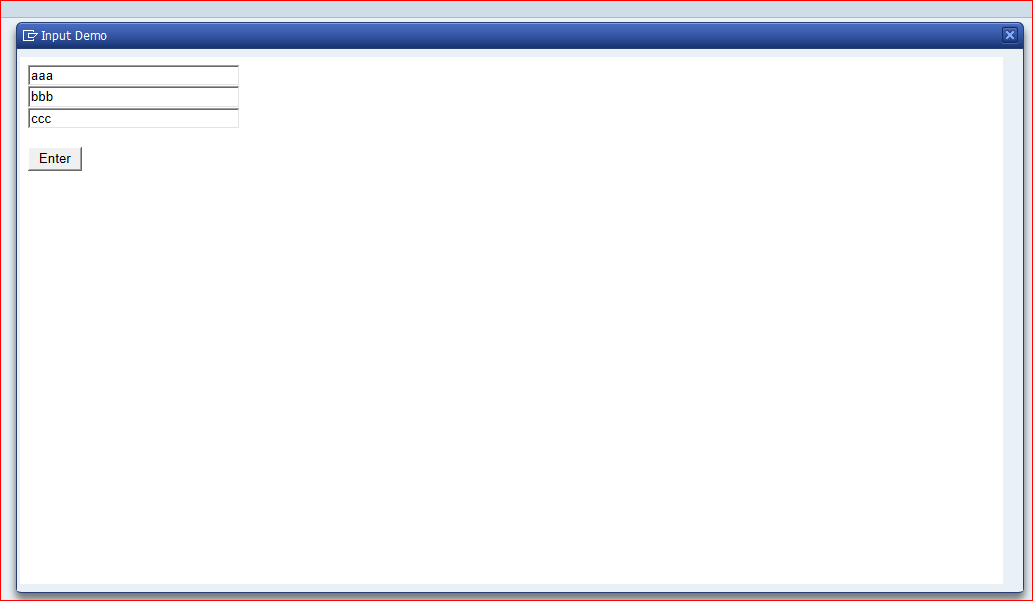
This example creates a HTML file containing multiple input fields, a pushbutton, and JavaScript functions for handling the input. The form INPUT uses method="post" to send the input data. The HTML control in CFW uses the parameter QUERY_TABLE of the event SAPEVENT to pass this data to its handler. The class CL_ABAP_BROWSER (a wrapper for the class CL_GUI_HTML_VIEWER also passes this parameter and the user input can be used in the ABAP program.
Also see the corresponding example for ICF.
SAP 实例 6 HTML input的更多相关文章
- SAP 实例 10 List Box with value list from input help
*&---------------------------------------------------------------------* *& Report DEMO_DROP ...
- SAP 实例 4 CFW
*&---------------------------------------------------------------------* *& Report demo_cfw ...
- Vue实例:演示input 和 textarea 元素中使用 v-model 实现双向数据绑定
最终效果: 主要代码: <template> <div> <p>input 元素:</p> <input v-model="messag ...
- SAP 实例- 下拉框
效果图 源代码 REPORT rsdemo_dropdown_listbox . DATA init. TABLES scarr. TABLES spfli. TABLES sflight. TABL ...
- SAP 实例- 页签tabsrip
屏幕页签:项目上有一需求,对标准TCODE 一个屏幕增加一个页签.于是做了个例子. 下面屏幕有两个页签. 我们来看一下屏幕结构.100屏幕是主屏幕,101,102是子屏幕,对应页签test1,test ...
- SAP 实例 12 List Box with Value List from PBO Module
REPORT demo_dynpro_dropdown_listbox. DATA: name TYPE vrm_id, list TYPE vrm_values, value LIKE LINE O ...
- SAP 实例 8 HTML from the MIME Repository
REPORT demo_html_from_mime. CLASS mime_demo DEFINITION. PUBLIC SECTION. CLASS-METHODS main. PRIVATE ...
- SAP 实例 5 CFW Events
REPORT demo_custom_control . * Declarations ***************************************************** CL ...
- SAP 实例 3 Context Menus
REPORT demo_dynpro_context_menu. DATA: field1 TYPE i VALUE 10, field2 TYPE p DECIMALS 4. DATA: prog ...
随机推荐
- STL空间分配器源码分析(一)
一.摘要 STL的空间分配器(allocator)定义于命名空间std内,主要为STL容器提供内存的分配和释放.对象的构造和析构的统一管理.空间分配器的实现细节,对于容器来说完全透明,容器不需关注内存 ...
- Java学习day7
Java继承不同与c++,格式为: public class 子类名 extends 父类名{ 语句体; } 继承提高了代码的复用性与维护性 在子类方法中访问一个变量时,首先在子类局部范围查找,其次到 ...
- 新手入门C语言第十章:C作用域规则
C 作用域规则任何一种编程中,作用域是程序中定义的变量所存在的区域,超过该区域变量就不能被访问.C 语言中有三个地方可以声明变量: 在函数或块内部的局部变量 在所有函数外部的全局变量 在形式参数的函数 ...
- Vue+element搭建后台管理系统-二、安装插件
我们继续上一章的内容,上一章讲到我们已经能将项目成功跑起来了,那么我们接下来把项目必用的东西完善一下. 一.安装elementUI 终于到了我们的男二了,继续在VSCode中新建一个终端,然后通过这个 ...
- Java语言学习day05--7月2日
今日内容介绍1.引用类型变量的创建及使用2.流程控制语句之选择语句 ###01创建引用类型变量公式 * A: 创建引用类型变量公式 * a: 我们要学的Scanner类是属于引用数据类型,我们先了解下 ...
- RecyclerView + SQLite 简易备忘录-----上
先看效果 图一只是做了简单的页面,没有连接数据库,刚写完页面才想起备忘录好像不需要登录------但用SharedPreferences写了个记住密码. 图二是主页面,实现了搜索,添加,删除,修改几个 ...
- JS的URIencode方式
BEGIN; 对需要传递的URL参数进行URLencode编码 刚开始浪费了很多时间都没搞出来,不知道怎么用.后面google到了不少解决方案,最终解决.转载下面内容: js对文字进行编码涉及3个函数 ...
- iOS全埋点解决方案-手势采集
前言 随着科技以及业务的发展,手势的应用也越来越普及,因此对于数据采集,我们要考虑如果通过全埋点来实现手势的采集. 一.手势识别器 苹果为了降低开发者在手势事件处理方面的开发难度,定义了一个抽 ...
- echarts踩坑总结
1,有关echarts引用的相关报错直接写这句 import * as echarts from 'echarts' 2,折线图 chartsObj = { tooltip: { trigger: ...
- Java 线程安全 与 锁
Java 线程安全 与 锁 多线程内存模型 线程私有栈内存 每个线程 私有的内存区域 进程公有堆内存 同一个进程 共有的内存区域 为什么会有线程安全问题? 多个线程同时具有对同一资源的操作权限,又发生 ...