
SAP 实例 5 CFW Events
REPORT demo_custom_control .

* Declarations *****************************************************

CLASS event_handler DEFINITION.

  PUBLIC SECTION.

    METHODS: handle_f1 FOR EVENT f1 OF cl_gui_textedit

             IMPORTING sender,

             handle_f4 FOR EVENT f4 OF cl_gui_textedit

             IMPORTING sender.

ENDCLASS.

DATA: ok_code LIKE sy-ucomm,

      save_ok LIKE sy-ucomm.

DATA: init,

      container TYPE REF TO cl_gui_custom_container,

      editor    TYPE REF TO cl_gui_textedit.

DATA: event_tab TYPE cntl_simple_events,

      event     TYPE cntl_simple_event.

DATA: line(256) TYPE c,

      text_tab LIKE STANDARD TABLE OF line,

      field LIKE line.

DATA handle TYPE REF TO event_handler.

* Reporting Events ***************************************************

START-OF-SELECTION.

  line = 'First line in TextEditControl'.

  APPEND line TO text_tab.

  line = '--------------------------------------------------'.

  APPEND line TO text_tab.

  line = '...'.

  APPEND line TO text_tab.

  CALL SCREEN 100.

* Dialog Modules *****************************************************

MODULE status_0100 OUTPUT.

  SET PF-STATUS 'SCREEN_100'.

  IF init is initial.

    init = 'X'.

    CREATE OBJECT: container EXPORTING container_name = 'TEXTEDIT',

                   editor    EXPORTING parent = container,

                   handle.

    event-eventid = cl_gui_textedit=>event_f1.

    event-appl_event = ' '.                     "system event

    APPEND event TO event_tab.

    event-eventid = cl_gui_textedit=>event_f4.

    event-appl_event = 'X'.                     "application event

    APPEND event TO event_tab.

    editor->set_registered_events(

                 EXPORTING events = event_tab ).

    SET HANDLER handle->handle_f1

                handle->handle_f4 FOR editor.

  ENDIF.

  editor->set_text_as_stream( EXPORTING text = text_tab ).

ENDMODULE.

MODULE cancel INPUT.

  LEAVE PROGRAM.

ENDMODULE.

MODULE user_command_0100 INPUT.

  save_ok = ok_code.

  CLEAR ok_code.

  CASE save_ok.

    WHEN 'INSERT'.

      editor->get_text_as_stream( IMPORTING text = text_tab ).

    WHEN 'F1'.

      MESSAGE i888(sabapdemos) WITH text-001.

    WHEN OTHERS.

      MESSAGE i888(sabapdemos) WITH text-002.

      cl_gui_cfw=>dispatch( ).                "for application events

      MESSAGE i888(sabapdemos) WITH text-003.

  ENDCASE.

  SET SCREEN 100.

ENDMODULE.

* Class Implementations **********************************************

CLASS event_handler IMPLEMENTATION.

  METHOD handle_f1.

    DATA row TYPE i.

    MESSAGE i888(sabapdemos) WITH text-004.

    sender->get_selection_pos(

         IMPORTING from_line = row ).

    sender->get_line_text(

         EXPORTING line_number = row

         IMPORTING text = field ).

    cl_gui_cfw=>set_new_ok_code(                "raise PAI for

         EXPORTING new_code = 'F1' ).           "system events

    cl_gui_cfw=>flush( ).

  ENDMETHOD.

  METHOD handle_f4.

    DATA row TYPE i.

    MESSAGE i888(sabapdemos) WITH text-005.

    sender->get_selection_pos(

         IMPORTING from_line = row ).

    sender->get_line_text(

         EXPORTING line_number = row

         IMPORTING text = field ).

    cl_gui_cfw=>flush( ).

  ENDMETHOD.

ENDCLASS.
Description
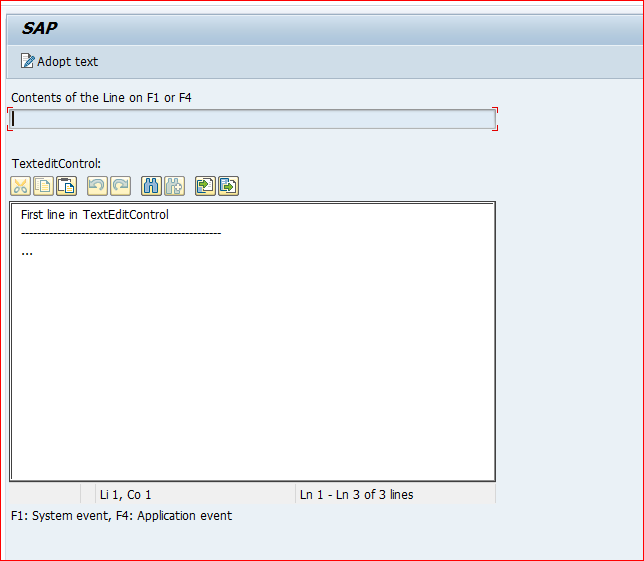
Screen 100 contains an output field field and a custom control called textedit. The flow logic of screen 100 is as follows:
- PROCESS BEFORE OUTPUT.
MODULE status_0100.
PROCESS AFTER INPUT.
MODULE cancel AT EXIT-COMMAND.
MODULE user_command_0100.
In the GUI status SCREEN_100, the function codes BACK, EXIT, and CANCEL have been created with type E and the function code INSERT has been created without any specific type.
The program contains a local class called event_handler with event handlers for the events F1 and F4 of global class CL_GUI_TEXTEDIT. When the program is executed, screen 100 instantiates objects of the classes CL_GUI_CUSTOM_CONTAINER, CL_GUI_TEXTEDIT, and event_handler at the PBO event.
The container control is linked to the custom control on the screen, and the instance of the textedit control is linked to this container. Since the events F1 and F4 of the textedit control are to be passed to the application server, the SET_REGISTERED_EVENTS method is used to register them, defining F1 as a system event and F4 as an application event. The event handling methods of the instance handle of the class event_handler are registered as handlers for the events.
Before the screen is sent, the textedit control is filled with the contents of table text_tab. As long as the screen is displyed, the user is allowed to edit the text. When INSERT is chosen, the PAI event is triggered, and the current text from the textedit control is copied into table text_tab.
If the user chooses the F1 key on the textedit control, the system immediately executes the handle_f1 method, assigning the row contents to the field field. Calling the SET_NEW_OK_CODE method triggers the PAI event. This is the only way to ensure that the PBO event is also processed and the contents of field are passed to the screen.
If the user chooses the F4 key on the textedit control, PAI is triggered. By calling the DISPATCH method, the system executes the handle_f4 method, assigning the row contents to the field field. Since the system then automatically returns to PAI processing, PBO is also processed and the field contents are transported.
In either case, regardless of whether the user chooses F1 or F4, the contents of the textedit control are not passed to the internal table text_tab. Consequently, the textedit control is overwritten with the previous contents of text_tab at the PBO event
SAP 实例 5 CFW Events的更多相关文章
- SAP 实例 4 CFW
*&---------------------------------------------------------------------* *& Report demo_cfw ...
- SAP 实例 8 HTML from the MIME Repository
REPORT demo_html_from_mime. CLASS mime_demo DEFINITION. PUBLIC SECTION. CLASS-METHODS main. PRIVATE ...
- SAP 实例 6 HTML input
REPORT demo_html_input. CLASS demo DEFINITION. PUBLIC SECTION. CLASS-METHODS main. PRIVATE SECTION. ...
- SAP 实例- 下拉框
效果图 源代码 REPORT rsdemo_dropdown_listbox . DATA init. TABLES scarr. TABLES spfli. TABLES sflight. TABL ...
- SAP 实例- 页签tabsrip
屏幕页签:项目上有一需求,对标准TCODE 一个屏幕增加一个页签.于是做了个例子. 下面屏幕有两个页签. 我们来看一下屏幕结构.100屏幕是主屏幕,101,102是子屏幕,对应页签test1,test ...
- SAP 实例 13 Random Grouping with LOOP
REPORT demo_loop_group_by_random. CLASS demo DEFINITION. PUBLIC SECTION. CLASS-METHODS: main, class_ ...
- SAP 实例 12 List Box with Value List from PBO Module
REPORT demo_dynpro_dropdown_listbox. DATA: name TYPE vrm_id, list TYPE vrm_values, value LIKE LINE O ...
- SAP 实例 10 List Box with value list from input help
*&---------------------------------------------------------------------* *& Report DEMO_DROP ...
- SAP 实例 9 Text output
REPORT demo_show_text. CLASS demo DEFINITION. PUBLIC SECTION. CLASS-METHODS main. ENDCLASS. CLASS de ...
随机推荐
- Golang 泛型的简单使用
go 学习泛型,利用泛型编写对数据集合执行操作的方法.
- 2021-01-25 cf #697 Div3 C题(超时,换思路减少复杂度)
题目链接:https://codeforces.com/contest/1475/problem/C 题意要求:需组成的2对,男的序号不能重,女的序号不能重 比如这例 输入: 行1--测试个数 行1` ...
- 原生 js 重点案例 [tab栏切换]
代码示例 : <!DOCTYPE html> <html lang="en"> <head> <meta charset="U ...
- 关于IDEA中添加静态资源(html,jpg等)后找不到资源(404 not found),以及WEB-INF目录介绍
关于静态资源的加载 在IDEA中的java web application(或者maven项目)添加新的静态资源时(如html,jpg,gif等),常常会遇到静态资源无法加载的情况.这样的情况我们一般 ...
- C#常见控件与SQL Sever数据库交互
C#常见控件与SQL Sever数据库交互 下拉框(ComboBox)与数据库绑定 首先,我们采用DataSet作为临时的数据库,这样会比较好 那么,我们先创建两个成员(对象) string sqlc ...
- python学习-Day7
目录 作业讲解 数据类型内置方法2 字符串(str) 列表(list) 类型转换 内置方法 索引取值 切片操作 步长 统计列表中元素的个数 成员运算 (in和not in) 列表添加元素的方式* 删除 ...
- [洛谷] P2241 统计方形(数据加强版)
点击查看代码 #include<bits/stdc++.h> using namespace std; long long n, m, total, sum1, sum2; int mai ...
- ImageKnife组件,让小白也能轻松搞定图片开发
本期我们给大家带来的是开发者周黎生的分享,希望能给你的HarmonyOS开发之旅带来启发~ 图片是UI界面的重要元素之一, 图片加载速度及效果直接影响应用体验.ArkUI开发框架提供了丰富的图像处理能 ...
- IIS发布Https和Https的问题
asp.net调试页面的时候遇到一个问题,我喜欢右键点击在浏览器查看页面,打开的页面默认是https的,其实iis会同时生成http和https两种页面,但是我懒得每次去点.问题是页面中测试接口是ht ...
- 从防御者视角来看APT攻击
前言 APT防御的重要性毋庸讳言,为了帮助各位师傅在防御方面建立一个总体认识,本文会将APT防御方法分为三类,分别是:监控.检测和缓解技术,并分别进行梳理,介绍分析代表性技术.这一篇分析现有的监控技术 ...