
使用postman 测试restful接口
前提:
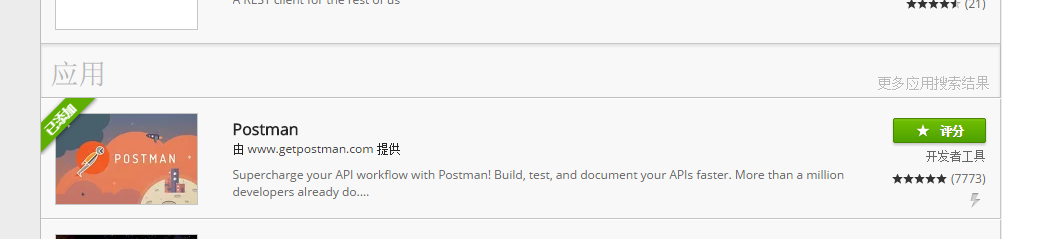
在chrome网上应用商店安装postman 和 Postman Interceptor.
如下图:

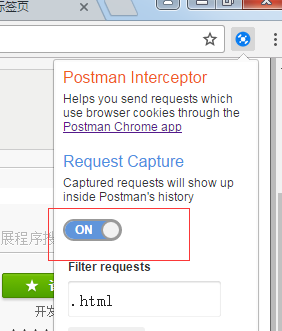
使用postman的时候,最后开启postman Interceptor,如下图:
然后启动,postman工具,开始使用。
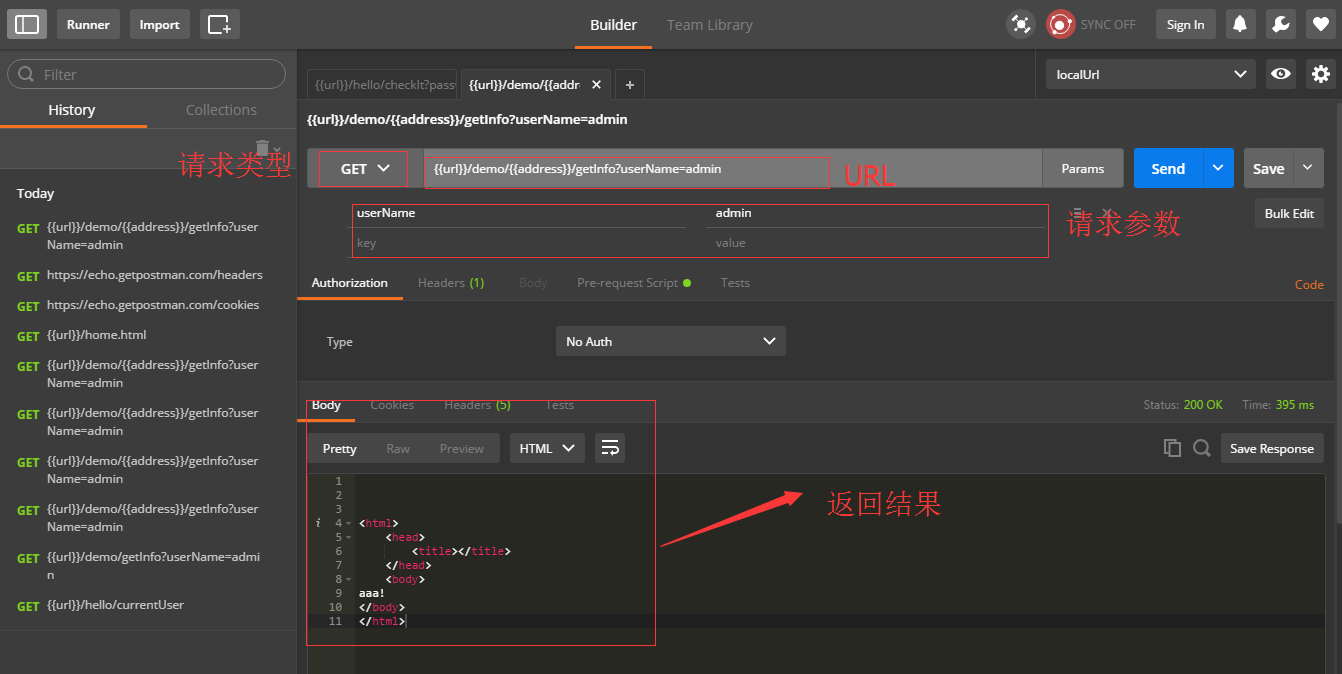
其中{{url}}的使用,是因为在设置了环境变量,如下图:

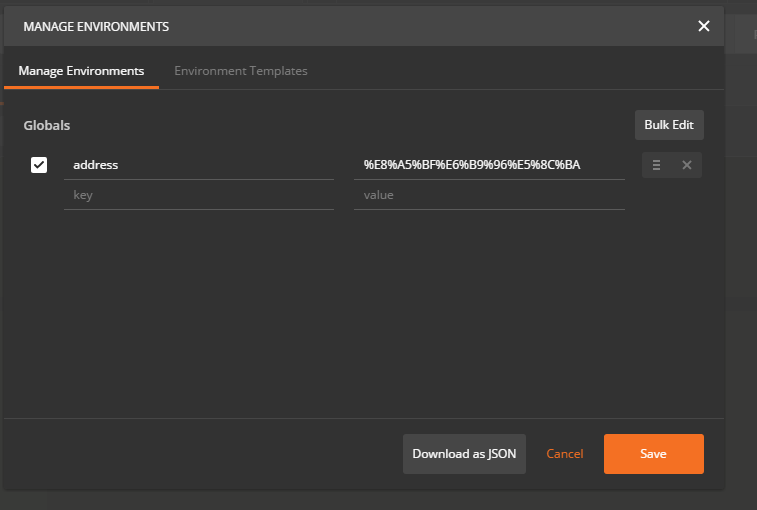
使用{{address}}是因为设置了全局变量,如下图:
Testing 实例
来看一些Postman用于test的例子。这些例子中的大多数在Postman中是有效的,他们像一行JavaScript语句一样简答。在你的request中你可以有很多的test。
注意:test脚本在从服务器收到response后执行
1.设置环境变量:
postman.setEnvironmentVariable("key", "value");2.设置全局变量:
postman.setGlobalVariable("key", "value");3.检查response的body中是否包含字符串:
tests["Body matches string"] = responseBody.has("string_you_want_to_search");4.把XML的body转换成JSON对象:
var jsonObject = xml2Json(responseBody);5.检查response的body是都为一个字符串:
tests["Body is correct"] = responseBody === "response_body_string";6.检查JSON的值:
var data = JSON.parse(responseBody);

tests["Your test name"] = data.value === 100;
7.内容类型存在(检查不区分大小写)
tests["Content-Type is present"] = postman.getResponseHeader("Content-Type"); //Note: the getResponseHeader() method returns the header value, if it exists.8.内容类型存在(区分大小写):
tests["Content-Type is present"] = responseHeaders.hasOwnProperty("Content-Type");9.response的响应时间小于200ms:
tests["Response time is less than 200ms"] = responseTime < 200;10.状态码为200:
tests["Status code is 200"] = responseCode.code === 200;11.Code name contains a string:
tests["Status code name has string"] = responseCode.name.has("Created");12.成功的POST request状态码:
tests["Successful POST request"] = responseCode.code === 201 || responseCode.code === 202;使用postman 测试restful接口的更多相关文章
- jmeter 测试restful接口
jmeter 测试restful接口,JSON数据格式 1.添加线程组 2.添加HTTP信息头管理器 请求发送JSON数据格式参数,需要设置Content-Type为application/json ...
- 使用PostMan测试WebService接口
使用PostMan测试WebService接口 参考资料: 通过XML请求WebServer https://blog.csdn.net/qq_33933408/article/details/53 ...
- 使用Postman对Restful接口进行测试
趁着项目需要,花了两天时间对postman进行了一下学习,因为看到各大测试群,各个初入测试的孩子们都在问postman,但其实网上也有很多的教程,这里我就再来发一篇. 1. Http协议 要对接口进行 ...
- 使用Postman测试https接口时的小问题记录
测试本地的WebApi接口时,接口是https,自己写的用httpclient测试是可以的, 用postman一直连接不了.原因正是由于https,不过postman在界面上已经给出了可能的原因和解决 ...
- postman测试REST接口注意事项
postman在测试第三方REST接口,当POST请求内容要求为application/json时,注意要在postman中设置POST请求体类型设置为raw,然后设置其内容为application/ ...
- Postman测试http接口
一.安装 官网:https://www.getpostman.com/ Postman是一个Chrome的一个插件工具,我们可以通过Chrome的应用商店进行进行搜索并安装,安装完成会在桌面上显示一个 ...
- PostMan测试REST接口时候,如何绕过登录的验证
原文地址:https://blog.csdn.net/qq_34178998/article/details/80361315 之前测试的时候,需要页面进行登录之后,才能让访问后台程序,但是在进行接口 ...
- postMan测试https接口
一.如何安装postman? Postman下载地址https://www.getpostman.com/ 我下载的版本是Postman-win64-5.0.0-Setup.exe 这是免安装的,可以 ...
- postMan测试Controller接口
1.介绍 Postman是一款功能强大的网页调试与发送网页HTTP请求的Chrome插件. 2.安装 Postman 4.1.2 下载地址: http://files.cnblogs.com/file ...
随机推荐
- Unity3d数据加密
在unity中能够使用c#自带的对称算法对数据进行加密,以下两种加密算法: using System; using System.Text; using System.Security.Cryptog ...
- 【视频】零基础学Android开发:蓝牙聊天室APP(一)
零基础学Android开发:蓝牙聊天室APP第一讲 1. Android介绍与环境搭建:史上最高效Android入门学习 1.1 Google的大小战略 1.2 物联网与云计算 1.3 智能XX设备 ...
- Windows 10家庭版也能共享打印机(中)解除Guest账户网络登录限制,实现局域网共享
由于Windows系统默认是禁止Guest账户从网络登录的.我们须要解除这个限制.首先想到的是用组策略编辑器gpedit.msc. 可是Windows 10家庭版没有组策略编辑器,我们先尝试用U盘把W ...
- c26---文件包含include
// // main.c // 文件包含 #include <stdio.h> // 函数可以重复声明, 但不能重复定义 void test(); void test(); void te ...
- JavaScript:DOM对象
ylbtech-JavaScript:DOM对象 1. HTML DOM Document 对象返回顶部 1. HTML DOM Document 对象 HTML DOM 节点 在 HTML DOM ...
- 基于Websocket的火拼俄罗斯(基础)
传统的HTTP请求是由浏览器发起,然后呢服务端接收到请求之后呢返回一个数据.那么这样一次来回之后呢请求就断了.但是WebSocket它不一样,它同样是由浏览器去发起一个请求但是这个请求是一个WebSo ...
- C Linux read write function extension
前言 - 赠送 readn / writen Linux 上默认的 read 和 write 函数会被信号软中断. 且 read 和 write 函数中第三个参数 count #include < ...
- bind(),call(), apply()方法的区别是什么?
bind(),call(), apply()方法的区别是什么? 共同点:改变this指向,任何调用都不在起作用 bind() 改变this的指向,不会调用函数,返回一个新的函数 var o ={a:' ...
- 修改python的pip下载源
推荐两个源: 豆瓣:http://pypi.douban.com/simple/ 清华:https://pypi.tuna.tsinghua.edu.cn/simple 使用方法有两种,一种为临时使用 ...
- Codeforces Round #449
960 asteri 1384 492 00:04 -1 892 01:33 960 PEPElotas 1384 488 00:06 896 00:26 960 ...