
使用PHPUnit + Selenium进行自动化测试
project: blog

target: how-to-use-phpunit-selenium-test.md

date: 2015-12-22

status: publish

tags:

    - Selenium

    - PHPUnit

    - Test

categories:

    - Selenium
第一步,安装PHPUnit
最简单的方式莫过于到PHPUnit的官网下载PHPUnit,然后把那个下载了的phpunit.phar加到PATH中。
此外,还可以通过 pear 来安装phpunit:
pear clear-cache

pear channel-discover pear.phpunit.de

pear channel-discover components.ez.no

pear channel-discover pear.symfony-project.com

pear install -a -f  phpunit/PHPUnit
参考:http://www.cnblogs.com/wanfox/p/4613517.html
然而使用 pear 安装方式,我却是没有成功!大概是因为天朝的神奇的GFW吧!
第二步,下载Selenium Standalone Server
传送门:http://docs.seleniumhq.org/download/
下载下来一般是一个selenium-server-standalone-2.48.2.jar这样的文件(版本号可能会有所更新)。
第三步,下载WebDriver for Chrome
传送门: https://sites.google.com/a/chromium.org/chromedriver/downloads
这个要根据电脑是Windows、Linux还是MAC,来下载相应的驱动,并解压缩。
第四步,启动Server
前面两步的东西都下载好了,就可以启动这个server了:
# 假设1:已经装了java, 而且将java加到了PATH中

# 假设2:前面两步下载的东东都在当前目录下

java -jar selenium-server-standalone-2.42.2.jar -Dwebdriver.chrome.driver=./chromedriver
p.s. 对于Windows的用户,后面的./chromedriver需要修改为.\chromedriver.exe
第四步,下载PHP的WebDriver封装库
本人喜欢使用Facebook出品的这个库.
鉴于composer在国内的悲惨现状,还是直接下载zip包,然后自行加载吧。
下面是我常用的自动加载器:
// file: tests/bootstrap.php

call_user_func(function(){

    $namespaces = array(

        'Facebook\WebDriver' =>  __DIR__.'/../php-webdriver/lib',

    );

    spl_autoload_register(function($class) use ($namespaces){

        $class = ltrim($class, '\\');

        foreach ($namespaces as $ns => $dir) {

            if (strncmp($class, $ns, strlen($ns)) === 0){

                $file = str_replace('\\', DIRECTORY_SEPARATOR, $dir . DIRECTORY_SEPARATOR . ltrim(substr($class, strlen($ns)), '\\')) . '.php';

                if (is_file($file)){

                    include_once($file);

                }

            }

        }

    });

});
这个自动加载器可以放到bootstrap.php中,以便phpunit跑用例前加载。
第五步,编写一个简单的测试用例
下面这个测试用例测试下百度是否能正常打开,检查百度的标题和URL是否符合预期。
// file: tests/sample/BaiduTest.php

class BaiduTest extends PHPUnit_Framework_TestCase

{

    public function testTheTitleUrl()

    {

        // create a browser

        $browser = create_browser();

        // open baidu via GET

        $browser->get('https://www.baidu.com/');

        // get title

        $this->assertEquals('百度一下,你就知道', $browser->getTitle());

        // get the current URL

        $this->assertEquals('https://www.baidu.com/', $browser->getCurrentURL());

        // close the browser

        $browser->quit();

    }

}
注意:文件名和类名要以Test结尾,而其中的测试函数要以test开头,这样子方便phpunit查找测试用例。
此外,其中create_browser是放在bootstrap.php中的一个辅助函数:
use Facebook\WebDriver\Remote\DesiredCapabilities;

use Facebook\WebDriver\Remote\RemoteWebDriver;

/**

 * @return RemoteWebDriver

 */

function create_browser(){

    return RemoteWebDriver::create('http://localhost:4444/wd/hub',

                                    DesiredCapabilities::chrome(),

                                    5000);

}
第六步,跑一下测试用例试试
phpunit --bootstrap tests/bootstrap.php tests/sample/BaiduTest.php

Nice~ 成功跑通~
最后,用phpunit.xml定义测试套,跑起来更便捷~
老是敲那么一长串的命令也挺麻烦的,要是能像make一样只要敲一个make就搞定就好了 —— phpunit刚好提供了一个phpunit.xml让我们能定义常用的测试套之类的选项。
详细的介绍在官方文档中已经很详细了,我这里就不啰嗦了。只秀个我认为较为简洁有效的配置:
<?xml version="1.0" encoding="UTF-8"?>

<phpunit

        backupGlobals               = "false"

        backupStaticAttributes      = "false"

        colors                      = "true"

        convertErrorsToExceptions   = "true"

        convertNoticesToExceptions  = "true"

        convertWarningsToExceptions = "true"

        processIsolation            = "false"

        stopOnFailure               = "false"

        syntaxCheck                 = "false"

        bootstrap                   = "tests/bootstrap.php" >

    <testsuites>

        <testsuite>

            <directory>tests/sample</directory>

        </testsuite>

        <!-- ... -->

    </testsuites>

</phpunit>
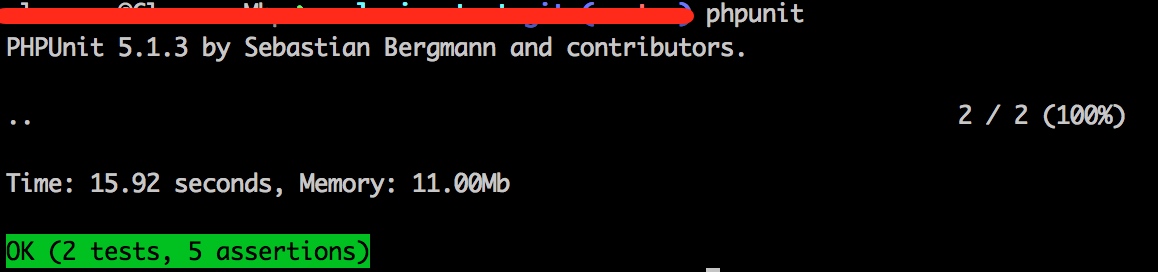
把上述内容写入phpunit.xml中后,跑phpunit就变得非常简单了,一个phpunit就搞定了:
Well done. 收工~
使用PHPUnit + Selenium进行自动化测试的更多相关文章
- [软件测试基础2]基于selenium的自动化测试
这次上机我们主要使用Selenium进行自动化测试,首先我们需要下载selenium-java的依赖项. 若使用maven管理项目,则在.pom文件中加入如下依赖项: <dependency&g ...
- selenium + python 自动化测试环境搭建
selenium + python 自动化测试 —— 环境搭建 关于 selenium Selenium 是一个用于Web应用程序测试的工具.Selenium测试直接运行在浏览器中,就像真正的用户在操 ...
- Selenium终极自动化测试环境搭建(二)Selenium+Eclipse+Python
Selenium终极自动化测试环境搭建(二)Selenium+Eclipse+Python 前面举例了Selenium+Eclipse+Junit+TestNG自动化测试环境的搭建,在前一篇的基础上, ...
- Selenium终极自动化测试环境搭建(一) Selenium+Eclipse+Junit+TestNG
Selenium终极自动化测试环境搭建(一)Selenium+Eclipse+Junit+TestNG 第一步 安装JDK JDk1.7. 下载地址:http://www.oracle.com/tec ...
- selenium+python自动化测试
F12: 右键 选择复制 path 在selenium+python自动化测试(一)–环境搭建中,运行了一个测试脚本,脚本内容如下: from selenium import webdriver ...
- Selenium 2自动化测试实战
Selenium 2自动化测试实战 百度网盘 链接:https://pan.baidu.com/s/1aiP3d8Y1QlcHD3fAlEj4sg 提取码:jp8e 复制这段内容后打开百度网盘手机Ap ...
- 【转载】selenium与自动化测试成神之路
Python selenium —— selenium与自动化测试成神之路 置顶 2016年09月17日 00:33:04 阅读数:43886 Python selenium —— selenium与 ...
- Selenium 页面自动化测试 面试 问题汇总
1. 专业技术 在学习完Selenium的大部分接口或者方法之后,你可能会去面试自动化测试,主要是Selenium的自动化测试.下面这些问题总结,可能会对你有所帮助. 什么是Selenium? S ...
- selenium + python自动化测试unittest框架学习(五)webdriver的二次封装
因为webdriver的api方法很长,再加上大多数的定位方式是以xpath方式定位,更加让代码看起来超级长,为了使整体的代码看起来整洁,对webdriver进行封装,学习资料来源于虫师的<se ...
随机推荐
- UIButton设置圆角和边框及边框颜色
1. 按钮边框颜色 //设置边框颜色 [btn.layer setMasksToBounds:YES]; [btn.layer setCornerRadius:10.0]; //设置矩形四个圆角半径 ...
- ubuntu下gcc、g++和gfortran版本切换
第一步:用 which gcc.which g++和which gfortran查看位置,我的显示结果为:/usr/bin/gcc:/usr/bin/g++和/usr/bin/gfortran 第二部 ...
- 使用GIt向github上传代码
github是一个基于git的代码托管平台,付费用户可以建私人仓库,我们一般的免费用户只能使用公共仓库,也就是代码要公开.这对于一般人来说公共仓库就已经足够了. 1.注册账户以及创建仓库 要想 ...
- h-ui前端框架
h-ui.net
- mongodb中的副本集搭建实践
准备运行1个主节点,2个从节点,从节点中其中是一个是仲裁节点(Arb). --oplogSize --oplogSize --oplogSize 其中application是副本集的名称,节点必须相同 ...
- Java 中的 static 使用之静态变量
大家都知道,我们可以基于一个类创建多个该类的对象,每个对象都拥有自己的成员,互相独立.然而在某些时候,我们更希望该类所有的对象共享同一个成员.此时就是 static 大显身手的时候了!! Java 中 ...
- python: 模块发布
一.准备发布 1.为模块文件创建一个文件夹,并将模块文件复制到这个文件中(一般,文件夹的名字和模块的名字一样) 2.在文件夹中创建一个名为『setup.py』的文件,内容如下: #encoding:u ...
- GPIO相关知识
参考资料: 1. 维基百科GPIO 2. GPIO博客资料(一) 3. MMIO和PMIO 知识点: ● GPIO是General-purpose input/output的缩写,是一个在集成电路上的 ...
- hibernate中设置BigDeCimal的精度
@Column(precision = 12, scale = 2) 在MySQL数据库中的精度为:
- JavaScript的一点自我总结
学习前端不知不觉都两个月了,从零基础到现在,网页布局没多大问题,就是JS学的很差,有一段时间都怀疑自己是不是选错了.但自我调节后,心态发生了一些变化后,学习也没那么痛苦了.虽然做不到看代码像看初恋那样 ...