
Web Performance Test: 如果使用Plugin过滤Dependent Request
前言
由于Visual Studio的Web Performance Test是基于XML脚本的,留给用户修改测试行为的自由度并不高。因此,Plugin机制就对于实现很多客户化的配置显得很重要。
问题描述
当使用Web Performance Test进行测试,发送一个Request并收到Response后,框架会自动帮你解析Dependent Request,比如 -- css,javascript,图片等,然后再去请求这些资源。你需要做的是把 Parse Dependent Request属性设置为True:
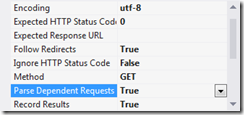
这个功能很好,可以帮助你更真实地模拟实际的压力,但是由于对Dependent Request的解析是运行时动态解析的,因此从脚本中你是无法指定哪些Dependent Request并不想去请求。而我们不想去请求的原因可能是:
1,有的资源可能放在第三方的服务器上,比如用到了第三方的图片服务,但是你只想测试自己的服务。
2,有些第三方资源可能访问有问题,将导致测试用例失败。比如我遇到的是页面包含了google提供的jquery脚本,请求有时会抛出socket异常,测试用例就直接失败了。
3,第三种情况我猜测可能存在--即某些第三方资源对同一IP的访问有限制,可能导致资源有时请求成功,有时失败。
解决方案
我们通过Plugin来过滤掉我们不喜欢的Dependent Requests,
    public class RequestFilterWebTestPlugin : WebTestPlugin

    {

        public override void PreRequest(object sender, PreRequestEventArgs e)

        {

            int count = e.Request.DependentRequests.Count;

            for (int i = count - 1; i >= 0; i--)

            {

                if (e.Request.DependentRequests[i].Url.ToLower().Contains("****.com"))

                {

                    continue;

                }

                else

                {

                    e.Request.DependentRequests.RemoveAt(i);

                }

            }

        }

        public override void PostRequest(object sender, PostRequestEventArgs e)

        {

            int count = e.Request.DependentRequests.Count;

            for (int i = count - 1; i >= 0; i--)

            {

                if (e.Request.DependentRequests[i].Url.ToLower().Contains("****.com"))

                {

                    continue;

                }

                else

                {

                    e.Request.DependentRequests.RemoveAt(i);

                }

            }

        }

    }
以上代码很简单,继承WebTestPlugin, 在PreRequest和PostRequest方法中,移除掉e.Request.DependentRequests中不需要的Request。我们这里很简单,只是移除掉所有非****.com域的Dependent Requests,读者也可以自己实现更复杂的功能-- 黑名单、白名单、配置在配置文件中等等。
Binhua Liu原创,写于2013/9/29。
Web Performance Test: 如果使用Plugin过滤Dependent Request的更多相关文章
- Web Performance Test : 为Request的Post参数名添加XPath支持
问题描述 本文的标题看起来有些含糊其辞,这里我需要把问题阐述得更加清楚.这是我们使用VSTS进行Web Performance Test时,Asp.net造成的特定问题(也许其他开发工具或插件也会造成 ...
- Visual Studio的Web Performance Test提取规则详解(3)
总结 Visual Studio的Web Performance Test是基于HTTP协议层的,它不依赖于浏览器,通过直接接收,发送HTTP包来和Web服务器交互.Web Performance T ...
- Visual Studio的Web Performance Test提取规则详解(2)
总结 Visual Studio的Web Performance Test是基于HTTP协议层的,它不依赖于浏览器,通过直接接收,发送HTTP包来和Web服务器交互.Web Performance T ...
- Visual Studio的Web Performance Test提取规则详解(1)
总结 Visual Studio的Web Performance Test是基于HTTP协议层的,它不依赖于浏览器,通过直接接收,发送HTTP包来和Web服务器交互.Web Performance T ...
- C# .net mvc web api 返回 json 内容,过滤值为null的属性
在WebApiConfig.Register 中增加一段 #region 过滤值为null的属性 //json 序列化设置 GlobalConfiguration.Configuration.Form ...
- Web Performance and Load Test Project错误集
当我们创建Web Performance and Load Test Project时,经常会遇到下面这些问题: 1. 当点击Add Recording时, 左边的record tree没有出现: 解 ...
- 前端使用AngularJS的$resource,后端ASP.NET Web API,实现分页、过滤
在上一篇中实现了增删改查,本篇实现分页和过滤. 本系列包括: 1.前端使用AngularJS的$resource,后端ASP.NET Web API,实现增删改查2.前端使用AngularJS的$re ...
- 13 Reasons Why You Should Pay Attention to Mobile Web Performance
Mobile is no longer on the sidelines. If you’re not already thinking mobile first, you should at lea ...
- Learning Web Performance with MDN
Learning Web Performance with MDN Web 性能是客观的衡量标准,是加载时间和运行时的感知用户体验. https://developer.mozilla.org/en- ...
随机推荐
- JSONObject简介
JSONObject简介 本节摘要:之前对JSON做了一次简单的介绍,并把JSON和XML做了一个简单的比较:那么,我就在想,如果是一个json格式的字符串传到后台,需要怎么对其处理?如果前台页面需要 ...
- oracle结构与安全
从宏观上来看:oracle数据库服务器主要有数据库和实例组成. 在orale数据库服务器中,首先会产生一个实例,通过实例访问一个数据库. 一个实例对应着一个数据库. oracle 数据库在逻辑上是按层 ...
- JS判断登陆端是PC还是手机
前些天朋友问我怎么判断登陆端是PC还是手机...自己也是很困惑,然后自己查了资料,这些东西都藏在USER-AGENT里面,查了他的一些属性,写了一个简单的验证页面大家共同学习. 读取navigator ...
- OSI七层与TCP/IP五层网络架构详解
引用自:http://www.2cto.com/net/201310/252965.html OSI和TCP/IP是很基础但又非常重要的网络基础知识,理解得透彻对运维工程师来说非常有帮助.今天 ...
- phpstorm 实用快捷键 和 注释
1. 注释 类似 /**退款详情 * @param * @param * @param * @return * @author */ 在方法中引入,直接/**+enter键 2.快捷建 CTRL ...
- C# 拷贝数组的几种方法
已知数组如下: int[] array = { 1, 5, 9, 3, 7, 2, 8 ,6, 4}; (1).引用复制,易引起错误,不推荐 int[] copy = array; (2).遍历拷贝 ...
- smarty模板原理和增删改查例题
Smarty模板:(前后端分离)原理:核心是一个类,先修改配置文件,在使用的时候引入配置文件即可,(init.inc.php)$smarty->assign("ceshi", ...
- 求s=a+aa+aaa+aaaa+aa...a的值,其中a是一个数字。例如2+22+222+2222+22222(此时共有5个数相加),几个数相加有键盘控制。
package com.lw.HomeWork1;//包名 2 import java.util.Scanner; public class Demo18 { /** * @param args */ ...
- 基于netty的心跳机制实现
前言:在实现过程查找过许多资料,各种波折,最后综合多篇文章最终实现并上线使用.为了减少大家踩坑的时间,所以写了本文,希望有用.对于实现过程中有用的参考资料直接放上链接,可能有些内容相对冗余,不过时间允 ...
- linux中ONBOOT=yes的含义
在/etc/sysconfig/network-scripts/ifcfg-eth0(确认ONBOOT=yes),其中eth0是设备名 ONBOOT是指明在系统启动时是否激活网卡,只有在激活状态的网卡 ...