
Visual Studio的Web Performance Test提取规则详解(3)
总结
Visual Studio的Web Performance Test是基于HTTP协议层的,它不依赖于浏览器,通过直接接收,发送HTTP包来和Web服务器交互。Web Performance Test发送和接收的一系列请求和响应之间存在相关性,例如,用户登录后,SID被传递给客户端,下一次请求时,需要把SID发送到服务器。因此,Web Perfomance Test 定义了多种提取规则,帮助从服务器响应中提取信息,用于之后的请求。或者保存起来,作为测试结果的一部分。
Web Performance Test提供多种提取规则,以下表格来自MSDN:
| 提取规则的类型 | 说明 |
| Selected Option | 提取列表或组合框中的选定文本。 |
| Tag Inner Text | 从指定的 HTML 标记中提取内部文本。 |
| Extract Attribute Value | 从指定的 HTML 标记中提取特性的值。 有关以下内容的更多信息使用提取特性值规则的更多信息,请参见演练:向 Web 性能测试添加验证规则和提取规则。 |
| Extract Form Field | 提取响应中指定窗体字段的值。 |
| Extract HTTP Header | 提取 HTTP 标头的值。 |
| Extract Regular Expression | 从与正则表达式相匹配的响应中提取文本。 |
| Extract Text | 从响应中提取文本。 |
| Extract Hidden Fields | 从响应中提取所有的隐藏字段。 |
在 (1)和(2)中,我们讲解了系统默认的一些提取规则,本文将讲解如何建立自定义提取规则,本文的代码可以从这里下载。
继承ExtractionRule
所有的提取规则,包括自定义规则都需要从ExtractionRule继承,该类在Microsoft.VisualStudio.QualityTools.WebTestFramework.dll中实现。
独立的Library
我们最好把自定义规则都放到一个独立的类库中,这样方便多个web performance test 工程引用。 web performance test 工程只要引用了该类库,在右键点击URL,选择Add Extraction Rule中,在打开的Add Extraction Rule窗口中,就可以看到所有的自定义提取规则,和用法系统默认的规则完全相同。
例子
本文继续沿用(2)中的例子,那是一个简单的算术站点:
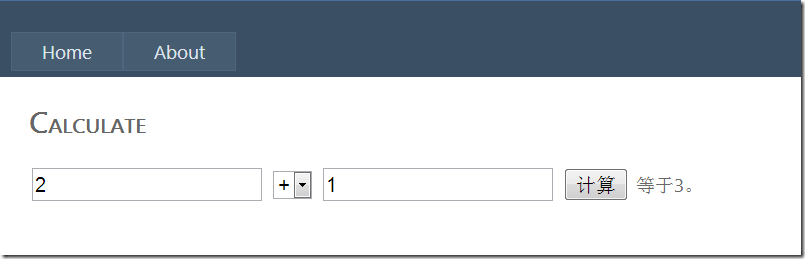
在(2)中,我们发现Extract Regular Express规则不适合把“等于3。”中的数字提取出来,它提取的值将会包括整个文本。那么,本文将定义一个“Custom Extract Regular Express”,实现通过正则表达式提取其中的数字,而不是整个文本。
看代码:
using System;

using System.Collections.Generic;

using System.Linq;

using System.Text;

using System.Globalization;

using Microsoft.VisualStudio.TestTools.WebTesting;

using System.ComponentModel;

using System.Text.RegularExpressions;

using System.Web;

namespace CustomExtractionRule

{

    [DescriptionAttribute("Extracts the specificed group from mached regex")]

    [DisplayNameAttribute("Custom Extract Regular Expression")]

    public class CustomExtractRegularExpression : ExtractionRule

    {

        [DescriptionAttribute("Whether or not to perfom HTML decoding of extracted strings.")]

        [DisplayNameAttribute("Html Decode")]

        [DefaultValue(true)]

        public bool HtmlDecode { get; set; }

        [DefaultValue(false)]

        [DescriptionAttribute("Ignore case during search for matching text.")]

        [DisplayNameAttribute("Ignore Case")]

        public bool IgnoreCase { get; set; }

        [DefaultValue(0)]

        [DescriptionAttribute("Indicates which occurrence of the string to extract. this is a zero-based index.")]

        [DisplayNameAttribute("Index")]

        public int Index { get; set; }

        [DescriptionAttribute("Specify the regular expression to search for.")]

        [DisplayNameAttribute("Regular Expression")]

        public string RegularExpression { get; set; }

        [DefaultValue(true)]

        [DescriptionAttribute("If ture, the extraction  rule fails if no value is found to extract.")]

        [DisplayNameAttribute("Required")]

        public bool Required { get; set; }

        [DefaultValue(0)]

        [DescriptionAttribute("Indicates which group of the string to extract in matched regular expression. this is a zero-based index.")]

        [DisplayNameAttribute("Group Index")]

        public int GroupIndex { get; set; }

        public override void Extract(object sender, ExtractionEventArgs e)

        {

            String errormessage="";

            String result = this.Extract(e.Response.BodyString, ref errormessage);

            if (!string.IsNullOrEmpty(result))

            {

                if (this.HtmlDecode)

                {

                    result = HttpUtility.HtmlDecode(result);

                }

                e.WebTest.Context[this.ContextParameterName] = result;

            }

            else

            {

                e.Success = false;

                e.Message = errormessage;

            }

        }

        internal String Extract(string document,ref string errormessage)

        {

            int startat = 0;

            int num2 = 0;

            RegexOptions options = RegexOptions.Multiline;

            if (this.IgnoreCase)

            {

                options |= RegexOptions.IgnoreCase;

            }

            Regex regex = new Regex(this.RegularExpression, options);

            Match selectedMatch=null;

            while (startat < document.Length)

            {

                Match match = regex.Match(document, startat);

                if (!match.Success)

                {

                    break;

                }

                int num3 = match.Index + match.Length;

                if (num2 == this.Index)

                {

                    selectedMatch = match;

                }

                startat = num3;

                num2++;

            }

            if (selectedMatch == null)

            {

                errormessage = "Matched string is not found";

                return null;

            }

            if (selectedMatch.Groups.Count - 1 < this.GroupIndex)

            {

                errormessage = "Matched group is not found";

                return null;

            }

            return selectedMatch.Groups[GroupIndex].Value;

        }

    }

}
1) 在CustomExtractRegularExpression 的类和属性上,我们用到了DisplayNameAttribute,DescriptionAttribute,DefaultValue这些Attribute,他们的作用是在VS的Add Extraction Rule窗口上配置提取规则时,定义规则的显示名和描述,以及每个属性的显示名,描述和默认值。
2)提取规则通过重载void Extract(object sender, ExtractionEventArgs e) 方法来实现。如果提取成功,把e.Success 设置为true,并且把提取的参数值保存在e.WebTest.Context[this.ContextParameterName]中;否则e.Success设置为false,并在e.Message中填入失败的消息。
3)Custom Extract Regular Expression规则,相对于Extract Regular Expression规则,我们增加了一个Group Index参数,允许用户从特定的正则表达式匹配中,选中匹配的group,关于正则表达式group,可以参考MSDN。
应用自定义规则
现在,我们把规则添加到web performance test中,我们用Custom Extract Regular Expression来替换在(2)中我们使用的Extract Text规则来提取结果中的数值。属性配置如下:
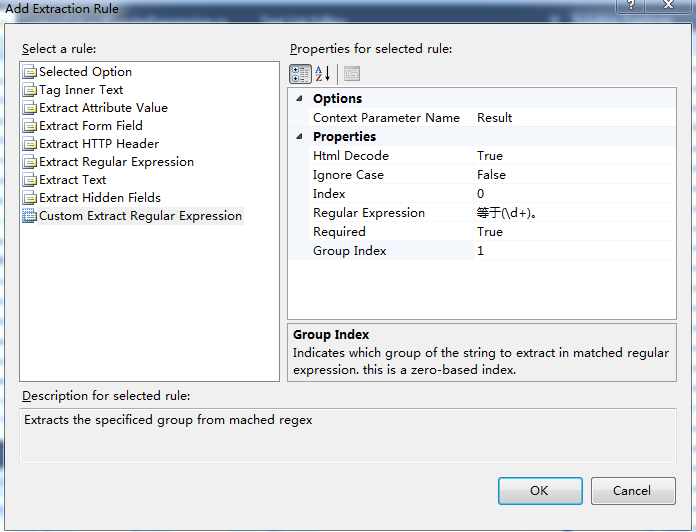
注意,"Group Index”参数应该设置为1
知平软件致力于移动平台自动化测试技术的研究,我们希望通过向社区贡献知识和开源项目,来促进行业和自身的发展。
Visual Studio的Web Performance Test提取规则详解(3)的更多相关文章
- Visual Studio的Web Performance Test提取规则详解(2)
总结 Visual Studio的Web Performance Test是基于HTTP协议层的,它不依赖于浏览器,通过直接接收,发送HTTP包来和Web服务器交互.Web Performance T ...
- Visual Studio的Web Performance Test提取规则详解(1)
总结 Visual Studio的Web Performance Test是基于HTTP协议层的,它不依赖于浏览器,通过直接接收,发送HTTP包来和Web服务器交互.Web Performance T ...
- 转:Visual Studio进行Web性能测试- Part I
原文作者:Ambily.raj Visual Studio是可以用于性能测试的工具之一.Visual Studio Test版或Visual Studio 2010旗舰版为自动化测试提供了支持.本文介 ...
- Visual Studio进行Web性能测试- Part I
Visual Studio进行Web性能测试- Part I 2012-08-29 08:01 by 知平软件, 5356 阅读, 9 评论, 收藏, 编辑 原文作者:Ambily.raj Visua ...
- Visual Studio 使用 Web Deploy 发布远程站点
Ø 简介 本文介绍 Visual Studio 如何使用 Web Deploy发布远程站点,有时候我们开发完某个功能时,需要快速将更改发布至服务器.通常 Visual Studio 可以采用两种方式 ...
- Visual Studio进行Web性能测试- Part II
Visual Studio进行Web性能测试- Part II 2012-08-31 14:34 by 知平软件, 7557 阅读, 5 评论, 收藏, 编辑 原文作者:Ambily.raj 对于一个 ...
- Visual Studio 2013 Web开发
cnbeta新闻:微软正式发布Visual Studio 2013 RTM版,微软还发布了Visual Studio 2013的最终版本..NET 4.5.1以及Team Foundation Ser ...
- Visual Studio 2013 Web开发、新增功能:“Browser Link”
微软正式发布Visual Studio 2013 RTM版,微软还发布了Visual Studio 2013的最终版本..NET 4.5.1以及Team Foundation Server 2013. ...
- Visual Studio 2013 Web开发、新增功能:“Browser Link”
微软正式发布Visual Studio 2013 RTM版,微软还发布了Visual Studio 2013的最终版本..NET 4.5.1以及Team Foundation Server 2013. ...
随机推荐
- Spring中的单例一二
Spring框架很好的帮助我们创建和管理dao.bean.service.action等对象, 但是它创建的对象是单例呢还是多例,又有哪些区别以及为什么 1.在Spring中默认创建的是单例模式,简单 ...
- 数据库---MySQL常用函数总结
一.数学函数 数学函数主要用于处理数字,包括整型.浮点数等. ABS(x) 返回x的绝对值 SELECT ABS(-1) -- 返回1 CEIL(x),CEILING(x) 返回大于或等于 ...
- PHP 上传大文件
- [办公自动化]一次制作、多场合多次使用的PPT
面试或汇报总结时,你可能需要制作一份PPT来介绍自己.但是这些场合你不一定能讲完所有的内容. 你可以尝试分1分钟.3分钟.5分钟.10分钟的版本来准备. 使用同一份PPT. 没错. 在office20 ...
- json.parse 与 json.stringfy
转自 :http://blog.csdn.net/wangxiaohu__/article/details/7254598 parse用于从一个字符串中解析出json对象,如 var str = '{ ...
- [转]JNIEnv解析
1.关于JNIEnv和JavaVM JNIEnv是一个与线程相关的变量,不同线程的JNIEnv彼此独立.JavaVM是虚拟机在JNI层的代表,在一个虚拟机进程中只有一个JavaVM,因此该进程的所有线 ...
- python简单爬虫示例
#coding=utf-8 import urllib import re def downloadPage(url): h = urllib.urlopen(url) ret ...
- 基于VirtualBox的多重载入
问题描述 这个问题要追溯到中秋之前,也就是写第一周博客的时候,当时我用的还是虚拟机上的ubuntu:当时我的ubuntu不是最新版,所以有提示升级,你懂的,我升了(因为时间有点久,我先去吃了个饭):等 ...
- Linux Shell编程基础
在学习Linux BASH Shell编程的过程中,发现由于不经常用,所以很多东西很容易忘记,所以写篇文章来记录一下 ls 显示当前路径下的文件,常用的有 -l 显示长格式 -a 显示所有包括隐 ...
- LeetCode Two Sum II - Input array is sorted
原题链接在这里:https://leetcode.com/problems/two-sum-ii-input-array-is-sorted/ 题目: Given an array of intege ...