
Use Dapper ORM With ASP.NET Core
Dapper.NET is not just another ORM tool, it’s considered as the king of ORM. Because it’s fast, easy to integrate, requires fewer lines of code, supports bulk data insertion and supports static and dynamic object binding. And Dapper ORM can be used with .NET. So in this post, let’s find out how to use Dapper ORM with ASP.NET Core for CRUD operations.
Use Dapper ORM With ASP.NET Core
For this post, we will be using SQL Server as a database with Dapper ORM. So let’s first create the database. Open SQL Server Management Studio and create a new database called “DapperDemo” or you can name it anything of your choice. And create a table named “Products”.
|
1
2
3
4
5
6
7
8
9
10
11
12
|
CREATE TABLE [dbo].[Products]( [ProductID] [int] IDENTITY(1,1) NOT NULL, [Name] [nvarchar](max) NULL, [Quantity] [int] NULL, [Price] [float] NULL, CONSTRAINT [PK_Products] PRIMARY KEY CLUSTERED ( [ProductID] ASC)WITH (PAD_INDEX = OFF, STATISTICS_NORECOMPUTE = OFF, IGNORE_DUP_KEY = OFF, ALLOW_ROW_LOCKS = ON, ALLOW_PAGE_LOCKS = ON) ON [PRIMARY]) ON [PRIMARY] TEXTIMAGE_ON [PRIMARY]GO |
Okay. Let’s create an ASP.NET Core Web API project. The default Web API template comes with a controller named “Value”. We don’t need this for demo, so I deleted it. To use Dapper ORM, we need to install following nuget package.
- “Dapper”: “1.50.2”
To test our WEB API, also add Swagger. If you don’t know about using Swagger then read how to add swagger to the ASP.NET Core WEB API
So your project.json should look like this,
|
1
2
3
4
5
6
7
8
9
10
11
12
13
14
15
16
17
18
19
|
"dependencies": { "Microsoft.NETCore.App": { "version": "1.0.0", "type": "platform" }, "Microsoft.ApplicationInsights.AspNetCore": "1.0.0", "Microsoft.AspNetCore.Mvc": "1.0.0", "Microsoft.AspNetCore.Server.IISIntegration": "1.0.0", "Microsoft.AspNetCore.Server.Kestrel": "1.0.0", "Microsoft.Extensions.Configuration.EnvironmentVariables": "1.0.0", "Microsoft.Extensions.Configuration.FileExtensions": "1.0.0", "Microsoft.Extensions.Configuration.Json": "1.0.0", "Microsoft.Extensions.Logging": "1.0.0", "Microsoft.Extensions.Logging.Console": "1.0.0", "Microsoft.Extensions.Logging.Debug": "1.0.0", "Microsoft.Extensions.Options.ConfigurationExtensions": "1.0.0", "Swashbuckle": "6.0.0-beta901", "Dapper": "1.50.2"}, |
Now, we need to add Product entity model. So create a folder named “Model” and create a new class “Product.cs” as follows,
|
1
2
3
4
5
6
7
8
|
public class Product{ [Key] public int ProductId { get; set; } public string Name { get; set; } public int Quantity { get; set; } public double Price { get; set; }} |
Setting up Dapper is very easy process and similarly using it is also very simple and straightforward. You need to follow 3 simple steps to use it.
- Create an
IDBConnectionobject with a connection string. - Form your raw SQL query.
- Pass the query to Dapper and it’s done.
So let’s create ProductRepository for all database calls. Create a folder named “Repository” and create a new class “ProductRepository.cs” as follows,
|
1
2
3
4
5
6
7
8
9
10
11
12
13
14
15
16
17
18
19
20
21
22
23
24
25
26
27
28
29
30
31
32
33
34
35
36
37
38
39
40
41
42
43
44
45
46
47
48
49
50
51
52
53
54
55
56
57
58
59
60
61
62
63
64
65
66
67
68
69
|
public class ProductRepository{ private string connectionString; public ProductRepository() { connectionString = @"Server=localhost;Database=DapperDemo;Trusted_Connection=true;"; } public IDbConnection Connection { get { return new SqlConnection(connectionString); } } public void Add(Product prod) { using (IDbConnection dbConnection = Connection) { string sQuery = "INSERT INTO Products (Name, Quantity, Price)" + " VALUES(@Name, @Quantity, @Price)"; dbConnection.Open(); dbConnection.Execute(sQuery, prod); } } public IEnumerable<Product> GetAll() { using (IDbConnection dbConnection = Connection) { dbConnection.Open(); return dbConnection.Query<Product>("SELECT * FROM Products"); } } public Product GetByID(int id) { using (IDbConnection dbConnection = Connection) { string sQuery = "SELECT * FROM Products" + " WHERE ProductId = @Id"; dbConnection.Open(); return dbConnection.Query<Product>(sQuery, new { Id = id }).FirstOrDefault(); } } public void Delete(int id) { using (IDbConnection dbConnection = Connection) { string sQuery = "DELETE FROM Products" + " WHERE ProductId = @Id"; dbConnection.Open(); dbConnection.Execute(sQuery, new { Id = id }); } } public void Update(Product prod) { using (IDbConnection dbConnection = Connection) { string sQuery = "UPDATE Products SET Name = @Name," + " Quantity = @Quantity, Price= @Price" + " WHERE ProductId = @ProductId"; dbConnection.Open(); dbConnection.Query(sQuery, prod); } }} |
There are CRUD methods defined using raw SQL queries for all DB operations. As mentioned earlier, in every method
- Create IDbConnection object.
- Form the Query.
- Open the connection and execute the query.
Now, lets create a new controller “ProductController.cs” as follows,
|
1
2
3
4
5
6
7
8
9
10
11
12
13
14
15
16
17
18
19
20
21
22
23
24
25
26
27
28
29
30
31
32
33
34
35
36
37
38
39
40
41
42
43
44
45
46
|
[Route("api/[controller]")]public class ProductController : Controller{ private readonly ProductRepository productRepository; public ProductController() { productRepository = new ProductRepository(); } // GET: api/values [HttpGet] public IEnumerable<Product> Get() { return productRepository.GetAll(); } // GET api/values/5 [HttpGet("{id}")] public Product Get(int id) { return productRepository.GetByID(id); } // POST api/values [HttpPost] public void Post([FromBody]Product prod) { if (ModelState.IsValid) productRepository.Add(prod); } // PUT api/values/5 [HttpPut("{id}")] public void Put(int id, [FromBody]Product prod) { prod.ProductId = id; if (ModelState.IsValid) productRepository.Update(prod); } // DELETE api/values/5 [HttpDelete("{id}")] public void Delete(int id) { productRepository.Delete(id); }} |
This controller has methods for GET, POST, PUT and DELETE. That’s all to code. Now, let’s just run the application and execute the GET API. Since the table is empty, so you should see following.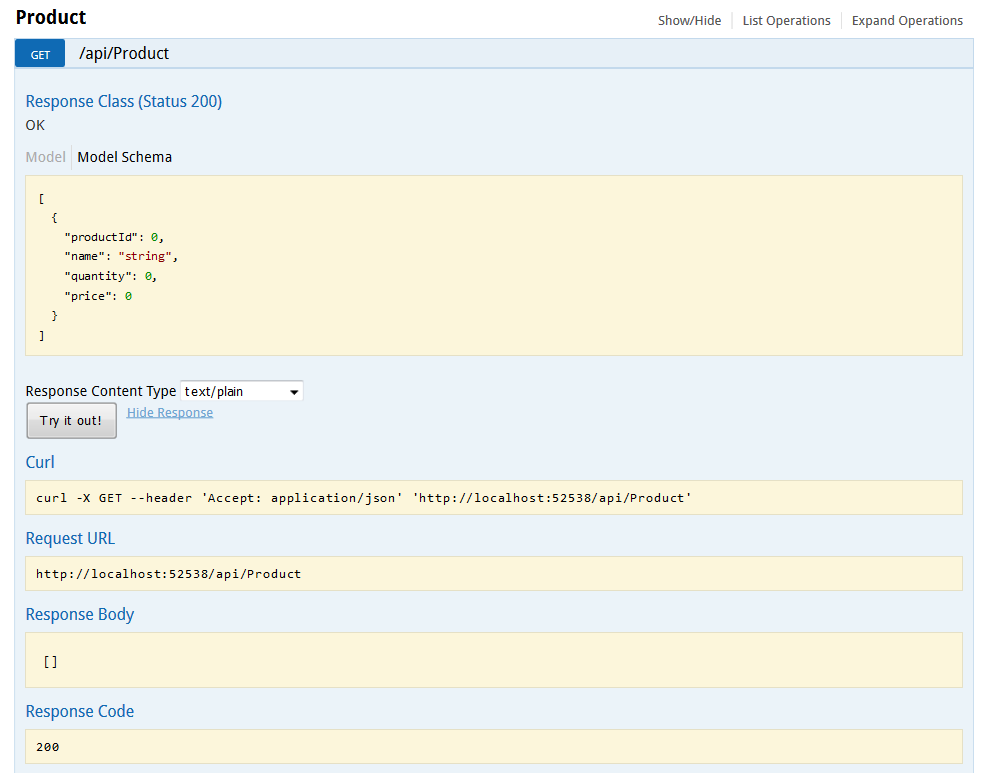
Now, let’s add a product via Post API.
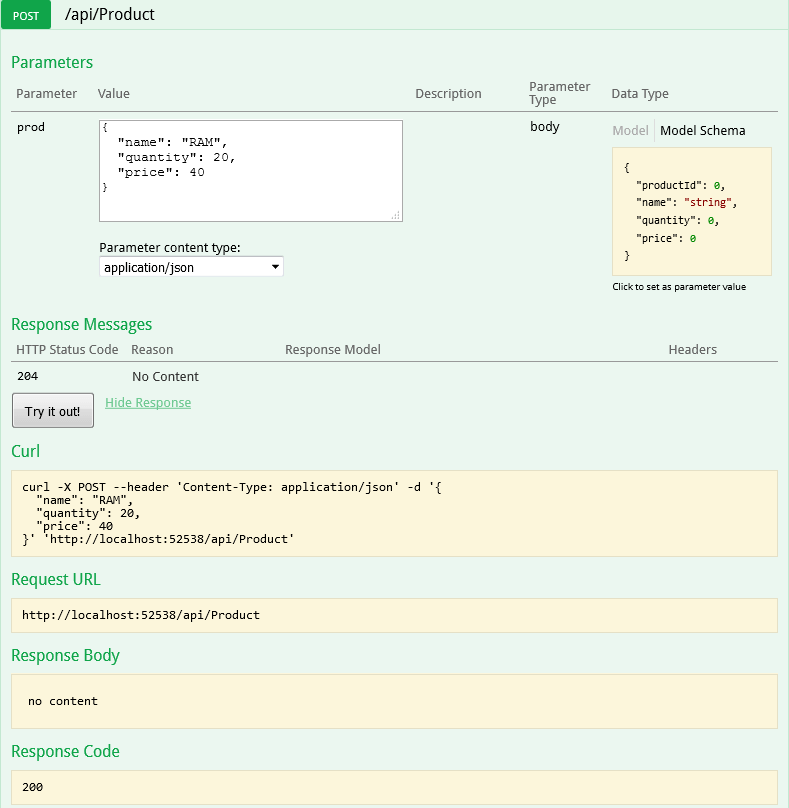
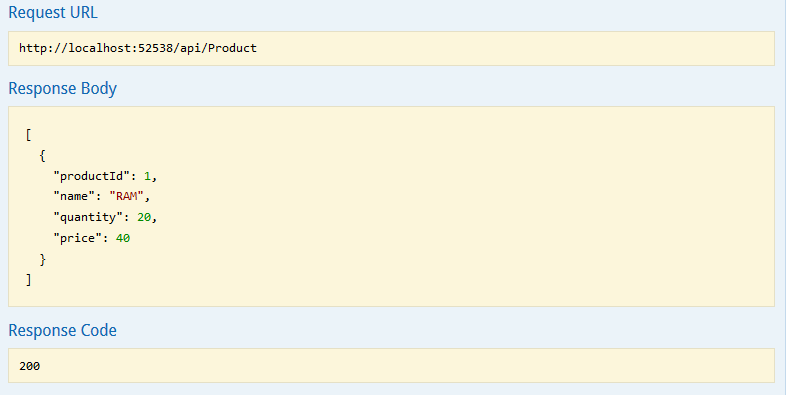
And now call the GET Product API again and you should see that product you just added is returned.
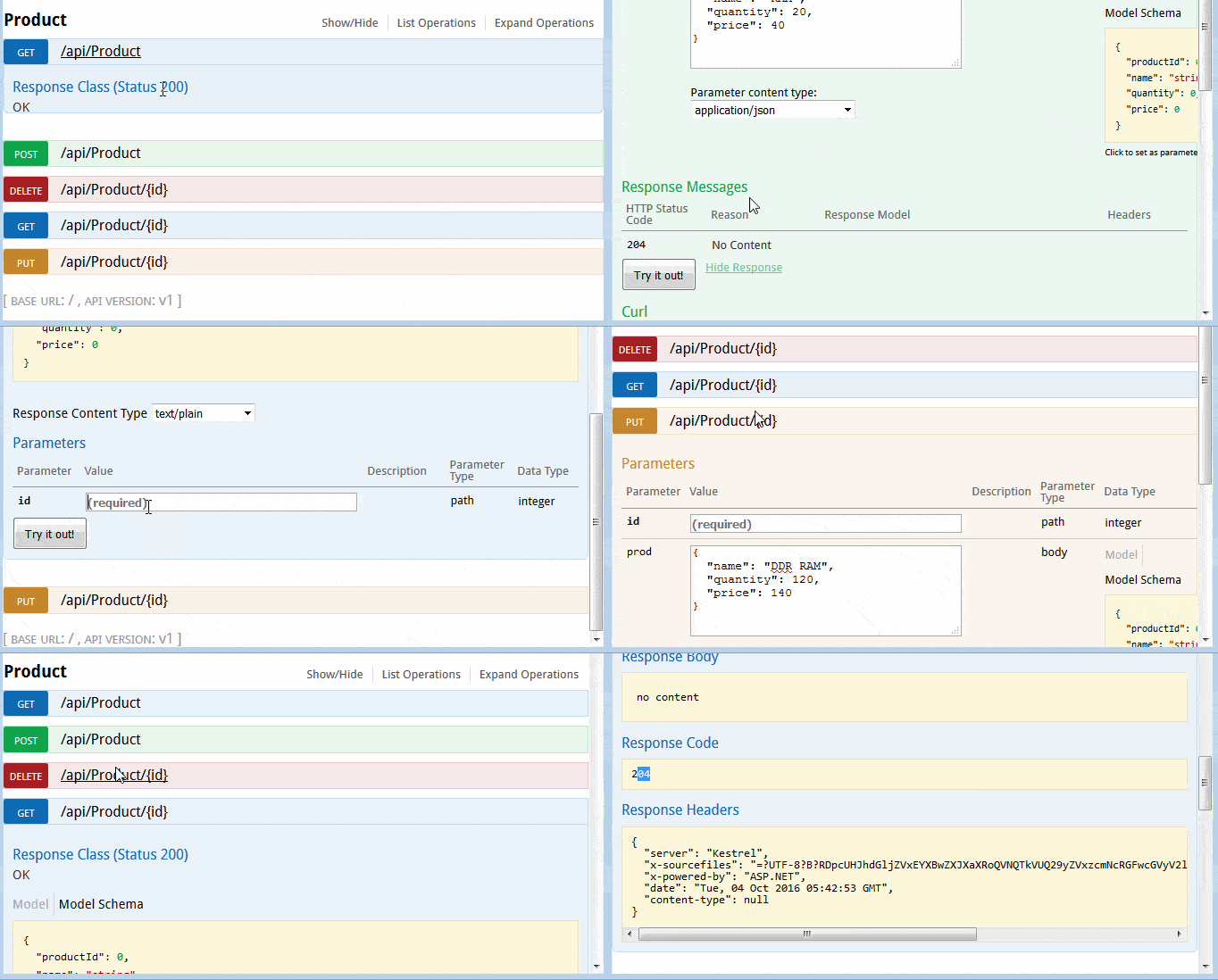
Here is the gif version of all 5 methods.
That’s it. Dapper.NET ORM is considered to be the fastest ORM as it directly executes the RAW SQL without any additional overhead. We saw how easy it was to integrate and use it with ASP.NET Core. If you want to support any other database providers like SQLite, then you need to change in public IDbConnection Connection property.
|
1
2
3
4
5
6
7
|
public IDbConnection Connection{ get { return new SqliteConnection(connectionString); }} |
You will also need to include the SQLite nuget package "Microsoft.Data.Sqlite": "1.0.0" in your project.json. Of course, based on database provider the SQL query syntax may differ. Hope you liked it. Just for your information Project.json for ASP.NET Core is going away.
If you are interested in Entity Framework Core, then read my posts about EF Core.
Thank you for reading. Keep visiting this blog and share this in your network. Please put your thoughts and feedback in the comments section.
Use Dapper ORM With ASP.NET Core的更多相关文章
- ASP.NET Core 1.0 使用 Dapper 操作 MySql(包含事务)
操作 MySql 数据库使用MySql.Data程序包(MySql 开发,其他第三方可能会有些问题). project.json 代码: { "version": "1. ...
- [译]ASP.NET Core Web API 中使用Oracle数据库和Dapper看这篇就够了
[译]ASP.NET Core Web API 中使用Oracle数据库和Dapper看这篇就够了 本文首发自:博客园 文章地址: https://www.cnblogs.com/yilezhu/p/ ...
- C#实现多级子目录Zip压缩解压实例 NET4.6下的UTC时间转换 [译]ASP.NET Core Web API 中使用Oracle数据库和Dapper看这篇就够了 asp.Net Core免费开源分布式异常日志收集框架Exceptionless安装配置以及简单使用图文教程 asp.net core异步进行新增操作并且需要判断某些字段是否重复的三种解决方案 .NET Core开发日志
C#实现多级子目录Zip压缩解压实例 参考 https://blog.csdn.net/lki_suidongdong/article/details/20942977 重点: 实现多级子目录的压缩, ...
- ASP .NET Core 基本知识点示例 目录
ASP.NET Core 的 运行机制 文章 ASP.NET Core 中的 配置 文章 源代码 ASP.NET Core 中的 依赖注入 文章 源代码 ASP.NET Core 中的 日志 文章 源 ...
- 极简版ASP.NET Core学习路径及教程
绝承认这是一个七天速成教程,即使有这个效果,我也不愿意接受这个名字.嗯. 这个路径分为两块: 实践入门 理论延伸 有了ASP.NET以及C#的知识以及项目经验,我们几乎可以不再需要了解任何新的知识就开 ...
- ASP .Net Core 使用 Dapper 轻型ORM框架
一:优势 1,Dapper是一个轻型的ORM类.代码就一个SqlMapper.cs文件,编译后就40K的一个很小的Dll. 2,Dapper很快.Dapper的速度接近与IDataReader,取列表 ...
- Asp.net Core 系列之--2.ORM初探:Dapper实现MySql数据库各类操作
ChuanGoing 2019-09-10 距离上一篇近一个月时间,断断续续才把本篇码完,后面将加快进度,争取年度内把本系列基本介绍完成,同时督促本人持续学习. 本篇学习曲线: 1.初识Dapper ...
- Ubuntu Server 16.04下ASP.NET Core Web Api + MySql + Dapper在 Jexus、nginx 下的简单测试
一.环境及工具 1.服务器 VirtualBox5.1.4 安装 Ubuntu Server 16.04 amd64 MySql Ver 14.14 Distrib 5.6.21 Jexus 5.8. ...
- ASP.NET Core:使用Dapper和SwaggerUI来丰富你的系统框架
一.概述 1.用VS2017创建如下图的几个.NET Standard类库,默认版本为1.4,你可以通过项目属性进行修改,最高支持到1.6,大概五月份左右会更新至2.0,API会翻倍,很期待! 排名分 ...
随机推荐
- android动态注册监听网络变化异常
在使用广播接收器监听网络变化的时候,在AndroidManifest.xml中加入<user-permission android:name="android.permission.A ...
- 使用Hive或Impala执行SQL语句,对存储在Elasticsearch中的数据操作
http://www.cnblogs.com/wgp13x/p/4934521.html 内容一样,样式好的版本. 使用Hive或Impala执行SQL语句,对存储在Elasticsearch中的数据 ...
- iOS 获取版本号(Swift和OC两种)
iOS获取应用版本号:version OC: [[[NSBundle mainBundle] infoDictionary] objectForKey:@"CFBundleShortVers ...
- day 2远程连接Linux系统管理
IP端口-协议等基本概念 互联网上的计算机,都会有一个唯一的32位的地址,IP地址. 我们访问服务器.就必须通过这个IP地址. 局域网也有预留的IP地址 192/10/172开头.局域网的 I ...
- 举例讲解Linux系统下Python调用系统Shell的方法
有时候难免需要直接调用Shell命令来完成一些比较简单的操作,比如mount一个文件系统之类的.那么我们使用Python如何调用Linux的Shell命令?下面来介绍几种常用的方法:1. os 模块 ...
- Windows批处理:自动检查网络连通性
检测网络连通性我用的是丛远到近的方法,即“外网——网关——内网——本机”,脚本的实现也是根据这个顺序用ping来检测,为提高检测速度,这里我只ping了2次,各位可以根据自己的需要进行修改. 使用方法 ...
- css3常用动画+动画库
一.animates.css animate.css是来自dropbox的工程师Daniel Eden开发的一款CSS3的动画效果小类库.包含了60多款不同类型的CSS3动画,包括:晃动,闪动,各种淡 ...
- UVA 12169 Disgruntled Judge【扩展欧几里德】
题意:随机选取x1,a,b,根据公式xi=(a*xi-1+b)%10001得到一个长度为2*n的序列,奇数项作为输入,求偶数项,若有多种,随机输出一组答案. 思路:a和b均未知,可以考虑枚举a和b,时 ...
- 树网的核[树 floyd]
描述 设T=(V, E, W) 是一个无圈且连通的无向图(也称为无根树),每条边到有正整数的权,我们称T为树网(treebetwork),其中V,E分别表示结点与边的集合,W表示各边长度的集合,并设T ...
- AC日记——接龙游戏 codevs 1051
1051 接龙游戏 时间限制: 1 s 空间限制: 128000 KB 题目等级 : 钻石 Diamond 题目描述 Description 给出了N个单词,已经按长度排好了序.如果 ...