
调用xml文件的bean
AcTest.class
package com.zyz.db;

import com.zyz.dao.PersonDao;

import org.springframework.context.ApplicationContext;

import org.springframework.context.support.ClassPathXmlApplicationContext;

import org.springframework.context.support.FileSystemXmlApplicationContext;

import org.springframework.jdbc.datasource.DriverManagerDataSource;

/**

 * Created by zyz on 2016-8-5.

 */

public class AcTest {

    public static void main(String[] args){

//        方法1:使用FileSystemXmlApplicationContext

        ApplicationContext ac1=new FileSystemXmlApplicationContext("src/main/webapp/WEB-INF/applicationContext-jdbc.xml");

        DriverManagerDataSource dataSource=(DriverManagerDataSource) ac1.getBean("dataSource");

        System.out.println(dataSource.getUsername());

//        方法2:使用ClassPathXmlApplicationContext

        ApplicationContext ac2=new ClassPathXmlApplicationContext("beans.xml");

        PersonDao personDao=(PersonDao)ac2.getBean("personDao");
System.out.println(personDao.getVersion());
System.out.println(personDao.getPersons().get(0).getName()); } }
方法1:只要指定xml文件的在项目中的相对位置
方法2:从classpath位置读xml文件,即编译后class文件存放的位置.
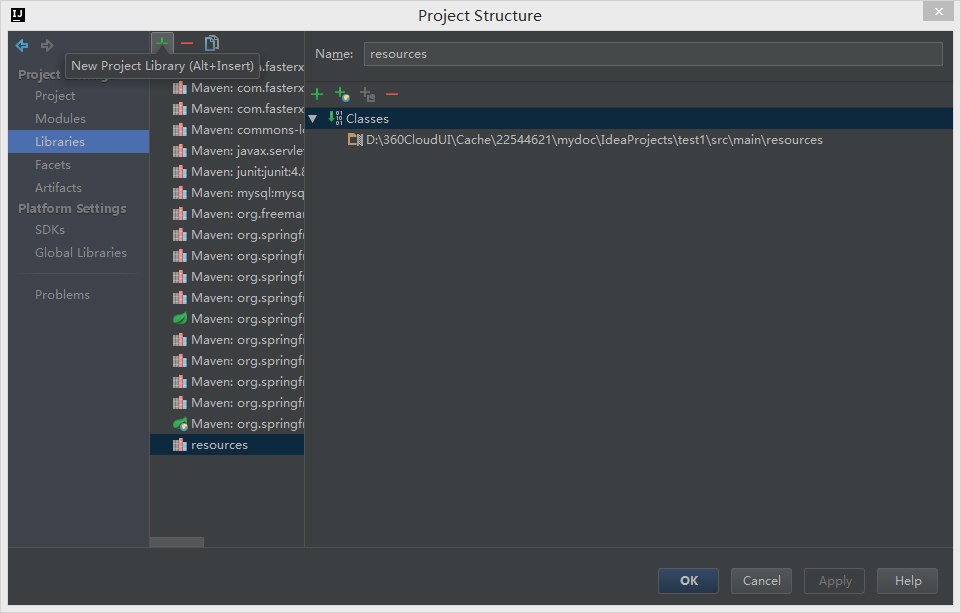
可以先将xml文件放入resources文件夹,然后将resources文件夹加入到classpath,在idea中:
"File"->"Project Structure",出现对话框,添加resources文件夹,编译运行后,系统会将xml文件复制到classes文件夹中
applicationContext-jdbc.xml
<?xml version="1.0" encoding="UTF-8"?>
<beans xmlns="http://www.springframework.org/schema/beans"
xmlns:xsi="http://www.w3.org/2001/XMLSchema-instance"
xmlns:jdbc="http://www.springframework.org/schema/jdbc"
xsi:schemaLocation="http://www.springframework.org/schema/beans
http://www.springframework.org/schema/beans/spring-beans.xsd
http://www.springframework.org/schema/jdbc http://www.springframework.org/schema/jdbc/spring-jdbc-3.2.xsd
"> <!--配置mysql数据库-->
<bean id="dataSource" class="org.springframework.jdbc.datasource.DriverManagerDataSource">
<property name="driverClassName">
<value>com.mysql.jdbc.Driver</value>
</property>
<property name="url">
<value>jdbc:mysql://localhost:3306/school?useUnicode=true&characterEncoding=UTF-8</value>
</property>
<property name="username">
<value>root</value>
</property>
<property name="password">
<value>root</value>
</property>
</bean> <!--jdbcTemplate和数据库关联-->
<bean id="jdbcTemplate" class="org.springframework.jdbc.core.JdbcTemplate">
<property name = "dataSource" ref="dataSource"/>
</bean>
</beans>
beans.xml
<?xml version="1.0" encoding="UTF-8"?>

<beans xmlns="http://www.springframework.org/schema/beans"

       xmlns:xsi="http://www.w3.org/2001/XMLSchema-instance"

       xsi:schemaLocation="http://www.springframework.org/schema/beans http://www.springframework.org/schema/beans/spring-beans.xsd">

    <bean id="personDao" class="com.zyz.dao.PersonDao">

        <property name="version">

            <value>3.85</value>

        </property>

    </bean>

</beans>
调用xml文件的bean的更多相关文章
- Spring框架入门之基于xml文件配置bean详解
关于Spring中基于xml文件配置bean的详细总结(spring 4.1.0) 一.Spring中的依赖注入方式介绍 依赖注入有三种方式 属性注入 构造方法注入 工厂方法注入(很少使用,不推荐,本 ...
- 01_1_jdom调用xml文件
01_1_jdom调用xml文件 1. 导入jdom.jar包 2. xml文件内容 test.xml <?xml version="1.0" encoding=" ...
- 4. Spring 如何通过 XML 文件配置Bean,以及如何获取Bean
在 Spring 容器内拼凑 bean 叫做装配.装配 bean 的时候,你是在告诉容器,需要哪些 bean ,以及容器如何使用依赖注入将它们配合在一起. 理论上,bean 装配的信息可以从任何资源获 ...
- Struts2 学习笔记——struts.xml文件之Bean的配置
Struts2的大部分核心组件不是以硬编码的形式写在代码中,而是通过自身的IoC容器来管理的. Struts2以可配置的形式来管理核心组件,所以开发者可以很容易的扩展框架的核心组件.当开发者需要扩展或 ...
- tomcat与springmvc 结合 之---第19篇(下,补充) springmvc 加载.xml文件的bean标签的过程
writedby 张艳涛,上一篇写了springmvc对<mvc:annoXXXX/>标签的解析过程,其实是遗漏重要的细节,因为理解的不深入吧 今天接着解析<bean>标签 & ...
- 又一本springmvc学习指南 之---第22篇 springmvc 加载.xml文件的bean标签的过程
writedby 张艳涛,今天看spring mvc 学习指南的第2章,特意提下这个作者是how tomcat works 俩个作者之一, 喜欢上一本书的风格,使用案例来讲述原理, 在做第一个案例的时 ...
- 使用配置类而不使用XML文件(代替bean.xml)对spring进行配置
以下类是一个配置类,它的作用和bean.xml是一样的注解: @Configuration 作用: 用于指定当前类是一个spring配置类,当创建容器时会从该类上加载注解. 获取容器时需要使用Anno ...
- tomcat与springmvc 结合 之---第19篇 springmvc 加载.xml文件的bean 过程
writedby 张艳涛,看springmvc 的源码太难了,怎么办, 这篇文章主要分析了看透springmvc的第9章结尾的 如何解析xml 命名空间标签 <?xml version=&quo ...
- Java JSON、XML文件/字符串与Bean对象互转解析
前言 在做web或者其他项目中,JSON与XML格式的数据是大家经常会碰见的2种.在与各种平台做数据对接的时候,JSON与XML格式也是基本的数据传递格式,本文主要简单的介绍JSON/XML ...
随机推荐
- xampp 文件夹拷贝的注意事项。
xampp可以同盘符拷贝,比如由A电脑的D:\XAMPP拷贝到B电脑的D:\XAMPP,此拷贝不用修改任何设置,当进行不同盘拷贝时,要修改apache和mysql下的一大堆conf文件,修改盘符: x ...
- jquery 中的几个函数方法
1.$.map(data,function(item,index){return XXX})处理每一个元素的函数.第一个参数是数组元素,第二个参数是该元素的索引值. 遍历data数组中的每个元素,并按 ...
- Centreon插件nagvis
======================================= http://docs.nagvis.org/1.8/en_US/index.html https://document ...
- 3D Touch集成过程整理
1.集成App图标按压快速打开某个功能 在AppDelegate.m中加入以下三个东西 在启动方法里加入3D Touch菜单 - (BOOL)application:(UIApplication *) ...
- neutron创建network执行的那些命令
当搭建完openstack之后,在创建instance之前,第一件事情就是创建network,一个经典的流程如下: TENANT_NAME="openstack"TENANT_NE ...
- 使用springMVC实现文件上传和下载之文件下载
接上一篇,文件下载需要获取下载文件的存储路径,这里只是手动填入,如果是在具体项目中,可以把文件名和上传后的存储路径保存在数据库中.然后增加一个文件列表的页面展示文件名和文件路径,然后点击下载的时候把相 ...
- [补充工程统计case]科技活动经费sql2014
select bd_glorgbook.glorgbookcode,bd_glorgbook.glorgbookname, gl_detail.explanation, bd_accsubj.disp ...
- 在.NET中使用EPPlus生成Excel报表 .
--摘抄自:http://blog.csdn.net/zhoufoxcn/article/details/14112473 在开发.NET应用中可能会遇到需要生成带图表(Chart)的Excel报表的 ...
- PHP For Windows/php-5.6.11-Win32-VC11-x64启动脚本
启动php-cgi.bat @echo off E: cd E:\php-5.6.11-Win32-VC11-x64 php-cgi.exe -b 127.0.0.1:9000 -c php.ini- ...
- C#_GDI+详细教程(图形图像编程基础)
第7章 C#图形图像编程基础 本章主要介绍使用C#进行图形图像编程基础,其中包括GDI+绘图基础.C#图像处理基础以及简单的图像处理技术. 7.1 GDI+绘图基础 编写图形程序时需要使用GDI( ...